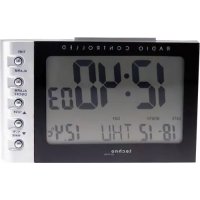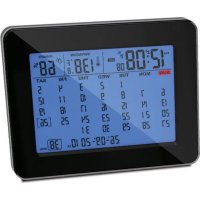
WT 2500 - Alarm bell TECHNOLINE - Free user manual and instructions
Find the device manual for free WT 2500 TECHNOLINE in PDF.



| Product type | Radio-controlled alarm clock with living room calendar and temperature/humidity display |
| Brand | TECHNOLINE |
| Model | WT 2500 |
| Power supply | 2 AA batteries (not included) |
| Display | Time, date, indoor temperature, humidity, week number |
| Synchronization | Automatic via DCF signal (radio-controlled) every night at 1am/2am/3am |
| Indoor temperature range | 0°C to +50°C (32°F to 122°F) |
| Indoor humidity range | 20% to 95% RH |
| Temperature resolution | 0.1°C/°F |
| Humidity resolution | 1% RH |
| Temperature accuracy | ±1°C (0 to +40°C), ±1.8°F (32 to 104°F) |
| Humidity accuracy | ±5% (40 to 80% RH) |
| Alarm functions | 2 independent alarms, crescendo over 2 minutes, snooze 5 minutes, standby |
| Backlight | 5 seconds per press on SNOOZE/LIGHT |
| Time formats | 12h/24h adjustable |
| Date format | Day/Month or Month/Day (D/M or M/D) |
| Time offset setting | ±12 h |
| Temperature units | °C or °F |
| Dimensions | Not provided |
| Weight | Not provided |
| Care and cleaning | Clean with a soft, dry cloth. Avoid moisture and abrasive products. |
| Safety | Use in a dry environment, away from sources of interference (TV, computer). |
| Spare parts and repairability | Batteries not included. No spare parts provided. In case of failure, contact customer service. |
| General information | ISO 8601 standard for weeks. Optimal DCF reception near a window. |
Frequently Asked Questions - WT 2500 TECHNOLINE
User questions about WT 2500 TECHNOLINE
0 question about this device. Answer the ones you know or ask your own.
Ask a new question about this device
Download the instructions for your Alarm bell in PDF format for free! Find your manual WT 2500 - TECHNOLINE and take your electronic device back in hand. On this page are published all the documents necessary for the use of your device. WT 2500 by TECHNOLINE.
USER MANUAL WT 2500 TECHNOLINE
Radio Controlled Table Calendar Clock
Features:
▶ Clock auto synchronize via receiving DCF RCC (Radio Controlled Clock) signal
▶ Table Calendar with weeks
▶ D/M or M/D date format selectable
▶ Time zone setting +/-12h
▶ 12/24 HR selectable
▶ °C/°F selectable
▶ Indoor Temperature measurement range: 0°C \~ +50°C (32°F\~122°F)
▶ Indoor Humidity measurement range: 20% \~ 95%RH
▶ Dual Alarms
▶ Snooze function (5 minutes interval)
▶ Back light
▶ Powered by 2 x AA batteries (not included)
Power on or Reset:
▶ After power on or Reset, full display and buzzer beeps, unit will receive RCC signal up to 7 minutes, then enter Clock Mode.
Receiving of the RCC signal:
- When power on or reset, the unit will automatically receive RCC signal for Max. 7 minutes, and “ ” icon flash.
▶ At 1:00 /2:00 / 3:00 a.m., RCC receiving will be turned on automatically, and the clock will be synchronized if receive successfully. If this receiving fail, the radio mast icon disappears, the unit will receive RCC signal automatically next time.
▶ Press and hold the "WAVE" key also can enable or disable the RCC receiving.
▶ During RCC receiving, only "WAVE" and "SNOOZE/LIGHT" keys have function.
F.Y.I.:
- Flashing “” icon indicates that the signal is strong, without the icon means the signal is weak.
▶ A fixed “ ” icon indicates that receiving successfully, without this icon means receiving fail.
▶ How to set offset time : Offset time means the time different between local time and Germany time; If local time is 1 hour faster than Germany time, then set the offset time to +1HR; If local time is 1 hour slower than Germany time, then set the offset time to -1HR; Unit's clock will automatically set to local time after receiving DCF signal successfully.
▶ DST indicator: If unit receive signal with Daylight Saving Time (DST) successfully, DST icon will be on; Otherwise DST icon will disappear.
We recommend a minimum distance of 2.5 meters to all sources of interference, such as television or computer monitor
▶ Radio receiving is weaker in rooms with concrete walls (e.g.: in cellars) and in offices. In such extreme
circumstances, place the unit close to the window.
Clock Mode:
▶ At Clock Mode, press "MODE" key to toggle the display among Clock/ Weeks Display/ Alarm1/ Alarm2.
Clock setting:
▶ At Clock Mode, Press and hold the "MODE" key more than 2 seconds to set Year → D/M or M/D → Month → Date → Offset Time →12/24HR →Hour → Minute → °C/°F.
▶ Corresponding icon flash, then press "+" or "-" key to set the value; and hold "+" or "-" key for fast increasing or decreasing.
▶ Press "MODE" key to confirm the setting and come to next setting, unit will return to Clock Mode after setting finish.
F.Y.I.:
The seconds are set to "0" when change minute value during setting.
Alarm Setting:
- When display Alarm1 or Alarm2, press "-" key to enable or disable corresponding alarm.
When display Alarm1 or Alarm2 time, Press and hold "MODE" key more than 2 seconds to set Alarm Hour & Minute, corresponding icon flash, then press "+" or "-" key to set the value; And hold "+" or "-" key for fast increasing or decreasing.
▶ Alarm sound crescendo for 2 minutes.
▶ During alarm, only press "SNOOZE/LIGHT" key to enable snooze function, "Z ^z " icons will flash, the unit will alarm 5 minutes later. If press other keys, alarm will stop the alarm immediately.
Month Display:
▶ At clock mode, press "+" or "DOWN" key to look through month forward or backward. "Year / Month / Date" icons will flash accordingly; and press and hold "+" or "-" key for fast increasing or decreasing.
▶ Unit will return to clock mode if without key operation more than 1 minute or press "MODE" key to exit look through status and return to clock mode.
Weeks Display:
▶ At clock mode, press "MODE" key once to enter weeks look through mode, "Weeks" icon will flash at this mode. Press "+" or "-" key to look through weeks forward or backward; And press and hold "+" or "-" key for fast increasing or decreasing.
▶ Unit will return to clock mode if without key operation more than 1 minute, or press "MODE" key to exit look through status and return to clock mode.
F.Y.I.:
▶ Comply with ISO 8601:2000, Monday is the first day of the week, and Sunday is the last day. The week include Jan 4 is the first week of the year.
▶ Current date only can be changed on clock setting mode.
Indoor Temperature:
▶ Indoor Temperature measurement range: 0 \~ +50°C (32\~122°F), “LL.L” will be displayed if lower than 0°C, “HH.H” will be displayed if higher than +50°C, resolution is 0.1°C/°F, accuracy is +/-1°C at range 0 \~ +40°C (+/-1.8°F at 32\~122°F).
Indoor Humidity:
Indoor Humidity measurement range: 20% \~ 95%RH, resolution is 1%, accuracy is +/-5% at range 40%\~80%
Back Light:
▶ Press "SNOOZE /LIGHT" key to turn on back light for 5 seconds.