Perfect DB11501 - Iron AEG - Free user manual and instructions
Find the device manual for free Perfect DB11501 AEG in PDF.



| Brand | AEG |
| Model | Perfect DB11501 |
| Product type | Steam iron |
| Power supply | 220-240 V ~ 50/60 Hz |
| Power consumption | 1600 - 2000 W |
| Soleplate | Stainless steel soleplate with steam outlet holes |
| Water tank capacity | Approx. 200 ml (up to MAX mark) |
| Weight | Approx. 1.2 kg |
| Dimensions (approx.) | 30 x 12 x 15 cm |
| Main functions | Steam ironing, dry ironing, steam shot function, spray function, anti-drip system |
| Temperature settings | Temperature selector with positions for synthetics, silk/wool, cotton/linen, and cool position |
| Steam settings | Steam selector with positions for no steam, variable steam, and cleaning |
| Vertical steam function | Yes, to refresh hanging garments (10-20 cm from fabric) |
| Care and cleaning | Built-in auto descaling; monthly cleaning recommended with selector on cleaning position; do not use vinegar or descaling agents |
| Recommended water quality | Tap water up to 17 °dH (3 mmol/l); distilled water or 1/2 mix for harder water |
| Supplied accessories | Measuring cup |
| Cord length | Approx. 2 m (with cord wrap) |
| Safety | Temperature indicator light, automatic steam shut-off in vertical position, anti-drip system, hot soleplate (caution burn) |
| Storage | Vertical position on storage surface; empty water before storing; wrap cord around the device |
Frequently Asked Questions - Perfect DB11501 AEG
User questions about Perfect DB11501 AEG
0 question about this device. Answer the ones you know or ask your own.
Ask a new question about this device
Download the instructions for your Iron in PDF format for free! Find your manual Perfect DB11501 - AEG and take your electronic device back in hand. On this page are published all the documents necessary for the use of your device. Perfect DB11501 by AEG.
USER MANUAL Perfect DB11501 AEG
Operating instructions
Mode d'emploi
Gebruiksaanwijzing
2
3
2

4
natural_image
Line drawing of a steam iron on a plate (no text or symbols)5
6/A
6/B
natural_image
Line drawing of a hand using a power tool to cut a leaf-like object (no text or symbols)7
natural_image
Line drawing of a steam iron with a checkered band strap (no text or symbols)8
3





D
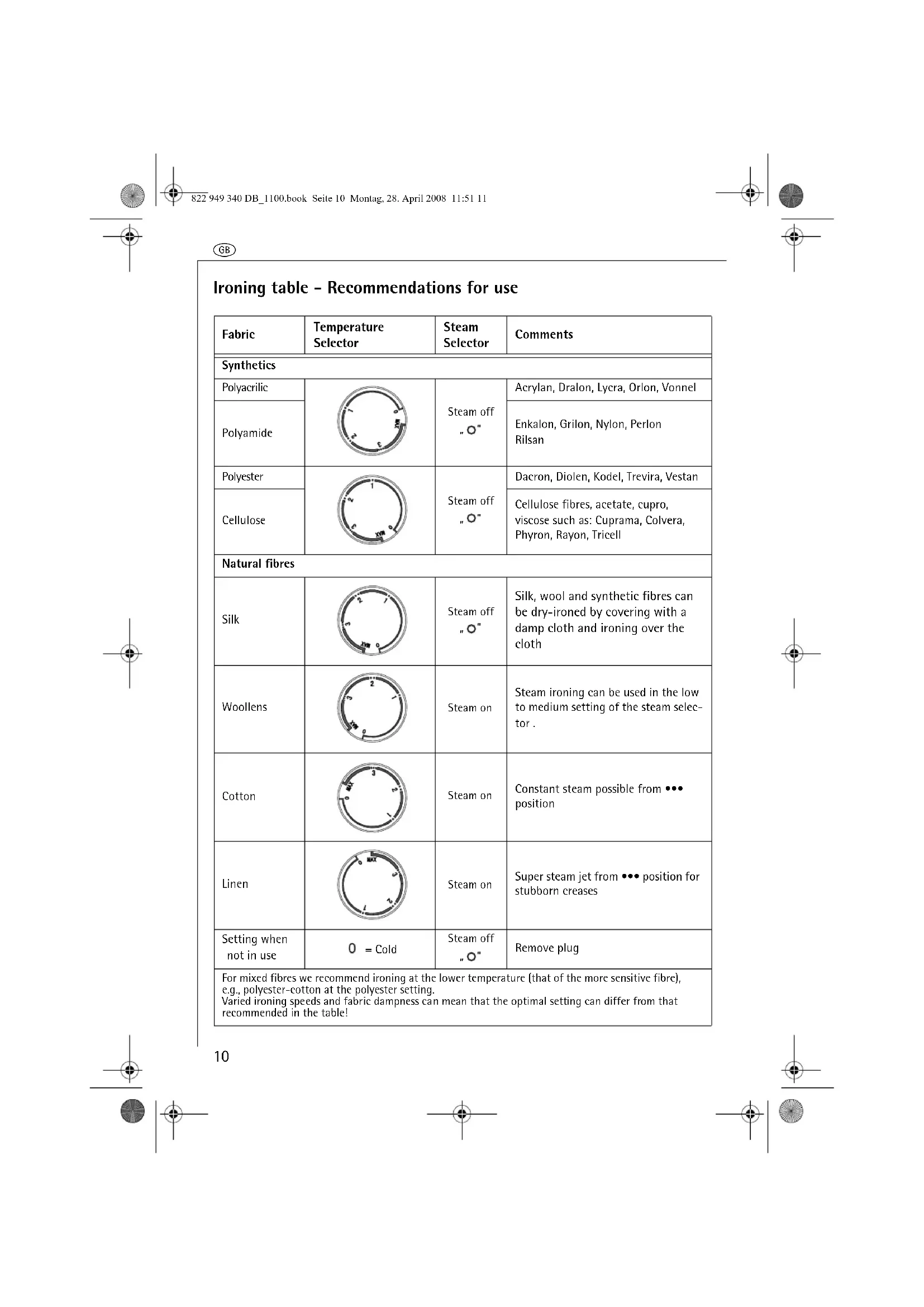
| Fabric | Temperature Selector | Steam Selector | Comments |
| Synthetics | |||
| Polyacrylic | 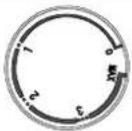 | Steam off „O” | Acrylan, Dralon, Lycra, Orlon, Vonnel |
| Polyamide | Enkalon, Grilon, Nylon, Perlon Rilsan | ||
| Polyester | 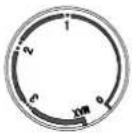 | Steam off „O” | Dacron, Diolen, Kodel, Trevira, Vestan |
| Cellulose | Cellulose fibres, acetate, cupro, viscose such as: Cuprama, Colvera, Phyron, Rayon, Tricell | ||
| Natural fibres | |||
| Silk | 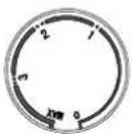 | Steam off „O” | Silk, wool and synthetic fibres can be dry-ironed by covering with a damp cloth and ironing over the cloth |
| Woollens | 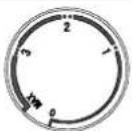 | Steam on | Steam ironing can be used in the low to medium setting of the steam selec-tor . |
| Cotton | 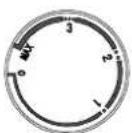 | Steam on | Constant steam possible from ••• position |
| Linen | 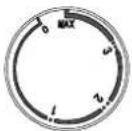 | Steam on | Super steam jet from ••• position for stubborn creases |
| Setting when not in use | 0 = Cold | Steam off „O” | Remove plug |
| For mixed fibres we recommend ironing at the lower temperature (that of the more sensitive fibre), e.g., polyester-cotton at the polyester setting. Varied ironing speeds and fabric dampness can mean that the optimal setting can differ from that recommended in the table! | |||
GB
Dear customer
Please read these operating instructions carefully. Above all please observe the safety instructions on the initial pages of these operating instructions! Please keep these operating instructions for future reference. Pass them on to any subsequent owner of the appliance.
Features (Figure 1)
A Rating plate
B Stainless steel soleplate
C Steam exit holes
D Spray nozzle
E Filling aperture
F Steam selector
G Jet button
H Spray function button
J Power indicator
K Mains cord
L Heel
M Cord storage
N Temperature selector
0 Transparent water reservoir
P Measuring beaker
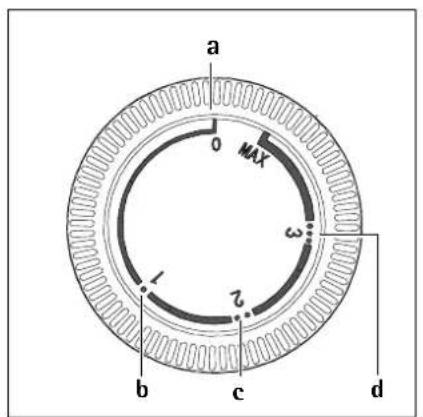
Temperature Selector (Figure 2)
a "Cold" setting
b Synthetics
c Silk/wool
d Cotton/linen
!
Safety Instructions
• The appliance may only be operated using the voltage and current rating indicated on the rating plate (Figure 1/A).
- The appliance should only be plugged into a socket installed according to regulations.
- This appliance is not intended for use by persons (including children) with reduced physical, sensory or mental capabilities or lack of experience and knowledge unless they have been given initial supervision or instruction concerning use of the appliance by a person responsible for their safety.
- Caution! When in use, the soleplate and cover of the steam iron reach high operating temperatures!
- Do not leave the appliance alone when switched on. Even when leaving the room for a short period remove the plug. Keep children away from the appliance.
• Children should be supervised to ensure that they do not play with the appliance.
!
When steam ironing, steam is emitted from the holes in the soleplate - risk of burns!
• Always remove the mains plug before cleaning the steam iron, filling with water or emptying.
- The iron must not be left unattended while it is connected to the supply mains.
- Never immerse the steam iron in water!
• Always stand the steam iron on its heel. When placing the iron on its stand, ensure that the surface on which the stand is placed is stable.
- The iron must be used and rested on a stable surface.
- Do not twist or bend the mains cord or wrap it round the steam iron while it is still hot. Only store the appliance once it is cool and after emptying any remaining water.
- The iron is not to be used if it has been dropped, if there are visible signs of damage or if it is leaking.




GB
- Please check the mains cord from time to time for damage! Special tools are required to repair a damaged mains cord. If the supply cord is damaged, it must be replaced by the manufacturer, its service agent or similarly qualified persons in order to avoid a hazard. Repairs to this appliance may only be carried out by qualified service engineers. Considerable danger may result from improper repairs. If repairs become necessary, please contact the Customer Care Department or your authorised dealer.
Technical Data
Power consumption: 1600 - 2000 W
Mains voltage: 220 - 240 V
CE This appliance conforms with the following EC Directives:
• Low Voltage Directive 2006/95/EC
• EMC Directive 89/336/EEC with amendments 92/31/EEC and 93/68/EEC
Using for the First Time
Setting the Temperature (Figure 2)
Please note the internationally applicable care symbols on garment labels. On good quality garments they indicate the correct ironing temperatures. The ironing table indicates which temperature is most appropriate for a particular type of fabric. We recommend sorting the washing first. Start with materials that require low temperature ironing (e.g. PERLON). Follow on by ironing materials that require progressively higher temperatures. In this way you avoid damaging sensitive fabrics by using too high a temperature. When switched on, the power indicator lamp lights up (Figure 1/J); it goes out when the temperature set has been reached. However, if the temperature selector (Figure 1/N) is turned back, please note
that it takes a while for the soleplate to cool down. Only when the power indicator light comes on again has the soleplate reached the cooler temperature.
Dry Ironing
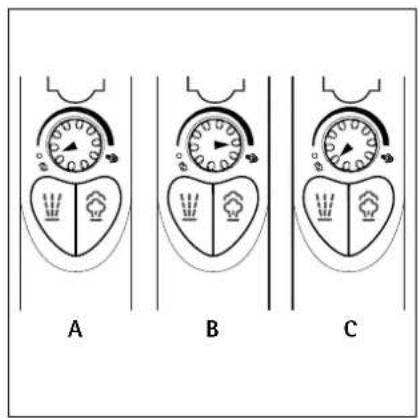
Set the steam selector (Figure 1/F) to position „O“ (Figure 4/A).
Turn the temperature selector (Figure 1/N) to the desired temperature.
Steam Ironing
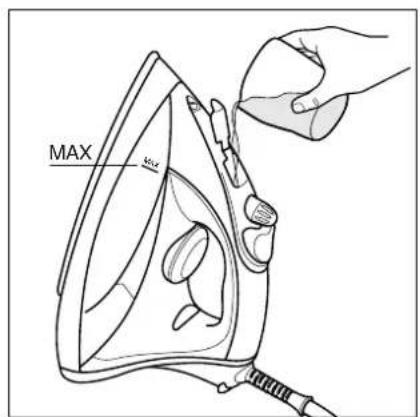
Filling the Steam Iron (Figure 3)
The water reservoir should only be filled when the plug has been removed from the socket.
Set the steam selector to position "O" = dry iron (Figure 4/A) and hold the appliance upright.
Fill the water reservoir at most to the "MAX" mark. To do this, you can use the measuring beaker supplied (Figure 1/P).
Water Quality
You can use tap water up to 3 mmol/l 17° dH water hardness level. Your local Water Authority can advise you on the hardness of the water in your area. If the water from your tap is harder than the above, please use distilled water available from a chemist or a 50:50 mixture of tap water and distilled water.
When using for the first time, please note:
Fill the reservoir with water; set the steam selector (Figure 1/F) to maximum position (Figure 4/B).
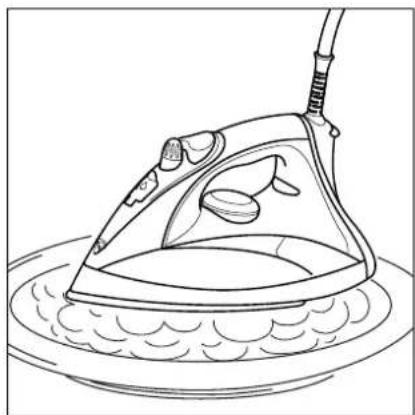
Heat the appliance and place it with the soleplate facing downwards on an iron rest or plate (Figure 5) to allow the water to steam through and activate the steam chamber.
You will obtain optimal steaming results and the noise produced by the steaming will be steadier after the water reservoir has been filled and drained three times.
Ironing with Steam
To steam iron, set the temperature selector (Figure 1/N) to the required fabric type and wait until the power indicator (Figure 1/J) goes out - only then set the steam selector (Figure 1/F) to the desired position (Figure 4/B). You will find which temperature setting (fabric type) matches which steam setting in the ironing table. As soon as the steam iron is held horizontally steam begins to form. When the steam iron is set upright again the steam supply stops automatically.
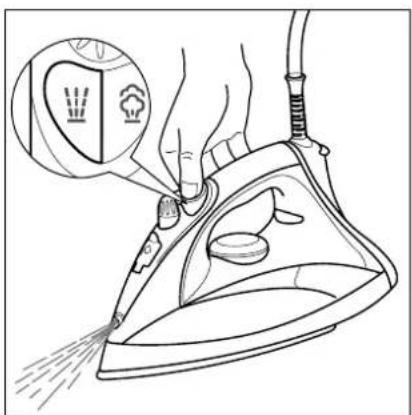
Spray Function (Figure 6/A)
The first time you use the appliance, or if you have not used it for a long time, you will need to press the spray function button (Figure 1/H) several times before water comes out of the spray nozzle (Figure 1/D). You can also use the spray function when dry ironing.
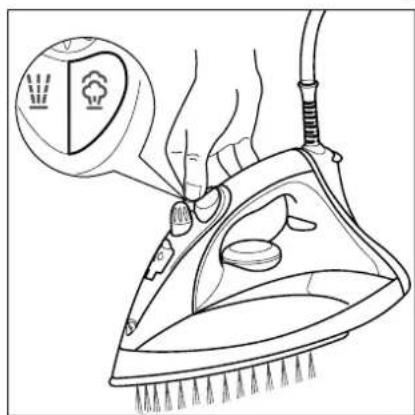
Super Steam Jet Function (Figure 6/B)
The super steam jet function is of valuable assistance when ironing, for example, creases, embroidery etc. You can trigger the additional steam jet both when steam ironing and when dry ironing.
Set the temperature selector (Figure 1/N) to the "MAX" position and wait until the correct temperature has been reached, i.e., until the power indicator (Figure 1/J) goes out.
■ Raise the steam iron a little away from the material and press the steam jet button (Figure 1/G).
Always wait another 5 seconds before pressing the steam jet button again.
Steaming hanging items of clothing
Turn the temperature selector (Figure 1/N) to the "MAX" position and wait until the power indicator (Figure 1/J) goes out.
Hang the article concerned on a hanger and hold the steam iron at a distance of 10 - 20 cm from the material.
Now press the steam jet button (Figure 1/G). Wait at least 5 seconds before pressing the button again.
Warning: Do not attempt to freshen up clothing whilst it is still being worn. Risk of burning!
Drip Stop
The steam iron has an automatic drip stop function. The drip stop immediately interrupts the creation of steam if the temperature selected is too low.
Storage
Remove the plug from the socket!
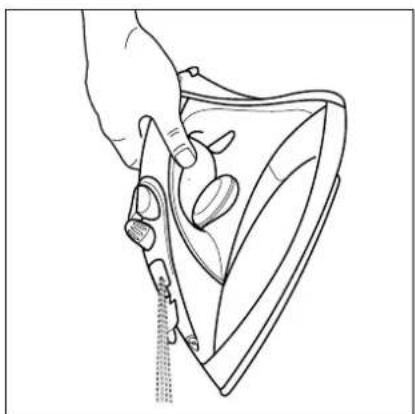
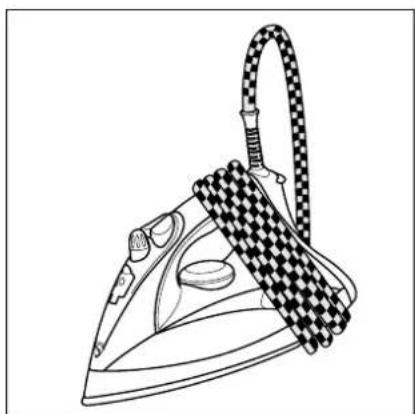
Set the temperature selector (Figure 1/N) to the "Cold" position 0 (Figure 2/a) and the steam selector (Figure 1/F) to position "○" (Figure "○" 4/A). Empty out remaining water (Figure 7). Store the appliance standing upright. To store properly wrap the mains cord around the cord storage (Figures 1/M and 8).
Care and Maintenance
The steam iron has an automatic decalcification feature, which significant slows down the deposit of limescale in the steam chamber.
The steam iron must not be descaled! Neither vinegar nor proprietary brands of descaler must be filled into the water reservoir!
GB
Cleaning
As a precaution we recommend cleaning every three months.
Unplug from the mains.
Set the steam selector (Figure 1/F) to position "O" (Figure 4/A).
Fill the water reservoir (Figure 1/0) with clear water to the "MAX" mark.
Set the temperature selector (Figure 1/N) to "MAX".
Insert the plug into the socket.
Wait until the power indicator (Figure 1/J) goes out.
Set the steam selector (Figure 1/F) to position (Figure 4/C).
Place the appliance horizontally over a sink.
Press the steam selector (Figure 1/F) for at least 1 minute.
Water is flowing out of the steam exit holes. Your steam iron is now ready for use again.
What to do, if ...
- no "steam" appears when using on a steam setting?
- In warm, dry air (during the winter), reduced amounts of vapour are normal because it is absorbed by the dry air before condensing.
- Emptying the filled water reservoir can wash out fluff. Remove the mains cord and tip the filled appliance forwards at an angle (Figure 7) so that the water can run out of the filling aperture.
- drops of water are coming out of the steam exit holes?
- Do not set the steam selector to another position than „O“ until the temperature for steam ironing has been reached. If the temperature has been set too low for steam ironing increase the setting.
• stains appear on the washing while ironing?
- Clean the steam iron. Rub the sole-plate while still warm with a mixture
of water and vinegar or with a non-abrasive cleaning agent.
- When dry ironing fluff can enter the steam chambers and carbonise. This can lead to stains as the water passes through. Therefore also clean the inside of the water reservoir. Fill it with water and gently shake the steam iron. Then pour the water out.
• the soleplate is rough or furred?
- The iron temperature was set too high.
- Select the correct ironing temperature for the fabric (see ironing table).
Disposal

Packaging material
The packaging materials are environmentally friendly and can be recycled. The plastic components are identified by markings, e.g. >PE<, >PS<, etc. Please dispose of the packaging materials in the appropriate container at the community waste disposal facilities.

Old appliance

The symbol / on the product or on its packaging indicates that this product may not be treated as household waste. Instead it shall be handed over to the applicable collection point for the recycling of electrical and electronic equipment. By ensuring this product is disposed of correctly, you will help prevent potential negative consequences for the environment and human health, which could otherwise be caused by inappropriate waste handling of this product. For more detailed information about recycling of this product, please contact your local city office, your household waste disposal service or the shop where you purchased the product.
natural_image
Pure geometric crosshair symbol without any text or labels
natural_image
Pure geometric crosshair symbol without any text or labels
natural_image
Pure geometric crosshair symbol without any text or labels
natural_image
Pure geometric crosshair symbol without any text or labels
natural_image
Pure geometric crosshair symbol without any text or labels
natural_image
Pure geometric crosshair symbol without any text or labels
natural_image
Pure geometric crosshair symbol without any text or labels
natural_image
Pure geometric crosshair symbol without any text or labels
natural_image
Pure geometric crosshair symbol without any text or labels
natural_image
Pure geometric crosshair symbol without any text or labels
natural_image
Pure geometric crosshair symbol without any text or labels
natural_image
Pure geometric crosshair symbol without any text or labels


[NO TEXT]

© Copyright by Electrolux
822 949 340 -02-1107


Thinking of you
Electrolux
Share more of our thinking at
www.electrolux.com
Subject to change without notice


- GB
- Dear customer
- Features (Figure 1)
- Temperature Selector (Figure 2)
- !
- Safety Instructions
- Technical Data
- Using for the First Time
- Setting the Temperature (Figure 2)
- Dry Ironing
- Steam Ironing
- Filling the Steam Iron (Figure 3)
- Water Quality
- When using for the first time, please note:
- Ironing with Steam
- Spray Function (Figure 6/A)
- Super Steam Jet Function (Figure 6/B)
- Steaming hanging items of clothing
- Drip Stop
- Storage
- Care and Maintenance
- Cleaning
- What to do, if ...
- Disposal
- Packaging material
- Old appliance
Brand : AEG
Model : Perfect DB11501
Category : Iron