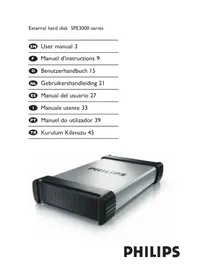
SPD3031 - External hard drive PHILIPS - Free user manual and instructions
Find the device manual for free SPD3031 PHILIPS in PDF.


| Product Type | External hard drive |
| Brand | Philips |
| Model | SPD3031 |
| Interface | USB 2.0 (high speed) |
| Transfer speed | 480 Mb/s |
| Rotation speed | 7200 rpm |
| Cache memory | 8 MB / 32 MB (depending on model) |
| Capacity | Variable depending on model |
| Power supply | External power adapter |
| Package contents | Hard drive, power adapter, power cord, USB cable, user manual |
| Compatible operating systems | Windows 2000, XP, Vista; Mac (FAT32 formatting required) |
| Default file format | NTFS (for Windows) |
| Connection | Connect the power adapter, then the USB cable to the computer |
| Safe disconnection | Use the 'Safely Remove Hardware' icon in the system tray |
| Warranty | Consult the 'Philips Warranty' folder on the drive |
| Safety | Do not expose to water, do not subject to shocks or extreme forces |
| Maintenance | Install in a well-ventilated area; keep plastic bags away from children |
| Country of origin | Not specified |
| Reparability | Spare parts not provided; contact Philips support |
| Regulatory information | Comply with WEEE legislation for disposal |
Frequently Asked Questions - SPD3031 PHILIPS
User questions about SPD3031 PHILIPS
0 question about this device. Answer the ones you know or ask your own.
Ask a new question about this device
Download the instructions for your External hard drive in PDF format for free! Find your manual SPD3031 - PHILIPS and take your electronic device back in hand. On this page are published all the documents necessary for the use of your device. SPD3031 by PHILIPS.
USER MANUAL SPD3031 PHILIPS
natural_image
Exterior view of a Philips electronic device (no additional text or symbols visible)Contents
EN
4 What's in the box?
4 How to connect?
5 How to disconnect?
5 Installation for Mac
6 Important information
7 Need help?
8 FCC Compliance
What's in the box?
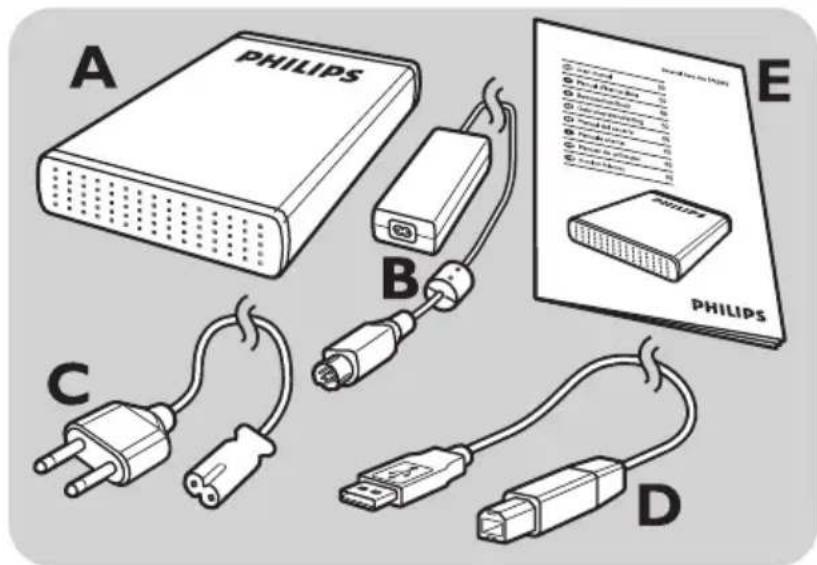
A : External hard disk
B : Power adapter
C: Power cord
D : USB cable
E : User manual
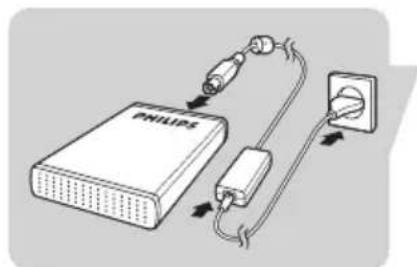
How to connect?
natural_image
Diagram of a Philips power supply connected to an electrical outlet, showing connections via wires and components (no text labels)Put the Power Adapter (B) and the Power Cord (C) together and connect them to the external hard disk and a power outlet.
natural_image
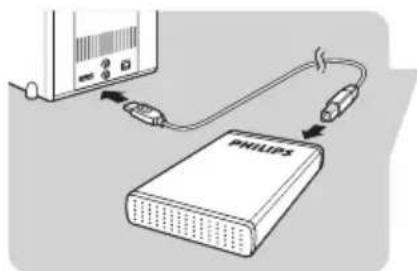
Diagram showing connection between a Philips device and a server, with no visible text or symbols.Plug the USB cable (D) in the USB port of your external hard disk. Connect the other side of the USB cable to an empty USB port of your computer.
A drive icon, Philips External Hard Disk, appears in Windows Explorer and the Blue light should light up. (To use the new hardware, the computer sometimes needs to be restarted)
Your hard disk is now ready to use and you can now save and copy data, just as you do when using your internal hard disk.
How to disconnect?
EN
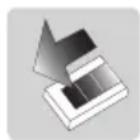
I Double-click the Safely Remove Hardware icon in the task bar in the lower right part of the screen.
2 In the window that appears, select the name of the device that is to be removed, then click the Stop button.
3 When the Stop a hardware device screen appears, make sure the correct information is displayed, and then click the OK button.
4 When the message Safe to remove hardware appears, remove the drive from the computer's USB port.
Installation
Installation for Mac
The hard disk is preconfigured for Windows 2000,
Windows XP and Windows Vista, with a NTFS format.
For Mac, the hard disk needs to be formatted to FAT32.
How to find warranty information?
Look on your external hard disk and browse to the folder ‘Philips Warranty’.
You need Adobe Reader software to open these files. If you don't have Adobe Reader, you can download it for free on www.adobe.com.
The Philips warranty may not apply if damage is caused by accidents, shock, misuse or neglect.

"The making of unauthorized copies of copy-protected material including computer programs, files, broadcasts and sound recordings, may be an infringement of copyrights and constitute a criminal offence.
This equipment should not be used for such purposes."
WEEE mark: "Information to the Consumer"

Disposal of your old product
Your product is designed and manufactured with high quality materials and components, which can be recycled and reused. Please inform yourself about the local separate collection system for electrical and electronic products, including those marked by the crossed-out wheel bin symbol.
Please act according to your local rules and do not dispose of your old products with your normal household waste.
WARNING
Plastic bags can be dangerous.
To avoid danger of suffocation, keep this bag away from babies and small children.
Although this product has been designed with utmost care for long-lasting performance. Philips does advise
you to handle electronics with good care: Avoid contact with water, exposure to extreme forces.
Please make sure you place the device in a well-ventilated environment, to ensure longest possible lifetime and optimal performance.
Specifications
Capacity Depending on model
Interface Hi-Speed USB 2.0
Transfer speed 480 Mb/s
Rotational speed 7200 rpm
Cache memory 8 MB/32 MB*
System requirements USB 1.1 (USB 2.0 for
max. transfer speed)
Windows 2000,
Windows XP,
Windows Vista
* for versions >= 750 GB
Need help?
For interactive help and support:
www.philips.com/support
For software updates and frequently asked questions:
www.philips.com/storageupdates
Caution:
Changes or modifications made to this equipment not expressly approved by Philips may void the FCC authorization to operate this equipment.
Note:
This equipment has been tested and found to comply with the limits for a Class B digital device, pursuant to Part 15 of the FCC Rules. These limits are designed to provide reasonable protection against harmful interference in a residential installation. This equipment generates, uses and can radiate radio frequency energy and, if not installed and used in accordance with the instructions, may cause harmful interference to radio communications. However, there is no guarantee that interference will not occur in a particular installation. If this equipment does cause harmful interference to radio or television reception, which can be determined by turning the equipment off and on, the user is encouraged to try to correct the interference by one or more of the following measures:
- Reorient or relocate the receiving antenna.
- Increase the separation between the equipment and receiver.
- Connect the equipment into an outlet on a circuit different from that to which the receiver is connected.
- Consult the dealer or an experienced radio/TV technician for help.
The shielded interface cable and connectors must be used in order to comply with the limits for digital device pursuant to subpart B of Part 15 of FCC Rules.
Table des matières
natural_image
Diagram of a Philips power supply connected to an electrical outlet, showing connections via wires and components (no text or symbols)natural_image
Diagram showing connection between a Philips device and a server, with no visible text or symbols.Be responsible Respect copyrights
* for versions >= 750 GB
Aide
www.philips.com/support
natural_image
Diagram of a Philips power supply connected to an electrical outlet, showing cable routing and wiring (no text or symbols)natural_image
Diagram showing connection between a Philips device and a server unit (no text or symbols visible)Be responsible Respect copyrights
* for versions >= 750 GB
natural_image
Diagram of a Philips power supply connected to an electrical outlet, showing connections via wires and components (no text labels)natural_image
Diagram showing connection between a device labeled 'PHILIPS' and a server, with no visible text or symbols beyond the label.Be responsible Respect copyrights
* for versions >= 750 GB
Hulp nodig?
www.philips.com/support
natural_image
Diagram of a Philips power supply connected to an electrical outlet, showing cable routing and wiring (no text or symbols)natural_image
Diagram showing connection between a Philips device and a server, with no visible text or symbols* for versions >= 750 GB
¡Necesita ayuda?
www.philips.com/support
natural_image
Diagram of a Philips power supply connected to an electrical outlet, showing cable routing and wiring (no text or symbols)natural_image
Diagram showing connection between a Philips device and a server, with no visible text or symbols* for versions >= 750 GB
Assistenza
natural_image
Diagram of a Philips power supply connected to an electrical outlet via cable and plug (no text or symbols)natural_image
Diagram showing connection between a Philips device and a server unit (no text or symbols visible)Be responsible Respect copyrights
* for versions >= 750 GB
www.philips.com/support
natural_image
Diagram showing connection between a Philips device and a server unit (no text or symbols visible)Be responsible Respect copyrights
* for versions >= 750 GB
Yardım?
Specifications subject to change without notice.
All dimensions shown are approximate.
All rights reserved.
Reproduction, copying, usage, modifying, hiring, renting,
Public performance, transmission and/or broadcasting in whole or part is prohibited without the written consent of Philips Electronics N.V.


- Contents
- What's in the box?
- How to connect?
- How to disconnect?
- Installation
- Installation for Mac
- How to find warranty information?
- WEEE mark: "Information to the Consumer"
- Disposal of your old product
- WARNING
- Specifications
- Need help?
- Caution:
- Note:
- Table des matières
- Aide
- Hulp nodig?
- ¡Necesita ayuda?
- Assistenza
- Yardım?
Brand : PHILIPS
Model : SPD3031
Category : External hard drive