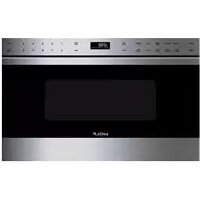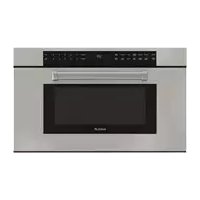
Convection Microwave Oven - Microwave Oven WOLF - Free user manual and instructions
Find the device manual for free Convection Microwave Oven WOLF in PDF.


User questions about Convection Microwave Oven WOLF
0 question about this device. Answer the ones you know or ask your own.
Ask a new question about this device
Download the instructions for your Microwave Oven in PDF format for free! Find your manual Convection Microwave Oven - WOLF and take your electronic device back in hand. On this page are published all the documents necessary for the use of your device. Convection Microwave Oven by WOLF.
USER MANUAL Convection Microwave Oven WOLF
4SafetyPrecautions
6 Installation
7 Convection Microwave Oven Features
8 Microwave Oven Operation
16CareRecommendations
17Troubleshooting
19WolfWarranty
Customer Care
The model and serial number are printed on the enclosed product registration card. Both numbers are also listed on the product rating plate. Refer to page 6 for rating plate location. For warranty purposes, you will also need the date of installation and name of your authorized Wolf dealer. Record this information below for future reference.
If your product ever needs attention, be sure to use a Wolf factory certified service provider recommended by our customer care center, or select one from our list of providers available at wolfappliance.com/locator. All factory certified service providers are carefully selected and thoroughly trained by us.
SERVICE INFORMATION
Model Number
Serial Number
Date of Installation
Certified Service Name
Certified Service Number
Authorized Dealer
Dealer Number
Important Note
To ensure this product is installed and operated as safely and efficiently as possible, take note of the following types of highlighted information throughout this guide:
IMPORTANT NOTE highlights information that is especially important.
CAUTION indicates a situation where minor injury or product damage may occur if instructions are not followed.
WARNING states a hazard that may cause serious injury or death if precautions are not followed.
IMPORTANT NOTE: Throughout this guide, dimensions in parentheses are millimeters unless otherwise specified.
Thank You
Thank you for your purchase. We look forward to being part of your home for decades to come. As a third-generation family-owned company, we take a very personal stake in the preparation of your family's food. We built our business and our reputation on helping families serve the finest food possible.
With your purchase, you receive one of the strongest warranties in the appliance industry. Take a moment to read the full warranty statement on page 19. It's also important to register your Wolf appliance to ensure that you don't miss out on exclusive owner benefits, such as; assurance that you will be taken care of in the unlikely event that service becomes necessary during the warranty period, and a proof-of-purchase record in case of a home insurance claim. You may register by one of the following options:
- Mail in the completed Wolf product registration card.
- Register online at wolfappliance.com/register and create a personalized My Sub-Zero/ Wolf account using the serial number on your product.
- Register by phone by calling Wolf Customer Care at 800-222-7820.
As a Wolf owner, you can count on ongoing support, day in and day out. Our customer care center is available 24 hours a day, seven days a week and staffed by knowledgeable product experts at our factory in Madison, Wisconsin. Should the need arise, simply call 800-222-7820 and speak with one of our product experts. They will help troubleshoot any issues you might have.
We are confident this guide will answer your questions about the features, operation, and maintenance of your Wolf, but if you have additional questions, please contact us at 800-222-7820 or visit us online at wolfappliance.com.
IMPORTANT INSTRUCTIONS
PRECAUTIONS TO AVOID POSSIBLE EXPOSURE TO EXCESSIVE MICROWAVE ENERGY
- Do not attempt to operate this microwave oven with the door open since open-door operation can result in harmful exposure to microwave energy. It is important not to defeat or tamper with the safety interlocks.
- Do not place any object between the microwave oven front face and the door or allow soil or cleaner residue to accumulate on sealing surfaces.
- Do not operate the microwave oven if it is damaged. It is particularly important that the oven door close properly and that there is no damage to the: (1) door (bent), (2) hinges and latches (broken or loosened), (3) door seals and sealing surfaces.
- The microwave oven should not be adjusted or repaired by anyone except properly qualified service personnel.
When using electrical appliances, basic safety precautions should be followed, including the following:
WARNING
To reduce the risk of burns, electric shock, fire, injury to persons or exposure to excessive microwave energy, observe the following:
- Read all instructions before using the appliance.
- Read and follow the specific PRECAUTIONS TO AVOID POSSIBLE EXPOSURE TO EXCESSIVE MICROWAVE ENERGY.
- This appliance must be properly grounded. See GROUNDING INSTRUCTIONS on page 6.
- Install or locate this appliance only in accordance with installation instructions on page 6.
- Some products such as whole eggs and sealed containers (e.g. closed glass jars) are able to explode and should not be heated in this oven.
- Do not operate this appliance if it has a damaged cord or plug, if it is not working properly or if it has been damaged or dropped.
IMPORTANT INSTRUCTIONS
- Use this appliance only for its intended use as described in this guide. Do not use corrosive chemicals or vapors in this appliance. This type of oven is specifically designed to heat, cook or dry food. It is not designed for industrial or laboratory use.
- This appliance should be serviced only by qualified service personnel. Contact nearest authorized service facility for examination, repair or adjustment.
- As with any appliance, close supervision is necessary when used by children.
- Do not cover or block any openings on the appliance.
- Do not store this appliance outdoors. Do not use this product near water (e.g. near a kitchen sink, in a wet basement or near a swimming pool, or similar locations).
- Do not immerse cord or plug in water.
- Keep cord away from heated surfaces.
- Do not let cord hang over edge of table or counter.
- When cleaning appliance sealing surfaces that come together on closing the door, use only mild, nonabrasive soaps or detergents applied with a sponge or soft cloth. Refer to care recommendations on page 16.
- Liquids, such as water, coffee or tea are able to be overheated beyond the boiling point without appearing to be boiling. Visible bubbling or boiling when the container is removed from the microwave oven is not always present. This could result in very hot liquids suddenly boiling over when the container is disturbed or a utensil is inserted into the liquid.
TO REDUCE THE RISK OF FIRE IN THE OVEN
- Do not overcook food. Carefully attend appliance when paper, plastic or other combustible materials are placed inside the oven to facilitate cooking.
- Remove wire twist ties from paper or plastic bags before placing bag in oven.
- If materials inside the oven ignite, keep oven door closed, turn oven off and disconnect the power cord, or shut off power at the fuse or circuit breaker panel.
- Do not use the cavity for storage purposes. Do not leave paper products, cooking utensils or food in the cavity when not in use.
SAVE THESE INSTRUCTIONS
Installation
The convection microwave oven can be used freestanding or built into cabinetry using accessory trim to match Wolf L series or E series ovens.
For freestanding applications, a minimum 2^ (51) space is required at the top, rear and sides of the microwave oven for air circulation.
For built in applications, refer to installation instructions provided with the trim kit. Accessory trim kits are avail able through an authorized Wolf dealer. For local dealer information, visit the find a showroom section of our website, wolfappliance.com.
Electrical
Installation must comply with all applicable electrical codes.
The receptacle should be located within reach of the power cord. For built in applications, refer to installation instructions provided with the trim kit for electrical location.
| ELECTRICAL REQUIREMENTS | |
| Electrical Supply grounded, 120 VAC, 60 Hz | |
| Service 15 amp dedicated circuit | |
| Receptacle 3-prong grounding-type | |
| Power Cord 4' | (1.2 m) |
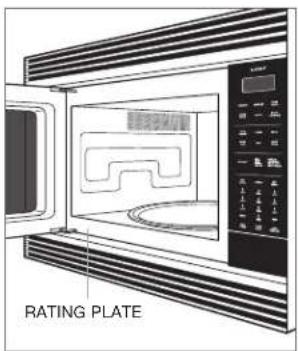
Rating plate location.
GROUNDING INSTRUCTIONS
This appliance must be grounded. The microwave oven is equipped with a cord having a grounding wire with a grounding plug. It must be plugged into a wall receptacle that is properly installed and grounded in accordance with the National Electrical Code and local codes and ordinances. In the event of an electrical short circuit, grounding reduces risk of electric shock by providing an escape wire for the electric current.
WARNING
Improper use of the grounding plug can result in a risk of electric shock. Do not use an extension cord. If the power cord is too short, have a qualified electrician or service technician install an outlet near the appliance.
Convection Microwave Oven Features
| FEATURE | |
| 1 | Product Rating Plate |
| 2 | Control Panel |
| 3 | Interactive Visual Display |
| 4 | One-Touch Door Opening |
| 5 | Convection Fan |
| 6 | Removable Turntable |
| 7 | Interior Lighting |
| 8 | Waveguide Cover |
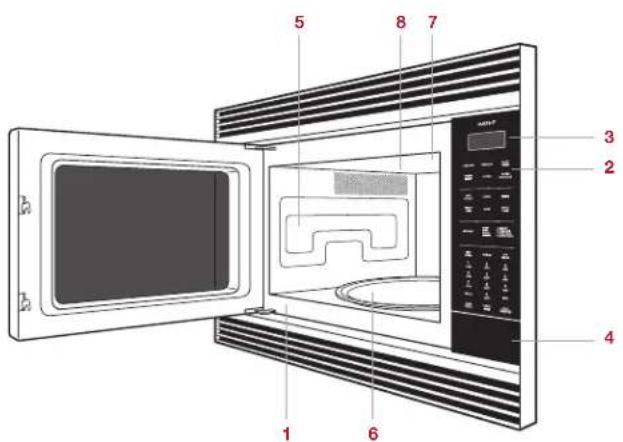
Convection microwave oven with E series trim.
Getting Started
We know you are eager to start cooking, but before you do, please take some time to read this use & care guide. Whether you are an occasional cook or an expert chef, it will be to your benefit to familiarize yourself with the safety practices, features, operation and care recommendations of your convection microwave oven.
Clean the oven thoroughly with hot water and mild detergent. Rinse and dry with a soft cloth to remove any residual oil and grease left from the manufacturing process. Refer to care recommendations on page 16.
IMPORTANT NOTE: The microwave oven cannot be used for cooking without the turntable in place. Never restrict movement of the turntable.
Control Panel
The control panel features touch controls and an interactive visual display. Refer to the illustration below.

Control panel.
Oven Operation
OPENDOOR
To open the door, depress the area directly below the number pads on the control panel.
CLOCK
The time of day will be illuminated on the control panel display unless the timer or other display functions are active. The clock must be set prior to use and after a power failure.
Setting clock:
1TouchCLOCK.
2 Use number pads to enter the time of day, then touch CLOCK.
TIMER
The timer can be set for a maximum of 99 minutes and 99 seconds. Once a time is set, the countdown will appear on the control panel display. Oven will chime and 'END' will appear on the display when complete.
Setting timer:
1TouchTIMER.
2 Use number pads to enter timer duration.
3 Touch TIMER to begin.
4 Touch STOP/CLEAR to cancel.
Oven Operation
TIME ADJUSTMENT
The time adjustment feature increases or decreases cook time for sensor cooking modes.
To adjust time:
1 Select desired sensor cooking mode, then touch POWER LEVEL once for 'MORE' or twice for 'LESS' time before touching START/QUICK ON.
HELP INDICATOR
Gourmet, auto defrost and sensor cooking settings offer a helpful cooking hint. To check the hint, touch SETTINGS whenever the HELP indicator appears on the control panel display.
QUICK ON
The quick on feature cooks continuously at 100% power by touching and holding START/QUICK ON (e.g. melting cheese). Maximum cook time is 30 seconds and can be repeated up to 10 times.
Settings
The settings feature allows the user to select individual preferences. Preferences must be reset after a power failure.
CONTROL PANEL LOCK
The control panel lock feature prevents unwanted microwave oven operation.
To lock:
1 Touch SETTINGS, touch 1, then touch START/QUICK ON. 'LOCK ON' will appear on the control panel display.
To unlock:
1 Touch SETTINGS, then touch START/QUICK ON. 'CHILD LOCK OFF' will appear on the control panel display.
AUDIBLE SIGNAL
An audible signal will chime with every touch and upon cook time and timer completion.
To eliminate signal:
1 Touch SETTINGS, touch 2, then touch STOP/CLEAR. 'SOUND OFF' will appear on the control panel display.
To restore signal:
1 Touch SETTINGS, touch 2, then touch START/QUICK ON. 'SOUND ON' will appear on the control panel display.
LANGUAGE/WEIGHT SELECTION
This feature allows the user to choose language and weight preference. Language options include English, Spanish and French. Weight measurements can be displayed in imperial (lb) or metric (kg).
To select language/weight:
1 Touch SETTINGS, then touch 4.
2 Continue to touch until the desired language/weight is displayed, then touch START/QUICK ON.
Manual Cooking
POWER LEVEL
The microwave oven has ten preset power levels.
To cook manually at 100% power:
1 Use number pads to enter desired cook time.
2TouchSTART/QUICKON.
3 Oven will chime and 'END' will appear on the control panel display when complete.
To cook manually at a power level less than 100% , touch POWER LEVEL, then touch the number pad to select the desired power level (e.g. 7 for 70% power). To defrost manually, adjust power level to 30% .
MULTIPLE SEQUENCE COOKING
The microwave oven can be programmed for up to four automatic cooking sequences for microwave modes and two for convection, micro bake and micro roast modes.
To use multiple sequence cooking (e.g. start at 100% , then switch to 50% power):
1 Touch POWER LEVEL twice (100% power). Use number pads to enter desired cook time.
2 Touch POWER LEVEL, then touch 5 (50% power). Use use number pads to enter desired cook time.
3TouchSTART/QUICKON.
AUTO START
The microwave oven can be programmed to begin cooking automatically at a designated time of day. The clock must be set to the correct time for auto start to function properly.
To use auto start:
1 Touch SETTINGS, then touch 3 for auto start.
2 Use number pads to enter start time.
3TouchCLOCK.
4 Use number pads to enter cook time. Adjust power level if necessary.
5 Touch START/QUICK ON. The auto start time will appear on the control panel display. Touch CLOCK to view time of day.
Cooking Modes
POPCORN
The sensor popcorn feature prepares microwave popcorn. Use only popcorn packaged for microwave ovens.
To use popcorn:
1 Touch POPCORN once for standard or twice for snack size.
BEVERAGE
The beverage feature will reheat a beverage or prepare hot water for coffee or tea.
To use beverage:
1TouchBEVERAGE.
2 To reheat beverage: Touch 1 multiple times to select amount in 1/2 cup increments, up to 2 cups.
For hot water: Touch 2 multiple times to select amount in 1 cup increments, up to 6 cups.
3TouchSTART/QUICKON.
BAKED POTATO
The sensor baked potato feature will prepare a baked potato.
To use baked potato:
1 Touch BAKED POTATO.
2TouchSTART/QUICKON.
FROZENENTREE
The sensor frozen entree feature will prepare a frozen entree.
To use frozen entree:
1 Touch FROZEN ENTREE.
2TouchSTART/QUICKON.
BACON
The bacon feature will prepare up to 6 slices of bacon.
To use bacon:
1 Touch BACON, then select the number of slices.
2TouchSTART/QUICKON.
FROZENVEGETABLES
The sensor frozen vegetables feature will prepare frozen vegetables.
To use frozen vegetables:
1 Touch FROZEN VEGETABLES.
2TouchSTART/QUICKON.
SOFTEN
The soften feature will soften ice cream or cream cheese.
To use soften:
iTouchSOFTEN.
2 For ice cream: Touch 1 once for 1 pint or twice for 12 gallon.
For cream cheese: Touch 2 once for 3 ounces or twice for 8 ounces.
3TouchSTART/QUICKON.
REHEAT
The sensor reheat feature detects moisture and humidity from food as it reheats, and automatically adjusts cook time and power level.
To use reheat:
1 Touch REHEAT.
2TouchSTART/QUICKON.
Cooking Modes
MICRO BAKE/MICRO ROAST
The convection microwave oven has two preset settings that make it easy to cook with both convection heat and microwave automatically. Microwave-safe or oven-safe bakeware may be used. With the exception of those foods that cook best by convection cooking alone, most foods are well suited to combination cooking using either micro bake or micro roast. Refer to the chart below.
The temperatures, which range from 100^ (40^) to 450^ (230^) , can be changed; however, the power level cannot.
COMBINATION COOKING
SETTING TEMPERATURE POWER
Micro Bake 325^ (165^) 10%
Micro Roast 300^
(150°C) 30%
To select combination cooking:
1 Touch MICRO BAKE or MICRO ROAST. If a temperature other than preset is desired, touch MICRO BAKE or MICRO ROAST again, then use number pads to enter temperature (e.g. 6 for 350^ (175^) ).
2 Touch START/QUICK ON to begin preheat.
3 When preheat is complete, add food, enter desired cook time, then touch START/QUICK ON.
MANUAL CONVECTION
During convection cooking, hot air is circulated throughout the oven to brown and crisp foods quickly and evenly. To view set temperature during cooking, touch CONV.
To select manual convection:
1 Touch CONV. If a temperature other than preset is desired, touch CONV again, then use number pads to enter temperature (e.g. 6 for 350^ (175^) ).
2 Touch START/QUICK ON to begin preheat.
3 When preheat is complete, add food, enter desired cook time, then touch START/QUICK ON.
AUTO DEFROST
The auto defrost feature uses preset settings to defrost select food items. Refer to the auto defrost guide on page 15. For foods not listed, defrost manually. Refer to power level on page 10.
To select auto defrost:
1 Touch AUTO DEFROST, then use number pads to select desired food (e.g. 3 for Chicken Pieces).
2 Use number pads to enter weight.
3 Touch START/QUICK ON. After a period of time, the microwave oven will stop so food can be checked.
4 Open door and turn food over.
5 Repeat until defrost is complete.
Cooking Modes
KEEP WARM
The keep warm feature will keep food warm for up to 90 minutes.
To use keep warm:
1 Touch KEEP WARM.
2 Use number pads to enter desired keep warm time.
3TouchSTART/QUICKON.
ADD MINUTE
The add minute feature cooks for one minute at 100% by touching ADD MINUTE. Touch multiple times to increase cook time. Each touch increases time by one minute. This feature cannot be used with defrost, keep warm or Gourmet.
Gourmet
The Gourmet feature removes the guesswork from selecting a temperature and cooking mode. Select a food from the Gourmet guide on the control panel and the microwave oven does the rest. Some foods may require additional control panel interaction to select desired doneness. Follow directions on the control panel display to select desired options. Refer to the Gourmet guide on page 14.
To select Gourmet:
1 Touch GOURMET, then use number pads to select desired food and doneness.
2TouchSTART/QUICKON.
Gourmet Guide
| FOOD AMOUNT POSITION METHOD | ||||
| BEEF 1 Hamburgers 1-8 patties | 1/4 lb (115 g) each | Low rack For desired doneness, touch POWER LEVEL. | ||
| 2 Steak | 3/4" - 1" (19-25) thick1/2-2 lb (230 g-.9 kg) | Low rack For desired doneness, touch POWER LEVEL. | ||
| 3 Roast Beef | 2-4 lb (.9-1.8 kg) | Low rack | For desired doneness, touch POWER LEVEL. | |
| FISH | 3/4" - 1" (19-25) thick1/4-2 lb (115 g-.9 kg) | Turntable Place fish in a microwave-safe dish and cover with plastic wrap. After cooking, let stand covered for 3 minutes. | ||
| PORK 2-3 | 1/2 lb (.9-1.6 kg) | Low rack | After cooking, cover with foil and let stand 5-10 minutes. Internal temperature 160°F (70°C). | |
| TURKEY 1 Turkey 6 | 1/2-16 lb (2.9-7.3 kg) | Low rack | After cooking, cover with foil and let stand 10 minutes. Internal temperature of white meat 170°F (75°C), dark meat 180°F (80°C). | |
| 2 Turkey Breast | 3-6 lb (1.4-2.7 kg) Low rack After cooking, cover with foil and let stand 10 minutes. | |||
Auto Defrost Guide
| NUMBER FOOD AMOUNT METHOD | ||
| 1 Ground Meat | 1/2-3 lb (230 g-1.4 kg) | Remove any thawed pieces after each audible signal. Let stand for 5-10 minutes, covered. |
| 2 Steaks, Chops | 1/2-4 lb (230 g-1.8 kg) | After each audible signal, rearrange. If there are warm or thawed portions, shield with small flat pieces of aluminum foil. Remove any meat that is almost defrosted. Let stand for 10-20 minutes, covered. |
| 3 Chicken Pieces | 1/2-3 lb (230 g-1.4 kg) | After each audible signal, rearrange pieces or remove should they become warm or thawed. Let stand for 10-20 minutes, covered. |
Care Recommendations
| CLEANING | |
| Stainless steel | Use a nonabrasive stainless steel cleaner and apply with a soft lint-free cloth. To bring out the natural luster, lightly wipe surface with a water-dampened microfiber cloth followed by a dry polishing chamois. Always follow the grain of stainless steel. |
| Door front Spray glass cleaner on a cloth to clean. | |
| Control panel | Use spray degreaser to remove fingerprints and food soil. Spray on a cloth before wiping panel. IMPORTANT NOTE: Do not spray cleaners directly on the control panel. To lock the control panel before cleaning, refer to page 9. |
| Interior | Wipe with a soft damp cloth. Do not use abrasive or harsh cleaners or scouring pads. For heavier soil, use baking soda or a mild soap; rinse thoroughly with hot water. Do not use chemical oven cleaners. |
| Turntable | Remove for cleaning. Wash in water with mild soap. For stubborn stains use a mild cleanser and non-abrasive scouring sponge. Turntable is also dishwasher-safe. |
| Waveguide cover | The waveguide cover, located on the inside top of the microwave interior. Carefully wipe with a soft damp cloth. Do not remove the waveguide cover. |
Troubleshooting
Microwave oven does not operate.
- Verify power is on.
- Verify electrical power to unit and home circuit breaker is on.
Food in microwave oven is not heating.
- Check controls to verify proper setting.
Interior light does not work.
Light bulb is loose or burned out. Contact Wolf factory certified service.
Touch controls will not operate.
Control panel lock is on. Refer to page 9 to unlock.
Display flashes.
- Power failure. Touch STOP/CLEAR and reset clock. If microwave oven was in use, reset cooking function.
Radio or TV interference caused by microwave oven.
- Verify microwave oven is on a different electrical circuit, relocate radio or TV as far away from microwave oven as possible or check position and signal of antenna.
Service
- Maintain the quality built into your product by contacting Wolf factory certified service. For the name of the nearest Wolf factory certified service, check the contact & support section of our website, wolfappliance.com or call Wolf customer care at 800-222-7820.
- When contacting service, you will need the model and serial number of your product. Both numbers are listed on the product rating plate. Refer to page 6 for rating plate location.
- For warranty purposes, you will also need the date of installation and name of your authorized Wolf dealer. This information should be recorded on page 2 of this guide.
Wolf Appliance Residential Limited Warranty
FOR RESIDENTIAL USE
FULL TWO YEAR WARRANTY*
For two years from the date of original installation, this Wolf Appliance product warranty covers all parts and labor to repair or replace, under normal residential use, any part of the product that proves to be defective in materials or workmanship. All service provided by Wolf Appliance under the above warranty must be performed by Wolf factory certified service, unless otherwise specified by Wolf Appliance, Inc. Service will be provided during normal business hours.
LIMITED FIVE YEAR WARRANTY
For five years from the date of original installation, Wolf Appliance will repair or replace the following parts that prove to be defective in materials or workmanship: gas burners (excludes appearance), electric heating elements, blower motors (ventilation hoods), electronic control boards, magnetron tubes and induction generators. If the owner uses Wolf factory certified service, the service provider will repair or replace these parts with the owner paying for all other costs, including labor. If the owner uses non-certified service, the owner must contact Wolf Appliance, Inc. (using the information below) to receive repaired or replacement parts. Wolf Appliance will not reimburse the owner for parts purchased from non-certified service or other sources.
TERMS APPLICABLE TO EACH WARRANTY
The warranty applies only to products installed for normal residential use. The warranty applies only to products installed in any one of the fifty states of the United States, the District of Columbia or the ten provinces of Canada. This warranty does not cover any parts or labor to correct any defect caused by negligence, accident or improper use, maintenance, installation, service or repair.
THE REMEDIES DESCRIBED ABOVE FOR EACH WARRANTY ARE THE ONLY ONES THAT WOLF APPLIANCE, INC. WILL PROVIDE, Either UNDER THIS WARRANTY OR UNDER ANY WARRANTY ARISING BY OPERATION OF LAW. WOLF APPLIANCE, INC. WILL NOT BE RESPONSIBLE FOR ANY CONSEQUENTIAL OR INCIDENTTAL DAMAGES ARISING FROM THE BREACH OF THIS WARRANTY OR ANY OTHER WARRANTY, WHETHER EXPRESS, IMPLIED OR STATUTORY.
Some states do not allow the exclusion or limitation of incidental or consequential damages, so the above limitation or exclusion may not apply to you. This warranty gives you specific legal rights and you may also have other legal rights that vary from state to state.
To receive parts and/or service and the name of Wolf factory certified service nearest you, contact Wolf Appliance, Inc., P.O. Box 44848, Madison, WI 53744; check the contact & support section of our website, wolfappliance.com, email us at customerservice@subzero.com or call 800-222-7820.
*Stainless steel (doors, panels, handles, product frames and interior surfaces) are covered by a limited 60-day parts and labor warranty for cosmetic defects.
*Replacement filters for ventilation hood recirculating kits are not covered by the product warranty.
Contedio
KEEP WARM (GARDER AU CHAUD)
ADD MINUTE (AJOUTER ONE MINUTE)
CONDITIONS S'APPLIQUANT A CHAQUE GARANTIE
WOLF APPLIANCE, INC. P.O. BOX 44848 MADISON, WI 53744 WOLFAPPLIANCE.COM 800.222.7820