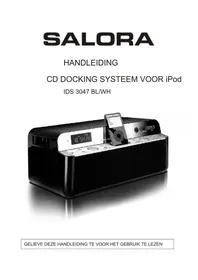
IDS3047BLWH - Loudspeaker SALORA - Free user manual and instructions
Find the device manual for free IDS3047BLWH SALORA in PDF.


| Product Type | Audio system with iPod dock |
| Dimensions | 400 (W) x 185 (H) x 240 (D) mm |
| Power Supply | AC 230V - 50 Hz |
| Power Consumption | 65 W |
| Radio Frequency Range | AM 522 - 1620 kHz, FM 87.5 - 108 MHz |
| Antenna | FM: wire antenna, AM: ferrite antenna |
| CD Compatibility | CD, CD-R, CD-RW (8 and 12 cm) |
| iPod Compatibility | iPod 3rd, 4th, 5th generation, iPod Photo, Mini, Nano (1st and 2nd), Video |
| Supported Audio Formats | MP3, WMA (CD, USB, SD/MMC) |
| USB / SD/MMC Player | Yes, via USB interface and SD/MMC slot |
| Functions | AM/FM Radio, CD player, iPod dock, USB, SD, remote control, timer, equalizer (5 modes), repeat, random play, anti-shock (ESP) |
| Remote Control | Yes, with AAA batteries (not included) |
| Display | LCD Screen |
| Laser Output Power | 0.6 mW (wavelength 790 nm, class 1) |
| Cleaning | Clean the cabinet and discs with a soft cloth. Do not use abrasive products or liquids. |
| Safety Precautions | Do not expose to rain or moisture. Unplug if unused for a long time. Do not obstruct ventilation openings. |
Frequently Asked Questions - IDS3047BLWH SALORA
User questions about IDS3047BLWH SALORA
0 question about this device. Answer the ones you know or ask your own.
Ask a new question about this device
Download the instructions for your Loudspeaker in PDF format for free! Find your manual IDS3047BLWH - SALORA and take your electronic device back in hand. On this page are published all the documents necessary for the use of your device. IDS3047BLWH by SALORA.
USER MANUAL IDS3047BLWH SALORA
KLASSE 1 LASERPRODUCT
CLASS 1 LASER PRODUCT APPAREIL A LASER DE CLASSE1 PRODUITLASERDE CLASSE1

MANUEL D'INSTRUCTIONS
SYSTEME DOCK AUDIO/CD POUR iPod
IDS 3047 BL/WH
LISEZ CE MANUEL D'INSTRUCTIONS AVANT D'UTILISER L'APPAREIL
AVERTISSEMENTS
RISQUE D' ELECTROCUTION NE PAS OUVRIR

AVERTISSEMENT: AFIN DE RÉDUIRE LES RISQUES D'ÉLECTROCUTION, NE PAS RETIRER LE COUVERCLE (OU LE DOS) DE L'APPAREIL. AUCUNE PIECE RÉPARABLE PAR L'UTILISATEUR N'EST PRÉSENTE DANS L'UNITE. REFEREZ-VOUS À DU PERSONNEL QUALIFIE POUR TOUTE RÉPARATION.
PRODUIT LASER DE CLASSE 1
CLASS 1 LASER PRODUCT APPAREIL A LASER DE CLASSE1 PRODUITLASERDE CLASSE1
ATTENTION
UN RAYON LASER EST ÉMIS LORSQUE LE BOITIER DE L'APPAREIL EST OUVERT ET LE VERROU DÉSENCLENCHÉ. ÉVITEZ TOUT CONTACT DIRECT AVEC LE RAYON LASER.

To reduce the risk of fire or electric shock, do not expose this appliance to rain or moisture
CAUTION
RISK OF ELECTRIC SHOCK DO NOT OPEN

WARNING: TO REDUCE THE RISK OF ELECTRIC SHOCK. DO NOT REMOVE COVER. NO USER SERVICEABLE PARTS INSIDE. REFER SERVICING TO QUALIFIED SERVICE PERSONNEL.
EXPLANATION OF GRAPHIC SYMBOLS
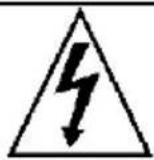
The lightning flash with arrowhead symbol, with in an equilateral triangle, is intended to alert user to the presence of uninsulated "dangerous voltage" within the product enclosure that may be of sufficient magnitude to constitute a risk of electric shock to persons.

The exclamation point within an equilateral triangle is intended to alert the user to the presence of important operating and maintenance (servicing) instruction in the literature accompanying the appliance.
HAZARD WARNING: TO REDUCE THE RISK OF FIRE OR ELECTRIC SHOCK, DO NOT EXPOSE THIS PRODUCT TO RAIN OR MOISTURE.
ESD Remark:
In case of malfunction due to electrostatic discharge just reset the product (reconnect of power source may be required) to resume normal operation
CLASS 1 LASER PRODUCT
CLASS1 LASERPRODUCT APPAREIL A LASERDE CLASSE1 PRODUITLASER DE CLASSE1
CAUTION
INVISIBLE LASER RADIATION WHEN OPEN AND INTERLOCK FAILED OR DEFEATED. AVOID DIRECT IXPOSURE TO LASER BEAM

This product contains a low-power laser emitter
PRECAUTIONS FOR USE
To ensure safe, appropriate use of your personal CD player, please follow the advice below:
Location
- Do not use the product in extremely hot, cold, dusty or damp conditions.
- Place the product on a smooth, flat surface.
- Ensure that air is free to circulate through the product. Do not use it in a poorly ventilated place, cover it with a cloth or place it on carpet.
Power supply
- Before using the product, check that its rated voltage is suitable for your mains supply.
Safety precautions
- When you plug in or unplug the power cord, always hold the plug rather than the cable. Pulling the cord could damage it and create a hazard.
- Always unplug the product from the mains if you do not intend to use it for an extended period.
- The STANDBY button does not disconnect the product from the mains power supply. To disconnect the product from the power supply, you must unplug the power cord.
- This product should only be used in a horizontal position.
- The rating label is located at the bottom of the cabinet.
Condensation
- Water droplets or condensation may form inside the CD player if it is left in a warm, damp atmosphere.
- The product may not operate correctly if condensation forms inside it.
- Leave the product in a warm, dry room for 1 to 2 hours to allow the condensation to evaporate.
In the event of a problem, unplug the power cord and contact a qualified repair technician.
Warning: Ventilation
Your personal CD player has ventilation holes, which should never be obstructed.
Liquid warning:
Never allow liquids to splash or drip onto the product. Never place a liquid-filled container (e.g. vase, jar, etc.) above it.
- The apparatus shall not be exposed to dripping or splashing liquids, no objects filled with liquids, such as vases, shall be placed on the apparatus
- The mains plug is used as the disconnect device and it shall remain readily operable. To be completely disconnect the power input, the mains plug of apparatus shall be disconnected from the mains.
The apparatus will be use in open area - The ventilation should not be impeded by covering the ventilation openings with items such as newspaper, table-cloths, curtains etc
- No open flame sources such as lighted candles should be placed on the apparatus;
- Attention should be drawn to the environmental aspects of battery disposal;
- Only use the apparatus in moderate climates.
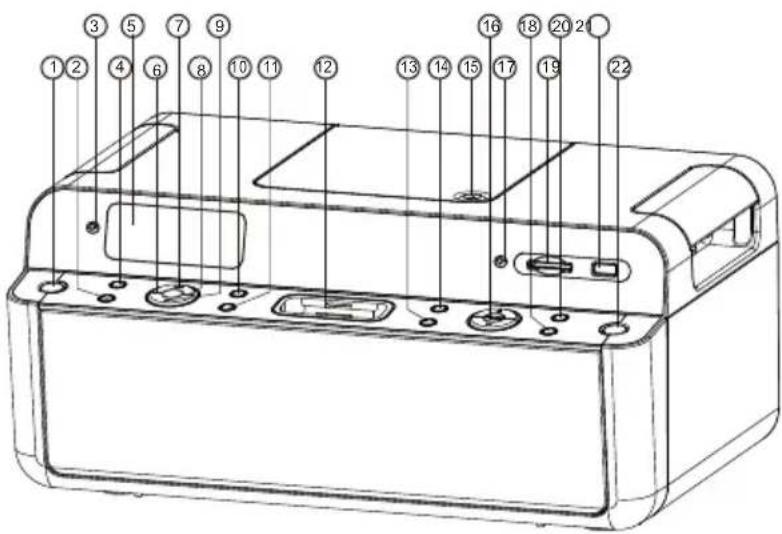
LOCATION OF CONTROLS
- STANDBY BUTTON
- EQ BUTTON
- REMOTE SENSOR
- TIMER BUTTON
- LCD DISPLAY
6.SEARCH - PLAY BUTTON
8.SEARCH - STOP BUTTON
10.REPEAT BUTTON
11.MEMORY BUTTON
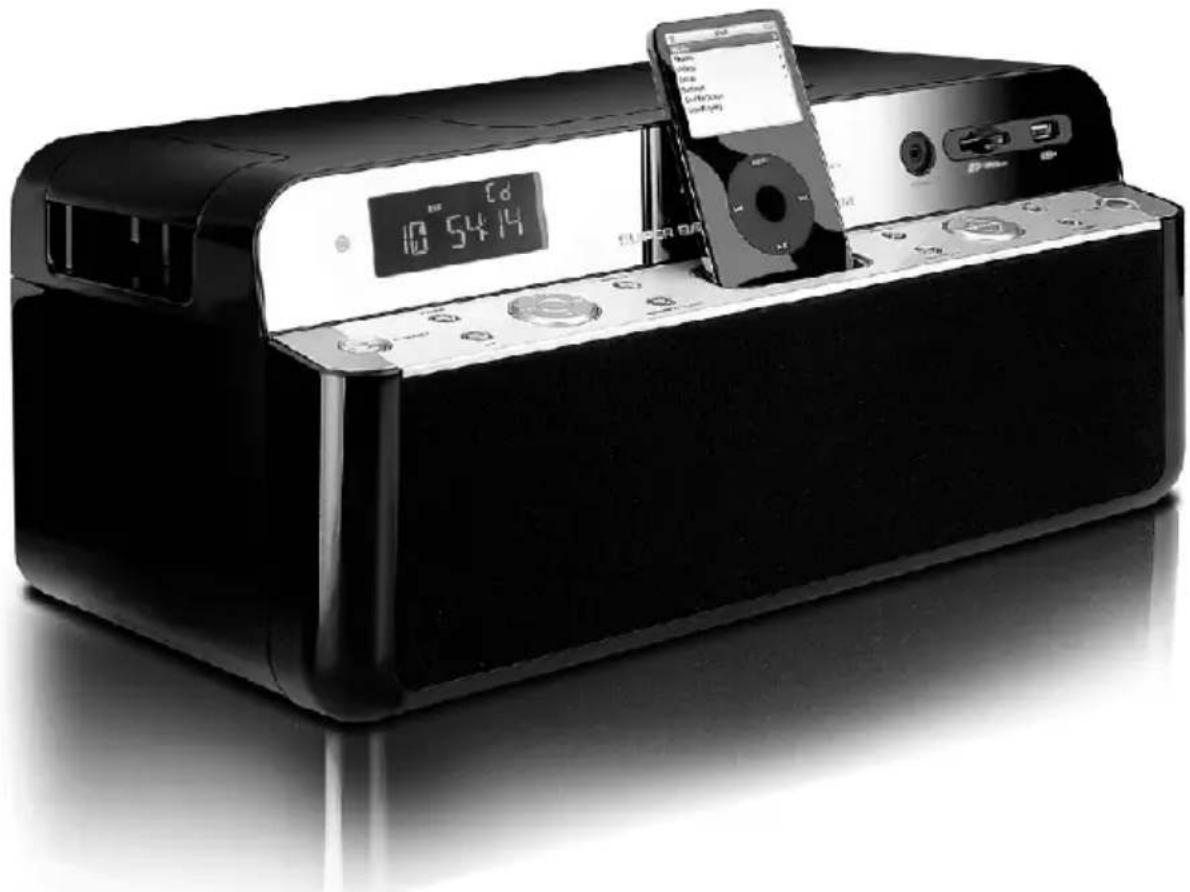
12.30PINS i-Pod DOCKING STATION
13.PRE-DOWN BUTTON
14.PRE-UP BUTTON
15.CD D00R
16.VOLUME UP/DOWN
17.STEREO HEADPHONE JACK
18.FIND/ESP BUTTON
19.SD/MMC MEMORY SLOT
20.BAND SELECTOR
21.USB INTERFACE
22.FUNCTION BUTTON
23.AC MAINS
24.FM ANTENNA - Video Out Jack

CAUTION:
Usage of controls, adjustments, performance or procedures other than those specified herein may result in hazardous radiation exposure. This unit should not be adjusted or repaired by anyone except a qualified service person.
IMPORTANT:
Since movement of the CD mechanism and the sensitive circuitry may cause interference to the radio tuner nearby, switch this unit off while operating other radio devices.
PRECAUTIONS FOR USE
INSTALLATION
Unpack all parts and remove protective material. Do not connect the unit to the power outlet before checking the voltage and before all other connections have been made. Do not cover any vents and make sure that there is a space of several inches/centimeters around the unit for ventilation.
CONNECTION
- Connect the power cord to AC outlet.
- When you first plug the unit into the power outlet, the unit will go into standby mode, the display will blink the un-set clock.
. Turn on the power and select CD function. If the LCD display is on with backlighting, it means the power supply is normal and your system is ready to play music.
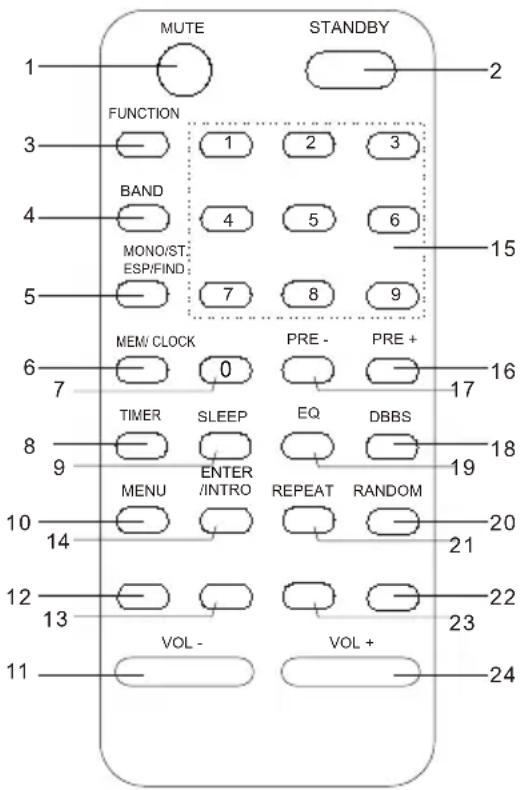
REMOTE CONTROL HANDSET
- MUTE: Press to activate/de-activate MUTE function.
- STANDBY: Press to turn power On or Off.
- FUNCTION: Press to select the system for CD/TUNER or iPod.
- BAND: Press to select TUNER mode or to select BAND (FM or AM).
- MONO/ST/ESP/FIND: In MP3 mode, press this button in twice, ALBUM search mode change. If FIND button is pressed long time, ID3 TAG is displayed. In Tuner mode, press to switch between FM MONO & FM STEREO
- MEMORY / CLOCK: Press to set CD/Radio or Clock memories.
- O : Selects the CD tracks.
- TIMER: Activates or de-activates the timer function.
- SLEEP: Press to activate the sleep function. This turns either the CD or the Radio off automatically for between 90 to 10 minutes at 10 minute intervals.
- MENU: Press to show or esc the menu in iPod mode.
- VOL- : Press to reduce volume.
- : In CD/iPod mode, press once to start playback. Press again to stop the disc play temporarily.
- : In CD/iPod mode, press once to skip to previous tack, press & hold for search forward. In tuner mode, press to change the station.
- ENTER/ INTRO: Enter the selected MENU in iPod mode. In CD mode, press to play the first 10 seconds of music of each track..
- 1-9 NUMERIC: Selects particular track number directly.
- PRE + : In Mp3 mode, s tep up the a Ibum number. In tuner mode, st ep up the preset stat ion. In iPod mode, scroll up the m
- PRE- : In MP3 mode, ste p down the a Ibum number. In tuner m ode, st ep down t he preset station. In iPod mode, scroll down down the menu.
- DBBS: Press the DBBS button, the sound changes to bass boost.
- EQ: Press to select the presets EQ mode.
- RANDOM: Press to start the random playback for CD mode.
- REPEAT: Press to activate the repeat function.
- STOP: In CD/iPod mode, press to terminate CD playback.
- : In CD/iPod mode, press once to skip to the next track. Press & hold for search forward. In Tuner mode, press to change the station.
- VOLUME+ : Press to increase volume.
Remarks: Insert 2 x AAA batteries before usage.
CLOCK TIMER & SLEEP
CLOCK SETTING
- Swith the unit to standby mode.
- Press MEMORY/CLOCK button more than 1 second. Press or button to set 24 HOUR or 12 HOUR. Press MEMORY/CLOCK button to store.
- Press or to set the hours. Press MEMORY/CLOCK button to store.
- Press or to set the minutes. Press MEMORY/CLOCK button to store.
TIMER SETTING
- Press TIMER button more than 1 Second, ON (timer on) will be shown on the display.
- Press or button to set the hours. Press TIMER button to store.
- Press or button to set the minutes. Press TIMER button to store. OFF (timer off) will be shown on the display.
- Repeat the step 2 and 3 to set hours and minutes to set timer OFF.
- Press or button to select desired source TUNER,iPOD or CD. Press TIMER button to store.
- Press or button to set the volume level. Press TIMER button to store.
- Switch the system to standby mode. When reaching the preset time, the selected source will play and switch off again at the preset time.
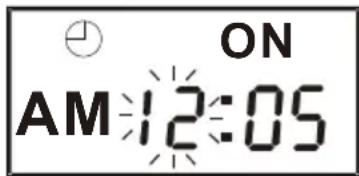
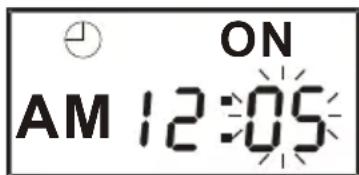
Active timer is indicated by showing on the display.
NOTE:
- Make absolutely sure that the clock is set to the correct time before setting the timer
- The timer setting will automatically cancelled if no button is being pressed for more than 10 Se cond.
- If the selected source CD is not available when activated by timer, TUNER will be selected automatically instead.
DEACTIVATE THE TIMER
- Press TIMER button to deactivate this function, will disappear on the display. To activate the timer again with the preset time, press the TIME button again.
- To cancel active timer until next day, press the STANDBY button.
SLEEP FUNCTION:
SLEEP mode will be activated once SLEEP button is pressed on the remote handset. By pressing one at a time the SLEEP timer will change to 90, 80, 70, 60, 50, 40, 30, 20, 10 minutes and OFF.
- Press BAND button to select desired BAND (AM or FM).
- Tune to the required station by pressing the or button.
- Adjust volume control to the desired volume level.
AUTO TUNING
- Press BAND button to select desired band (AM or FM).
- Press and hold the button for 1 - 2 seconds and then release.
- The unit will start scanning automatically and stops when a radio station is reached.
- Repeat steps 2 & 3 until a desired radio station is reached.
- Adjust volume control to a desired volume level.
PRESET STATIONS BY REMOTE HANDSET
You can store up to a total of 40 radio stations in the memory (30-FM / 10-AM).
- Set to TUNER mode.
- Tune to the desired radio station by "MANUAL" or "AUTO" tuning methods.
- Press MEMORY/CLOCK button to enable programming state.
- Press PRE button to select the desired station memory for storage.
- Press MEMORY/CLOCK button again to confirm the setting.
- Repeat steps 2 to 5 to store other stations.
- Press PRE button to reload the preset stations in order.
- To return to normal tuning mode, leave the keys alone.
FM & FM-STEREO RECEPTION
- Press the MONO/ST. on remote handset to select MONO or STEREO reception mode.
HINTS FOR BEST RECEPTION:
AM: The receiver has a built-in AM ferrite antenna. If the AM reception is weak, rotate or reposition the unit. This usually improves the AM reception.
FM: Attached FM wire antenna plugged in at the rear of the unit should be fully unwound and extended its full length for best reception.
TO USE THE DOCK WITH YOUR IPOD:
- Remove the iPod cover from the unit.
- Install the iPod Dock Adaptor into Dock, then put your iPod in the Dock on the unit. (Dock adapter is a iPod accessories available separately and fits with your iPod product).
Note:
1)After placing the iPod in the Dock, all iPod functions can be operated by remote controller, please don't try to use the iPod controls because the iPod connector may be damaged while the dock is connected with your iPod.
2)The iPod battery is still charging when the unit is under Power standby mode.
3)This player can support following model number iPod
A.Third Generation iPod
B.Fourth Generation iPod
C.Fifth Generation iPod Video
D.iPod Photo
E.iPod Mini
F.iPod Nano (First Generation)
G.iPod Nano (Second Generator)
H.iPod video
- Playing music Through the unit speakers: Using the iPod Dock, you can play music from iPod through the unit speakers and operated with remote controller
1)Place iPod in the Dock.
2)Use the remote controller to play iPod with following steps.
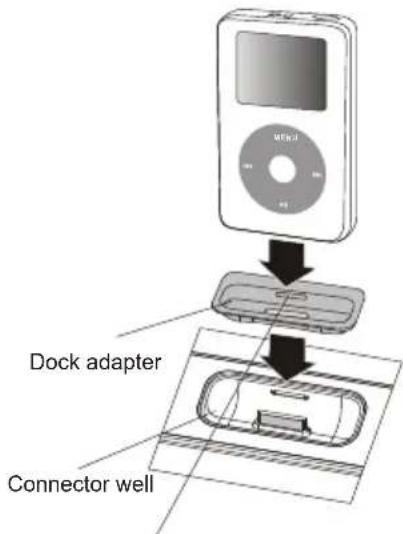
You can remove the Dock adapter with your fingernail by using this slot
| Enter main menu | Press the MENU button on remote control. |
| The top and bottom choose | Press the PRE-/PRE+ button on remote control or main unit. |
| To choose an item | Press the ENTER button on remote control |
| Play or pause a song. | Press the play/pause (▶/■) button on remote control or main unit. |
| Change the volume | Press the "VOL+" or "VOL- " button on remote control or main unit. |
| Skip to the next song. | Press the next/fast-forward (▶) button on remote control or main unit. |
| Start a song over or play the previous song. | Press the previous/rewind (▶) button once to start a song over, press it twice to play the previous song. on remote control or main unit. |
| To go back to the previous menu | Press the MENU button on remote control. |
CONNECTING AN iPod
Before connecting an iPod you must first check if your iPod has a docking connector as early iPod models do not have one and cannot be docked to your unit. If your iPod does have a docking connector it will be located on the bottom of the iPod as shown in the diagram.
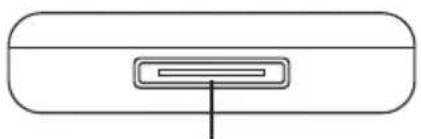
Docking connector
If your iPod does have a docking connectoryou must firstfit the correct iPod adaptor to the iPod bay. There are 8 adaptors supplide, each has an adaptor number printed on the underside.
FINDING THE CORRECT iPod ADAPTOR
Refer to the table of compatible iPod models in the next column and the correct adaptors to match them. Once you have located the correct adaptor for your iPod, press it gently into the iPod bay before attempting to connect your iPod.
NOTE: If you connect an iPod without fitting the correct adaptor, you may damage the iPod and your Music System.
LIST OF COMPATIBLE iPod MODELS
iPod nano(round case sides)
Use adaptor No.11.
iPod nano-flat case sides)
Use adaptor No.8.
iPod mini(4GB or 6GB)
Use adaptor No.3.
iPod video(30GB)
Use adaptor No.9.
iPod video(60GB or 80GB)
Use adaptor No.10.
iPod photo, with a colour display(40GB or 60GB)
Use adaptor No.7.
iPod, with a B&W display and clickw heel with legends on wheel (20GB)
Use adaptor No.4
iPod, with a B&W display and clickwheel with legends
on wheel(40GB)
Use adaptor No.5.
CONNECTING IPOD TO TV
iPod photo and 5th Generation iPod with Photo and video can be viewed by connection to TV/monitor with a video input, connect the VIDEO OUT jack on the rear of the unit to the TV video input as show on the right.
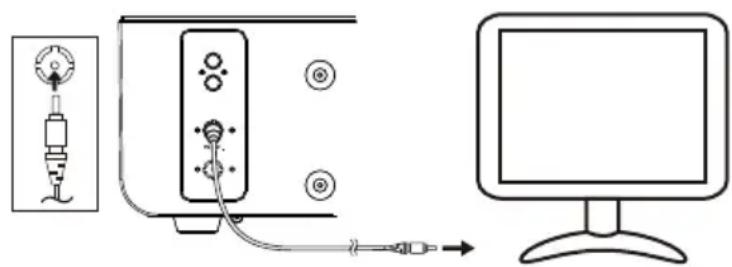
TO CHARGE THE BATTERY
When the iPod is connected to this unit, the battery will start charging.
Fig.1: this icon will show whow when the battery is charging.
Fig.2: this icon will show whow when the battery is full charged.
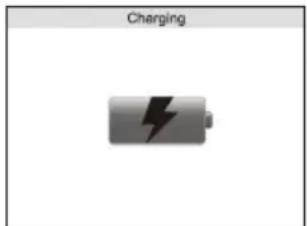
Fig 1
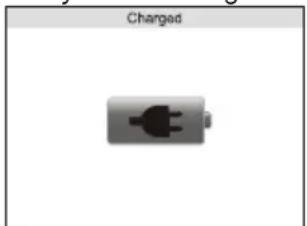
Fig 2
- GETTING STARTED
- Press FUNCTION button to select "CD" mode.
- Place a music disc with the printed side facing up inside the tray.
- Press the button to close the CD door.
- The display will show the total number of tracks and playing time.
- PLAY / PAUSE MODE
- Press the button to start playback. The first track will be played and the TRACK NO. will appear on the LCD display.
- To interrupt, press the button once. The current playing time will flash on the LCD display. Press the button again to resume playback.
- STOP MODE
- If button is pressed during play or pause mode, CD play will go to stop mode.
- SKIP / SEARCH MODE (SKIP UP SKIP DOWN)
- During PLAY or PAUSE mode: If the button is pressed, it will go to the next track and display the track No. and then remain in the PLAY or PAUSE mode.
- During PLAY or PAUSE mode: if the button is pressed, it will go back to the beginning of the track and display the original track No. while remaining in the PLAY or PAUSE mode.
- After step 2, press button again. It will go to the previous track and remain in the PLAY or PAUSE mode. Note: press and hold the button to activate the search function.
FOR MP3 DISC
- Press PRE- or PRE+ buttons to select the album No.
- Press or buttons to select the track No.
- When the desired track is selected, press the button to start playback.
- MP3 SEARCH (FIND A TRACK)
- Press ESP/FIND button once to activate the track search function.
- Press and buttons to scroll through the albums on the CD alphabetically.
- Once the desired track is displayed, press the button to begin playback.
- MP3 SEARCH (FIND AN ALBUM)
- Press ESP/FIND button twice to activate the album (subfolder) search function.
- Press and buttons to scroll through the albums on the CD.
3.Once the desired album is displayed, press the button to skip to the beginning of that album.
REMARK:
- MP3 playing performance will vary in quality depending on the condition of the disc being played, and how it was recorded. Reading time for a MP3 - CD is longer than normal CD's due to the difference in the way it is formatted.
- REPEAT MODE
Press the repeat button before or during play. A single track, single folder (MP3 only) or all the tracks can be repeated. Press the button for the repeat mode as follows:
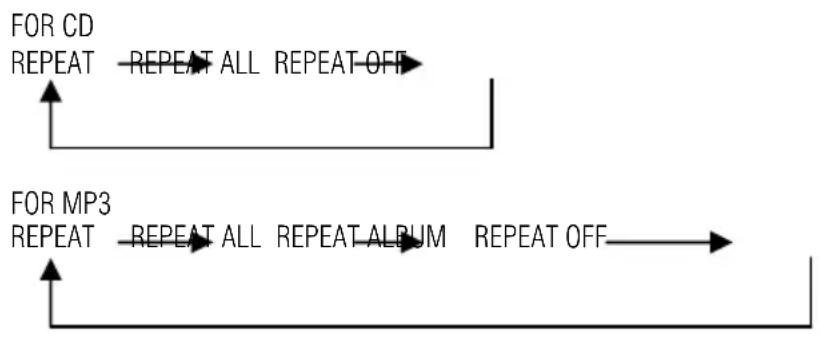
REPEAT MODE REPEAT INDICATOR ON DISPLAY
REPEAT SINGLE TRACK REPEAT
REPEAT ALL TRACKS REPEAT ALL
REPEAT CURRENT ALBUM (MP3 only) REPEAT ALBUM
- RANDOM PLAY (BY REMOTE)
You can listen all the tacks in a random order using this function.
- Press RANDOM button and RANDOM lights up on the LCD.
- All tracks will start playback in a random order automatically.
- Press or RANDOM button to cancel the random mode.
- ESP FUNCTION
ESP (ANTI-SHOCK) function will be activated automatically during playback of MP3-CD.
Press ESP/FIND button to disable the ESP function during normal CD playback.
CD PROGRAMMING
Up to 64 tracks can be programmed for disc play in any sequence. Before using, be sure to press the button first.
- Set in CD mode.
- Press tMEMORY/CLOCK button. MEMORY will appear on the LCD display. The program number and the digits for track number are displayed.
- Select a desired track by pressing buttons.
- Press thEMORY/CLOCK button to store the track into memory.
- Repeat steps 3 and 4 to enter additional tracks into the memory if necessary.
- When all the desired tracks have been programmed, press the button to play the disc in the order you have programmed.
- Press the button to terminate program playing.
- The programming will automatically stop if no button is pressed within 10 seconds.
MUTE FUNCTION
To temporarily shut off the sound from the speakers press MUTE. The volume display will show the level and flashes to indicate that the Mute function is on. Press MUTE again to cancel Mute and restore the sound. The volume display will briefly show the level to indicate that Mute function is OFF.
PRESET EQ FUNCTION
This unit provides 5 different sound modes to enhance your listening quality, you can select the desired effect by pressing the EQ button repeatedly in the following sequence:

- Press FUNCTION key to select CARD-USB mode
- Display will show CARD-USB
- Plug in USB Memory Stick into USB Port or insert SD or MMC card with label facing up in card slot
- Display will show total track number
- Press to start music playing
- Press to select tracks
- Repeat function can be selected identical to CD/MP3 playback
- Press to end playback
Note : Due to fast changing IT technology, this unit may not be compatible with some USB or SD/MMC flash storage device.
- USB support Specification : USB V1.1/V2.0
MAINTENANCE
CARE OF THE COMPACT DISC
To remove a disc from its storage case, press down on the center of the case and lift the disc out, holding it carefully by the edges.
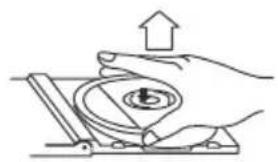
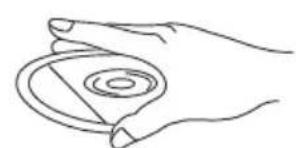
- Fingprints and dust should be carefully wiped off the disc's recorded surface with a soft cloth. Unlike conventional records, compact discs have no grooves to collect dust and microscopic debris. Wiping with a soft cloth should remove most particles. Wipe in a straight line from the inside to the outside of the disc. Small dust particles and light stains will have absolutely no effect on reproduction quality.
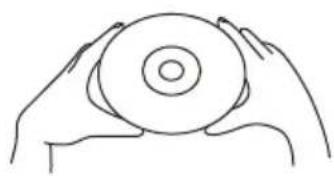
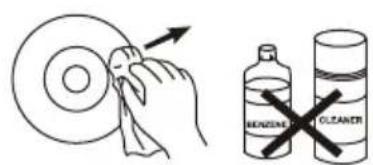
- Clean the disc periodically with a soft, lint-free, dry cloth. Never use detergents or abrasive cleaners to clean the disc. If necessary, use a CD cleaning kit.
- Never write on or affix labels to the surface of compact discs.
CARE OF THE CABINET
If the cabinet becomes dusty wipe it with a soft dry dust cloth. Do not use any wax, polish sprays, or abrasive cleaners on the cabinet.
CAUTION:
Never allow any water or other liquids to get inside the unit while cleaning.
TROUBLESHOOTING
If a fault occurs, first check the points listed below before taking the set for repair. Do not open the set as there is a risk of electric shock.
If you are unable to remedy the problem by following these hints, call service and support at the phone number shown below.
Warning: Under no circumstances should you try to repair the set yourself, as this will invalidate the warranty
| Problem Cause Solution | ||
| No sound / power | Volume not adjusted Adjust the Volume | |
| Power cord not securely connected | Connect the AC cord properly | |
| Display does not function properly / No reaction to operation of any of the controls | Electrostatic discharge | Switch off and unplug the set. Reconnect after a few seconds |
| The CD skips tracks | CD damaged or dirty Replace or clean CD | |
| Program is active Quit program mode | ||
| No disc indication | No CD inserted Insert a CD, CD-R or CD-RW | |
| CD badly scratched or dirty Replace or clean CD | ||
| Laser lens has steamed up Wait until lens has cleared | ||
| CD-R is blank or the disc is not finalized Use a finalized CD-R | ||
| CD Playback does not work | CD badly scratched or dirty Replace or clean CD | |
| Laser lens steamed up Wait until lens has adjusted to room temperature | ||
| USB / Memory card failure | USB / Memoy Card connecting error Unplug and reinsert memory card or USB stick | |
| USB / Memory Card does not contain playable files | Use a USB / Memory Card containing MP3 or WMA files |
GENERAL
Power Supply: AC230V~50Hz
Power consumption: 65 W
Dimensions of unit: 400(w) x 185(h) x 240(d) mm
Frequency range: AM 522 - 1620 kHz
FM 87,5 - 108 MHz
Antenna:
FM: PIGTAIL
ANTENNA
AM: FERRBITE
BAR
ANTENNA
Remote Control:
Battery 1^ 1.5V Type AAA / Micro (not included)
COMPACT DISC
Disc Drive Top Loading CD Drive, 8cm & 12cm compatible
Laser Type CLASS 1 LASER
Disc Compatibility CD-R / CD-RW
Laser output
0.6mW(Continuous wave max.)
Wave length
790 nm
SPEAKER SYSTEM
Speaker 2.1 ch Speaker System
MP3 PLAYER
Format:
ISO9660 JOLIET
Bitrate: 8 - 320 kBit/s CBR/VBR
Sampling Rate: 32, 44 & 48 kHz
SPECIFICATIONS SUBJECT TO CHANGE WITHOUT NOTICE
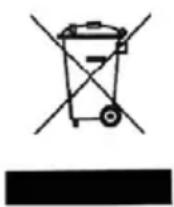
This symbol on the product or in the instructions means that your electrical and electronic
equipment shoule be disposed at the end of its life separately from your household
waste. There are separate collection systems for recycling in the EU.
For more information, please contact the local authority or your retailer where you purchased the product.

- KLASSE 1 LASERPRODUCT
- AVERTISSEMENTS
- PRODUIT LASER DE CLASSE 1
- ATTENTION
- CAUTION
- CLASS 1 LASER PRODUCT
- PRECAUTIONS FOR USE
- Location
- Power supply
- Safety precautions
- Condensation
- Warning: Ventilation
- Liquid warning:
- LOCATION OF CONTROLS
- CAUTION:
- IMPORTANT:
- INSTALLATION
- CONNECTION
- REMOTE CONTROL HANDSET
- CLOCK TIMER & SLEEP
- CLOCK SETTING
- TIMER SETTING
- NOTE:
- DEACTIVATE THE TIMER
- SLEEP FUNCTION:
- AUTO TUNING
- PRESET STATIONS BY REMOTE HANDSET
- FM & FM-STEREO RECEPTION
- HINTS FOR BEST RECEPTION:
- TO USE THE DOCK WITH YOUR IPOD:
- CONNECTING AN iPod
- CONNECTING IPOD TO TV
- TO CHARGE THE BATTERY
- - GETTING STARTED
- - PLAY / PAUSE MODE
- - STOP MODE
- - SKIP / SEARCH MODE (SKIP UP SKIP DOWN)
- FOR MP3 DISC
- - MP3 SEARCH (FIND A TRACK)
- - MP3 SEARCH (FIND AN ALBUM)
- REMARK:
- - REPEAT MODE
- - RANDOM PLAY (BY REMOTE)
- - ESP FUNCTION
- CD PROGRAMMING
- MUTE FUNCTION
- PRESET EQ FUNCTION
- MAINTENANCE
- CARE OF THE COMPACT DISC
- CARE OF THE CABINET
- TROUBLESHOOTING
- GENERAL
- COMPACT DISC
- SPEAKER SYSTEM
- MP3 PLAYER
- SPECIFICATIONS SUBJECT TO CHANGE WITHOUT NOTICE
Brand : SALORA
Model : IDS3047BLWH
Category : Loudspeaker