F60CONXD - Oven BERTAZZONI - Free user manual and instructions
Find the device manual for free F60CONXD BERTAZZONI in PDF.



| Product type | Electric built-in oven |
| Brand | Bertazzoni |
| Model | F60CONXD |
| Dimensions (W x H x D) | 595 x 595 x 550 mm (estimated) |
| Weight | Approximately 30 kg (estimated) |
| Electrical supply | 230 V, 50 Hz |
| Total power | Approximately 2.5 kW (estimated) |
| Capacity | 65 liters (estimated) |
| Door material | Tempered glass with inner pane |
| Interior lighting | 2 side bulbs |
| Control panel | Touch control with electronic clock |
| Cooking functions | Traditional, Bottom heat, Grill and bottom heat, Grill, Maxigrill with turbine, Traditional with turbine, Turbo, Pizza, Defrost |
| Rack | 1 chrome rack |
| Baking tray | 1 tray |
| Telescopic guides | Yes |
| Defrost system | Hot air at 2 levels (HI/LO) |
| Rapid preheat | Yes (with certain functions) |
| Child safety | Touch lock of oven |
| Automatic shut-off | Yes (programmable in duration and end of cooking) |
| Door gasket | Removable oven gasket |
| Cleaning | Clean with a damp cloth; avoid abrasive products |
| Spare parts | Available from after-sales service |
Frequently Asked Questions - F60CONXD BERTAZZONI
User questions about F60CONXD BERTAZZONI
0 question about this device. Answer the ones you know or ask your own.
Ask a new question about this device
Download the instructions for your Oven in PDF format for free! Find your manual F60CONXD - BERTAZZONI and take your electronic device back in hand. On this page are published all the documents necessary for the use of your device. F60CONXD by BERTAZZONI.
USER MANUAL F60CONXD BERTAZZONI
F60CONXD
Specifiche tecniche
Feature List
natural_image
Line drawing of a standard open oven with a lid and front panel (no text or symbols)
BERTAZZONI SpA Via Palazzina 8 42016 Guastalla RE ITALY
WWW.BERTAZZONI.COM
FROM THE DESK OF THE PRESIDENT
Dear new owner of a Bertazzoni product,
Our company brings to homeowners around the world beautiful, high-performance kitchen appliances, which make their dreams come true.
We marry the finest Italian craftsmanship with technical precision using state-of-the-art manufacturing, which give our customers peace of mind.
Our brand elevates food – preparing it, sharing it, enjoying it – to a new dimension where taste, fun, and lifestyle - the values of our land - come together.
We have built this company with the unique passion and dedication of family entrepreneurship. Our fathers handed it to us. Our children will inherit it. It's in our minds, our hearts, our soul.
Since 1882 our name is on the products we build. We are proud – and at the same time humbled – by our heritage. This company is Bertazzoni. We are Bertazzoni. And we vow to continue building this great enterprise into the future.
DALLA SCRIVANIA DEL PRESIDENTE
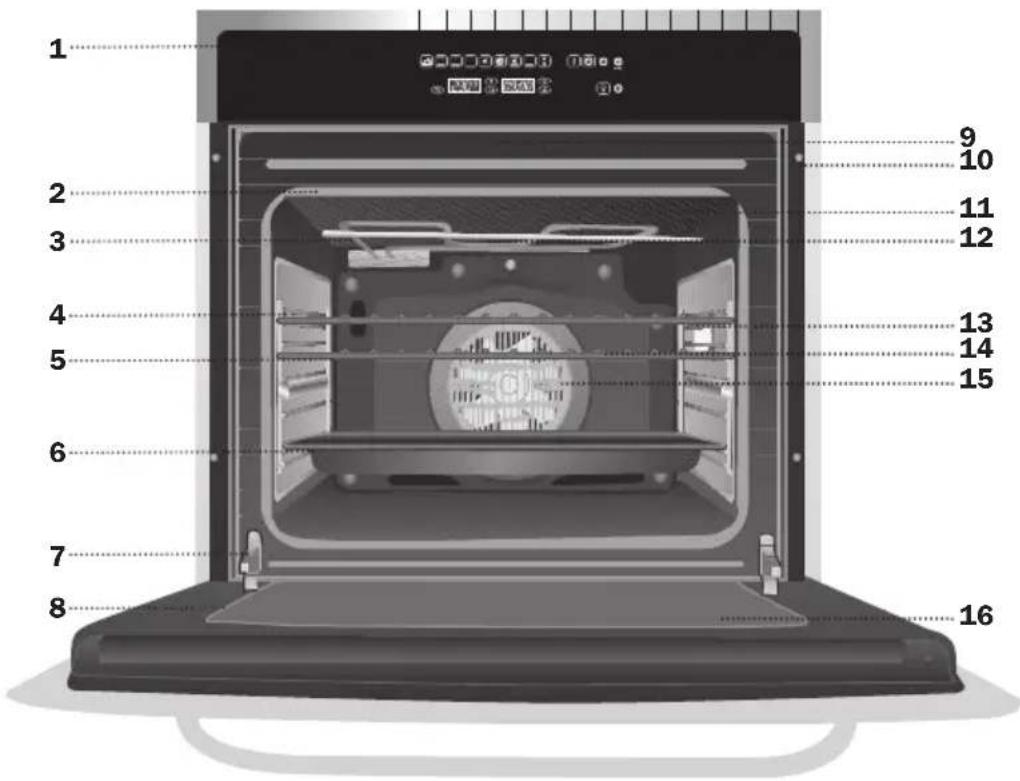
4 Chrome Support + Telescopic Guides
5 Oven Grid
6 Cake Tray
7 Hinge
8 Door
9 Air Outlet for Cooling
10 Cabinet Mounting
11 Grill Screen
12 Smoke Outlet
13 Side light
14 Back Wall Panel
15 Fan
16 Large Inner Glass Door
Control Panel
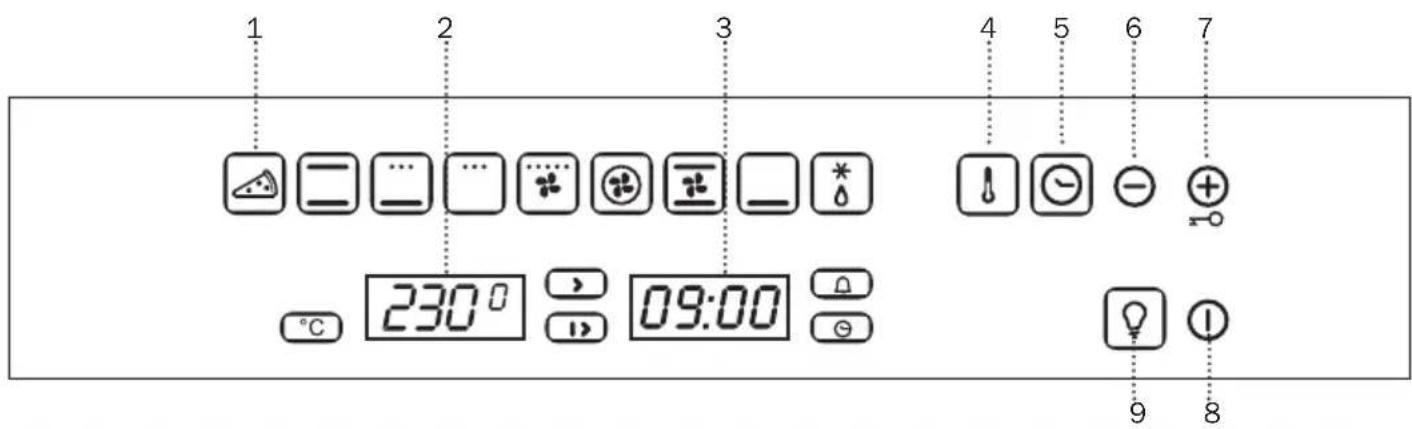
1 Cooking Functions
2 Temperature Indicator
3 Electric Clock
4 Temperature Sensor
5 Electric Clock Sensor
6 Sensor ⊖
7 Sensor ⚠Child Safety Function
8 On / Off
9 Inside Light

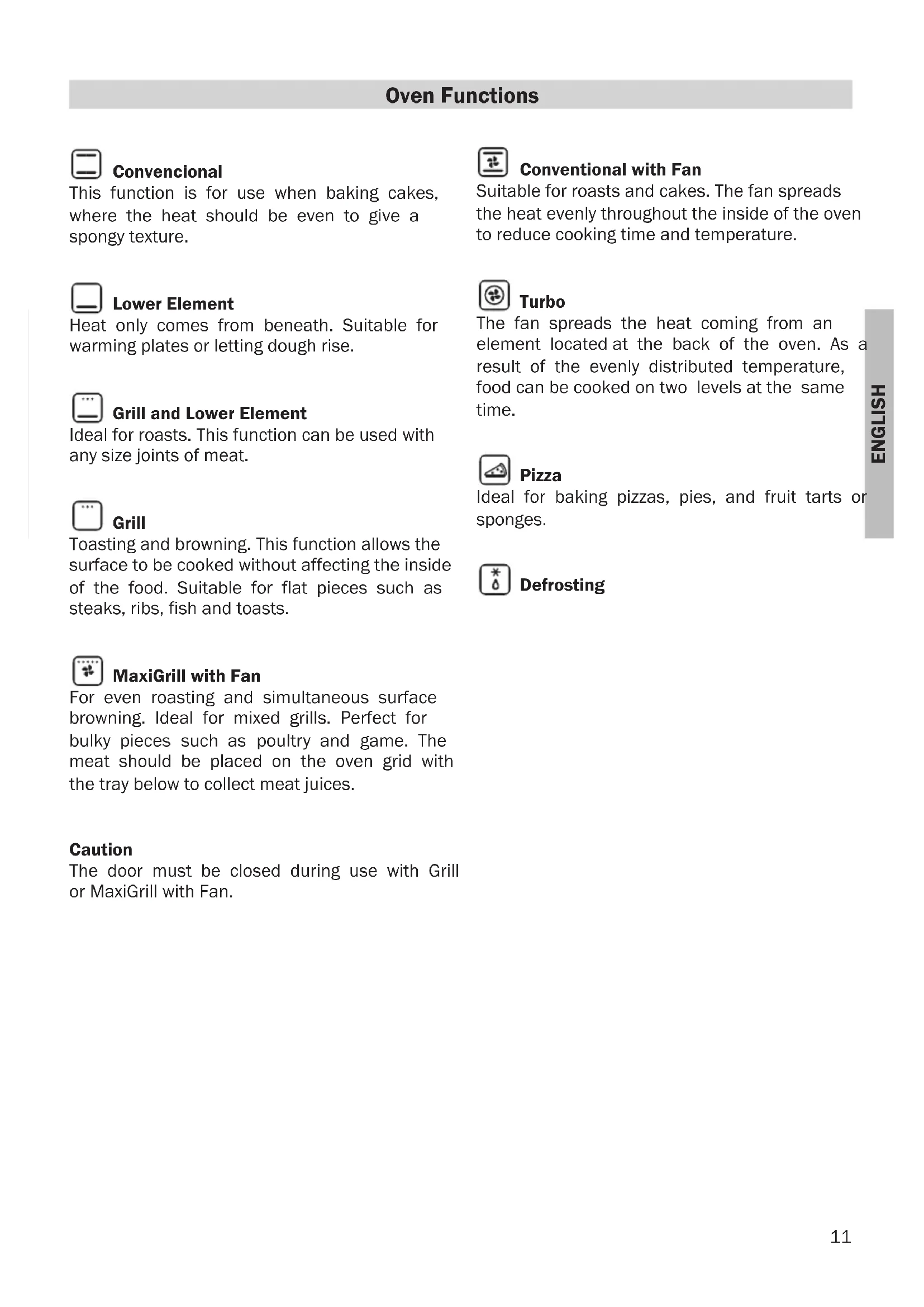
Convencional
This function is for use when baking cakes, where the heat should be even to give a spongy texture.

Lower Element
Heat only comes from beneath. Suitable for warming plates or letting dough rise.

Grill and Lower Element
Ideal for roasts. This function can be used with any size joints of meat.

Grill
Toasting and browning. This function allows the surface to be cooked without affecting the inside of the food. Suitable for flat pieces such as steaks, ribs, fish and toasts.

MaxiGrill with Fan
For even roasting and simultaneous surface browning. Ideal for mixed grills. Perfect for bulky pieces such as poultry and game. The meat should be placed on the oven grid with the tray below to collect meat juices.
Caution
The door must be closed during use with Grill or MaxiGrill with Fan.

Conventional with Fan
Suitable for roasts and cakes. The fan spreads the heat evenly throughout the inside of the oven to reduce cooking time and temperature.

Turbo
The fan spreads the heat coming from an element located at the back of the oven. As a result of the evenly distributed temperature, food can be cooked on two levels at the same time.

Pizza
Ideal for baking pizzas, pies, and fruit tarts or sponges.

Defrosting
Recommendations for Defrosting Food
The defrost function works by means of a 2-level system of hot air. HI is for meats in general and LO is for fish, cakes, pastries and bread. When selecting the defrost function, select HI or LO on the temperature display by pressing on the temperature sensor and then the or sensors.
- Unpackaged food should be placed on the oven tray or on a dish.
-
Defrost large pieces of meat or fish by placing them over the grid with a tray underneath to collect any liquid.
-
Meat and fish do not need to be completely thawed before cooking. Condiments can be added once the surface is soft.
- Food should always be cooked after defrosting.
- Do not refreeze defrosted food.
See the following chart for defrosting times and temperature levels:
| FOOD | LO LEVEL | HI LEVEL | ||
| Weight Time | Weight Time | |||
| Bread | 12 Kg | 35 mins | ||
| Cake | 12 Kg | 25 mins | ||
| Fish | 12 Kg | 30 mins | ||
| Fish | 1 Kg | 40 mins | ||
| Chicken | 1 Kg | 75 mins | ||
| Chicken | 1,5 Kg | 90 mins | ||
| Rib steak | 12 Kg | 40 mins | ||
| Minced meat | 12 Kg | 60 mins | ||
| Minced meat | 1 Kg | 120 mins | ||
The times shown in the chart are a guide. The time needed for defrosting will depend on the temperature of the room, weight of the food and how frozen it is.
Oven Use
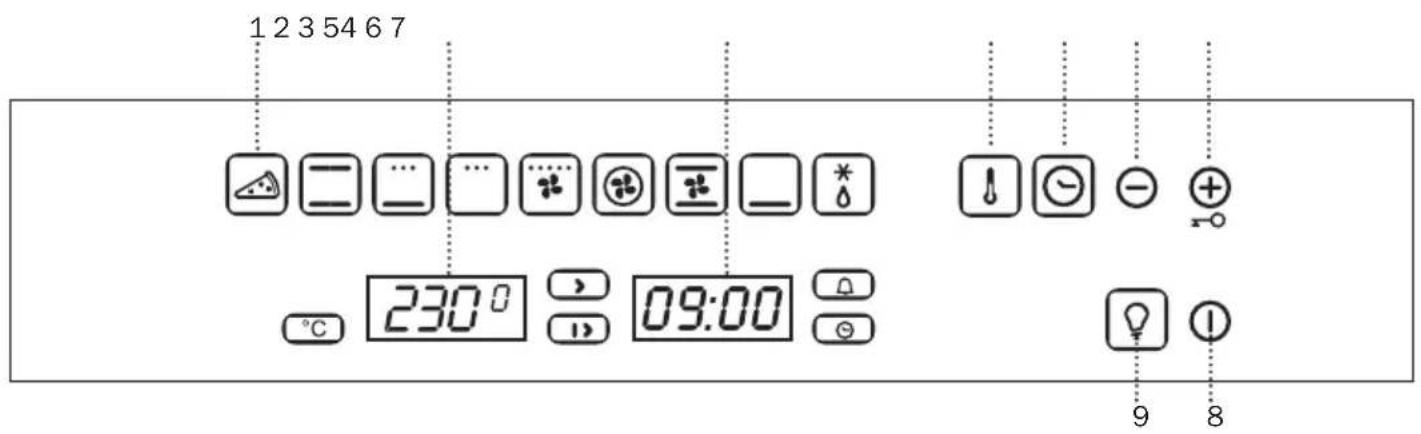
Use of the electronic timer
Caution
The electronic clock features Touch-Control technology. To operate, simply touch the glass control symbols with your fingertip.
The touch control sensitivity continuously adapts to changing conditions. Ensure that the glass front of the control panel is clean and free of any obstacles when turning on the oven.
If the clock does not respond correctly when you touch the glass, you will need to turn off the oven for a few seconds and then turn it back on. By doing this, the sensors adjust automatically and will react once more to fingertip control.
Setting the Electronic Clock
When turning your oven on, you will see the clock flashing 12:00. Set the clock by touching the ⏻ symbols on the glass.
You will hear 2 beeps confirming the time has been set.
If you want to change the time, touch the clock sensor until the indicator flashes. Change the time by touching the ⊕ or ⊖ sensors. The two beeps you hear after that will confirm the new time has been set.
Manual Operation
After setting the clock, the oven is ready for use:
1 Press the On sensor Ⓘ.
2 Press on the desired cooking function symbol.
3 The temperature display will show the preset temperature for that cooking function. Press on the temperature sensor ⚠️ to change it. Select the desired temperature by pressing on the ⊕ or ⊖ sensors.
4 The top oven cavity will start to heat up. Functions 📄 🐃 🐃 🐃 and □ will start the fast preheating function for a few minutes. The oven will beep when it reaches the selected temperature.
Caution: this preheating function turns on the turbo motor at the back of the top oven cavity.
5 During oven heating, the° display will flash to show that the food is being heated.
6 Press on the Off sensor ① to stop cooking.
Caution
When cooking has finished, you will notice that oven cooling feature will work until the temperature inside the oven has been suitably lowered.
Oven Lighting
The inside light will go on:
- When the oven door is open. If the door is not closed after a certain time, the light will turn off to reduce power consumption.
- When any cooking function is selected. The light will turn off after a certain time.
If you want to turn the light on during cooking, just touch the Oven Light sensor ☑ If you keep your finger on this sensor for a few seconds, the light will stay on throughout cooking.
Electronic Clock Functions
Cooking Time: This function allows you to programme cooking time length, after which the oven will turn off automatically.
Cooking Stop Time: This function allows you to programme the time for cooking to stop, after which the oven will turn off automatically.
Cooking Time and Cooking Stop Time: This function allows both cooking time length and the stop time to be programmed. With this function, the oven switches on automatically at the set time and operates for the cooking time it has been programmed for. It switches itself off automatically at the entered stop time.
Timer Alarm: A beep will go sound when the set time has finished, whether the oven is on or off.
Child safety: This function locks the oven, preventing small children from playing with it.
Programming the Timer Alarm
1 Press on the clock sensor Ⓗ several times until the symbol Ⓗ lights up.
2 Select the length of time after which you want the alarm to sound by pressing on the ⊕ or ⊖ sensors.
3 You will then hear two beeps, the display will show the time left before the alarm sounds and the symbol △ will flash slowly, indicating that the timer has been set.
4 Once the programmed time has passed, an alarm will sound and the symbol Ⓞ will begin to flash more quickly.
5 Press on any sensor on the control panel to stop the alarm.
You can change the programmed time whenever you want by touching the clock sensor ⏻ until the symbol ⏱ flashes, and then touching the ═ or ⏱ sensors. The two beeps you hear after that will confirm the new time has been set.
Programming Cooking Time
1 Press on the clock sensor ☑. The symbol ☑ will light up.
2 Select the cooking time by pressing the ⊕ or ⊖ sensors.
3 Two consecutive beeps will then sound and the display will show the remaining cooking time. The symbol ⏻ will flash slowly to indicate that the oven will switch itself automatically.
4 Select a cooking function and temperature.
5 Once the cooking time is complete, the oven will turn off, an alarm will sound and the symbol will flash more quickly.
6 Press on any sensor on the control panel to stop the alarm.
You can change the programmed time whenever you want by touching the clock sensor ⏻ and then on the ⊕ or ⊖ sensors. The two beeps you hear after that will confirm the new time has been set.
Programming the Cooking Stop Time
1 Press on the clock sensor several times until the symbol lights up.
2 Select the cooking stop time by pressing the sensors.
3 Two consecutive beeps will then sound and the display will show the remaining cooking time. The symbol will flash slowly to indicate that the oven will switch itself automatically.
4 Select a cooking function and temperature.
5 Once it is the set time, the oven will turn off, an alarm will sound and the symbol will flash more quickly.
6 Press on any sensor on the control panel to stop the alarm.
You can change the programmed cooking stop time at any moment by pressing on the clock sensor ⏻ until the ➤ symbol flashes and then by pressing on the ⊕ or sensors.
The two beeps you hear after that will confirm the new time has been set.
You can use this function even if you are already cooking with the oven. If this is the case, follow all of the above instructions except No. 4.
Programming Cooking Time and Cooking Stop Time
1 Press on the clock sensor Ⓗ . The symbol ⏻ will light up.
2 Select the cooking time by pressing the ⊕ or ⊖sensors.
3 Two consecutive beeps will then sound, and the display will show the remaining cooking time. The ☐ symbol will flash slowly.
4 Press on the clock sensor ⏻ several times until the symbol ➤ lights up.
5 Select the cooking stop time by pressing the sensors.
6 This will be confirmed by two beeps. The current time will show on the display and the ⏻ symbol will remain lit.
7 Select a cooking function and temperature.
8 The oven will remain off, with the symbol lit and the symbol flashing slowly. The clock will show the current time and the inside light will remain off. The oven is now programmed.
9 When it is time to start cooking, the oven will switch on and will operate for the programmed cooking time. The clock display will show the remaining cooking time.
10 Once the set time is reached, the oven will turn off, an alarm will sound and the 15 and 76mbols will flash.
11 Press on any sensor on the control panel to stop the alarm.
If you wish to change the cooking stop time while cooking is in progress, press on the clock sensor until the symbol flashes.
You can then change the cooking stop time by pressing on the ⊕ or ⊖ sensors. The two beeps you hear after that will confirm the new time has been set.
Child Safety Function
This function locks the oven, preventing small children from playing with it. To turn on the function, press on the ⊕ symbol until you hear a long beep and see several flashing dots between the digits of the temperature display. The oven is now locked.
To turn off the child lock, keep the pressed until a long beep sounds.
⊕ symbol
Caution
In the event of power failure, your electronic clock timer settings will be erased and 12:00 will flash on the clock display. Reset the clock and programme again.
F60CONXD
- F60CONXD
- FROM THE DESK OF THE PRESIDENT
- DALLA SCRIVANIA DEL PRESIDENTE
- Convencional
- Lower Element
- Grill and Lower Element
- Grill
- MaxiGrill with Fan
- Caution
- Conventional with Fan
- Turbo
- Pizza
- Defrosting
- Recommendations for Defrosting Food
- Oven Use
- Use of the electronic timer
- Setting the Electronic Clock
- Manual Operation
- Oven Lighting
- Electronic Clock Functions
- Programming the Timer Alarm
- Programming Cooking Time
- Programming the Cooking Stop Time
- Programming Cooking Time and Cooking Stop Time
- Child Safety Function
Brand : BERTAZZONI
Model : F60CONXD
Category : Oven