DTI309 - Cooker DE DIETRICH - Free user manual and instructions
Find the device manual for free DTI309 DE DIETRICH in PDF.



User questions about DTI309 DE DIETRICH
0 question about this device. Answer the ones you know or ask your own.
Ask a new question about this device
Download the instructions for your Cooker in PDF format for free! Find your manual DTI309 - DE DIETRICH and take your electronic device back in hand. On this page are published all the documents necessary for the use of your device. DTI309 by DE DIETRICH.
USER MANUAL DTI309 DE DIETRICH
Induction hob operating and installation guide
PT
Chere Cients, Cher Client
LES CAUSES POSSIBLES
Thank you for buying a DE DIETRICH hob.
Our research teams have designed a new generation of kitchen appliances. As a result of our unique expertise, we have produced a range of goods whose quality, design and technical advance are unsurpassed.
You will find that the clean lines and modern look of your De Dietrich hob blends in perfectly with your kitchen décor. It is easy to use and performs to a high standard.
De Dietrich also makes a range of products that will enhance your kitchen such as hobs, extractor hoods, built-in dishwashers and refrigerators. There are models to complement your new De Dietrich hob.
Of course, we make every effort to ensure that our products meet all your requirements, and our Customer Relations department is at your disposal, to answer all your questions and to listen to all your suggestions (see back cover of manual).
De Dietrich is certain that by setting new standards of excellence by which comparisons can be made, customers will find that De Dietrich appliances offer a better and more exciting way of living.
DE DIETRICH.
For any information on our products please contact us at :
BRANDT GROUP UK Ldt
Intec 4 - Wade Road
Basingstoke
RG24 8NE
UK
Tel:01256308000
Fax:01256325888
Website:
List of contents
Using your hob in complete safety. 17
Installing your hob in complete safety. 19
Containers. 21
Using your hob in all simplicity. 22
Reserving and maintaining your hob. 25
Small problems and solutions. 26
Cooking. 27
In this Manual,

displays safety instructions,

displays tips and hints
We have designed this hob for domestic use only.
With a view to constantly improving our products, we reserve the right to make technical and programming changes or modify the appearance.
This hob is designed solely for cooking food. No asbestos has been used in its manufacture.
We suggest that you should periodically check that there are no objects (glass, paper, etc.) that could obstruct the air inlet under your induction hob (See fitting).
For Australia only :
- Young children should be supervised to ensure that they do not play with the appliance.
- The appliance is not intended for use by young children or infirm person without supervision.
- If the supply cord is damaged, it must be replaced by the manufacturer or its service agent or a similarly qualified person in order to avoid hazard.
- Do not install the product if you see any damage on it.
For Service issues, phone number: 1300 553 720, fax number: 1300 553 719
Using your hob in complete safety
For saucepans
For the hob
Overheat sensor
- Each unit is equipped with a sensor that continuously monitors the temperature of the bottom of the pan, so that overheating is impossible (empty saucepan, etc.).
- A sensor continuously monitors the temperature of the components of your hob. The power output by the hob will automatically be reduced if this temperature becomes excessive.
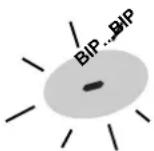
Overflow protection
The shutdown of the hob, a special display (symbol shown opposite) and an audible "beep"* can all be triggered in one of the three following cases:
- An overflow which covers the control buttons.
- A damp cloth being placed on the buttons.
- A metal object being placed on the control buttons.
Clean or remove the object and start cooking once again.
- depending on the model

Residual heat indicator
After intensive use, the cooking zone may remain hot for several minutes.
The letter "H" is displayed during this period. Do not touch the zones concerned.

Auto-stop system
The "Automatic-Stop" function activates automatically if the user forgets to turn off the cooker after cooking.
It starts up automatically if ever you forget to turn off after cooking
The letter AS is displayed for the heating zone concerned and the hob will bleep for about 2 minutes. The AS will continue to be displayed until any control of the zone in question is touched. The hob will then bleep twice to confirm your action.
| Power used goes out automatically after: | |
| Between 1....98 hours Between 10....142 hours Between 15....Boost 1 hour |
Keypad lock
Your cook top is equipped with a child safety feature which locks it during the use:
- Either when stopped (for cleaning)
- Or during cooking (any operations underway will continue and the displayed settings remain active).
this case, for safety reasons only the "STOP" button is still usable.
Don't forget to unlock the appliance before reusing it.
Locking the appliance
- Use the special locking buttons
(- + ) shown above a lock (or key) symbol.
- Press simultaneously on these buttons (- + ) until or displayed
The display goes out after a few seconds.
Pressing any of the buttons activates the display.
Unlocking the appliance
Press simultaneously on the locking buttons (- + ) until the display goes out.
Automatic saucepan detection
Your induction hob is able to recognise most recipients.
- Test recipient: place your recipient on one of the rings on power setting 4.
If the display remains unchanged, your recipient is compatible.
If it flashes on and off, your recipient cannot be used with induction. - You can also check using a magnet.
If it "sticks" to the base of the recipient, then this recipient is compatible with induction.
Removing the recipient from the hob immediately turns off the power to your hob. To completely turn off the ring you should press on the "Stop" button.
"Small item" safety feature
A small object such as a fork, spoon or a ring placed on your induction hob by itself is not detected as a pan. The display flashes and there is no output power.
Using your hob in complete safety
The principles of induction
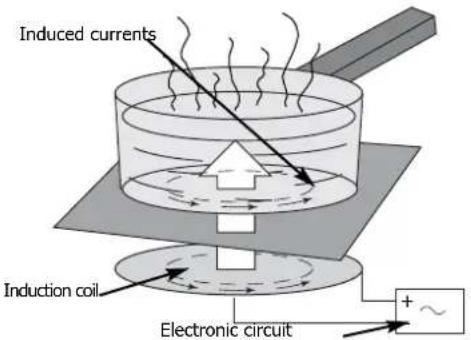
When your induction hob is switched on and a heating power has been selected, the electronic circuits produce induced currents that instantaneously heat the bottom of the pan that transfers this heat to the food.
Thus cooking takes place with practically no energy loss between the induction hob and the food.
For the attention of wearers of pacemakers or other active implants:
The hob complies with all current standards on electromagnetic interference.
Your induction hob is therefore perfectly in keeping with legal requirements (89/336/CEE directives). It is designed not to create interference on any other electrical apparatus being used on condition that the apparatus in question also complies with this legislation.
Your induction hob generates short-range magnetic fields.
To avoid any interference between your induction hob and a pacemaker, the latter must be designed to comply with relevant regulations.
In this respect, we can only guarantee our own product conformity. Please consult the pacemaker manufacturer or your doctor concerning its conformity or any possible incompatibility.

If a crack appears in the glass surface, disconnect the appliance immediately to avoid any risk of electric shock.
For disconnecting, remove the fuses or use the cutout switch
Do not re-use your hob until the glass surface has been changed.
Your hob must never be used as a storage space or cutting surface for any products whatsoever.
Never allow power cables for other electrical appliances to trail across the hob.
When cooking never use aluminium foil and never place products wrapped in aluminium foil or products deep-frozen in aluminium packs on the hob. The aluminium will melt and damage your appliance irreparably. Do not leave empty pans on your hob in case of residual heat or if the hob is turned on by mistake.
If your hob is placed above your oven (see "Choice of Installation") thermal protectors prevent it being used when the oven is being pyro-cleaned.
A steam cleaner must not be used.
Installing your hob in complete safety
Above a cupboard or drawer unit
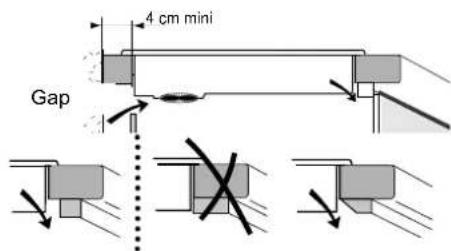
Ensure that the unit crossbar does not block the air passage, make a bevel if necessary.
Above an oven
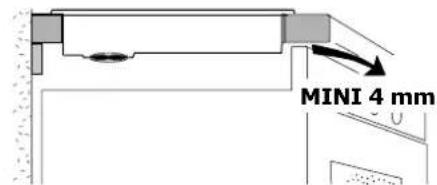
If the appliance underneath your hob produces excess heat:
this will be detected by a safety device incorporated into your induction hob. A high temperature will be indicated by a series of dashes or F7 will appear in the display.
If this happens we suggest you either create an opening in the side of the unit and/or install an insulation kit available from the After-Sales Dept (ref 75X1652), which will protect your hob from the heat generated beneath it.
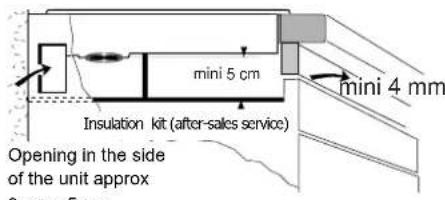
Providing the advice on ventilation given above is followed, your hob can be installed above any piece of kitchen equipment.
Always ensure that the air vents beneath the hob are kept clear.
Your induction hob must always be adequately ventilated.
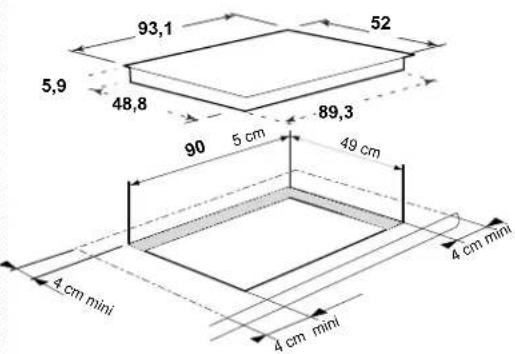
dimensions in cm
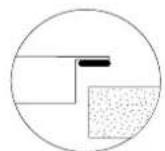
A seal exists for preventing any humidity getting under the hob.
- Stick the seal under the rim of the hob and lower the hob into position on the worktop.
-This seal is supplied in the sachet; stick it in place beneath the hob.
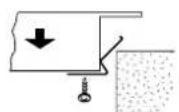
fix the clips on to the hob
Electrical connections
Installing your hob in complete safety
- Your hob's electrical characteristics
Operating voltage. 220-240 V~50 Hz
Total energy consumption. 10800 W
Hobs must be connected to the mains by:
-
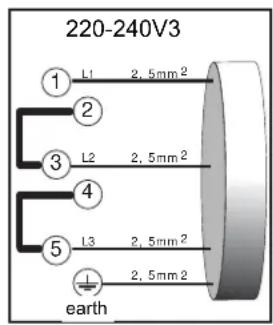
A Type H05RRF power cable with three 2.5mm^2 or five 1.5mm^2 conductors (including a green/yellow earth wire).
-
A plug that complies with the CEI 60083 announcement or an all-pole cutout unit with contacts that open by at least 3mm .
This appliance meets European Directives 73/23/CEE and 89/336/CEE.
The unit must be installed so that the mains plug is easily accessible.
32A

16A
- When the power is switched on, or after a long power failure, a light code appears on the control panel. This disappears automatically after about 30 seconds or as soon as any touch control is touched on the
panel. This is normal, as the display is for use by the after-sales service when required. The user must not take this into account under any circumstances.If the unit has a 3 phase 400 V2N connection, and is not working correctly, check that the neutral wire is correctly connected.
This precaution should also be taken for all your other electronic apparatus.
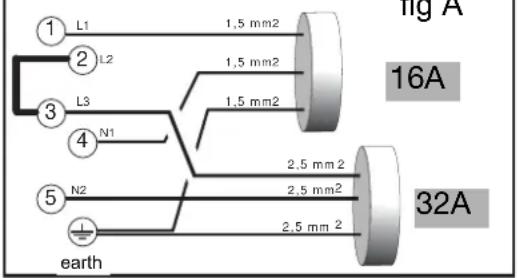
220-240V-2 cables
Containers
You probably already have some suitable pans.
Your induction hob is able to recognize most types of pans.
Pan test: Place your pan on a zone, for example at position 4; you know that your pan is compatible if the display does not flash, but if it does flash then you cannot use this pan for induction cooking. You can also test it with a magnet: if the magnet "sticks" to the base of the pan, then you can use it for induction cooking.
Pans compatible with induction are:
- pans made of enamel coated steel with or without a non-stick coating.
- cast iron pans with or without enamel coated base.
An enamelled coated base will prevent the glass top of your hob from getting scratched.
- stainless steel pans designed for induction cooking.
Most stainless steel pans (saucepans, stewpans, frying pans, deep frying pans, etc.) are suitable for induction cooking if they pass the pan test.
- aluminium pans with special base. pans which do not have a flat base may be suitable, however they must not be deformed too badly.
Choose a pan marked with the logo on its base or packaging to be sure that it is perfectly suitable for use on your induction hob under normal conditions of use. A list of utensils is supplied with these instructions to help you make your choice.
Note
Glass, ceramic, earthenware pans, aluminium pans (without a special base) and copper pans, and some non-magnetic stainless steel pans are incompatible with induction cooking. You will be informed by the flashing display.
You should choose pans with a thick flat base for uniform cooking (heat is better distributed).
Using the cooking zones according to the pan (depending on the model)
Large cooking zone
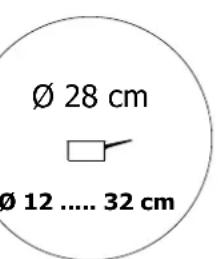
This 28 cm cooking zone:
- Automatically adapts to the pan.
- Delivers optimal power.
- Provides excellent heat distribution.
- Supplies an even cooking temperature and consequently you can prepare big pancakes, large fish etc... or large quantities or small amounts, they will all be cooked in the same way.
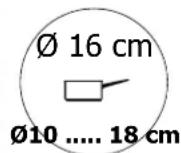
Multi-service zone
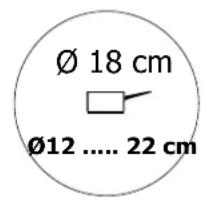
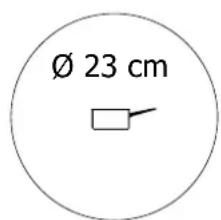
For small pans
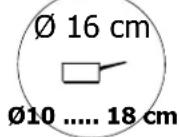
Slow cooking (saues,creams...).
Preparing small quantities or indvidual portions...
Using your hob in all simplicity
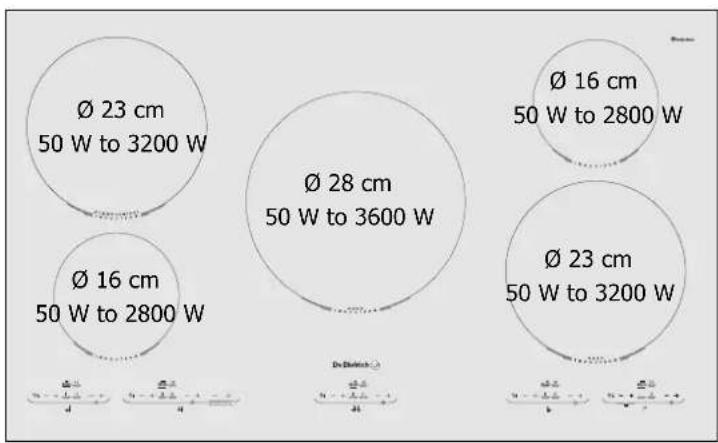
DTI 309
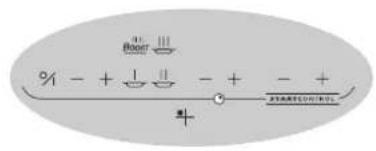
Using your hob in all simplicity
Adjusting the time
When you switch on
The clock blinks. Set the time using the + and - controls.
20.10
Resetting the clock
Press on both the + and controls for 3-4 seconds and then use the + and - controls to adjust.
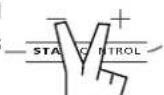
You have 5 seconds before a default time appears automatically.
3,4s
Start/Stop
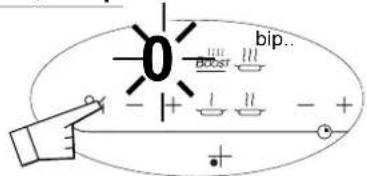
A beep and a flashing 0 show that the zone concerned has been turned on.
You can then choose the desired power.
If you do not set the power, the cooking zone will turn itself off automatically.
Setting power
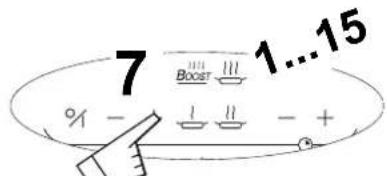

Low heat 7 = SIMMER

Moderate heat 11 = COOK

High heat 15 = BRING TO BOIL

Maximum power bo BOIL VIGOROUSLY
If you use one of the rings at maximum power on the induction side of the hob, the other ring will automatically have its output limited and the power displays will reflect this.
Setting the timer
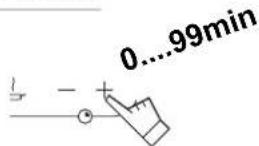
manual stopping

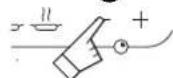
automatic stopping
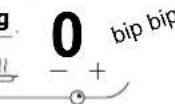

To stop the beep touch any control key in the cooking zone concerned. It will stop by default after about 1 minute.
Operates when cooking zones concerned are working. You can modify cooking times and any time
Using your hob in all simplicity
Altering the programmes
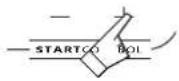
Your hob has a STARTCONTROL ring that enables you to reheat or simmer food with a delayed end of cooking time.
To do this,
- Set the end time (within 24 hours)
- Set the cooking time (for up to 99 minutes),
- Set the cooking heat (6 is the highest option for simmering or maintaining the temperature)
NOTE : This option can be used with or without other programming
1- Switch on the STARTCONTROL ring
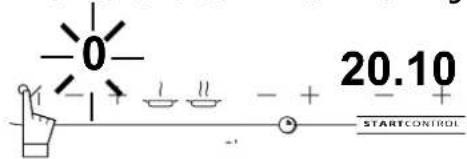
2- Set the end of reheating time.
e.g. If you want it cooked through for 8.45pm
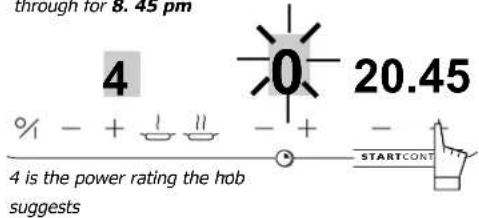
3 - Set how long to cook for
You want it to cook for 20 minutes
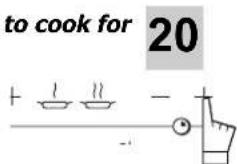
4 - Adjust the temperature
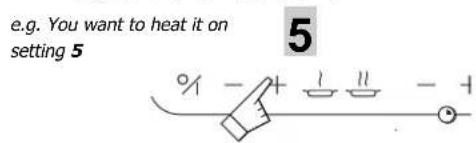
The settings are entered automatically after 3 seconds.
A d is displayed = programme is set
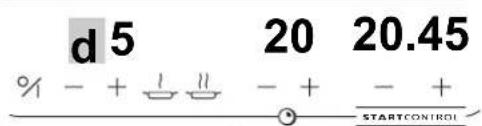
In the interests of economy, after a few moments a dot replaces the chosen settings.
If you want to see them again, just press any control. When cooking starts the display lights up again (except the programming letter d)
5- Changing/cancelling the programming
Press any control to display the settings then alter the one(s) you want to change To cancel altogether, press the start/stop control.
| Dish | Container | Lid | Temperature | Reheat time |
| I packet pasta meal | Saucepan | NO | 4 | 12 mins |
| Cassoulet (800gr) | Cast-iron dish | YES | 4 | 30 mins |
| Ratatouille (500gr) | Saucepan | 4 | 15 mins | |
| Cooked rice and pasta | Saucepan | YES | 4 | 8 - 9 mins |
| Soup (2 servings) | Saucepan | 5 | 10 mins | |
| Cooked vegetables | Frying pan | YES | 4 | 10 - 12 mins |
| Cocoa (I large mug) | Saucepan | NO | 4 | 10 mins |
Preserving and maintaining your hob
- Avoid banging pots and pans down on the hob:
The glass surface is very tough but not unbreakable
- Avoid rubbing with any abrasive or with base of pans etc. as in time this will deteriorate the markings on the top of your ceramic hob.
Rest your pans on the surround or rim (depending on model)
- Avoid using pans with rough or dented bases:
They may hold and transport matter liable to stain or scratch the hob.
- Place your pan in the middle of the heating zone.
- Do not leave an empty pan on a heating zone.
Any such faults, which are not the cause of breakdowns nor make the hob impossible to use, are not included in the guarantee conditions.
- Do not leave metal cooking utensils, knives and forks, or metal objects on the hob. They will get hot if left close to any heating zone that is in use.
- Do not store MAINTENANCE or INFLAMMABLE products in the cupboard under your hob.
- Do not heat up a closed can. It may burst; this recommendation applies to all methods of cooking.
- Do not heat up a closed can. It may burst; this recommendation applies to all methods of cooking. Preheat at maximum temperature when using pans with non-stick inside surfaces (Teflon type). Use very little or no fat at all.
The maximum heating position is for boiling and frying only.
It is very easy to clean your hob, especially if you follow these few recommendations:
| TYPE OF STAIN | WHAT TO DO | ACCESSORIES EMPLOYED |
| Minor | Soak the area to be cleaned with hot water, then wipe it. | Clean sponges |
| Accumulated burnt-on stains | Soak the area to be cleaned with hot water, use a special ceramic hob scraper to remove the worst, finish off with the rough side of a cleaning sponge, then wipe it clean. | Clean sponges special ceramic hob scraper |
| Rings and traces of limescale | Apply hot white spirit vinegar on the stain, leave to act then wipe off with a soft cloth. - Use a commercial cleaner. | Special ceramic hob cleaner. |
| Burnt-on stains following sugar spillage, melted aluminium or plastic. | - Apply a special ceramic hob cleaner on the surface, preferably one which contains silicone (protective action). | Special ceramic hob cleaner |
Minor troubleshooting
You have doubts about whether your hob is working correctly .... ... this does not necessarily mean there is a breakdown. Nevertheless, check the following points
IF YOU REALIZE THAT
When you switch on, the display lights up
When you switch on, the fuse blows
When you switch on, only one side of the hob works
The fan keeps going for a few minutes after the hob has been switched off
The hob does not work. Displays on the keyboard do not come on
The hob has stopped during use and is giving out a bleep every ten seconds and a (F7) appears on the display.
A series of little (eF7) appears
The hob does not work, another message comes on
After having turned on a heating zone, the keyboard displays continue to flash.
The pans make a noise during cooking
The hob gives off a smell when first used for cooking
The hob makes a slight clicking noise.
POSSIBLE CAUSES
The hob is working normally.
Your hob is connected incorrectly.
Your hob is connected incorrectly.
The electronics are cooling down
The apparatus is not under power. There is a power or connection problem.
- Something has overflowed and or an object is touching the control panel.
Electronic circuits have overheated.
The electronic circuit is working badly.
The saucepan you use is unsuitable for induction cooking or its diameter is under 12cm (10 cm on the 160 mm zone).
This comes from vibrations made by energy going from the hob to the pan.
A new apparatus
This is caused by power redistribution
WHAT SHOULD YOU DO?
NOTHING: see chapter Remarks on connections
Check the connection and make sure it complies with requirements.
This is normal.
Inspect the fuses and the cut-out switch.
Clean the hob or remove the object in question and start cooking again.
See "Fitting your hob".
Call the After Sales Service
See containers.
Under high power this phenomenon is normal with certain types of pans. There is no danger for the hob.
Use each heating zone for 12 hour with a pan full of water.
NOTHING, it is quite normal
If the slightest break or crack appears in the ceramic glass surface, disconnect the unit immediately and contact your After Sales Service.
| DISHES | FRYING BRANDING TO THE BOIL | COOKING/BROWNING BRANDING BACK TO THE BOI STEADY SIMMERING | COOKING SIMMERING | KEEPING WARM | |
| HEATING POWER | 15-13 | 10765 | 432 | 19812-11 | |
| SOUPS | BOOST TOUCH* | ||||
| THICK SOUP | |||||
| FISH | STOCK | ||||
| FROZEN | |||||
| SAUCES | THICK, MADE WITH FLOUR MADE WITH BUTTER AND EGGS (BEARNAISE, HOLLANDAISE) | ||||
| VEGETABLES | CHICORY, SPINACH | ||||
| PULSES | |||||
| BOILED POTATOES | |||||
| FRIED POTATOES | |||||
| SAUTE POTATOES | |||||
| DEFROSTING VEGETABLES | |||||
| MEAT | THINLY SLICED MEAT | ||||
| FRYING STEAKS | |||||
| GRILLING (CAST IRON GRILL PAN) | |||||
| DEEP FRYING | FROZEN CHIPS | ||||
| FRESH CHIPS | |||||
| MISCELLANEOUS | PRESSURE COOKER (ONCE IT HISSES) | ||||
| STEWED FRUIT | |||||
| PANCAKES | |||||
| CUSTARD | |||||
| MELTING CHOCOLATE | |||||
| JAM | |||||
| MILK | |||||
| FRIED EGGS | |||||
| PASTA | |||||
| BABY FOOD IN JARS (BAIN MARIE) | |||||
| STews | |||||
| CREOLE RICE | |||||
| RICE PUDDING | |||||
Pe queños recipientes