VSX1023K - AV receiver PIONEER - Free user manual and instructions
Find the device manual for free VSX1023K PIONEER in PDF.


| Product type | 7.2-channel audio-video receiver |
| Brand | Pioneer |
| Model | VSX-1023K |
| Output Power | 110 W per channel at 8 Ω (20 Hz - 20 kHz, 0.09% THD) |
| Supported Audio Formats | Dolby TrueHD, DTS-HD Master Audio, Dolby Digital Plus, DTS-HD High Resolution, etc. |
| Automatic Calibration | MCACC (Multi-Channel Acoustic Calibration) with supplied microphone |
| HDMI Inputs | 6 (including 1 on front) |
| HDMI Outputs | 1 (ARC compatible) |
| Network Connectivity | Ethernet (LAN) for internet radio and online services |
| USB Input | 1 (front) for iPod/iPhone and USB drives |
| Bluetooth | Via optional adapter (AS-BT100) |
| Radio | FM/AM with 63 presets |
| Dimensions (W x H x D) | 435 x 168 x 363 mm |
| Weight | 11.2 kg |
| Power Consumption | 550 W (standby: 0.1 W) |
| Power Supply | 220-230 V AC, 50/60 Hz |
| Speaker Compatibility | Nominal impedance 6 Ω to 16 Ω |
| Main Features | Multichannel playback, internet radio, iPod/USB, MCACC calibration, ARC compatibility, advanced surround modes |
| Maintenance and Cleaning | Dry, soft cloth; do not use solvents. Ensure ventilation: 40 cm above, 20 cm at rear and sides. |
| Safety | Unplug before any wiring. Do not block ventilation openings. Avoid heat sources and humidity. |
| Spare Parts and Repairability | Contact an authorized Pioneer service center (http://www.pioneerelectronics.com) |
| Included Accessories | Remote control, setup microphone, AAA batteries x2, power cord, quick start guide, CD-ROM (instruction manual), warranty card |
Frequently Asked Questions - VSX1023K PIONEER
User questions about VSX1023K PIONEER
0 question about this device. Answer the ones you know or ask your own.
Ask a new question about this device
Download the instructions for your AV receiver in PDF format for free! Find your manual VSX1023K - PIONEER and take your electronic device back in hand. On this page are published all the documents necessary for the use of your device. VSX1023K by PIONEER.
USER MANUAL VSX1023K PIONEER
CD-ROM (Operating instructions)
SPEAKER CAUTION Sheet (English only)
these quick start guide
Register your product at
http://www.pioneerelectronics.com (US)
http://www.pioneerelectronics.ca (Canada)
- Protect your new investment
The details of your purchase will be on file for reference in the event of an insurance claim such as loss or theft.
Receive free tips, updates and service bulletins on your new product - Improve product development
Your input helps us continue to design products that meet your needs.
Receive a free Pioneer newsletter
Registered customers can opt in to receive a monthly newsletter.
http://www.pioneerelectronics.ca (Canada)
Connecting the speakers
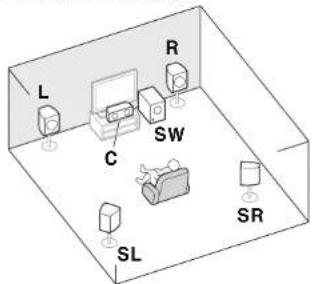
The receiver will work with just two stereo speakers (the front speakers in the diagram) but using at least three speakers is recommended; and a complete setup is best for surround sound. To achieve the best possible surround sound, install your speakers as shown below.
5.1 channel surorund system:
Connecting the speaker cables
Make sure you connect the speaker on the right to the right (R) terminal and the speaker on Inc left to the left (L) terminal. Also make sure the positive and negative (+/-) terminals on the receiver match those on the speakers.
CAUTION
Before marking or changing connections, switch off the power and disconnect the power cord from the AC outlet.
These speaker terminals carry
HAZARDOUS LIVE voltage. To prevent the risk of electric shock when connecting or disconnecting the speaker cables, disconnect the power cord before touching any uninsulated parts.
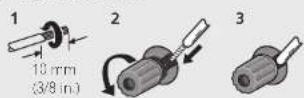
Twist exposed wire strands together.
2 Loosen terminal and insert exposed wire.
3 Tighten terminal.
Connect the wires to the B-Speaker terminals of VSX-1023 and the center and surround speaker terminals of VSA-523 as shown below:
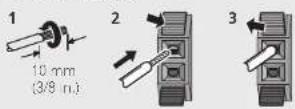
Twist exposed wire strands together.
2 Push open the tabs and insert exposed wire.
3 Release the tabs.
After installing the speakers, connect them as shown below.
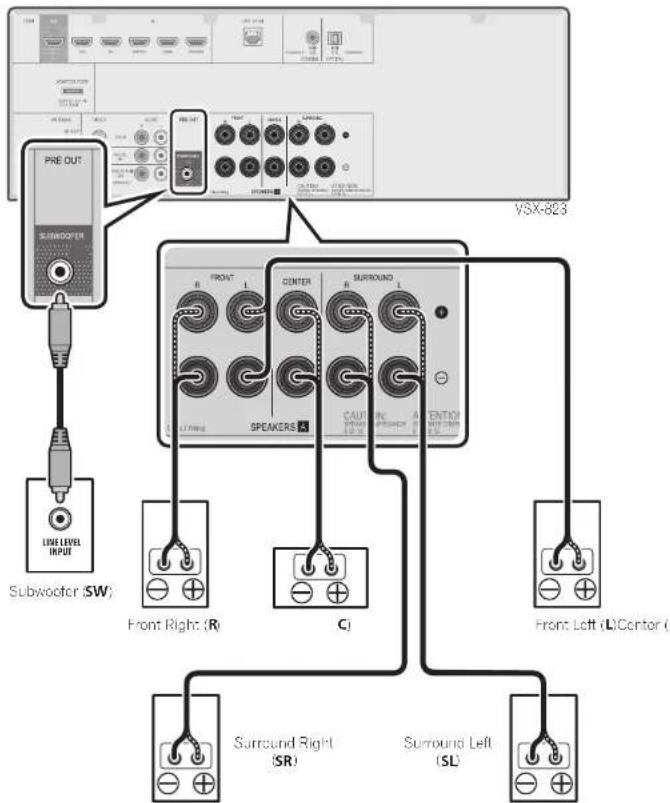
The type of conl and surround speaker terminals for VSX-523 is different from this diagram. You can use speakers with a nominal impedance between 6Ω and 16Ω.
Connecting a TV and playback components
HDM/DVI-compatible TV
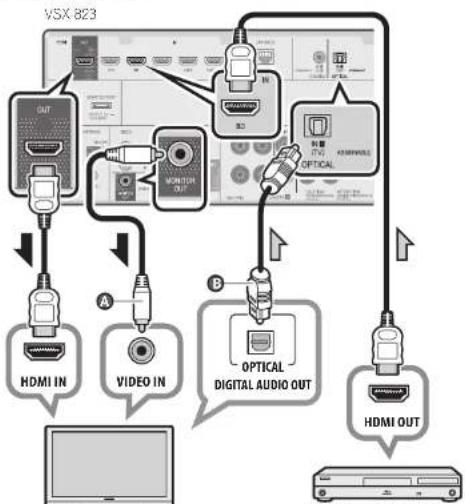
HDMI/DVI-compatible BLuR-Dis card player,etc.
- VSK-823 only: Composite video capo connection is necessary in order to see the OSD of the unit on the TV.
- VSK-1023/VSK-823 only: The OSD will only be pulled from the HDMI OUT terminal.
- If the TV does not support the HDMI Audio Return Channel function, optical digital cable (O) connection is required to listen to the TV sound over the receiver.
If the TV supports the HDMI Audio Return Channel function, the sound of the TV is input to the receiver via the HDMI terminal, so there is no need to connect an optical digital cable. In this case, set ARC at HDMI Setup to
ON "The HDMI Setup menu" on page 32 (VSX-523), "HDMI Setup" on page 52 (VSX-1023/VSX-823) - Please refer to the TV's operation manual for directions on connections and setup for the TV.
Connecting antennas
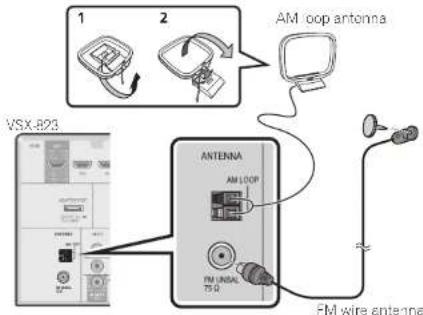
Connecting to the network through LAN interface
VSX-1023/VSX-823 ony
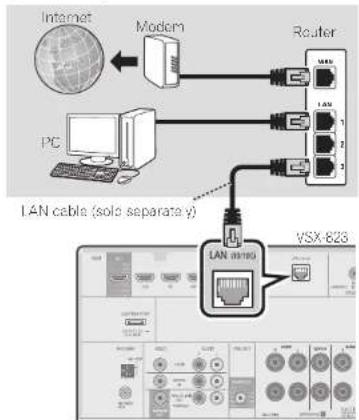

Note
Refer to the operating instructions in the included CD-ROM if you wish to connect a TV or playback component in a method other than an HDMI connection.
Refer to the operating instructions in the included CD ROM for other device connections.

CAUTION
- Handle the power cord by the plug part. Do not pull out the plug by tugging the cord, and never touch the power cord when your hands are wet, as this could cause a short circuit or electric shock. Do not place Inc unit, a piece of furniture, or other object on the power cord or pinch the cord in any other way. Never make a knot in the cord or tie it with other cables. The power cords should be routed so that they are not likely to be stepped on. A damaged power cord can cause a fire or give you an electric shock. Check the power cord once in a while, if you find it damaged, ask your nearest Pioneer authorized independent service company for a replacement.
VENTILATION CAUTION
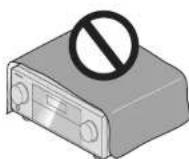
When installing this unit, make sure to leave space around the unit for ventilation to improve heat radiation (at least 40 cm at top, 20 cm at rear, and 20 cm at each side).
WARNING
Slots and openings in the cabinet are provided for ventilation to ensure reliable operation of the product, and to protect it from overhealing. To prevent fire, hazard, the openings should never be blocked or covered with items (such as newspapers, tablecloths, curtains) or by operating the equipment on thick carpet or a bed.
03-4-2-1-7bA1Ln
STEP2 Initial Setup
Before you start
1 Put the batteries in the remote control.
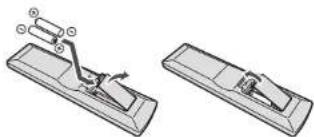
The batteries included with the unit are to check initial operations; they may not last over a long period. We recommend using alkaline batteries that have a longer life.
2 Switch on the receiver and your TV.
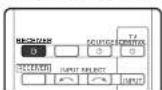
3 Switch the TV input so that it connects to the receiver.
4 Turn the subwoofer on and turn up the volume.
CAUTION
Do not use or store batteries in direct sunlight or other excessive hot place, such as inside a car or near a heater. This can cause batteries to icak overheat, explode or catch fire. It can also reduce the life or performance of batteries.
- When inserting the batteries, make sure not to damage the springs on the battery's (-) terminals. This can cause batteries to leak or overheat.
When disposing of used batteries, please comply with governmental regulations or environmental public instiution's rules that apply in your country/area.
Automatically setting up for surround sound (MCACC)
The Auto Multi-Channel Acoustic Calibration (MCACC) setup uses the supplied setup microphone to measure and analyze the test tone that is outputled by the speakers. This setup enables automatic high precision measuring and sellings; utilizing it will create an optimum user listening environment.
Important
Measure in a quiet environment.
If you have a tripod, use it to place the microphone so
that it's about ear level at your normal listening position. Otherwise, place the microphone at ear level using a table or a chair.
- Accurate measurements may not be possible if there are obstacles between the speakers and the listening position (microphone).
- When measuring, step away from the listening position, and operate using the remote control from the external side of all the speakers.
1 Connect the supplied setup microphone.
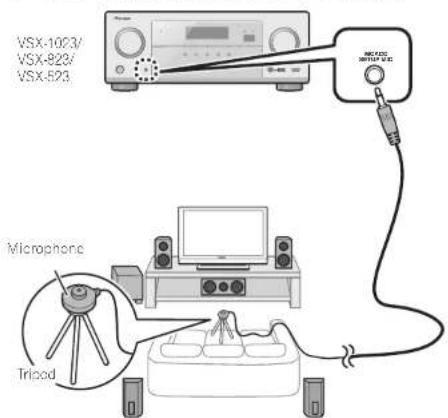
2 Press RECEIVER on the remote control, then press the HOME MENU button. The Home Menu appears on your TV.
3 Select 'Auto MCACC' from the Home Menu, then press ENTER.
Automatic measuring will start
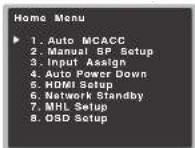
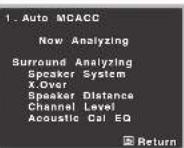
VSX-823
- Measuring will take about 3 to 12 minutes.
4 Follow the instructions on-screen. - Aulornatic selling is complete when the Home Menu screen appears.
5 Make sure the setup microphone is disconnected.
STEP3 Basic playback
Multichannel playback
VSX523VSX1023/VSX623
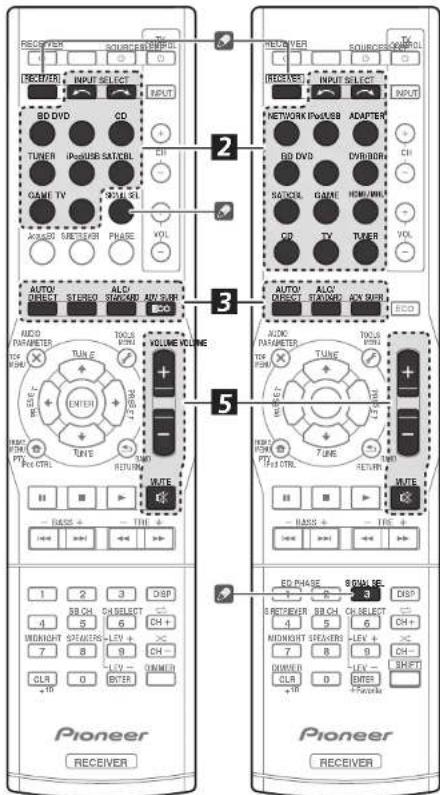
1 Switch on the playback component.
E.g. Turn the Blur ray Disc player connected to the HDMI BD IN terminal on.
2 Switch the input of the receiver.
E.g. Press BD to select the BD input.
3 Press AUTO/DIRECT to select 'AUTO SURROUND'.
Also press ALC/STANDARD or ADV SURR for multichannel playback. Select your preferred listening mode.
4 Start the playback component's playback.
Lg. Start playback of the Bluray Disc player.
5 Use VOLUME + / - to adjust the volume level.
Sound can be switched off by pressing MUTE button.
Note
In order to listen to the audio from the source component that is connected to this receiver using a coaxial or an optical cable, choose the C1 (coaxial) or O1 (optical) input. (VSX-523: Press SIGNAL SEL; VSX-1023/VSX-823: Press RECEIVER then press SIGNAL SEL.)
The input of the receiver will switch over, and you will be able to operate other components using the remote control. To operate the receiver, first press RECEIVER on the remote control, then press the appropriate button to operate.
Listening to the radio
1 Press TUNER to select the tuner.
If necessary, press BAND to change the band (FM or AM).
2 Press TUNE / to tune to a station.
-
Press and holdTUNE for about a second. The receiver will start searching for the next station.
-
If you're listening to an FM station but the reception is weak, press BAND to select FM MONO and set the receiver to the mono reception mode.
Saving station presets
If you often listen to a particular radio station, it's convenient to have the receiver store the frequency for easy recall whenever you want to listen to that station.
1 Press TOOLS while receiving a signal from the station you want to store.
The presel number is blinking.
2 Press PRESET / to select the station preset you want, then press ENTER.
The preset number stop blinking and the receiver stores the station.
Listening to station presets
You will need to have some preset stores to do this.
Press PRESET to select the station preset you want.
Playing an iPod
- About one minute is required between turning the power on and completion of startup.
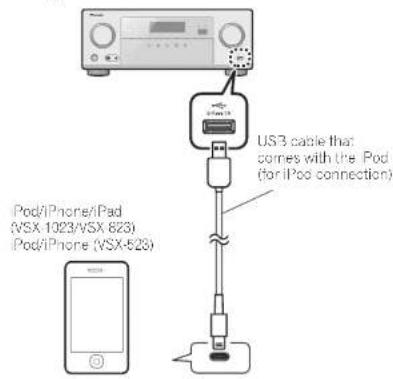
1 Connect your iPod.
2 Press iPod/USB to select the iPod/USB input.
When the display shows the names of folders and files, you're ready to play music from the iPod.
3 Use / to select a category, then press ENTER to browse that category.
To return to the previous level any time, press RETURN
4 Use / to browse the selected category (e.g., albums).
- Use to move to previous/next levels
5 Continue browsing until you arrive at what you want to play, then press to start playback.
Listening to Internet radio stations
VSX-1023/VSX-823 only
- About one minute is required between turning the power on and completion of startup.
Important
- When using a broadband Internet connection, a contract with an Internet service provider is required. For more details, contact your nearest Internet service provider.
To listen to Internet radio stations, you must have high-speed broadband Internet access. With a 56 K or ISDN modem, you may not enjoy the full benefits of Internet radio. - Access to content provided by third parties requires a high speed internet connection and may also require account registration and a paid subscription. Third party content services may be changed, suspended, interrupted, or discontinued at any time without notice, and Pioneer disclaims any liability in connection with such occurrences. Pioneer does not represent or warrant that content services will continue to be provided or available for a particular period of time, and any such warranty, express or implied, is disclaimed.
1 Press NETWORK repeatedly to select the NETRADIO input.
It may take several seconds for this receiver to access the network.
2 Use / to select the Internet radio station to play back, and then press ENTER.
To enjoy the many functions of the unit to the fullest extent
Load the CD-ROM into your computer and download the PDF manual from the menu screen to read.
Functions
Playing a USB device
page 24 (VX-523), page 28 (VX-1023/VX-823)
Bluetooth ADAPTER for Wireless Enjoyment of Music
page 31 (VX-1023/VX-823 only)
Playback with NETWORK features
page 39 (VSX-1023/VSX-823 only)
Setting the Audio options
page 28 (VX-523), page 37 (VX-1023/VX-823)
Using the Home Menu
page 30 (VX-523), page 49 (VX-1023/VSX-823)
Troubleshooting
page 34 (VSK-523), page 62 (VSK-1023/VSK-823)
English
STEP1 Raccordements
To register your product, find the nearest authorized service location, to purchase replacement parts, operating instructions, or accessories, please go to one of following URLs:
In Canada/Aux Canada http://www.pioneerelectronics.ca
S018B1EnFt
© 2012 PIONEER CORPORATION.
All rights reserved.
© 2012 PIONEER CORPORATION.
PIONEER ELECTRONICS (USA) INC.
P.O. BOX 1540, Long Beach, California 90801-1540, U.S.A. TEL: (800) 421-1404
PIONEER ELECTRONICS OF CANADA, INC.
340 Ferrier Street, Unit 2, Markham, Ontario L3R 2Z5, Canada TEL: 1-877-283-5901, 905-479-4411
PIONEER EUROPE NV
Haven 1067, Keetberglaan 1, B-9120 Melsele, Belgium TEL: 03/570.05.11
PIONEER ELECTRONICS ASIACENTRE PTE. LTD.
253 Alexandra Road, 04-01, Singapore 159936 TEL: 65-6472-7555
PIONEER ELECTRONICS AUSTRALIA PTY. LTD
5 Arco Lane, Heatherton, Victoria, 3202, Australia, TEL: (03) 9586-6300
PIONEER ELECTRONICS DE MEXICO S.A. DE C.V.
Blvd.Manuel Avila Camacho 138 10 piso Col.Lomas de Chapultepec, Mexico, D.F. 11000 TEL: 55-9178-4270
K002_03_En

- http://www.pioneerelectronics.com (US)
- http://www.pioneerelectronics.ca (Canada)
- Connecting the speakers
- Connecting the speaker cables
- CAUTION
- Connecting a TV and playback components
- Connecting antennas
- Connecting to the network through LAN interface
- Note
- VENTILATION CAUTION
- WARNING
- STEP2 Initial Setup
- Before you start
- Automatically setting up for surround sound (MCACC)
- STEP3 Basic playback
- Multichannel playback
- Listening to the radio
- Saving station presets
- Listening to station presets
- Playing an iPod
- Listening to Internet radio stations
- Important
- Press NETWORK repeatedly to select the NETRADIO input.
- To enjoy the many functions of the unit to the fullest extent
- Functions
- Playing a USB device
- Troubleshooting
- STEP1 Raccordements
- In Canada/Aux Canada http://www.pioneerelectronics.ca
- PIONEER ELECTRONICS DE MEXICO S.A. DE C.V.
Brand : PIONEER
Model : VSX1023K
Category : AV receiver