DEH2460R - Car stereo PIONEER - Free user manual and instructions
Find the device manual for free DEH2460R PIONEER in PDF.


| Product type | Car stereo |
| Brand and model | Pioneer DEH-2460R |
| Dimensions (mounting) | 178 × 50 × 157 mm |
| Dimensions (front panel) | 188 × 58 × 19 mm |
| Weight | 1.5 kg |
| Power supply | 14.4 V DC (10.8 to 15.1 V possible) |
| Maximum current consumption | 10.0 A |
| Maximum power output | 45 W × 4 |
| Continuous power output | 22 W × 4 (DIN 45324, +B=14.4 V) |
| Load impedance | 4 Ω (4 to 8 Ω possible) |
| Equalizer | 3 bands (bass, mid, treble), adjustment ±12 dB |
| Loudness compensation | 3 levels (LOW, MID, HI) with bass and treble boost |
| F.I.E. function | Front sound image enhancement, selectable frequencies (100, 160, 250 Hz) |
| FM frequency range | 87.5 – 108.0 MHz (50 kHz or 100 kHz step) |
| MW range | 531 – 1,602 kHz (9 kHz step) |
| LW range | 153 – 281 kHz |
| RDS | Station name display, PTY, AF, TA, PTY alarm |
| TA function | Automatic reception of traffic information announcements |
| Station memory | 12 FM (6 per band) + 6 MW/LW, preset tuning keys 1-6, BSM |
| Anti-theft | Removable front panel with supplied protective case |
| Built-in CD player | CD-R/CD-RW compatible, plays 12 cm and 8 cm CDs |
| Frequency response (CD) | 5 – 20,000 Hz (±1 dB) |
| Signal-to-noise ratio (CD) | 94 dB (1 kHz) (IEC-A network) |
| Preamp output | 2.2 V/1 kΩ |
Frequently Asked Questions - DEH2460R PIONEER
User questions about DEH2460R PIONEER
0 question about this device. Answer the ones you know or ask your own.
Ask a new question about this device
Download the instructions for your Car stereo in PDF format for free! Find your manual DEH2460R - PIONEER and take your electronic device back in hand. On this page are published all the documents necessary for the use of your device. DEH2460R by PIONEER.
USER MANUAL DEH2460R PIONEER
Thank you for buying this Pioneer product.
Please read through these operating instructions so you will know how to operate your model properly. After you have finished reading the instructions, put them away in a safe place for future reference.
Before You Start
About this unit 2
About this manual 2
Precautions 2
In case of trouble 2
What's what 3
Optional remote control (DEH-3400R) 4
Protecting your unit from theft 4
- Removing the front panel 4
- Attaching the front panel 5
Power ON/OFF
Turning the unit on 5
Selecting a source 5
Turning the unit off 5
Tuner
Listening to the radio 6
Storing and recalling broadcast frequencies 7
Tuning in strong signals 7
Storing the strongest broadcast frequencies 7
RDS
Introduction of RDS operation 8
Switching the RDS display 8
Receiving PTY alarm broadcasts 8
Selecting alternative frequencies 9
• Using PI Seek 9
• Using Auto PI Seek for preset stations 9
- Limiting stations to regional programming 9
Receiving traffic announcements 10
- Responding to the TP alarm 10
PTY list 11
Built-in CD Player
Playing a CD 12
Repeating play 13
Pausing CD playback 13
Audio Adjustments
Introduction of audio adjustments 14
Using balance adjustment 14
Using the equalizer 15
• Recalling equalizer curves 15
- Adjusting equalizer curves 15
Adjusting loudness 15
Front image enhancer (FIE) 16
Adjusting source levels 16
Initial Settings
Adjusting initial settings 17
Setting the FM tuning step 17
Switching Auto PI Seek 17
Additional Information
Cellular telephone muting 18
CD player and care 18
CD-R/CD-RW discs 19
Understanding built-in CD player error messages 19
Specifications 20
Before You Start
About this unit
This product complies with the EMC Directives (89/336/EEC, 92/31/EEC) and CE Marking Directive (93/68/EEC).
The tuner frequencies on this unit are allocated for use in Western Europe, Asia, the Middle East, Africa and Oceania. Use in other areas may result in improper reception. The RDS function operates only in areas with FM stations broadcasting RDS signals.
About this manual
This unit features a number of sophisticated functions ensuring superior reception and operation. All the functions have been designed for the easiest possible use, but many are not self-explanatory. This operation manual will help you benefit fully from this product's potential and to maximize your listening enjoyment.
We recommend that you familiarize yourself with the functions and their operation by reading through the manual before you begin using this unit. It is especially important that you read and observe precautions on this page and in other sections.
Precautions
- A CLASS 1 LASER PRODUCT label is affixed to the bottom of this unit.

- The Pioneer CarStereo-Pass is for use only in Germany.
- Keep this manual handy as a reference for operating procedures and precautions.
• Always keep the volume low enough so you can hear sounds outside of the car. - Protect this product from moisture.
- If the battery is disconnected or discharged, the preset memory will be erased and must be reprogrammed.
In case of trouble
Should this product fail to operate properly, contact your dealer or nearest authorized Pioneer Service Station.
text_image
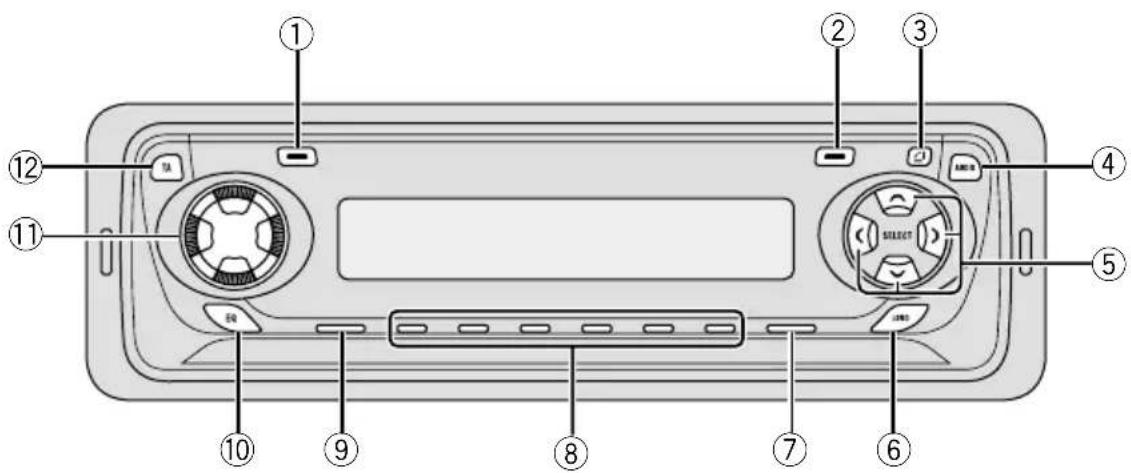
Diagram of a device rear panel with numbered labels pointing to key components such as buttons, dials, and switches.What's what
① DISP/REG button
Press to switch the RDS display.
Press and hold for two seconds to switch regional function on or off.
②LOCAL/BSM button
Press to switch local function on or off.
Press and hold for two seconds to switch BSM function on or off.
③OPEN button
Press to open the front panel.
④AUDIO button
Press to select various sound quality controls.
⑤ ▲/▼/◄/► buttons
Press to do manual seek tuning, fast forward, reverse and track search controls. Also used for controlling functions.
⑥LOUDNESS button
Press to switch loudness function on or off.
⑦BAND button
Press to select among two FM or MW/LW bands and cancel the control mode of functions.
⑧1-6 (PRESET TUNING) buttons
Press for preset tuning.
⑨SOURCE button
This unit is switched on by selecting a source. Press to cycle through all of the available sources.
⑩EQ button
Press to select various equalizer curves.
⑪VOLUME
Rotate to increase or decrease the volume.
⑫TAbutton
Press to switch traffic announcements function on or off.
Before You Start
text_image
⑨ ATT ⑦ ⑤ Δ V ⑭ ④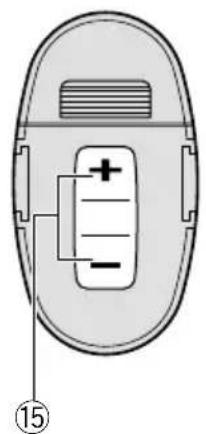
text_image
Diagram of a device with labeled components and numbered marker (15)Optional remote control (DEH-3400R)
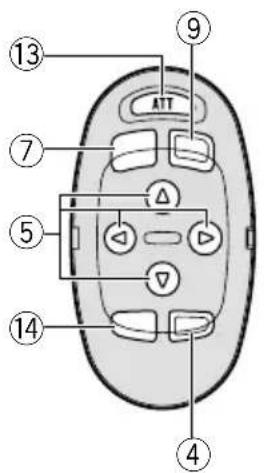
The steering remote control CD-SR80 is sold separately. Operation is the same as when using the button on the head unit. See the explanation of the head unit about the operation of each button with the exception of ATT, which is explained below.
⑬ATT button
Press to quickly lower the volume level, by about 90%. Press once more to return to the original volume level.
⑭ FUNCTION button
Not used.
⑮VOLUME button
Press to increase or decrease the volume.
Protecting your unit from theft
The front panel can be detached from the head unit and stored in the protective case provided to discourage theft.
- Keep the front panel closed while driving.

Important
- Never use force or grip the display and the buttons tightly when removing or attaching.
- Avoid subjecting the front panel to excessive shocks.
- Keep the front panel out of direct sunlight and high temperatures.
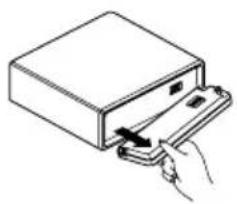
Removing the front panel
1 Press OPEN to open the front panel.
2 Grip the left side of the front panel and pull it gently outward.
Take care not to grip it tightly or drop it.
natural_image
Illustration of a hand inserting a device into a rectangular box (no text or symbols)3 Put the front panel into the protective case provided for safe keeping.
Before You Start Power ON/OFF
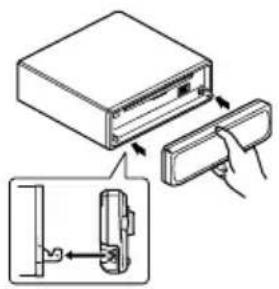
Attaching the front panel
Replace the front panel by holding it upright to this unit and clipping it securely into the mounting hooks.
text_image
Diagram showing a device being inserted into a folder, with an inset close-up highlighting the internal structure.
Turning the unit on
Press SOURCE to turn the unit on.
When you select a source the unit is turned on.

Selecting a source
You can select a source you want to listen to. To switch to the built-in CD player, load a disc in this unit (refer to page 12).
Press SOURCE to select a source.
Press SOURCE repeatedly to switch between the following sources:
Built-in CD player—Tuner

Notes
- When no disc is set in this product, built-in CD player source will not change.
- When this unit's blue/white lead is connected to the car's auto-antenna relay control terminal, the car's antenna extends when this unit's source is switched on. To retract the antenna, switch the source off.
Turning the unit off
Press SOURCE and hold for at least one second to turn the unit off.
Tuner
Listening to the radio
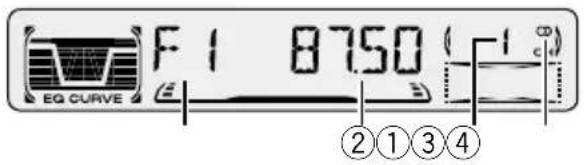
text_image
F1 8750 (-1°) EQ CURVE ②①③④This unit's AF (alternative frequencies search) function can be switched on and off. AF should be off for normal tuning operation (refer to page 9).
①BAND indicator
Shows which band the radio is tuned to, MW, LW or FM.
② FREQUENCY indicator
Shows to which frequency the tuner is tuned.
③PRESET NUMBER indicator
Shows what preset has been selected.
④ STEREO (○) indicator
Shows that the frequency selected is being broadcast in stereo.
1 Press SOURCE to select the tuner.
2 U s e VOLUME to adjust the sound level.
Rotate to increase or decrease the volume.
3 Press BAND to select a band .
Press BAND until the desired band is displayed.
F1, F2 for FM or MW/LW.
4 To perform manual tuning, press ◀ or ▶ with quick presses.
The frequencies move up or down step by step.
5 To perform seek tuning, press and hold ◀ or ▶ for about one second and release.
The tuner will scan the frequencies until a broadcast strong enough for good reception is found.
- You can cancel seek tuning by pressing either
◀ or ▶ with a quick press.
- If you press and hold ◀ or ▶ you can skip broadcasting stations. Seek tuning starts as soon as you release the buttons.

Note
- When the frequency selected is being broadcast in stereo the STEREO (○) indicator will light.
Tuner
Storing and recalling broadcast frequencies
If you press any of the PRESET TUNING buttons you can easily store up to six broadcast frequencies for later recall with the touch of a button.
When you find a frequency that you want to store in memory press a PRESET TUNING button and hold until the preset number stops flashing.
The number you have pressed will flash in the PRESET NUMBER indicator and then remain lit. The selected radio station frequency has been stored in memory.
The next time you press the same PRESET TUNING button the radio station frequency is recalled from memory.

Notes
- Up to 12 FM stations, 6 for each of the two FM bands, and 6 MW/LW stations can be stored in memory.
- You can also use ▲ and ▼ to recall radio station frequencies assigned to PRESET TUNING buttons.
Tuning in strong signals
Local seek tuning lets you tune in only those radio stations with sufficiently strong signals for good reception.
1 Press LOCAL/BSM to turn local seek tuning on.
Local seek sensitivity (LOC) appears in the display.
2 When you want to return to normal seek tuning, press LOCAL/BSM to turn local seek tuning off.
Storing the strongest broadcast frequencies
BSM (best stations memory) lets you automatically store the six strongest broadcast frequencies under PRESET TUNING buttons 1–6 and once stored there you can tune in to those frequencies with the touch of a button.
Press and hold LOCAL/BSM for about two seconds to turn BSM on.
BSM begins to flash. While BSM is flashing the six strongest broadcast frequencies will be stored under PRESET TUNING buttons in order of their signal strength. When finished, BSM stops flashing.
- To cancel the storage process, press LOCAL/BSM.

Note
- Storing broadcast frequencies with BSM may replace broadcast frequencies you have saved using PRESET TUNING.
Introduction of RDS operation
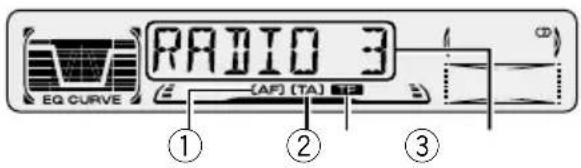
text_image
RADIO 3 EQ CURVE (AF) (TA) ① ② ③RDS (radio data system) is a system for providing information along with FM broadcasts. This inaudible information provides such features as program service name, program type, traffic announcement standby and automatic tuning, intended to aid radio listeners in finding and tuning in to a desired station.
①AF indicator
Shows when AF (alternative frequencies search) function is on.
②TAindicator
Shows when TA (traffic announcement standby) function is on.
③TP indicator
Shows when a TP station is tuned in.
④Program service name
Shows the type of broadcast program.

Notes
- RDS service may not be provided by all stations.
- RDS functions like AF and TA are only active when your radio is tuned to a RDS station.
Switching the RDS display
When you tune in a RDS station its program service name is displayed. If you want to know the frequency you can.
Press DISP/REG repeatedly to switch between the following settings:
Program service name—PTY information—Frequency
PTY (program type ID code) information is listed on page 11.
- PTY information and the frequency of the current station appears on the display for eight seconds.
Receiving PTY alarm broadcasts
PTY alarm is a special PTY code for announcements regarding emergencies such as natural disasters. When the tuner receives the radio alarm code, ALARM appears on the display and the volume adjusts to the TA volume. When the station stops broadcasting the emergency announcement, the system returns to the previous source.
- An emergency announcement can be cancelled by pressing TA.
Selecting alternative frequencies
If you are listening to a broadcast and the reception becomes weak or there are other problems, the unit will automatically search for a different station in the same network which is broadcasting a stronger signal.
- AF is on as a default.
1 Press and hold TAfor about two seconds to turn AF on.
AF is displayed.
2 Press and hold TAfor about two seconds to turn AF off.

Notes
- Only RDS stations are tuned in during seek tuning or BSM when AF is on.
- When you recall a preset station, the tuner may update the preset station with a new frequency from the station's AF list. (This is only available when using presets on the F1 band.) No preset number appears on the display if the RDS data for the station received differs from that for the originally stored station.
- Sound may be temporarily interrupted by another program during a AF frequency search.
- When the tuner is tuned to a non-RDS station the AF indicator flashes.
- AF can be switched on or off independently for each FM band.
Using PI Seek
If the unit fails to find a suitable alternative frequency, or if you are listening to a broadcast and the reception becomes weak, the unit will automatically search for a different station with the same programming. During the search, PI
SEEK is displayed and the output is muted. The muting is discontinued after completion of the PI seek, whether or not a different station is found.
Using Auto PI Seek for preset stations
When present stations cannot be recalled, as when travelling long distances, the unit can be set to perform PI Seek during preset recall.
- The default setting for Auto PI Seek is off. See Switching Auto PI Seek on page 17.
Limiting stations to regional programming
When AF is used to automatically retune frequencies, the regional function limits the selection to stations broadcasting regional programs.
Press and hold DISP/REG for about two seconds to turn the regional function on/off.

Notes
- Regional programming and regional networks are organized differently depending on the country (i.e., they may change according to the hour, state or broadcast area).
- The preset number may disappear on the display if the tuner tunes in a regional station which differs from the originally set station.
- REG can be turned on or off independently for each FM band.
Receiving traffic announcements
TA (traffic announcement standby) lets you receive traffic announcements automatically, no matter what source you are listening to. TA can be activated for both a TP station (a station that broadcasts traffic information) or an enhanced other network's TP station (a station carrying information which cross-references TP stations).
1 Tune in a TP or enhanced other network's TP station.
When you are tuned into a TP or enhanced other network's TP station the TP indicator will light.
2 Press TAto turn traffic announcement standby on.
Press TA and the TA indicator appears in the display. The tuner will standby for traffic announcements.
- To turn traffic announcements standby off, press TA again.
3 Use VOLUME to adjust the TA volume when a traffic announcement begins.
Rotate to increase or decrease the volume. The newly set volume is stored in memory and recalled for subsequent traffic announcements.
4 Press TAwhile a traffic announcement is being received to cancel the announcement.
The tuner returns to the original source but remains in the standby mode until TA is pressed again.

Notes
- The system switches back to the original source following traffic announcement reception.
- Only TP and enhanced other network's TP stations are tuned in during seek tuning or BSM when TA is on.
Responding to the TP alarm
When a TP or enhanced other network's TP station is lost due to a weak signal the TP indicator is extinguished and a series of short beeps, about five seconds long, sound to remind you to select another TP or enhanced other network's TP station.
When listening to the tuner, tune in another TP or enhanced other network's TP station.
- When listening to sources other than the tuner the unit will automatically seek out a TP station with the strongest signal after about 10-or about 30-second delay. The delay is about 10 seconds if TA is on and 30 seconds if TA and AF are on.
PTY list
Specific Type of program
NEWS News
AFFAIRS Current affairs
INFO General information and advice
SPORT Sports
WEATHER Weather reports/meteorological information
FINANCE Stock market reports, commerce, trading, etc.
POP MUS Popular music
ROCK MUS Contemporary modern music
EASY MUS Easy listening music
OTH MUS Non categorized music
JAZZ Jazz
COUNTRY Country music
NAT MUS National music
OLDIES Oldies music, golden oldies
FOLK MUS Folk music
L. CLASS Light classical music
CLASSIC Serious classical music
EDUCATE Educational programs
DRAMA All radio plays and serials
CULTURE National or regional culture
SCIENCE Nature, science and technology
VARIED Light entertainment
CHILDREN Children's
SOCIAL Social affairs
RELIGION Religion affairs or services
PHONE IN Phone in
TOURING Travel programs, not for announcements about traffic problems
LEISURE Hobbies and recreational activities
DOCUMENT Documentaries

Built-in CD player
Playing a CD
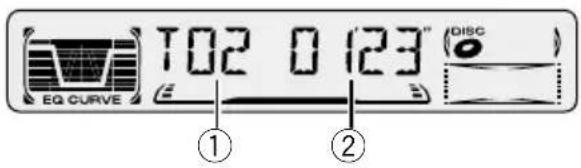
text_image
EQ CURVE T02 0 123" (DISC) ① ②①TRACK NUMBER indicator
Shows the track currently playing.
②PLAY TIME indicator
Shows the elapsed playing time of the current track.
1 Press OPEN to open the front panel.
CD loading slot appears.
2 Insert a CD into the CD loading slot.
Playback will automatically start.
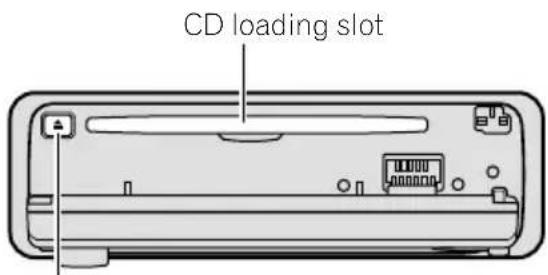
text_image
CD loading slotCD EJECT button
- You can eject a CD by pressing CD EJECT.
3 Close the front panel.
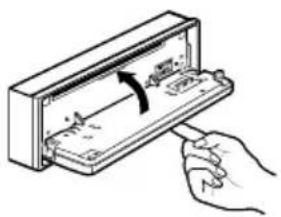
natural_image
Illustration of a hand inserting a component into an open electrical enclosure (no text or symbols visible)• After a CD has been inserted, press SOURCE to select the built-in CD player.
4 U s e VOLUME to adjust the sound level.
Rotate to increase or decrease the volume.
5 To perform fast forward or reverse, press and hold ◀or ▶.
6 To skip back or forward to another track, press ◀ or ▶.
Pressing ▶ skips to the start of the next track. Pressing ◀ once skips to the start of the current track. Pressing again will skip to the previous track.

Notes
- The built-in CD player plays one, standard, 12-cm or 8-cm (single) CD at a time. Do not use an adapter when playing 8-cm CDs.
- Do not insert anything other than a CD into the CD loading slot.
- If you cannot insert a disc completely or if after you insert a disc the disc does not play, check that the label side of the disc is up. Press CD EJECT to eject the disc, and check the disc for damage before inserting the disc again.
- If the built-in CD player does not operate properly, an error message such as ERROR-14 may be displayed. Refer to Understanding built-in CD player error messages on page 19.
Built-in CD player
Repeating play
Repeat play lets you hear the same track over again.
1 Press 5 to turn repeat play on.
RPT appears in the display. The track presently playing will play and then repeat.
2 Press 5 to turn repeat play off.
The track presently playing will continue to play and then play the next track.

Note
- If you perform track search or fast forward/reverse, repeat play is automatically cancelled.
Pausing CD playback
Pause lets you temporarily stop playback of the CD.
1 Press 6 to turn pause on.
PAUSE appears in the display. Play of the current track pauses.
2 Press 6 to turn pause off.
Play will resume at the same point that you turned pause on.
Audio Adjustments
Introduction of audio adjustments
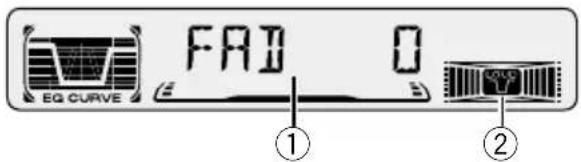
text_image
EQ CURVE FAD 0 ① ②①AUDIO display
Shows the audio adjustments status.
②LOUD indicator
Appears in the display when loudness is turned on.
Press AUDIO to display the audio function names.
Press AUDIO repeatedly to switch between the following audio functions:
FAD (balance adjustment)—EQ-L (equalizer)—LOUD (loudness)—FIE (front image enhancer)—SLA (source level adjustment)
- When selecting the FM tuner as the source, you cannot switch to SLA.
• To return to the display of each source, press BAND.

Note
- If you do not operate the audio function within about 30 seconds, the display is automatically returned to the source display.
Using balance adjustment
You can select a fader/balance setting that provides an ideal listening environment in all occupied seats.
1 Press AUDIO to select FAD.
Press AUDIO until FAD appears in the display.
- If the balance setting has been previously adjusted, BAL will be displayed.
2 Press ▲ or ▼ to adjust front/rear speaker balance.
Each press of ▲ or ▼ moves the front/rear speaker balance towards the front or the rear.
- FAD F15 – FAD R15 is displayed as the front/rear speaker balance moves from front to rear.
- FAD 0 is the proper setting when only two speakers are used.
3 Press ◀ or ▶ to adjust left/right speaker balance.
When you press ◀ or ▶, BAL 0 is displayed. Each press of ◀ or ▶ moves the left/right speaker balance towards the left or the right.
- BALL9 – BALR9 is displayed as the left/right speaker balance moves from left to right.
Audio Adjustments
Using the equalizer
The equalizer lets you adjust the equalization to match car interior acoustic characteristics as desired.
Recalling equalizer curves
There are six stored equalizer curves which you can easily recall at any time. Here is a list of the equalizer curves:
Display Equalizer curve
SPR-BASS Super bass
POWERFUL Powerful
NATURAL Natural
VOCAL Vocal
CUSTOM Custom
EQ FLAT Flat
- CUSTOM is an adjusted equalizer curve that you create.
- When EQ FLAT is selected no supplement or correction is made to the sound. This is useful to check the effect of the equalizer curves by switching alternatively between EQ FLAT and a set equalizer curve.
Press EQ to select the equalizer.
- If the equalizer has been previously set to an equalizer curve other than POWERFUL then the title of that previously selected equalizer curve will be displayed, such as SPR-BASS.
NATURAL, VOCAL, CUSTOM, or EQ FLAT.
Adjusting equalizer curves
You can adjust the currently selected equalizer curve setting as desired. Adjusted equalizer curve settings are memorized in CUSTOM.
1 Press AUDIO to select the equalizer mode. Press AUDIO until EQ-L/EQ-M/EQ-H appears in the display.
2 Select the band you want to adjust with the ◀/▶.
EQ-L (low) — EQ-M (mid) — EQ-H (high)
3 Press ▲ or ▼ to adjust the equalizer curve.
Each press of ▲ or ▼ increases or decreases the equalizer curve respectively.
- +6 - -6 is displayed as the equalizer curve is increased or decreased.
- The actual range of the adjustments are different depending on which equalizer curve is selected.

Note
- If you make adjustments when a curve other than CUSTOM is selected, the newly adjusted curve will replace the previous curve. Then a new curve with CUSTOM appears on the display while selecting the equalizer curve.
Adjusting loudness
Loudness compensates for deficiencies in the low- and high-sound ranges at low volume.
1 Press AUDIO to select LOUD.
Press AUDIO until LOUD appears in the display.
Audio Adjustments
2 Select LOUD on or off with ▲/▼.
3 Select the desired level with ◀/▶. LOW (low) —MID (mid) —HI (high)

Note
- You can also switch LOUD on or off by pressing the LOUDNESS.
Front image enhancer (FIE)
The F.I.E. (Front Image Enhancer) function is a simple method of enhancing front imaging by cutting mid- and high-range frequency output from the rear speakers, limiting their output to low-range frequencies. You can select the frequency you want to cut.

Precaution
- When the F.I.E. function is deactivated, the rear speakers output sound of all frequencies, not just bass sounds. Reduce the volume before disengaging F.I.E. to prevent a sudden increase in volume.
1 Press AUDIO to select FIE.
Press AUDIO until FIE appears in the display.
2 Select FIE on or off with ▲/▼.
3 Select the desired frequency with ◀/▶. 100—160—250 (Hz)

Notes
- After switching the F.I.E. function ON, select the Fader/Balance mode in the Audio Menu, and adjust front and rear speaker volume levels until they are balanced.
- Switch the F.I.E. function OFF when using a 2-speaker system.
Adjusting source levels
SLA (Source level adjustment) lets you adjust the volume level of each source to prevent radical changes in volume when switching between sources.
- Settings are based on the volume level of the FM tuner, which remains unchanged.
1 Compare the FM tuner volume level with the level of the source you wish to adjust.
2 Press AUDIO to select SLA.
Press AUDIO until SLA appears in the display.
3 Press ▲ or ▼ to adjust the source volume.
Each press of ▲ or ▼ increases or decreases the source volume.
- SLA +4 – SLA -4 is displayed as the source volume is increased or decreased.

Notes
- Since the FM tuner volume is the control, it is not possible to apply source level adjustments to the FM tuner.
- The MW/LW tuner volume level can also be adjusted with source level adjustments.
Initial Settings
Adjusting initial settings

text_image
EQ CURVE STEP 100Initial settings lets you perform initial set up of different settings for this unit.
1 Press SOURCE and hold until the unit turns off.
2 Press AUDIO and hold until STEP appears in the display.
Press AUDIO repeatedly to switch between the following settings:
STEP—A-PI
Use the following instructions to operate each particular setting.
- To cancel initial settings, press BAND.
- You can also cancel initial settings by holding down AUDIO until the unit turns off.
Setting the FM tuning step
Normally the FM tuning step employed by seek tuning is 50 kHz. When AF or TA are on the tuning step automatically changes to 100 kHz. It may be preferable to set the tuning step to 50 kHz when AF is on.
1 Press AUDIO to select STEP.
Press AUDIO repeatedly until STEP appears in the display.
2 Select the FM tuning step with ◀/▶.
Pressing ◀/▶ will switch the FM tuning step between 50 kHz and 100 kHz while AF or TA is on. The selected FM tuning step will appear in the display.

Note
- The tuning step remains at 50 kHz during manual tuning.
Switching Auto PI Seek
The unit can automatically search for a different station with the same programming, even during preset recall.
1 Press AUDIO to select A-PI.
Press AUDIO repeatedly until A-PI appears in the display.
2 Select A-PI on or off with ▲/▼.
Pressing ▲/▼ will switch A-PI between on and off and that status will be displayed.
Additional Information
Cellular telephone muting
Sound from this unit is muted automatically when a call is made or received using a connected cellular telephone.
- The sound is turned off, MUTE is displayed and no audio adjustments, except volume control, are possible. Operation returns to normal when the phone call is ended.
CD player and care
- Use only CDs that have Compact Disc Digital Audio marks as show below.

- Use only normal, round CDs. If you insert irregular, non-round, shaped CDs they may jam in the CD player or not play properly.
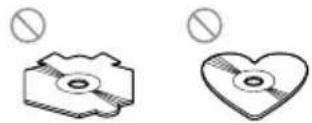
- Check all CDs for cracks, scratches or warped discs before playing. CDs that have cracks, scratches or are warped may not play properly. Do not use such discs.
- Avoid touching the recorded (non-printed side) surface when handling the disc.
- Store discs in their cases when not in use.
- Keep discs out of direct sunlight and do not expose the discs to high temperatures.
- Do not attach labels, write on or apply chemicals to the surface of the discs.
- To clean dirt from a CD, wipe the disc with a soft cloth outward from the center of the disc.
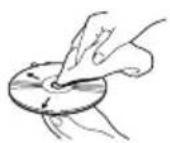
- If the heater is used in cold weather, moisture may form on components inside the CD player. Condensation may cause the CD player to not operate properly. If you think that condensation is a problem turn off the CD player for an hour or so to allow the CD player to dry out and wipe any damp discs with a soft cloth to remove the moisture.
- Road shocks may interrupt CD playback.
Additional Information
CD-R/CD-RW discs
- CD-R (CD-Recordable)/CD-RW (CD-Rewritable) discs recorded on CD-R/CD-RW units other than a music CD recorder may not play properly on this CD player.
- Music CD-R/CD-RW discs, even recorded on a music CD recorder, may not play properly on this CD player due to differing disc characteristics, scratches or dirt on the disc. Dirt or condensation on the lens inside this unit may also prevent playback.
- Read the precautions with CD-R/CD-RW discs before using them.
Understanding built-in CD player error messages
When problems occur during CD play an error message may appear on the display. If an error message appears on the display refer to the table below to see what the problem is and the suggested method of correcting the problem. If the error cannot be corrected, contact your dealer or your nearest Pioneer Service Center.
Message Cause Action
| ERROR-11, 12, 17, 30 | Dirty disc Clean disc. |
| ERROR-11, 12, 17, 30 | Scratched disc Replace disc. |
ERROR-14 Blank disc Check the disc.
| ERROR-10, 11, 12, 14, 17, 30, A0 | Electrical or mechanical | Turn the ignition ON and OFF, or switch to a different source, then back to the CD player. |
| HEAT CD player over-heated | Turn off the CD player until the CD player cools down. | |

Additional Information
Specifications
General
Power source .... 14.4 V DC (10.8 - 15.1 V allowable)
Grounding system ...... Negative type
Max. current consumption 10.0 A
Dimensions (W ×H ×D): Mounting size .... 178 × 50 × 157 mm Nose .... 188 × 58 × 19 mm
Weight 1.5 kg
Audio/DSP
Maximum power output ..... 50 W × 4 (DEH-3400R) 45 W × 4 (DEH-2460R, DEH-2430R)
Continuous power output .. 27 W ×4 (DEH-3400R) 22 W ×4 (DEH-2460R, DEH-2430R) (DIN 45324, +B=14.4 V)
Load impedance .... 4 Ω (4 - 8 Ω allowable)
Preout max output level/output impedance 2.2 V/1 kΩ
Equalizer (3-Band Equalizer): (LOW) .... Level : ±12 dB
(MID) ...... Level : ±12 dB
(HIGH) ...... Level : ±12 dB
Loudness contour (LOW) ....+3.5 dB (100 Hz), +3 dB (10 kHz)
(MID) ....+10 dB (100 Hz), +6.5 dB (10 kHz)
(HIGH) ....+11 dB (100 Hz), +11 dB (10 kHz) (volume : -30 dB)
CD player
System .... Compact disc audio system
Usable discs .... Compact disc
Signal format: Sampling frequency ... 44.1 kHz Number of quantization bits .... 16; linear
Frequency characteristics 5 - 20,000 Hz (±1 dB)
Signal-to-noise ratio .... 94 dB (1 kHz) (IEC-A network)
Dynamic range 92 dB (1 kHz)
Number of channels ...... 2 (stereo)
FM tuner
Frequency range 87.5–108.0 MHz
Usable sensitivity .... 9 dBf (1.0 μV/75 Ω, mono, S/N: 30 dB)
50 dB quieting sensitivity ... 15 dBf (1.7 μV/75 Ω, mono)
Signal-to-noise ratio ..... 70 dB (IEC-A network)
Distortion .... 0.3% (at 65 dBf, 1 kHz, stereo)
Frequency response ...... 30 - 15,000 Hz (±3 dB)
Stereo separation 40 dB (at 65 dBf, 1 kHz)
MW tuner
Frequency range 531 - 1,602 kHz (9 kHz)
Usable sensitivity 18 μV (S/N: 20 dB)
Selectivity 50 dB (±9 kHz)
LW tuner
Frequency range 153–281 kHz
Usable sensitivity 30 V (S/N: 20 dB)
Selectivity 50 dB (±9 kHz)

Note
- Specifications and the design are subject to possible modifications without notice due to improvements.
Contenido
CLASS 1 LASER PRODUCT
text_image
Diagram of a device rear panel with numbered labels pointing to key components such as buttons, dials, and switches.Qué es cada cosa
①Botón DISP/REG
text_image
Diagram of a device's internal components with numbered labels pointing to various functions like ATT, battery, and indicator lights.Control remoto opcional (DEH-3400R)
natural_image
Line drawing of a device with a hand inserting a component into a rectangular box (no text or symbols)text_image
Diagram showing a device with an open box and a close-up of its internal component, illustrating the process of inserting or removing a device.
text_image
RADIO 3 EQ CURVE (AF) (TA) ① ② ③natural_image
Illustration of a hand inserting a device into a rectangular housing (no text or symbols visible)| SPR-BASS Supergraves |
| POWERFUL Potente |
| NATURAL | Natural |
| VOCAL | Vocal |
| CUSTOM Personalizado |
| EQ FLAT Neutro |
text_image
CLASS 1 LASER PRODUCTWichtig
text_image
Diagram of a device rear panel with numbered labels pointing to key components such as buttons, dials, and switches.Die einzelnen Teile
①Taste DISP/REG
text_image
Diagram of a device control panel with numbered labels pointing to various buttons and indicators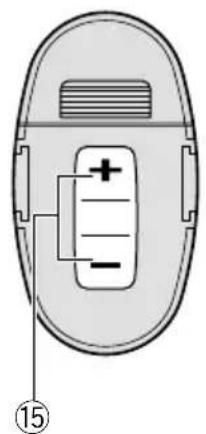
text_image
Diagram of a device with labeled components and numbered marker (15)natural_image
Line drawing of a hand inserting a card into a rectangular device (no text or symbols)text_image
Diagram showing a device with an open box and a close-up of its internal component, illustrating the process of inserting or removing a device.
text_image
RADIO 3 EQ CURVE (AF) (TA) ① ② ③OLDIES Oldies, Goldene Oldies
FOLK MUS Volksmusik
natural_image
Illustration of a hand inserting a device into a rectangular housing (no text or symbols visible)(DIN 45324, +B = 14.4 V)
Lastimpedanz 4 Ω (4 - 8 Ω zulässig)
text_image
Diagram of a device rear panel with numbered labels pointing to key components such as buttons, dials, and switches.text_image
Diagram of a device with labeled components and numbered marker (15)natural_image
Line drawing of a hand inserting a card into a rectangular device (no text or symbols)text_image
Diagram showing a device being inserted into a folder, with an inset close-up highlighting the internal structure.
text_image
RADIO 3 EQ CURVE (AF) (TA) ① ② ③natural_image
Hand inserting a component into a device (no text or symbols visible)CLASS 1 LASER PRODUCT
text_image
Diagram of a device rear panel with numbered labels pointing to key components such as buttons, dials, and switches.Nomenclatura
①Tasto DISP/REG
text_image
Diagram of a device's internal components with numbered labels pointing to various functions like ATT, battery, and indicator lights.Telecomando opzionale (DEH-3400R)
natural_image
Line drawing of a hand inserting a card into a rectangular device (no text or symbols)text_image
Diagram showing a device being inserted into a box, with an inset close-up highlighting the internal structure.
text_image
RADIO 3 EQ CURVE (AF) (TA) ① ② ③EDUCATE Programmi educativi
natural_image
Illustration of a hand inserting a device into a rectangular box with an arrow indicating rotation (no text or symbols)| SPR-BASS Super bassi |
| POWERFUL Potente |
| NATURAL Naturale |
| VOCAL | Vocale |
Consumo massimo ..... 10,0 A
Dimensioni (L × A × P):
94 dB (a 1 kHz) (rete IEC-A)
Gamma dinamica 92 dB (a 1 kHz)
CLASS 1 LASER PRODUCT
text_image
Diagram of a device rear panel with numbered labels pointing to key components such as buttons, dials, and switches.Wat is wat
①DISP/REG toets
text_image
Diagram of a device with labeled components and numbered marker (15)natural_image
Line drawing of a hand inserting a card into a rectangular device (no text or symbols)text_image
Diagram showing a device being inserted into a folder, with an inset close-up highlighting the internal structure.
④ STEREO (○) indicator
text_image
RADIO 3 EQ CURVE (AF) (TA) ① ② ③EDUCATE Educatieve programma's
PHONE IN Inbel-programma's
natural_image
Illustration of a hand inserting a device into a rectangular box with an arrow indicating rotation (no text or symbols)PIONEER ELECTRONICS (USA) INC.
P.O. Box 1760, Long Beach, California 90801, U.S.A.
TEL: (800) 421-1404
PIONEER EUROPE NV
Haven 1087, Keetberglaan 1, B-9120 Melsele, Belgium
TEL: (0) 3/570.05.11
PIONEER ELECTRONICS AUSTRALIA PTY. LTD.
178-184 Boundary Road, Braeside, Victoria 3195, Australia
TEL: (03) 9586-6300
PIONEER ELECTRONICS OF CANADA, INC.
300 Allstate Parkway, Markham, Ontario L3R OP2, Canada
TEL: (905) 479-4411
PIONEER ELECTRONICS DE MEXICO, S.A. de C.V.
San Lorenzo 1009 3er. Piso Desp. 302
Col. Del Valle Mexico, D.F. C.P. 03100
TEL: 5-688-52-90
Published by Pioneer Corporation.
Copyright © 2001 by Pioneer Corporation.
All rights reserved.
Publication de Pioneer Corporation.
Copyright © 2001 Pioneer Corporation.