ManualGo.com
KF300 - Mobile Phone LG - Free user manual and instructions
Find the device manual for free KF300 LG in PDF.



Download the instructions for your Mobile Phone in PDF format for free! Find your manual KF300 - LG and take your electronic device back in hand. On this page are published all the documents necessary for the use of your device. KF300 by LG.
USER MANUAL KF300 LG
- Zeer dringend! Bel me.
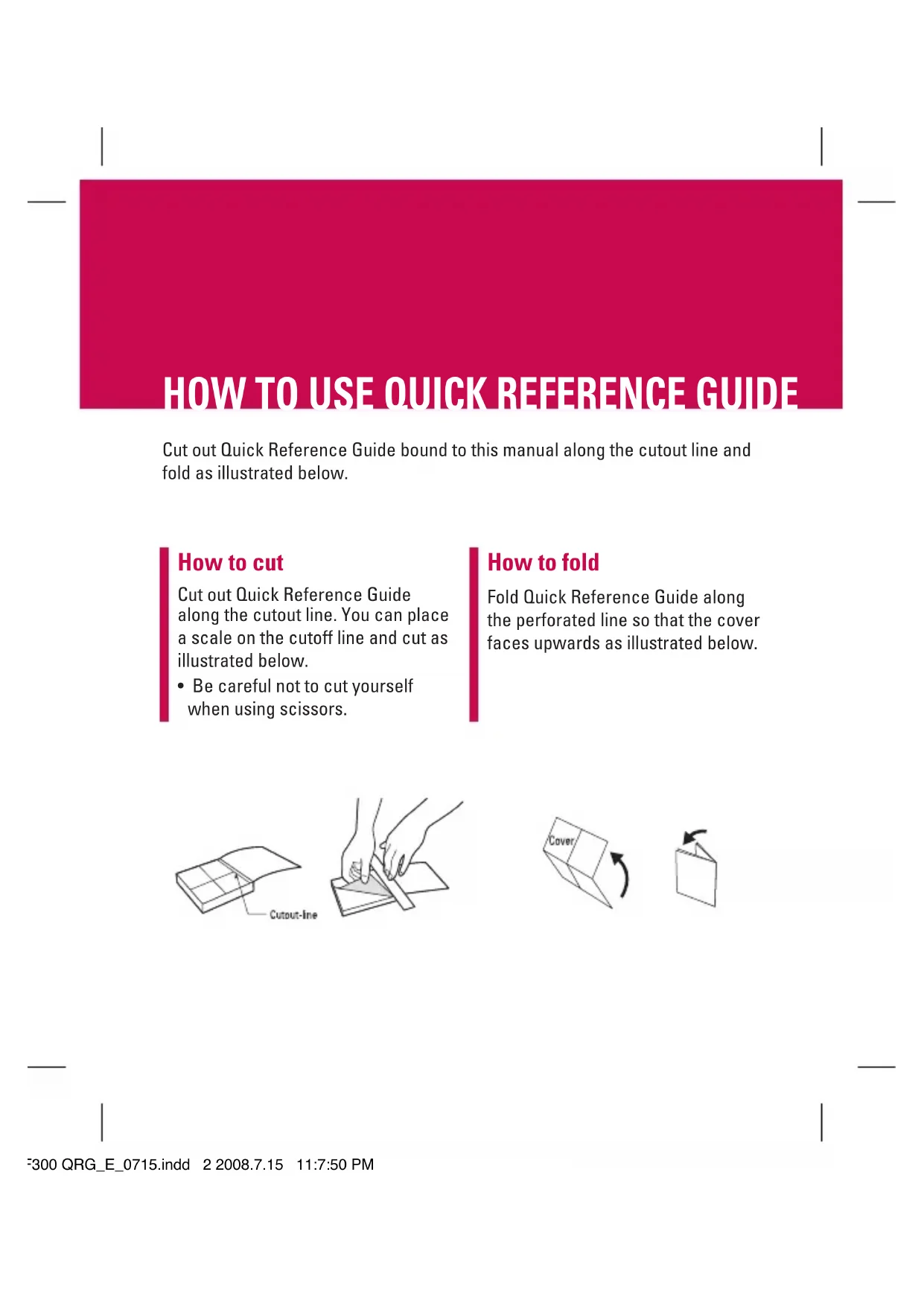
- Be careful not to cut yourself when using scissors. How to fold Fold Quick Reference Guide along the perforated line so that the cover faces upwards as illustrated below. KF300 QRG_E_0715.indd 2 2008.7.15 11:7:50 PMQUICK REFERENCE GUIDE
KF300 For more details, please refer to the User Guide. MP3 player The KF300 has an integrated MP3 player built-in. You can enjoy listening to MP3 music files on your phone using a compatible headset or via the internal loudspeaker. You can transfer MP3 files from a compatible PC to the memory in your phone using the Mass Storage. When you connect the phone to a PC using the USB cable and then you can show removable disk through windows explorer. After you copy songs in removable disk, you should execute safe remove from your system. All songs You can see the all of music files. My playlist You can set the music files of your taste. Settings v Shuffle: If you select On, you can listen to the music randomly. v Repeat: This menu allows to set the play mode: Off, One, All. v Equalizer: This menu helps you to adjust various of environment on listening to the music. v Player skin: This menu allows to change the background of main LCD on playing MP3 file. Parts of the phone
1. Connect the headset with your phone.
2. After presetting radio channels, you can listen
to other channel by pressing the corresponding number key (short press).
3. You can access the following option menus by
pressing the left soft key [Options]. v Edit channel: You can adjust frequency and change the radio station in the selected channel. You can change the frequency with Left/Right navigation keys and number keys. v Auto scan: If you select "Auto scan Now?" On, automatically set the radio channel. And When "Save this station" message will be popped up, if you select Yes, the selected frequency will be stored. v Reset all channels: You can delete all channels you saved. v Listen via: Select this to listen to the radio through Speaker/Wired headset/Bluetooth in the [Options]. Voice recorder You can record a voice memo.
1. Press the OK key to start recording. Once
recording is started, the message “REC” and the recording time are displayed, talk into the microphone.
2. If you want to finish recording, press the
right soft key [Stop]. The recorded file is automatically saved in Sounds folder of My stuff. Note Music is copyright protected in international treaties and national copyright laws. It may be necessary to obtain permission or a license to reproduce or copy music. In some countries national law prohibits private copying of copyrighted material. Please check the national legislation of the applicable country concerning the use of such material. Camera Using the camera module built in your phone, you can take pictures of people. Additionally, you can send photos to other people and select photos as wallpaper. Note When using the camera, power consumption increases. If the battery is too low, you may not be able to use the Camera feature, please recharge the battery before use.
- To take a picture - To take clear pictures, press the camera C key while holding the camera without any movement. - Appropriately adjust distance to the object that you want take a picture of (more than 50 cm).
1. Press the camera C key in standby mode.
2. Focus on the subject to capture the image, and
then press the camera C key or the OK key. Note v You can adjust the brightness by using the L , R. Video camera
1. To start recording press the OK key. As soon as it
starts to record a timer will be displayed.
LG offers you a limited warranty that the enclosed phone and its enclosed accessories will be free from defects in material and workmanship, according to the following terms and conditions: (1) The limited warranty for the product remains in effect for a period of 24 months from the date of purchase of the product. The limited warranty for the batteries remains in effect for a period of 12 months from the date of purchase of the product. Accessories only have a 6 month warranty. (2) The limited warranty extends only to the original purchaser of the product and is not assignable or transferable to any subsequent purchaser/end user. (3) This warranty is good only to the original purchaser of the product during the warranty period, but limited to certain country if specied. (4) The external housing and cosmetic parts shall be free of defects at the time of shipment and, therefore, shall not be covered under these limited warranty terms. (5) Upon request from LG, the consumer must provide information to reasonably prove the date of purchase. (6) The customer shall bear the cost of shipping the product to the Customer Service Department of LG. LG shall bear the cost of shipping the product back to the consumer after the completion of service under this limited warranty.
2. WHAT THIS WARRANTY DOES NOT COVER :
(1) Defects or damages resulting from use of the product in other than its normal and customary manner. (2) Defects or damages from abnormal use, abnormal conditions, improper storage, exposure to moisture or dampness, unauthorized modications, unauthorized connections, unauthorized repair, misuse, neglect, abuse, accident, alteration, improper installation, or other acts which are not the fault of LG, including damage caused by shipping, blown fuses, spills of food or liquid. (3) Breakage or damage to antennas unless caused directly by defects in material or workmanship. WC_Netherland_(100-120).indd 1 2007.10.22 10:3:20 AM(4) That the Customer Service Department at LG was not notied by consumer of the alleged defect or malfunction of the product during the applicable limited warranty period. (5) Products which have had the serial number removed or made illegible. (6) This limited warranty is in lieu of all other warranties, express or implied either in fact or by operations of law, statutory or otherwise, including, but not limited to any implied warranty of marketability or tness for a particular use. (7) Damage resulting from use of non-LG approved accessories. (8) All plastic surfaces and all other externally exposed parts that are scratched or damaged due to normal customer use. (9) Products operated outside published maximum ratings. (10) Products used or obtained in a rental program. (11) Consumables (such as fuses).
No other express warranty is applicable to this product. THE DURATION OF ANY IMPLIED WARRANTIES, INCLUDING THE IMPLIED WARRANTY OF MARKETABILITY, IS LIMITED TO THE DURATION OF THE EXPRESS WARRANTY HEREIN. LG ELECTRONICS INC. SHALL NOT BE LIABLE FOR THE LOSS OF THE USE OF THE PRODUCT, INCONVENIENCE, LOSS OR ANY OTHER DAMAGES, DIRECT OR CONSEQUENTIAL, ARISING OUT OF THE USE OF, OR INABILITY TO USE, THIS PRODUCT OR FOR ANY BREACH OF ANY EXPRESS OR IMPLIED WARRANTY, INCLUDING THE IMPLIED WARRANTY OF MARKETABILITY APPLICABLE TO THIS PRODUCT. Some do not allow the exclusive of limitation of incidental or consequential damages or limitations on how long an implied warranty lasts; so these limitations or exclusions may not apply to you. This warranty gives you specic legal rights and you may also have other rights which vary from country to country. WC_Netherland_(100-120).indd 2 2007.10.22 10:3:21 AM