ManualGo.com
G4015 - Mobile Phone LG - Free user manual and instructions
Find the device manual for free G4015 LG in PDF.


Download the instructions for your Mobile Phone in PDF format for free! Find your manual G4015 - LG and take your electronic device back in hand. On this page are published all the documents necessary for the use of your device. G4015 by LG.
USER MANUAL G4015 LG
the original enduser.2.Thelimited warranty extends only tothe original enduserofthe product andisnot assignable ortransferabletoany subsequent purchaser/end user.3.This warranty good only tothe original enduserofthe product during the warranty period long asitisinCanada.4. Upon request from LG, theconsumermust provide infromationto reasonably provethedateof purchase. During the applicable warranty period, LGwill repair replace atLG'ssole option, without charge tothe original enduser,anydefective component part ofthe phone oraccessory.6.LGmay,use rebuilt, reconditionedornew parts components when repairing any product replace product witha rebuilt, reconditionedornew product.
WHAT THIS WARRANTY DOES NOT COVER: 1.Defectsor damages resulting fromuseofthe product inotherthanitsnormaland customary manner.2.Defectsor damages fromabnormaluse,abnormal conditions, improper storage, exposuretomoistureor dampness, unauthorized modifications, unauthorized connections, unauthorized repair, misuse, neglect, abuse, accident, alteration, improper installationorotheractswhicharenotthefaultof LG, including damage caused
spills offoodor liquids. Breakage damage toantennasunlesscaused directly
defectsinmaterialor workmanship. 4.Thefact thattheCustomerService Department atLGwasnotnotified the original enduserofthe alleged defectormalfunctionofthe product, during the warranty period. 5.Productswhichhavehadtheirserialnumbersremovedormade illegible. LIMITED WARRANTY STATEMENT6. Damage resulting fromuseofnon-LG approved accessories.7.All plastic surfacesandallother externally exposed parts thatarescratchedor damaged duetonormalcustomeruse.8.Productsserviced non-authorizedpersonsor companies. Notes: 1.Thislimited warranty isinlieuofallother warranties, expressor implied eitherinfactor
operations law, statutory otherwise, including, butnotlimitedtoany implied warranty merchantability orfitnessfora particular purpose.2. Shipping damage isthesole responsibility ofthe shipping company.
GET WARRANTY SERVICE: Toobtain warranty service, please callthe following telephone numberfrom anywhere inCanada:LGElectronics Canada, Inc.Tel.1-888-542-2623 www.lg.ca (see linksto"WirelessPhone Service") Electronics Canada Inc. Mississauga, OntarioLG
During aCall35 Making Second Call Swapping BetweenTwo Calls Answering Incoming Call Rejecting Incoming Call Muting the Microphone Multiparty orConferenceCalls37 Making Second Call Setting upa Conference Call Activate the Conference Call Hold Adding Calls the Conference Call Private Call ina Conference Call Ending Conference Call Menu Tree
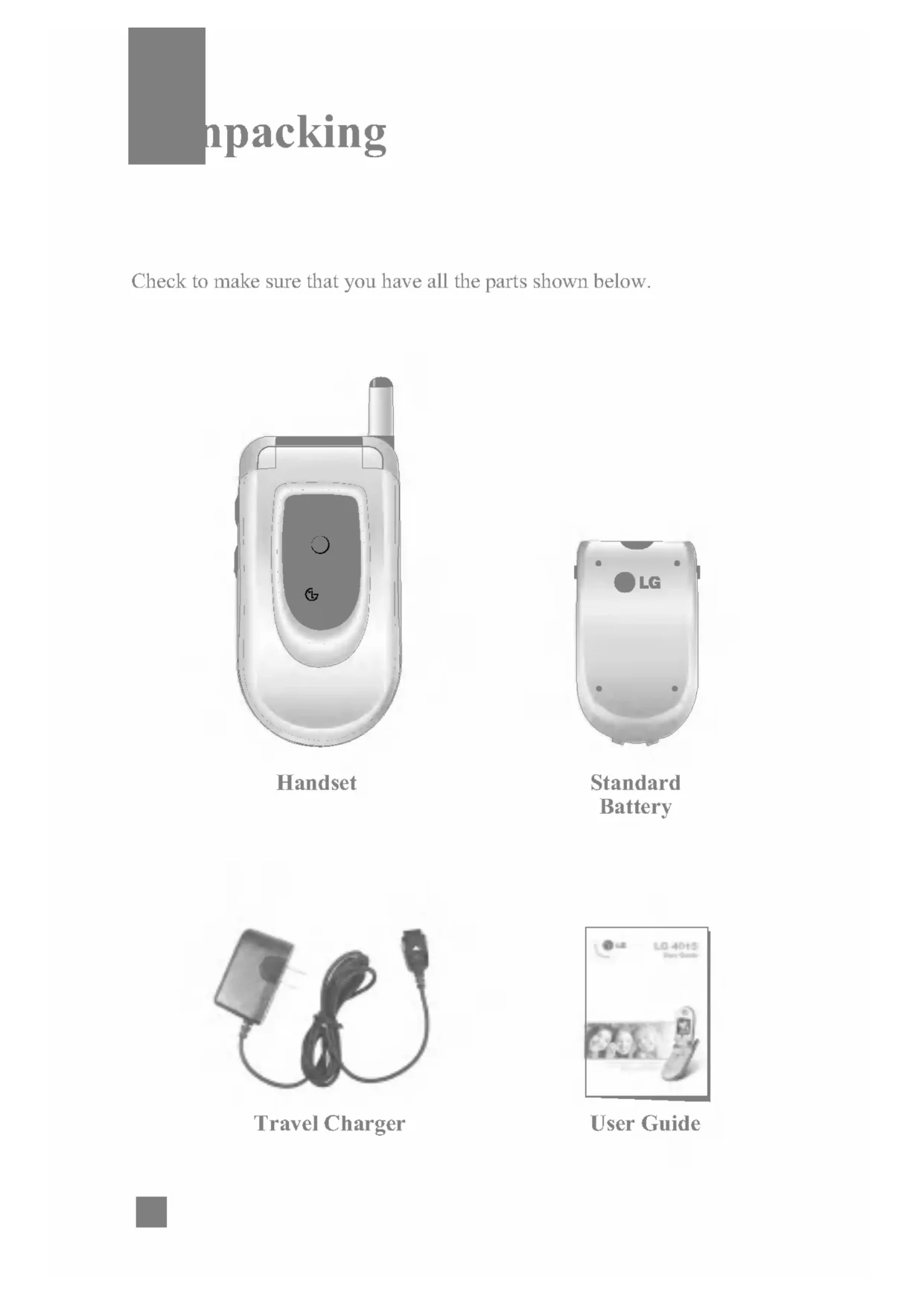
Index 1048Checktomakesurethatyouhaveallthe parts shownbelow. Unpacking Handset Standard Battery User Guide Travel ChargerImportant Information Thisuser guide contains important informationontheuseand operation ofthis phone. Pleasereadalltheinformation carefully for optimal performance andtopreventany damage to,ormisuseof,the phone. Any changes ormodificationsnot expressly approved inthisuser guide couldvoidyourwarrantyforthis equipment. Before You Start Safety Instructions WARNING! Toreducethe possibility ofelectricshock,donotexposeyour phone high humidity areas,suchasthebathroom, swimming pool, etc. Always store your phone awayfromheat.Neverstoreyour phone settings thatmayexposeittotemperatureslessthan-18°Corgreaterthan40°C,suchasoutside during asnowstormorinyourcaronahot day. Exposure toexcessivecoldorheatwillresultinmalfunction, damage and/or catastrophic failure.Becarefulwhen using your phone near otherelectronicdevices.RFemissionsfromyourmobile phone mayaffect nearby inadequately shieldedelectronic equipment. Youshouldconsultwithmanufacturersofany personal medicaldevicessuchas pacemakers and hearing aidestodetermineif they are susceptible tointerferencefromyourmobile phone. Turnoffyour phone inamedical facility oratagasstation.Never place your phone inamicrowaveovenasthiswillcausethe battery explode. IMPORTANT! PleasereadtheTIA SAFETY INFORMATIONonpage87before using your phone. For Your SafetySafety Information Pleasereadandobservethe following informationforthesafeandproperuseofyour phone andto prevent any unanticipated damage. Also, keep theuser'smanualinanaccessible place atalltimesafter reading it.
Unplug thepowercordand charger during lightning stormtoavoidelectricshockorfire. Donotuseyour phone high explosive areasasthe phone may generate sparks.
Donot put your phone ina place subject toexcessive dust, and keep theminimum required distancebetweenthepowercordandheatsources. Donot damage thepowercord
Using damaged battery placing battery inyourmouthmaycauseserious injury.
Charging displayed onthescreenafter connecting thetravel adapter. Only ifthe battery totally empty, Callindicator Light isonwithout displaying "Charging". ForYour Safety]Donot place items containing magnetic components suchasacredit card, phone card, bankbookora subway ticket, nearyour phone. The magnetic strip canbe damaged
the phone. ]Donotholdorlettheantennacomeincontactwithyour body during acall.] Talking onyour phone fora long period oftimemayreducethecall quality duetoheat generated during theuseofthe phone. ]Donotallowexcessivevibrationor impact tothe phone. ]Whenyoudonot plan tousethe phone fora long period time, storeitinasafeareawiththepowercord unplugged. FCC
Exposure Information WARNING!Readthisinformationbefore operating the phone. August 1996, theFederalCommunications (FCC) oftheUnited States, withitsactionin Report andOrderFCC 96-326, adopted updated safety standardforhumanexposuretoradio frequency (RF) electromagnetic energyemitted FCC regulated transmitters.Those guidelines areconsistentwiththe safety standard previously set bothU.S.andinternationalstandardsbodies.The design ofthis phone complies withtheFCC guidelines andtheseinternationalstandards.ForYour SafetyCAUTION Use only the supplied and approved antenna.Useofunauthorizedantennasormodificationscould impair call quality, damage the phone, voidyour warranty and/orresultinviolationofFCC regulations. Donotusethe phone witha damaged antenna.Ifa damaged antennacomesintocontactwith skin, aminorburnmayresult.Contactyourlocaldealerfora replacement antenna. Body-worn Operation Thisdevicewastestedfor typical body-worn operations withthebackofthe phone kept 10mmbetweentheuser's body andthebackofthe phone. comply withFCCRFexposure requirements, aminimum separation distanceof10mmmustbemaintainedbetweentheuser's body andthebackofthe phone. Third-party belt-clips, holstersandsimilaraccessories containing metallic components shouldnotbeused. Body-worn accessoriesthatcannotmaintain3/4inch
cm) separation distancebetweenthe user's body andthebackofthe phone, andhavenotbeentestedfor typical body-worn operations maynot comply withFCCRFexposurelimitsandshouldbeavoided. Vehicle Mounted External Antenna (optional,
Class Compliance Thisdeviceanditsaccessories comply with part 15ofFCCrules. Operation subject tothe following twoconditions: (1) Thisdeviceanditsaccessoriesmaynotcauseharmful interference, and (2) thisdeviceanditsaccessoriesmust accept anyinterference received, including interferencethatmaycauseundesired operation. Cautions for Battery
Please dispose ofyour battery properly bring toyourlocalwirelesscarrierfor recycling.
Donot dispose infireorwithhazardousorflammablematerials. Adapter (Charger) Cautions
Using thewrong battery charger could damage your phone andvoidyour warranty.
See page72forfurtherdetails. Lamp Thered light illuminateswhenyouturnthepoweronandwhenyouhavean incoming callormessage.YourPhone Lamp17 Display Information Your Phone Area Description Firstline Displays variousicons.Seepage18Middlelines Display messages,instructionsandanyinformationthatyou enter, suchasnumbertobedialed.LastlineShowsthefunctions currently assigned tothetwosoft keys. Icon area Textand graphic area Soft key indicationsYourPhone On-Screen Icons Thetablebelowdescribesvarious display indicatorsoriconsthatappearonthe phone's display screen.Icon Description Indicatesthe strength ofthenetwork signal. Indicates callisinprogress.Indicatesthat you are roaming offthenetwork.IndicatesthatGPRSserviceisavailable.Indicatesthealarmhasbeen set andis on. Indicatesthe status ofthe battery charge. Indicatesthe receipt
voicemail.Indicatesthat you can use thedownloadmessageservice.Indicatesthatthe vibration ringer hasbeen set. IndicatestheSilent profile isactivated.IndicatestheHeadset profile isactivated.IndicatestheCar profile isactivated.IndicatestheGeneral profile isactivated.IndicatestheSchedulefunction.19 Installing the SIM Card Whenyousubscribetoacellular network, youare provided witha plug-in SIMcardloadedwithyour subscription details, suchasyour PIN, any optional servicesavailableandmanyothers.1.Ifnecessary,switchoffthe phone
holding downthe key untilthe power-off image displays. 2.Removethe battery. Todoso: Pullandholdthe battery lockabovethe battery towardthe top ofthe phone.
Liftthe battery away,asshown. Getting Started Important! The plug-in SIMcardandits contacts can easily damaged
becarefulwhen handling, inserting
removing thecard. Keep allSIMcards out ofthereachofsmallchildren.
Slide the SIM card into the SIM card socket
locks the card into place. Make sure that the notched corner
bottom left and the gold contacts
the card face into the phone.21
Press the battery until
clicks into place. Make sure that the battery
properly installed before switching the phone on. Getting Started
Place the battery that the tabs the end align with the slots the bottom
the phone.22 Getting Started When charging finished, disconnectthe adapter fromthepoweroutletand fromthe phone
pressing onthegraytabsonbothsidesoftheconnectorwhile pulling theconnectorout. Charging the Battery Useofunauthorizedaccessoriescould damage your phone andinvalidateyour warranty. Tousethetravel charger provided withyour phone: With the battery position onthe phone, connecttheleadfromthetravel charger tothebottomofthe phone. Checkthatthearrowontheleadconnectoris facing towardsthefrontofthe phone. 2.Connectthe adapter toastandardACwalloutlet. Only usethetravel charger thatcomesincludedwiththe package. Warning You must unplug the adapter before
remove the battery fromthe phone during charging; otherwise, the phone couldbe damaged.
Ifyour phone powered onwhile charging, you'll seethebarsinthe battery indicatoricon cycle. Whenthe battery fully charged, thebarsinthe battery indicatoriconwillflashonandoff Ifyour phone powered off, the display willshowthe charging status. 'Charging' or'Full'willbe displayed. Ifthe battery fails
After turning the phone onand off, please attempt recharge the battery.
After detaching and reattaching the battery, please attempt recharge the battery. Full Charging24 Turning Your Phone
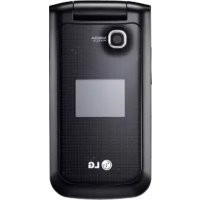
and Off Open the flip. 2.Holddownthe key untilthe phone switcheson.3.Ifthe phone asksfora PIN, enterthePINandpresstheleftsoft key [OK]. Forfurther details, seepage78.The phone searchesforyournetworkandafter finding it, theidlescreen,illustrated below, appearsonthe display. Now, youcanmakeorreceiveacall.4. When youwishtoswitchthe phone off, holddownthe key untilthe power-off image displays. NoteThe display language ispreset
using the Change Codesfeature (Menu
pressing the Send Key 1.Pressthe key, andthemostrecent incoming, outgoing andmissed phone numberswillbe displayed. 2.Selectthedesirednumber
simply looking upanameinthecontactlist.FormoredetailsontheContactList feature, please refertopage67. Adjusting the Volume During call, ifyouwantto adjust the earpiece volume, usetheside keys ofthe phone. Inidlemodewiththe flip coveropen,youcan adjust the ring volume using theside keys. Answering Call When youreceivea call, the phone rings andthe flashing phone iconappearsonthescreen.Ifthecallercanbe identified, thecaller's phone number(or nameifstoredinyourAddress Book) displayed. Open the flip andpressthe key ortheleftsoft key toanswer an incoming call.Ifthe Any Key menu option(Menu
hasbeensetto any key presswillansweracall except forthe key orthe right soft key. 2.Endthecall
closing the phone pressing the key. Notice You can answer
incoming call, pressandholdtheside keys
theleftsideofthe phone without opening the flip. ]IftheAnswerMode menu option(Menu
flip open,youdo not need pressany key. You can answer thecall simply
opening the flip. General FunctionsVibrate Mode (Quick) Whenthe flip opened, VibrateModecanbeactivated
pressing and holding down key. Signal Strength Ifyouareinsidea building, being nearawindowmay give youbetter reception. Youcanseethe strength ofyour signal
predictive text input modeallowsyoutoenterwords easily withaminimumnumberof key presses.Asyoupresseach key, the phone begins display thecharactersthatitthinksyouare typing basedonabuilt-in dictionary. Asnewlettersare added, theword changes toreflectthemost likely candidatefromthe dictionary. When youareinthe
predictive text input mode, start entering aword
pressing keys to.Pressone key perletter. Theword changes aslettersare typed ignore what'sonthescreenuntilthewordis typed completely.
Ifthewordisstillincorrectafter typing completely, pressthedown navigation key onceormoreto cycle through theotherword options. Example: Pressto type Good Press [down navigation key] type Home Ifthedesiredwordis missing fromthewordchoices list, addit
the characters available using the keys. Using the123 (Numbers) ModeThe123Modeenables you
functions that allow youto customize the phone. These functions are arranged
menus and sub-menus, accessed via the two soft keys marked and Each menu and sub-menu allows youto view and alter the settings
particular function. The roles
the soft keys vary according the current context; the label the bottom line
simply pressing the key. During call, youcan reject incoming call
pressing the right soft key and selecting Reject call. Muting the Microphone Youcanmutethe microphone during acall
pressing the right soft key Muteor going tothe [Options] then selecting Mute.Thehandsetcanbeunmuted
pressing the right soft key [Unmute] choosing Unmuteinthe [Options].37 In-Call Menu Multiparty Conference Calls The multiparty orconferenceservice provides youwiththe ability tohaveasimultaneousconversationwithmorethanone caller, ifyournetworkservice provider supports thisfeature.A multiparty callcan only besetupwhenyouhaveoneactivecallandonecallon hold, bothcalls having beenanswered.Oncea multiparty callissetup,callsmaybe added, disconnectedor separated (that is, removedfromthe multiparty callbutstillconnectedto you)
pressing the key. Setting
Conference Call Tosetupaconference call, place onecallonholdandwhilethe activecallison,presstheleftsoft key [Options] thenselect Conference andthen Join. Activate the Conference Call Hold Toactivateaconferencecallon hold, presstheleftsoft key [Options] thenselectRetrieve Call. Adding Calls
Conference Call Tohavea private callwithonecallerfromaconference call, dialanother number, presstheleftsoft key [Options Menu] thenselect Conference andthenPrivate. Ending Conference Call Currently displayed callerfromaconferencecallcanbedisconnected
pressing the key.*:Shown only supported
CPHS(Common PCSHandset Specification) The following illustration shows the available menustructure and indicates the:
Number assigned each menu option.
Page where youcan find the feature description. 1.Sounds (see page 42)
Security Certificates
phone muting turned off hearVoice option. NoteTheVoice option not availableinFrench
Spanish. MessagingText Messages Menu
Your phone canreceivevoicemailnotificationmessagesandShort Message Service (SMS) messages.VoicemailandSMSarenetworkservices.Pleasecontactyourservice provider formoreinformation.Whentheiconappears,youhavereceivedanewvoicemail.Whentheiconappears,youhavereceivedanewtextmessage.Ifthemessagememoryis full, anerrormessageis displayed, theiconflashesandyoucannotreceiveanynewmessages.UsetheDelete option intheInbox (Menu
Shown only supported
SIM cardThe following options areavailable. (Press the right soft key [Attach])
Receivedtextmessages,pagemessagesandemaillistsmaybesearchedandthecontentsmaybeviewed.Receivedmessagesare displayed fromnewesttooldest.The following options areavailable.
Reply: Replies tothereceivedmessage. Delete:DeletestheselectedmessagefromtheInbox. Forward:Forwardsareceivedmessagetoother recipients. After recipients are entered, themessagecanbeforwarded. Return Call: Callbackthesender. Extract:Extractsa phone number, emailaddressfromthemessage. Outbox (Menu
View listsandcontentsofsentmessagesinthismenuandalso verify iftransmissionwassuccessful.The following options areavailable. Delete:DeletestheselectedmessagefromtheOutbox. Forward:Forwardsthecurrentmessagetoother recipients. MessagingMessaging Drafts (Menu
Shown only supported
Subject: Ifyousetittoon,allowsyoutoenterthe subject.
Bearer Setting: Youcanselect GPRS GSM. Contactyournetwork operator orservice provider forinformationrelatedto setting aselected bearer, pricing andconnection speed. GSM Preferred/GPRS Preferred Delete All (Menu
Thismenu provides youwitha quick wayof accessing yourvoicemailbox (if provided
your network). Before using this feature, youmustenterthevoiceservernumberobtainedfromyourservice provider. When newvoicemailis received, the symbol willbe displayed onthescreen.Pleasecheckwithyournetworkservice provider fordetailsoftheirserviceinorder to configure thehandset accordingly. Listen
Before using this feature, youmustenterthevoiceservernumberobtainedfromyourservice provider (see menu option
pressing and holding the key in IdleMode. Voice Mailbox Number (Menu
Allowsyouto change thevoicemailserver number, ifnecessary.
Shown only supported
Youcanorder push messagesfromWAPservice providers. Pushmessagesarenotifications of, for example, newsheadlinesand they maycontaina text messageoraddressofaWAPservice.For availability and subscription, contact yourWAPservice provider. Service providers can update existing push messageeverytimeanew push messageisreceived. Messages canbe updated evenifyouhavemovedthem anotherfolder.Pushmessages expire and they aredeleted automatically. ]Information:Showstheinformationofreceived push messages.]Load:Allowsyou
specific site using theinformationinthereceived push message.]Delete:Deletetheselected push message. Receive (Menu
?Pleasecallmeback? I'm late.I will bethere
Where are you now? I'm onthe way. Urgent! Please contact. ?Iloveyou The following options are available.
Delete: Allows youto delete the selected template message. Business Card (Menu
the Name, Mobile number, Office number,Fax number and E-mail address.
Delete: Allows youto delete the selected name card. Memory Status Menu
Youcan check the currentmemorystatus
each memory for SMS.50Youcanaccessvarious WAP(Wireless Application Protocol) servicessuchas banking, news,weather reports and flight information.Theseservicesare specially designed formobile phones and they aremaintained theWAPservice providers. Checkthe availability ofWAP services, pricing andtariffswithyournetwork operator and/orthe service provider whoseserviceyouwishtouse.Service providers willalso give youinstructionsonhowtousetheirservices.Pleasecontactyourservice provider toopenanInternetaccount.TousetheWeb Browser, youmustindicateyour phone numberviatheOwnNumbermenu option (See page71forfurther details.) Tolaunchthebrowserin standby mode, pressandholddownthe key. Once connected, the homepage displayed. Thecontent depends ontheservice provider. YoucanopenanyWWWpage
TheWAPBrowserversionis displayed. NoteCacheis buffer memory, whichisused to store data temporarily.Javaisa technology developed
description filethatincludesalldetailedinformation.Fromthe network, prior
Displays currentJavaversion.Games
Forfurther details, seepage42.
Theleftsoft key [Options] will bring upthe following options.
Set Ring Tone:This sets the Ring Tonewith currently selected Sound. Graphics Menu5.3Download Graphics (Menu
Rogers graphic downloadsite. Graphics (Menu
Theleftsoft key [Options] will bring upthe following options.
Set Wallpaper: Currently selectedPicturecanbe set asa Wallpaper.
Delete: Currently selectedPicturecanbedeleted. EditTitle:Titleof currently selectedPicturecanbeedited. DeleteAll:AllPicturescanbedeleted. Media Services Note Sounds supplied
Theleftsoft key [Options] will bring upthe following options.
Delete: Currently selectedAnimationcanbedeleted. EditTitle:Titleof currently selectedAnimationcanbeedited. DeleteAll:AllAnimationscanbedeleted.Media ServicesRecent Calls Youcanchecktherecordof missed, receivedanddialedcalls only ifthenetworksupportsthe Calling LineIdentification (CLI) withintheservicearea.Thenumberandname (if available) are displayed together withthedateandtimeatwhichthecallwasmade.Youcanalsoviewcalltimes. Missed Calls Menu
This option letsyouviewthelast10unansweredcalls.Youcanalso:
View thenumberifavailableandcall it, orsaveitin theAddressBook EnteranewnameforthenumberandsavebothintheAddressBook
Send amessagetothisnumber Deletethecallfromthelist Deleteallmissedcallsfromthelist Dialed Calls Menu
Send amessage thisnumber Deletethecallfromthelist Deleteall incoming callsfromthelistReceived Calls Menu
This option letsyouviewthelast20 incoming calls.Youcanalso:?Viewthenumberifavailableandcall it, orsaveitintheAddressBook?EnteranewnameforthenumberandsavebothintheAddressBook?Sendamessage thisnumber?Deletethecallfromthelist?Deleteall incoming callsfromthelist Delete Recent Calls Menu
Allowsyou delete Missed, ReceivedandDialedCallslists.Youcandeleteallcalllists onetime. Call Durations Menu
Allowsyou viewthedurationofyour incoming and outgoing calls.Youcanalso reset thecalltimes.The following timersareavailable: Last Call (Menu
Length ofthelastcall. Received Calls (Menu
Length ofthe incoming calls. Dialed Calls (Menu
Length ofthe outgoing calls.RecentCallsAll Calls (Menu
Cost ofthelastcallmade. All Calls' Cost (Menu
your service provider may vary, depending upon networkfeatures, rounding-off for billing and forth.Recent Calls
your service provider may vary, depending upon networkfeatures, rounding-off for billing tax and forth. Shown only supported
SIM cardCost Settings Menu6.7 Call Cost's Limit (Menu
Thisnetworkserviceallowsyoutolimitthecostofyourcalls selected charging units.IfyouselectRead,thenumberof remaining unitisshown.Ifyouselect Change, you can change your charge limit. Set Tariff (Menu
You can setthecurrencytypeandthe unit price. Contactyourservice providers toobtain charging unit prices. Toselectthe Currency
Shown only supported
Youcanchecktheamountofdatatransferredoverthenetwork through theGPRSinformation option. addition, youcanalsoviewhowmuchtimeyouareonline. WAP Information (Menu
Youcancheckthedatavolumeandtheduration through WAP. External Device (Menu
Youcancheckthedatavolumeandtheduration through GPRS
using anexternaldevicesuchasaserial port. Acablemustbe purchased separately toconnecttoexternaldevice. Total Data (Menu
pressing the right/left navigation keys. 3.Ifyouwanttosetthetimefor activating the alarm, pressthedown navigation key. 4.Enterthe required time, pressthedown navigation key. 5.The following options areavailable. Once:Thealarm rings only onceandisthendeactivated.
Daily: Thealarm rings every day atthesametime.
the specified time, even whenthe phone isswitchedoff. stopthealarmwhenit rings, open the phone andpressthe right soft key[Quit]. ToolsTools Schedule Menu
Whenyouenterthismenuacalendarwillbe displayed. Top ofthescreenindicatessectionsfordate. Square cursorisusedtolocatea particular day. Theunderbaronthecalendarindicatesascheduleormemoonthat day. Thisfunction helps toremindyouofthescheduleandmemo.The phone willsoundanalarmtoneifithasbeensetfora specific note.For changing the day, monthandyear.] View: Presstheleftsoft key [Options] todeleteoreditthenoteyouselected.]Edit:Allowsyoutoedittheschedule.]Delete:Allowsyoutodeletetheschedule.]Add New: Youcaneditmaximumof30charactersandcreateupto30notes.] Calendar:Allows youtoconsultthecalendar.] Scheduler Tone:The phone cansoundanalarmtonewhenthescheduleddateforaneventhasbeenreachedwiththis option. NoteSchedule editing options are available only after initial appointment hasbeenenteredinto your calendar.If entryhasbeen made, then calendariconappears theidle display
thedateofthe appointment, and, when viewing the calendar,
datewith appointments highlighted
shaded differently fromdateswith
appointments. Key Description up/down navigation key left/right navigation key Weekly Daily64Tools] View All Schedules: Showsthenotesthataresetforall days. Usethe up/down navigation keys tobrowse through thenotelists.Youcanusethemenu
pressing theleftsoft key [Options].
ToDate:Allowsyouto jump toa specific date.]DeletePast:Delete past scheduleeventthathas already beennotified.]DeleteAll:Deleteallschedules.Youareaskedtoconfirmyouraction. Calculator Menu
Using this feature, youcanusethe phone asacalculator.Thecalculator provides thebasicarithmeticfunctions: addition, subtraction, multiplication anddivision. Using theCalculator1.Enterthefirstnumber using thenumeric keys. 2.Usethe navigation keys toselecta sign forcalculation.3.Tocalculatethe result, presstheleftsoft key [Result] key. NoteYou can see Edit, Delete,View all schedules, DeletepastandDeleteall menus dependent
setting oftheschedule.Note include decimal point, pressthe key. Note make number negative, pressthe (minus symbol) key prior
pressing the key. NoteThetime zone setting of each city inWorldtime menu may beaffected networkcondition.67 Address Book Youcanstore phone numbersandtheir corresponding namesinthememoryofyourSIMcard.In addition, youcanstoreupto255numbersandnamesinthe phone memory.TheSIMcardand phone memories, although physically separate, areusedasif they werea single entity, calledtheAddressBook. Contact List Menu
3.Ifyouwantto edit, deleteorcopyan entry, select [Options]. 4.Onceyouhavefoundthe required entry, pressthetodialthenumber. ViewDetail:Toviewindetailtheselectedname. Delete:Youcandeletean entry.
Youcanaddaaddressbook entry
withanamelist entry. Youcancall directly
Others.4.Selectthe Group namethatyouwanttomanage
Youcancopythe entry fromtheSIMcardto phone memory. Phone
Youcancopythe entry fromthe phone memorytotheSIMcard.The following options areavailable:] Keep Original: When copying, Original DialNumberis kept. ]Delete Original: When copying, Original DialNumberwillbeerased. Delete All Menu
Ifyouselect Off, youcan only viewthenameof eachmember (Menu 8.4). Information Menu
Service Dial Number (Menu
yournetwork provider(If supported
the SIM card). Such numbersincludetheemergency, directory assistanceandvoicemailnumbers.1. Select the Service dialnumber option. 2.Thenamesoftheavailableservices willbeshown.3.Usethe up/down navigation keys
turning the backlight off.]MainLCDItturnsoffifno key pressed withinoneminute. Offmeansthatthe backlight isneveron. 10Secondsturnsthe backlight off10secondsafterthelast key was pressed.
30Secondsturnsthe backlight off30secondsafterthelast key was pressed.
60Secondsturnsthe backlight off60secondsafterthelast key was pressed.? Always Onturnsthe backlight onwhile flip opened. Contrast (Menu
pressing the navigation key. Languages (Menu
Whenthisnetworkserviceis activated, youcandirectyour incoming calls another number, for example,
yourvoicemailboxnumber.For details, contact yourservice provider. The following options areavailable:]AllVoiceCalls:Divertsvoicecalls unconditionally. ]If Busy: Divertsvoicecallswhenthe phone isinuse.]IfNo Reply: Divertsvoicecallswhichyoudo not answer.]IfOutOfReach:Divertsvoicecallswhenthe phone isswitchedoffor out ofcoverage.]AllDataCalls:Diverts anumberwithaPCconnection unconditionally. ]AllFaxCalls:Diverts anumberwithafaxconnection unconditionally.
Shown only supported
SIM card76 Settings Answer Mode (Menu
opening the flip. Any Key: Youcanansweran incoming call
pressing any key, except the key. ]Send Key Only: Youcananswer an incoming call
only pressing the key. Send
This option allowsyouto specify whetherthe phone must beep everyminute during outgoing callto keep youinformedofthe length ofthecall. Auto Redial (Menu
Select On, andyour phone willmakeamaximumofthree attempts toconnectthecallafteranunsuccessfulcall attempt.
Shown only supported
SIMcard Closed User Group (Menu
Preset: Setting theselected CUG Index. On: Activating and editing the CUG Index. Off: Deleting theselected CUG. Send DTMF (Menu
YoucansendtheDTMF (dual tone multi-frequency) tones ofthenumberonthe display during acall.This option helpful for entering password account numberwhenyoucallanautomated system, likea banking service.Settings Security Menu
Variouscodesand passwords areusedto protect the featuresofyour phone. They aredescribedinthe following sections (see page 25). PIN Code Request (Menu
Call barring allowsyoutorestrictfrom making and receiving callswithyour phone. Forthis function, youneedthe barring password, whichyoucanobtainfromyourservice provider. The following options areavailable:]All Outgoing: Callscannotbemade.] Outgoing International:Internationalcallscannotbemade.]O/G (Outgoing) International Except Home Country: When abroad, callscanbemade only tonumberswithinthecurrent country andtoyourhome country, whichiswhereyourhomenetwork provider islocated.]All Incoming: Callscannotbereceived.] Incoming WhenAbroad:Callscannotbereceivedwhenyouare using your phone outsideyourhomeservicearea.]CancelAll Barrings: Allcall barring settings are deactivated; callscanbemadeandreceived normally. NoteBefore disabling thePINcoderequest feature, you must enter your PIN
Shown only supported
entering again. Fixed Dial Number (FDN) (Menu
Allowsyoutorestrictyour outgoing callstoselected phone numbers, ifthisfunctionis supported
place you can remember
contact your service provider you need to reset your security codes.NoteNotallSIMcardshave PIN2.If your SIMcarddoesnot,this menu option not displayed. Note
use Call Barring service, you must input thenetwork password. Whencalls are barred, calls may possible
certainemergencynumbersin some networks.Connection Menu
Network Selection (Menu
IfyouselectPowerOnandyouareinanetworkthat supports packet data, the phone registers totheGPRSnetworkand sending shortmessageswillbedoneviaGPRS. Also, starting anactive packet data connection, for example, tosendandreceive e-mail, quicker. IfyouselectWhen Needed, the phone willusea packet dataconnection only ifyoustartan application oractionthatneedsit.TheGPRSconnectionisclosedafteritisnotused any application. Settings NoteYou can select networkotherthan your homenetwork only ifithas valid roaming agreementwith your homenetwork.
Shown only supported
ThisallowsProfileinformationtoberestoredto original setting. For example, this option willrestoretheProfilethathasbeendeleted theDeleteAllselectionfromtheAccessPoint (Menu 3.2) submenu. Reset Setting Menu
Settings82Pleasechecktoseeifany problems youhaveencounteredwiththe phone aredescribedinthissectionbefore taking the phone inforaserviceor calling yourservice provider.
HowdoIviewthelistof outgoing calls, incoming callsandmissedcalls? Pressthe key.
HowdoIclearallcall history?
Why istheconnectionnotconsistentor abruptly disconnectsevenwhenestablished? When frequency isunstableorweakoriftherearetoomanyusers,connectionmaybecutoffevenafteritwasestablished.Please try again lateror attempt after relocating tootherareas.
Why doestheLCDnotturnon? Removethe battery andturnonthepowerafter placing itbackon.Ifthereisno change, fully charge the battery and try again. Q&AQ&A
special properties (semi electronic telephone exchange) ofthe equipment ontheotherend.
Why doesthe phone heat up?
The phone may get hotwhenthereisavery long calldurationorwhengamesare played orevenwhen surfing theInternetfora long time.Thishasnoeffectuponthelifeofthe product performance.
Why doesthe battery life get shorterin standby mode? The battery iswornout.Astimepasses,the battery life gradually becomesshorter.Ifthe battery lastsabouthalftheamountoftimeaswhenfirst purchased, it'stimeto purchase anew battery.
Why doesthe battery runoutso quickly during normaluse? Itisduetotheuserenvironmentora large numberofcallsorweak signal.84 Q&A
using theaddressbook Search feature.Re-store them, ifnecessary.
Why can'tmy correspondent reachme? Isyour phone switchedon (pressed formorethanthree seconds)? Areyou accessing the right cellularnetwork? Or, youmayhavesetan incoming call barring option.
Icannotfindthe lock, PINorPUKcode. What ismy password?
Thedefaultlockcodeis'0000'.Ifyou forget orlose thelock code, contactyour phone dealer.Ifyou forget orloseaPINorPUK code, orifyouhavenotreceivedsucha code, contactyournetworkservice provider.85 Travel Charger This adapter allowsyouto charge the battery. supports standardU.S.120Volt60Hzoutlets.Ittakes3hoursto charge completely discharged battery. Battery (760 mAh) Standard battery isavailable. Vehicle Power Adapter Youcan operate the phone andtrickle charge the phone battery fromyourvehicle
using thevehiclepower adapter. Ittakes3hoursto charge completely discharged battery. Therearea variety ofaccessoriesavailableforyourmobile phone. Youcanselectthese options according toyour personal communication requirements. Consultyournetworkservice provider for availability. Accessories86 Headset Connectstoyour phone, allowing hands-free operation. Includes earpiece, microphone and integrated callanswer/terminationbutton. Data Cable Kit Connectsyour phone toaPC.Cablecanbeusedfor GPRS modem connectivity orPC Synch ofyourcalendarandcontacts.AccessoriesTIA Safety Information ProvidedhereinisthecompleteTIASafetyInformationforWirelessHandheldphones.InclusionofthetextcoveringPacemakers,HearingAidsandOtherMedicalDevicesisrequiredintheowner'smanualforCTIACertification.UseoftheremainingTIAlanguageisencouragedwhenappropriate. Exposure toRadio Frequency Signal Your wirelesshandheldportabletelephoneis low-powerradiotransmitterandreceiver.WhenitisON,itreceivesandalsosendsoutradiofrequency(RF)signals. August,1996,theFederalCommunicationsCommissions(FCC)adopted
exposure guidelineswithsafetylevels forhandheldwirelessphones.Thoseguidelines are consistentwiththesafetystandardspreviouslysetbybothU.S.andinternationalstandardsbodies:ANSIC95.1(1992) NCRP Report 86(1986)ICNIRP(1996)Thosestandards were based comprehensiveandperiodicevaluationsoftherelevantscientificliterature. For example, over 120scientists,engineersandphysiciansfromuniversities, government healthagenciesandindustryreviewedtheavailablebodyofresearchtodeveloptheANSIStandard(C95.1).*AmericanNationalStandardsInstitute;NationalCouncil RadiationProtectionand Measurements; InternationalCommission Non-IonizingRadiationProtectionThedesignof your phonecomplieswiththeFCCguidelines(andthosestandards).AntennaCareUseonlythesupplied
approvedreplacementantenna.Unauthorized antennas, modifications attachmentscoulddamagethephoneand may violateFCCregulations. Safety GuidelinesPhone Operation NORMAL POSITION: Holdthe phone asyouwouldanyother telephone withtheantenna pointed upandoveryourshoulder. Tips Efficient Operation Foryour phone operate most efficiently:
Give fullattentionto driving
driving safely isyourfirst responsibility;
Usehands-free operation, available;
Pullofftheroadand park before making answering acallif driving conditionsso require. Electronic Devices Mostmodernelectronic equipment isshieldedfromRF signals. However, certainelectronic equipment maynotbeshielded against theRF signals fromyourwireless phone. Pacemakers TheHealth Industry ManufacturersAssociationrecommendsthataminimum separation ofsix (6') inchesbemaintainedbetweenahandheldwireless phone anda pacemaker toavoid potential interferencewiththe pacemaker. Theserecommendationsareconsistentwiththe independent research andrecommendationsof Wireless Technology Research. Safety GuidelinesSafety GuidelinesPersonswith pacemakers: ]ShouldALWAYS keep the phone morethansixinchesfromtheir pacemaker whenthe phone isturned ON; ]Shouldnotcarrythe phone inabreast pocket. ]Shouldusetheear opposite tothe pacemaker tominimizethe potential forinterference.]Ifyouhaveanyreasonto suspect thatinterferenceis taking place, turnyour phone OFF immediately. Hearing Aids Some digital wireless phones mayinterferewithsome hearing aids.Intheeventofsuch interference, youmaywanttoconsultyourservice provider. Other Medical Devices Ifyouuseanyother personal medical device, consultthemanufacturerofyourdevicetodetermineif they are adequately shieldedfromexternalRFenergy.Your physician maybeabletoassistyouin obtaining thisinformation.Turnyour phone OFFinhealthcarefacilitieswhenany regulations posted intheseareasinstructyoutodoso. Hospitals orhealthcarefacilitiesmaybe using equipment thatcouldbesensitivetoexternalRFenergy. Vehicles signals mayaffect improperly installedor inadequately shieldedelectronic systems inmotorvehicles.Checkwiththemanufacturerorits representative regarding yourvehicle.Youshouldalsoconsultthemanufacturerofany equipment thathasbeenaddedtoyourvehicle. Posted Facilities Turnyour phone OFFinany facility where posted noticesso require.Safety Guidelines Aircraft FCC regulations prohibit using your phone whileintheair.Turnyour phone OFFbefore boarding anaircraft. Blasting Areas Toavoid interfering with blasting operations, turnyour phone OFFwhenina 'blasting area'orinareas posted: 'Turnoff two-way radio'. Obey all signs andinstructions. Potentially Explosive Atmosphere Turnyour phone OFFwheninanyareawitha potentially explosive atmosphere and obey all signs andinstructions. Sparks insuchareascouldcausean explosion orfire resulting bodily injury orevendeath.Areaswitha potentially explosive atmosphere are often, butnot always, marked clearly. Potentialareasmayinclude: fueling areas (such gasoline stations); belowdeckon boats; fuelorchemicaltransferor storage facilities; vehicles using liquefied petroleum gas (such aspropaneor butane); areaswheretheaircontainschemicalsor particles (such grain, dustormetal powders); andanyotherareawhereyouwould normally beadvisedtoturnoffyourvehicle engine. For Vehicles Equipped with
Air Bag Anair bag inflateswith great force.DONOT place objects, including eitherinstalledor portable wireless equipment, intheareaovertheair bag orintheair bag deployment area.Ifin-vehiclewireless equipment improperly installedandtheair bag inflates, serious injury couldresult.Safety Guidelines FDA Consumer Update TheU.S.FoodandDrugAdministration'sCenterforDevicesand Radiological HealthConsumer Update onMobilePhones.1.Dowireless phones pose health hazard? Theavailablescientificevidencedoes not showthat any health problems areassociatedwith using wireless phones. Thereisno proof, however, thatwireless phones are absolutely safe.Wireless phones emitlowlevelsof radiofrequency energy (RF) in themicrowave range while being used. They alsoemit very lowlevelsof wheninthe standby mode.Whereas high levelsof can produce healtheffects (by heating tissue), exposure
lowlevel thatdoes not produce heating effectscausesnoknownadversehealtheffects.Manystudiesoflowlevel
exposures have not found any biological effects.Somestudieshave suggested thatsome biological effects may occur, butsuch findings have not beenconfirmed additionalresearch. some cases, otherresearchershavehad difficulty reproducing those studies, orin determining thereasonsforinconsistentresults.2.WhatistheFDA'srole concerning the safety ofwireless phones? Underthe law, theFDAdoes not reviewthe safety radiation-emitting consumer products suchaswireless phones before they canbe sold, asitdoes withnew drugs ormedicaldevices. However, the agency has authority
take actionifwireless phones areshown emit radiofrequency energy (RF)
alevelthatishazardous theuser. sucha case, theFDAcould require themanufacturersofwireless phones
repair, replace orrecallthe phones sothatthehazardno longer exists. Although the existing scientificdatado not justify FDA regulatory actions, theFDAhas urged thewireless phone industry
takeanumberof steps, including the following:Safety Guidelines
Support needed research into possible biological effects
away that minimizes anyRFexposureto the user that
notnecessary for device function; and
wireless phones with the best possible information possible effects
wireless phone useon human health. The FDA belongs toan interagency working group
the federal agencies that have responsibility for different aspects
safety toensure coordinated efforts the federal level. The following agencies belong this working group:o National Institute for Occupational Safety and Health Environmental Protection Agency Occupational Safety and Health Administration National Telecommunications and Information Administration The National Institutes
some interagency working group activities well. The FDA shares regulatory responsibilities for wireless phones with the Federal Communications Commission (FCC). All phones that are sold
the United States must comply with FCC safety guidelines that limit RFexposure. The FCC relies the FDA and other health agencies for safety questions about wireless phones. The FCC also regulates the base stations that the wireless phone networks rely upon. While these base stations operate higher power than
the wireless phones themselves, the RFexposures that people get from these base stations are typically thousands
times lower than those they can get from wireless phones. Base stations are thus not the subject
the safety questions discussed
phones are the subject
this update? Theterm'wireless phone' refersheretohandheldwireless phones withbuilt-in antennas, oftencalled 'cell', 'mobile'or'PCS' phones. These types ofwireless phones can expose theusertomeasurable radiofrequency energy (RF) because ofthe shortdistancebetweenthe phone andtheuser'shead.These
exposures arelimited FCC safety guidelines thatwere developed withtheadviceoftheFDAandotherfederalhealthand safety agencies. Whenthe phone islocatedat greater distancesfromtheuser,the exposure
drastically lower becausea person's
exposure decreases rapidly with increasing distancefromthesource.Theso-called'cordless phones,' whichhaveabaseunitconnectedtothe telephone wiring ina house, typically operate atfarlower power levels, andthus produce
exposures farbelowtheFCC safety limits. 4.What are the results
the research done already? Theresearchdonethusfarhas produced conflicting results, and many studieshavesufferedfromflawsintheirresearchmethods.Animal experiments investigating theeffectsof radiofrequency energy (RF) exposures characteristicofwireless phones have yielded conflicting resultsthatoftencannotbe repeated inotherlaboratories.Afewanimal studies, however, have suggested thatlowlevelsof couldacceleratethe development ofcancerin laboratory animals. However, many ofthestudiesthatshowedincreasedtumor development usedanimalsthathadbeen genetically engineered ortreatedwith cancer-causing chemicalssoastobe pre-disposed develop cancerintheabsenceof
exposure. Otherstudies exposed theanimalsto for to22hours per day. Theseconditionsarenotsimilartotheconditionsunderwhich people usewireless phones, sowedon'tknowwith certainty whattheresultsofsuchstudiesmeanforhumanhealth.Three large epidemiology studieshave been published sinceDecember2000. Between them, thestudies investigated any possible associationbetweentheuseofwireless phones and primary braincancer, glioma, meningioma, oracousticneuroma,tumorsofthebrainor salivary gland,Safety Guidelines leukemia, orothercancers.Noneofthestudiesdemonstratedtheexistenceofanyharmfulhealtheffectsfromwireless phone RFexposures. However, noneofthestudiescananswer questions about long-term exposures,sincetheaverage period phone useinthesestudieswasaroundthreeyears. 5.What research
needed decide whether exposure from wireless phones poses
health risk? Acombinationof laboratory studiesand epidemiological studiesof people actually using wireless phones would provide someofthedatathatareneeded.Lifetimeanimalexposurestudiescouldbe completed inafewyears. However, very large numbersofanimalswouldbeneeded
provide reliable proof ofacancer promoting effectifoneexists. Epidemiological studiescan provide datathatis directly applicable
human populations, but10ormoreyears follow-up maybeneeded
provide answersaboutsomehealth effects, suchascancer.Thisisbecausetheintervalbetweenthetimeofexposure
maybemany,manyyears.The interpretation epidemiological studiesis hampered
difficultiesin measuring actualRFexposure during day-to-day useofwireless phones. Many factorsaffectthismeasurement,suchasthe angle
whichthe phone held, orwhichmodelof phone isused. 6.What
the FDA doing tofindout more about the possible health effects
wireless phone RF?TheFDAis working withtheU.S.National Toxicology Program andwithgroupsof investigators aroundtheworld ensurethat high priority animalstudiesareconducted address important questions abouttheeffectsofexposure
radiofrequency energy (RF). TheFDAhasbeena leading participant intheWorldHealth Organization International Electromagnetic Fields (EMF) Project sinceits inception in1996.Aninfluentialresultofthisworkhasbeenthe development ofadetailed agenda ofresearchneedsthathasdriventheestablishmentofnewresearchprogramsaroundtheworld.The project hasalso helped develop aseriesof public informationdocumentsonEMFissues.Safety Guidelines TheFDAandtheCellularTelecommunications&InternetAssociation (CTIA) haveaformal Cooperative Researchand Development Agreement (CRADA) todoresearchonwireless phone safety. TheFDA provides thescientific oversight, obtaining input from experts government, industry andacademic organizations. CTIA-fundedresearchisconducted through contractswith independent investigators. Theinitialresearchwillincludeboth laboratory studiesandstudiesofwireless phone users.TheCRADAwill alsoincludeabroadassessmentofadditionalresearchneedsinthecontextofthelatestresearch developments aroundtheworld. 7.How can
find out how much radio frequency energy exposure
wireless phone? All phones soldin the United States must comply withFederalCommunicationsCommission (FCC) guidelines thatlimitradio frequency energy (RF) exposures.TheFCCestablishedthese guidelines inconsultationwiththeFDAandtheotherfederalhealthand safety agencies. TheFCClimitforRFexposurefromwireless telephones issetata Specific Absorption Rate (SAR) of1.6wattsper kilogram (1.6 W/kg). TheFCClimitisconsistentwiththe safety standards developed
theInstituteofElectricalandElectronic Engineering (IEEE) andtheNationalCouncilonRadiationProtectionandMeasurement.Theexposurelimittakesintoconsiderationthe body's ability toremoveheatfromthetissuesthatabsorbenergyfromthewireless phone andissetwellbelowlevelsknowntohaveeffects.Manufacturersofwireless phones must report theRFexposurelevelforeachmodelof phone totheFCC.TheFCCwebsite (http://www.fcc.gov/oet/ rfsafety) gives directionsfor locating theFCCidentificationnumberonyour phone soyoucanfindyour phone's RFexposurelevelintheonline listing. 8.What has the FDA done
measure the radio frequency energy coming from wireless phones? TheInstituteofElectricalandElectronic Engineers (IEEE) developing atechnicalstandardfor measuring theradio frequency energy (RF)Safety Guidelinesexposurefromwireless phones andotherwirelesshandsetswiththe participation and leadership ofFDAscientistsand engineers. The standard, 'RecommendedPracticefor Determining the Spatial-Peak Specific Absorption Rate (SAR) intheHuman Body DuetoWirelessCommunicationsDevices: Experimental Techniques,' setsforththefirstconsistenttest methodology for measuring therateatwhichRFis deposited intheheadsofwireless phone users.Thetestmethodusesa tissue-simulating modelofthehumanhead.StandardizedSARtest methodology expected greatly improve the consistency ofmeasurementsmadeatdifferentlaboratoriesonthesame phone. SARisthemeasurementoftheamountofenergyabsorbedin tissue, either thewhole body orasmall part ofthe body. Itismeasuredin watts/kg (or milliwatts/g) ofmatter.Thismeasurementisusedtodeterminewhetherawireless phone complies with safety guidelines. 9.What steps can
exposure radiofrequency energy from
wireless phone? Ifthereisariskfromthese products
andatthis point wedonotknowthatthereis itis probably verysmall.Butifyouareconcernedabout avoiding even potential risks, youcantakeafew simple steps tominimizeyourexposureto radiofrequency energy (RF). Sincetimeisa key factorinhowmuchexposureaperson receives, reducing theamountoftime spent using awireless phone willreduceRFexposure.Ifyoumustconductextendedconversations wireless phone every day, youcould place moredistancebetweenyour body andthesourceofthe RF, since theexposurelevel drops off dramatically withdistance.For example, youcoulduseaheadsetandcarrythewireless phone awayfromyour body oruseawireless phone connectedtoaremoteantenna. Again, thescientificdatadonotdemonstratethatwireless phones areharmful.ButifyouareconcernedabouttheRFexposurefromthese products, youcanusemeasureslikethosedescribedabovetoreduceyourRFexposurefromwireless phone use.Safety Guidelines 10.What about children using wireless phones? Thescientificevidencedoesnotshowa danger tousersofwireless phones, including childrenand teenagers. Ifyouwanttotake steps tolowerexposureto radiofrequency energy (RF), themeasuresdescribedabovewould apply tochildrenand teenagers using wireless phones. Reducing thetimeofwireless phone useand increasing thedistancebetweentheuserandtheRFsourcewillreduceRFexposure.Somegroups sponsored
othernational governments haveadvisedthatchildrenbe discouraged from using wireless phones atall.For example, the government intheUnited Kingdom distributedleaflets containing sucharecommendationinDecember2000. They notedthatnoevidenceexiststhat using awireless phone causesbraintumorsorotherilleffects.Theirrecommendationtolimitwireless phone use childrenwas strictly precautionary; itwasnotbasedonscientificevidencethatanyhealthhazardexists. 11.What about wireless phone interference with medical equipment? Radio frequency energy (RF) fromwireless phones caninteractwithsomeelectronicdevices.Forthisreason,theFDA helped develop adetailedtestmethodtomeasure electromagnetic interference (EMI) implanted cardiac pacemakers anddefibrillatorsfromwireless telephones. Thistestmethodisnow part ofastandard sponsored
theAssociationfortheAdvancementofMedicalinstrumentation (AAMI). Thefinal draft, joint effort the FDA, medicaldevicemanufacturersandmanyothergroups,was completed inlate2000.Thisstandardwillallowmanufacturerstoensurethatcardiac pacemakers anddefibrillatorsaresafefromwireless phone EMI.TheFDAhastested hearing aidsforinterferencefromhandheldwireless phones and helped develop voluntary standard sponsored
find additional information? Foradditional information, please refertothe following resources:FDAwebpageonwireless phones (http://www.fda.gov/cdrh/phones/index.html) FederalCommunicationsCommission (FCC) Safety Program (http://www.fcc.gov/oet/rfsafety) InternationalCommissionon Non-lonizing RadiationProtection (http://www.icnirp.de) World Health Organization (WHO) InternationalEMF Project (http://www.who.int/emf) National Radiological ProtectionBoard (UK) (http://www.nrpb.org.uk/)Safety Guidelines Consumer Information SAR (Specific Absorption Rate) This Model Phone Meets the Government's Requirements for Exposure Radio Waves. Yourwireless phone isaradiotransmitterandreceiver.Itis designed andmanufacturednottoexceedtheemissionlimits forexposuretoradio frequency (RF) energyset theFederalCommunicationsCommission (FCC) oftheU.S.Government.Theselimitsare part comprehensive guidelines andestablish permitted levelsofRFenergyforthe general population. The guidelines arebasedonstandardsthatwere developed
independent scientific organizations through periodic and thorough evaluationofscientific studies.Thestandardsincludeasubstantial safety margin designed toassurethe safety ofallpersons, regardless ofageandhealth.Theexposurestandardforwirelessmobile phones employs aunitofmeasurementknownasthe Specific Absorption RateorSAR.TheSARlimitset theFCCis 1.6W/kg.
TestsforSARareconducted using standard operating positions specified
theFCCwiththe phone transmitting atits highest certifiedpowerlevelinalltested frequency bands. Although SARisdeterminedatthe highest certifiedpower level, the actualSARlevelofthe phone while operating canbewellbelowthemaximumvalue.Becausethe phone designed operate multiple powerlevelstouse only thepower required toreachthe network, general, the closeryouaretoawirelessbasestation antenna, thelowerthepower output. Beforea phone modelisavailableforsaletothe public, itmustbetestedandcertifiedtotheFCCthatitdoesnotexceedthelimitestablished the government-adopted requirement forsafeexposure.Thetestsare performed positions andlocations (e.g., attheearandwornonthe body) required
W/kg. (Body-worn measurements differ among phone models, depending upon available accessories and FCC requirements.) While there may
differences between SAR levels
various phones and various positions, they all meet the government requirement for safe exposure. The FCC has granted Equipment Authorization for this model phone with all reported SAR levels evaluated
compliance with the FCC emission guidelines. SAR information this model phone
file with the FCC and can
found under the Display Grant section
Additional information Specific Absorption Rates (SAR) can
found the Cellular Telecommunications Industry Association (CTIA) website http://www.wow-com.com *In the United States and Canada, the SAR limit for mobile phones used
watts/kg (W/kg) averaged overonegram
tissue. The standard incorporates substantial margin
safety give additional protection for the public and toaccount for any variations
measurements.To help youunderstandthemaintechnicaltermsandabbreviationsusedinthisbookletandtakefull advantage ofthe featureonyourmobile phone, hereareafewdefinitions. Call Barring Ability torestrict outgoing and incoming calls. Call Forwarding Ability toreroutecallstoanothernumber. Call Waiting Ability toinformusersthat they havean incoming callwhen engaged onanothercall. GPRS (General Packet Radio Service) GPRS guarantees continuousconnectiontotheInternetformobile phone and computer users.ItisbasedontheGlobal System forMobileCommunication (GSM) circuit-switchedcellular phone connectionsandtheShort Message Service (SMS). GSM (Global System for Mobile Communication) Internationalstandardforcellular communication, guaranteeing compatibility betweenthevariousnetwork operators. GSMcoversmost European countriesandmanyother parts oftheworld. GlossaryJava Programming language generating applications thatcanrunonallhardware platforms, whether small, mediumor large, withoutmodification.Ithasbeen promoted forand geared heavily tothe Web, bothfor public WebsitesandIntranets.WhenaJavaprogramrunsfromaWebpage,itiscalledaJava applet. Whenitisrunonamobile phone orpager,itiscalledaMIDlet. Line Identification Services (Caller ID) Service allowing subscriberstovieworblockthe telephone numbersofcallers. Multiparty Calls Ability toestablishaconferencecall involving uptofiveadditional parties. Phone Password Security codeusedtounlockthe phone whenyouhaveselectedthe option tolockit automatically eachtimeitswitcheson. Roaming Useofyour phone whenyouareoutsideyourhomearea (when traveling for example). SIM (Subscriber Identification Module) Card containing chip withalltheinformation required operate the phone (network andmemory information, aswellasthesubscriber's personal data). TheSIMcardfitsintoasmallslotonthebackofthe phone andis protected
the battery. GlossaryGlossary SMS (Short Message Service) Network service sending and receiving messages and from another subscriber without having speak the correspondent. The message created received (up
characters long) can
Wallpaper 72WAPBrowser 50,52 WAP Information 52,61 World Time66 Write Message 44MemoMemoMemoMemoMemoMemo1. Press the left soft key [Menu].
2. Scroll with the up/down navigation keys through the list of menus
until you reach the required menu.3. Press the left soft key [Select].
4. Scroll with the up/down navigation keys through the list of options
until the required one is selected.
5. Press the left soft key [Select] to confirm.
Power on/offPress and hold .Making a Call1. Key in the number.
End a Call Briefly press the key. Answer a Call Open the flip and press the key. Adjust the Volume Press the Side keys of the phone. Store numbers in 1. Key in the number.
key, (Volume) and (Ringtone).
Selection reseau (Menu
ReponsesQuestions Reponses
Cellular Telecommunications Industry Association (CTIA),
Boite recept. 45,48 Boite emiss.