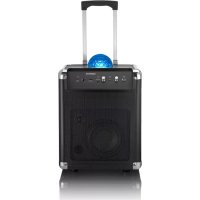
PA325 - Docking station LENCO - Free user manual and instructions
Find the device manual for free PA325 LENCO in PDF.


| Product type | Docking station / Mobile Bluetooth hi-fi system with disco ball |
| Model | PA-325 |
| Power supply | 230 V ~ 50 Hz, protection class II |
| Rechargeable battery | Lead 12 V, 4000 mAh (non-replaceable) |
| Charging time | Approximately 6 hours |
| Playtime | At least 5 hours (depending on volume and disco ball usage) |
| Connectivity | Bluetooth 2.1+EDR (A2DP, AVRCP, HSP, HFP); AUX (3.5 mm stereo jack); Microphone (6.3 mm jack); USB charging (5 V, 1 A) |
| Bluetooth range | Approximately 10 meters |
| Output power | 40 watts RMS |
| Speaker | 2-way |
| Light effects | Disco ball with LED (LIGHT switch) |
| Controls | Master volume (MASTER VOLUME), microphone volume (MIC 1 VOLUME), Bluetooth button, POWER and LIGHT switches |
| Inputs | AUX (3.5 mm jack), Microphone (6.3 mm jack), USB charging (type A) |
| Additional functions | Retractable handle with wheels for transport; charging of mobile devices via USB |
| Care and cleaning | Use a soft, lint-free cloth; avoid caustic, aggressive or abrasive products |
| Safety | Do not expose to water or moisture; do not look directly at the disco ball; maintain a ventilation space of at least 5 cm; do not open the housing |
| Spare parts and repairability | Battery not user-replaceable; LEDs not replaceable; contact after-sales service for any repairs |
| Ambient temperature | Use and charge between +10 °C and +40 °C |
| Color | Black (according to visuals) |
Frequently Asked Questions - PA325 LENCO
User questions about PA325 LENCO
0 question about this device. Answer the ones you know or ask your own.
Ask a new question about this device
Download the instructions for your Docking station in PDF format for free! Find your manual PA325 - LENCO and take your electronic device back in hand. On this page are published all the documents necessary for the use of your device. PA325 by LENCO.
USER MANUAL PA325 LENCO
natural_image
3D technical illustration of a computer tower case with hexagonal top panel and control buttons (no text or symbols)Mobile Bluetooth® Sound System with built-in disco ball
Dear Customer
With its powerful sound and atmospheric light effects, your new mobile Bluetooth ^® sound system will help get any party going.
We hope you will enjoy using this product.
Contents
3 About these instructions
10 Connecting a microphone or another external audio device
3 Safety warnings 10 Connecting a microphone
6 At a glance (features) 10 Connecting an external audio device
7 Prior to first use
11 Charging mobile devices via USB
7 Charging the battery 11 Light effects
8 Connecting to a Bluetooth ^® device
12 Transporting the Bluetooth ^® sound system
8 Turning the system on/off
8 Establishing a Bluetooth connection
13 Technical specifications
9 Reset 15 Declaration of Conformity
9 Bluetooth®: Playing music 16 Disposal
9 Playing music
9 Adjusting the volume
About these instructions
This product is equipped with safety features. Nevertheless, read the safety warnings carefully and only use the product as described in these instructions to avoid accidental injury or damage.
Keep these instructions for future reference.
If you pass this product on to another person, remember to give them these instructions.
Symbols used in these instructions:

This symbol warns you of the danger of injury.

This symbol warns you of the danger of injury caused by electricity.
The term DANGER warns of potential severe injury and danger to life.
The term WARNING warns of injury and severe material damage.
The term CAUTION warns of minor injury or material damage.

This indicates additional information.
Safety warnings

Intended use
The sound system is intended as a sound output device for mobile playback devices such as smartphones, tablets, notebooks, MP3 players, etc. using Bluetooth® or an audio cable.
The sound system is designed for private use and is not suitable for commercial purposes.
Use the product only in moderate climatic conditions.
DANGER to children
- Children are not aware of the risks involved when handling electric appliances incorrectly. Therefore, keep children away from the product.
- Keep all packaging material out of the reach of children.
There is a risk of suffocation!
DANGER due to electricity
- Do not immerse the sound system or the mains cord in water or other liquids. Do not use the sound system outdoors or in rooms with high humidity.
- Do not make any modifications to the product. Only have repairs to the product carried out by a specialist workshop, or contact the customer care service. Improper repairs can result in considerable risks to the user.
- Do not open or remove any part of the casing. Do not insert any objects into openings in the casing.
- Only connect the sound system to a properly installed and easily accessible wall socket with the mains voltage listed in the “Technical specifications”.
- Ensure that the mains cord is not kinked or squeezed.
- Never connect the mains cord to the mains supply if it shows any signs of damage.
- Remove the mains plug from the wall socket during thunderstorms. Always pull the plug, not the mains cord.
- To fully disconnect the device from the mains supply, you must remove the mains plug from the wall socket. The wall socket used must be easily accessible so that the mains plug can be removed quickly if necessary. Route the mains cord in such a way as to ensure that it cannot be tripped over.
- Do not put any containers filled with liquids, such as vases, on or within close proximity of the sound system. They could topple over and the liquid could impair the electrical safety of the device. Protect the sound system from moisture as well as drips and splashes of water. There is a risk of an electric shock.
DANGER – risk of eye damage
- Do not look directly at the disco ball when activated and, if applicable, instruct your guests accordingly.
DANGER – damage to health
- Persons with light-sensitive epilepsy may suffer from epileptic seizures or fall unconscious when experiencing special flashing light signals or light patterns in their day-to-day life. This may also happen to persons who have not previously shown any symptoms of epilepsy or suffered from epileptic seizures.
WARNING – risk of burns/fire
- You cannot and must not attempt to replace the rechargeable battery yourself. There is a risk of explosion if the battery is replaced incorrectly. It should be replaced only with an identical battery or one of equivalent value. If the rechargeable battery is defective, contact a specialist work- shop or the customer care service.
- Do not operate the sound system in closed cabinets or on shelves with insufficient ventilation. The sound system must have at least 5 cm free on all sides.
- The openings on the product must not be covered by any objects such as newspapers, tablecloths, curtains, etc., which would impair ventilation.
- Do not place any naked flames such as burning candles on or near the sound system. The product must be kept away from candles and other naked flames at all times to prevent the spread of fire.
- The product contains a lead acid rechargeable battery. This must not be taken apart, thrown into fire or short-circuited.
CAUTION – material damage
- Do not connect the sound system to the speaker output of a separate amplifier as this may damage the product.
-
Protect the sound system from dust, moisture and from intense heat such as direct sunlight or heaters.
• Taking the sound system from a cold place to a warm place may cause condensation to form inside. In this case, leave the product switched off for a few hours. -
Do not use any caustic, aggressive or abrasive products for cleaning. Use only a soft, lint-free cloth.
- Avoid direct contact between the sound system and any magnetised ID cards, phone cards, credit cards, etc. as well as audio tapes, watches, etc. These could be damaged by the integrated magnets in the sound system.
- Some varnishes, synthetic substances and types of furniture polish may react adversely with the material of the non-slip feet and soften them. To avoid unwanted marks on surfaces, place a non-slip mat underneath the product if necessary.
- Due to the long service life of the LEDs under the disco ball, it is not necessary to replace them. They cannot and must not be replaced. The LEDs are firmly built-in under the disco ball. Removing them could damage the product.
- Do not use any caustic, aggressive or abrasive products for cleaning. Use only a soft, lint-free cloth.
- Avoid direct contact between the sound system and any magnetised ID cards, phone cards, credit cards, etc. as well as audio tapes, watches, etc. These could be damaged by the integrated magnets in the sound system.
- Some varnishes, synthetic substances and types of furniture polish may react adversely with the material of the non-slip feet and soften them. To avoid unwanted marks on surfaces, place a non-slip mat underneath the product if necessary.
- Due to the long service life of the LEDs under the disco ball, it is not necessary to replace them. They cannot and must not be replaced. The LEDs are firmly built-in under the disco ball. Removing them could damage the product.
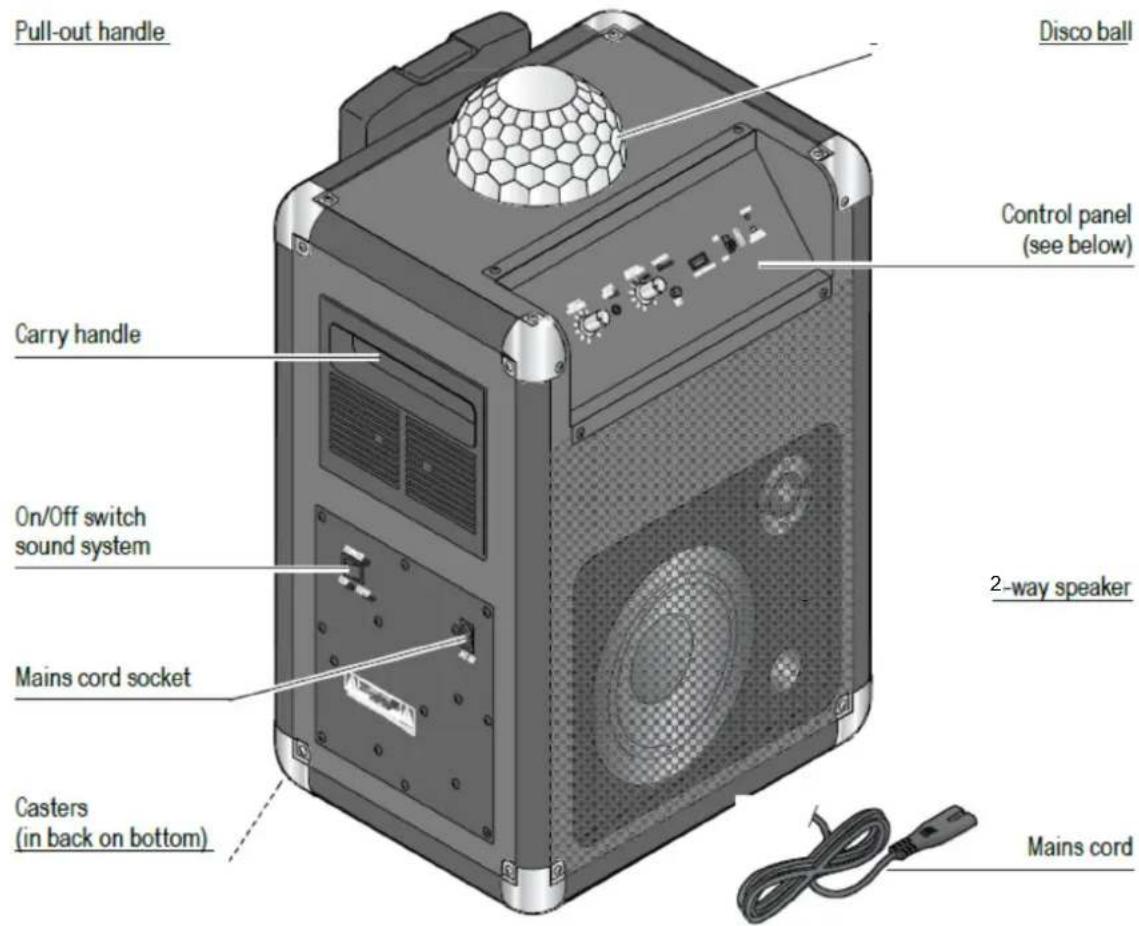
At a glance (features)
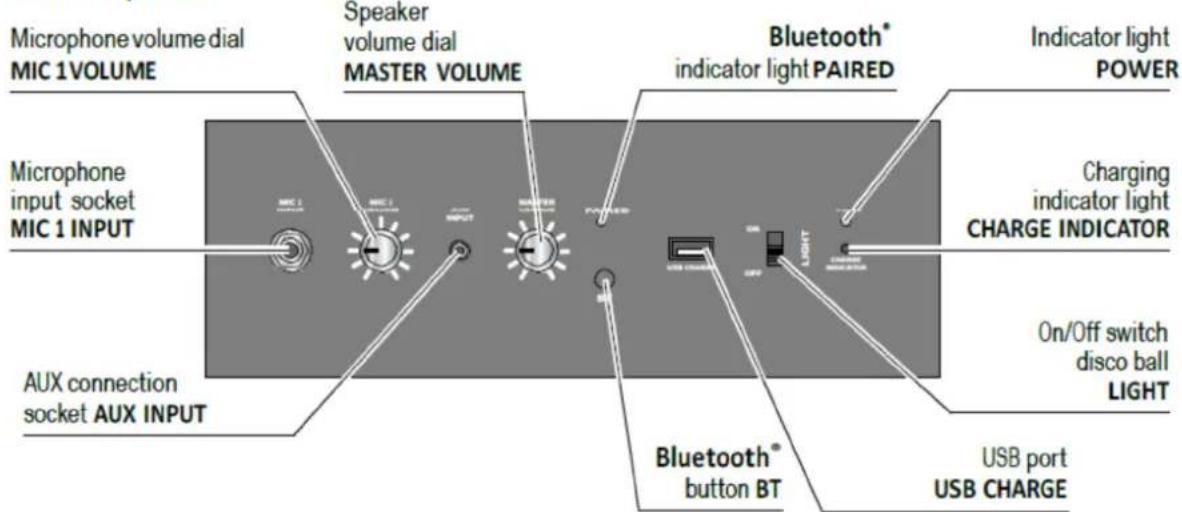
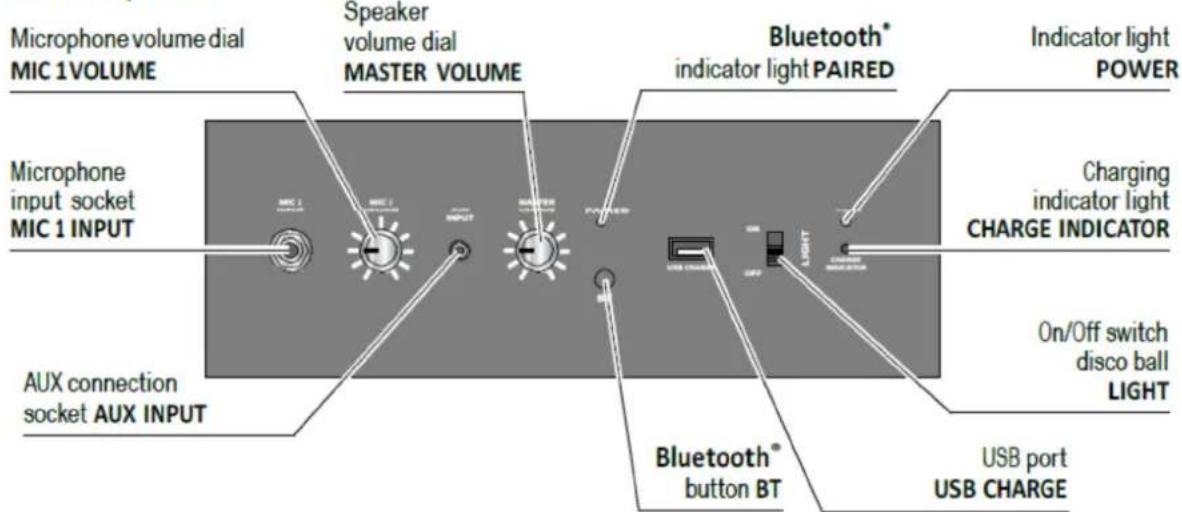
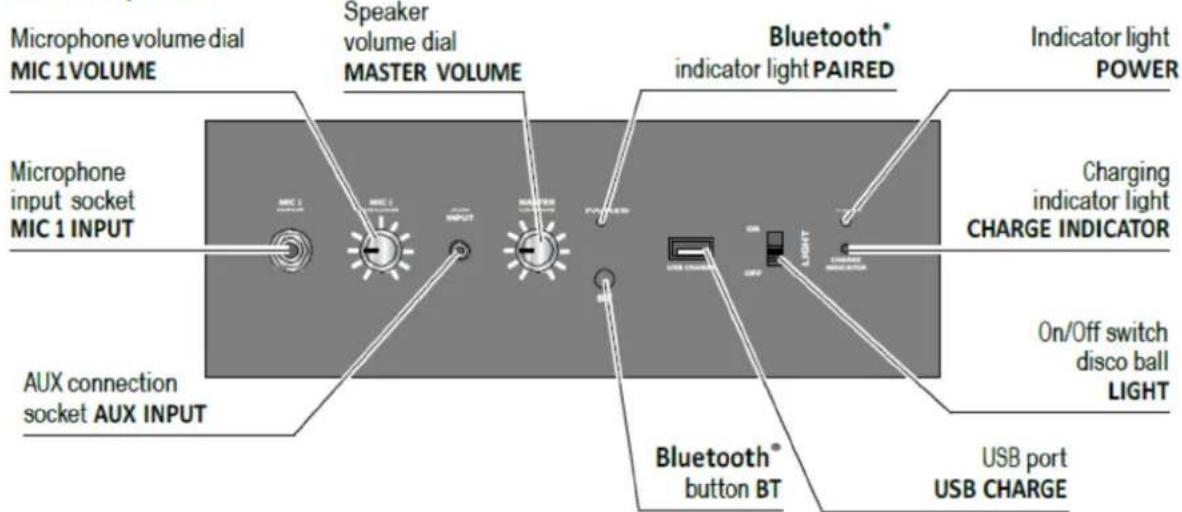
Control panel
| EN | EN |
| Pull-out handle Pull-out handle | |
| Carry handle Carry handle | |
| On/Off switch sound system On/Off switch sound system | |
| Mains cord socket Mains cord socket | |
| Casters (in back on bottom) Casters (in back on bottom) | |
| Disco ball Disco ball | |
| Control panel (see below) Control panel (see below) | |
| 2-way speaker 2-way speaker | |
| Mains cord Mains cord | |
| Control panel Control panel | |
| Microphone volume dial MIC 1 VOLUME | Microphone volume dial MIC 1 VOLUME |
| Speaker volume dial MASTER VOLUME | Speaker volume dial MASTER VOLUME |
| Bluetooth® indicator light PAIRED Bluetooth | ® indicator light PAIRED |
| Indicator light POWER | Indicator light POWER |
| Charging indicator light CHARGE INDICATOR | Charging indicator light CHARGE INDICATOR |
| On/Off switch disco ball LIGHT | On/Off switch disco ball LIGHT |
| USB port USB CHARGE | USB port USB CHARGE |
| Bluetooth® button BT | Bluetooth® button BT |
| AUX connection socket AUX INPUT | AUX connection socket AUX INPUT |
| Microphone input socket MIC 1 INPUT | Microphone input socket MIC 1 INPUT |
Prior to first use
To avoid damage to the rechargeable battery, it is only half charged when supplied. Charge the battery fully before using for the first time.
Charging the battery
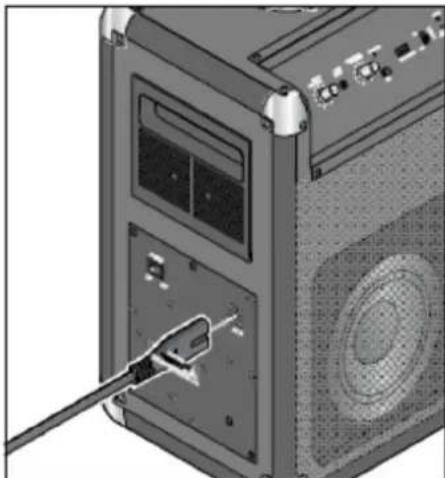
You can use the provided mains cord to charge the rechargeable battery of the Bluetooth® sound system.
- Make sure that the POWER switch is set to OFF.
natural_image
3D rendering of a computer tower with an attached cable showing the internal component (no text or symbols visible)- Insert the mains cord into the connection socket AC IN of the Bluetooth® sound system as illustrated.
- Plug the mains plug into an accessible wall socket and switch the power switch to ON.
The CHARGE INDICATOR light flashes red at short intervals. When the battery is empty, it normally takes around 6 hours to fully charge it. Once the rechargeable battery is fully charged, the charging indicator light will turn green.
The playback time via Bluetooth® is at least 5 hours (depending on the volume and if the disco ball is switched on/off, etc.).

- You can use the sound system while it is charging. However, this will increase the charging time.
- To preserve the rechargeable battery's full capacity for as long as possible, you should fully recharge the battery at least once a month, even if you do not use the sound system.
- Charge the battery in an environment between +10 and +40°C.
- The battery will best hold its charge at room temperature. The lower the surrounding temperature, the shorter the playback time.
• The battery needs to be recharged if the CHARGE INDICATOR light turns red.
Connecting to a Bluetooth® device
When power on the Bluetooth sound system, the Bluetooth indicator is flashing.

• You may be required to enter a password. If so, enter 0000.
• Always refer to the instruction manual for your mobile device.
• The audio cable must not be inserted into the AUX INPUT connection socket.
Turning the Bluetooth ^® sound system on/off
m Set the POWER switch to ON to switch the Bluetooth® sound system on.
m Set the POWER switch to OFF to switch the Bluetooth® sound system off.
Establishing a Bluetooth ^® connection
- Switch the Bluetooththund system on.
- Press and hold the BT button for approx. 3 seconds. A short melody will sound followed by 2 short beeps.
- Release the BT button.
- Switch on your mobile device.
- Activate the Bluetooth function on your mobile device.
- Start the device scan on your mobile device.
- Select Lenco PA-325 from the list and connect the devices.
Once the devices are connected with each other, a short melody will sound. The Bluetooth ^® indicator light lights up.

- If you switch the Bluetooth ^ sound system off for a while, it will automatically connect with the device connected before when it is switched back on again. If not, you need to press and hold the BT button for approx. 1 second (short melody will sound) to have it reconnect with the Bluetooth ^ device.
The Bluetooth ^® device must be placed nearby, switched on and Bluetooth ^® must be activated. Once the Bluetooth ^® device has been connected, two short beeps will sound.
- If you connect a device to the AUX INPUT connection socket, it will be the preferred connection for playback. The transmission from the Bluetooth® device will be paused. The transmission from the Bluetooth® device will not resume until you remove the plug from the AUX INPUT connection socket.
Disconnecting a Bluetooth ^® connection
There can only be one device connected to the Bluetooth ^® sound system via Bluetooth ^® at any time.
If you would like to pair another device, you must first end the existing connection by...
... switching off the Bluetooth® function on your mobile device or
... keeping the Bluetooth® button BT pressed for approx. 3 seconds. A short melody will sound.
Reset
Electromagnetic interference around the device could lead to malfunctions. If the device does not connect, proceed as follows:
- Move the device away from the electromagnetic interference.
-
Switch the Bluetoothband system off (POWER switch is set to OFF).
-
Wait for approx. 10 seconds.
- Switch the Bluetooth ^® sound system on (POWER switch is set to ON).
Bluetooth®: Playing music
Playing music
The Bluetooth ^® sound system can play back music in all standard file formats supported by your playback device.
The Bluetooth ^® sound system also supports the transmission standard A2DP. This standard is supported by most current smartphones and was specially developed for the wireless transmission of stereo audio signals via Bluetooth ^® .

It may be necessary to manually activate the A2DP transmission mode on your mobile device. For this, refer to the instruction manual for the mobile device.
m Start playback by activating the corresponding function on your mobile device and starting to play music.
m Pause and stop playback on your mobile device.
Adjusting the volume
m You can increase or decrease volume by turning the MASTER VOLUME dial clockwise or anti-clockwise.
Connecting a microphone or another external audio device
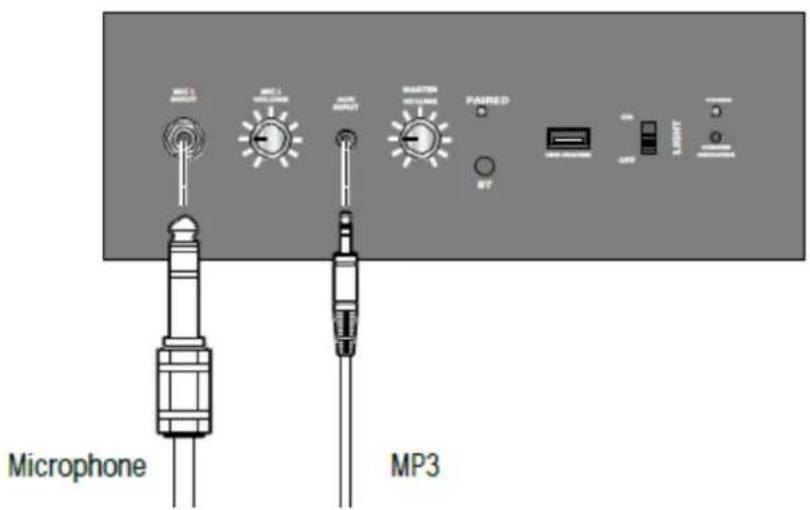
| EN | EN |
| Microphone | Microphone |
| MP3 | MP3 |
Connecting a microphone
- Make sure that the Bluetooth ^® sound system is switched off (POWER switch is set to OFF).
- Decrease the volume on the Bluetooth ^® sound system.
- Insert the connecting plug of your microphone (not included in delivery) into the MIC 1 INPUT connection socket.
- Switch the Bluetoothband system on (POWER switch is set to ON).
- You can increase or decrease the microphone volume by turning the MIC 1 VOLUME dial clockwise or anti-clockwise.
Connecting an external audio device
- Switch the Bluetooth system and the external audio device off and decrease volume.
- Connect the headphones output on the playback device to the AUX INPUT connection socket on the Bluetooth® sound system using an audio cable (not included in the delivery).
- Switch on both devices.
- Start or stop playback on the playback device.
- Increase or decrease the volume on the playback device and on the Bluetooth ^® sound system.
- Switch off the two devices before disconnecting them.
Charging mobile devices via USB

The USB CHARGE connection socket allows you to charge the batteries of mobile devices up to max. 5V, 1A that are designed to do so and have the necessary USB interface (e.g. MP3 players, smartphones, etc.). Observe the technical specifications of the devices you wish to connect.
- Switch off the mobile device you wish to charge.
- Connect the mobile device to be charged and the Bluetooth ^® sound system by using a suitable USB connecting cable and insert it into the USB CHARGE connection socket on the sound system.
The mobile device connected will be charged.
Light effects

DANGER – health hazard
- Persons with light-sensitive epilepsy may suffer from epileptic seizures or fall unconscious when experiencing special flashing light signals or light patterns in their day-to-day life. This may also happen to persons who have not previously shown any symptoms of epilepsy or suffered from epileptic seizures.
- Do not look directly at the disco ball when activated and instruct your guests accordingly.
m Slide the LIGHT on/off switch to ON, to switch on the LEDs in the disco ball.
m Slide the LIGHT on/off switch to OFF, to switch off the LEDs in the disco ball.
Transporting the Bluetooth® sound system
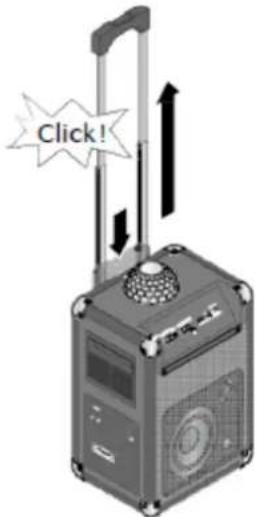
Click
Press and hold the button on top of the pull-out handle and pull the handle out until it stops.
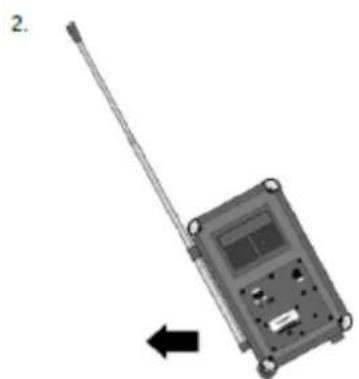
natural_image
Illustration of a handheld electronic device with a long pole and a left-pointing arrow (no text or symbols)Now you can pull the Bluetooth® sound system like a trolley suitcase.
Technical specifications
Model: PA-325
Mains voltage: 230 V \~ 50 Hz
Protection class: II
Rechargeable battery lead acid battery 12 V 4000mAh
(non-replaceable)
Charging time: approx. 6 hours
Playback time: At least 5 hours (at normal use)
Connections
USB: 5V—1A
AUX: 3.5 mm, stereo jack
Microphone: 6.3 mm, phono plug
Amplifier
Output power: 40 watts RMS
Bluetooth®
Version:
2.1+EDR
(A2DP, AVRCP, HSP, HFP)
Range: approx. 10 m
Ambient temperature: +10 to +40°C
Manufactured by: Lenco Group BV
Thermiekstaat
1a
6361 HB Nuth
Netherlands
In the course of product improvement, we reserve the right to make technical and optical modifications to the product.

Problems/solutions
Not working • Is the rechargeable battery flat or very low?
(Depending on the playback device you may be able to view the battery status of the sound system.) Charge the rechargeable battery of the Bluetooth® sound system by using the provided mains cord inserted into a wall socket.
No Bluetooth® connection
- Is your mobile device Bluetooth ^ -compatible? Refer to the instruction manual for the mobile device.
- Is Bluetooth®theactivated on your playback device? Check the settings. Activate Bluetooth® if necessary. Check whether the sound system appears in the list of detected devices. Place the devices close together. Remove any other radio communication devices from the surrounding area.
- Do you require a password for your playback device? Check the settings.
No audio playback • Is the volume on the playback device set too low?
- Is the volume on the Bluetooth ^ sound system set too low?
GUARANTEE
Lenco offers service and warranty in accordance with the European law, which means that in case of repairs (both during and after the warranty period) you should contact your local dealer.
Important note: It is not possible to send products that need repairs to Lenco directly.
Important note: If this unit is opened or accessed by a non-official service center in any way, the warranty expires.
This device is not suitable for professional use. In case of professional use, all warranty obligations of the manufacturer will be voided.
DISCLAIMER
Updates to Firmware and/or hardware components are made regularly. Therefore some of the instruction, specifications and pictures in this documentation may differ slightly from your particular situation. All items described in this guide are for illustration purposes only and may not apply to particular situation. No legal right or entitlements may be obtained from the description made in this manual.
Declaration of Conformity
Lenco hereby declares that this product PA-325 is in compliance with the essential requirements and other relevant provisions of Directive RED2014/53/EU at the time of its being placed on the market. The complete Declaration of Conformity can be found at www.lenco.eu/support.
Disposal
This product, its packaging and the built-in rechargeable battery have been manufactured from valuable materials that can be recycled. Recycling reduces the amount of refuse and helps to preserve the environment.
Dispose of the packaging at a recycling point that sorts materials by type. Make use of the local facilities provided for collecting paper, cardboard and lightweight packaging.

Devices marked with this symbol, as well as flat rechargeable batteries, must not be disposed of along with household refuse.

You are legally bound to dispose of old devices separately from house- hold waste, and to dispose of flat rechargeable batteries at a local authority collection point or to return them to a battery retailer.
Warning! This device contains a rechargeable battery that for safety reasons is firmly built into the device and cannot be removed without destroying the casing. Improper disassembly leads to safety hazards. Therefore, bring the device intact to a collection point where the device and rechargeable battery will be disposed of properly.
Information about collection points where old devices can be disposed of free of charge is available from your local authorities.
Model:
PA-325
Manufactured by:
Lenco Benelux B.V.
Thermiekstraat 1A
6361 HB Nuth
The Netherlands
SERVICE
For more information and helpdesk support, please visit www.lenco.com Lenco Benelux BV, Thermiekstraat 1a, 6361 HB, The Netherlands.
Nederlands
Control panel
| EN NL | |
| Pull-out handle Uitschuifbaar handvat | |
| Carry handle Handgreep om te dragen | |
| On/Off switch sound system Aan/uit-schakelaar sound system | |
| Mains cord socket Netsnoeraansluiting | |
| Casters (in back on bottom) Wieltjes (aan achterzijde op de onderkant) | |
| Disco ball Discobal | |
| Control panel (see below) Bedieningspaneel (zie beneden) | |
| 2-way speaker Tweewegluidspreker | |
| Mains cord Netsnoer | |
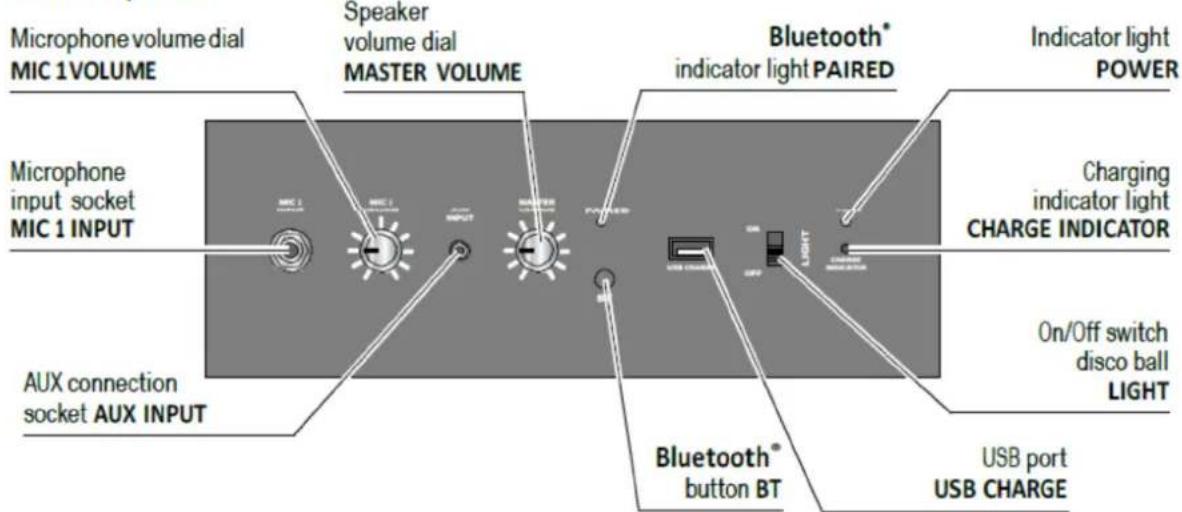
| Control panel Bedieningspaneel | |
| Microphone volume dial MIC 1 VOLUME | Volumeknop microfoon MIC 1 VOLUME |
| Speaker volume dial MASTER VOLUME | Volumeknop luidspreker MASTER VOLUME |
| Bluetooth® indicator light PAIRED Bluetooth | ® indicatielicht PAIRED |
| Indicator light POWER | Indicatielicht POWER |
| Charging indicator light CHARGE INDICATOR | Indicatielicht opladen CHARGE INDICATOR |
| On/Off switch disco ball LIGHT | Aan/uit-schakelaar discobal LIGHT |
| USB port USB CHARGE | USB-poort USB CHARGE |
| Bluetooth® button BT | Bluetooth®-knop BT |
| AUX connection socket AUX INPUT | AUX-aansluiting AUX INPUT |
| Microphone input socket MIC 1 INPUT | Microfoonaansluiting MIC 1 INPUT |
natural_image
3D rendering of a computer tower with an attached cable showing the internal component (no text or symbols visible)natural_image
Diagram of a handheld electronic device with a pole and control panel, showing an arrow indicating leftward motion (no text or symbols present)Control panel
| EN DE | |
| Pull-out handle Ausziehbarer Griff | |
| Carry handle Tragegriff | |
| On/Off switch sound system Ein/Ausschalter des Soundsystems | |
| Mains cord socket Netzkabelbuchse | |
| Casters (in back on bottom) Laufrollen (in der Rückseite unten) | |
| Disco ball Discokugel | |
| Control panel (see below) Bedienfeld (siehe nachstehend) | |
| 2-way speaker 2-Wege-Lautsprecher | |
| Mains cord Netzkabel | |
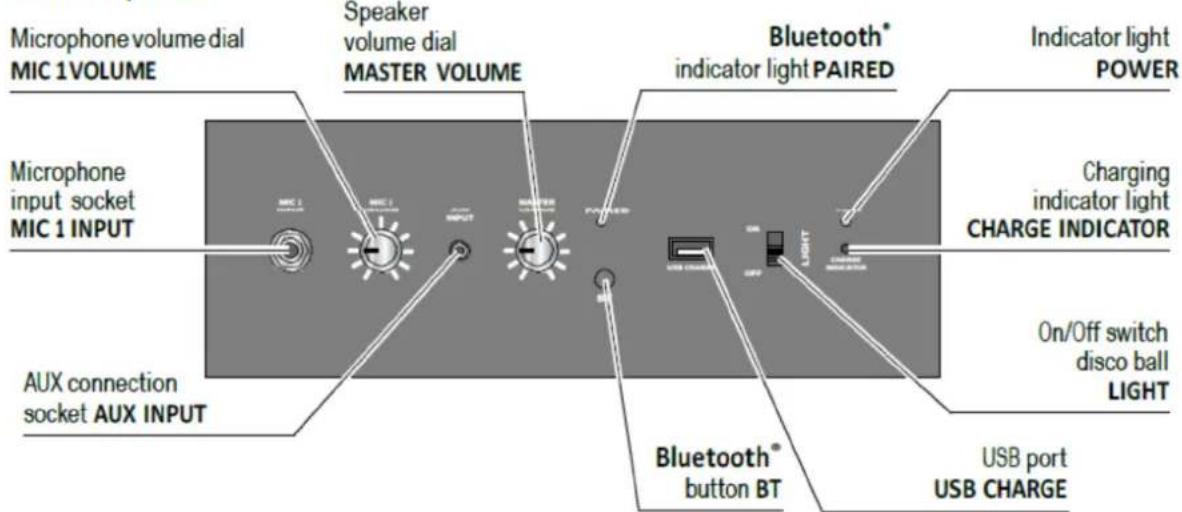
| Control panel Bedienfeld | |
| Microphone volume dial MIC 1 VOLUME | Mikrofonlautstärkeregler MIC 1 VOLUME |
| Speaker volume dial MASTER VOLUME | Lautsprecherlautstärkeregler MASTER VOLUME |
| Bluetooth® indicator light PAIRED Bluetooth | ®-Anzeige-LED PAIRED |
| Indicator light POWER | Ein/Aus-Anzeige-LED POWER |
| Charging indicator light CHARGE INDICATOR | Auflade-Anzeige-LED CHARGE INDICATOR |
| On/Off switch disco ball LIGHT | Ein/Ausschalter Discokugel LIGHT |
| USB port USB CHARGE | USB-Anschluss USB CHARGE |
| Bluetooth® button BT | Bluetooth®-Taste BT |
| AUX connection socket AUX INPUT | AUX-Anschlussbuche AUX INPUT |
| Microphone input socket MIC 1 INPUT | Mikrofon-Eingangsbuchse MIC 1 INPUT |
Vor Inbetriebnahme
natural_image
3D rendering of a computer tower with a cable inserted, showing internal components and ventilation (no text or symbols visible)natural_image
Illustration of a handheld electronic device with a vertical pole and left-pointing arrow (no text or symbols)Control panel
natural_image
Exterior view of a computer tower with a cable inserted into the front panel (no visible text or symbols)natural_image
Illustration of a handheld electronic device with a long pole and a left-pointing arrow (no text or symbols)Control panel
natural_image
3D rendering of a computer tower rear panel with a cable inserted, showing internal components and ventilation grille (no text or symbols)| EN ES | |
| Microphone | Micrófono |
| MP3 | MP3 |
natural_image
Illustration of a handheld electronic device with a long pole and control panel, shown with an arrow indicating leftward motion (no text or symbols present)Alcance: aprox. 10 m
Temperatura ambiente: +10 a +40°C
- Mobile Bluetooth® Sound System with built-in disco ball
- Dear Customer
- Contents
- About these instructions
- Safety warnings
- Intended use
- DANGER to children
- DANGER due to electricity
- DANGER – risk of eye damage
- DANGER – damage to health
- WARNING – risk of burns/fire
- CAUTION – material damage
- Prior to first use
- Charging the battery
- Connecting to a Bluetooth® device
- Turning the Bluetooth ® sound system on/off
- Establishing a Bluetooth ® connection
- Disconnecting a Bluetooth ® connection
- Reset
- Bluetooth®: Playing music
- Playing music
- Adjusting the volume
- Connecting a microphone or another external audio device
- Connecting a microphone
- Connecting an external audio device
- Charging mobile devices via USB
- Light effects
- DANGER – health hazard
- Transporting the Bluetooth® sound system
- Technical specifications
- Connections
- Amplifier
- Bluetooth®
- Problems/solutions
- GUARANTEE
- DISCLAIMER
- Declaration of Conformity
- Disposal
- SERVICE
- Nederlands
- Vor Inbetriebnahme
Brand : LENCO
Model : PA325
Category : Docking station