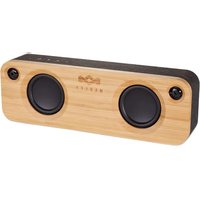
Bag of Riddim BT EMJA010 - Speaker HOUSE OF MARLEY - Free user manual and instructions
Find the device manual for free Bag of Riddim BT EMJA010 HOUSE OF MARLEY in PDF.



| Brand | House of Marley |
| Model | Bag of Riddim BT EMJA010 |
| Product Type | Portable Bluetooth® audio system |
| Category | Speaker |
| Connection Technology | Bluetooth® and 3.5mm auxiliary input |
| Speakers | 2 x 4.5" (114 mm) woofers and 2 x 1" (25 mm) tweeters |
| Amplifier | Built-in, powerful |
| Power Supply | Wall outlet (AC cable included), 12V DC adapter (not included), or 6 D batteries (not included) |
| Battery | Rechargeable battery pack included (alternative to D batteries) |
| USB Charging | Front USB port for charging devices (device-specific cable required) |
| Included Accessories | Power cable, 3.5mm mini-stereo cable, REWIND™ carry bag |
| Bag Material | Recycled hemp fibers, organic cotton, and RPET (recycled plastic bottles) |
| Cleaning | Using a dry cloth |
| Safety | Do not expose to water, do not block openings, do not use near a heat source |
| Battery Warning | Risk of explosion if incorrectly installed; replace with identical batteries |
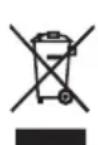
| Recycling | Compliant with WEEE; do not dispose with household waste; batteries to be recycled separately |
Frequently Asked Questions - Bag of Riddim BT EMJA010 HOUSE OF MARLEY
User questions about Bag of Riddim BT EMJA010 HOUSE OF MARLEY
0 question about this device. Answer the ones you know or ask your own.
Ask a new question about this device
Download the instructions for your Speaker in PDF format for free! Find your manual Bag of Riddim BT EMJA010 - HOUSE OF MARLEY and take your electronic device back in hand. On this page are published all the documents necessary for the use of your device. Bag of Riddim BT EMJA010 by HOUSE OF MARLEY.
USER MANUAL Bag of Riddim BT EMJA010 HOUSE OF MARLEY
Bag of Riddim BT with Battery
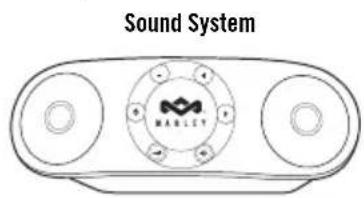
Bag of Riddim Portable Bluetooth Audio System
Greetings and Welcome to the House of Marley
We are honored you have selected Bag of Riddim to become part of your music experience. Bag of Riddim is a portable, two-way, stereo sound system which works with Bluetooth® devices connected wirelessly and hundreds of other devices via the auxiliary input. The system uses two high-output, long-throw 4.5" (114mm) woofers in a ported enclosure, two 1" (25mm) tweeters and a powerful amplifier. The system includes a convenient REWIND™ carry bag composed of reclaimed hemp, organic cotton, and recycled plastic bottles (RPET). Additional bag options make it easy to change the look of your Bag of Riddim. Check out all of the options at www.thehouseofmarley.com.
Everything You Need to Jam
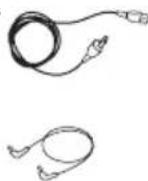
The Bag of Riddim comes with the following items:


Power Cord for Wall Outlet
3.5mm Stereo Mini Cable
Powering Your Bag of Riddim
Bag of Riddim can be powered by a wall outlet, six (6) D-cell batteries (not included) or an optional 12VDC car power outlet (not included).
Using a Wall Outlet
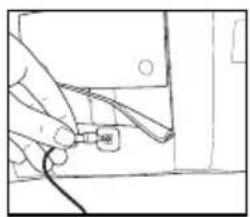
- Insert the AC power supply cord into the Bag of Riddim.
- Insert wall plug cord connector into the power supply.
- Insert wall plug into an appropriate wall outlet.
(1) (2)
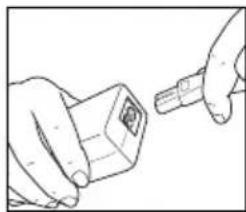
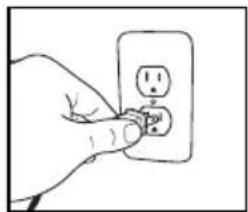
(3)
Rechargeable Battery
Note: 6 high quality alkaline D cell batteries (not included) may be used instead of the included battery pack.
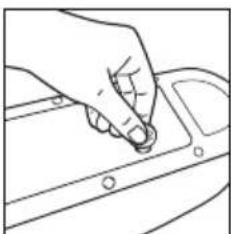
- Remove the battery door on the bottom of your Bag of Riddim by loosening the two screws with a coin or flat-head screwdriver.
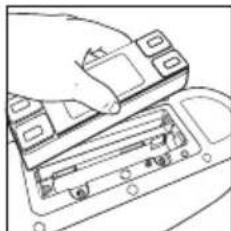
- Install battery pack in the orientation shown on the floor of the battery compartment.
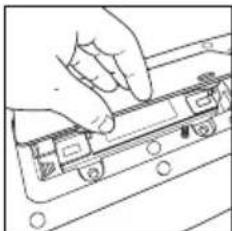
- Replace the battery door making sure the two screws are securely tightened.
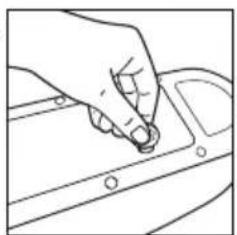
(1)

(2)
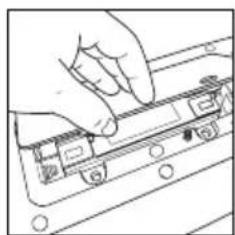
(3)
Connecting Your Music Device(s)
Pairing Mode (Blinking Blue LED)
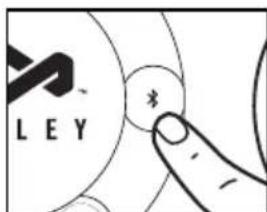
Bag of Riddim automatically goes into reconnect mode for 5 seconds as soon as you turn it on (flashing BLUE led). It then switches to auxiliary mode (RED led). You can pair a new device to Bag of Riddim by holding the for 3 seconds.
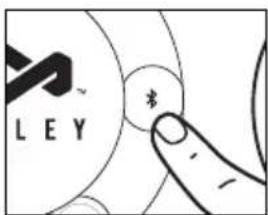
Note: Holding the × for 3 seconds will kick off the device currently connected to Bag of Riddim and go into Pairing Mode.
Connected Mode (Solid Blue LED)
Use your Bluetooth-enabled device to pair to Bag of Riddim. Bag of Riddim does not require a pairing password. Once paired, the LED will glow solid blue.
Note: Bag of Riddim will automatically pair with the last device connected to it when turned ON (when possible).
Connecting other devices
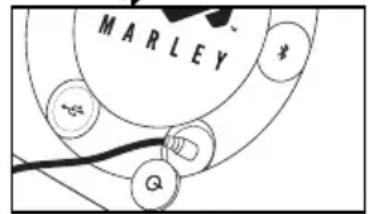
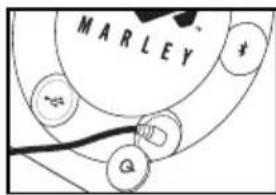
The auxiliary input on the front of the Bag of Riddim allows you to connect other audio devices to the system. Simply connect your device to the AUX input on the Bag of Riddim using the 3.5mm stereo mini cable (included).
Connecting multiple devices
When a device is connected to Bluetooth and another device is connected via auxiliary input, the color of the indicates the source. If the LED glows blue, the Bluetooth device will play. When red, the auxiliary input will play. Toggle between inputs by briefly pressing the .
Easy To Use
When the system is powered and a device is connected, you are ready to enjoy your Bag of Riddim.
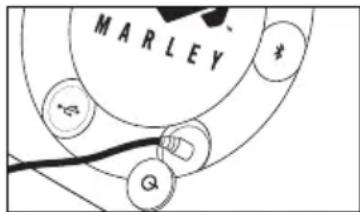
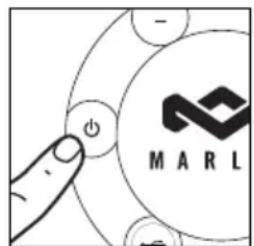
- Touch and hold the Power icon to turn Bag of Riddim on. Touch and hold the power icon again to turn your Bag of Riddim off. The red LED on the power icon indicates if the Bag of Riddim is on.
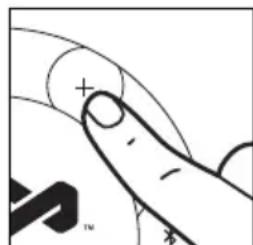
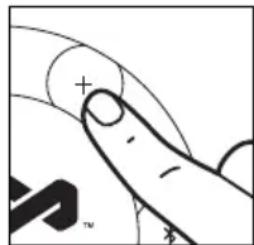
- Increase or decrease the volume on the Bag of Riddim by touching and/or holding the - and + buttons until the desired volume is reached. You can also adjust the system volume using the controls on your music source.
Charging Your Device
A convenient USB port is available on the front of Bag of Riddim to charge your devices while it is on. Use the cable that came with your device to charge.
NOTE: Not all devices are compatible with the USB port. If your device does not charge, use the power adapter that came with it.
Important Safety Information
- Follow and keep these instructions.
- Heed all warnings.
- Do not use this apparatus near water.
- Clean only with a dry cloth.
- Do not block any ventilation openings. Install in accordance with the manufacturer's instructions.
- Do not install near any heat sources such as radiators, heat registers, stoves, or other apparatus (including amplifiers) that produce heat.
- Protect the power cord from being walked on or pinched particularly at plug, convenience receptacles, and the point where they exit from the apparatus.
- Only use attachments/accessories specified by the manufacturer.
- Unplug this apparatus during lightning storms or when unused for long periods of time.
- Refer all servicing to qualified service personnel. Servicing is required when the apparatus has been damaged in any way, such as power-supply cord or plug is damaged, liquid has been spilled or objects have fallen into the apparatus, the apparatus has been exposed to rain or moisture, does not operate normally, or has been dropped.
- To reduce the risk of fire or electric shock, do not expose this apparatus to rain or moisture.
- CAUTION: Danger of explosion if battery is incorrectly replaced. Replace only with the same or equivalent type.
- Batteries (battery pack or batteries installed) shall not be exposed to excessive heat such as sunshine, fire or the like.
(1)
WEEE EXPLANATION
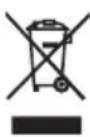
This marking indicates that this product should not be disposed with other household wastes throughout the EU. To prevent possible harm to the environment or human health from uncontrolled waste disposal, recycle it responsibly to promote the sustainable reuse of material resources. To return your used device, please use the return and collection systems or contact the retailer where the product was purchased. They can take this product for environmental safe recycling.
BATTERY DIRECTIVE

This symbol indicates that batteries must not be disposed of in the domestic waste as they contain substances which can be damaging to the environment and health. Please dispose of batteries in designated collection points.
Bag of Riddim
Benvenuti in "The House of Marley"
IpeepaJkaembI aKKymyIaTOp
Ppumuehue:Bmeo npunaaemoz oakymyamopno 6noka moKHO uCnlo3oeamb 6 ueonhybx 3neMeHmOB muna D bicokoz
Kauecmba (B KOMnnekm He Exoam).
- CHIMMTE KpbIJKy 6Ioka NITAHNA HdHe CymKn Bag of Riddim,OTBnHTNB Dba BNHTa npN NOMOu MoHeTbI NII NIOCKO NTBePTKn.
2.YCTAHOBITEaKKyMylTOpHbI6JOKBnIOJKeHne, 06o3HaueHHoe HaDHe aKKMyIATOpHOrO OTeKa.
3.YcTaHOBnTe KpbIuKy 6Ioka nHTaHna Ha MeCTO HnHaJeKHO 3aTaNHe Oba BnHTa.
(1)
(2)
(3)
PoiKIOUeHne yCtpoNCTB BOCpOu3BeHnMy3bIK
PexHM coeHNHeHH (cBeToNDnMnraeT cnHm)
Iocne BkIoueHnra ctepeocntema Bag of Riddim aBOMaTnueckn nepexoNTB pexHM noBTOPOHOIOKluOeHnRA, KOTOpbI dNITcB TceHne 5 MNHT (CBTeODIOMDMraet CINHM).3aTeM OHa nepeoxoNTB DOnOJIHnTeMbHbI pExMM (KpachbI INDnKaTOp).IyCTaHOBKn COeDNHeHNHOBOrO yCTPOiCTBa Co ctepeocntemBo Bag of Riddim cIeNyETydepKNBaT bTceHne 3 cekyHd.
PpmeaHne. Pn ydepKINBaHn B TeueHne 3 cekyHd ycTpoCTBO, noKIOUeHHoe K ctepeocnteme Bag of Riddim, 6ydt BkIIOyeHo, nocle yero OHa nepeJET B pexm coeHNHeHn.
IopcoeHHeHHbIpeKIM (cBeToIOo3arOpntcCnHM)
IcnoB3yTe yctpoiCTBO c noDepKoBlteoth nYcTaHOBHeHn coeHNHeHn co ctepeocntEmoB Bag of Riddim. Iyra YcTAHOBHeHn coeHNHeHn co ctepeocntEmoB Bag of Riddim He Tpe6yeTc Hkaknx napolne. Nocne ycTaHOBHeHn coeHNHeHn CBeToIOID 3aOpNTcCINHM.
PpmeHne. Pn BkIOueHn CtepeocncTeMa Bag of Riddim aBOMaTnueckn yCTaHaBnBaet CoeINHeHne c nocIeHNm noKIOueHHbIM yCtpoCTBOM (pn BO3MOXHOCTN).
IopKIOUeHneApyrnxyCTpoiCTB
Bn3y dok-ctanu n ctepeocntembl Bag of Riddim paonoloxen donoHnTehbnnopT, c nomoo kOTOPORK ctepeocnteme MOHO npdknoHT dpyrne aydnooyctpoictBa. IpocTo noDKIOUHTe yCTPOINCTBO K npTy AUX ctepeocntembl c nomoo kabeJc 3,5-MM pa3bemOM «ctepeo-MHH» (BXoNT B KOMPiKeT nOCTaKn).
IopKnIOueHHe HeckOJIbKINx UcTpoiCTB
Pn noekluohenn oJHoro yctpoecTBA uepe3 Bluetooth, a pyroro uee3 doonHntbHbI nopT cBET nHdkaToPA yka3bIbaet Ha TIN nctouhka. Pn noekluohenn yctpoecTBA c noepkkoi Bluetooth cBeToND 3arOpNTcCINHM. Pn noekluohenn yctpoecTBA uee3 doonHntbHbI npT CBeToND 3arOpNTcKpaChbIM. Dnpeekluohenn Mejdy npTAMn CJIerKa HaxMITE
Пюстota в Истов的基础上
YtobHaatb NcnoB3OBAHne cTepeocntEmb Bag of Riddim, noKIOHTe ee K nCTOHNky nITAHn, a 3aTeM NOKIOHTe Heo6xOumoe yctpoiCTBO.
- Haxmte u ydepkmbaTe 3NaOK nTaHn, YTO6bI BKNIOHTb Ctepeocntemy Bag of Riddim. NobTOpHO Haxmte u ydepkmbaTe 3NaOK nTaHn, YTO6bI BIKIOHTb Ctepeocntemy Bag of Riddim. PnB KIOUeHHoCtepeocntMe Ha 3Haue Ke NtAHn rOpNT KpaChbI CBToDnOHDhNnHNdkatOp.
- YTo6bI yBEnuHTb IInyUMeHbUnTb rPOMKocTb Ha cTepeOcnCTeMe Bag of Riddim, hAnMITE n/Inn yDepKunBaTe KHOKN «-» nIn «+» IJY Bb6opa JKeJaemoro yPoBnraPOMKocTn. Kpome TOrO, rPOMKocTb MoXHo OTperyJlnpoBaTb npn NOMOUs 3JIeMeHTOB ynpaBHeHnHa YcTPOiCtBe.
3apka yctpoictba
Udo6hoe paonoloxhene USB-nopTa ha nepeHne qactn ctepeocntembl Bag of Riddim no3B0JraT 3apKaTb yctpoiCTBO BO Bpema ero nokluohenK 3JeKtpnueccko pO3eTke. Ia 3apAKn yCtpoiCTBa HcNoIb3yTe Ka6eB, BXoJaun B KOMnEKT NOCTABKN.
ПРИМЕЧАН. He BCE yctpoiCTBa COBMEcTmblc USB-nOpTOM. EcIn yctpoiCTBO He 3apJxhaTcA, nCNoIb3yIte 3apJdHoe yctpoiCTBO, BXOJaUeB B KOMnJIeK T NOCTaBKn.

(1)
(2)
TexHnka 6e3onachOCTn
- PnpndepxnbAtecb npBedeHHbIX nHCTpyKcui.
- 06paaIte BnMaHne Ha BCE npEynpeKdEnH.
3.He nCnoB3yIte CTepeocnCTemy BO3ne BObl.
4.ДЯ OунstКИ NcNoIb3yIte TOLbKO cyXyIO TkaHb.
5.He 3aKpbBaIte BENTnlaUIOHHbIe OTBepCTH.N.YCTaHOBka DOnJHNa npON3BODNTbCB B COOTBeTCTBm C INHCTpyKUINM pON3BODNTeJI. - He yctaHaBnBaIte cTepeocnteMy Bo3Je nCTouHKnOB TeNla, TaKnx KaK 6aTapeu, oBorpeBaTei, nIITbI, nII npYrOro o6OpyIOBaHna (BKIOUcay YCNIInTei), KOTOpbl e N3LnuAOT TeNIO.
- He hactynaite Ha shyp nntaHn Hne doynckaiTe ero nepexkma, oco6eHHo B o6laCTN BnIKn, a TaKHe B MeCTax NODKNIOUeHn K po3etke n ctepeocnTeMe.
8.ИспльбутTeToьКо peKOMeHDoBaHbIe ПрОЗБODиTeJemПинHaДLEKHOCTN. - BbiknouaTe Ctepeocntemy n3 po3eTKBovBpemrpo3blneONHHeNCNOLb3yeTcB TeueHne DInTeNbHOBpMeHN.
- Bce cepBnchoe 6cbJyKbAHne DOJIHKHO BbINONHbTcR KBaIINHpOBaHHbIM NepcoHaJOM. CepBnchoe 6cbJyKbAHne Tpe6yeTcB Cnyae NOBpeJDeHNr CTpeocncTeMbI KaKIM-No6o Obpa3OM, B TOM YNCle NOBpeJdeHNr UHpya NITAHN r NIN BUNKN, NonadHn IOnkI INI dpyro JxIKOCTN lno NaDEHNr KaKIX-NIO ppeMeTOB Ha CTpeocncTeMy. Kpome TORO, 6cbJyKbAHne Heo6xoDmO, ecIn CTpeocncTeMa He pa6oTaET DoJIHKbIM Obpa3OM INI OHa naDana.
- TTo6bI yMeHbIuTb pNCK nopAkeHnE 3JIeKTPnueckn m TokOM, He dOnyckaIe nOJaHaHn CTepeocncTeMbI NOd DOJkb, a TaKHe nOJaHaHn Ha Hee KaKnx-JIn6o Dpynx KInkocTe.
- BHIMAHHE! HenpaBnIbHna 3aMeHa 3JeMeHTOB nITaHn MaKeT npNBecTu K B3pbBy. CMeHHbIe 3JeMeHTbI DoJIHHbI 6blrTO rO Je nn 3KBuBaJIeTHOrTo Tuna.
- Θлемьиптайя (устовские посы ветаар) He Должны подеврац урзмерю нагpeBy ot coнца, огни T. П.
PONcHne WEEE
JaHHa MapKnPOBka O3Hauaet, YTO B CTpaHax EByponbI He DonycKaeTc yTNINHnPoBaTb np6Op BMeCTe CpyHMn 6bITOBIM OTXoAMn. TTo6bl He Hahectu yuepe6a OKpykaIOSe cpeE n3DopOBbIO HaceJeHnB Pe3yNbTaTe HeBepHO yTNIN3aun OTxOoB, np6Op CLeMy eTb HA nepepaboK TY, TTo6bl oecneuHTb kOLOrHHe NOBtOPHe NCNoB3OBAHne MaTePnaJIbHbIX pecypcoB. BepHNTe 6bIBwN B yNOtpe6leHnn np6Op uee3 CnCTeMy BO3Bpata N cbopa OTXoOB INN CBJKNTECb npednpnTmem p03HnuHOn TopBOBn, rDe bbl npno6peHn np6Op. TaM Bbl CMOKeTe CdaTb 3OT npOdyKT dNkOLOrHuCeKn 6e3onachOH nepepa6oTK.
HHTPYKUN K BATAPERM

Данньсимьол Oзнayaет,чTo 6aTapeи He cIeIyET yTnIn3nPoBaTB COBmecTHO C 6bITOBbIM MycopoM, NOCKoJIbKу OHI coDEpXkAT BeueCTBa, cnOC6HbIe HAnecTH BpeD OkpykaHouSei CpeDe n 3dOpOBbIo. YtInn3nPyIte 6aTapeN B cIeuaJIbHo npEHa3NaueHHbIX DЯ 3TORO pPneMHbIX nyHKtax.
Bag of Riddim
Draagbaar Bluetooth®-audiosystem
Hallo en welkom in The House of Marley
JBag of Riddim 5 5 Jol y1 00 led
4k = 3
Bae Jy Baaal 3 aag of Riddim
aial jall g
j)JLLED
gag jall gajlll aalj gajll Bag of Riddim.
Bag of Riddim.
J 1
S OBC = S COD + S_ BOC
Bag of Riddim(1)
s²y²+2y²+21y²
AUX Jd j 10000000000000000000000000000000000000000000000000000000000000000000000000
.35 1s Bag of Rhdhm
0222 0jz1
J 1
J 15 LED.
Jie aee yeaen bnae Jy dyaes nnnn nn nee eae
AaBbCgDgDgDgDgDgDgDgDgDgDgDgDgDgDgDgDgDgDgDgDgDgDgDgDgDgDgDgDgDgDgDgDgDgDgDgDgDgDgDgDgDgDgDgDgDgDgDgDgDgDg
J 10
J 1
A
yj 11
Tpofoosoiou Bag of Riddim
To Bag of Riddim μnopei va tpofoobotηei ano μia enitoixua πipα, éxi (6) μnatapiec toun D (δev περλαβáovvτa) n εva προμεικό tpofoobotikα autokivntou 12 VDC (δev περλαβávτa).