
Planter Speaker - Loudspeaker ION - Free user manual and instructions
Find the device manual for free Planter Speaker ION in PDF.



| Product type | Bluetooth speaker integrated into a flower pot |
| Brand | ION |
| Model | Planter Speaker |
| Power supply | Rechargeable lead-acid battery, AC adapter included |
| Estimated battery life | Up to several hours (not specified) |
| Wireless connectivity | Bluetooth 4.0 (optimal max range) |
| Auxiliary input | 3.5mm TRS connector (input/output) |
| Main functions | Bluetooth playback, auxiliary input, pairing two speakers |
| LED indicators | Power, Bluetooth, battery, auxiliary |
| Water resistance | Waterproof (do not immerse, splash resistant) |
| Dimensions (estimated) | Approximately 25 cm height, 20 cm diameter |
| Weight (estimated) | Approximately 2.5 kg |
| Materials | Plastic, electronic components |
| Recommended use | Indoor and outdoor (patio, garden) |
| Maintenance and cleaning | Wipe with a dry cloth; do not use the adapter in a humid environment |
| Safety | Keep non-waterproof devices dry; do not expose to rain |
| Included accessories | Charging adapter, quick start guide |
| Repairability | Battery replaceable by technical service; contact www.ionaudio.com/support |
| Warranty | Not specified in the manual |
Frequently Asked Questions - Planter Speaker ION
User questions about Planter Speaker ION
0 question about this device. Answer the ones you know or ask your own.
Ask a new question about this device
Download the instructions for your Loudspeaker in PDF format for free! Find your manual Planter Speaker - ION and take your electronic device back in hand. On this page are published all the documents necessary for the use of your device. Planter Speaker by ION.
USER MANUAL Planter Speaker ION
- Make sure all items listed in the BOX CONTENTS are included in the box.
- READ SAFETY INSTRUCTION BOOKLET BEFORE USING THE PRODUCT.
- MAKE SURE THAT YOU HAVE COMPLETELY CHARGED THE BATTERY PRIOR TO FIRST USE FOR MAXIMUM BATTERY LIFE.
- Study this setup diagram.
Go to www.ionaudio.com for product registration.
BOX CONTENTS
■ Planter Speaker
- Charging Adapter
■ Quickstart Guide
■ Safety Instructions & Warranty Information Booklet
INTRODUCTION
Thank you for purchasing the ION Audio Planter Speaker! Planter Speaker features a classic style pot, with a rechargeable battery-powered, water-resistant speaker. Equipped with Bluetooth® technology, you can listen to your favorite music wirelessly. Its full-range speaker provides clear, undistorted audio indoors and outdoors.
WARNING: Keep any non-water-resistant devices (phones, music players, etc.) in a dry place where they will not be affected by water and cause a risk of electric shock.
RECHARGEABLE BATTERIES
Rechargeable lead-acid batteries are the same type used in automobiles. As with your car battery, how you use this battery has a significant impact on its lifespan. With proper use and treatment, a lead-acid battery can last for years. Here are some recommendations for getting the longest life from the internal battery.
GENERAL USAGE
• FULLY CHARGE THE BATTERY BEFORE USING IT.
- CHARGE THE BATTERY COMPLETELY AFTER EACH USE.
- AVOID COMPLETELY DRAINING THE BATTERY.
- You may leave the unit plugged in for up to two weeks.
- For maximum life, drain the battery 80% once a month.
STORAGE
- For long-term storage, periodically recharge the battery.
• If you do not charge the battery for six months, it may not charge.
RECONNECT
- As the battery nears the end of its life, it may lose its ability to recharge. If this occurs, contact ION Audio technical support at www.ionaudio.com/support.
DISPOSAL
- Bring the unit to a recycling center or dispose of in accordance with local ordinances.
CONNECTION DIAGRAM
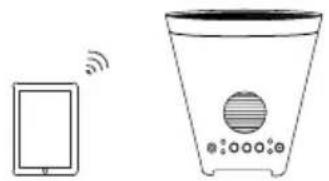
Setup Scenario 1
Connect a Bluetooth device with Planter Speaker.
Setup Scenario 2
Connect an MP3 Player to Planter Speaker.
Setup Scenario 3
Connect two Planter Speakers together to extend the output for more spacious sound.
natural_image
Illustration of a smartphone connected to a washing machine with sound waves (no text or symbols)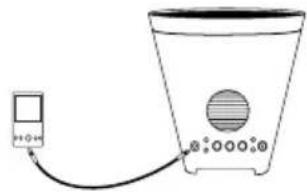
natural_image
Simple line drawing of a washing machine connected to a power cord (no text or symbols)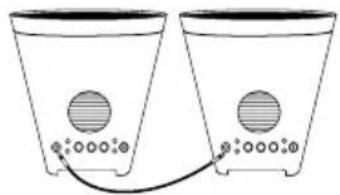
natural_image
Simple line drawing of two identical containers with circular wells and a connecting tube, no text or symbols present.PARTS DESCRIPTION
- Aux/Linking Connector: This 3.5mm jack can be used to connect a CD player, MP3 player, or other audio source using a 3.5mm TRS cable*. This can also be used to link two Planter Speakers together using a 3.5mm TRS cable.
Note: Since this connector functions as an output when Planter Speaker is connected to a Bluetooth device, you can connect headphones to it and the internal speaker will still output sound. - Connecting LED: Indicates when a device is connected to Planter Speaker.
- Aux LED: Indicates when Planter Speaker is playing audio from a device connected to the Aux/Linking Connector.
- Connecting Button: Press the Connecting button for 5 seconds to begin Bluetooth Connecting. The Connecting LED will blink blue when searching for Bluetooth devices to connect to. The Connecting LED will be lit solid blue when a device is connected to Planter Speaker. Press the Connecting button to disconnect a connected Bluetooth device.
- Vol +/-: Adjusts the speaker's volume.
- Power LED: Indicates whether Planter Speaker is powered on or off.
- Battery LED: Indicates whether the battery needs to be charged or is charging. This LED will turn off once charging is complete.
- Charging Adapter Input*: Insert the included charging adapter here to charge Planter Speaker's battery.
- Speaker: This full-range speaker will play audio from a connected Bluetooth device or a source connected to the Aux/Linking Connector.
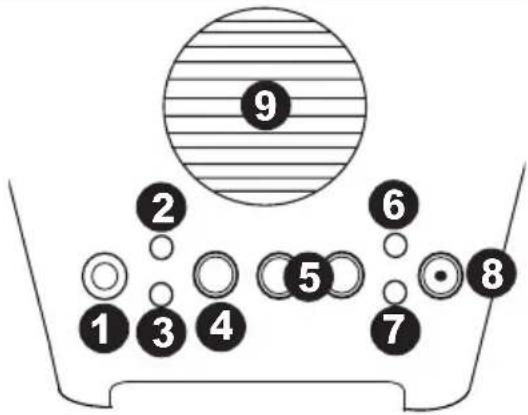
Planter Speaker LED activity:
Solid Red Power LED = Power is on.
Solid Blue Connecting LED = Connected to a Bluetooth device.
Solid Green Battery LED = Battery is charging.
Solid Amber Aux LED = When Aux is set as an input.
Blinking Blue Connecting LED = Searches for Bluetooth devices to connect to.
Blinking Green Battery LED = Battery needs to be charged.
*Note: If the battery is low when using a charging adapter, Planter Speaker is not guaranteed to provide power for use while charging is occurring.
CONNECTING A BLUETOOTH DEVICE
-
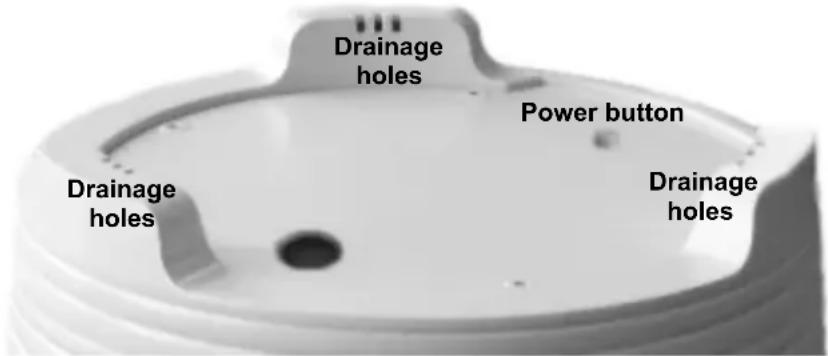
Turn on Planter Speaker by firmly pressing the power button once, located on the bottom of the pot.
-
Press and hold the Connecting button for 5 seconds until the blue Connecting LED blinks.
-
Navigate to your Bluetooth device's setup screen, find "lon Planter spk" and connect.
-
If your Bluetooth device is not able to connect to Planter Speaker, press the Connecting button on Planter Speaker to break previous Bluetooth connections and reset the Bluetooth module. Note: Maximum range will be achieved when using devices with Bluetooth 4.0.
-
To connect a new device, press and hold the Connecting button for 5 seconds. Repeat Step 3.
-
To disconnect a connected Bluetooth device, press the Connecting button on Planter Speaker. Note: If you experience trouble connecting or playing music, update your device's OS.
WARNING: Keep any non-water-resistant devices (phones, music players, etc.) in a dry place where they will not be affected by water and cause a risk of electric shock.
LISTENING TO MUSIC FROM THE AUX/LINKING CONNECTOR
-
Turn on Planter Speaker by firmly pressing the power button once, located on the bottom of the pot.
-
Connect a 3.5mm TRS cable* from the music source to Planter Speaker's Aux/Linking Connector.
-
Press and hold the Vol + button for 3-5 seconds to switch the Aux/Linking Connector function as an input.
-
To listen to the signal from a connected Bluetooth device instead of the signal from the Aux/Linking Connector, press the Connecting button for 5 seconds or remove the audio cable which will disengage the Aux/Linking Connector and switch back to Bluetooth Connecting.
SPEAKER LINKING
By default, the Aux/Linking Connector functions as an output. To connect two Planter Speakers together for extended output, the Planter Speaker that is not connected to your Bluetooth device will need its Aux/Linking Connector to function as an input. To do this, connect a 3.5mm TRS cable* between the two Planter Speaker Aux/Linking Connectors (see the CONNECTION DIAGRAM section). Press and hold the Vol + button for 3-5 seconds on the Planter Speaker that is not connected to your Bluetooth device.
SETUP GUIDE
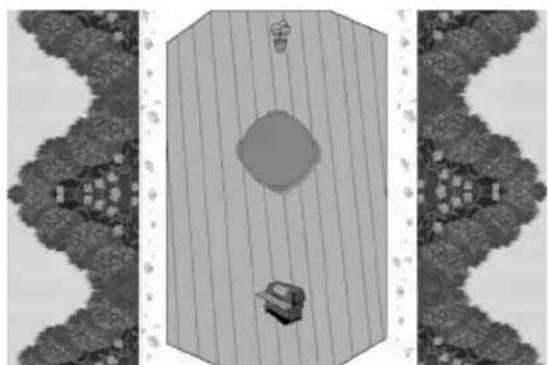
Setup Example #1: Sound for a fixed listening area
In this example you can use a single Planter Speaker for listening in a fixed area, such as on a deck with a table and chairs directly facing the speaker.
natural_image
Top-down architectural layout showing a central circular structure with two small figures, surrounded by trees and a fence (no text or symbols)Setup Example #2: Extended range of sound for a patio with multiple listening areas
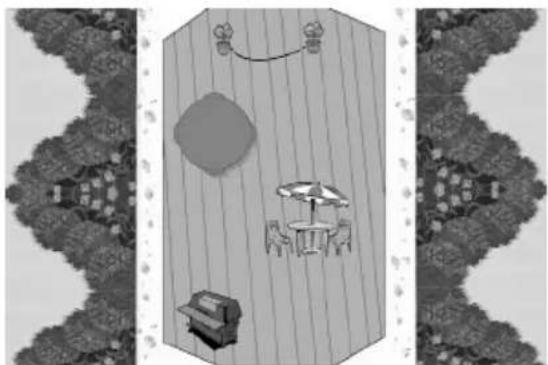
In this example, we have multiple listening areas: a barbecue setting with two tables and chairs. Since the listening will be spread across multiple locations, use a pair of Planter Speakers to get spacious sound, filling a wide area.
natural_image
Top-down architectural rendering of a dining table with chairs, umbrellas, and a large roundabout, surrounded by trees (no text or symbols)OUTDOOR USE AND CARE
Please review the tips below to get the best performance from Planter Speaker:
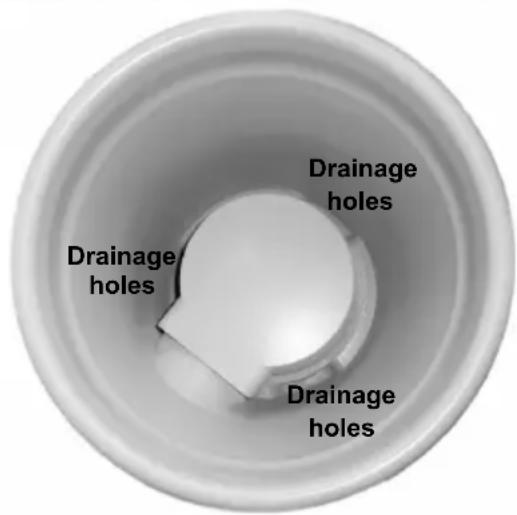
- It is normal for water to leak out from the drainage holes located on the bottom of Planter Speaker. (See side photos.)
- Fill the pot with dirt to plant your favorite variety of flowers or plants. Filling the pot with dirt will also allow for the best sound from the speaker.
- Bring Planter Speaker indoors during snow or rain.
- Please do not connect the charging adapter to Planter Speaker in a humid or wet environment.
natural_image
Simple line drawing of a smartphone connected to a refrigerator with a speaker (no text or symbols)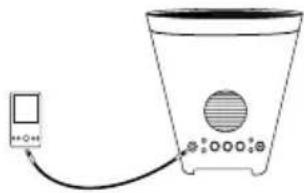
natural_image
Simple line drawing of a washing machine with a digital meter connected to its side (no text or symbols)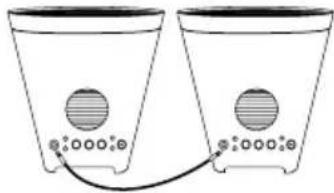
natural_image
Two identical containers with circular wells and a connecting tube, connected by a cable (no text or symbols)natural_image
Top-down architectural rendering of a modern building with a central circular feature and surrounding trees (no text or symbols)natural_image
Top-down architectural layout of a dining table with chairs, umbrella, and decorative plants (no text or symbols)USO Y CUIDADO EN EXTERIORES
natural_image
Simple line drawing of a smartphone connected to a water dispenser with sound waves (no text or symbols)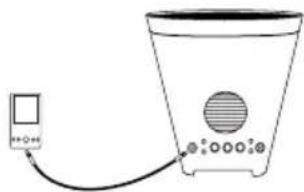
natural_image
Simple line drawing of a water heater connected to a digital meter (no text or symbols)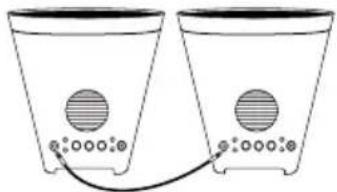
natural_image
Two identical containers with circular wells and a connecting tube, no text or symbols presentDESCRIPTION
natural_image
Top-down architectural layout showing a central circular room with a sofa and two small furniture items, flanked by decorative wall patterns (no text or symbols)natural_image
Top-down architectural rendering of a dining table with chairs, umbrella, and decorative wall art (no text or symbols)UTILISATION ET ENTRETIEN EXTÉRIEUR
natural_image
Simple line drawing of a smartphone connected to a water dispenser with a speaker (no text or symbols)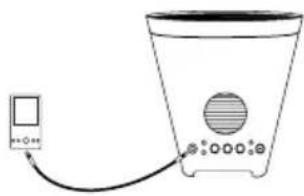
natural_image
Simple line drawing of a washing machine connected to a power cord (no text or symbols)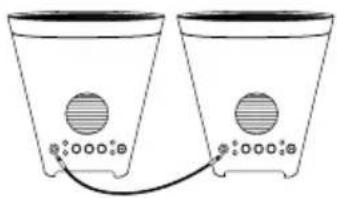
natural_image
Two identical containers connected by a cable, each with a circular vent and small circular base (no text or symbols)natural_image
Top-down architectural layout showing a central circular structure with surrounding trees and small buildings (no text or symbols)natural_image
Top-down architectural layout of a dining table with chairs, tables, and decorative wall panels (no text or symbols)UTILIZZO ALL'APERTO E CURA
natural_image
Illustration of a smartphone connected to a water dispenser with sound waves (no text or symbols)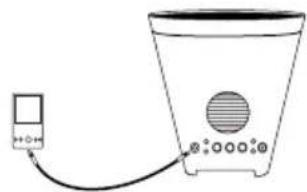
natural_image
Simple line drawing of a washing machine with a power cord and control panel (no text or symbols)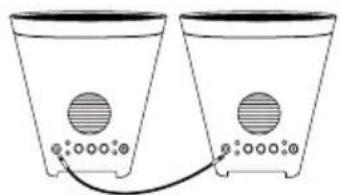
natural_image
Two identical conical containers with circular wells and a connecting tube, connected by a wire (no text or symbols)natural_image
Top-down architectural layout showing a central circular structure surrounded by trees and small buildings (no text or symbols)natural_image
Top-down architectural rendering of a dining table with chairs and a round pendant, surrounded by trees (no text or symbols)natural_image
Illustration of a smartphone connected to a water dispenser with sensors (no text or symbols)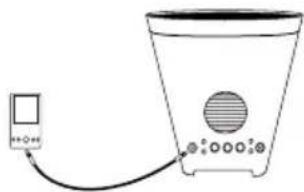
natural_image
Simple line drawing of a portable water heater connected to a digital display (no text or symbols)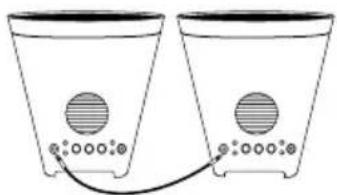
natural_image
Two identical containers with circular wells and a connecting tube, connected by a cable (no text or symbols)BESCHRIJVING VAN DE ONDERDELEN
natural_image
Top-down architectural layout showing a central circular space with furniture and trees, no visible text or symbolsnatural_image
Top-down architectural rendering of a dining table with chairs, umbrella, and outdoor seating (no text or symbols)GEBRUIK BUITENSHUIS EN ONDERHOUD
Charging Adapter: 9.0V, 1A
Battery: Built-in rechargeable lead-acid battery
Battery Input Voltage: 6V, 4.5 AH
Battery Life: 10 hours*
* Battery life may vary based on temperature, age, and volume usage of product.
Water-resistant class: IPX4 (protected from splashing water but is not submersible)
Speaker Output: 10W
Supported Bluetooth Profile: A2DP
Bluetooth Range: Approximately 10 meters (33 feet) in an open space.
www.ionaudio.com
- BOX CONTENTS
- INTRODUCTION
- RECHARGEABLE BATTERIES
- GENERAL USAGE
- STORAGE
- RECONNECT
- DISPOSAL
- CONNECTION DIAGRAM
- Setup Scenario 1
- Setup Scenario 2
- Setup Scenario 3
- PARTS DESCRIPTION
- Planter Speaker LED activity:
- CONNECTING A BLUETOOTH DEVICE
- LISTENING TO MUSIC FROM THE AUX/LINKING CONNECTOR
- SPEAKER LINKING
- SETUP GUIDE
- Setup Example #1: Sound for a fixed listening area
- Setup Example #2: Extended range of sound for a patio with multiple listening areas
- OUTDOOR USE AND CARE
- USO Y CUIDADO EN EXTERIORES
- DESCRIPTION
- UTILISATION ET ENTRETIEN EXTÉRIEUR
- UTILIZZO ALL'APERTO E CURA
- BESCHRIJVING VAN DE ONDERDELEN
- GEBRUIK BUITENSHUIS EN ONDERHOUD
Brand : ION
Model : Planter Speaker
Category : Loudspeaker