SFCRW2900 K - Pregnant PIONEER - Free user manual and instructions
Find the device manual for free SFCRW2900 K PIONEER in PDF.


User questions about SFCRW2900 K PIONEER
0 question about this device. Answer the ones you know or ask your own.
Ask a new question about this device
Download the instructions for your Pregnant in PDF format for free! Find your manual SFCRW2900 K - PIONEER and take your electronic device back in hand. On this page are published all the documents necessary for the use of your device. SFCRW2900 K by PIONEER.
USER MANUAL SFCRW2900 K PIONEER
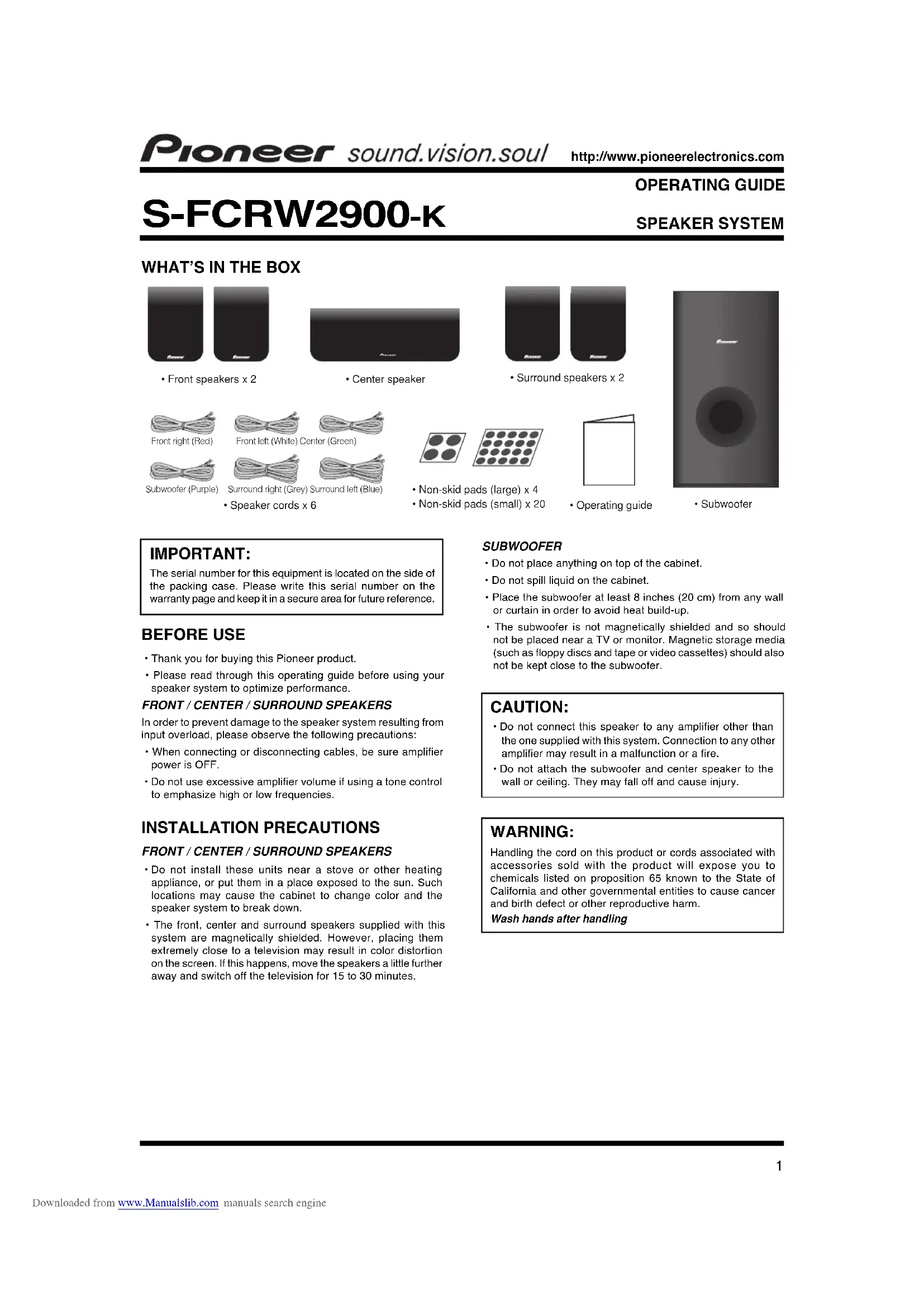
- Front speakers x 2

- Center speaker
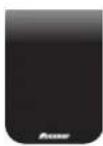
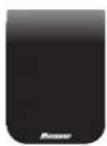
- Surround speakers x 2
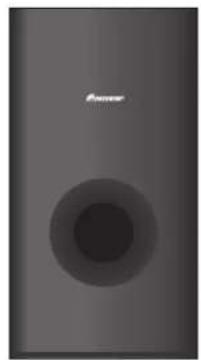
- Subwoofer
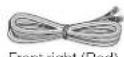
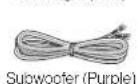
Front left (White) Center (Green)
er (Green)
Surround right (Grey) Surround left (Blue)
- Speaker cords x 6


- Operating guide
IMPORTANT:
The serial number for this equipment is located on the side of the packing case. Please write this serial number on the warranty page and keep it in a secure area for future reference.
BEFORE USE
- Thank you for buying this Pioneer product.
- Please read through this operating guide before using your speaker system to optimize performance.
In order to prevent damage to the speaker system resulting from input overload, please observe the following precautions:
- When connecting or disconnecting cables, be sure amplifier power is OFF.
- Do not use excessive amplifier volume if using a tone control to emphasize high or low frequencies.
INSTALLATION PRECAUTIONS
- Do not install these units near a stove or other heating appliance, or put them in a place exposed to the sun. Such locations may cause the cabinet to change color and the speaker system to break down.
- The front, center and surround speakers supplied with this system are magnetically shielded. However, placing them extremely close to a television may result in color distortion on the screen. If this happens, move the speakers a little further away and switch off the television for 15 to 30 minutes.
SUBWOOFER
- Do not place anything on top of the cabinet.
- Do not spill liquid on the cabinet.
- Place the subwoofer at least 8 inches (20 cm) from any wall or curtain in order to avoid heat build-up.
- The subwoofer is not magnetically shielded and so should not be placed near a TV or monitor. Magnetic storage media (such as floppy discs and tape or video cassettes) should also not be kept close to the subwoofer.
CAUTION:
- Do not connect this speaker to any amplifier other than the one supplied with this system. Connection to any other amplifier may result in a malfunction or a fire.
- Do not attach the subwoofer and center speaker to the wall or ceiling. They may fall off and cause injury.
WARNING:
Handling the cord on this product or cords associated with accessories sold with the product will expose you to chemicals listed on proposition 65 known to the State of California and other governmental entities to cause cancer and birth defect or other reproductive harm.
Wash hands after handling
CONNECTING YOUR SYSTEM
IMPORTANT:
Make sure all equipment is turned off before making any connections.
FRONT/CENTER/SURROUND/SUBWOOFERSPEAKERS
Correct wiring of your loudspeakers is essential for achieving the best sound quality. Be careful to ensure proper polarity of connection.
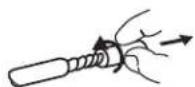
Twist and pull off the protective shields on each wire.
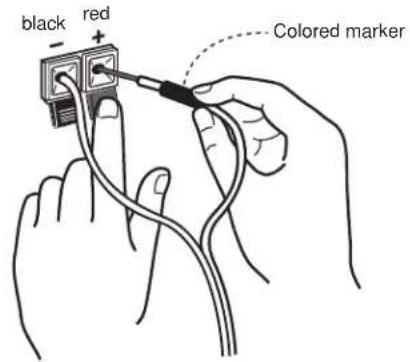
Connect to the speaker terminals on the rear of the receiver.
To connect, insert the colored wire into the matching positive (colored) terminal and the other wire into the negative (black) terminal as shown below.
Note that the color-coded tabs are as follows:
Red:Front right (R)
-
Purple: Subwoofer
-
White : Front left (L)
-
Grey : Surround right (R)
Green: Center speaker
- Blue : Surround left (L)
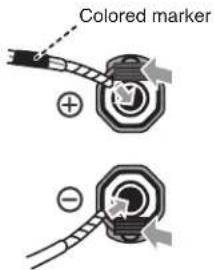
Connect to the speaker terminals on the rear of the speakers.
Match the colored wire with the color-coded label (above the tabs), then insert the colored wire into the red (+) tab and the other wire with the black (-) tab.
PLACEMENT AND FINE TUNING
SUBWOOFER
Sound spreads in all directions in the very low frequency range. Human hearing cannot easily detect the source of very low frequencies. Be sure to provide a space of at least 8 inches (20 cm) between the rear of the subwoofer and the nearest wall.
FRONT SPEAKERS
For best results the loudspeaker should be positioned near ear level and the loudspeakers separated a distance approximately equal to the listening distance. Angling the loudspeakers inward towards the listener will improve the image stability for non-central listeners. Close proximity to a side or rear wall will enhance the midbass performance, although too close (particularly a corner location) and the bass may be unnaturally high and image performance may be degraded.
CENTER SPEAKER
The loudspeaker should be positioned below the TV. For best results align the front of the loudspeaker with the front of the TV. If the loudspeaker is placed under the TV and very close to the floor, then tilting upwards may be beneficial.
SURROUND SPEAKERS
For best results the loudspeakers should be positioned at or above ear level. Depending upon your room layout and preferences, the left and right rear speakers should be positioned on the side walls just the rear of the listening position, or on the walls.
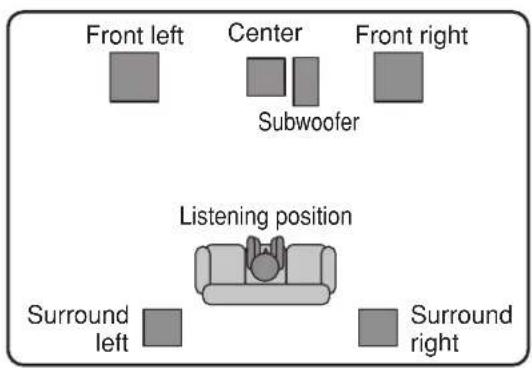
STANDARD SURROUND SETUP
This is a standard multichannel surround sound speaker setup for optimal 5.1 channel home theater sound.
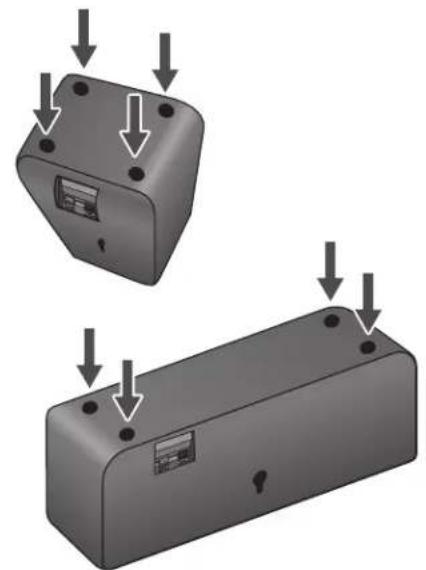
NON-SKID PADS
If the front, center and surround speakers are placed on a hard surface, such as wood or tile place four non-skid pads (small) on the bottom flat surface of the speakers.
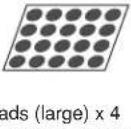
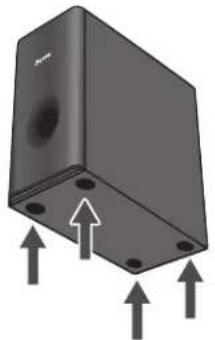
If the subwoofer is placed on a hard floor, such as wood or tile, place four non-skid pads (large) on the bottom surface of the subwoofer.
CABINET MAINTENANCE
Use a polishing cloth or dry cloth to wipe off dust and dirt.
When the cabinet is very dirty, clean with a soft cloth dipped in some neutral cleanser diluted five or six times with water, and then wipe again with a dry cloth. Do not use furniture wax or cleaners.
Never use thinners, benzine, insecticide sprays and other chemicals on or near the cabinets, since these will corrode the surfaces.
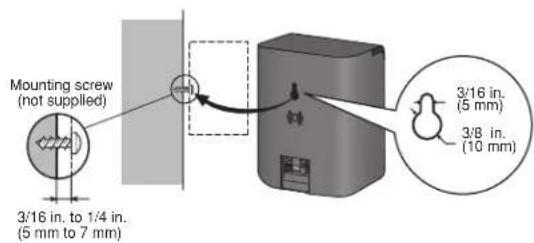
- Remember that the speaker system is heavy and that its weight could cause the screws to work loose, or the wall material to fail to support it, resulting in the speaker falling. Make sure that the wall you intend to mount the speakers on is strong enough to support them. Do not mount on plywood or soft surface walls.
- Mounting screws are not supplied. Use screws suitable for the wall material and support the weight of the speaker.
NOTE
If you are unsure of the quality and strength of the walls, consult a professional for advice.
- Pioneer is not responsible for any accidents or damage that result from improper installation.
TROUBLESHOOTING
| SYMPTOM | PROBABLE CAUSE REMED | Y |
| 1. No sound | • B ad speaker wire or connection • Receiver is off • V olume control is atero | • C onnect correctly or replace wire • T u r n on receiver • S l o wy turnalpmae |
| 2. Sound is distorted | • E x t r e m e signal condition | • T u r n down the amplifier's output level (volume, bass control, bass boost) to lower the level. |
SPECIFICATIONS
Enclosure Closed-box bookshelf type magnetically shielded)
System 7.7 cm 1-way system
Speakers 7.7 cm cone type
Nominal impedance 89
Frequency range 85 Hz to 20 kHz
Dimensions 100 mm (W) x 136 mm (H) x 80 mm (D)
3 15/16 in. (W) x 5 3/8 in. (H) x 3 1/8 in. (D)
Weight. 0.55 kg/1 Ib 3 oz
SUBWOOFER
Enclosure Bass-reflex floor type
System 16 cm 1-way system
Speaker 16 cm cone type
Nominal impedance 89
Frequency range 30 Hz to 2 kHz
Dimensions 190 mm (W) x 360 mm (H) x 320 mm (D)
71/2 in. (W) x 14 3/16 in. (H) x 12 5/8 in. (D)
Weight 4.0 kg/8 lb 13 oz
CENTER SPEAKER
Enclosure Closed-box bookshelf type (magnetically shielded)
System 7.7 cm 1-way system
Speakers 7.7 cm cone type
Nominal impedance 8Ω
Frequency range 75 Hz to 20 kHz
Dimensions 270 mm (W) x 96 mm (H) x 90 mm (D)
10 5/8 in. (W) x 3 3/4 in. (H) x 3 9/16 in. (D)
Weight. 0.78 kg/1 lb 12 oz
NOTE: Specifications and design subject to possible modification without notice due to improvements.
Published by Pioneer Corporation.
Copyright © 2007 Pioneer Corporation.
All rights reserved.


Dear Customer:
Selecting fine audio equipment such as the unit you've just purchased is only the start of your musical enjoyment. Now it's time to consider how you can maximize the fun and excitement your equipment offers. This manufacturer and the Electronic Industries Association's Consumer Electronics Group want you to get the most out of your equipment by playing it at a safe level. One that lets the sound come through loud and clear without annoying blaring or distortion-and, most importantly, without affecting your sensitive hearing.
Sound can be deceiving. Over time your hearing "comfort level" adapts to higher volumes of sound. So what sounds "normal" can actually be loud and harmful to your hearing. Guard against this by setting your equipment at a safe level BEFORE your hearing adapts.
Toestablish a safe level:
- Start your volume control at a low setting.
- Slowly increase the sound until you can hear it comfortably and clearly, and without distortion.
Once you have established a comfortable sound level:
Set the dial and leave it there.
Taking a minute to do this now will help to prevent hearing damage or loss in the future. After all, we want you listening for al lifetime.
We Want You Listening For A Lifetime
Used wisely, your new sound equipment will provide a lifetime of fun and enjoyment. Since hearing damage from loud noise is often undetectable until it is too late, this manufacturer and the Electronic Industries Association's Consumer Electronics Group recommend you avoid prolonged exposure to excessive noise. This list of sound levels is included for your protection.
Decibel
Level Example
30 Quiet library, soft whispers
40 Living room, refrigerator, bedroom away from traffic
50 Light traffic, normal conversation, quiet office
60 Air conditioner at 20 feet, sewing machine
70 Vacuum cleaner, hair dryer, noisy restaurant
80 Average city traffic, garbage disposals, alarm clock at two feet.
THE FOLLOWING NOISESCAN BEDANGEROUS UNDERCONSTANT EXPOSURE
90 Subway, motorcycle, truck traffic, lawn mower
100 Garbage truck, chain saw, pneumatic drill
120 Rock band concert in front of speakers, thunderclap
140 Gunshot blast, jet plane
180 Rocket launching pad
Information courtesy of the Deafness Research Foundation.


S-FCRW2900-K
MODE D'EMPLOI
ENCEINTES ACOUSTIQUES
CONTENU DE L'EMBALLAGE
Publication de Pioneer Corporation.
© 2007 Pioneer Corporation.
PIONEER ELECTRONICS (USA) INC.
PIONEER ELECTRONICS OF CANADA, INC.
WARRANTY PERIOD
For the period specified below from date of original retail purchase (the warranty period) from an authorized Pioneer dealer, Pioneer Electronics (USA) Inc. (PUSA), and Pioneer Electronics of Canada, Inc. (POC) warrants that products distributed by PUSA in the U.S.A., and by POC in Canada that fail to function properly under normal use due to a manufacturing defect when installed and operated according to the operating instructions enclosed with the unit will be repaired or replaced with a unit of comparable value, at the option of PUSA or POC, without charge to you for parts or actual repair work. Parts supplied under this warranty may be new or rebuilt at the option of PUSA or POC.
WARRANTY PERIOD
PRODUCT PARTS LABOR
Loudspeakers / Subwoofer (amplifier section not included) 1 YEAR 1 YEAR Amplifier Section (if applicable) 1 YEAR 1 YEAR
This warranty covers the product during the warranty period whether in the possession of the original owner or any subsequent owner. In the event service is required, the product must be delivered within the warranty period, transportation prepaid, from within the Country of purchase as explained in this document. You will be responsible for removal and installation of the product.
WHAT'S NOT COVERED
This warranty does not cover any product which is used in any trade or business, or in an industrial or commercial application. This warranty does not apply to any speaker that has been subjected to power in excess of its published power rating. This warranty does not cover the cabinet or any appearance item, any damage to the product resulting from alterations or modifications not authorized in writing by PUSA or POC, accident, misuse or abuse, or damage due to lightning or to power surges. This warranty does not cover the cost of parts or labor which would be otherwise provided without charge under this warranty obtained from any source other than a PUSA OR POC Authorized Service Company or other designated location. This warranty does not cover defects or damage caused by the use of unauthorized parts or labor, or from improper maintenance. ALTERED, DEFACED OR REMOVED SERIAL NUMBERS Void THIS WARRANTY.
YOUR RIGHTS
PUSA and POC excludes any obligation on its part for incidental or consequential damages related to the failure of products to function properly under the conditions set forth above. IN THE U.S.A. - PUSA LIMITS ITS OBLIGATIONS UNDER ANY IMPLIED WARRANTYING INCLUDING, BUT NOT LIMITED TO, THE IMPLIED WARRANTY OF MERCHANTABILITY AND FITNESS FOR A PARTICULAR PURPOSE, TO A PERIOD NOT TO EXCEED THE WARRANTY PERIOD. NO WARRANTYES SHALL APPLY AFTER THE WARRANTY PERIOD. SOME STATES DO NOT ALLOW LIMITATIONS ON HOW LONG AN IMPLIED WARRANTY LASTS, AND SOME STATES DO NOT ALLOW THE EXCLUSION OR LIMITATION OF INCIDENTAL OR CONSEQUENTIAL DAMAGES, SO THE ABOVE LIMITATIONS OR EXCLUSIONS MAY NOT APPLY TO YOU. THIS WARRANTY GIVES YOU SPECIFIC LEGAL RIGHTS, AND YOU MAY HAVE OTHER RIGHTS WHICH MAY VARY FROM STATE TO STATE. IN CANADA - EXCEPT AS EXPRESSLY PROVIDED HEREIN, THERE ARE NO REPRESENTATIONS, WARRANTYES, OBLIGATIONS OR CONDITIONS, IMPLIED, STATUTORY OR OTHERWISE, APPLICABLE TO THIS PRODUCT.
TO OBTAIN SERVICE
PUSA and POC have appointed a number of Authorized Service Companies throughout the U.S.A., and Canada should your product ever require service. To receive warranty service you will need to present your sales receipt or, if rented, your rental contract showing place and date of original owner's transaction. Should it become necessary to ship your unit, you will need to package the product carefully and send it, transportation prepaid by a traceable, pre-insured method, to an Authorized Service Company. Carefully package the product using adequate padding material to prevent damage in transit. The original container is ideal for this purpose. Include in the package your name, address, telephone number where you can be reached during business hours, a copy of your sales receipt and a detailed description of the problem. PUSA or POC, as appropriate, will pay for the cost of returning the repaired or replacement product to you within the Country of purchase.
For additional information about this limited warranty or to locate the nearest PUSA or POC Authorized Service Company, please contact:
IN THE U.S.A. IN CANADA
CUSTOMER SERVICE DEPARTMENT CUSTOMER SERVICE DEPARTMENT
PIONEER ELECTRONICS (USA) INC. PIONEER ELECTRONICS OF CANADA, INC.
P.O. BOX 1760 300 ALLSTATE PARKWAY
LONG BEACH, CA 90801-1760, U.S.A MARKHAM, ON L3R 0P2
Phone: (800)421-1404 Phone: 1-877-283-5901, 905-479-4411
DO NOT RETURN ANY PRODUCT TO THE ABOVE ADDRESSES. THEY ARE NOT SERVICE LOCATIONS.
RECORD THE PLACE AND DATE OF PURCHASE FOR FUTURE REFERENCE
Model No.: Serial No.:
Purchase Date: Purchased From:
KEEP THIS INFORMATION AND YOUR SALES RECEIPT IN ASAFE PLACE
PIONEER CORPORAT
4-1, Meguro 1-Chome, Meguro-ku, Tokyo 153-8654. Japan
PIONEER ELECTRONICS (USA) INC.
P.O. BOX 1540, Long Beach, California 90801-1540. U.S.A. TEL:(800)421-1404
PIONEER ELECTRONICS OF CANADA
NC. 300 Allstate Parkway Markham, Ontario L3R 0P2, Canada TEL:1-877-283-5901, 905-479-4411
PIONEER ELECTRONIC (EUROPE) N.V.
Haven 1087 Keetbergiaan 1,9120 Melsele, Belgium, TEL: 03/570.05.11
PIONEER ELECTRONICS AUSTRALIA P
Y. LTD. 178-184 Boundary Road, Braeside, Victoria 3195, Australia, TEL: [03] 9586-6300
PIONEER ELECTRONICS DE MEXICO S.
A. DE C.V. Blvd. Manuel Avila Camacho 138, 10 piso, Colas De Chapultepec, Mexico D.F. 11000, TEL: 52-55-9178-4270
Printed in China
Published by Pioneer Corporation.
Copyright © 2007 Pioneer Corporation
All rights reserved.