LAR91B - Car radio TOKAI - Free user manual and instructions
Find the device manual for free LAR91B TOKAI in PDF.


| Product type | Bluetooth car stereo with USB/SD player, FM/AM tuner and auxiliary input |
| Brand | Tokaï |
| Model | LAR91B |
| Dimensions (W x D x H) | 178 x 101.5 x 50 mm |
| Power supply | DC 12V, negative ground, max. 10A consumption |
| Output power | 4 x 45 Watts (measured at 14.4V) |
| Number of channels | 2 stereo channels |
| FM frequency range | 87.5 – 108 MHz |
| AM frequency range | 522 – 1620 kHz |
| Supported audio formats (USB/SD) | MP3, WMA |
| Wireless connectivity | Bluetooth (hands-free calls, audio streaming A2DP/AVRCP) |
| Inputs | USB, SD/MMC, AUX 3.5 mm, radio antenna |
| RDS functions | AF (alternative frequencies), TA (traffic announcements), PTY (program type) |
| Front panel | Detachable (anti-theft security) |
| Sound settings | Bass, treble, balance, fader, loudness, presets (Flat/Classic/Rock/Pop) |
| Playback functions | Repeat (track/folder), random play, intro, direct track search |
| Clock | Adjustable 12/24 h display, visible when device is off |
| Reset | Reset button (microprocessor) |
| RCA line output | 1200 mV max. |
| Storage temperature | Not specified, avoid direct sunlight exposure |
| Maintenance | Clean with a soft dry cloth, without solvents |
| Warranty | Void if fixed ISO connector is cut |
| Compliance | European directives R&TTE 1999/05/EC, WEEE 2002/96/EC |
| Included accessories | Extraction keys, metal mounting chassis, metal bracket |
Frequently Asked Questions - LAR91B TOKAI
User questions about LAR91B TOKAI
0 question about this device. Answer the ones you know or ask your own.
Ask a new question about this device
Download the instructions for your Car radio in PDF format for free! Find your manual LAR91B - TOKAI and take your electronic device back in hand. On this page are published all the documents necessary for the use of your device. LAR91B by TOKAI.
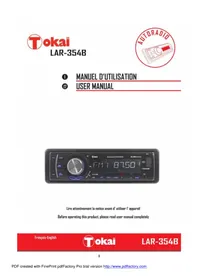
USER MANUAL LAR91B TOKAI
1 MANUEL D'UTILISATION
15 USER MANUAL
Lire attentivement la notice avant d'utiliser l'appareil Before operating this product, please read user manual completely
AVANT DE COMMENCER
CHER CLIENT
EnChoosingcteappareil,vousavezfaitlepremipasversleplaisirdel'ecoutemusicale.Maintenant,c'estlemomentdeyoudevoilercommentoptimiserlesfonctionsde cetequipement.
PTY music group - PTY speech group
-
POP M, ROCK M
-
NEWS, AFFAIRS, INFO
-
EASY M, LIGHT M
-
SPORT, EDUCATE, DRAMA
-
CLASSICS, OTHER M
-
CULTURE, SCIENCE, VARIED
-
JAZZ, COUNTRY
-
WEATHER, FINANCE, CHILDREN
-
NATION M, OLDIES
-
SOCIAL, RELIGION, PHONE IN
-
FOLK M
-
TRAVEL, LEISURE, DOCUMENT
7. FONCTI ONNEMENT DE LA RADIO (suite)
Selecting fine audio equipment such as the unit you have just purchased is only the start of your musical enjoyment. Now it is time to consider how you can maximize the fun and excitement your equipment offers. We want you to get the most out of your equipment by playing it at a safe level. One that lets the sound come through loud and clear without annoying blaring or distortion - and, most importantly, without affecting your sensitive hearing.
Sound can be deceiving. Over time your hearing "comfort level" adapts to higher volumes of sound. So what sounds"normal" can actually be loud and harmful to your hearing.
Guard against this by setting your equipment at a safe level BEFORE your hearing adapts.
To establish a safe level:
. Start your volume control at a low setting
. Slowly increase the sound until you can hear it comfortably and clearly, and without distortion we want you listening for a lifetime.
Once you have established a comfortable sound level:
. Set the dial and leave it there.
Take a minute to do this now; it will help to prevent hearing damage or loss in the future. After all, we want you listening for a lifetime.
ABOUT THIS MANUAL
This product features a number of sophisticated functions ensuring superior reception and operation. All are designed for the easiest possible use, but many are not self-explanatory.
This operation manual is intended to help you benefit fully from their potential and to maximize your listening enjoyment.
We recommend that you familiarize yourself with the functions and their operation by reading through the manual before you begin using this product. It is especially important that you read and observe the "precaution" as follows.
In this operation manual, the Basic Operation for each sound source is outlined at the beginning of its explanation, covering simple operation for that source, such as merely playing music.
PRECAUTION
- Read through this instruction manual before installation and use.
- Do not touch the power plug with wet hand.
- Switch off the main power when the unit is not in use. (Disconnect the power plug from the power outlet when you do not intend to use the unit for a prolonged period of time.)
- Do not open the cover or touch any of the components exposed out of the unit, only for qualified technicians.
- Do not expose the unit under direct sunlight or nearby objects that radiate heat to avoid damage to the unit.
- Do not place the unit in moist and humid conditions, which affect the pick-up of the unit.
- Clear the panel and case with soft dry cloth only, do not apply any kind of thinner, alcohol or sprays.
2. UNIT INSTALLATION
INSTALLATION METHOD
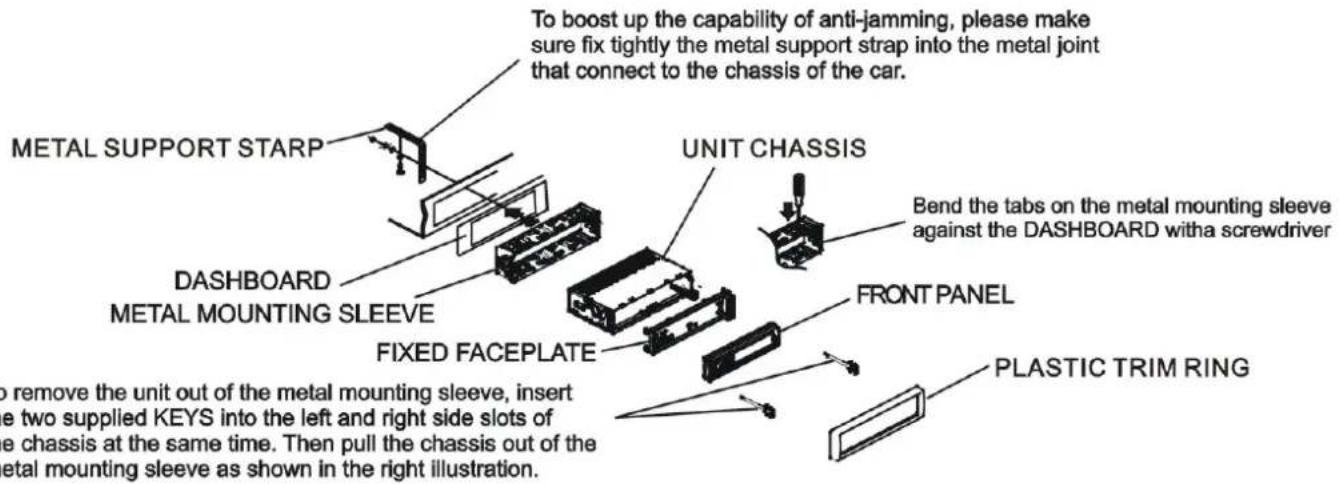
This is an anti-theft installation method. The main unit wears a METAL MOUNTING SLEEVE. Please connect the wiring, eg, the Power Supply, the Speakers and the Antenna according to the requirements of this Instruction Manual, then install the metal mounting sleeve into the car as per the diagram illustrated below.
3. WI RING CONNECTION
DESCRIPTION OF THE BACK OF THE UNIT
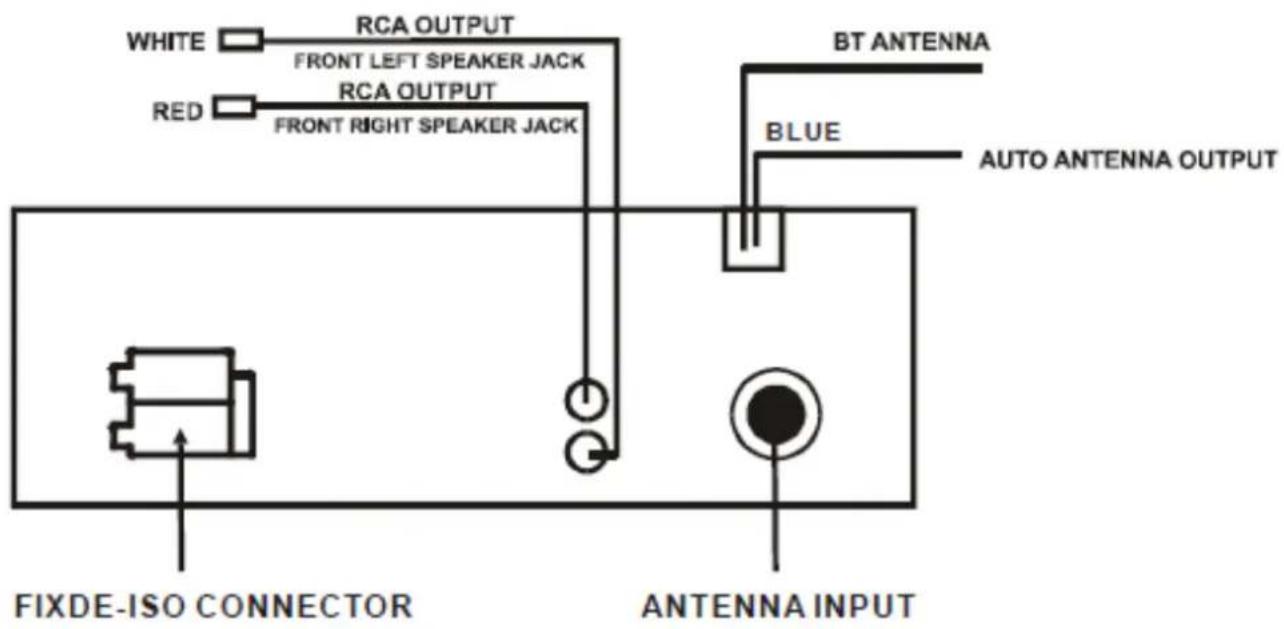
SPEAKER WIRING
FIXED-ISO CONNECTOR
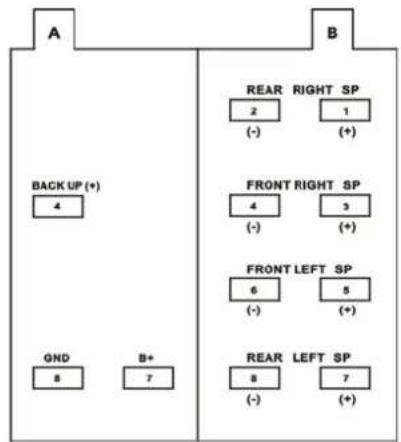
Note: IF YOUR CAR DOES NOT HAVE ISO CONNECTOR YOU CAN PROCURE IT FROM ANY ACCESSORY SHOP
Important
IF FIXED-ISO CONNECTOR IS CUT, THE GUARANTY WILL BE VOID.
4. LOCATION AND FUNCTIONS OF CONTROLS
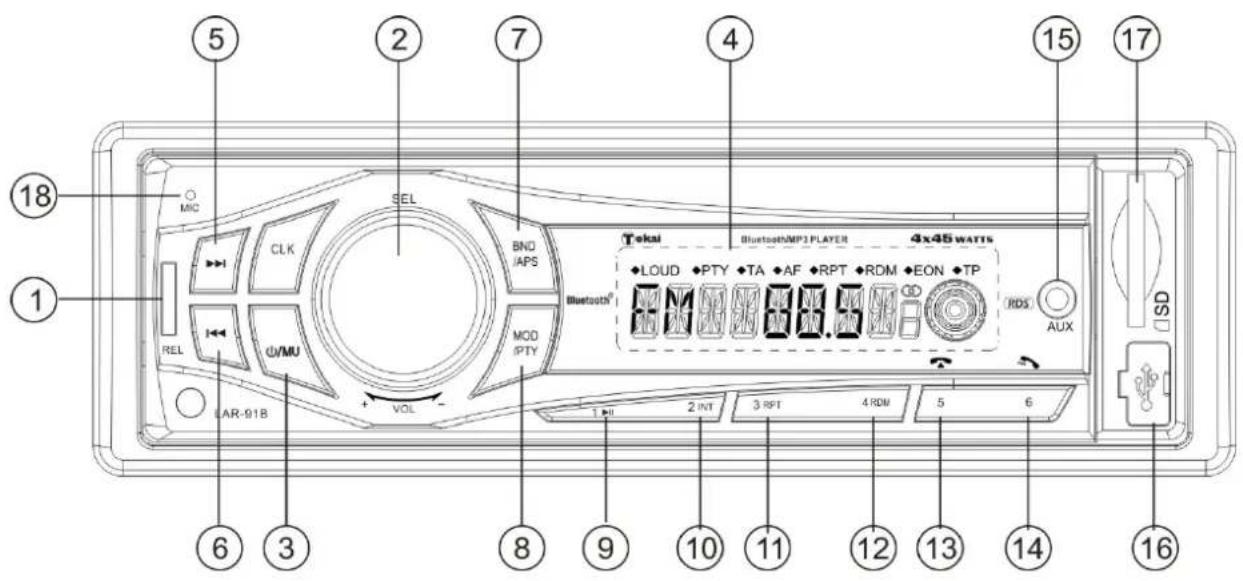
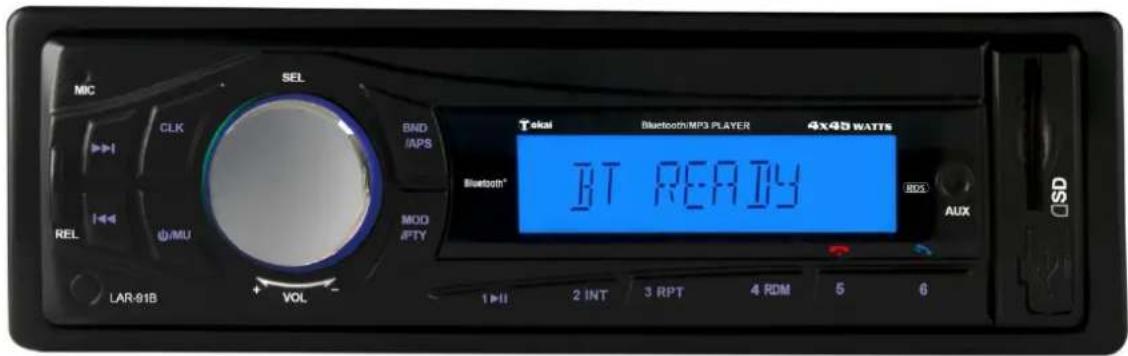
The figure of the front panel
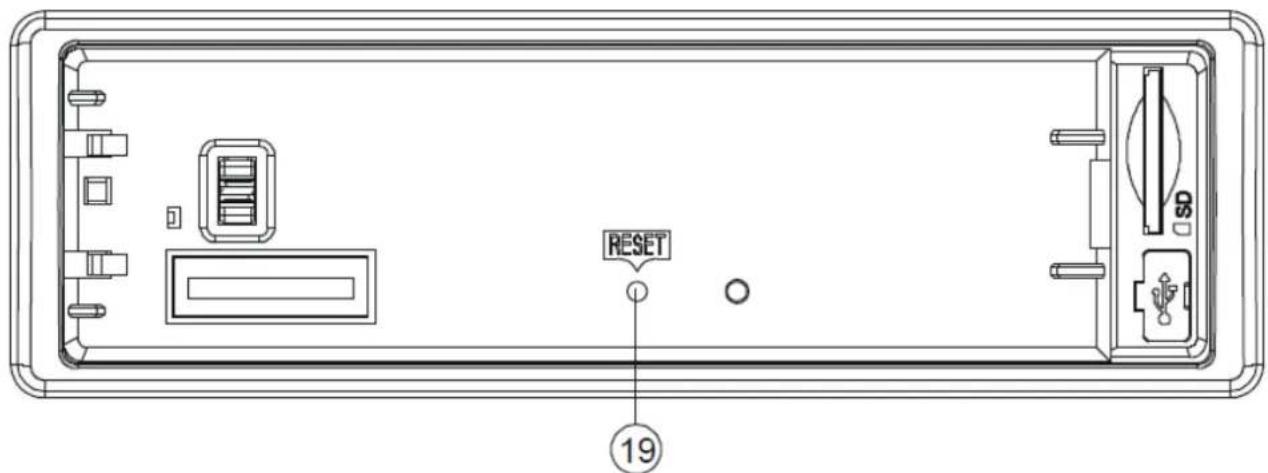
The figure of the Unit Chassis Facet after removing the Front Panel
- RELEASE button
- SELECTION & VOLUME knob
- POWER & MUTE button
- LCD DISPLAY
5&6. /buttons - BAND/APS button
- MODE/PTY button
- PRESET 1/ TOP/> | button
-
PRESET 2/INTRO button
-
PRESET 3/ REPEAT button
- PRESET 4/ RANDOM button
- PRESET 5/ -10/HANG UP button
- PRESET 6/+10/CALL button
- AUXIN jack
- USB socket
17.Card slot - BT MICRO
- RESET
5. COMMON OPERATION
1. To turn the unit on/off.
In power off mode, press any button except RELEASE button to turn on the unit. In power on mode, long press the POWER button to turn off the unit.
2. To select function mode
Press MODE button to change function mode as follows: --> TUNER --> USB --> CARD --> BT--> AUX. When there is no media (USB/CARD), that mode will be skipped.
-
To adjust the volume level: rotate VOLUME knob to adjust volume level during playback.
-
To mute or resume sound: press MUTE to cut the sound, press again to resume sound immediately during playback. To resume the sound immediately, you can also turn VOLUME knob.
5. To set sound mode and menu
1) Sound settings: Press SEL button shortly and repeatedly to select the following modes: VOL (volume), BASS (without preset DSP), TRE (treble)(without preset DSP), BAL(balance) and FAD (fader) in the sequence and circulation. In each mode, the waiting time is about 5 seconds, and when the waiting time is over, it will return to the last display mode. After selecting a sound mode, use volume control to set level of the selected sound mode.
2) To set menu: Press SEL button and hold for more than 2 seconds to turn on TA ON/ OFF mode, then press SEL button shortly and repeatedly to select following options :
-
AF ON/ OFF
-
EUROPE/ AMERICA
-
TA SEEK/ TA ALARM
-
VOL LAST/ VOL DEFA
-
PI SOUND/ PI MUTE,
-
STEREO/MONO (in FM mode)
-
RETUNE L/ RETUNE S
-
LOUD OFF/ LOUD ON
*MASK DPI/MASK ALL
-
DX/ LOCAL (in FM mode)
-
BEEP ON/ BEEP OFF
-
CLK ON/CLK OFF
*USER SET (FLAT/CLASSIC/ROCK/POP)
- CLK 12/24 mode.
After selecting the desired mode, rotate the VOLUME button to select one setup item of the desired mode.
(1) TA SEEK/TAALARM:
TA SEEK mode: when newly tuned station does not receive TP information for 5 seconds, the radio retunes to next station which has not the same station(PI) as the last station, but has the TP information. When TP information gets lost at the current station for retune time which is set by RETUNE SHORT (60 seconds) or RETUNE LONG (90 seconds), the radio start to retune to next same PI station. When same PI station is not received in 1 cyclic search, the radio retunes to next station with TP information.
TA ALARM mode: when this mode is selected, any automatic retune mode is not activated. Only double beep sound (ALARM) is out-put. When newly tuned station does not have TP information for 5 seconds, beeps are sounded. When TP information gets lost at the current station for retune time which is set by RETUNE SHORT (60 seconds) or RETUNE LONG (90 seconds), the radio start to retune to next same PI station. When same PI station is not received in 1 cyclic search, the radio retunes to next station with TP information. When TP information gets lost at the current station for retune time, the beep sound is out-putted. When newly tuned station has no RDS signal, PI SEEK may be suppressed.
5. COMMON OPERATION (continued)
(2) PI SOUND/ PI MUTE:
PI SOUND mode: If a car is cruising between buildings, an oscillation phenomenon may occur, due to different PI codes being received from the same AF.
PI MUTE mode: In above situation, the sound will be muted for less than 1 second.
(3) RETUNE L / RETUNE S:
The initial time of automatic TA search or PI SEARCH mode is selected.
When PI information is not received during retune time, the radio starts to retune to next same PI station. When same PI station is not received during 1 cyclic search, the radio goes to last station and waits for 4-5 minutes until PI code is received.
RETUNE L mode: selected as 90 seconds./ RETUNE S mode: selected as 60 seconds.
(4) MASK DPI/ MASK ALL:
MASK DPI mode: masked only the AF which has different PI.
MASK ALL mode: masked the AF which has different PI and NO RDS signal with high field strength.
(5) BEEP ON/ BEEP OFF
BEEP ON mode: The beep is generated when any key is pressed.
BEEP OFF mode: The beep sound is disabled.
(6) VOL LAST/ VOL DEFA
VOL LAST: The volume level when switching off will be restored with power ON.
VOL DEFA: The volume level of the main unit after power on is a constant value.
When selecting VOL DEFA item, press SEL button to display AVOL, then you can pre-set the constant volume level after power on with VOL control.
(7) CLK ON/OFF
CLK ON: Clock will always show on the display when power is off.
CLK OFF: Clock will disappear from the display when power is off.
6. To display and adjust clock
Press CLK button briefly to display time for 5 seconds on the display, and then returns to its previous display unless the button is pressed again.
Press CLK button and hold for more than 1 second until the real time flashes on LCD. Then you can adjust HOUR or MINUTE with volume control.
7. To remove front control panel
Press RELEASE button to release front control panel from unit chassis, then you can remove it from unit chassis.
When the front control panel is removed, the LED indicator on front cabinet flashes.
8. To reset unit
Before operating the unit for the first time, after replacing the car battery or changing the connections, you must reset the unit. To reset the unit, remove the front control panel, and then press RESET button with a sharp object. This operation will erase clock setting and some stored contents.
6. RADIO OPERATION
1. To select radio band
Press BAND button briefly and repeatedly to select a desired radio band in sequence and circulation as follows:
-->FM1--->FM2--->FM3--->MW1--->MW2-->
2. To search for radio station manually or automatically
Press or button briefly to manual tune up/down for your desired radio stations step by step.
Press and hold or button for 0.5 seconds, to automatically tune up/down for a radio station of strong signal.
3. To store current station or turn on a preset one
1) Press one of the 6 number buttons and hold for more than 1 second to store the current station in the preset memory bank of the number button for the current band. In this way the unit can store 30 preset stations.
2) Press one of the 6 number buttons briefly to turn on the preset station stored in the preset memory bank of the number button for the current band.
When PTY mode is on, the 6 number buttons are shared as follows:
PTY music group PTY speech group
| 1. | P | O | P | M | , | R | O | C | K | M |
| 2. | EASY | M, | LIGHT | M | 2. SPORT, | |||||
| 3. | CLASSICS, | OTHER | M | 3. CULTURE, | S | |||||
| 4. | J | A | Z | Z | , | C | O | U | N T R Y | |
-
NATION M, OLDIES
-
SOCIAL, RELIGION, PHONE IN
-
FOLK M
-
TRAVEL, LEISURE, DOCUMENT
4. To scan for each preset station or auto search for the strongest stations
When pressing and holding BND button for more than 1 second, the radio searches from the current frequency and checks the signal strength level until the 6 strongest stations are found. And then the 6 strongest stations are preset to the corresponding preset memory numbered bank. The auto-storage operation is implemented in the each selected band. When the auto-storage operation is finished, the radio executes Preset scan.
5. To search for stations with a PTY (PROGRAM TYPE) program
Press and hold PTY on main unit to select one of PTY programs such as: POP M- - NEWS-- . While selecting POP M or NEWS, pressing one of 6 preset buttons briefly and repeatedly can select your desired PTY program as described in preset buttons.
When turning on a PTY program, the PTY program and PTY word is flashed on LCD. After selecting a desired PTY program and no operation for 2 seconds, it will search for the station of the PTY program. During 1 loop, if the desired station of the PTY program is not found, PTY NONE is displayed, and then returns to previous normal radio and PTY icon disappears.
6. AF [ALTERNATIVE FREQUENCIES] BUTTON
When pressed briefly, AF switching mode is selected and the state of AF switching mode is displayed by AF segment in display.
Segment off: AF switching mode off.
Segment on: AF switching mode on, and has RDS information.
Segment flashing: AF switching mode on, but RDS information is not received yet.
6. RADIO OPERATION (continued)
When AF switching mode is selected, the radio checks the signal strength of AF all the time.
The interval of checking time of each AF depends on the signal strength of the current station. minutes for strong station to a few seconds for weak station. Every time that new AF is stronger than current station, it switches over to that frequency for a very short time, and the NEW FREQUENCY is displayed for 1-2 seconds. Because the mute time of AF switching or checking time is very short, it is almost inaudible in case of normal program.
During FM mode, when AF is on, SEEK, (SCAN), AUTO-MEMORY function can only receive and save RDS program.
7. TA [TRAFFIC ANNOUNCEMENT] BUTTON
When TA mode is on (TA is displayed on LCD), it will begin to seek TA station and TA SEEK will be displayed on LCD for a while.
When traffic announcement is transmitted:
1). If the unit is in SD, USB mode, it will switch to radio mode temporarily.
2). If volume level is below 20, volume level is raised to 20, and returns to its previous mode and volume level when the traffic announcement is over.
If volume is adjusted during traffic announcement, only the traffic announcement volume is valid
* When TA is on, SEEK, (SCAN), AUTO MEMORY function can be received or saved only when traffic program identification code has been received.
Press the mode button to select auxiliary input playing mode. Then you can connect any matched external audio device to this socket. Use the volume knob to adjust volume.
1. To insert or pull out SD card or USB stick
To read audio files from your SD or USB, insert an SD card or USB stick into the card slot or USB socket. Then the playing mode will be changed into SD or USB mode and display Card or USB on LCD (When SD card and USB stick are both inserted into the slot or socket, the playing mode will be changed into the mode of the latter one), and then play the first track of SD or USB.
2. To select next or previous track to play
Press or button to select and play the next or the previous track.
3. To play fast forward or backward
Press and hold or button to play fast forward or backward in the track currently playing.
4. To play previous or next 10th track/ previous or next folder
Press 5/ -10 or 6 / + 10 button to play previous or next 10th track;
Press and hold 5/ -10 or 6 / + 10 button to play previous or next folder.
5. PLAY/ PAUSE button How to use 1 / > / TOP button
During playback, press 1 / > | | / TOP button to pause playback. When in pause mode, press 1 / > | | / TOP button to play again. Press and hold 1 / > | | TOP button to select the first track for playback.
6. INTRO FUNCTION
During playback, press INT button briefly to play the first 10 seconds of each track, press INT button again to cancel INT function and retain playing the track currently selected.
7. REPEAT FUNCTION
During playback, press RPT button briefly to play the current track repeatedly, and the LCD will display RPT ONE.
Press RPT button twice to play the tracks in the Album repeatedly, and the LCD will display RPT DIR. Press RPT button thrice to cancel REPEAT function, and the LCD will display RPT OFF.
8. RANDOM FUNCTION
During playback, press RDM button briefly to play all tracks in random. Press it again to cancel RDM function.
9. Tracks search
Press BND button to activate TRACK SEARCH mode. The LCD will display TRK 0 or 00 or 000 (it depends on the total number of tracks contained in your media) and the first 0 flashes. Rotate the VOL knob to select a number on the flashing digit position between 0 9 . Then press SEL button to confirm the second 0 next the first selected digit flashes. By following the same procedure, select the number on the flashing digit position with SEL knob. Once you finish your selection, press 1/PLAY button to play the selected track.
9. BLUETOOTH
Before using the Bluetooth function, your LAR-91B must first be paired with your Bluetooth device. Pairing is the term used when two Bluetooth devices are connected wirelessly for the first time. This allows the devices such as a mobile phone to see each other and sets up a one-to-one communication channel between both devices. Your Bluetooth device will keep the unique identification of your LAR-91B in its system.
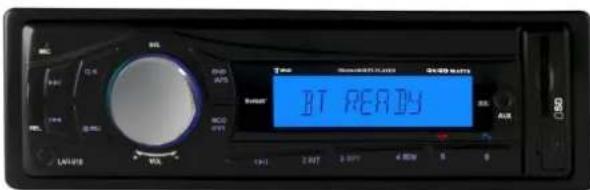
Press MODE button to enter in BLUETOOTH mode. When no device is paired to the radio NO CON is displayed on the screen.
1. Pairing
Turn on Bluetooth mode of mobile phone, then select the function for Finding Bluetooth Device and enter it. After finishing finding, it will show the name of Bluetooth Device if found, select it and enter it, then it will show an interface that asks you to input password. Input the password 0000 and enter it. Then the LCD of the car audio system will display BT READY.
IMPORTANT: Only one phone can be paired at a time with the LAR-91B. To pair another phone, disconnect the paired phone wait until NO CON is displayed on the LCD and follow the instructions of PAI RING described as above to match another device.
2. Connection or disconnection
A) Use mobile phone to do connection or disconnection
1) In connection status, find the paired and connected Bluetooth Device, then press the disconnection button to do disconnection.
2) In disconnection status, find the paired and disconnected Bluetooth Device, then press the connection button to do connection.
B) When powering on (after Acc of the car was switched off), the unit will search for mobile phone, pair and connect. This will take about 10-15 seconds.
Note:
(1) Bluetooth icon appears on LCD only when in connection status.
(2) In connection status: Mobile phone transfers to car audio player whenever a call takes place; Mobile phone transfers to car audio player whenever receiving a call.
3. Calling when in connection status
To make a call simply press the button and enter the number you wish to call using the mobile phone. When you're ready to make the call press again, to end the call simply press button.
To redial, press , the last call number is displayed on the LCD, press again to call.
4. Accept/ Reject/ End Call
A) During ringing, press TEL button to accept the call.
B) During ringing, press button to reject the call.
C) During talking, press button to end the call.
9. BLUETOOTH
5. Volume level setting calling
While talking, use volume control to adjust volume level, but this volume level cannot be saved.
6. Calling or receiving calls while the unit is in sleep mode
When the unit is in standby mode & when you make a call or receive a call, the car radio will power on automatically. Once the call is completed, the radio returns to standby mode.
7. AVRCP & A2DP MODE
To transfer the audio of a file played by Mobile Phone to the Car Audio Player If the mobile phone supports A2DP and could play audio files, when the Mobile Phone plays an audio file(For some Mobile Phones, you must first select Play by BT), the playback will be transferred to the Car Audio Player.
In A2DP mode, if the Bluetooth device of the Mobile Phone supports AVRCP, the functions of the / and PLAY/ PAUSE buttons are the same as one in media mode (no fast forward/backward functions for the / buttons). The other buttons normally available in media mode are not available.
10. TROUBLE SHOOTING
If a fault occurs, first check the points listed below before taking the set for repair. If you are unable to remedy a problem by following these hints, consult you dealer or service center.
WARNING: Under no circumstances should you try to repair the set yourself, as this would invalidate the guarantee.
| COMMON SYMPTOMS CAUSE SOLUTION | ||
| There is no power The car ignition is switched off If the power supply is properly connected to the car accessory, switch the ignition key to “ON” or “ACC” | ||
| The device does not work correctly Temperature inside the car is too high | Cool off until the ambient temperature returns to normal. | |
| There is no sound The volume control is set too low Turn up the Volume | properly | |
| The device has not been correctly connected | Check the power and earth connection according to the wiring diagram. | |
| The operation keys do not work | 1. The built in microcomputer is not operating properly due to noise2. Front panel is not properly fixed into its place. | 1. Switch the device off and on again. Or press the RESET button to resume the program.2. Reinstall the front panel |
| No radio reception | The antenna cable is not connected | insert the antenna cable firmly into the antenna socket of the device |
| In automatic search mode the radio does not stop at a transmitting station | The transmission signals are too weak | Tune in to a radio station manually |
| If none of the solutions described as above can solve your problems, perform a reset as described on page 21. | ||
11. SPECIFICATIONS
GENERAL
| S | u | p | p | l | y | V | o | l | t | a | g | e | D | C | 1 | ||||||||
| C | u | r | r | e | n | t | C | o | n | s | u | m | p | t | i | o | n | ||||||
| P | o | w | e | r | O | u | t | p | u | t | 4 | 5 | W | a | t | ||||||||
| N | u | m | b | e | r | o | f | C | h | a | n | n | e | l | s | ||||||||
| Unit | Dimensions | 178(W) | x | 108(D) | x | 50(H) | mm | ||||||||||||||||
FM SECTION
| F | r | e | q | u | e | n | c | y | R | a | n | g | e | 8 | 7 | ||||
| E | f | f | e | c | t | i | v | e | S | e | n | s | i | t | i | v | i | t | y |
| S | i | g | n | a | l | t | o | n | o | i | s | e | 5 | 0 |
AM SECTION
| F | r | e | q | u | e | n | c | y | R | a | n | g | e | 5 | 2 | 2 | ||||||||||||||||||||||||||||||||||||||||||||||||||||||||||||||||||||||||||||||||||||||||||||||||||||||
| E | f | f | e | c | t | i | v | e | S | e | n | s | i | t | i | v | i | t | y | |||||||||||||||||||||||||||||||||||||||||||||||||||||||||||||||||||||||||||||||||||||||||||||||||||
| S | i | g | n | a | l | t | o | n | o | i | s | e | 4 | 0 |
RCA LINE OUT
| O u t p u t | |||||||||||||||||||||||||||||||||||||||||||||||||||||||||||||||||||||||||||||||||||||||||||||||||||||||||||||||||||||||||||||||||||||||||||||||||||||||||||||||||||||||||||||||||||||||||||||||||||||||||||||||||||||||||||||||||||||||||||||||||||||||||||||||||||||||||||||||||||||||||||||||||||||||||||||||||||||||||||||||||||||||||||||||||||||||||||||||||||||||||||||||||||||||||||||||||||||||||||||||||||||
| MMC/SD or USB PLAYBACK | 1 | 0 | 0 | 0 | m | V | @ | M | |||||||||||||||||||||||||||||||||||||||||||||||||||||||||||||||||||||||||||||||||||||||||||||||||||||||||||||||||||||||||||||||||||||||||||||||||||||||||||||||||||||||||||||||||||||||||||||||||||||||||||||||||||||||||||||||||||||||||||||||||||||||||||||||||||||||||||||||||||||||||||||||||||||||||||||||||||||||||||||||||||||||||||||||||||||||||||||||||||||||||||||||||||||||||||||||||||||||||||||
| S y s t e m | M | P | 3 | a | u | d | i | o | (1KHz) | ||||||||||||||||||||||||||||||||||||||||||||||||||||||||||||||||||||||||||||||||||||||||||||||||||||||||||||||||||||||||||||||||||||||||||||||||||||||||||||||||||||||||||||||||||||||||||||||||||||||||||||||||||||||||||||||||||||||||||||||||||||||||||||||||||||||||||||||||||||||||||||||||||||||||||||||||||||||||||||||||||||||||||||||||||||||||||||||||||||||||||||||||||||||||||||||||||||||||||||
IMPORTANT: Due to continual revision and improvement on our products design, specifications are subject to change without further notice.
12. END OF LIFE DISPOSAL
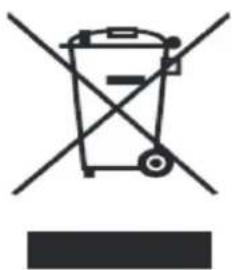
Warning! This logo set on the product means that the recycling of this apparatus comes within the framework of the Directive 2002/96/CE of January 27, 2003 concerning the Waste of Electrical and Electronic Equipment (WEEE).
This symbol means that used electrical and electronic products should not be mixed with general household waste. There is a separate collection system for these products.
If you want to dispose of this equipment, please do not use the ordinary dust bin!
- The presence of dangerous substances in the electrical and electronic equipments can have potential consequences on the environment and human health in the cycle of reprocessing this product.
- Therefore, at the end of its lifetime, this product shall not be disposed with other nonrecycled waste. Used electrical and electronic equipment must be treated separately and in accordance with legislation that requires proper treatment, recovery and recycling of used electrical and electronic equipment.
- Local authorities and resellers have set special procedures for the purpose of collecting and recycling this product (please contact your local authority for further details). You have the obligation to use the selective waste collection systems put in place by your local authority.
- If your used electrical or electronic equipment has batteries or accumulators, please dispose of these separately beforehand according to local requirements.
- By disposing of this product correctly you will help ensure that the waste undergoes the necessary treatment, recovery and recycling and thus prevent potential negative effects on the environment and human health which could otherwise arise due to inappropriate waste handling.

This unit complies with European Council Directive 2006 / 95 CE (Electromagnetic Compatibility & Low Voltage Directives)

We company LEMA SAS hereby states that the unit (unit type) complies with the essential requirements and other relevant provisions of the Council Directive R&TTE 1999/05/CE.
The Declaration of Conformity is available on request at the website www.tokai.fr (heading: Contact).
Tokai LAR-91
www.tokai.fr

- AVANT DE COMMENCER
- CHER CLIENT
- FONCTI ONNEMENT DE LA RADIO (suite)
- ABOUT THIS MANUAL
- PRECAUTION
- UNIT INSTALLATION
- INSTALLATION METHOD
- WI RING CONNECTION
- DESCRIPTION OF THE BACK OF THE UNIT
- SPEAKER WIRING
- FIXED-ISO CONNECTOR
- Important
- LOCATION AND FUNCTIONS OF CONTROLS
- The figure of the Unit Chassis Facet after removing the Front Panel
- COMMON OPERATION
- To turn the unit on/off.
- To select function mode
- To set sound mode and menu
- TA SEEK/TAALARM:
- COMMON OPERATION (continued)
- PI SOUND/ PI MUTE:
- RETUNE L / RETUNE S:
- MASK DPI/ MASK ALL:
- BEEP ON/ BEEP OFF
- VOL LAST/ VOL DEFA
- CLK ON/OFF
- To display and adjust clock
- To remove front control panel
- To reset unit
- RADIO OPERATION
- To select radio band
- To search for radio station manually or automatically
- To store current station or turn on a preset one
- To scan for each preset station or auto search for the strongest stations
- To search for stations with a PTY (PROGRAM TYPE) program
- AF [ALTERNATIVE FREQUENCIES] BUTTON
- RADIO OPERATION (continued)
- TA [TRAFFIC ANNOUNCEMENT] BUTTON
- When traffic announcement is transmitted:
- To insert or pull out SD card or USB stick
- To select next or previous track to play
- To play fast forward or backward
- To play previous or next 10th track/ previous or next folder
- PLAY/ PAUSE button How to use 1 / > / TOP button
- INTRO FUNCTION
- REPEAT FUNCTION
- RANDOM FUNCTION
- Tracks search
- BLUETOOTH
- Pairing
- Connection or disconnection
- Note:
- Calling when in connection status
- Accept/ Reject/ End Call
- Volume level setting calling
- Calling or receiving calls while the unit is in sleep mode
- AVRCP & A2DP MODE
- TROUBLE SHOOTING
- SPECIFICATIONS
- END OF LIFE DISPOSAL
- Tokai LAR-91
Brand : TOKAI
Model : LAR91B
Category : Car radio