MCD 220 - Car stereo CALIBER - Free user manual and instructions
Find the device manual for free MCD 220 CALIBER in PDF.


| Brand | CALIBER |
| Model | MCD 220 |
| Product type | Car radio |
| Power supply | 12 V DC (11-16 V), negative ground |
| Total output power | 70 W × 4 channels |
| Continuous output power | 28 W × 4 channels (4 Ω, 10% THD) |
| Speaker impedance | 4-8 Ω |
| Fuse | 15 A |
| FM radio frequency range | 87.5-108.0 MHz (Europe) / 87.5-107.9 MHz (USA) |
| MW radio frequency range | 522-1620 kHz (Europe) / 530-1710 kHz (USA) |
| Frequency response (FM) | 30 Hz - 15 kHz |
| Signal-to-noise ratio (FM) | 55 dB |
| Frequency response (CD player) | 20 Hz - 20 kHz |
| Signal-to-noise ratio (CD player) | > 86 dB |
| Total harmonic distortion (CD) | < 0.20% (1 kHz) |
| Channel separation (CD) | > 60 dB |
| Dynamic range (CD) | 95 dB |
| Compatible disc formats | CD, CD-R, CD-RW (no 8 cm CDs) |
| Auxiliary input (Aux-in) | Yes, level 300 mV |
| RDS functions | AF, TA, TP, PTY, CT, EON, REG |
| Remote control | Included |
| Front panel | Detachable (anti-theft system) |
| Care and cleaning | Clean CDs from center to edge with a soft cloth; do not use solvents; avoid direct sunlight |
| Safety precautions | Use only on 12 V negative system; disconnect battery before installation; do not open casing; replace fuse with identical type |
Frequently Asked Questions - MCD 220 CALIBER
User questions about MCD 220 CALIBER
0 question about this device. Answer the ones you know or ask your own.
Ask a new question about this device
Download the instructions for your Car stereo in PDF format for free! Find your manual MCD 220 - CALIBER and take your electronic device back in hand. On this page are published all the documents necessary for the use of your device. MCD 220 by CALIBER.
USER MANUAL MCD 220 CALIBER
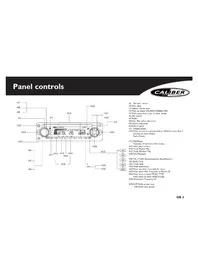
H3 Adjust volume level
H4 Push to select VOL/BAS/TRE/BAL/FAD
H5 Push more than 2 sec. to menu mode
H6 File search
H7 Radio
H8 Disc Play (when disc is in)
H9 Aux-in (optional)
H10 Band switch
H11 Display switch
H19 Press to tune in a preset station. Hold for more than 2 seconds to store station. Radio Preset
H12 Play/Pause
Top play ( Press more than 2 sec.)
H13 Intro play (10 sec.)
H14 Track Repeat Play
H15 Track Random Play
H18 Disc Playback
H20 TA (Traffic Announcements Identification)
H21 Radio Tune
H22 Track Seek
H23 Panel open/close
H24 Press less than 2 seconds for mute
H25 Press more than 2 seconds to Power off
H26 Press once to enter MUSIC TYPE Press twice to enter SPEECH type
H28 Alternative Frequency list
AMS H29 Radio preset scan H30 Radio auto preset

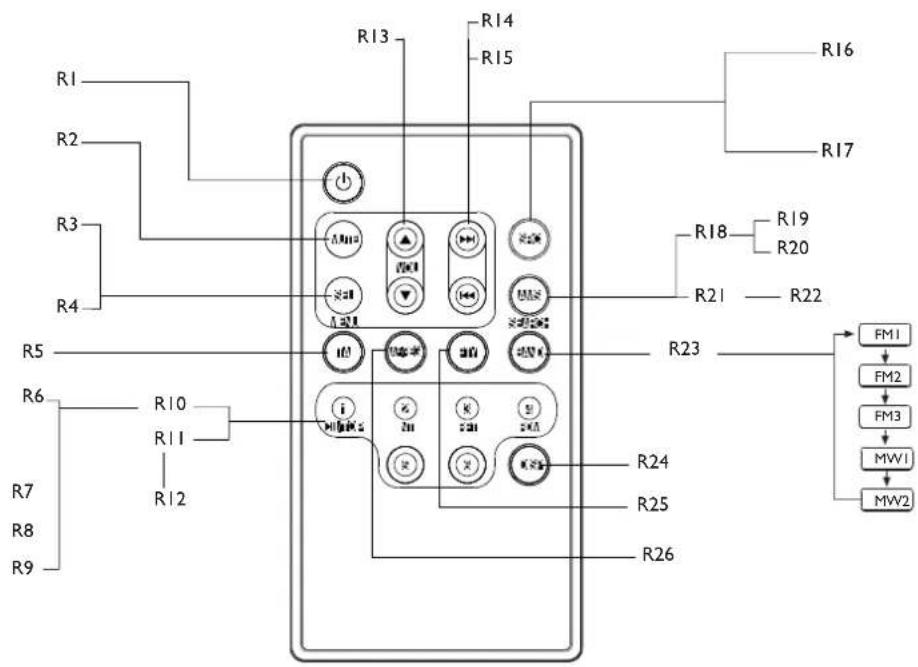
Remote Controls (Optional)
GB 3
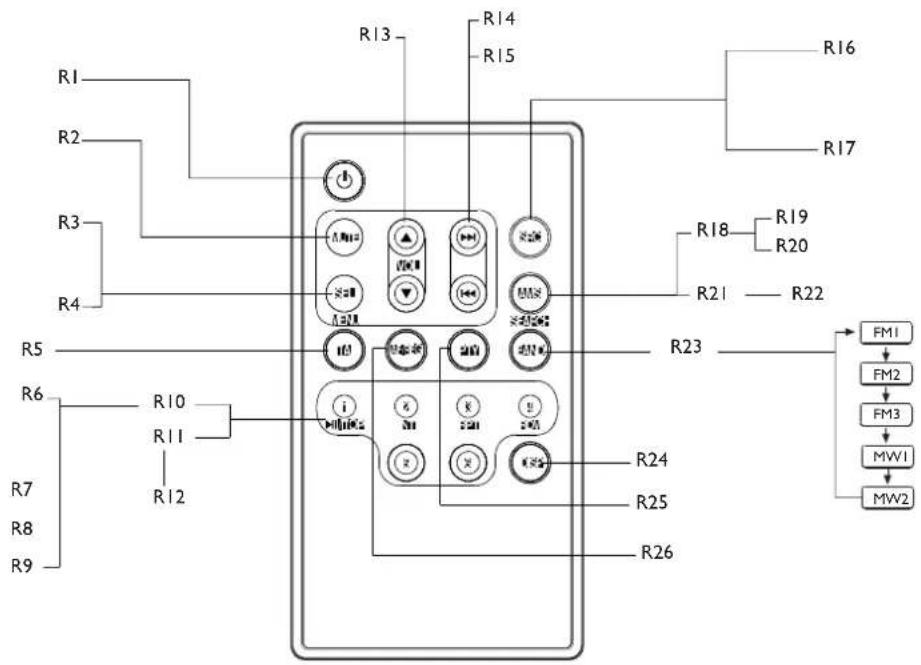
R1 Power on/off
R2 Mute
R3 Push to select VOL/BAS/TRE/BAL/FAD, use Volume button to adjust level.
R4 Push more than 2 seconds to Menu mode
R5 Traffic Announcements Identification
R6 Play / Pause Top play ( press more than 2 sec.)
R7 Intro play(10 sec.)
R8 Track Repeat Play
R9 Track Random Play
R10 Disc Playback
R11 Radio Preset
R12 Press to tune in a preset station. Hold for more than 2 sec. to store station.
R13 Volume
R14 Radio Tune
R15 Track Seek
R16 Radio
R17 Disc Play (when disc is in)
R19 Radio Preset scan
R20 Radio Auto Preset
R18 AMS
R21 SEARCH
R22 MP3 track / file search
R23 Band switch
R24 Display switch
R25 Program type
R26 Alternative Frequency list Region
Safety Information

PRECAUTIONS
- Use only in a 12-volt DC negative-ground electrical system.
- Disconnect the vehicle's negative battery terminal while mounting and connecting the unit.
- When replacing the fuse, be sure to use one with an identical amperage rating.
• U sing a fuse with a higher amperage rating may cause serious damage to the unit.
• DO NOT attempt to disassemble the unit. Laser beams from the optical pickup are dangerous to the eyes. - Make sure that pins or other objects do not get inside the unit; they may cause malfunctions, or create safety hazards such as electrical shock or laser beam exposure.
- If you have parked the car for a long time in hot or cold weather, wait until the temperature in the car become normal before operating the unit.
- Keep the volume at a level at which you can hear outside warning sounds (horns sirens, etc.).
CD Notes
- Playing a defective or dusty CD can cause dropouts in sound.
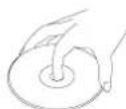
- Hold CDs as illustrated.
• DO NOT touch the unlabeled side. - DO NOT attach any seal, label or data protection sheet to either side of a disc.
- DO NOT expose a CD to direct sunlight or excessive heat.
- Wipe a dirty CD from the center outward with a cleaning cloth.
- Never use solvents such as benzine or alcohol.
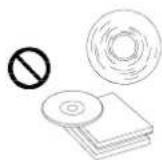
• This unit cannot play 3-inch (8cm) CDs. - NEVER insert a 3-inch CD contained in the adapter or an irregularly shaped CD.
- The unit may not be able to eject it, resulting in a malfunction.
Before operation
- DO NOT raise the volume level too much, as this will block outside sounds, making driving dangerous.
- Stop the car before performing any complicated operation.
Contents
Panel Controls 2
Remote Controls (optional) .....3
Safety Information ....4
Button Tips ....5
Menu Function (No RDS) .....6
RDS (optional) .....7
RDS (continued) 8
RDS (continued) 9
RDS Menu Function .....10
RDS Menu Function (continued) .....11
Electrical Connections .....12
Installation Guide ....13
Anti-Theft System .....14
Trouble Shooting....15
Specifications .....16
* In addition to ordinary CDs, this unit can play back a CD - R or CD - RW.
CAUTION
DO NOT open covers and do not repair by yourself. Consult the dealer or an experienced technician for help.

Button Tips
AMS:Auto memory store
Press briefly to scan the preset station 1-6 for 5 seconds each. Hold more than 2 seconds, the 6 strongest available station will be automatically saved in the memory of preset button 1 - 6.
Radio
Press briefly either side of the button to tune in the station that you have known it's frequency. Hold it more than 2 seconds, tuning will automatically activate and stop when signals of the next station are received.
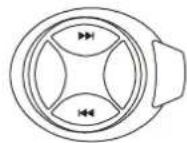
Disc playback
Press briefly either side of the button to go to the next or previous track. Hold it to fast forward or reverse back the track.
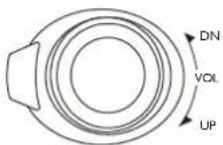
Set clock
Press disp button, time displays. Press again more than 2 seconds, time display blinks. Rotate the knob clockwise to set hours. Rotate the knob anticlockwise to set minutes.
Menu Function (No RDS)

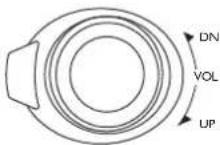
Press the button more than 2 seconds to enter menu mode, then each press changes the mode as follows: DSP mode > BEEP ON/OFF mode >SEEK 1/2 mode (only in tuner mode) >VOL LAST/ADJ mode
DSP mode: rotate the knob to choose DSP sound effect:
POP > ROCK > CLASSIC > FLAT > DSP OFF
BEEP ON/OFF mode :
Rotate the knob to choose sound on or off.
SEEK 1/2 mode: rotate the knob to choose radio seek mode 1 or 2.
SEEK I: searching station will stop when next station is received.
SEEK 2: searching station will stop when >> or << button is released and next station is received.
SEEK 1
VOL LAST / ADJUST MODE
Press knob to choose VOL LAST : the turn-on volume level is the volume level of latest power off.
Rotate knob to choose VOL ADJ,
then press + / - button to set the turn-on volume level.
VOL LAST
VOL ADJ

RDS (Radio Data System-Optional)
RDS service availability varies with areas. Please understand if RDS service is not available in you area, the following service is not available, either. The following functions are available when receiving RDS stations.
RDS Basics
AF( Alternative Frequency list ) When reception is poor, an RDS station broadcasting the same program is tuned in automatically.
PS Display (Program Service name) The name of station is displayed instead of frequency.
AF Mode : Press AF button less than 1 second to switch AF mode on and off.
AF indication on LCD will flash until RDS information is received.
The frequency is changed only for programs within the region.
The frequency is changed also for programs outside the region.
REG Mode : Press AF button more than 1 second to switch REG mode on and off.
During FM mode when AF is on, radio seek, scan and AMS functions can only receive and save RDS program.
88C P4
PEG ON
REG OFF
CT Service (Clock Time)
When receiving an RDS station, the CT (Clock Time) service automatically adjusts the time.
NO CT is displayed in areas where CT service is not available.
NO CT
RDS (continued)

Traffic Announcements
Some RDS FM stations periodically provide traffic information.
TP (Traffic Program Identification) Broadcasting of traffic information
TA(Traffic Announcements Identification) Radio announcements on traffic conditions
TRAF INF
TA Mode
Press TA button to turn on/off TA.
When TA mode is on and TA indicator on LCD is displayed.
When traffic announcement is transmitted, regardless of the mode, reception will begin at volume level 20 if volume level is below 20.
After the traffic announcement is over, it will return to previous mode and volume level.
When TA is turned on, SEEK, SCAN, AMS function can be received or saved when traffic program identification (TP) code is received.
EON (Enhanced Other Networks)
When EON data is received, the EON indicator lights and the TA and AF functions are expanded as follows.
TA: Traffic information from the current and other network stations can be received.
AF: The frequency list of preset RDS stations is updated by EON data. EON enables the radio to make fuller use of RDS information.
It constantly updates the AF list of preset stations, including that currently tuned in to. If you preset a station for from home, you will later be able to receive the same station at an alternative frequency, or any other station serving the same program, EON also keeps track of locally available TP stations for quick receptions.

RDS (continued)
PTY Reception (Program Type)
RDS FM stations provide a program type identification signal.
Example: news, rock, info, sport, etc.
PTY mode: press PTY button to turn PTY on, previous PTY type is displayed and searched if no button is pressed for 2 seconds. If there is no corresponding program type. No PTY is displayed.
PTY Type Preset
Press PTY once to enter MUSIC type or press PTY twice to enter SPEECH type. Then use buttons 1 - 6 to select the desired program type.
| Preset no. Music type Speech type | ||
| 1 POP M / | Rock M News / Affairs / Info | |
| 2 M.O.R. M/ Light M Sport / Educate / Drama | ||
| 3 Classic M / Other M Culture / Science / Varied | ||
| 4 Jazz M / Country M Weather / Finance / Children | ||
| 5 | National M / Oldies M | Social / Religion / Phone In |
| 6 | Folk M / Folk | Travel / Hobbies / Document |
GB 9
RDS Menu Function

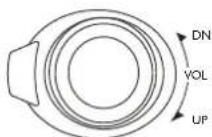
Press the button more than 2 sec. to enter menu mode, then each press changes the mode as follows:
TAmode > MASK mode > DSP mode > LOUD ON/OFF mode > BEEP ON/OFF

VOL mode < LOCAL / DX mode < ST/MO mode < SEEK 1/2 mode (only in tuner mode)
TA mode: Rotate the knob to choose TA ALARM or TA SEEK mode, When TA is turned on and no traffic program identification code has been received during the specified time, no TA/TP is displayed and according to the MENU SELECT, alarm is set off, or TA SEEK is activated.
TA ALARM mode: NO TA/TP is displayed and alarm is set off.
TA SEEK mode: TA SEEK is activated
TA ALARM
TA SEEK
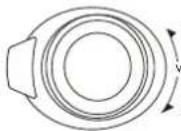
MASK mode:
Rotate the knob to choose MASK DPI or MASK ALL mode.
MASK DPI mode :
Only the AF which has different program identification is masked.
MASK ALL mode :
The AF which has different program identification and NO RDS signal with high field strength is masked.
MASK DPI
MASK ALL
GB 10

RDS Menu Function (continued)
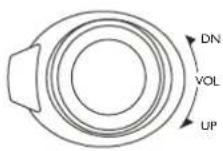
DN DSP mode: Rotate the knob to choose DSP sound effect: POP > ROCK > CLASSIC > FLAT > DSP OFF
VOL LOUD mode: Rotate the knob to choose loud on or off.
UP BEEP ON/OFF mode: Rotate the knob to choose button beep sound on or off.
SEEK 1/2 mode: Rotate the knob to choose radio seek mode 1 or 2.
SEEK I: searching station will stop when next station is received.
SEEK 2: searching station will stop when << or >> button is released and next station is received.
SEEK 1
LO/DX mode: Rotate the knob to choose tuner sensitivity local or distant.
ST/MO mode: Rotate the knob to choose FM stereo or mono.
VOL ADJ
VOL LAST / ADJUST MODE
Press knob to choose VOL LAST: the turn-on volume level is the volume level of latest power off.
Rotate knob to choose VOL ADJ, then rotate the knob to set the turn-on volume level.
VOL ADJ
Electrical Connections

Wiring Diagram
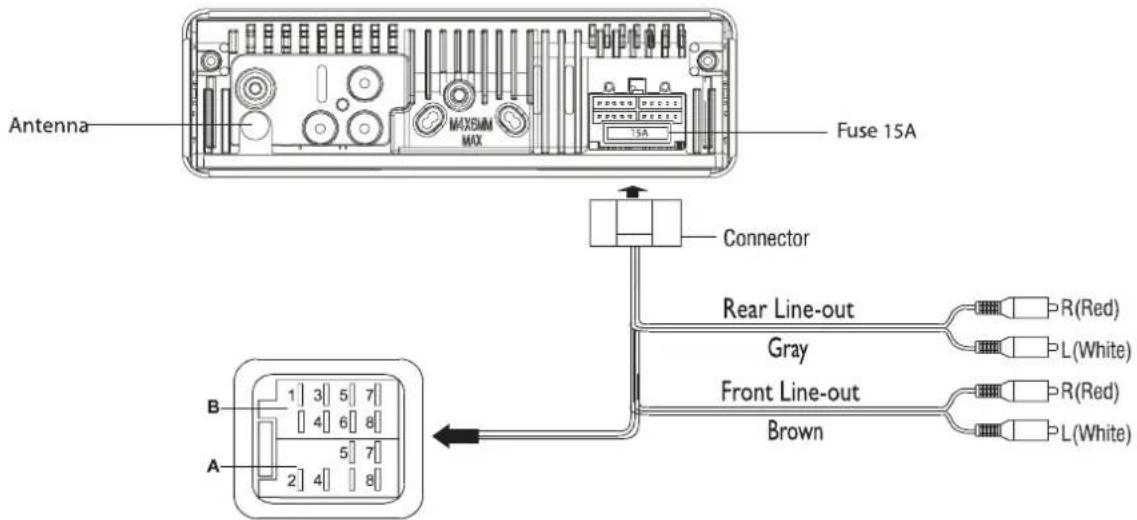
| Location Function | ||
| A | B | |
| 1 Rear right (+) - Purple2 T el mute Rear right (-) - Purple / Black stripe34 ACC + Front right (-) - Gray / Black stripe5 Auto Antenna Front Left (+) - White67 Battery 12V(+) Rear left (+) - Green8 G r | F | |
| F | ||
| G | ound Rear Le | |
r
ont Left (-) - Whit
GB 12

Installation Guide
Installation procedures
First complete the electrical connections, and then check them for correctness.
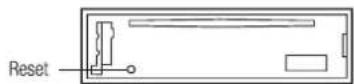
Reset
Press the Reset button with a pointed object to reset the unit to the original status.
(Note: Pressing the reset button will erase the clock setting and stored stations.)
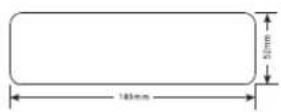
Installation Opening
This unit can be installed in any dashboard having an opening as shown above. The dashboard should be 4.75mm - 5.56mm thick in order to be able to support the unit.
- Insert mounting collar into the dashboard, and bend the mounting tabs out with a screwdriver. (Make sure that lock lever is flush with the mounting collar. Not projecting outward)
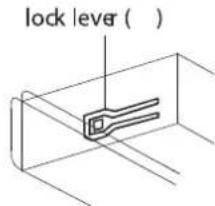
-
Secure the rear of the unit After fixing mounting bolt and power connector, fix the rear of the unit to the car body by rubber cushion.
-
Insert trimplate
Anti-Theft System

Anti-Theft System
This unit is equipped with a detachable panel.
Removing this panel makes the radio totally inoperable.
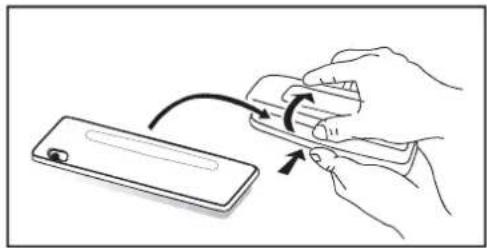
Removing the panel
- Switch off the power of the unit.
- Remove the detachable panel.
- Gently press the button of the case and open the cover.
Place the panel into the case and take it with you when you leave the car.
Install detachable panel
1.Fix right part of face plate in the right part of panel slot of the unit..
2. Press down the left side of the face plate until it clicks into the panel slot of the unit.
Remove the unit
Switch of the power of the unit.
I. Remove the panel and the trim plate.
2. Insert both T-Keys into hole in front of the set until they lock.
3. Pull out the unit.
natural_image
Illustration of hands using a tool to adjust or install a device (no text or symbols visible)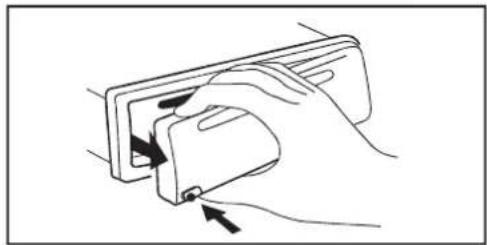
natural_image
Line drawing of a hand inserting a device into a rectangular device (no text or symbols)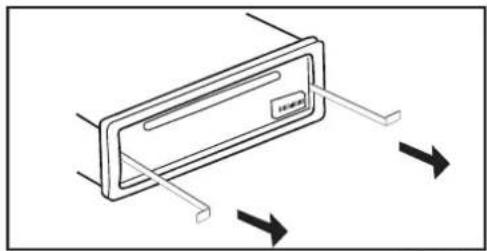
natural_image
Diagram of a device with directional arrows indicating movement or force (no text or symbols)GB 14

Trouble shooting
If you suspect something wrong immediately switch power off. Do not use the unit in abnormal condition, for example without sound, or with smoke or foul smell can cause fire or electric shock, immediately stop using it and call the store where you purchased it. Never try to repair the unit yourself because it is dangerous to do so.
General
• No power or no sound
Car's engine switch is not on. Turn your car's key to ACC or ON.
Cable is not correctly connected. Check connection
Fuse is burnt. Replace fuse.
Check volume or mute on / off.
Disc
• Disc is inside but no sound.
Disc is upside down. Place disc in the correct direction, and the label side up.
Disc is dirty or damaged. Clean disc or change another disc.
• Disc sound skips, tone quality is low.
Disc is dirty or damaged. Clean CD or change CD.
• Sound skips due to vibration
Mounting angle is over 30^ . Adjust mounting angle to less than 30^ .
Radio
- Much noise in broadcasts
Station is too far, or signals are too weak. Select other stations of higher signal level.
- Preset station is reset
Battery cable is not correctly connected. Connect the battery cable to the terminal that is always live.
Error Display Messages
- No file
Disc is not CD
- ERR-7
Disc upside down
- ERR-10
Recovery error, check the disc.
- ERR-3
Disc mechanism error. Press eject button to eject the disc. In case that the disc cannot be ejected by pressing the eject button, press the reset switch and press the eject button again. If still not ejecting consult your dealer.
Specifications

General
Power supply: 12V DC (11V-16V)
Test voltage 14,4V negative ground
Maximum power output: 70W x 4 channels
Continuous power output: 28W x 4 channels
Suitable speaker impedance: 4-8 ohm
Pre-Amp output voltage: 5V (CD play mode: 1kHz, 0dB, 10K load)
Fuse: 15A
Dimensions (WxHxD) 178 x 50 x 155mm
Weight: 1.7kg
FM Stereo Radio
Frequency range: 87.5 - 108.0MHz (Europe Model)
87.5 - 107.9MHz (USA Model)
Usable sensitivity: 8dB
Frequency response: 30Hz - 15kHz
Stereo separation: 30dB (1kHz)
Image response ratio: 50dB
IF response ratio: 70dB
Signal / noise ratio: 55dB
MW (AM) Radio
Frequency range: 522 - 1620KHz (Europe Model)
530 - 1710KHz (USA Model)
Usable sensitivity (S/N= 20dB) 30dB
Disc Player
System: Disc digital audio system
Frequency response: 20Hz - 20kHz
Signal / noise ratio: > 86dB
Total harmonic distortion: Less than 0.20% (1kHz)
Dynamic range: 95dB
Channel separation: > 60dB
Components
Mounting collar: I
Tapping screws M5 x 6mm 4
Mounting bolt (50mm)
Wire connector I
Removable face plate case I
Trim plate
T-key 2
Operating instructions
Rubber cushion I
Remote control optional
Note: Specifications and the design are subject to change without notice due to improvements in technology.

Remarques relatives aux CD
H13 Intro play (10 sec.)
H14 Track Repeat Play
H15 Track Random Play
H18 Disc Playback
H20 TA ( Traffic Announcements Identification )
H21 Radio Tune
H22 Track Seek
H28 Alternative Frequency list
AMS H29 Radio preset scan
H30 Radio auto preset

Remote Controls (Optional)
FR 4
RI Power on/off
R2 Mute
R5 Traffic Announcements Identification
R7 Intro play(10 sec.)
R8 Plage Repeat Play
R9 Track Random Play
R10 Disc Playback
R11 Radio Preset
R22 MP3 track / file search
R26 Alternative Frequency list Région
CT Service (Clock Time)
EON (Enhanced Other Networks)
2 Grand publique M/ Ambiance M Sport / Education / Théâtre
1
2
Dimensions (LxHxP) 178x50x155mm
Poids : 1,7kg

natural_image
Illustration of hands using a tool to interact with a device (no text or symbols visible)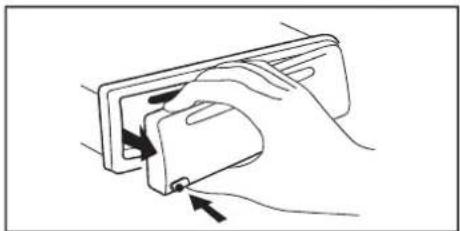
natural_image
Line drawing of a hand holding a device with directional arrows indicating movement (no text or symbols)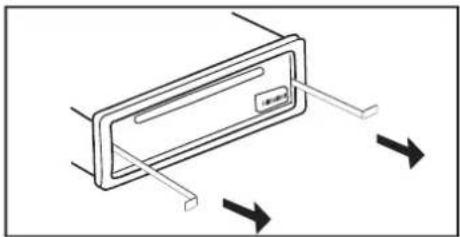
natural_image
Diagram of a vehicle door with directional arrows indicating movement or force (no text or symbols)