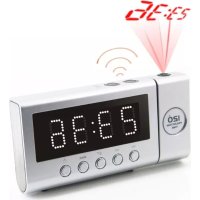
FUR6100SI - Alarm Clock Soundmaster - Free user manual and instructions
Find the device manual for free FUR6100SI Soundmaster in PDF.



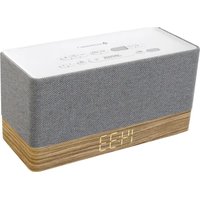
| Product type | Clock radio |
| Brand | Soundmaster |
| Model | FUR6100SI |
| Power supply | 230 V~ 50 Hz |
| Backup battery | 3 V (CR2032, not included) |
| FM frequency range | 87.5 – 108 MHz |
| Number of preset stations | 10 |
| Display | LED |
| Radio-controlled clock | DCF77 (Germany) |
| Alarms | 2 independent, wake-up by buzzer or radio, duration 30 min, snooze 9 min |
| Time projection | 180° rotation, distance 1-3 m, adjustable focus |
| Infrared sensor | Gesture control: snooze, alarm display, standby |
| Brightness dimmer | 3 levels (high, medium, low) |
| Nap timer | 10 to 90 minutes |
| Sleep timer | 15 to 90 minutes |
| Auto display function | Turns off after 15 s, reactivation by gesture or button |
| Antennas | Built-in FM antenna, radio-controlled clock antenna |
| Maintenance | Clean with a dry cloth, do not use detergents |
| Safety instructions | Do not open (risk of electric shock), use in a dry place, do not cover ventilation grilles |
Frequently Asked Questions - FUR6100SI Soundmaster
User questions about FUR6100SI Soundmaster
0 question about this device. Answer the ones you know or ask your own.
Ask a new question about this device
Download the instructions for your Alarm Clock in PDF format for free! Find your manual FUR6100SI - Soundmaster and take your electronic device back in hand. On this page are published all the documents necessary for the use of your device. FUR6100SI by Soundmaster.
USER MANUAL FUR6100SI Soundmaster
DEUTSCH
ENGLISH
FRANÇAIS
NEDERLANDS
ESPANOL
PORTUGUÊS
NORSK
SVENSKA
Do not dispose of this product with the normal household waste at the end of its life cycle. Return it to a collection point for the recycling of electrical and electronic devices. This is indicated by the symbol on the product, user manual or packaging
The materials are recyclable according to their labeling. By reusing materials or other forms of recycling old devices and packaging, you are making an important contribution to protecting our environment. If necessary, remove batteries and personal data before disposal free of charge and ask your local authority about the responsible disposal point
| WARNING | ! | |
| Risk of electric shockDo not open! |
Caution: To reduce the risk of electric shock, do not remove the cover (or back). There are no user serviceable parts inside. Refer servicing to qualified service personnel.

This symbol indicates the presence of dangerous voltage inside the enclosure, sufficient enough to cause electric shock.
This symbol indicates the presence of important operating and maintenance instructions for the device
Used batteries are hazardous waste and NOT to be disposed of with the household waste! As a consumer you are legally obligated to return all batteries for environmentally responsible recycling – no matter whether or not the batteries contain harmful substances*)
Return batteries free of charge to public collection points in your community or shops selling batteries of the respective kind. Only return fully discharged batteries ^* marked Cd = cadmium, Hg = mercury, Pb = lead
- Only use mercury and cadmium-free batteries.
- Used batteries are hazardous waste and NOT to be disposed of with the household waste!!!
- Keep batteries away from children. Children might swallow batteries.
- Contact a physician immediately if a battery was swallowed.
- Check your batteries regularly to avoid battery leakage.
- Batteries shall not be exposed to excessive heat such as sunshine, fire or the like.
- CAUTION: Danger of explosion if battery is incorrectly replaced
- Replace only with the same or equivalent type

WARNING
DO NOT INGEST BATTERY, CHEMICAL BURN HAZARD
This product contains a coin/button cell battery. If the coin/button cell battery is swallowed, it can cause severe internal burns in just 2 hours and can lead to death. Keep new and used batteries away from children. If the battery compartment does not close securely, stop using the product and keep it away from children.
If you think batteries might have been swallowed or placed inside any part of the body, seek immediate medical attention.
Safety, Environmental and Setup Instructions
- Use the device in dry indoor environments only.
- Protect the device from humidity.
- This apparatus is for moderate climates areas use, not suitable for use in tropical climates countries.
- No objects filled with liquids, such as vases, shall be placed on the apparatus.
- The mains plug or an appliance coupler is used as the disconnect device, the disconnect devices shall remain readily operable.
- Connect this device to a properly installed and earthed wall outlet only. Make sure the mains voltage corresponds with the specifications on the rating plate.
- Make sure the mains cable stays dry during operation. Do not pinch or damage the mains cable in any way.
- A damaged mains cable or plug must immediately be replaced by an authorized service center.
- In case of lightning, immediately disconnect the device from the mains supply.
- Children should be supervised by parents when using the device.
- Clean the device with a dry cloth only.
- Do NOT use CLEANING AGENTS or ABRASIVE CLOTHS!
- Do not expose the device to direct sunlight or other heat sources.
• Install the device at a location with sufficient ventilation in order to prevent heat accumulation.
- Do not cover the ventilation openings!
- Install the device at a safe and vibration-free location.
- Install the device as far away as possible from computers and microwave units; otherwise radio reception may be disturbed.
- Do not open or repair the enclosure. It is not safe to do so and will void your warranty. Repairs only by authorized service/ customer center.
- No naked flame sources, such as lighted candles, should be placed on the unit.
- When you are necessary to ship the unit store it in its original package. Save the package for this purpose.
- In case of malfunction due to electrostatic discharge or fast transient (burst), remove and reconnect the power supply.
- If the unit is not using for a long period of time, disconnect it from the power supply by unplugging the power plug. This is to avoid the risk of fire.
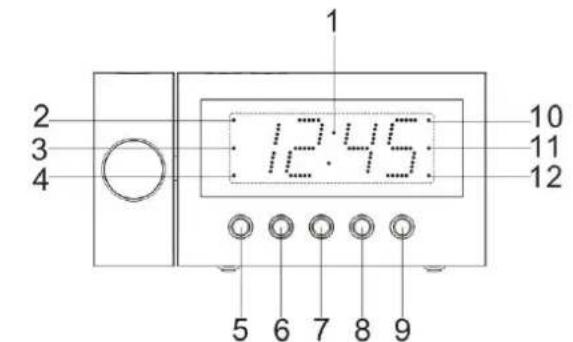
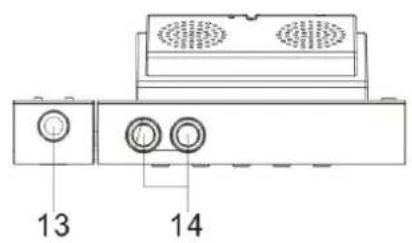
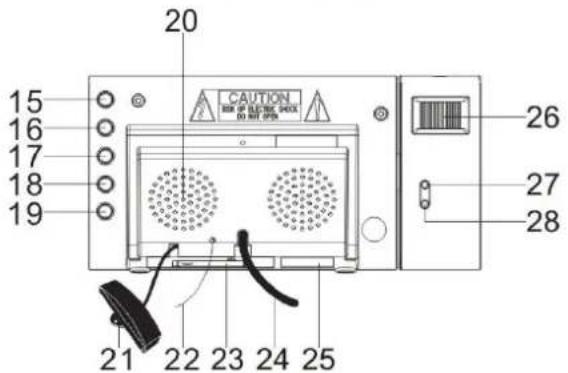
FUNCTION AND CONTROLS
- DISPLAY
- PM INDICATOR
- STANDBY INDICATOR
- ALARM 1 INDICATOR
- SNOOZE / SLEEP / DIMMER
- MEMORY-
- << / TUNE -
-
/ TUNE + / YEAR/MONTH/DAY
- ON-OFF RADIO / ALARM OFF
- RCC ANTENNA TOWER ICON INDICATOR
- RADIO INDICATOR
- ALARM 2 INDICATOR
- PROJECTION UNIT
- INFRARED SENSOR
- VOLUME UP / DISPLAY AUTO CHANGE ON-OFF
- VOLUME DOWN / DSIPALY AUTO ON-OFF
- ALARM 1 ON-OFF SET
- ALARM 2 ON-OFF SET
- CLK.ADJ. / MEMORY / MEMORY+ / NAP
- SPEAKER
- RADIO CONTROLLED CLOCK ANTENNA
- FM ANTENNA
- BATTERY COMPARTMENT
- AC POWER CORD
- RATING LABEL
- FOCUS ADJUSTMENT FOR PROJECTION UNIT
- PROJECTION TIME 180°
- PROJECTION ON/OFF
INTRODUCTION
The unit is designed to automatically synchronize its current time and date with radio signal generated from DCF 77 Frankfurt, Germany.
Power connection
Plug the AC power cord to a household outlet AC source. This unit is equipped with a battery backup system, it requires a 3V CR2032 flat lithium battery (not included). Insert the battery in the battery compartment, making certain that the positive and negative (+ and -) battery terminals are attached to the corresponding terminals on the plate in the battery compartment. If an AC power failure occurs, the clock automatically switches to the battery power supply, the clock and timer memory continue running. The display is not visible at this time! When the AC power resumes, the clock switches back to AC again and the display will show the again the time.
GETTING START
Plug the AC power cord to a household outlet AC source.
- The unit will display full segment for two seconds, then it will enter the normal mode.
- Display will lighten up.
- The unit will start searching radio controlled clock signal automatically. The display radio controlled clock Antenna tower will flash.
- The antenna icon appears and remains displayed when the time has been successfully set.
- If no time setting is possible after approx. 10 minutes, the search is automatically ended and the antenna symbol disappears.
Note:
- During automatic time search, the device is only conditionally operable (switchable on / off).
• Auto search can be stopped by pressing snooze button (5) for 3 seconds.
DISPLAY IN GOOD RECEPTION MODE
- The radio controlled clock Antenna tower icon will keep displaying.
DISPLAY IN POOR RECEPTION MODE
- The radio controlled clock Antenna tower icon will turn off.
1. RECEPTION:
- It will take 3-10 minutes to complete. Note: For best results, place the radio controlled clock antenna (21) away from metal or electrical objects and near a window.
2. SETTING WITH RADIO CONTROLLED:
- Not necessary as it is automatically adjusted.
- SETTING WITHOUT RADIO CONTROLLED MANUAL SETTING:
- Can be done when radio controlled clock antenna tower icon is turned off by pressing SNOOZE button (5) for 3 seconds.
TIME AND CALENDAR MANUAL SETTING
Setting Time and Calendar
A. Press CLK.ADJ. (19) button in standby mode and keep depress over 3 seconds to enter time set mode, after enter the setting mode, press CLK.ADJ. button (19) to change the mode cycle as follows
Normal → Year → Month → Day → 12/24 H → Real time Hour → Real time Min → Normal
Action (during data adjustment):
- Press << / Tune - button (7) to adjust data backward.
- Press >> / Tune + button (8) to adjust data forward.
- Keep depress << or >> button for 3 seconds to enable auto forward.
ALARM SETTING
Press the alarm set button (17/18) during normal mode to show the alarm time. Afterwards keep depress the alarm set button (17/18) over 2 seconds to enter the alarm set mode. After enter the setting mode, press the alarm set button (17/18) to change the mode cycle as follows :
Normal → AL 1 Hour → AL 1 Min → AL 1 weekday Alarm → AL 1 wake beep → AL 1 wake radio → AL 1 wake radio volume → Normal.
Normal → AL 2 Hour → AL 2 Min → AL 2 weekday Alarm → AL 2 wake beep → AL 2 wake radio → AL 2 wake radio volume → Normal.
Select alarm weekday mode as follows
1-5 : Monday to Friday
1-7: Whole week
6-7 : Saturday & Sunday
1-1 : One day of week
1 = Monday, 2 = Tuesday, 3 = Wednesday, ...
Action (during data adjustment) :
- Press << / Tune - button (7) to adjust data backward.
- Press >> / Tune + button (8) to adjust data forward.
- Keep depress << or >> button for 2 seconds to enable auto forward.
Enable / disable the Alarm
Press and hold the "ALARM 1" (17) / "ALARM 2" (18) button to enable or disable the alarm.
Once the alarm is activated, the bell symbol will be appeared on the display.
Alarm duration and snooze function:
Alarm Duration – Beep alarm or radio alarm will continue output for 30 minutes if no key press, then it will stop automatically and wait for same alarm time on next day.
Action for Snooze :
- During alarming, press Snooze button (5) will enable snooze function, Beep alarm or Radio alarm will stop.
- Snooze interval is 9 minute (not include second offset)
- Snooze will continue unless press ON/OFF button (9) to alarm off of Buzzer alarm or Radio Alarm stop automatically after 30 minutes.
Display Auto on-off function:
- Press & hold the display auto on-off button (16) for 3 seconds, the LED display standby Indicator will light on, the LED display will turn off after 15 seconds automatically, Press any button to maintain the LED display for 15 seconds.
- Press & hold the display auto on-off button (16) for 3 seconds, the LED display standby Indicator will light off to cancel this function.
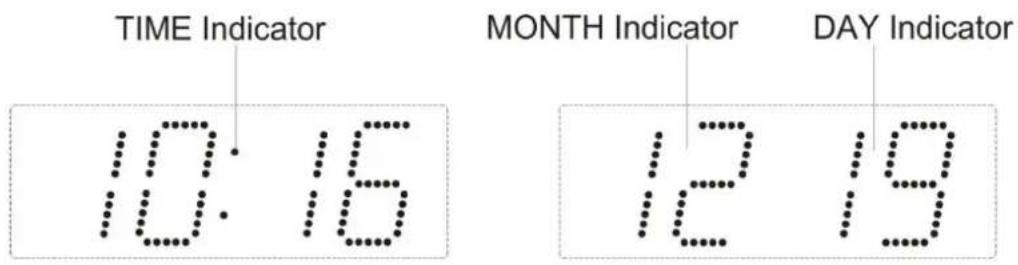
Auto change display content:
In radio off mode, press & hold the display auto change on/off button (15) for 3 seconds to enter time display auto change mode. to display the time and press again to display Month/Day, the display returns to time display after 5 seconds.
Listening to Radio
Press the ON/OFF button (9) to turn the unit on.
Use the Tune + or Tune – button to select the desired radio station. If you press and hold the Tune + or Tune – button for one second, the release, the unit will automatically scan to the next broadcasting station.
Press the ON/OFF button (9) to turn the radio OFF.
To set / recall the radio presets
Press the ON/OFF button (9) to turn the unit ON.
Use the Tune + or Tune - button to select the desired radio station.
Press and hold the memory / memory + button; "P01" will blink in the display.
Use the Tune+ or Tune- button to select the desired preset station (P01-P10)
Press the memory / memory + button again to set the preset.
Repeat steps 2 through 5 to set more presets.
The unit can preset 10 stations totally for FM.
When "P01-P10" is blinking, press the Tune+ or Tune- button to select the preset number.
When recalling preset stations, press memory / memory + button to select the preset number.
Note :
- Ensure that the FM antenna is completely unrolled and extended for best FM reception.
Sleep operation
When listening to radio, press Sleep button (5) to enter sleep mode. You can just adjust the sleep timer from 90 mins to 15 mins by pressing the Sleep button (5). The unit will automatically turn off after the selected time.
Dimmer control
In standby mode, press the DIMMER (5) button allows you to set the brightness of the LED display to high, medium and low 3 levels.
NAP timer function (count down timer)
During radio off mode, press the NAP button (19), to turn on the NAP mode, the NAP time will keep by 5 seconds, within 5 seconds and press NAP button (19) button can change the duration from 90 min – 10 min.
The alarm buzzer will sound for 30 min and then shut off automatically. To stop the alarm buzzer, press the ON/OFF button (9).
Press the NAP button (19) has no effect during alarm operation. Press ON/OFF button (9) to cancel NAP function.
Projection unit
- Focus setting : Adjust the projection clock brightness/focus by turning the brightness/focus adjustment wheel unit the projected time is clearly shown on the ceiling or wall.
- Adjust projected direction.
- To flip projected image by 180°, press PROJECTION TIME 180° FLIP button (27).
NOTE : PROJECTS TIME IMAGE ON THE CEILING OR WALL OF A DARKENED ROOM. MAXIMUN PROJECTION DISTANCE IS 3-9 FEET.
IMPORTANT
There is a sensor located on top of the unit that picks up any movement or objects near the top or back of the unit. Please be sure to place the radio on a surface with a no obstructions 9-12 inches above or 3-6 inches behind the unit. This will help maximize the area for recognizing the motion of your hand and also reduce the chances of the unit false triggering. If the unit begins beeping and the display functions erratically, it may be either too close to an object above or behind the unit. If this happens, please make sure there are 9-12 inches of clearance above and 3-6 inches behind the unit to avoid the false triggering.
INFRARED SENSOR FUNCTION
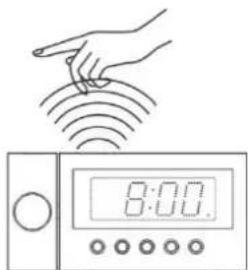
- In radio off mode, to display alarm time settings :
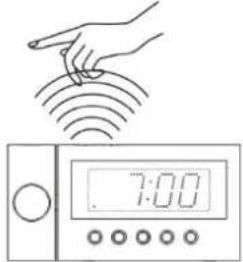
Wave your hand over the IR SENSOR (14) again within 1 second to show the ALARM 1 time.
natural_image
Illustration of a hand interacting with a digital timer displaying 8:00, no text or symbols presentWave your hand over the IR SENSOR (14) again within 1 second to show the ALARM 2 time.
- In radio on mode, to turn sleep function on:
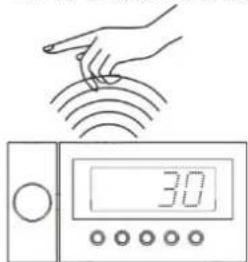
Wave your hand over the IR SENSOR (14) for about 2 seconds to turn on the sleep function, the "90" minutes icon will in the LED display. Sleep time can only be set for a maximum 90 minutes.
Press the SLEEP BUTTON (5) to change the sleep time as described before.
Press the ON/OFF BUTTON (9) to cancel the sleep function.
- While the alarm is sounding, to turn snooze function on:
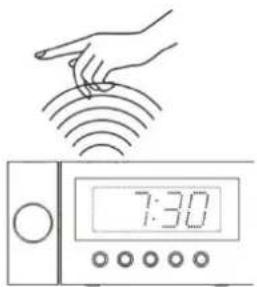
Wave your hand over the IR SENSOR (14) once to activate the snooze for 9 minutes.
- In radio on mode, to display the radio frequency and alarm time settings:
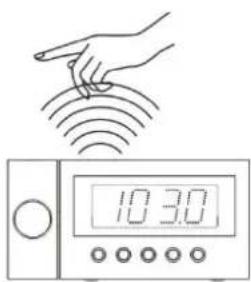
Wave your hand over the IR SENSOR (14) again within 1 second to show the radio frequency
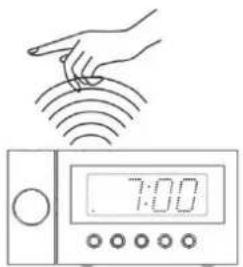
Wave your hand over the IR SENSOR (14) again within 1 second to show the ALARM 1 time.
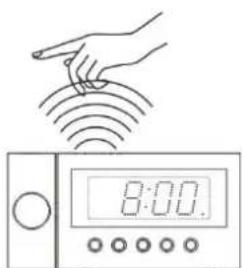
Wave your hand over the IR SENSOR (14) again within 1 second to show the ALARM 2 time.
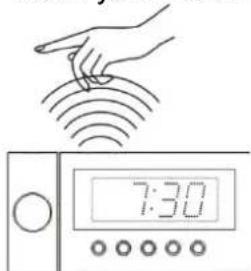
Wave your hand over the IR SENSOR (14) again within 1 second to show the Real time.
- In radio off mode, Press & hold the display auto on-off button (16) for 3 seconds, the LED display standby Indicator will light on, the LED display will turn off after 15 seconds automatically.
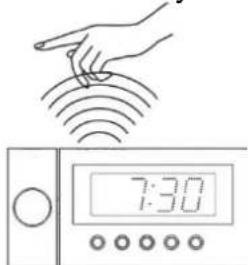
Wave your hand over the IR SENSOR (14) to turn the display on. Press any key button to turn display on.
Resetting
If the system does not respond or exhibits erratic or intermittent operation, you may have experienced an electrostatic discharge (ESD) or a power surge that triggered the internal microcontroller to shut down automatically. If this occurs, simply disconnect the ac power cord and remove the system backup battery, wait for at least 3 minutes and then setup the unit again as if it is a brand new unit.
Specifications
Frequency range : 87.5 – 108 MHz
Battery backup : 3V (CR2032 Flat Lithium battery x 1) not included
Power supply : AC230V 50Hz
Importer
Specifications are subject to change without further notice.
Copyright by Wörlein GmbH, D 90556 Cadolzburg.

PROTECTION DE L'ENVIRONNEMENT

VIS ETTER SUKSESSFULL TIDINNSTILLING
- STILLE INN MED RADIOSTYRING:
- STILLE INN UTEN RADIOSTYRING MANUELL INNSTILLING:
Handling for snooze:
D 90556 Cadolzburg E-post: service@soundmaster.de
GERMANY Web.: www.soundmaster.de
*) markerade Cd = kadmium, Hg = kvicksilver, Pb = bly

WARNING
SVÄLJ INTE BATTERI, KEMISKA BRÄNNSKADOR
E-post:service@soundmaster.de
TYSKLAND
Webb:www.soundmaster.de
D 90556 Cadolzburg, Germany
Tel: +49 9103 71 67 0
Fax: +49 9103 71 67 12
E-Mail: info@soundmaster.de
Internet: www.soundmaster.de
Hereby, Wörlein GmbH declares that this device is in compliance with the essential requirements and other relevant provisions of Directive 2014/53/EU.
A copy of the declaration of conformity can be obtained from the above address.




- WARNING
- DO NOT INGEST BATTERY, CHEMICAL BURN HAZARD
- FUNCTION AND CONTROLS
- INTRODUCTION
- Power connection
- GETTING START
- Note:
- DISPLAY IN GOOD RECEPTION MODE
- DISPLAY IN POOR RECEPTION MODE
- RECEPTION:
- SETTING WITH RADIO CONTROLLED:
- TIME AND CALENDAR MANUAL SETTING
- Setting Time and Calendar
- ALARM SETTING
- Enable / disable the Alarm
- Alarm duration and snooze function:
- Action for Snooze :
- Display Auto on-off function:
- Auto change display content:
- Listening to Radio
- To set / recall the radio presets
- Note :
- Sleep operation
- Dimmer control
- NAP timer function (count down timer)
- Projection unit
- IMPORTANT
- INFRARED SENSOR FUNCTION
- Resetting
- Specifications
- Importer
- PROTECTION DE L'ENVIRONNEMENT
- VIS ETTER SUKSESSFULL TIDINNSTILLING
- Handling for snooze:
- SVÄLJ INTE BATTERI, KEMISKA BRÄNNSKADOR
Brand : Soundmaster
Model : FUR6100SI
Category : Alarm Clock