Power Party - Speaker ION - Free user manual and instructions
Find the device manual for free Power Party ION in PDF.


| Product Type | Portable speaker with LED lighting |
| Brand | ION |
| Model | Power Party |
| Dimensions (L x W x H) | 161 x 191 x 241 mm |
| Weight | 2.48 kg |
| Power Supply | 100–240 V, 50/60 Hz, 30 W |
| Output Power | 16 W peak |
| Speaker | 72 mm (3 in) full range |
| Frequency Response | 80 Hz – 23 kHz |
| Bluetooth | Version 4.1, A2DP profile, range up to 30.5 m |
| Battery Life | Approximately 10 h (music only), up to 4 h (music + lights) |
| Charge Time | Up to 10 h |
| Auxiliary Input | 3.5 mm stereo jack |
| Lighting | Music-reactive light dome |
| Battery | Rechargeable lead-acid |
| Safety Instructions | Do not expose to water; do not look at dome light; do not sit on dome |
| Maintenance | Clean with a dry cloth; do not block vents |
| Repairability | Replaceable fuse near power input; replaceable battery |
| Warranty | See safety instruction and warranty information booklet |
Frequently Asked Questions - Power Party ION
User questions about Power Party ION
0 question about this device. Answer the ones you know or ask your own.
Ask a new question about this device
Download the instructions for your Speaker in PDF format for free! Find your manual Power Party - ION and take your electronic device back in hand. On this page are published all the documents necessary for the use of your device. Power Party by ION.
USER MANUAL Power Party ION
Quickstart Guide English (3-6)
- Make sure all items listed in the Box Contents are included in the box.
- READ THE SAFETY & WARRANTY MANUAL BEFORE USING THE PRODUCT.
- MAKE SURE THE BATTERY IS COMPLETELY CHARGED PRIOR TO FIRST USE FOR MAXIMUM BATTERY LIFE.
- Study the connection diagram.
Box Contents
- Party Power ^TM
- Audio Cable with 1/8" (3.5mm) connectors
- Quickstart Guide
- Safety Instructions & Warranty Information Booklet
Support
For the latest information about this product (system requirements, compatibility information, etc.) and product registration, visit ionaudio.com.
WARNING: DO NOT splash or immerse in water or other liquids.
Not for use in rain. Use only in dry locations.
WARNING: DO NOT look directly into the dome light. Do not sit, stand, or apply pressure on the dome light.
Rechargeable Batteries
Rechargeable lead-acid batteries are the same type used in automobiles. As with your car battery, how you use this battery has a significant impact on its lifespan. With proper use and treatment, a lead-acid battery can last for years. Here are some recommendations for getting the longest life from the internal battery.
General Usage Charge fully before use.
Charge fully before storing.
Storage For best product longevity, do not store at exceedingly hot (greater than 90^ F / 32^ C) or exceedingly cold (less than 32^ F / 0^ C) temperatures.
It is acceptable to leave your sound system plugged in. This will not overcharge the battery.
If you leave the battery level low and do not charge it for 6 months, it may permanently lose capacity.
Repair If the battery fails to charge, check the fuse near the power cable input. If the fuse is not intact, please replace it.
The battery can be replaced (details in the Technical Specifications).
For Warranty and Parts, contact the Parts Dept. at 401-658-3743 or by visiting ionaudio.com.
Disposal Bring the unit to a recycling center or dispose of in accordance with local ordinances.
Quick Setup
Connection Diagram
- For optimal performance, place Party Power in the center of the room so it is unobstructed by walls, furniture, etc.
- Turn down the Master Volume on the Party Power.
- Turn on Party Power.
- Connect your music player with an audio cable or Bluetooth (see Connecting with a Bluetooth Device for more details on this).
- Adjust the volume on your music player and on Party Power as needed.
- Press the Party Light button on Party Power to turn the lights on or off.
- Turn off Party Power when not in use.
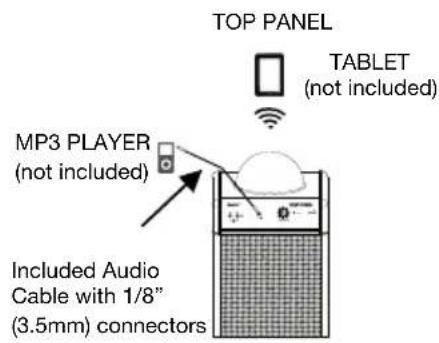
text_image
TOP PANEL TABLET (not included) MP3 PLAYER (not included) Included Audio Cable with 1/8" (3.5mm) connectors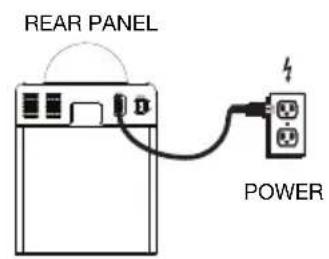
text_image
REAR PANEL POWERFeatures
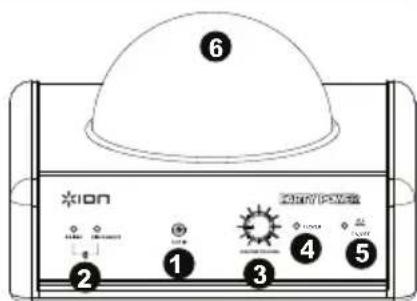
- Auxiliary Input: This stereo 1/8" (3.5mm) input can be used to connect a smartphone, MP3 player, or other audio sources.
- Bluetooth: The Paired LED will be lit when a device is paired to Party Power. This LED will not be lit when Party Power is first powered on (unless it was previously paired with a device). Press the Disconnect button to disconnect a paired Bluetooth device.
- Master Volume Control: This adjusts the speaker's main mix volume, which includes the Auxiliary Input and the audio of a paired Bluetooth device.
- Power LED: Indicates various states of activity on Party Power. See the Power LED callout box for more details.
- Party Light Button: Turns the lights on or off.
- Dome: Displays the lights which will react to the playing music when the Party Light button is activated.
- Power Input: Insert the included power cable here to power the unit.
- Power ON/OFF Switch: Turns Party Power on or off.
- Air Vents: These vents ensure the light dome operates efficiently. Note: Please ensure these vents do not get covered or blocked.
*WARNING: Do not look directly into the dome light. Do not sit, stand, or apply pressure on the dome light.
text_image
6 ION 2 1 3 4 5 ENERGY-LED System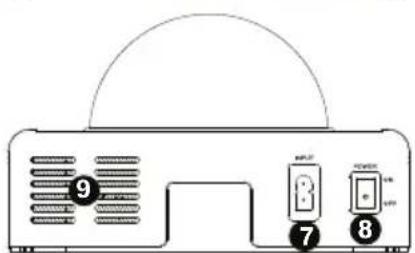
text_image
9 7 8Power LED:
Solid Green LED = Party Power is powered on
Solid Yellow LED = Battery is charging with the power on
Solid Red LED = Battery is charging with the power off
Solid Yellow LED = Battery is charging with the power on
Solid Green / Blinking Yellow LED = Party Power is powered on and the battery is low
LED OFF = Power is off, power cable is connected, and the battery is fully charged
Troubleshooting
If the sound is distorted: Try lowering the volume control of your sound source or musical instrument. Also, try to reduce the overall volume of Party Power.
If there is too much bass: Try adjusting the tone or EQ control on your sound source to lower the bass level. This will allow you to play the music louder before clipping (distortion) occurs.
Connecting with a Bluetooth Device
-
Turn on Party Power using the power switch.
-
Navigate to your Bluetooth device's setup screen, find "Party Power" and connect.
Note: The next time you approach Party Power with your Bluetooth device, it will automatically re-connect.
Note: If your Bluetooth device prompts for a pairing code, enter 0000.
- If your Bluetooth device is not able to connect to Party Power, press the Bluetooth Disconnect button on Party Power to break previous Bluetooth connections and reset the Bluetooth module.
Note: Maximum range will be achieved when using devices with Bluetooth 4.0.
-
The Paired LED will light up solid when it is 'paired'.
-
Start music playback from your Bluetooth device.
-
To connect to another Bluetooth device, press the Bluetooth Disconnect button. Repeat Step 2.
-
To disconnect a connected Bluetooth device, press the Bluetooth Disconnect button.
Note: If you experience trouble connecting or playing music, update your device's OS.
Specifications
| Dimensions (Depth x Width x Height) | 6.5" x 7.5" x 9.5" 165.10 mm x 190.50 mm x 241.30 mm |
| Weight | 5.5 lbs 2.48 kg |
| Power Input | 100-240V, 50/60 Hz; 30W |
| Power | 16W (peak) |
| Speaker | 3" (72 mm) Full-range driver |
| Frequency Response (-3dB) | 80 Hz-23 kHz |
| Supported Bluetooth Profile | A2DP |
| Bluetooth Range | Up to 100 ft. / 30.5 m * |
| Bluetooth Specification | Bluetooth 4.1 |
| Battery Life (when fully charged) | Up to 10 hours with music only; up to 4 hours with lights and music. |
| Charging Time | Up to 10 hours |
Specifications are subject to change without notice.
*Bluetooth range is affected by walls, obstructions, and movement. For optimal performance, place Party Power in the center of the room so it is unobstructed by walls, furniture, etc.
Trademarks and License
ION Audio is a trademark of ION Audio, LLC, registered in the U.S. and other countries.
The Bluetooth word mark and logos are owned by the Bluetooth SIG, Inc. and any use of such marks by ION Audio is under license.
All other product or company names are trademarks or registered trademarks of their respective owners.
For the electrostatic discharge (ESD) test of EN301 489-1/17, it was found that manual operation is needed to resume normal operation as intended after the test.
Assistance technique
text_image
Diagram of a device front panel with labeled ports and ventilation slotsVaste groene led = Party Power is ingeschakeld.