CAL9 - Calculator VELLEMAN - Free user manual and instructions
Find the device manual for free CAL9 VELLEMAN in PDF.



| Product type | 4-function calculator/clock |
| Brand | Velleman |
| Model | CAL9 |
| Dimensions | 115 × 155 × 70 mm |
| Weight | 200 g |
| Power supply | 1 CR2032 lithium battery (included) |
| Display | LCD, 8 digits |
| Calculator functions | Addition, subtraction, multiplication, division |
| Clock functions | 12/24h display, world clock for 16 cities |
| Calendar | Date with leap year adjustment (2000-2099) |
| Alarm | Daily alarm with auto shut-off after 2 minutes |
| Function selection | By tilting the LCD display |
| Maintenance | Protect from shocks, dust, moisture and extreme temperatures. Clean with a dry cloth. |
| Safety | Indoor use only. Keep out of reach of children. Do not open or modify. |
| Spare parts | No user-serviceable parts. Contact the dealer. |
| Warranty | Does not cover damage due to improper use. |
| Environmental information | Do not dispose of with household waste. Recycle according to local regulations. |
Frequently Asked Questions - CAL9 VELLEMAN
User questions about CAL9 VELLEMAN
0 question about this device. Answer the ones you know or ask your own.
Ask a new question about this device
Download the instructions for your Calculator in PDF format for free! Find your manual CAL9 - VELLEMAN and take your electronic device back in hand. On this page are published all the documents necessary for the use of your device. CAL9 by VELLEMAN.
USER MANUAL CAL9 VELLEMAN
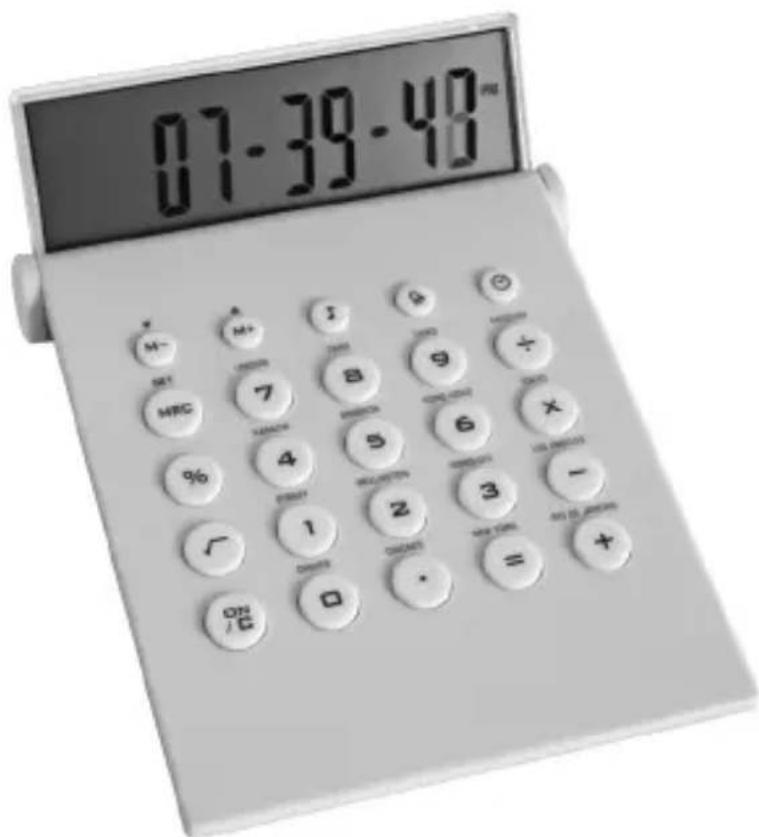
DESKTOP CALCULATOR WITH WORLD TIME CLOCK CALCULATOR MET WERELDKLOK CALCULATRICE AVEC HORLOGE UNIVERSALLE CALCULADORA CON RELOJ DEL HORARIO MUNDIAL REchner MIT WELTZEITUHR
USER MANUAL 2
GEBRUIKERSHANDLEIDING 5
NOTICE D'EMPLOI 8
MANUAL DEL USUARIO 11
BEDIENUNGSANLEITUNG 14
CAL9
User manual
1. Introduction
To all residents of the European Union
Important environmental information about this product

This symbol on the device or the package indicates that disposal of the device after its lifecycle could harm the environment.
Do not dispose of the unit (or batteries) as unsorted municipal waste; it should be taken to a specialized company for recycling.
This device should be returned to your distributor or to a local recycling service. Respect the local environmental rules.
If in doubt, contact your local waste disposal authorities.
Thank you for choosing Velleman! Please read the manual thoroughly before bringing this device into service. If the device was damaged in transit, don't install or use it and contact your dealer.
2. Safety Instructions

For indoor use only. Keep this device away from rain, moisture, splashing and dripping liquids.

Keep the device away from children and unauthorised users.

There are no user-serviceable parts inside the device. Refer to an authorized dealer for service and/or spare parts.
- Damage caused by disregard of certain guidelines in this manual is not covered by the warranty and the dealer will not accept responsibility for any ensuing defects or problems.
- Note that damage caused by user modifications to the device is not covered by the warranty.
3. General Guidelines
- Protect this device from shocks and abuse. Avoid brute force when operating.
- Protected the device against extreme heat, dust and moisture.
- Familiarise yourself with the functions of the device before actually using it.
- All modifications of the device are forbidden for safety reasons.
- Only use the device for its intended purpose. Using the device in an unauthorised way will void the warranty.
4. Features
- Clock/calculator with 4 functions:
o Calculator: 8 digits
○Clock: 12/24h selectable, world time display of 16 cities
Date: month/day calendar, auto-leap year adjusted from 2000-2099
O Alarm: daily alarm
- select desired function by gently pushing the LCD display
CAL9
5. Overview
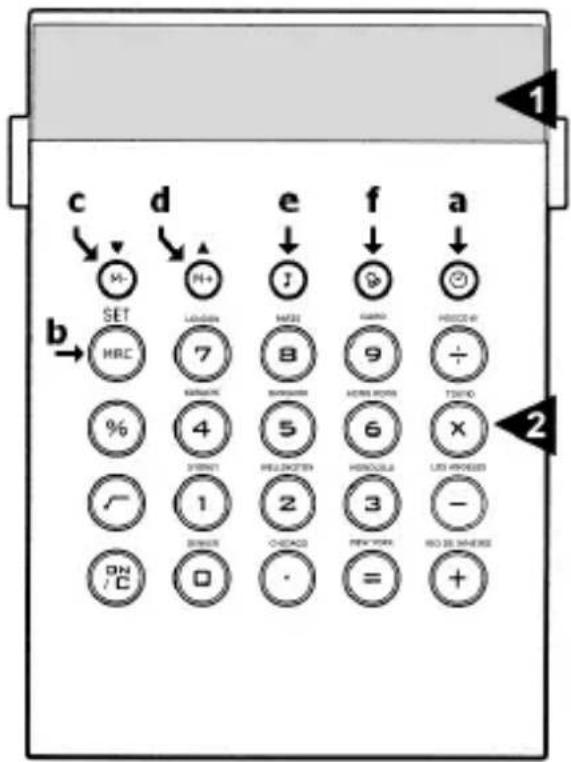
- LCD display
- key pad
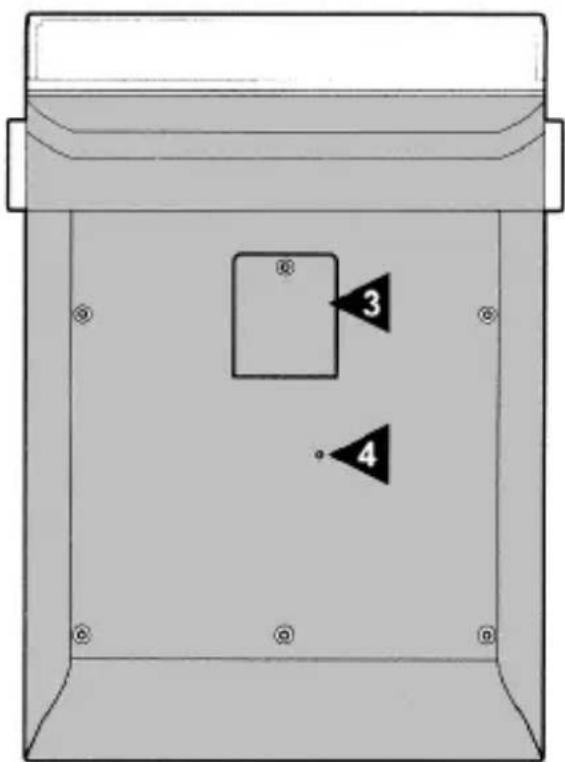
- battery compartment
- RESET button
6. Setting/operation
Clock
- Press the LCD (1) or button [a] to select time mode.
- Press button [b] (SET) to edit seconds and use button [c] or [d] to set to 00.
- Press button [b] (SET) to edit hour and use button [c] and [d] to adjust.
- Press button [b] (SET) to edit minutes and use button [c] and [d] to adjust.
- Press button [b] (SET) again to confirm and save the setting.
- To switch between 12/24 hour format, press button [=] in time edit mode.
World time
- While in time mode, press the button marked with the desired location. The time at that location will be displayed for 8 seconds, after which the local time is displayed again.
- To permanently see the time at a certain location, first display it an then press and hold button [b] (SET) for 2 seconds.
Date
- Press the LCD (1) or button [a] to select date mode.
- Press button [b] (SET) to edit the year and use button [c] or [d] to adjust.
- Press button [b] (SET) to edit the month and use button [c] or [d] to adjust.
- Press button [b] (SET) to edit the day and use button [c] or [d] to adjust.
- Press button [b] (SET) again to confirm and save the setting.
CAL9
Alarm time
- Press the LCD (1), button [a] or button [f] to select alarm time mode. ALM icon is shown in the display.
- Press button [b] (SET) to edit hour and use button [c] and [d] to adjust.
- Press button [b] (SET) to edit minutes and use button [c] and [d] to adjust.
- Press button [b] (SET) again to confirm and save the setting.
- Press button [c] or [d] to switch the alarm on or off. When on, an icon (A) is shown in the display.
- When the alarm sounds, press any button to turn it off. It will stop automatically after two minutes when no key is pressed.
Calculator
- Press the LCD (1), button [a] or button [ON/C] to select calculator mode.
- Press the button [ON/C] to change or cancel faulty inputs.
Key tones
- To switch the tone of the keys on or off, simply press button [e]. When on, an icon (music note) is shown on the display.
RESET
- In highly electrostatic environment, the device may automatically reset.
- When an error occurs, the device may be manually reset, by inserting a pointed object into the opening on the back (4).
7. Battery
- Before first use, remove the battery protection tape.
- To replace the battery, remove the screw form the battery cover (3) and open the cover.
- Replace the old battery with a new lithium battery type CR3032. Make sure to use the correct polarity.
- Remove the battery when the device is not in use.
- Do not recharge batteries and do not throw in fire as they may explode.

WARNING: handle Lithium batteries with care, observe warnings on battery casing. Dispose of batteries in accordance with local regulations.
Keep the battery away from children.
8. Technical Specification
power supply 1 x CR2032C Lithium battery (incl.)
dimensions 115 x 155 x 70mm
weight 200g
Use this device with original accessories only. Velleman nv cannot be held responsible in the event of damage or injury resulted from (incorrect) use of this device.
For more info concerning this product, please visit our website www.velleman.eu.
The information in this manual is subject to change without prior notice.
CAL9
- DESKTOP CALCULATOR WITH WORLD TIME CLOCK CALCULATOR MET WERELDKLOK CALCULATRICE AVEC HORLOGE UNIVERSALLE CALCULADORA CON RELOJ DEL HORARIO MUNDIAL REchner MIT WELTZEITUHR
- CAL9
- User manual
- Introduction
- To all residents of the European Union
- Important environmental information about this product
- If in doubt, contact your local waste disposal authorities.
- Safety Instructions
- General Guidelines
- Features
- Overview
- Setting/operation
- Clock
- World time
- Date
- Alarm time
- Calculator
- Key tones
- RESET
- Battery
- Technical Specification
Brand : VELLEMAN
Model : CAL9
Category : Calculator