UMC5200 - Microwave Oven AMANA - Free user manual and instructions
Find the device manual for free UMC5200 AMANA in PDF.



| Product Type | Microwave Oven |
| Brand | AMANA |
| Model | UMC5200 |
| Power Supply | 120 V, 60 Hz |
| Input Power | 1550 W (U.S.) / 1500 W (Canada) |
| Cooking Power | 1100 W (U.S.) / 1000 W (Canada) (IEC 60705) |
| Frequency | 2450 MHz |
| Rated Current | 13.5 A (U.S.) / 13 A (Canada) |
| Dimensions (W x H x D) | 601 x 336 x 462 mm |
| Interior Volume | 56.6 L (56.6 dm³) |
| Net Weight | 20.7 kg |
| Built-in Capability | Kit UMTK30/27 available (optional) |
| Main Functions | Sensor Cooking, Popcorn, Vegetables, Soften/Melt, Snacks, Kids Meals, Custom Program, Auto Defrost, Timer, Reheat, Pizza Slice, Baked Potatoes, etc. |
| Power Levels | 10 levels (10 high to 1 low) |
| Display Type | Digital display with clock |
| Child Safety | Control panel lock |
| Automation | Humidity sensor for automatic cooking |
| Maintenance | Clean with a soft cloth and mild detergent |
| Warranty | 1 year parts and labor (Whirlpool) |
Frequently Asked Questions - UMC5200 AMANA
User questions about UMC5200 AMANA
0 question about this device. Answer the ones you know or ask your own.
Ask a new question about this device
Download the instructions for your Microwave Oven in PDF format for free! Find your manual UMC5200 - AMANA and take your electronic device back in hand. On this page are published all the documents necessary for the use of your device. UMC5200 by AMANA.
USER MANUAL UMC5200 AMANA
IMPORTANT SAFETY INSTRUCTIONS 2
Precautions to Avoid Possible Exposure to Excessive Microwave Energy 4
Installation and Operation 6
Features 7
Operating Instructions 9
Care and Cleaning 21
Cooking Utensils 22
Troubleshooting 23
WHIRLPOOL CORPORATION MAJOR APPLIANCE WARRANTY 24
Keep instructions for future reference. Be sure Use & Care Guide stays with oven.
IMPORTANT SAFETY INSTRUCTIONS
Installer: Please leave this guide with this appliance.
Consumer: Please read and keep this Use & Care
Guide for future reference.
Keep sales receipt and/or cancelled check as proof of purchase.
Model Number
Serial Number
Date of Purchase
In our continuing effort to improve the quality and performance of our appliances, it may be necessary to make changes to the appliance without revising this guide.
If you have questions, write us (include your model number and phone number) or call:
Maytag Services
Attn: CAIR Center
P.O.Box 2370
Cleveland, TN 37320-2370
1-800-688-9900 U.S.A.
1-800-688-2002 Canada
1-800-688-2080 (US TTY for hearing or speech
impaired)
(Mon.-Fri., 8 a.m.-8 p.m. Eastern Time)
Internet: http://www-Maytag.com
WHAT YOU NEED TO KNOW ABOUT SAFETY INSTRUCTIONS
Warning and Important Safety Instructions appearing in this Use & Care Guide are not meant to cover all possible conditions and situations that may occur. Common sense, caution, and care must be exercised when installing, maintaining, or operating microwave.
Always contact your dealer, distributor, service agent, or manufacturer about problems or conditions you do not understand.
RECOGNIZE SAFETY SYMBOLS, WORDS, LABELS

DANGER
DANGER - Immediate hazards which WILL result in severe personal injury or death.

WARNING
WARNING - Hazards or unsafe practices which COULD result in severe personal injury or death.

CAUTION
CAUTION - Hazards or unsafe practices which COULD result in minor personal injury.

WARNING
Liquids such as water, coffee, or tea are able to be overheated beyond the boiling point without appearing to be boiling due to surface tension of the liquid. Visible bubbling or boiling when the container is removed from the microwave oven is not always present. THIS COULD RESULT IN VERY HOT LIQUIDS SUDDENLY BOILING OVER WHEN A SPOON OR OTHER UTENSIL IS INSERTED INTO THE LIQUID. To reduce the risk of injury to persons:
- Do not overheat the liquid.
- Stir the liquid both before and halfway through heating it.
- Do not use straight-sided containers with narrow necks.
- After heating, allow the container to stand in the microwave oven for a short time before removing the container.
- Use extreme care when inserting a spoon or other utensil into the container.
SAVE THESE INSTRUCTIONS
IMPORTANT SAFETY INSTRUCTIONS
WARNING
When using electrical appliances, basic safety precautions should be followed to reduce the risk of burns, electric shock, fire, or injury to persons or exposure to excessive microwave energy.
- READ all instructions before using oven.
- READ AND FOLLOW the specific "PRECAUTIONS TO AVOID POSSIBLE EXPOSURE TO EXCESSIVE MICROWAVE ENERGY" on page 4.
- Install or locate this oven ONLY in accordance with the installation instructions in this manual.
- Some products such as whole eggs and sealed containers—for example, closed glass jars—are able to explode and SHOULD NOT be HEATED in this oven.
- Use this oven ONLY for its intended use as described in this manual. Do not use corrosive chemicals or vapors in this oven. This type of oven is specifically designed to heat, cook, or dry food. It is not designed for industrial or laboratory use.
- As with any appliance, CLOSE SUPERVISION is necessary when used by CHILDREN or INFIRM PERSONS.
- See door cleaning instructions in the Care and Cleaning section.
- Baby food jars shall be open when heated and contents stirred or shaken before consumption, in order to avoid burns.
-
DO NOT use this oven for commercial purposes. It is made for household use only.
-
DO NOT heat baby bottles in oven.
- DO NOT operate this oven if it has a damaged cord or plug, if it is not working properly, or if it has been damaged or dropped.
- This oven, including power cord, must be serviced ONLY by qualified service personnel. Special tools are required to service oven. Contact nearest authorized service facility for examination, repair, or adjustment.
- DO NOT cover or block filter or other openings on oven.
- DO NOT store this oven outdoors. DO NOT use this product near water - for example, near a kitchen sink, in a wet basement, near a swimming pool or similar locations.
- DO NOT immerse cord or plug in water.
- Keep cord AWAYfrom HEATED surfaces.
- DO NOT let cord hang over edge of table or counter.
CAUTION
To avoid risk of fire in the oven cavity:
a. DO NOT overcook food. Carefully attend oven when paper, plastic, or other combustible materials are placed inside the oven to facilitate cooking.
b. Remove wire twist-ties from paper or plastic bags before placing bag in oven.
c. If materials inside the oven ignite, keep oven door CLOSED, turn oven off and disconnect the power cord, or shut off power at the fuse or circuit breaker panel.
d. DO NOT use the cavity for storage. DO NOT leave paper products, cooking utensils, or food in the cavity when not in use.
SAVE THESE INSTRUCTIONS
PRECAUTIONS TO AVOID POSSIBLE EXPOSURE TO EXCESSIVE MICROWAVE ENERGY
A. DO NOT attempt to operate this oven with the door open since open-door operation can result in harmful exposure to microwave energy. It is important not to defeat or tamper with the safety interlocks.
B. DO NOT place any object between the oven front face and the door or allow soil or cleaner residue to accumulate on sealing surfaces.
C. DO NOT operate the oven if it is damaged. It is particularly important that oven door close properly and that there is no damage to:
- door (bent),
- hinges and latches (broken or loosened),
- door seals and sealing surfaces.
D. Oven should not be adjusted or repaired by anyone except properly qualified service personnel.
CAUTION
To avoid personal injury or property damage, observe the following:
- Do not deep fat fry in oven. Fat could overheat and be hazardous to handle.
- Do not cook or reheat eggs in shell or with an unbroken yolk using microwave energy. Pressure may build up and erupt. Pierce yolk with fork or knife before cooking.
- Pierce skin of potatoes, tomatoes, and similar foods before cooking with microwave energy. When skin is pierced, steam escapes evenly.
- Do not operate oven without load or food in oven cavity.
- Use only popcorn in packages designed and labeled for microwave use. Popping time varies depending on oven wattage. Do not continue to heat after popping has stopped. Popcorn will scorch or burn. Do not leave oven unattended.
- Do not use regular cooking thermometers in oven. Most cooking thermometers contain mercury and may cause an electrical arc, malfunction, or damage to oven.
- Do not use metal utensils in oven.
- Never use paper, plastic, or other combustible materials that are not intended for cooking.
- When cooking with paper, plastic, or other combustible materials, follow manufacturer's recommendations on product use.
- Do not use paper towels which contain nylon or other synthetic fibers. Heated synthetics could melt and cause paper to ignite.
- Do not heat sealed containers or plastic bags in oven. Food or liquid could expand quickly and cause container or bag to break. Pierce or open container or bag before cooking.
- To avoid pacemaker malfunction, consult physician or pacemaker manufacturer about effects of microwave energy on pacemaker.
IMPORTANT SAFETY INSTRUCTIONS
WARNING
To avoid risk of electrical shock or death, this oven must be grounded and plug must not be altered.
GROUNDING INSTRUCTIONS
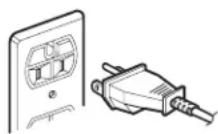
Oven MUST be grounded.
Grounding reduces risk of electric shock by providing an escape wire for the electric current if an electrical short occurs. This oven
is equipped with a cord having a grounding wire with a grounding plug. The plug must be plugged into an outlet that is properly installed and grounded. See Installation Instructions.
Consult a qualified electrician or servicer if grounding instructions are not completely understood, or if doubt exists as to whether the oven is properly grounded.
Do not use an extension cord. If the product power cord is too short, have a qualified electrician install a three-slot receptacle. This oven should be plugged into a separate 60 hertz circuit with the electrical rating as shown in specifications table. When the oven is on a circuit with other equipment, an increase in cooking times may be required and fuses can be blown. Microwave operates on standard household current, 110-120V.
WARNING
Do not cut or remove the third(ground) prong.
FEDERAL COMMUNICATIONS COMMISSION RADIO FREQUENCY INTERFERENCE STATEMENT (U.S.A. ONLY)
This equipment generates and uses ISM frequency energy and if not installed and used properly, that is in strict accordance with the manufacturer's instructions, may cause interference to radio and television reception. It has been type tested and found to comply with limits for ISM Equipment pursuant to part 18 of FCC Rules, which are designed to provide reasonable protection against such interference in a residential installation.
However, there is no guarantee that interference will not occur in a particular installation. If this equipment does cause interference to radio or television reception, which can be determined by turning the equipment off and on, the user is encouraged to try to correct the interference by one or more of the following:
- Reorient the receiving antenna of the radio or television.
- Relocate the microwave oven with respect to the receiver.
- Move the microwave oven away from the receiver.
- Plug the microwave oven into a different outlet so that the microwave oven and the receiver are on different branch circuits.
The manufacturer is not responsible for any radio or television interference caused by unauthorized modification to this microwave oven. It is the responsibility of the user to correct such interference.
Installation and Operation
CIRCUITS
For safety purposes this oven must be plugged into a 15A (CANADA) or 20A (USA) circuit. No other electrical appliances or lighting circuits should be on this line. If in doubt, consult a licensed electrician.
VOLTAGE
The voltage used at the wall receptacle must be the same as specified on the oven name plate located inside oven door. Use of a higher voltage is dangerous and may result in a fire or other type of accident causing oven damage. Low voltage will cause slow cooking. In case your microwave oven does not perform normally in spite of proper voltage, remove and reinsert the plug.
PLACEMENT OF THE OVEN
Your microwave oven can be placed easily in your kitchen, family room, or anywhere else in your home. Place the oven on a flat surface such as a kitchen countertop or a specially designed microwave oven cart. Do not place oven above a gas or electric range. Free air flow around the oven is important.
UNPACKING OVEN
- Inspect oven for damage such as dents in door or inside oven cavity.
Report any dents or breakage to source of purchase immediately. Do not attempt to use oven if damaged. - Remove all materials from oven interior.
- If oven has been stored in extremely cold area, wait a few hours before connecting power.
BUILT-IN CAPACITY
For information call:
1-800-688-9900 U.S.A.
1-800-688-2002 Canada
Available Trim kit is UMTK30/27.
DO NOT BLOCK AIR VENTS
All air vents should be kept clear during cooking. If air vents are covered during oven operation the oven may overheat. In this case, a sensitive thermal safety device automatically turns the oven off. The oven will be inoperable until it has cooled sufficiently.
GETTING THE BEST COOKING RESULTS
To get the best results from your microwave oven, read and follow the guidelines below.
- Storage Temperature: Foods taken from the freezer or refrigerator take longer to cook than the same foods at room temperature.
- Size: Small pieces of food cook faster than large ones, pieces similar in size and shape cook more evenly. For even cooking, reduce the power when cooking large pieces of food.
- Natural Moisture: Very moist foods cook more evenly because microwave energy is attracted to water molecules.
- Stir foods such as casseroles and vegetables from the outside to the center to distribute the heat evenly and speed cooking. Constant stirring is not necessary.
- Turn over foods like pork chops, baking potatoes, roasts, or whole cauliflower halfway through the cooking time to expose all sides equally to microwave energy.
- Place delicate areas of foods, such as asparagus tips, toward the center of the dish.
- Arrange unevenly shaped foods, such as chicken pieces or salmon steaks, with the thicker, meatier parts toward the outside of the dish.
-
Shield, with small pieces of aluminum foil, parts of food that may cook quickly, such as wing tips and leg ends of poultry.
-
Let It Stand: After you remove the food from the microwave, cover food with foil or casserole lid and let it stand to finish cooking in the center and avoid overcooking the outer edges. The length of standing time depends on the density and surface area of the food.
- Wrapping in waxed paper or paper towel: Sandwiches and many other foods containing prebaked bread should be wrapped prior to microwaving to prevent drying out.
Features
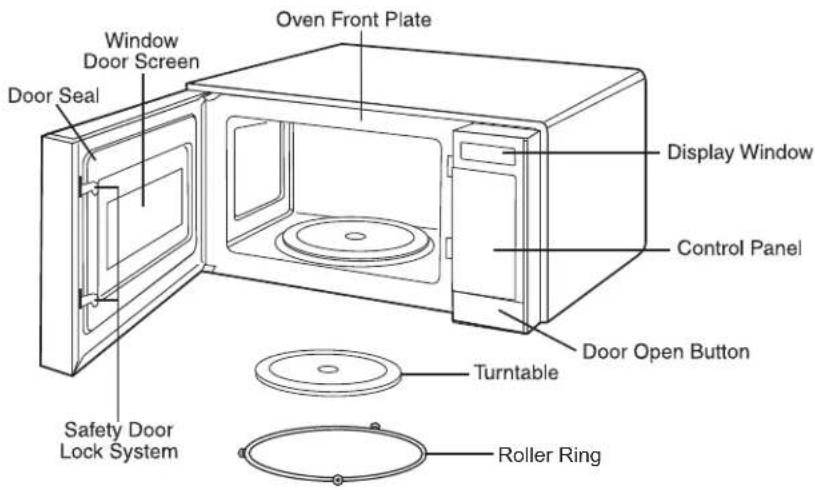
OVEN SPECIFICATIONS
| Power Supply 1 | 20 VAC, 60 Hz |
| Input Power 1,5 | 50 W (USA) 1,500 W (CANADA) |
| Cooking Power | 1,100 W (USA) 1,000 W (CANADA) (IEC 60705 Standard) |
| Frequency | 2,450 MHz |
| Rated Current 1 | 3.5 A (USA) 13 A (CANADA) |
| Outer Dimensions (WxHxD) | 23 21/32" x 13 17/64" x 18 3/16" |
| Cavity Volume | 2.0 Cu. Ft. |
| Net Weight 41.4 | Ibs. |
Features
Setting Up Your Microwave Oven
- Plug the cord into a grounded outlet. Once plugged in, the display on your oven will show: PLEASE TOUCH CLOCK AND SET TIME OF DAY.
- Open the oven door by pulling the handle on the right side of the door.
- Wipe the inside of the oven with a damp cloth.
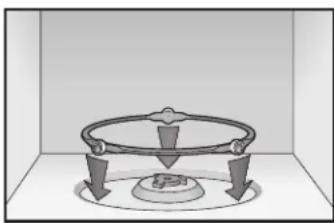
- Place the pre-assembled ring in the indentation in the center of the oven.
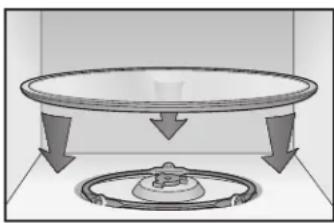
- Place the glass tray on top of the ring so that the three glass tabs in the center of the tray fit securely into the tabs on the floor of the oven.
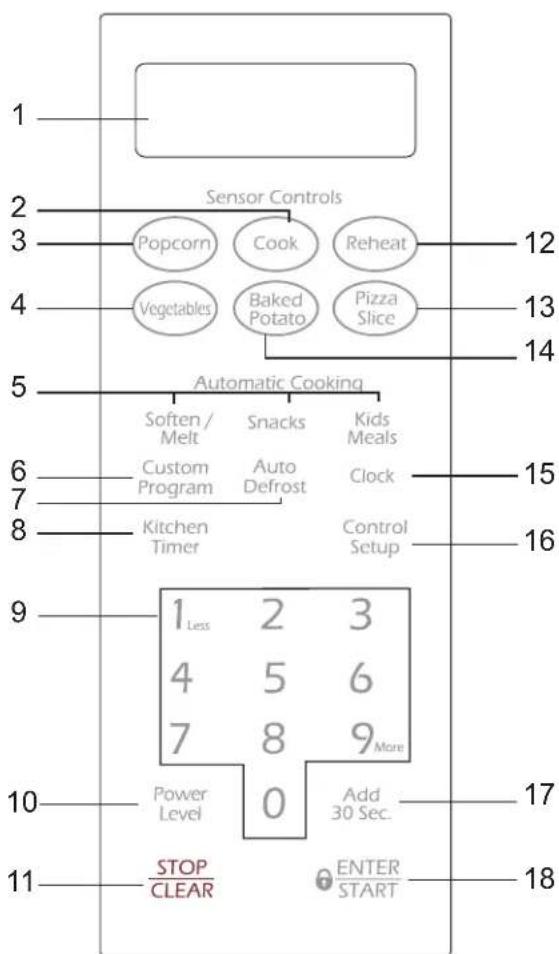
FEATURES
- DISPLAY: The Display includes a clock and indicators to tell you time of day, cooking time settings and cooking functions selected.
- COOK: Touch this pad to cook beverage, frozen dinner, frozen breakfast, chicken breast. The oven's sensor will tell the oven how long to cook depending on the amount of humidity coming from the food. See page 13 for more information.
- POPCORN: Touch this pad when popping popcorn in your microwave oven. The oven's sensor will tell the oven how long to cook depending on the amount of humidity it detects from the popcorn. See page 12 for more information.
- VEGETABLES: Touch this pad to cook fresh or frozen vegetables. The oven's sensor will tell the oven how long to cook depending on the amount of humidity it detects from the vegetables. See page 13 for more information.
- SOFTEN/MELT, SNACKS, KIDS MEALS: Touch this pad to cook specific food. See pages 15,16 and 17 for more information.
6.CUSTOM PROGRAM: Touch this pad to recall one cooking instruction previously programmed into memory. See page 10 for more information. - AUTO DEFROST: Touch this pad to defrost food by weight. See page 18 for more information.
- KITCHEN TIMER: Touch this pad to set the kitchen timer. See page 9 for more information.
- NUMBER: Touch number pads to enter cooking time, power level, quantities, or weights.
- POWER LEVEL: Touch this pad to select a cooking power level.
-
STOP/CLEAR: Touch this pad to stop the oven or to clear all entries.
-
REHEAT: Touch this pad to reheat dinner plate, casserole, and pasta. The oven's sensor will tell the oven how long to reheat depending on the amount of humidity coming from the food. See page 13 for more information.
- PIZZA SLICE: Touch this pad to reheat pizza. The oven's sensor will tell the oven how long to cook depending on the amount of humidity it detects. See page 12 for more information.
- BAKED POTATOouch this pad to cook potatoes. The oven's sensor will tell the oven how long to cook depending on the amount of humidity it detects from the potato. See page 13 for more information.
- CLOCK: Touch this pad to enter the time of day. See page 9 for more information.
- CONTROL SETUP: Touch this pad to change the oven's default settings. See page 9 for more information.
- ADD 30 SEC: Touch this pad to set and start quickly at 100% power level. See page 9 for more information.
NOTE:
-
Add 30 sec pad can not be used with any sensor control pad or AUTO DEFROST.
-
ENTER/START: Touch this pad to start a function. If you open the door after oven begins to cook, close the door and touch ENTER/START again.
Operating Instructions
This section introduces you to the basics you need to know to operate your microwave oven. Please read this information before use.
CAUTION
- To avoid risk of personal injury or property damage, do not run oven empty.
- To avoid risk of personal injury or property damage, do not use stoneware, aluminum foil, metal utensils, or metal trimmed utensils in the oven.
KITCHEN TIMER
You can use your microwave oven as a timer. Use the Kitchen Timer for timing up to 99 minutes, 99 seconds.
Example: To set for 3 minutes.
Kitchen Timer
- TouchKITCHEN TIMER pad.
300
- Enter the time by using the number pads.
ENTER START
- Touch ENTER/START pad.
When the time is over, you will hear beeps and END will display.
CHILD LOCK
You may lock the control panel to prevent the microwave from being accidentally started or used by children.
The Child Lock feature is also useful when cleaning the control panel.
Child Lock prevents accidental programming when wiping the control panel.
Example: To set the child lock.
STOP CLEAR
ENTER START
- Touch STOP/ CLEAR pad.
- Touch and hold ENTER/START pad more than 3 seconds. CHILD LOCK ON will appear in the display window with two beeps.
Example: To cancel the child lock.
ENTER START
- Touch and hold ENTER/START pad more than 3 seconds. LOCKED will disappear and you hear two beeps.
ADD 30 SEC.
A time-saving pad, this simplified control lets you quickly set and start microwave cooking without the need to touch the ENTER/ START pad.
Example: To set ADD 30 SEC. for 2 minutes.
Add 30 Sec.
TouchAdd 30 SEC. pad 4 times. The oven begins cooking and display shows time counting down.
CLOCK
Example: To set 8:00 AM.
Clock
- TouchCLOCK pad.
800
- Enter the time by using the number pads.
ENTER START
-
TouchENTER/START pad.
-
Touch 1 for AM.
ENTER START
- TouchENTER/START pad.
NOTE:
- Follow steps 1-3 above, when clock is set in the 24 hour clock mode.
CONTROL SETUP
You can change the default values. See following chart for more information.
| No. | Function No | Result | |
| 1 | Weight mode selected | 1 2 | Lbs. Kg. |
| 2 | Sound ON/OFF control | 1 2 | Sound ON Sound OFF |
| 3 | Clock display control | 1 2 | 12HR 24HR |
| 4 | Scroll speed | 1 2 3 | Slow speed Nomal speed Fast speed |
| 5 | Remind end Signal | 1 2 | ON OFF |
| 6 | Demo Mode | 1 2 | ON OFF |
| 7 | Daylight Saving Time | 1 2 | ON OFF |
| 8 | Language | 1 2 | English Spanish |
Example: To change weight mode (from Lbs. to Kg).
Control Setup
- Touch CONTROL SETUP pad.
1 Less
- Touch number pad.
- Touch numbe2 pad.
2
Operating Instructions
CUSTOM PROGRAM
CUSTOM PROGRAM lets you recall one cooking instruction previously placed in memory and begin cooking automatically.
Example: Memory to cook for 2 minutes at 70% power.
Custom Program
- Touch CUSTOM PROGRAM pad.
200
- Enter the cook time.
Power Level
7
-
Touch POWER LEVEL pad.
-
Enter the power level.
ENTER START
- TouchENTER/START pad.
Example: To recall the custom program.
Custom Program
- Touch CUSTOM PROGRAM pad.
ENTER START
- TouchENTER/START pad.
When the cook time is over, you will hear four beeps and END will display.
MORE/LESS
By using the MORE(9) or LESS(1) pad, all of the pre-programmed cook and time cook features can be adjusted to cook food for a longer or shorter time.
9More
- TouchingMORE(9) pad will add 10 seconds of cooking time each time you touch it.
1 Less
- Touching LESS(1) pad will subtract 10 seconds of cooking time each time you touch it.
COOKING AT HIGH POWER LEVELS
Example: To cook food for 8 minutes, 30 seconds at 100% power.
830
ENTER START
-
Enter the cook time.
-
TouchENTER/STARTpad.
When the cook time is over, you will hear four beeps and END will display.
Note: If the oven is set to cook for more than 25 minutes, it will automatically adjust itself to 70 percent power after 25 minutes to avoid overcooking.
HIGH power cooking does not always give you the best results with foods that need slower cooking, such as roasts, baked goods, or custards. Your oven has 9 power settings in addition to HIGH.
Example: To cook food for 7 minutes 30 seconds at 70% power.
730
- Enter the cook time.
Power Level
- Touch POWER LEVEL pad.
7
- Enter the power level.
ENTER START
- TouchENTER/START pad.
When the cook time is over, you will hear four beeps and END will display.
See cooking guide for Power levels, page 11.
COOKING WITH MORE THAN ONE COOK CYCLE
For best results, some recipes call for one Power Level for a certain length of time, and another Power Level for another length of time. Your oven can be set to change from one to another automatically, for up to three cycles if the first cycle is defrost.
Example: To cook food for 3 minutes at 100% power and then 70% power for 7 minutes 30 seconds.
300
Power Level
-
Enter the first cook time.
-
Touch POWER LEVEL pad.
1 Less 0
- Enter the power level.
730
- Enter the second cook time.
Power Level
-
Touch POWER LEVEL pad.
-
Enter the power level.
ENTER START
- Touch ENTER/START pad.
When the cook time is over, you will hear four beeps and END will display.
Operating Instructions
COOKING GUIDE FOR POWER LEVELS
The 10 power levels allow you to choose the best power level for the food you are cooking. Below are listed all the power levels, examples of foods best cooked at each level, and the amount of microwave power you are using.
| POWER LEVEL MIC | ROWAVE OUTPUT USE | |
| 10 High 100% | Boil water. Cook ground beef. Make candy. Cook fresh fruits and vegetables Cook fish and poultry. Preheat browning dish. Reheat beverages. Bacon slices. | |
| 9 90% | Reheat meat slices quickly. Saute onions, celery, and green pepper. | |
| 8 80% | All reheating. Cook scrambled eggs. | |
| 7 70% | Cook breads and cereal products. Cook cheese dishes, veal. Cook cakes, muffins, brownies, cupcakes. | |
| 6 60% Cook pasta. | ||
| 5 50% | Cook meats, whole poultry. Cook custard. Cook whole chicken, turkey, spare ribs, rib roast, sirloin roast. | |
| 4 40% | Cook less tender cuts of meat. Reheat frozen convenience foods. | |
| 3 30% | Thaw meat, poultry, and seafood. Cook small quantities of food. Finish cooking casserole, stew, and some sauces. | |
| 2 20% | Soften butter and cream cheese. Heat small amounts of food. | |
| 1 10% | Soften ice cream. Raise yeast dough. |
Operating Instructions
SENSOR OPERATING INSTRUCTIONS
Sensor Cook allows you to cook most of your favorite foods without selecting cooking times and power levels. The display will indicate the sensing period by scrolling the name of the food. The oven automatically determines required cooking time for each food item. When the internal sensor detects a certain amount of humidity coming from the food, it will tell the oven how much longer to heat. The oven will beep and either turn off or the display will show the remaining heating time. For best results for cooking by Sensor, follow these recommendations:
- Food cooked with the sensor system should be at normal storage temperature.
- Glass turntable and outside of container should be dry to assure best cooking results.
- Most foods should always be covered loosely with microwavable plastic wrap, waxed paper, or a lid. See sensor tables on page 14.
- Do not open the door or touch the STOP/CLEAR pad during the sensing time. When sensing time is over, the oven beeps once and the remaining cooking time will appear in the display window or the oven will turn off. At this time you can open the door to stir, turn, or rearrange the food.
IMPORTANT:
When using sensor cook, the oven must cool for 5 minutes between uses or food will not cook properly.
SENSOR COOKING GUIDE
Appropriate containers and coverings help assure good Sensor cooking results.
-
Always use microwavable containers and cover them with lids or vented plastic wrap.
-
Never use tight-sealing plastic covers. They can prevent steam from escaping and cause food to overcook.
- Match the amount to the size of the container. Fill containers at least half full for best results.
- Be sure the outside of the cooking container and the inside of the microwave oven are dry before placing food in the oven. Beads of moisture turning into steam can mislead the sensor.
ADDING OR SUBTRACTING COOK TIME
By using the MORE(9) or LESS(1) pad all of the sensor cook and time cook settings can be adjusted to cook food for a longer or shorter time.
POPCORN
POPCORN lets you pop commercially packaged microwave popcorn. Pop only one package at a time. For best results, use fresh bags of popcorn.
Example: To pop popcorn
Popcorn
Touch POPCORN pad.
When the cook time is over, you will hear four beeps and END will display.
Recommended amounts: 3.0-3.5 ozs.
PIZZA SLICE
Reheating pizza with PIZZA SLICE lets you reheat one or several slices of pizza without selecting cooking times and power levels.
Example: To reheat 2 slices of pizza.
Pizza
Slice
TouchPIZZA
SLICE pad.
When the cook time is over, you will hear four beeps and END will display.
Recommended amounts: 1-4 slices.
After heating, let stand for 1-3 minutes
NOTE:
If food is not thoroughly cooked or reheated when using the sensor feature, complete cooking using a power level and cooking time.
DO NOT continue using the sensor pad.
Operating Instructions
BAKED POTATO
The BAKED POTATO pad lets you bake one or several potatoes without selecting cooking times and power levels.
NOTES:
- Before baking, pierce potato with fork several times.
After baking, let stand for 5 minutes.
Example: To cook 2 potatoes.
Baked
Potato
- Touch BAKED
POTATO pad.
When the cook time is over, you will hear four beeps and END will display.
Recommended amounts: 1-6 potatoes.
- Let stand 5 minutes.
IMPORTANT:
When using sensor cook, the oven must cool for 5 minutes between uses or food will not cook properly.
VEGETABLES
VEGETABLES have preset cook powers for 2 food categories: Fresh, Frozen.
Example: To cook Frozen Vegetables.
Vegetables
- Touch
VEGETABLES
pad.
2
- Choose food category.
When the cook time is over, you will hear four beeps and END will display.
| Category | Touch Pad Number |
| Fresh Vegetable | 1 |
| Frozen Vegetable 2 |
Recommended amounts :1-4 servings
COOK
Using COOK lets you heat common microwave-prepared foods without needing to program cooking times and power levels. COOK has preset cooking times and power levels for 4 food categories: Beverage, Frozen Dinner, Frozen Breakfast, Chicken Breast.
Example: To cook Frozen Breakfast.
Cook
- Touch COOK
pad.
3
- Choose food category.
| Category | Touch Pad Number |
| Beverage | 1 |
| Frozen Dinner | 2 |
| Frozen Breakfast | 3 |
| Chicken Breast | 4 |
When the cook time is over, you will hear four beeps and END will display.
Recommended amounts:
| Beverage 8-10 | ozs. |
| Frozen Dinner 8 | 14 ozs. |
| Frozen Breakfast | 4-8 ozs. |
| Chicken Breast 8 | 24 ozs. |
After cooking let stand for 1-3 minutes.
REHEAT
REHEAT lets you heat foods without needing to program cooking times and power levels. REHEAT has preset cooking times and power levels for 3 categories: Dinner Plate, Casserole, and Pasta.
Example: To reheat Casserole.
Reheat
- Touch REHEAT pad.
2
- Choose food category.
| Category | Touch Pad Number |
| Dinner Plate 1 | |
| Casserole 2 | |
| Pasta | 3 |
When the cook time is over, you will hear four beeps and END will display.
Recommended amounts:
| Dinner Plate 1 serving |
| Casserole 1-4 servings |
| Pasta 1-4 servings |
After reheating let stand for 1-3 minutes.
NOTE:
If food is not thoroughly cooked or reheated when using the sensor feature, complete cooking using a power level and cooking time.
DO NOT continue using the sensor pad.
Operating Instructions
SENSOR COOK TABLE
| CATEGORY | DIRECTIONS AMOUNT | ||
| Popcorn | Use only one microwave-only bag of popcorn at a time. Use caution when removing and opening the hot bag from oven. Let oven cool for at least 5 minutes before using again. | 3.0-3.5 oz1 package. | |
| Baked Potato | Prick each potato several times with fork. Place on turntable in spoke-like fashion. Turn the food over when oven beeps. Let stand 3-5 minutes. Let oven cool for at least 5 minutes before using again. Use MORE(9) pad when cooking larger potatoes. | 1 to 6 potatoes | |
| Pizza Slice | Put 1-3 slices of pizza on microwave-safe plate with wide end of slice towards the outside edge of the plate. Do not let slices overlap. Do not cover. Let oven cool for at least 5 minutes before using again. Use MORE(9) pad to increase reheat time for thick crust pizza. | 1 to 4 slices | |
| VEGETABLES | Fresh Vegetables | Place fresh vegetables in microwave-safe ceramic, glass or plastic dish and add 2-4 Tbs. water. Cover with lid or vented plastic wrap during cooking and stir before standing. Let oven cool for at least 5 minutes before using again. Use MORE(9) pad when cooking dense vegetables such as carrots or broccoli spears. | 1 to 4 servings |
| Frozen Vegetables | Place frozen vegetables in microwave-safe ceramic, glass or plastic dish and add 2-4 Tbs. water. Cover with lid or vented plastic wrap during cooking and stir before standing. Let oven cool for at least 5 minutes before using again. Use MORE(9) pad when cooking dense vegetables such as carrots or broccoli spears. | 1 to 4 servings | |
| COOK | Beverage | Use measuring cup or mug, do not cover. Place the beverage in the oven. After heating, stir well. Let oven cool for at least 5 minutes before using again. | 8 to 10 oz. |
| Frozen Dinner | Remove food from outer wrapping and follow box instructions for covering and standing. Let oven cool for at least 5 minutes before using again. | 8 to 14 oz. | |
| Frozen Breakfast | Follow package instructions for covering and standing. Use this pad for frozen sandwich, breakfast entree, etc. Let oven cool for at least 5 minutes before using again. | 4 to 8 oz. | |
| Chicken Breast | Place chicken breasts on a microwave-safe plate and cover with plastic wrap. Cook to an internal temperature of 170 degrees F. Let stand 5 minutes. Use the MORE(9) pad to increase cooking time for larger or thicker chicken breasts. | 8 to 24 oz. | |
SENSOR REHEAT TABLE
| CATEGORY | DIRECTIONS AMOUNT | |
| Dinner Plate | Use only pre-cooked, refrigerated foods. Cover plate with vented plastic wrap or waxed paper, tucked under plate. If food is not as hot as you prefer after heating with SENSOR REHEAT, continue heating using cooking time and power level. Contents: - 3-4 oz. meat, poultry or fish(up to 6 oz. with bone) - 1/2 cup starch (potatoes, pasta, rice, etc.) - 1/2 cup vegetables (about 3-4 oz.) | 1 serving (1 plate) |
| Casserole | Cover plate with lid or vented plastic wrap. If food is not as hot as you prefer after heating with SENSOR REHEAT, continue heating using cooking time and power level. Stir foods once before serving. Contents: - Casserole-refrigerated foods. - Pasta-canned spaghetti and ravioli, refrigerated foods. | 1 to 4 servings |
| Pasta |
NOTES:
- Desired food temperature varies from person to person.
- Use the MORE(9)/LESS(1) pads to fit your temperature preference.
- Allow food to stand 3 to 5 minutes before serving.
NOTE:
If food is not thoroughly cooked or reheated when using the sensor feature, complete cooking using a power level and cooking time.
DO NOT continue using the sensor pad.
Operating Instructions
SOFTEN/MELT
SOFTEN/MELT lets you soften or melt 3 categories of food : Melt Chocolate, Soften Cream Cheese and Melt Butter.
Example: To melt chocolate.
Soften / Melt
1 Less
- Touch SOFTEN/MELT pad.
- Choose food category(1-3).

- Touch ENTER/START pad.
| Category Touch Pad Number |
| Melt Chocolate 1 |
| Soften Cream Cheese 2 |
| Melt Butter 3 |
SOFTEN/MELT CHART
| Item | Amount orservings | Remarks |
| Melt Chocolate 2 squares | es or1 cup chips | ·Place chocolate chips or square in a microwave-safe dish.·Stir well at half time when the oven beeps, and re-start the oven.·Unless stirred, the chocolate keeps its shape even when heating time is over. |
| Soften Cream Cheese | package (8 oz.) | Unwrap cream cheese and place on microwave-safe dish.Let stand 1-2 minutes. |
| Melt Butter 1 stick (1/4lb.) · Remove wrapping and cut butter in half vertically. | ||
| 2 sticks (1/2 lb.) | ||
| Stir well after finishing and let stand 1-2 minutes. | ||
Operating Instructions
KIDS MEALS
KIDS MEALS lets you heat 4 categories of food: Chicken Nuggets, Hot dogs, French Fries and Frozen Sandwiches.
Example: To cook frozen sandwiches.
Kids Meals
- Touch KIDS MEALS pad.
4
- Choose food category(1-4).
ENTER START
- Touch ENTER/START pad.
| Category Touch | Pad Number |
| Chicken Nuggets | 1 |
| Hot Dogs 2 | |
| French Fries | 3 |
| Frozen Sandwiches | 4 |
KIDS MEALS CHART
| Item | Amount or servings | Remarks |
| Chicken Nuggets | serving (4-5 oz.)2 servings(6-7 oz.) | • Put a paper towel on top of plate and arrange nuggets in spoke fashion on paper towel. • Do not cover. Let stand 1 minute. |
| Hot Dogs 2 EA | 4 EA | • Prick hot dogs, place on plate. When the oven beeps, add buns and re-start the oven. |
| French Fries 1 serving | (4-5 oz.)2 servings(6-7 oz.) | • Place 2 paper towels on plate and arrange french fries on towels, do not overlap. • Blot with additional paper towel after removal from oven. |
| Frozen Sandwiches | 1 EA2 EA | • Place frozen sandwich in susceptor "sleeve" (which is in package) and put on plate. |
Operating Instructions
SNACKS
SNACKS lets you heat 4 categories of food : Nachos, Chicken Wings, Potato Skins, and Cheese Sticks.
Example: To cook chicken wings.
Snacks
- Touch SNACKS pad.
2
- Choose food category(1-4).
- Select serving size. (Chicken Wings, Potato Skins, Cheese Sticks)
ENTER START
- Touch ENTER/START pad.
| Category Touch | Pad Number |
| Nachos 1 | |
| Chicken Wings | 2 |
| Potato Skins | 3 |
| Cheese Sticks | 4 |
SNACKS CHART
| Item | Amount or servings | Remarks |
| Nachos 1 serving | Place tortilla chips on plate without overlapping. Sprinkle evenly with cheese. Contents:-2 cups tortilla chips-1/3 cup grated cheese | |
| Chicken Wings | 5-6 oz.7-8 oz. | Use pre-cooked, refrigerated chicken wings. Place chicken wings around plate in spoke fashion and cover with wax paper. Touch '1' or '2' to select amount. |
| Potato Skins 1 | cooked potato2 cooked potatoes | Cut cooked potato into 4 even wedges. Scoop or cut out potato flesh, leaving about 1/4" of skin. Place skins in spoke fashion around plate. Sprinkle with bacon, onions and cheese. Do not cover. Touch '1' or '2' to select amount. |
| Cheese Sticks | 5-6 pcs7-10 pcs | Place cheese sticks on plate in spoke fashion. Do not cover. Touch '1' or '2' to select amount. |
Operating Instructions
AUTO DEFROST
Defrost choices are preset in the oven. The defrost feature provides you with the best defrosting method for frozen foods, because the oven automatically sets the defrosting times according to the weight you enter. For added convenience, the AUTO DEFROST includes beeps to remind you to check or turn over the food during the defrost cycle.
After touching the AUTO DEFROST pad once, select the food weight. Available weight ranges are 0.1 to 6.0 lbs.
Example : To defrost 1.2 lbs of meat.
Auto Defrost
- Touch AUTO DEFROST pad.
- Enter the weight.
- Touch ENTER/START pad.
NOTES:
- After you touch ENTER/START pad, the display counts down the defrost time. The oven will beep twice during the Defrost cycle. At this time, open the door and turn the food as needed. Remove any portions that have thawed then return frozen portions to the oven and touch ENTER/START pad to resume the defrost cycle.
The oven will beep to signal you to check or turn over the food.
DEFROSTING GUIDE
- Follow the instructions below when defrosting different types of food.
| Food | Standard Amount | Procedure |
| Roast Beef, Pork | 2.5-6.0 lbs. | Start with the food placed fat side down. After each stage, turn the food over and shield any warm portions with narrow strips of aluminum foil. Let stand, covered, for 15 to 30 minutes. |
| Steaks, Chops, Fish | 0.5-3.0 lbs. | After each stage, rearrange the food. If there are any warm or thawed portions of food, shield them with narrow flat pieces of aluminum foil. Remove any pieces of food that are nearly defrosted. Let stand, covered, for 5-10 minutes |
| Ground Meat | 0.5-3.0 lbs. | After each stage, remove any pieces of food that are nearly defrosted. Let stand, covered with foil, for 5-10 minutes. |
| Whole Chicken | 2.5-6.0 lbs. | Remove giblets before freezing poultry. Start defrosting with the breast side down. After the first stage, turn the chicken over and shield any warm portions with narrow strips of aluminum foil. After the second stage, again shield any warm portions with narrow strips of aluminum foil. Let stand, covered for 30-60 minutes in the refrigerator. |
| Chicken Pieces | 0.5-3.0 lbs. | After each stage, rearrange or remove any pieces of food that are nearly defrosted. Let stand for 10-20 minutes. |
DEFROST TIPS
- When using AUTO DEFROST, the weight to be entered is the net weight in pounds and tenths of pounds (the weight of the food minus the container).
- Use AUTO DEFROST only for raw food. AUTO DEFROST gives best results when food to be thawed is a minimum of 0^ (taken directly from a true freezer). If food has been stored in a refrigerator-freezer that does not maintain a temperature of 5^ or below, always program a lower food weight (for a shorter defrosting time) to prevent cooking the food.
- If the food is stored outside the freezer for up to 20 minutes, enter a lower food weight.
- The shape of the package alters the defrosting time. Shallow rectangular packets defrost more quickly than a deep block.
- Separate pieces as they begin to defrost. Separated pieces defrost more easily.
- Shield areas of food with small pieces of foil if they start to become warm.
- You can use small pieces of aluminum foil to shield foods like chicken wings, leg tips, and fish tails, but the foil must not touch the side of the oven. Foil causes arcing, which can damage the oven lining.
- Let food stand covered for 15 to 30 minutes.
- Let Roasts or Whole poultry stand for 30 to 60 minutes.
Operating Instructions
COOKING GUIDE
Guide for Cooking Meat in Your Microwave
- Place meat on a microwave-safe roasting rack in a microwave-safe dish.
- Start meat fat-side down. Use narrow strips of aluminum foil to shield any bone tips or thin meat areas.
- Check the temperature in several places before letting the meat stand the recommended time.
- The following temperatures are removal temperatures. The temperature of the food will rise during the standing time.
| Food Cook time | Power level Directions | ||
| Roast Beef Boneless (Up to 4 lbs.) | 8-12 min./lb. for 145° F (Rare) | High(10) for first 5 minutes, then medium(5) | Place roast fat-side down on roasting rack. Cover with wax paper. Turn over half way through cooking. Let stand 10 minutes. |
| 9-13 min./lb. for 160° F (Medium) | |||
| 10-15 min./lb. for 170° F (Well Done) | |||
| Pork Boneless or bone-in (Up to 4 lbs.) | 12-16 min./lb. for 170° F (Well Done) | High(10) for first 5 minutes, then medium(5) | Place roast fat-side down on roasting rack. Cover with wax paper. Turn over half way through cooking. Let stand 10 minutes. |
- Expect a 10^ rise in temperature during the standing time.
| Food Remove from oven After standing (10 min.) | ||
| Beef | Rare | 135°F 145°F |
| Medium | 150°F 160°F | |
| Well Done | 160°F 170°F | |
| Pork | Medium | 150°F 160°F |
| Well Done | 160°F 170°F | |
| Poultry | Dark meat | 170°F 180°F |
| Light meat | 160°F 170°F | |
Guide for Cooking Poultry in Your Microwave
- Place poultry on a microwave-safe roasting rack in a microwave-safe dish.
- Cover poultry with wax paper to prevent spattering.
- Use aluminum foil to shield bone tips, thin meat areas, or areas that start to overcook.
- Check the temperature in several places before letting the poultry stand the recommended time.
| Food Cook | Time/Power Level Directions | |
| Whole Chicken Up to 4 lbs. | Cooking Time: 7-10 min. / lb. 180°F dark meat 170°F light meat Power Level: Medium High(7). | Place chicken breast-side down on roasting rack. Cover with wax paper. Turn over half way through cooking. Cook until juices run clear and meat near the bone is no longer pink. Let stand 5-10 minutes. |
| Chicken Pieces Up to 2 lbs. | Cooking Time: 7-10 min. / lb. 180°F dark meat 170°F light meat Power Level: Medium High(7). | Place chicken bone-side down on dish, with the thickest portions towards the outside of the dish. Cover with wax paper. Turn over half way through cooking. Cook until juices run clear and meat near the bone is no longer pink. Let stand 5-10 minutes. |
Operating Instructions
Guide for Cooking Seafood in Your Microwave
Cook fish until it flakes easily with a fork.
- Place fish on a microwave-safe roasting rack in a microwave-safe dish.
- Use a tight cover to steam fish. A lighter cover of wax paper or paper towel provides less steaming.
- Do not overcook fish; check it at minimum cooking time.
| Food Cook | Time/Power Level Directions | |
| Steaks Up to 1.5 lbs. | Cooking Time: 7-11 min. / lb. Power Level: Medium-High(7). | Arrange steaks on roasting rack with meaty portions towards the outside of rack. Cover with wax paper. Turn over and rearrange when cooking time is half up. Cook until fish flakes easily with a fork. Let stand 3-5 minutes. |
| Filletts Up to 1.5 lbs. | Cooking Time: 4-8 min. / lb Power Level:Medium-High(7). | Arrange fillets in a baking dish, turning any thin pieces under. Cover with wax paper. If over 1/2 inch thick, turn over and rearrange when cooking time is half up. Cook until fish flakes easily with a fork. Let stand 2-3 minutes. |
| Shrimp Up to 1.5 lbs. | Cooking Time: 4-6 1/2 min. / lb. Power Level: Medium-High(7). | Arrange shrimp in a baking dish without overlapping or layering. Cover with wax paper. Cook until firm and opaque, stirring 2 or 3 times. Let stand 5 minutes. |
Guide for Cooking Eggs in Your Microwave
- Never cook eggs in the shell, and never warm hard-cooked eggs in the shell; they can explode.
- Always pierce whole eggs to keep them from bursting.
Cook eggs just until set; they become tough if overcooked.
Guide for Cooking Vegetables in Your Microwave
Vegetables should be washed just before cooking. Often, no extra water is needed. If dense vegetables such as potatoes, carrots and green beans are being cooked, add about 14 cup water.
- Small vegetables (sliced carrots, peas, lima beans, etc.) will cook faster than larger ones.
Whole vegetables, such as potatoes, acorn squash or corn on the cob, should be arranged in a circle on the turntable before cooking. They will cook more evenly if turned over after half the cooking time has passed.
- Always place vegetables like asparagus and broccoli with the stem ends pointing towards the edge of the dish and the tips toward the center.
- When cooking cut vegetables, always cover the dish with a lid or vented microwavable plastic wrap.
Whole, unpeeled vegetables such as potatoes, squash, eggplant, etc., should have their skin pricked in several spots before cooking to prevent them from bursting.
- For more even cooking, stir or rearrange whole vegetables halfway through the cooking time.
- Generally, the denser the food, the longer the standing time. (Standing time refers to the time necessary for dense, large foods and vegetables to finish cooking after they come out of the oven.) A baked potato can stand on the counter for five minutes before cooking is completed, while a dish of peas can be served immediately.
Care and Cleaning
CARE AND CLEANING
For best performance and safety, keep the oven clean inside and out-side. Take special care to keep the inner door panel and the oven front frame free of food or grease build-up. Never use rough powder or pads. Wipe the microwave oven inside and out, including the hood bottom cover, with a soft cloth and a warm (not hot) mild detergent solution. Then rinse and wipe dry. Use a chrome cleaner and polish on chrome, metal and aluminum surfaces. Wipe spatters immediately with a wet paper towel, especially after cooking chicken or bacon. Clean your oven weekly or more often, if needed.
Follow these instructions to clean and care for your oven.
- Keep the inside of the oven clean. Food particles and spilled liquids can stick to the oven walls, causing the oven to work less efficiently.
- Wipe up spills immediately. Use a damp cloth and mild soap. Do not use harsh detergents or abrasives.
- To help loosen baked on food particles or liquids, heat two cups of water (add the juice of one lemon if you desire to keep the oven fresh) in a four-cup measuring glass at High power for five minutes or until boiling. Let stand in the oven for one or two minutes.
- Remove the glass tray from the oven when cleaning the oven or tray. To prevent the tray from breaking, handle it carefully and do not put it in water immediately after cooking. Wash the tray carefully in warm sudsy water or in the dishwasher.
- Clean the outside surface of the oven with soap and a damp cloth. Dry with a soft cloth. To prevent damage to the operating parts of the oven, don't let water seep into the openings.
- Wash the door window with very mild soap and water. Be sure to use a soft cloth to avoid scratching.
- If steam accumulates inside or outside the oven door, wipe with a soft cloth. Steam can accumulate when operating the oven in high humidity and in no way indicates microwave leakage.
- Never operate the oven without food in it; this can damage the magnetron tube or glass tray. You may wish to leave a cup of water in the oven when it is not in use to prevent damage if the oven is accidentally turned on.
Cooking Utensils
Recommended Use
Glass and glass-ceramic bowls and dishes Use for heating or cooking.
- Microwave Browning dish — Use to brown the exterior of small items such as steaks, chops, or pancakes. Follow the directions provided with your Browning dish.
- Microwavable plastic wrap - Use to retain steam. Leave a small opening for some steam to escape and avoid placing it directly on the food.
Wax paper Use as a cover to prevent spattering.
- Paper towels and napkins - Use for short-term heating and covering; they absorb excess moisture and prevent spattering. Do not use recycled paper towels, which may contain metal and can catch fire.
- Paper plates and cups - Use for short-term heating at low temperatures. Do not use recycled paper, which may contain metal and can catch fire.
- Thermometers - Use only those labeled "Microwave Safe." and follow all directions. Check the food in several places. Conventional thermometers may be used once the food has been removed from the oven.
Limited Use
- Aluminum foil - Use narrow strips of foil to prevent overcooking of exposed areas. Keep the foil no more than 1-2 inches long and 1 inch wide. Using too much foil can damage your oven, so be careful.
- Ceramic, porcelain, and stoneware — Use these if they are labeled "Microwave Safe." If they are not labeled, test them to make sure they can be used safely. Never use dishes with metallic trim.
- Plastic - Use only if labeled "Microwave Safe." Other plastics can melt.
- Straw, wicker, and wood - Use only for short-term heating, as they can be flammable.
Not Recommended
- Glass jars and bottles — Regular glass is too thin to be used in a microwave, and can shatter.
- Paper bags — These are a fire hazard, except for popcorn bags that are designed for microwave use.
- Styrofoam plates and cups — These can melt and leave an unhealthy residue on food.
- Plastic storage and food containers — Containers such as margarine tubs can melt in the microwave.
- Metal utensils - These can damage your oven. Remove all metal before cooking.
Testing Utensils
If you are not sure whether a dish is microwave-safe or not, you can perform this test:
- Fill a glass measuring cup with water and put it inside your oven, next to the dish you want to test.
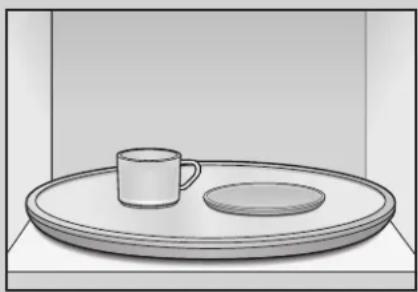
- Press the Add 30sec. button once to heat them for 30 seconds at High power.
The water should be warm and the dish you are testing should be cool. If the dish is warm, then it is absorbing microwave energy and is not acceptable for use in the microwave.
Troubleshooting
TROUBLESHOOTING GUIDE
Before you call a repair person for your oven, check this list of possible problems and solutions.
Neither the oven's display nor the oven operate.
- Properly insert the plug into a grounded outlet.
- If the outlet is controlled by a wall switch, make sure the wall switch is turned on.
- Remove the plug from the outlet, wait ten seconds, then plug it in again.
- Reset the circuit breaker or replace any blown fuse.
- Plug another appliance into the outlet; if the other appliance doesn't work, have a qualified electrician repair the outlet.
- Plug the oven into a different outlet.
The oven's display works, but the power won't come on.
Make sure the door is closed securely.
- Check to see if packing material or other material is stuck to the door seal.
- Check for door damage.
- Touch STOP/CLEAR pad twice and re-enter all cooking instructions.
The power goes off before the set time has elapsed.
- If there has not been a power outage, remove the plug from the outlet, wait ten seconds, then plug it in again. If there was a power outage, the time indicator will display: PLEASE TOUCH CLOCK AND SET TIME OF DAY. Reset the clock and any cooking instructions.
- Reset the circuit breaker or replace any blown fuse.
The food is cooking too slowly.
- Make sure the oven is on its own 20 amp circuit line. Operating another appliance on the same circuit can cause a voltage drop. If necessary, move the oven to its own circuit.
You see sparks or arcing.
- Remove any metallic utensils, cookware, or metal ties. If using foil, use only narrow strips and allow at least one inch between the foil and interior oven walls.
The turntable makes noises or sticks.
- Clean the turntable, roller ring and oven floor.
Make sure the turntable and roller ring are positioned correctly.
Using your microwave causes TV or radio interference.
- This is similar to the interference caused by other small appliances, such as hair dryers. Move your microwave further away from other appliances, like your TV or radio.
NOTE:
If the oven is set to cook for more than 25 minutes, it will automatically adjust itself to 70 percent power after 25 minutes to avoid overcooking.
If you have a problem you cannot solve, please call our service line:
1-800-688-9900 U.S.A.
1-800-688-2002 Canada
WHIRLPOOL CORPORATION MAJOR APPLIANCE WARRANTY
LIMITED WARRANTY
For one year from the date of purchase, when this major appliance is operated and maintained according to instructions attached to or furnished with the product, Whirlpool Corporation or Whirlpool Canada LP (hereafter "Whirlpool") will pay for Factory Specified Parts and repair labor to correct defects in materials or workmanship. Service must be provided by a Whirlpool designated service company. This limited warranty is valid only in the United States or Canada and applies only when the major appliance is used in the country in which it was purchased. Outside the 50 United States and Canada, this limited warranty does not apply. Proof of original purchase date is required to obtain service under this limited warranty.
ITEMS EXCUSED FROM WARRANTY
This limited warranty does not cover:
- Service calls to correct the installation of your major appliance, to instruct you on how to use your major appliance, to replace or repair house fuses, or to correct house wiring or plumbing.
- Service calls to repair or replace appliance light bulbs, air filters or water filters. Consumable parts are excluded from warranty coverage.
- Repairs when your major appliance is used for other than normal, single-family household use or when it is used in a manner that is contrary to published user or operator instructions and/or installation instructions.
- Damage resulting from accident, alteration, misuse, abuse, fire, flood, acts of God, improper installation, installation not in accordance with electrical or plumbing codes, or use of consumables or cleaning products not approved by Whirlpool.
- Cosmetic damage, including scratches, dents, chips or other damage to the finish of your major appliance, unless such damage results from defects in materials or workmanship and is reported to Whirlpool within 30 days from the date of purchase.
- Any food loss due to refrigerator or freezer product failures.
- Costs associated with the removal from your home of your major appliance for repairs. This major appliance is designed to be repaired in the home and only in-home service is covered by this warranty.
- Repairs to parts or systems resulting from unauthorized modifications made to the appliance.
- Expenses for travel and transportation for product service if your major appliance is located in a remote area where service by an authorized Whirlpool servicer is not available.
- The removal and reinstallation of your major appliance if it is installed in an inaccessible location or is not installed in accordance with published installation instructions.
- Major appliances with original model/serial numbers that have been removed, altered or cannot be easily determined. This warranty is void if the factory applied serial number has been altered or removed from your major appliance.
The cost of repair or replacement under these excluded circumstances shall be borne by the customer.
DISCLAIMER OF IMPLIED WARRANTY; LIMITATION OF REMEDIES
CUSTOMER'S SOLE AND EXCLUSIVE REMEDY UNDER THIS LIMITED WARRANTY SHALL BE PRODUCT REPAIR AS PROVIDED HEREIN. IMPLIED WARRANTYES, INCLUDING WARRANTYES OF MERCHANTABILITY OR FITNESS FOR A PARTICULAR PURPOSE, ARE LIMITED TO ONE YEAR OR THE SHORTEST PERIOD ALLOWED BY LAW. WHIRLPOOL SHALL NOT BE LIABLE FOR INCIDENTAL OR CONSEQUENTIAL DAMAGES. SOME STATES AND PROVINCES DO NOT ALLOW THE EXCLUSION OR LIMITATION OF INCIDENTAL OR CONSEQUENTIAL DAMAGES, OR LIMITATIONS ON THE DURATION OF IMPLIED WARRANTYES OF MERCHANTABILITY OR FITNESS, SO THESE EXCLUSIONS OR LIMITATIONS MAY NOT APPLY TO YOU. THIS WARRANTY GIVES YOU SPECIFIC LEGAL RIGHTS, AND YOU MAY ALSO HAVE OTHER RIGHTS WHICH VARY FROM STATE TO STATE OR PROVINCE TO PROVINCE.
If outside the 50 United States and Canada, contact your authorized Whirlpool dealer to determine if another warranty applies.
If you need service, first see the "Troubleshooting" section of the Use & Care Guide. After checking "Troubleshooting," you may find additional help by checking the "Assistance or Service" section or by calling Whirlpool. In the U.S.A., call 1-800-253-1301. In Canada, call 1-800-807-6777.
DE68-03154B
12/07
Printed in Malaysia
Four à micro-ondes
GARANTIE DES GROS APPAREILS MENAGERS WHIRLPOOL CORPORATION 48
ADD 30 SEC. (AJOUTER 30 S.)
GARANTIE DES GROS APPAREILS MÉNAGERS WHIRLPOOL CORPORATION
GARANTIE LIMITEE

- IMPORTANT SAFETY INSTRUCTIONS
- WHAT YOU NEED TO KNOW ABOUT SAFETY INSTRUCTIONS
- RECOGNIZE SAFETY SYMBOLS, WORDS, LABELS
- DANGER
- WARNING
- CAUTION
- SAVE THESE INSTRUCTIONS
- PRECAUTIONS TO AVOID POSSIBLE EXPOSURE TO EXCESSIVE MICROWAVE ENERGY
- GROUNDING INSTRUCTIONS
- FEDERAL COMMUNICATIONS COMMISSION RADIO FREQUENCY INTERFERENCE STATEMENT (U.S.A. ONLY)
- Installation and Operation
- CIRCUITS
- VOLTAGE
- PLACEMENT OF THE OVEN
- UNPACKING OVEN
- BUILT-IN CAPACITY
- DO NOT BLOCK AIR VENTS
- GETTING THE BEST COOKING RESULTS
- Features
- Setting Up Your Microwave Oven
- NOTE:
- Operating Instructions
- KITCHEN TIMER
- Example: To set for 3 minutes.
- CHILD LOCK
- Example: To set the child lock.
- Example: To cancel the child lock.
- ADD 30 SEC.
- Example: To set ADD 30 SEC. for 2 minutes.
- CLOCK
- Example: To set 8:00 AM.
- CONTROL SETUP
- CUSTOM PROGRAM
- MORE/LESS
- COOKING AT HIGH POWER LEVELS
- COOKING WITH MORE THAN ONE COOK CYCLE
- COOKING GUIDE FOR POWER LEVELS
- SENSOR OPERATING INSTRUCTIONS
- IMPORTANT:
- SENSOR COOKING GUIDE
- ADDING OR SUBTRACTING COOK TIME
- POPCORN
- PIZZA SLICE
- BAKED POTATO
- NOTES:
- Example: To cook 2 potatoes.
- VEGETABLES
- Example: To cook Frozen Vegetables.
- COOK
- REHEAT
- Example: To reheat Casserole.
- SOFTEN/MELT
- KIDS MEALS
- SNACKS
- 2
- ENTER START
- AUTO DEFROST
- DEFROSTING GUIDE
- DEFROST TIPS
- COOKING GUIDE
- Guide for Cooking Meat in Your Microwave
- Guide for Cooking Poultry in Your Microwave
- Guide for Cooking Seafood in Your Microwave
- Guide for Cooking Eggs in Your Microwave
- Guide for Cooking Vegetables in Your Microwave
- Care and Cleaning
- Follow these instructions to clean and care for your oven.
- Cooking Utensils
- Recommended Use
- Limited Use
- Not Recommended
- Testing Utensils
- Troubleshooting
- TROUBLESHOOTING GUIDE
- Neither the oven's display nor the oven operate.
- The oven's display works, but the power won't come on.
- The power goes off before the set time has elapsed.
- The food is cooking too slowly.
- You see sparks or arcing.
- The turntable makes noises or sticks.
- Using your microwave causes TV or radio interference.
- WHIRLPOOL CORPORATION MAJOR APPLIANCE WARRANTY
- LIMITED WARRANTY
- ITEMS EXCUSED FROM WARRANTY
- DISCLAIMER OF IMPLIED WARRANTY; LIMITATION OF REMEDIES
- Four à micro-ondes
- ADD 30 SEC. (AJOUTER 30 S.)
- GARANTIE DES GROS APPAREILS MÉNAGERS WHIRLPOOL CORPORATION
- GARANTIE LIMITEE
Brand : AMANA
Model : UMC5200
Category : Microwave Oven