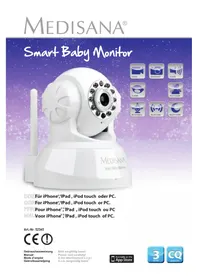
Smart Baby Monitor 52345 - Baby monitors MEDISANA - Free user manual and instructions
Find the device manual for free Smart Baby Monitor 52345 MEDISANA in PDF.


| Product type | Baby monitor with IP camera |
| Brand | Medisana |
| Model | Smart Baby Monitor 52345 |
| Dimensions | Approx. 100 x 99 x 118 mm (L x W x H) |
| Weight | Approx. 245 g |
| Power supply | 5 VDC, 1.5 A, max. power consumption 6 W |
| Sensor | CMOS 300K, min. illumination 0 lux (automatic IR) |
| Lens | F = 3.6 mm, F = 2.0 |
| Video resolution | 640x480 (VGA), 320x240 (QVGA), 160x120 (QQVGA) |
| Video compression | MJPEG |
| Refresh rate | 30 fps |
| Rotation angle | 0° to 270° |
| Tilt angle | 0° to 120° |
| Infrared lighting | 10 IR LEDs 850 nm, range 5 m |
| Audio | Built-in microphone, jack output, ADPCM compression, two-way audio |
| Network connection | RJ-45 Ethernet 10/100, Wi-Fi 802.11 b/g |
| Network protocols | TCP/IP, UDP/IP, HTTP, SMTP, FTP, DHCP, DDNS, UPNP, NTP, PPPOE |
| Compatible software | iOS 4.0+ (iPod Touch, iPhone, iPad), PC/Mac (Windows 98 or later) |
| Main functions | Remote pan/tilt, night vision, two-way audio, email/FTP alerts |
| Package contents | Camera, 5V power adapter, base, network cable, antenna, 2 screws, 2 wall plugs, manual |
| Operating temperature | 0°C to 40°C |
| Humidity | 10% to 80% |
| Care and cleaning | Clean with a slightly damp cloth; do not use abrasive cleaners, do not immerse in water |
| Safety | Do not use outdoors; keep away from children; do not disassemble; unplug in case of malfunction |
| Spare parts and repairability | No user-serviceable parts; contact authorized after-sales service |
| Warranty | 3 years from date of purchase, upon presentation of proof of purchase |
| Article number | 52345 |
| EAN | 40 15588 52345 8 |
Frequently Asked Questions - Smart Baby Monitor 52345 MEDISANA
User questions about Smart Baby Monitor 52345 MEDISANA
0 question about this device. Answer the ones you know or ask your own.
Ask a new question about this device
Download the instructions for your Baby monitors in PDF format for free! Find your manual Smart Baby Monitor 52345 - MEDISANA and take your electronic device back in hand. On this page are published all the documents necessary for the use of your device. Smart Baby Monitor 52345 by MEDISANA.
USER MANUAL Smart Baby Monitor 52345 MEDISANA
NNL Voor iPhone®, iPad, iPod touch of PC.
Art.-Nr. 52345

1 Safety Information 1 GB
2 Useful Information 4 GB
3 Getting Started. 5 GB
4 Operation with Apple device 6 GB
5 Operation with PC 7 GB
6 Operation with MAC 8 GB
7 Access via web interface.. GB9
8 Miscellaneous. GB10
9 Warranty. GB12
FR Mode d'emploi
1 Camera lens
Infrared LED (totally 10 pcs., arranged around the camera lens)
Status Indicator
Indicates the camera operating status:
LED flashes slowly (appr. once every 2 seconds) =
The device is searching for a network connection
LED flashes normally (appr. once per second) =
The device is connected via cable network
LED flashes quickly (appr. 2-3 times per second) =
The device is connected via wireless network
Antenna for wireless LAN connection
5 Jack for antenna
Adaptor connection (power input) 5V, 1.5A
Audio output socket, e.g. for speakers etc.
RJ45-jack for ethernet cable (LAN ethernet socket self-adjust 10/100M)
FR
Read the instruction manual carefully before using this device, especially the safety instructions, and keep the instruction manual for future use. Should you give this device to another person, it is vital that you also pass on these instructions for use.
Explanation of Symbols

This instruction manual belongs to this device. It contains important information about starting up and operation. Read the instruction manual thoroughly. Non-observation of these instructions can result in serious injury or damage to the device.

WARNING
These warning notes must be observed to prevent any injury to the user.

CAUTION
These notes must be observed to prevent any damage to the device.

NOTE
These notes give you useful additional information on the installation or operation.
LOT
LOT number

Manufacturer


Safety Information
-
Before connecting the device to your power supply, please ensure that the supply voltage stated on the rating plate is compatible with your mains supply.
-
Use the device only according to its intended purpose as specified in the instruction manual.
-
The warranty will be invalidated if the device is used for purposes other than those for which it is intended.
-
This device is intended for use in interiors. An exterior usage may lead to defects or electric shocks. Risk of injury!
-
This device is not designed to be used by persons (including children) with limited physical, sensory or mental abilities, or by persons with insufficient experience and/or knowledge, unless under observation by a person responsible for their safety, or unless they have been instructed in the use of the device.
Children must be supervised to ensure that they do not play with the device.
-
Do not use the device if it is not working correctly, if it has been dropped or has fallen into water or has been damaged.
-
Do not use the device in a location where extremely high temperatures or humidity may occur.
-
Do not expose the device (especially the lens) to direct sunlight!

-
Keep the device away from adverse surrounding conditions like:
-
Extreme coldness or heat
- Moisture or too high humidity
- Direct sunlight
- Dust or flammable gases, fumes or solvents
Strong convulsions -
Strong magnetic fields, e.g. close to machines or speakers
-
Never place the camera on unstable places. Only place the camera on even and non-slippery underground.
- Never insert objects through the openings into the inside of the device.
- The device must not be subjected to impacts or vibration. Already by falling from a low height, the device may be damaged.
- Do not attempt to dismantle the unit, otherwise the warranty will be invalidated. The unit does not contain any parts that need to be maintained by the user.
- Do not attempt to repair the device yourself in the event of a malfunction since this will invalidate the warranty Repairs should only be carried out by authorised service centres.
- Clean the unit after use with a damp cloth. Do not use scouring agent and never submerge the unit in water.
- Only use the unit with accessories designed for this model and supplied by the manufacturer. Never connect any incompatible products.
-
Please observe the safety hints and instruction manuals of other, connected devices.
-
Carefully check the device before each use. Do not use the device if there is any doubt about the integrity of the unit. Contact the service point.
This item by
Important information when using electrical appliances with a mains adaptor:
- Never touch an appliance that has fallen into water.
- Unplug the unit from the mains outlet immediately.
- You must not continue to use the unit if the lead or the mains adaptor are damaged. For safety reasons, these parts may only be replaced by authorized service personnel.
- You must never submerge the unit, the lead or the mains adaptor in water or hold them under running water.
- Do not store the lead near a heat source or drag it over sharp edges.
- Only handle the mains adaptor when your hands are dry.
- Never carry, pull or turn the unit by the mains lead and do not let the lead get tangled.
- Unplug the mains adaptor from the outlet when the unit is switched off and no longer in use.
i NOTES regarding the software
- Make sure that your Apple device is running on the latest operating system. For information about software updates, see the instructions for your Apple device.
- Make sure that your iHealth Baby monitor App is updated at regular intervals. For information about App updates, see the instructions for your Apple device.
- For the unit to function correctly, the Apple device has to be sufficiently charged. Users should have a power supply unit or a charging device to hand.

End user license agreement
IMPORTANT: READ THE FOLLOWING TERMS AND CONDITIONS CAREFULLY BEFORE CONTINUING THE SOFTWARE INSTALLATION.
If you do not agree with these terms and conditions, promptly remove the software from your devices and return the software. If you downloaded this software, please remove the software from your devices. Medisana grants you the limited, non-exclusive license to install and use one copy of the software on a single computer resp. one Apple device. With the installation and use of the respective software you agree to these terms and conditions.
Thank you!
Thank you for your confidence in us and congratulations!
With this Smart Baby Monitor you have acquired a quality product from MEDISANA. In collaboration with your iPhone, iPod touch, iPad or PC you can keep an eye on your child at any time in any place - regardless of whether you are at home or away. The camera features a pan/tilt function, which can be adjusted from afar. The 2-way-audio function enables you to hear and speak with your child. To ensure that your MEDISANA Smart Baby Monitor provides successful results for a long time, we recommend that you read carefully through the following notes on its use and care.
2.1 Items supplied and packaging
Please check first of all that the unit is complete and is not damaged in any way. If in doubt, do not use the appliance. Send it to a service point.
The following parts are included:
1 MEDISANA Smart Baby Monitor
1 Quick Start Guide
- 1 Power Adaptor 5V
1 Plastic stand
- 1 Network cable
1 Antenna
2 Screws
2 Dowels
The packaging can be reused or recycled. Please dispose properly of any packaging material no longer required. If you notice any transport damage during unpacking, please contact your retailer without delay.

WARNING
Please ensure that the polythene packing is kept away from the reach of children! Risk of suffocation!
3 Getting Started
3.1 Cable connection
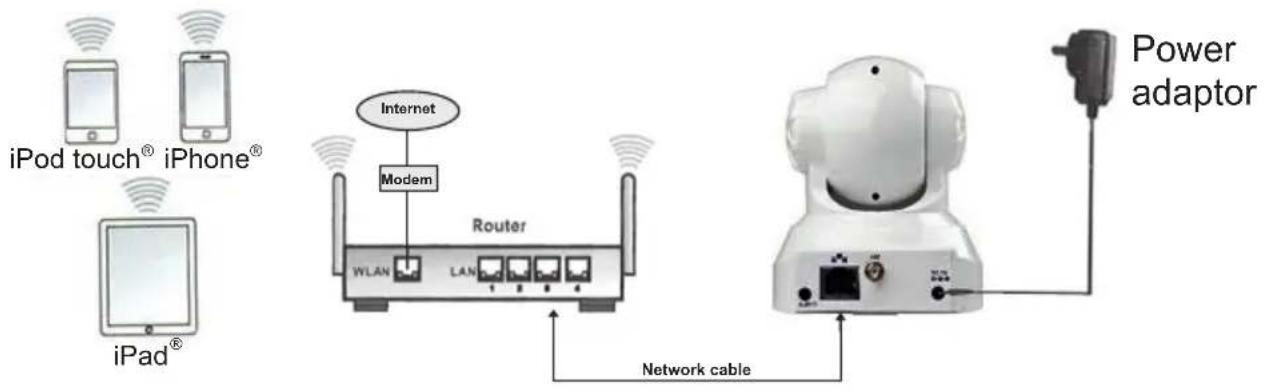
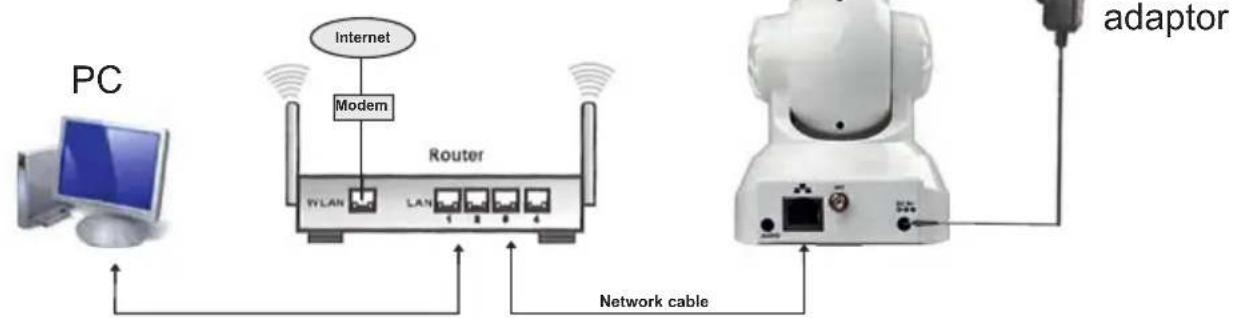
Make sure, the power supply of the camera is properly established and the antenna has been connected to the jack for antenna 5. For the first installation, it is in any case necessary to connect the camera with the network cable (wireless installation is not possible). Connect the cable to the camera (RJ45-jack for ethernet cable 8 of the camera) and to a free port of your router.
Connection example for operation with Apple device:
Connection example for operation with PC:
4 Operation with Apple device (iPod touch, iPhone or iPad)
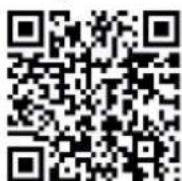
Launch the Apple app store and search for "Smart Baby Monitor" from MEDISANA. Alternatively, you may scan this QR code to directly access the app:
After downloading, a corresponding icon will appear on your Apple device:

THIS IS A FREE DOWNLOAD!
Start the app and follow the instructions. After setting up WIFI, disconnect the network cable. The Smart Baby Monitor now can be accessed via WIFI.

NOTE
Your Apple device needs to have iOS version 4.0 or later installed for proper installation. To download the software, you need an Apple ID with an e-Mail address and a password, as well as an active internet connection. Downloading the software may be subject to charges from your provider.
Downloading the software:
To discover the Smart Baby Monitor in your network download the latest version of the free software for PC or Mac from the software section of our homepage. (http://www.medisana.com/sbm)
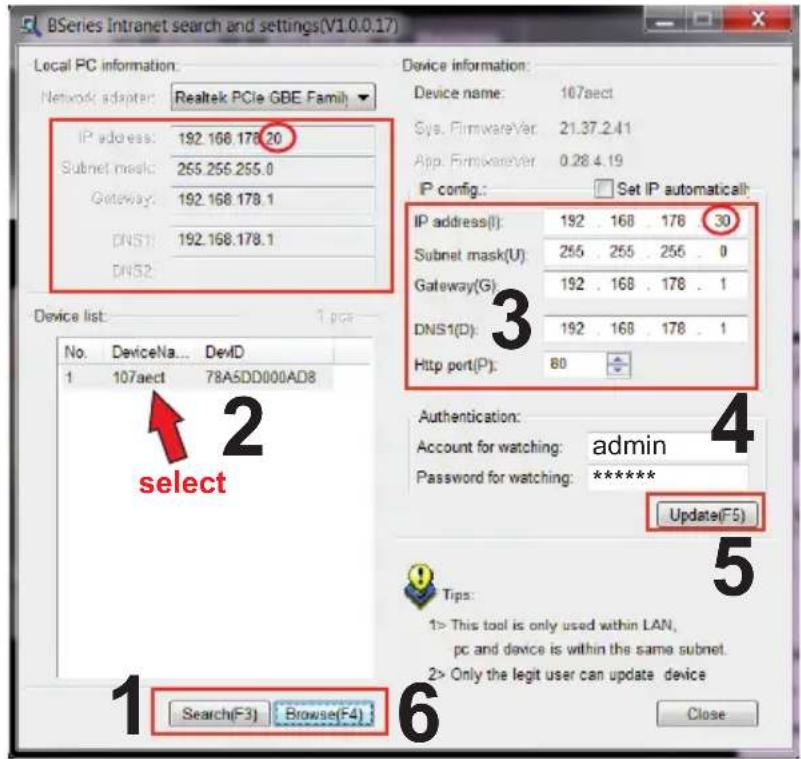
- Click "Search (F3)" (1) and click on the found device in the list (2).
- The IP address (3) should be given automatically by DHCP and should be the same as under "Local PC information", except the circled area above. If this is not the case, proceed with step 3, otherwise with step 4.
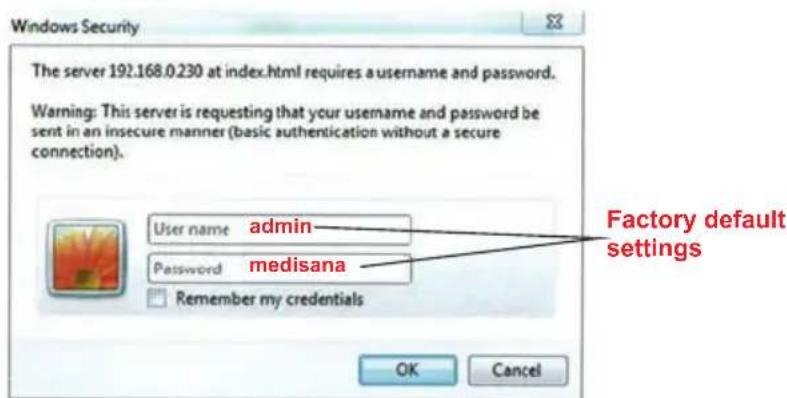
- Enter the authentication information (4). The factory default setting for "Account for watching" is "admin" and for "Password for watching" it is "medisana". Click "Update (F5)" (5).
- Now click "Search (F3)" (1), on the found device (2) and on "Browse (F4)" (6). The below security pop-up window will appear. Enter your user name (default: "admin") and password (default: "medisana") to access the network camera.
Downloading the software:
To discover the Smart Baby Monitor in your network download the latest version of the free software for PC or Mac from the software section of our homepage.
(http://www.medisana.com/sbm)
After a while the camera with an IP address will appear in the list. Click twice on the found device. Your standard browser will open. Please proceed as described under "7 Access via web interface".
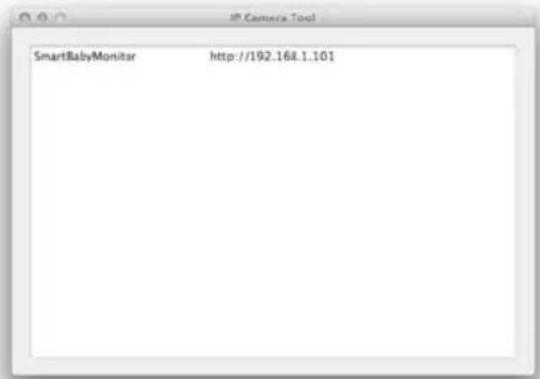
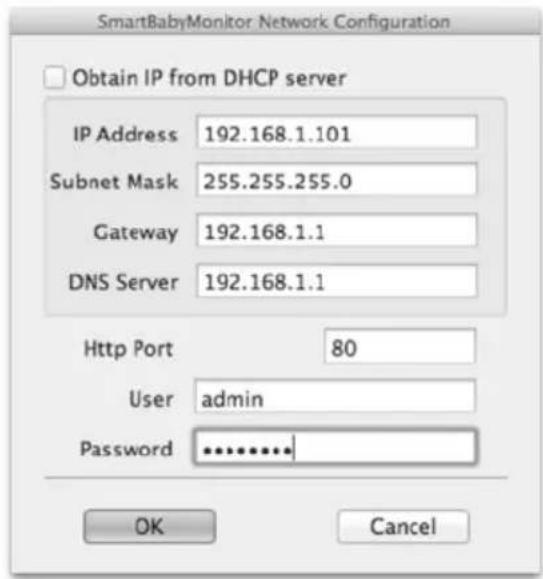
If you do not see an IP address, your router is not configured to DHCP-service or is not working correctly. Restart the camera or set your IP manually by double-clicking on the device.
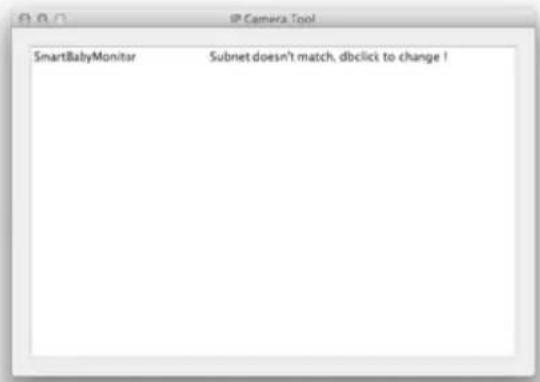
In this window you may input an IP, subnet, gateway, DNS Server manually and assign the HTTP port.
Enter the authentication information (user and password) and click "OK".

NOTE
The factory default setting for "User" is "admin" and for "Password" it is "medisana".
7.1 Access via internet browser
If the Smart Baby Monitor is correctly installed within the network, you can use your internet browser to access the device. In order to access the device via internet, your router needs to support the corresponding control. Please check the instruction manual of your router to find out how such a control can be installed. You may also address your camera via a DynDNS-client.
7.2 Camera control through internet browser
The welcome screens allows you to choose between 3 different access variants:
- via Internet Explorer
- via other browser (e.g. Firefox or Safari)
- via browser for mobile devices (Smartphones)
We recommend to use the Internet Explorer, as this provides the full functionality of the programme. Before first access with Internet Explorer, the provided video player software needs to be installed. Therefore click "download and install player (first use)". A pop-up window like this will appear:
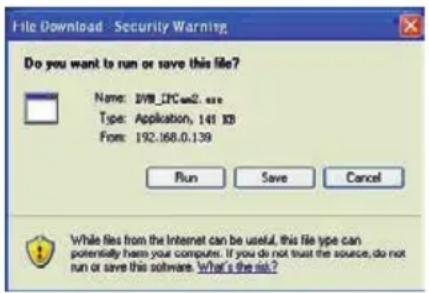
Click "RUN". The automatic download and installation procedure will begin. Please pay attention, that it may be necessary to adjust your browser- and virus-programme settings for a complete installation. If your browser blocks the installation, open the security settings and lower the safety level or contact your IT- resp. network administrator.
After the installation of the video player software, click "Mode 1 to view" in the welcome screen to access your camera with the Internet Explorer browser.
8.1 FAQ
The interaction with the camera resp. the camera control are working very slowly only - what is the problem?
The network bandwidth is important for the possible connection speed. The bandwidth for videos of size 640x480@10 fps should be at least between 4 and 5 Mbits and for videos of size 320x240@30 fps between 1.2 and 1.6 Mbits. Does your network provide lower bandwidth rates, the working speed will decrease remarkably.
After unlocking my Apple device, the camera view cannot be loaded correctly, although I had a good connection before automatic lock was activated.
What should I do?
Set the time for Auto-Lock in the general settings of your Apple device to "NEVER", if you plan a constant surveillance. Alternatively you may close the app after your view. For a new view, restart the app.
The camera has been found by the software, but I cannot access the device. What could be the cause for this?
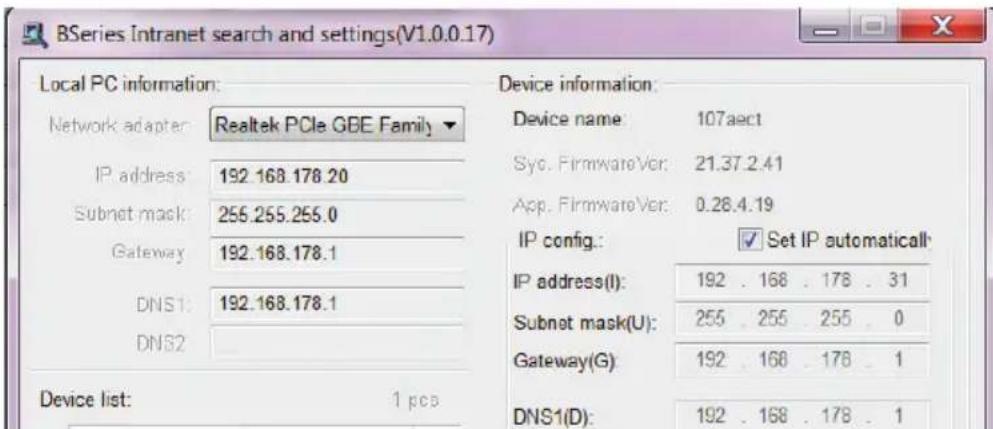
In case the IP address of the camera and the PC are not within the same range in the network, you need to adapt it. The range of the network is identified by the first 3 numbers of the IP address. E.g. if the IP address of the PC is 192.168.0.100, the camera can only be accessed within the range of 192.168.0.1 to 192.168.0.255 properly.
The camera can be accessed through a public IP address, but not through the manufacturer's domain.
Make sure, the DNS settings of the camera and the PC are consistent. Please observe the example below - the DNS needs to be identical.
8.2 Technical details
Image acquisition system: 300k CMOS sensor, minimum illumination 0 LUX (Auto IR)
Lens: f = 3,6mm , F = 2.0
Pan coverage: 0 - 270°
Tilt coverage: 0 - 120°
Lighting assistant: 10 × 850 ~nm IR LEDs, 5m Auto-Control
Video resolution: 640x480 (VGA), 320x240 (QVGA), 160x120 (QQVGA)
Compression method: MJPEG
Frame rate: 30 fps
Bitrate: 128kbps - 5 Mbps
Image rotation: Mirror / Flip
Audio compression: ADPCM
Network protocols: TCP/IP, UDP/IP, HTTP, SMTP, FTP, DHCP, DDNS, UPNP, NTP, PPPOE
W-LAN: 802.11 b/g
User level: 3 levels
Alarm methods: E-Mail / FTP / Network drive
Upgrade: via network
Network connection: RJ-45 Ethernet 10Base-T/100Base-TX
Audio input: Integrated microphone x 1
Audio output: 1
Software for iPod Touch, iPhone and iPad: iOS 4.0 or newer, free app
Supported operating systems (PC/Laptop): Microsoft Windows 98 or higher
Power supply: 5 VDC
Power consumption: max. 6W
Weight: approx. 245 g
Measurements: approx. L 100 x W 99 x H 118 mm
Operating temperature: 0^ - 40^ , relative humidity: 10% -80%
Article no.: 52345
EAN Code: 40 15588 52345 8

In accordance with our policy of continual product improvement, we reserve the right to make technical and optical changes without notice.
9.1 Warranty and reapair terms
Please contact your dealer or the service centre in case of a claim under the warranty. If you have to return the unit, please enclose a copy of your receipt and state what the defect is.
The following warranty terms apply:
- The warranty period for MEDISANA products is three years from date of purchase. In case of a warranty claim, the date of purchase has to be proven by means of the sales receipt or invoice.
- Defects in material or workmanship will be removed free of charge within the warranty period.
- Repairs under warranty do not extend the warranty period either for the unit or for the replacement parts.
- The following is excluded under the warranty:
a. All damage which has arisen due to improper treatment, e.g. nonobservance of the user instructions.
b. All damage which is due to repairs or tampering by the customer or unauthorised third parties.
c. Damage which has arisen during transport from the manufacturer to the consumer or during transport to the service centre.
d. Accessories which are subject to normal wear and tear.
- Liability for direct or indirect consequential losses caused by the unit are excluded even if the damage to the unit is accepted as a warranty claim.

MEDISANA AG
Jagenbergstraße 19
41468 NEUSS
Germany
For service, accessories and spare parts, please contact:
Medisana Healthcare UK Limited,
Emery House,
Greatbridge Road,
Romsey,
Hampshire, SO51 0AD
United Kingdom
Tel.: (+44) 0844 888 20 32
email: customerservice@medisana.co.uk
web: www.medisana.co.uk

REMARQUE IMPORTANTE! TOUJOURS CONSERVER!
Vibrations excessives
Lens: f = 3,6 mm, F = 2,0
Draaihoek: 0 - 270°
Compressiemethode:MJPEG
Actualiseringsintervallen: 30 fps
Bitrate: 128kbps - 5Mbps
Upgrade: via network
Netwerkverbinding: RJ-45 Ethernet 10Base-T/100Base-TX