LIFE P67001 MD 84645 - Baby monitors MEDION - Free user manual and instructions
Find the device manual for free LIFE P67001 MD 84645 MEDION in PDF.


User questions about LIFE P67001 MD 84645 MEDION
0 question about this device. Answer the ones you know or ask your own.
Ask a new question about this device
Download the instructions for your Baby monitors in PDF format for free! Find your manual LIFE P67001 MD 84645 - MEDION and take your electronic device back in hand. On this page are published all the documents necessary for the use of your device. LIFE P67001 MD 84645 by MEDION.
USER MANUAL LIFE P67001 MD 84645 MEDION
1. About these instructions 5
1.1. Warning symbols and key words used in these instructions 5
2. Package contents
3. Proper use 7 NL
4. Safety instructions
4.1. Child safety
4.2. Medical information 10
4.3. Environmental requirements 10
4.4. Mains connection 10
4.5. Batteries 12
4.6. Never carry out repairs yourself 14
5. Overview of the device 15
5.1. Baby unit 15
5.2. Parent unit 17
6. Insert the battery 19
7. Connecting the device 20
8. Charging the batteries in the parent unit 20
8.1. Possible battery displays 21
9. Using room monitoring 22
9.1. Setting the volume 22
9.2. Voice connection to baby unit 23
9.3. Language 23
9.4. Alarm tone 23
9.5. Night light 24
10. Cleaning 24
- Disposal 25
- Technical data 26
- Declaration of conformity 27
- Legal notice 28
1. About these instructions

Before using the device for the first time, you should read these operating instructions thoroughly and follow the safety advice! This device may only be used as described in the operating instructions.
Always keep these operating instructions to hand but store them safely so that you can pass them on to a new owner should you sell the device!
1.1. Warning symbols and key words used in these instructions

DANGER!
Warning: immediate mortal danger!
WARNING!
Warning: possible mortal danger and/or serious irreversible injuries!
ATTENTION!
Danger of possible minor or moderate injuries!

CAUTION!
Please follow the guidelines to avoid property damage!
| i | NOTE! Additional information on using the device! |
| B | NOTE! Please follow the guidelines in the operating instruc-tions! |
| A | WARNING! Warning: danger of electric shock! |
| ·Bullet point/information on operating steps and re-sults | |
| ►Tasks to be performed | |
2. Package contents
When unpacking the product, ensure that the following parts are included:
-1 x baby unit
-1 x parent unit
-2 x mains adapters, model: S004LV0600045, manufacturer: TenPao
- 2 x N-MH AAA 1.2 V 400 mAh NiMH batteries
-Operating instructions and warranty documents
3. Proper use
This device is designed for acoustic room monitoring or monitoring of babies and small children and is only intended for private use. It is not a medical monitoring device.
Please note that we shall not be liable in cases of improper use:
- Do not modify the device without our consent and do not use any auxiliary equipment that we have not approved or supplied.
- Use only spare parts and accessories which we have supplied or approved.
- Follow all the instructions in these operating instructions, especially the safety information. Any other use is deemed improper and can cause personal injury or damage to the product.
- Do not use the device in extreme environmental conditions.
4. Safety instructions
This device is not intended for use by people (including children) with reduced physical, sensory or mental abilities or by those without experience and/or knowledge, unless they are supervised by a person responsible for their safety or they have been instructed in its use by that person. Children should be supervised to ensure they do not play with this device.

WARNING!
The device is not intended as a replacement for responsible supervision of your child. You should personally monitor the activities of your child at regular intervals. Never use the device if your or someone else's life or health would be dependent on its functionality! The manufacturer assumes no responsibility for death or injury of a person or loss of or damage to goods due to the malfunction or improper use of the device.
4.1. Child safety

DANGER!
Keep the packaging out of reach of children. There is a risk of suffocation.
- Rechargeable batteries can be fatal if swallowed. Therefore, you should keep the device out of reach of children. If a battery is swallowed, please obtain immediate medical assistance.
- Do not let young children play with the device unsupervised.
- Do not place/lay the baby unit or cable in the cot or within reach of the baby (at least one metre away).
- The device emits only a low amount of radio radiation and is therefore also suitable for children. However, to further minimise the risk of radio radiation, the device should be placed at a distance of at least 3cm from the head.
4.2. Medical information
- If you use a pacemaker, do not keep the parent unit in your breast pocket when it is switched on. Maintain a minimum distance of at least 15cm .
4.3. Environmental requirements
- Do not expose the mains adapter to water drops or splashes. There is a risk of electric shock.
- Do not use the devices in the rain.
- Store the devices and the mains adapter in a dry environment.
- Place the baby unit on a firm, even surface where it cannot fall down.
- Do not cover the equipment with a towel or blanket.
4.4. Mains connection
WARNING!
Live components. There is a risk of electric shock.
Therefore, follow the instructions below:
- Only connect the mains adapter to an easily accessible and correctly installed safety socket (100 - 240 V ~ 50/60 Hz) that is close to the place where
you have set up the device. The plugs are designed for wall or floor outlets, but not for outlets that are only accessible from below. Always keep the socket free of obstructions so that the plug can be pulled out easily.
- When disconnecting the device from the mains supply, always pull on the mains adapter rather than on the cable. Do not kink or pinch the mains cable.
- If the plug, power cable or the device is damaged or if liquids or foreign bodies enter the device, remove the plug immediately from the socket.
- To avoid the risk of tripping, please avoid using extension cables.
4.5. Batteries
The parent unit may only be operated with the supplied batteries.

WARNING
Batteries may contain combustible materials. If not handled correctly, batteries can leak, become very hot, ignite or even explode, which could damage your device and/or your health. Please follow the safety advice below closely:
- Before inserting the batteries, check that the contacts in the device and on the batteries are clean, and clean them if necessary.
- Store batteries in a cool, dry place. Strong direct heat can damage the batteries. Therefore, do not expose the devices to any sources of strong direct heat.
- Never short-circuit the batteries.
- Never throw batteries into a fire.
-
If the device is not going to be used for some time, remove the battery.
-
In the event of leakage, remove the batteries from the device immediately. Clean the contacts before inserting new batteries. There is a risk of chemical burns due to battery acid.
- Also remove dead batteries from the devices.
- CAUTION! There is a risk of explosion if batteries are replaced incorrectly! Replace the batteries with the same or equivalent type only.
- Disconnect the mains adapter from the mains before you replace the batteries.
- Never operate the parent unit without the battery compartment cover!
4.6. Never carry out repairs yourself

WARNING!
Live components. There is a risk of electric shock. Therefore, follow the instructions below:
- If the mains adapter, cable, parent unit or baby unit is damaged, remove the corresponding plug from the power supply immediately.
- Never try to open and/or repair the devices yourself.
- The cable on the mains adapter cannot be replaced. If the cable is damaged, the mains adapter must be scrapped and replaced with a mains adapter of the same type in order to avoid hazards. In such cases please contact the Medion Service Centre.
5. Overview of the device
5.1. Baby unit
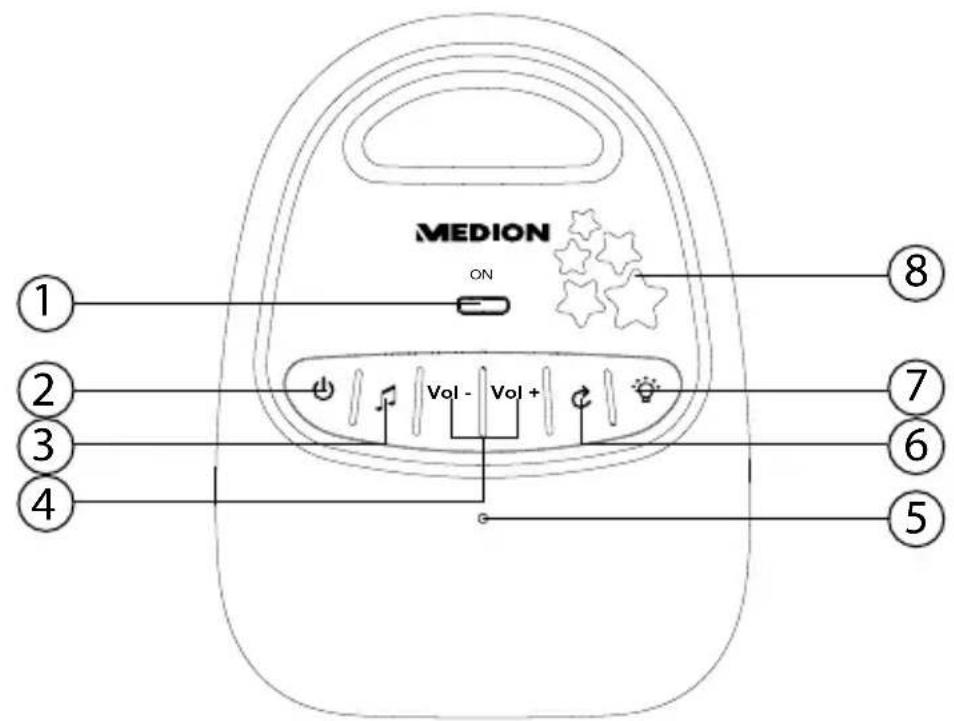
1) Operating LED
2) On/off button
3) Lullaby selection
4) Volume control
5) Microphone
6) Start/stop lullaby
7) Lights on/off
8) Illuminated stars
5.1.1. Side view
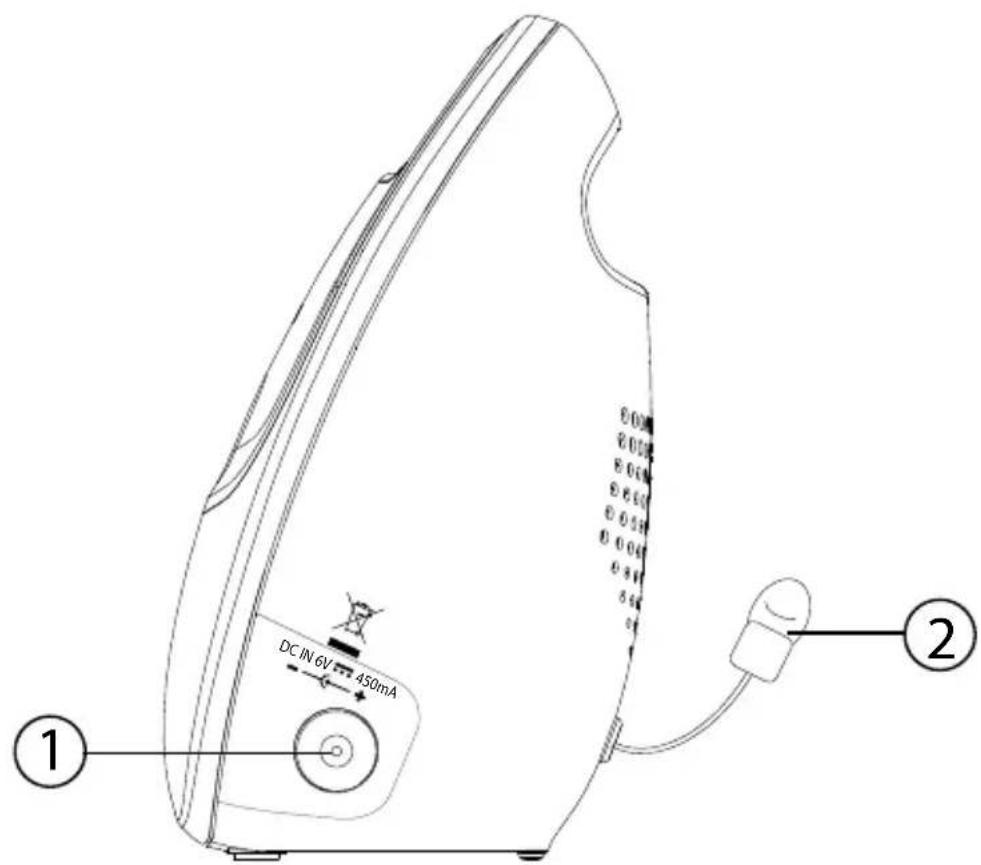
1) Mains adapter connection
2) Temperature sensor
5.2. Parent unit
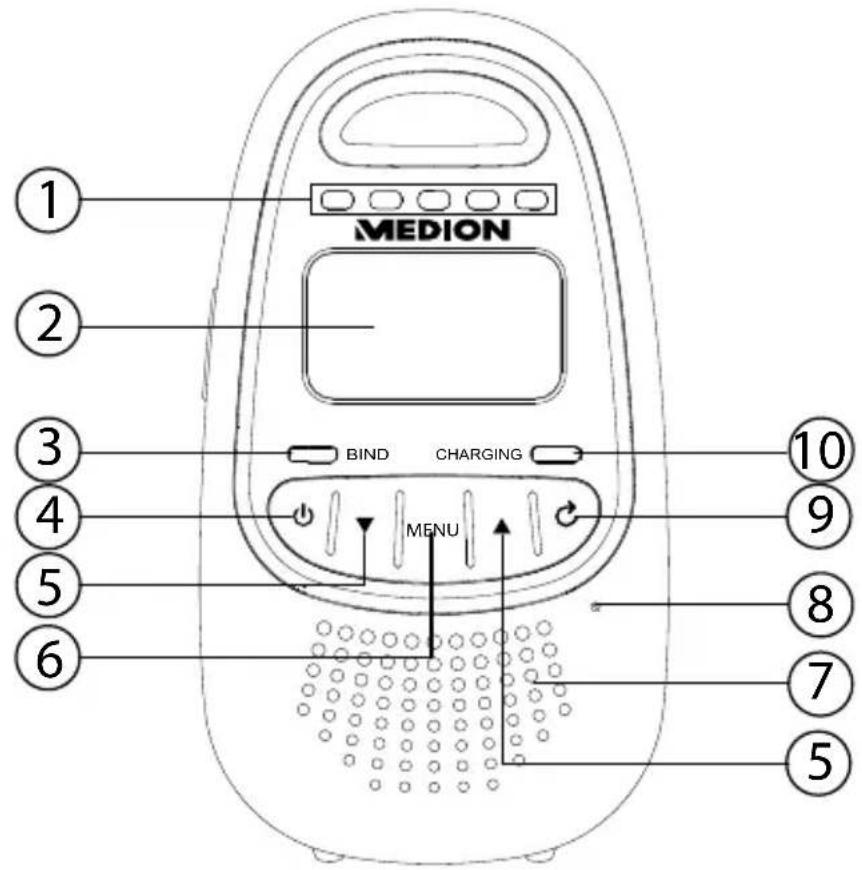
1) Noise level indicator
2) Display
3) Pairing LED
4) On/off button
5) Navigation buttons/volume control
6) Menu button
7) Speaker
8) Microphone
9) Back button
10) Charging LED
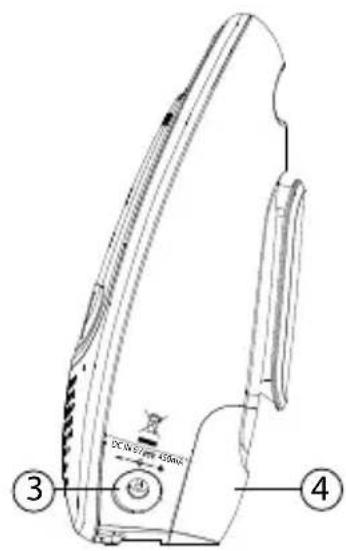
5.2.1. Side view
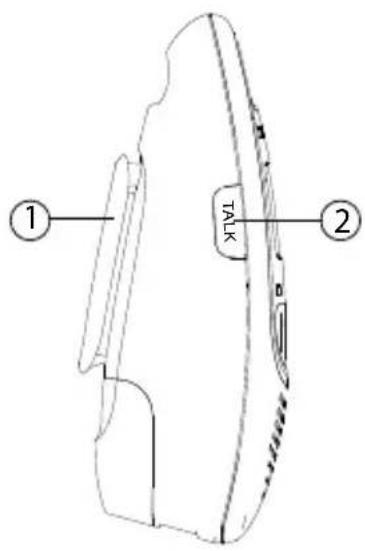
1) Belt clip
2) Talk button
3) Mains adapter connection
4) Battery compartment
5.2.2. Possible symbols on the display:
| Icon Meaning | |
| Lights up: connection made | |
| Flashes: connection interrupted The pairing LED also flashes | |
| Lights up: battery charging | |
| Lights up: sound transmission off | |
| Lights up: lighting is activated | |
| Noise level indicator | |
| Lights up: alarm tone is set Flashes: alarm tone is activated | |
| Lights up: lullaby is being played | |
6. Insert the battery
The parent unit can be operated using the mains adapter or the supplied batteries. We recommend leaving the batteries in the device even when operating it from the mains.
- Remove the battery compartment cover on the back of the parent unit, if required, by pushing it gently backwards.
Insert the batteries into the battery compartment the right way round. Ensure that the contacts of the batteries and those in the device are touching. - Push the battery compartment cover back onto the rear side of the parent unit until it clicks into place.
7. Connecting the device
- Use only the supplied mains adapters S004LV0600045 for operating the parent unit and the baby unit.
- Connect the jack of the supplied mains adapters into the sockets on the parent unit and the baby unit as described above.
Plug the mains plugs of the mains adapters into a mains socket.
8. Charging the batteries in the parent unit
The parent unit is connected to the mains via the mains adapter as described above.
- Hold and press the on/off button until the animated charging battery icon indicates that the charging process on the parent unit has started.
The battery charging LED on the parent unit lights up during the charging process.

NOTE!
The charging time is approx. 12 hours for a fully discharged battery pack.
Do not interrupt the charging process, otherwise the capacity of the batteries could be permanently reduced.
To reduce the charging time, switch off the parent unit.
8.1. Possible battery displays
When the hand-held unit is switched on, the following battery messages may be seen on the display:
| Icon Charging status Required action | ||
| Animated battery charging icon | Battery pack is being charged. | Charge the battery pack without interruption (min. 30 minutes). |
| and the battery charge LED indicator flashes | The battery charge is very low. | Charge the battery pack without interruption (min. 30 minutes). |
| The battery pack is fully charged. | To ensure a full charge for the next use, leave the device connected to the mains when not in use. | |
9. Using room monitoring
Do not place the baby unit or cable in the cot or within reach of the baby (at least one metre away).
- Place the baby unit on a firm, flat surface where it cannot fall down or attach it firmly to the wall (see above).
Press and hold the button on the baby unit for a few seconds until the power LED lights up.
Now switch on the parent unit by pressing and holding down the button.
- The two units will now connect with each other automatically. If, however, the baby station does not connect to the parent station, the icon and NO CONNECTION flash on the display.
The pairing LED on the device also flashes.
9.1. Setting the volume
Parent unit
Use the arrow keys and to set the volume of the speaker.
Baby unit
Press the or button to adjust the volume of the speaker.
9.2. Voice connection to baby unit
You can establish a voice connection to the baby unit; for example, to calm your child.
Press the TALK button and hold it down while talking.
TALKING appears on the display.
Releasing the TALK button ends the conversation.
9.3. Language
Press the MENU button.
- Use the arrow keys and to select the LANGUAGE menu and confirm the selection with MENU.
Use the arrow keys and to select between the following languages:
-English
—German
-French
-Italian
-Spanish
-Portuguese
9.4. Alarm tone
- Use the arrow keys and to select the ALARM TONE menu and confirm the selection with MENU.
- Use the arrow keys and to switch the following alarm tones ON or OFF:
Signal: weak battery
The battery power is very low, the parent unit must be connected to the mains to charge.
Signal: No connection
The connection to the baby unit has been interrupted. Pair the units again or check the range.
Alarm tone
Noises have triggered the baby unit. Check your child's activities personally if necessary.
- Confirm your entry with MENU.
9.5. Night light
Press the MENU button.
- Use the arrow keys and to select the NIGHT LIGHT menu and confirm the selection with MENU.
Use the arrow keys and to switch the night light ON or OFF:
10. Cleaning
Before cleaning, remove the mains adapter from the mains socket. Use a dry, soft cloth for cleaning. Avoid the use of chemical solutions and cleaning products because these may damage the device surface and/ or markings.
11. Disposal

Packaging
Your device is packaged to protect it from damage in transit. The packaging is made from materials that can be reused or recycled.
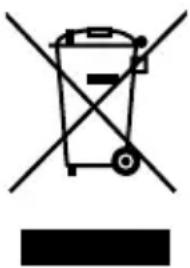
Machine
Old devices should not be disposed of with household waste.
As per EC Directive 2002/96/EC, the device must be disposed of at an official disposal facility at the end of its service life. This ensures that valuable resources contained in the device are recycled and do not pollute the environment. Hand in the old equipment at a collection point for electrical waste or a recycling centre. Contact your local authority for information about the opening times and addresses of collection points, your local disposal company or consumer centres.
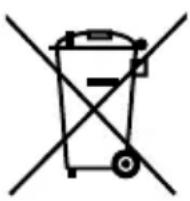
Batteries
Old batteries and accumulators should not be disposed of with household waste.
Remove the batteries from the device before disposal. Every consumer is obliged by law to take old batteries to a collection point for used batteries in a recycling centre or retailer that sells batteries.
12. Technical data
Transmission frequency: 1.88-1.9 GHz DECT standard
Transmission:
half
duplex
Range: up to 300 m free field
In buildings up to 50m
Battery: 2 × AAA 1.2 V 400 mAh NiMH
GPI INTERNATIONAL LTD.
Model:
VTHC043C00
Ambient temperature: operation 0 to 40^
Storage: -20 to 60^
Dimensions baby unit W/H/D: approx. 85 × 112 × 63 mm
Dimensions parent unit W/H/D: approx. 65 × 118 × 46 mm
Mains adapter
Baby unit: model: S004LV0600045
Manufacturer: TenPao, China
Input: 100 - 240V 50 / 60Hz
Output: 6 V DC 450mA
Parent unit:
model: S004LV0600045
Manufacturer: TenPao, China
Input: 100 - 240V 50 / 60Hz
Output: 6 V DC 450mA

13. Declaration of conformity
C∈0168
Medion AG hereby declares that the product MD 84645 conforms to the following European requirements:
R&TTE Directive 1999/5/EC
EMC Directive 2004/108/EC
Low Voltage Directive 2006/95/EC
- Ecodesign Directive 2009/125/EC
RoHS Directive 2011/65/EU.
Full declarations of conformity are available at www.medion.com/conformity.
14. Legal notice
Copyright © 2014
All rights reserved.
This operating manual is protected by copyright. Mechanical, electronic and any other form of reproduction is prohibited without the written permission of the manufacturer.
The owner of the copyright is:
Medion AG
Am Zehnhof 77
45307 Essen
Germany
These operating instructions can be re-ordered via the Service Hotline and are available for download on the Service web page www.medion. com/at/service/start/.
You can also scan the QR code above to download the instructions onto your mobile device via the service portal.

Sommaire
DE
Transmission: Semi-duplex
