ManualGo.com
 CSE12PKEW - Climatisation PANASONIC - Free user manual and instructions
Find the device manual for free CSE12PKEW PANASONIC in PDF.


Download the instructions for your Climatisation in PDF format for free! Find your manual CSE12PKEW - PANASONIC and take your electronic device back in hand. On this page are published all the documents necessary for the use of your device. CSE12PKEW by PANASONIC.
USER MANUAL CSE12PKEW PANASONIC
INVERTER DELUXE XE series E series
CS-XE7PKEW CS-XE9PKEW CS-XE12PKEW CS-XE15PKEW CS-XE18PKEW CS-XE21PKEW CS-E7PKEW CS-E9PKEW CS-E12PKEW CS-E15PKEW CS-E18PKEW CS-E21PKEW CS-E24PKEW ME series
CS-ME5PKE Outdoor Unit
CU-E7PKE CU-E9PKE CU-E12PKE CU-E15PKE CU-E18PKE CU-E21PKE CU-E24PKE CU-2E15PBE CU-2E18PBE CU-3E18PBE CU-4E23PBE CU-4E27PBE CU-5E34PBE Operating Instructions
Operating Instructions
Thank you for purchasing Panasonic Air Conditioner.
Installation instructions attached.
Before operating the unit, read these operating
instructions thoroughly and keep them for future
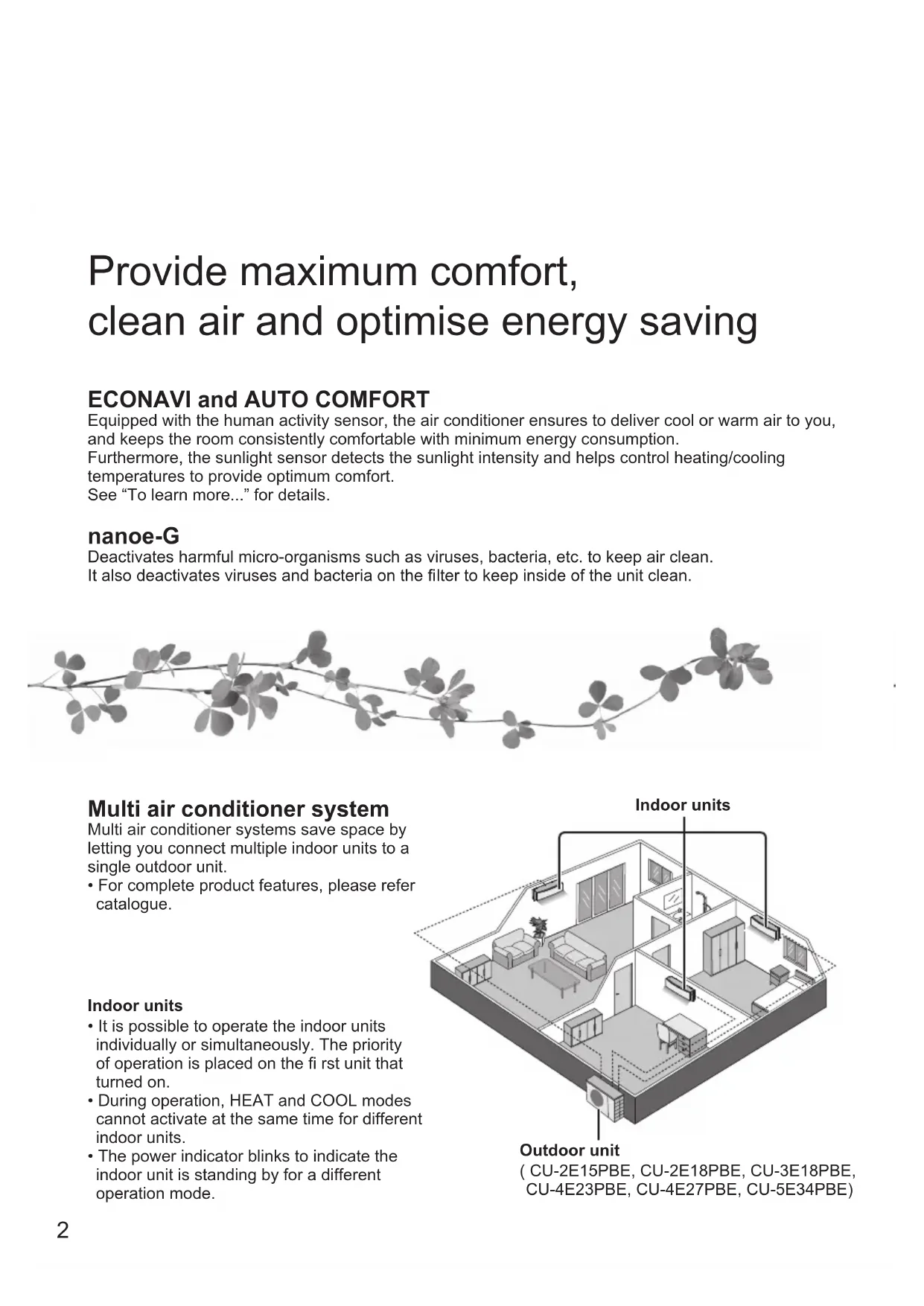
gebruik.Multi air conditioner system
Multi air conditioner systems save space by
letting you connect multiple indoor units to a
single outdoor unit.
• For complete product features, please refer
• It is possible to operate the indoor units
individually or simultaneously. The priority
of operation is placed on the fi rst unit that
• During operation, HEAT and COOL modes
cannot activate at the same time for different
• The power indicator blinks to indicate the
indoor unit is standing by for a different
Provide maximum comfort,
clean air and optimise energy saving
ECONAVI and AUTO COMFORT Equipped with the human activity sensor, the air conditioner ensures to deliver cool or warm air to you,
and keeps the room consistently comfortable with minimum energy consumption.
Furthermore, the sunlight sensor detects the sunlight intensity and helps control heating/cooling
temperatures to provide optimum comfort.
See “To learn more...” for details.
nanoe-G Deactivates harmful micro-organisms such as viruses, bacteria, etc. to keep air clean.
It also deactivates viruses and bacteria on the fi lter to keep inside of the unit clean.3
Pull out the back cover of
(can be used ~ 1 year)
Select the desired mode
Start/stop the operation
• Please note that the OFF
indication is on to start.
Operating the unit within the
recommended temperature
indicator brightness, press
and hold for 5 seconds.
• Use remote control within 8 m
from the remote control receiver
The illustrations in this manual are for explanation purposes
only and may differ from the actual unit. They are subject to
change without notice for future improvement.
Safety precautions 4-5
To learn more... 8-9
Cleaning instructions 10
• Screws for remote control
To prevent personal injury, injury to others
or property damage, please comply with the
Incorrect operation due to failure to follow
instructions below may cause harm or damage,
the seriousness of which is classifi ed as below:
WARNING This sign warns of
CAUTION This sign warns of
The instructions to be followed are classifi ed by
the following symbols:
This symbol denotes an
action that is PROHIBITED.
These symbols denote
WARNING Indoor unit and outdoor unit
This appliance is not intended for use by
persons (including children) with reduced
physical, sensory or mental capabilities, or lack
of experience and knowledge, unless they have
been given supervision or instruction concerning
use of the appliance by a person responsible for
their safety. Children should be supervised to
ensure that they do not play with the appliance.
Please consult authorised dealer or specialist to
clean the internal parts, repair, install, remove
and reinstall the unit. Improper installation and
handling will cause leakage, electric shock or fi re.
Confi rm with authorised dealer or specialist on
usage of any specifi ed refrigerant type.
Using refrigerant type other than the specifi ed
may cause product damage, burst and injury etc.
Do not install the unit in a potentially explosive
or fl ammable atmosphere. Failure to do so could
Do not insert your fi ngers or other
objects into the air conditioner indoor or
outdoor unit, rotating parts may cause
Do not touch the outdoor unit during lightning, it
may cause electric shock.
Do not expose yourself directly to cold air for a
long period to avoid excess cooling.
Do not sit or step on the unit, you may
fall down accidentally.
Do not allow infants and small children to play
with the remote control to prevent them from
accidentally swallowing the batteries.
Do not use a modifi ed cord,
joint cord, extension cord or
unspecifi ed cord to prevent
overheating and fi re.
To prevent overheating, fi re or electric shock:
Do not share the same power outlet with
Do not operate with wet hands.
Do not over bend the power supply cord.
Do not operate or stop the unit by inserting
or pulling out the power plug.
If the supply cord is damaged, it must be
replaced by the manufacturer, service agent
or similarly qualifi ed persons in order to avoid
It is strongly recommended to be installed
with Earth Leakage Circuit Breaker (ELCB)
or Residual Current Device (RCD) to prevent
electric shock or fi re.
To prevent overheating, fi re or electric shock:
Insert the power plug properly.
Dust on the power plug should be
periodically wiped with a dry cloth.
Stop using the product if any abnormality/
failure occurs and disconnect the power plug
or turn off the power switch and breaker.
(Risk of smoke/fi re/electric shock) Examples
of abnormality/failure
The ELCB trips frequently.
Burning smell is observed.
Abnormal noise or vibration of the unit is
Water leaks from the indoor unit.
Power cord or plug becomes abnormally hot.
Fan speed cannot be controlled.
The unit stops running immediately even if it
is switched on for operation.
The fan does not stop even if the operation
Contact your local dealer immediately for
This equipment must be earthed to prevent
electrical shock or fi re.
Prevent electric shock by switching off the
power supply and unplug:
- Before cleaning or servicing,
- When extended non-use, or
- During abnormally strong lightning activity.
CAUTION Indoor unit and outdoor unit
Do not wash the indoor unit with water,
benzine, thinner or scouring powder to
avoid damage or corrosion at the unit.
Do not use for preservation of precise
equipment, food, animals, plants, artwork
or other objects. This may cause quality
Do not use any combustible equipment
in front of the airfl ow outlet to avoid fi re
Do not expose plants or pet directly to airfl ow
to avoid injury, etc.
Do not touch the sharp aluminium
fi n, sharp parts may cause injury.
Do not switch ON the indoor unit when waxing
the fl oor. After waxing, aerate the room
properly before operating the unit.
Do not install the unit in oily and smoky areas
to prevent damage to the unit.
Do not dismantle the unit for cleaning purpose
Do not step onto an unstable bench when
cleaning the unit to avoid injury.
Do not place a vase or water container on the
unit. Water may enter the unit and degrade
the insulation. This may cause an electric
Do not open window or door for long time
during COOL/DRY mode operation.
Prevent water leakage by ensuring drainage
- Connected properly,
- Kept clear of gutters and containers, or
- Not immersed in water
After a long period of use or use with any
combustible equipment, aerate the room
After a long period of use, make sure the
installation rack does not deteriorate to
prevent the unit from falling down.
Do not use rechargeable (Ni-Cd) batteries. It
may damage the remote control.
To prevent malfunction or damage of the
Remove the batteries if the unit is not going
to be used for a long period of time.
New batteries of the same type must be
inserted following the polarity stated.
Do not disconnect the plug by pulling the cord
to prevent electric shock.
AUTO OFF/ON Use when remote control is misplaced or a malfunction occurs. Raise the front panel:
1. Press the button once to use in AUTO mode.
2. Press and hold the button until you hear 1 beep, then release to use in forced
3. Repeat step 2. Press and hold the button until you hear 2 beeps, then release to
use in forced HEAT mode.
• Press the button again to turn off.
temperature setting in
Press to restore the
remote control receiver
TIMER AUTO COMFORT NANOE-G POWERFUL QUIET POWER
(Green) (Green) (Blue) (Orange)(Orange)(Orange) (Green)
FAN SPEED To select fan speed
(Remote control display)
• For AUTO, the indoor fan speed is automatically
adjusted according to the operation mode.
AUTO - For your convenience
HEAT - To enjoy warm air
COOL - To enjoy cool air
DRY - To dehumidify the environment MILD DRYCOOLING To improve humidity and
This operation reduces air dryness and
provides you with a comfortable living
environment during COOL mode only.
When vertical airfl ow direction is set to
AUTO, it stops at lower position to avoid
cold air contact. However, you can adjust
the louver direction manually.
• Function not applicable. POWERFUL/QUIET To switch between
QUIETPOWERFUL NORMAL POWERFUL: To reach temperature quickly
This operation stops automatically after
• Press the button again or turn OFF the
unit to stop this operation.
QUIET: To enjoy quiet operation
AUTO COMFORT • Can be activated in all modes and can be
cancelled by pressing the respective button
• Cannot be selected at the same time.
Cannot be activated during MILD DRY COOLING.
2 sets of ON and OFF timers are available
to turn ON or OFF the unit at different preset
• Each time pressed:
• If timer is cancelled manually or due to power
failure, you can restore the timer again by
to select respective or
• The nearest timer setting will be displayed and
will activate in sequence.
• When ON Timer is set, the unit may start
earlier (up to 35 minutes) before the actual
set time in order to achieve the desired
temperature on time.
• Timer operation is based on the clock set in
the remote control and repeats daily once set.
For clock setting, please refer to Quick guide.
See "To learn more..." for details.
• Can be activated even when the unit is turned
off. In this condition, the unit will operate as a fan
with AUTO fan speed and louver swing.
• This operation cannot be performed or
will be stopped if other indoor unit is
activating HEAT mode.
To deactivate viruses/bacteria on the fi lter
• After the unit is turned off, the nanoe-G in-fi lter
deactivation may activate up to 150 minutes.
Turning on the unit cancels this operation.
• To disable this operation in the future, press and
until a short beep sound is heard. This
will not disable the nanoe-G to purify the air.
To restore the nanoe-G in-fi lter deactivation, press and
until a long beep sound is heard.
A IR SWING To adjust airfl ow direction
(Remote control display)
• Keeps the room ventilated.
• In COOL/DRY mode, if AUTO is set, the louver
swings left/right and up/down automatically.
• In HEAT mode, if AUTO is set, the horizontal
louver is fi xed at the predetermined position.
The vertical louver swings left/right after the
• Do not adjust the louver by hand.Operation mode
AUTO : During operation mode selection the POWER indicator blinks. Single • Unit selects operation mode every 10 minutes according to setting temperature and room temperature. Multi • Unit selects operation mode every 3 hours according to setting temperature, outdoor temperature and room
HEAT : Unit takes a while to warm up. The POWER indicator blinks during this operation.
COOL: Use curtains to screen off sunlight and outdoor heat to reduce power consumption during COOL mode.
DRY : Unit operates at low fan speed to give a gentle cooling operation.
nanoe-G in-fi lter deactivation
Depending on the unit’s accumulated operation time, nanoe-G in-fi lter deactivation may activate only once a day after
the unit turned off.
To remove the moisture left in the internal parts, the fan will operate for 30 minutes with louver opened slightly. This
process only applicable when the unit is operated in COOL/DRY mode before turned off. Then, nanoe-G deactivates
viruses/bacteria on the fi lter for 2 hours with fan stopped and louver closed.
Do not turn off the power supply during this operation. After power failure, this operation will not resume.
ECONAVI and AUTO COMFORT ECONAVI AUTO COMFORT or
Note AIR SWING When manual AIR SWING is selected,
the ECONAVI and AUTO COMFORT
operations will be cancelled.
The unit will start to initialise
(for approximately 1 minute)
The human activity sensor
and the sunlight sensor will
Human activity sensor operation
Low activity Normal activity
High activity Absent
; Detecting human presence and activity, the unit controls room temperature to save energy.
Low activity Normal activity
High activity Absent
AUTO COMFORT ; Detecting human presence and activity, the unit controls room temperature to keep human
ECONAVI and AUTO COMFORT take advantage of
the human nature that human being takes time to feel
the temperature rise during low activity level; the unit
adjusts temperature to maximise energy saving
without sacrificing the comfort.
comfortable consistently.
HEAT COOL/DRY HEAT COOL/DRY
* During low activity, fan speed 1 tap up for first 15 minutes or until set temperature is reached.
Precise control of temperature during low activity to maximise energy saving.
To learn more... Single Single split system Multi Multi split system9
Operation conditions
Use this air conditioner under the following temperature range.
DBT: Dry bulb temperature / WBT: Wet bulb temperature
Single split outdoor unit
Multi split outdoor unit
CU-2E15PBE, CU-2E18PBE,
CU-3E18PBE, CU-4E23PBE,
CU-4E27PBE, CU-5E34PBE Indoor Outdoor
The human activity sensor will also scan for area of heat source and movement in a room.
• Based on area activeness horizontal airfl ow direction louver will adjust either fi x at
predetermined position or swing left/right periodically.
• The human activity sensor performance is infl uenced by indoor unit location, movement speed, temperature range,
• The human activity sensor may:
- mistakenly detect an object with heat source & movement similar to human, such as pets, etc.
- mistakenly detect as non-heat source & movement if a human stays motionless for certain period of time.
• Do not place large objects near the sensor and keep away heating units or humidifi er from the sensor’s detection
area. They may cause sensor malfunction.
Sunlight Sensor operation
ECONAVI is activated,
the unit maintains set
temperature until a high
sunlight intensity is detected.
The sunlight sensor detects
sunlight intensity during
weather or day/night
changes, and the unit adjusts
• In a room without window or with thick curtain, the sunlight sensor will judge as cloudy/night.10
Cleaning instructions
To ensure optimal performance of the unit,
cleaning has to be carried out at regular
intervals. Dirty unit may cause malfunction
and you may see error code “H99”. Please
consult authorised dealer.
• Switch off the power supply and unplug before
• Do not touch the aluminium fi n, sharp parts may
• Do not use benzine, thinner or scouring powder.
pH 7) or neutral household
• Do not use water hotter than 40 °C.
Wipe the unit gently with a soft,
Human activity sensor
Do not hit or violently press or poke it with a sharp
object. This can lead to damage and malfunction.
Wash gently and dry.
Remove the front panel
Press at center of the front panel.
• Clean with dry cotton bud.
• Do not touch during operation.
• Wash/rinse the fi lters gently
with water to avoid damage to
• Dry the fi lters thoroughly under shade, away
from fi re or direct sunlight.
• Replace any damaged fi lters.
Remove air fi lter Attach air fi lter
Insert into the unit
For seasonal inspection after extended
• Checking of remote control batteries.
• No obstruction at air inlet and air outlet vents.
• Use Auto OFF/ON button to select COOL/
HEAT operation. After 15 minutes of
operation, it is normal to have the following
temperature difference between air inlet and
COOL: ≥ 8 °C HEAT: ≥ 14 °C For extended non-use
Activate HEAT mode for 2~3 hours to remove
moisture left in the internal parts thoroughly to
prevent mould growth.
• Turn off the power supply and unplug.
• Remove the remote control batteries.
Aluminium fi nFront panel
The following symptoms do not indicate malfunction.
Mist emerges from indoor unit. • Condensation effect due to cooling process.
Water fl owing sound during operation. • Refrigerant fl ow inside the unit.
The room has a peculiar odour. • This may be due to damp smell emitted by the wall,
carpet, furniture or clothing.
Indoor fan stops occasionally during automatic
• This helps to remove the surrounding odour.
Airfl ow continues even after operation has
• Extraction of remaining heat from the indoor unit
(maximum 30 seconds).
Operation is delayed a few minutes after
• The delay is a protection to the unit’s compressor.
Outdoor unit emits water/steam. • Condensation or evaporation occurs on pipes.
TIMER indicator is always on. • The timer setting repeats daily once set.
POWER indicator blinks during HEAT mode
with no warm air supply (and louver is closed).
• The unit is in defrost mode (and AIR SWING is set to
Indoor fan stops occasionally during heating
• To avoid unintended cooling effect.
POWER indicator blinks before the unit is
• This is a preliminary step in preparation for the
operation when the ON timer has been set.
Cracking sound during operation. • Changes of temperature caused the expansion/
contraction of the unit.
Check the following before calling for servicing.
Operation in HEAT/COOL mode is not working
• Set the temperature correctly.
• Close all doors and windows.
• Clean or replace the fi lters.
Clear any obstruction at the air inlet and air outlet vents.
Noisy during operation. • Check if the unit has been installed at an incline.
• Close the front panel properly.
Remote control does not work.
(Display is dim or transmission signal is weak.)
• Insert the batteries correctly.
• Replace weak batteries.
The unit does not work. • Check if the circuit breaker is tripped.
• Check if timers have been set.
The unit does not receive the signal from the
• Make sure the receiver is not obstructed.
• Certain fl uorescent lights may interfere with signal
transmitter. Please consult authorised dealer.
NON SERVICEABLE CRITERIAS TURN OFF POWER SUPPLY AND UNPLUG then please consult authorised
dealer under the following conditions:
• Abnormal noise during operation.
• Water/foreign particles have entered the
• Water leaks from Indoor unit.
• Circuit breaker switches off frequently.
• Power cord becomes unnaturally warm.
• Switches or buttons are not functioning
S ET CL O C K R E S ET A C RC Press for 5 secondsPress for 5 seconds to quit checkingPress until you hear beep sound, then write down the error codeTurn the unit off and reveal the error code to authorised dealer 2
For certain errors, you may restart the unit for limited
operation with 4 beeps when operation starts.
Cleaning instructions / TroubleshootingSystème de climatisation
actions OBLIGATOIRES.
DBT WBT DBT WBT FREDDO Max. 32 23 43 26
DBT WBT DBT WBT FREDDO Max. 32 23 46 26
- Niet ondergedompeld is in water
DBT WBT DBT WBT KOELEN Max. 32 23 43 26
DBT WBT DBT WBT KOELEN Max. 32 23 46 26
Information for Users on Collection and Disposal of Old Equipment and Used Batteries
These symbols on the products, packaging, and/or
accompanying documents mean that used electrical
and electronic products and batteries should not be
mixed with general household waste.
For proper treatment, recovery and recycling of old
products and used batteries, please take them to
applicable collection points, in accordance with your
national legislation and the Directives 2002/96/EC
By disposing of these products and batteries
correctly, you will help to save valuable resources
and prevent any potential negative effects on
human health and the environment which could
otherwise arise from inappropriate waste handling.
For more information about collection and recycling
of old products and batteries, please contact your
local municipality, your waste disposal service or the
point of sale where you purchased the items.
Penalties may be applicable for incorrect disposal of
this waste, in accordance with national legislation.
For business users in the European
If you wish to discard electrical and
electronic equipment, please contact
your dealer or supplier for further
[Information on Disposal in other
Countries outside the European
These symbols are only valid in the
European Union. If you wish to discard
these items, please contact your local
authorities or dealer and ask for the
correct method of disposal.
Note for the battery symbol (bottom
two symbol examples):
This symbol might be used in
combination with a chemical symbol.
In this case it complies with the
requirement set by the Directive for the
2002/96/EC e 2006/66/EC.
Authorised representative in EU Panasonic Testing Centre