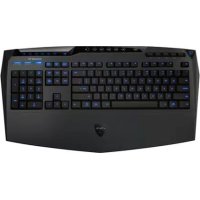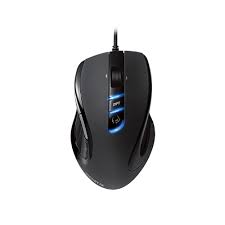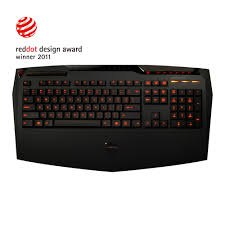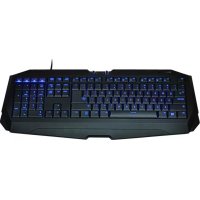
FORCE K7 - Keyboard GIGABYTE - Free user manual and instructions
Find the device manual for free FORCE K7 GIGABYTE in PDF.



| Product type | Gaming keyboard |
| Brand | GIGABYTE |
| Model | FORCE K7 |
| Connectivity | Wired USB |
| Supported operating systems | Windows XP / Vista / 7 / 8 |
| Power supply | USB bus (5V) |
| Backlight | Yes, adjustable brightness and color (blue/green/cyan/off) |
| Volume wheel | Yes, with mute function |
| Anti-ghosting | Up to 7 simultaneous keys on the WASD cluster |
| Lockable Windows key | Yes, with LED indicator |
| Shortcut keys | 12 function keys (F1-F12) for quick launch |
| Wrist rest | Integrated extended area |
| Non-slip feet | Yes, rubber |
| Operating temperature | 0 °C to 40 °C |
| Maintenance | Avoid any contact with liquids, do not disassemble |
| Warranty | Contact GIGABYTE customer service, do not repair yourself |
Frequently Asked Questions - FORCE K7 GIGABYTE
User questions about FORCE K7 GIGABYTE
0 question about this device. Answer the ones you know or ask your own.
Ask a new question about this device
Download the instructions for your Keyboard in PDF format for free! Find your manual FORCE K7 - GIGABYTE and take your electronic device back in hand. On this page are published all the documents necessary for the use of your device. FORCE K7 by GIGABYTE.
USER MANUAL FORCE K7 GIGABYTE
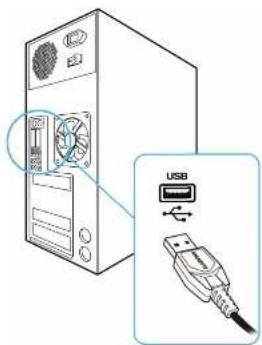
- System requirement: PC with built-in USB
- OS Supported: Windows ^® XP / Vista/ 7/8
- Plug FORCE K7 into the USB port of your computer.
- Wait until your PC detects the FORCE K7 and backlight is on.
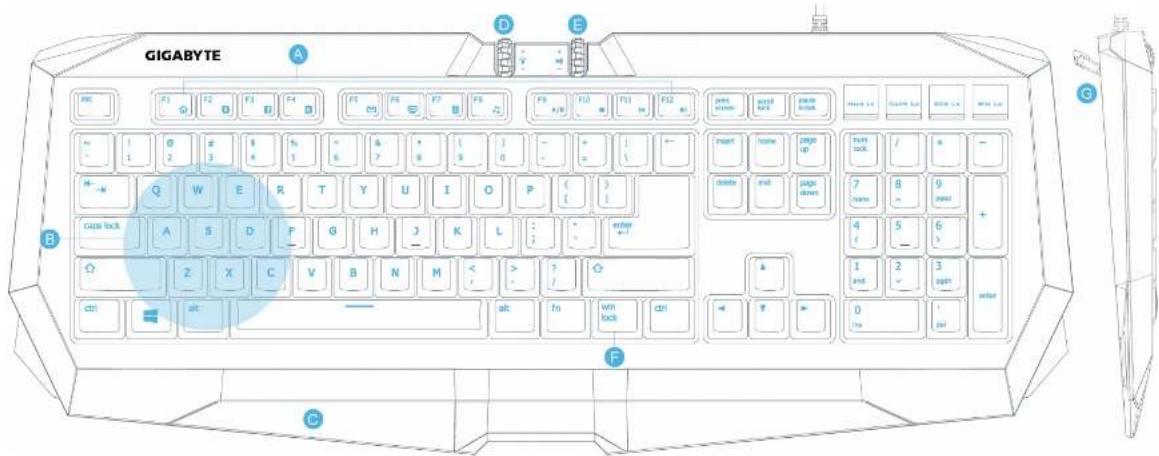
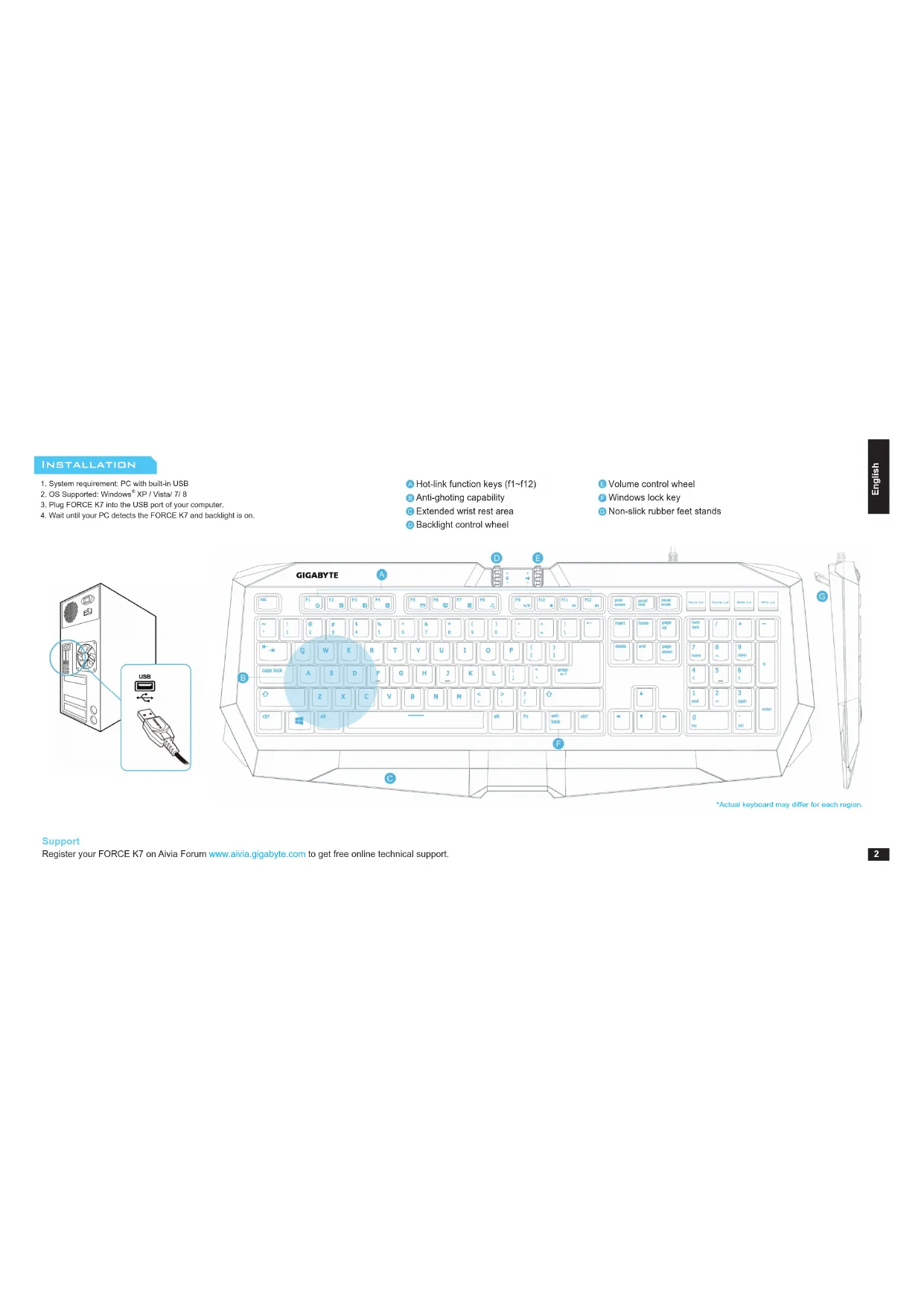
Hot-link function keys (f1\~f12)
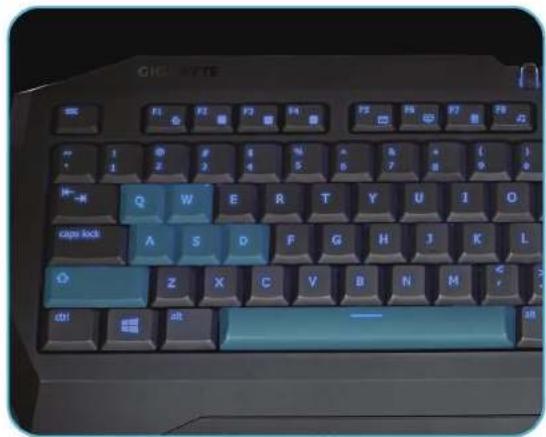
Anti-ghoting capability
Extended wrist rest area
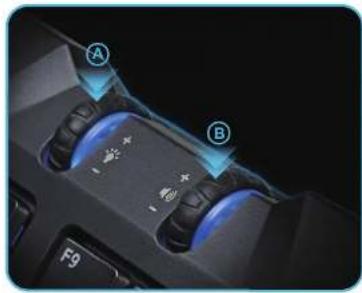
Backlight control wheel
Volume control wheel
Windows lock key
© Non-slick rubber feet stands
text_image
Diagram showing a computer tower with fan and USB cable connector, highlighting the connection point of the tower.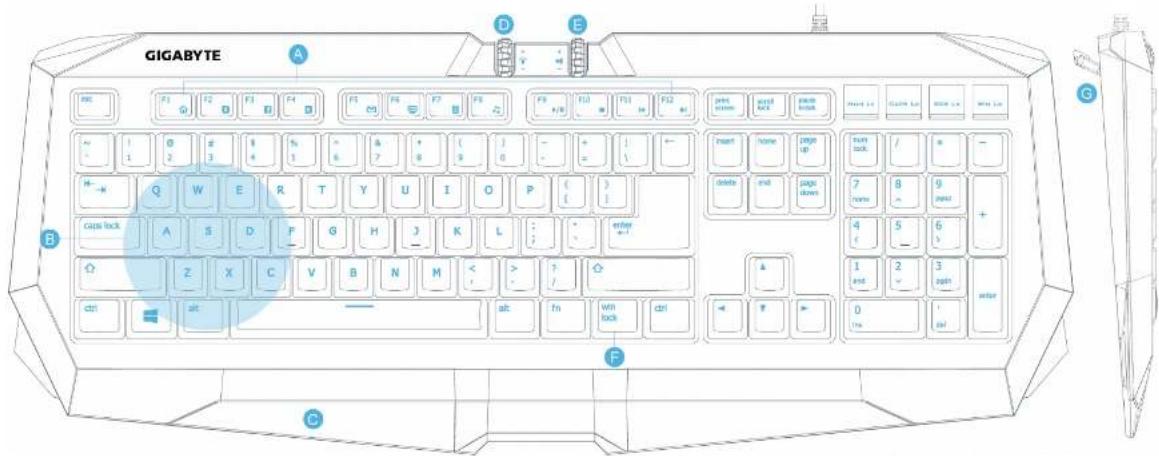
text_image
GIGABYTE A B C D E F G H I J K L M N O P Q R S T U V W X Y Z acn acn*Actual keyboard may differ for each region.
Support
Register your FORCE K7 on Aivia Forum www.aivia.gigabyte.com to get free online technical support.
natural_image
Close-up of a game controller with blue illuminated buttons labeled A and B, showing action buttons and control buttons (no readable text or symbols beyond labels)Ⓐ Backlighting Control Wheel
Scroll up and down to adjust the illumination Press down on wheel to cycle the colors or off backlight (Blue/Green/Cyan/OFF cycling)
⑧ Volume Control Wheel
Scroll up and down to adjust the volume Press down on wheel to mute
text_image
CHIC BYTE Q W E R T Y U I O Cape lock A S D F G H J K L Z X C V B N M dbl Alt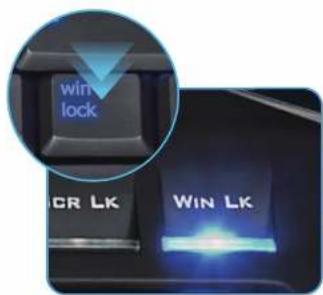
text_image
win lock CR LK WIN LKWindows Lock Functionality Anti-ghosting Capability Around WASD Cluster
The Win-lock key will disable the Windows key and prevent accidental activation of the Windows Start function during gaming session. To reactive the Windows key, just press again the Win-lock key and then the Win Lk indicator LED will be OFF.
Anti-ghosting capability around the WASD cluster on FORCE K7 guarantees the general gaming combination keys are registered and executed without conflict. Never be hurt by the missing signal failure during you press multiple keys simultaneously for the gaming commands.
* The FORCE K7 supports up to Q / W / A / S / D / left shift / space 7 simultaneous key-presses without conflict!
HOT-LINK FUNCTION KEYS

text_image
F1 F2 F3 F4 F5 F6 F7 F8 F9 F10 F11 F12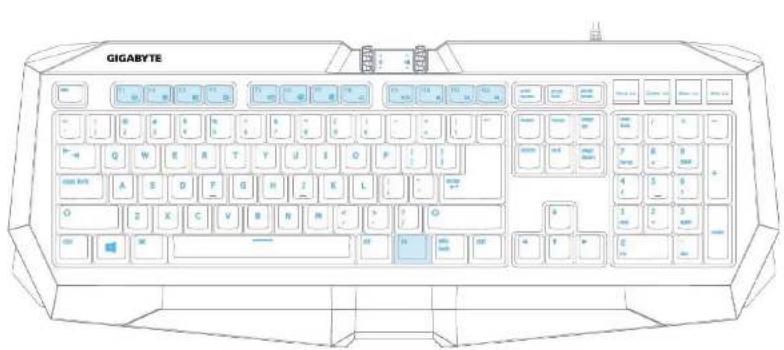
text_image
GIGABYTE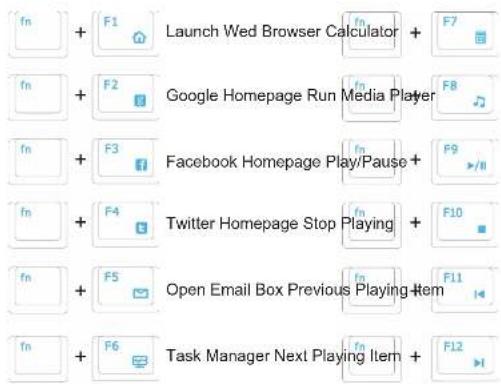
flowchart
graph TD
    A["Start"] --> B["F1"]
    B --> C["Launch Wed Browser Calculator"]
    C --> D["F7"]
    E["Start"] --> F["F2"]
    F --> G["Google Homepage Run Media Player"]
    G --> H["F8"]
    I["Start"] --> J["F3"]
    J --> K["Facebook Homepage Play/Pause"]
    K --> L["F9"]
    M["Start"] --> N["F4"]
    N --> O["Twitter Homepage Stop Playing"]
    O --> P["F10"]
    Q["Start"] --> R["F5"]
    R --> S["Open Email Box Previous Playing Item"]
    S --> T["F11"]
    U["Start"] --> V["F6"]
    V --> W["Task Manager Next Playing Item"]
    W --> X["F12"]
MAINTENANCE
- Should you have trouble operating the keyboard properly, please contact GIGABYTE customer service center on www.gigabyte.com for support. Do not attempt to service or fix the device yourself at any time.
- Do not take the keyboard apart (doing so will also void your warranty) and do not remove the keycaps under any circumstance.
- Keep your keyboard away from liquid, humidity or moisture. Operate your keyboard only within the specified temperature range of 0^ C ( 32^ F) to 40^ C ( 104^ F). Should you operate it in a temperature that is beyond this range, unplug and switch off the device in order to let the temperature stabilize within the optimal temperature range.
SAFETY
FCC Declaration:
- This device has been tested and found to comply with the limits for a Class B digital device, pursuant to Part 15 of the FCC Rules. These limits are designed to provide reasonable protection against harmful interference in a residential installation. This equipment generates, uses and can radiated radio frequency energy and, if not installed and used in accordance with the instructions, may cause harmful interference to radio communications. However, there is no guarantee that interference will not occur in a particular installation. If this equipment does cause harmful interference to radio or television reception, which can be determined by turning the equipment off and on, the user is encouraged to try to correct the interference by one or more of the following measures:
- Reorient or relocate the receiving antenna.
- Increase the separation between the equipment and receiver.
- Connect the equipment into an outlet on a circuit different from that to which the receiver is connected.
- Consult the dealer or an experienced radio/TV technician for help.
- This device complies with part 15 of the FCC Rules. Operation is subject to the following two conditions: (1) This device may not cause harmful interference, and (2) this device must accept any interference received, including interference that may cause undesired operation.
IMPORTANT INFORMATION
Long period of repetitive motion using an improperly set-up workplace, or incorrect body posture may be associated with physical discomfort and injury to nerves, tendons, and muscles.
INSTALLATION
text_image
Diagram showing a computer tower with fan and USB cable connector, highlighting the connection point of the tower.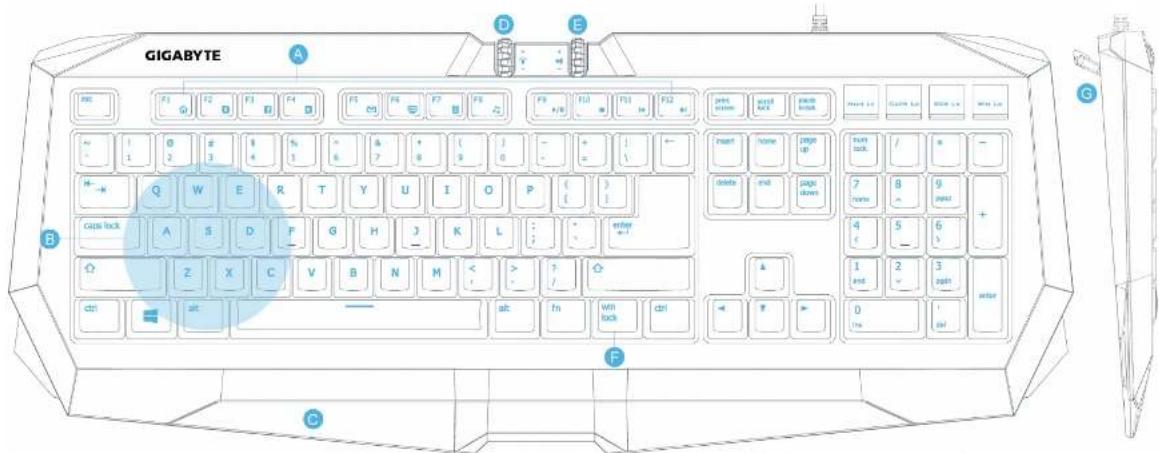
text_image
GIGABYTE A B C D E F G H I J K L M N O P Q R S T U V W X Y Z A B C D E F G H I J K L M N O P Q R S T U V W X A B C D E F G H I J K L M N O P Q R S T U V W X A B C D E Fnatural_image
Close-up of a game controller with blue glowing buttons and control buttons (no readable text or symbols)text_image
win lock CR LK WIN LKWindows-Tastensperre Anti-Ghosting um den WASD-Block
text_image
Diagram showing a computer tower with fan and USB cable connector, highlighting the connection point of the tower.
text_image
GIGABYTE A B C D E F G H I J K L M N O P Q R S T U V W X Y Z acn atc alt alt fn win lock ctrl print screen page lock page button main home page up delete and page down main lock / s - home 8 9 past + 4 5 6 s- 1 and 2 3 past waternatural_image
Close-up of a game controller with blue glowing buttons and control buttons (no readable text or symbols)text_image
win lock CR LK WIN LK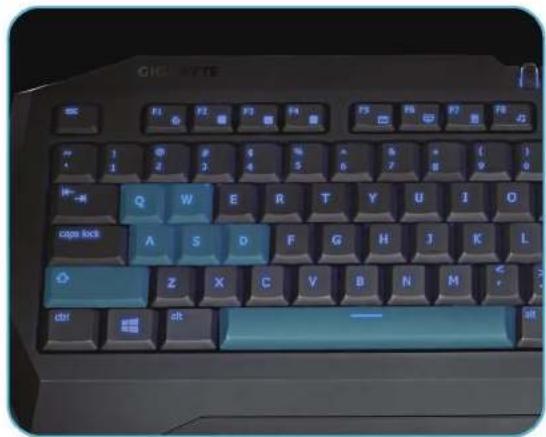
text_image
CHIC BYTE F1 F2 F3 F4 F5 F6 F7 F8 1 2 3 4 5 6 7 8 Q W E R T Y U I O A S D F G H J K L Z X C V B N M dtl dt —text_image
Diagram showing a computer tower with fan and USB cable connector, highlighting the connection point of the tower.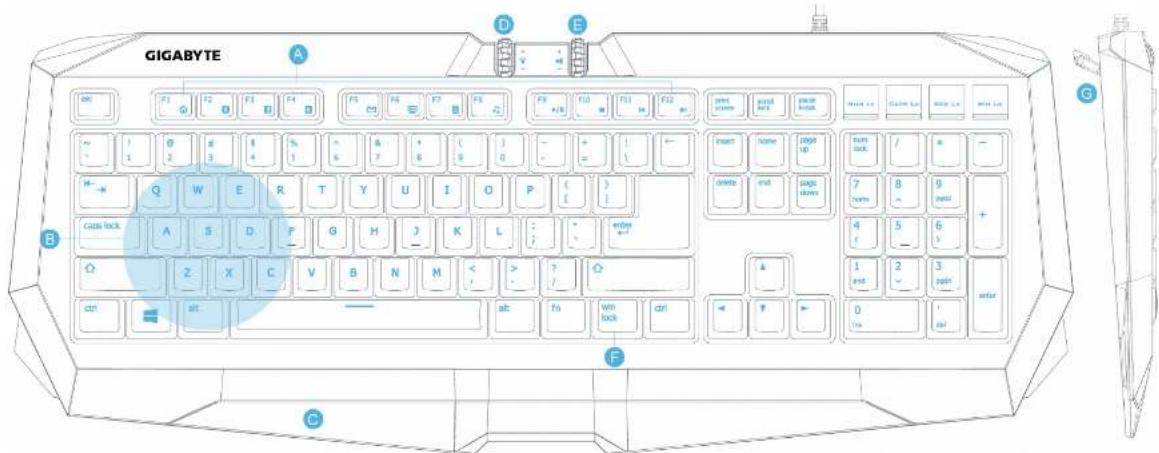
text_image
GIGABYTE A B C D E F G H I J K L M N O P Q R S T U V W X Y Z ac at out on on on on on on on on on on on on on on on on on on on on on on on on on on on on on on on on on on on on on on on on on on on on on on on on on on On On On On On On On On On On On On On On On On On On On On On On On On On On On On On On On On Onnatural_image
Close-up of a game controller with blue illuminated buttons labeled A and B, no visible text or symbols on the device itself.text_image
win lock CR LK WIN LKtext_image
Diagram showing a computer tower with fan and USB cable connector, highlighting the connection point of the tower.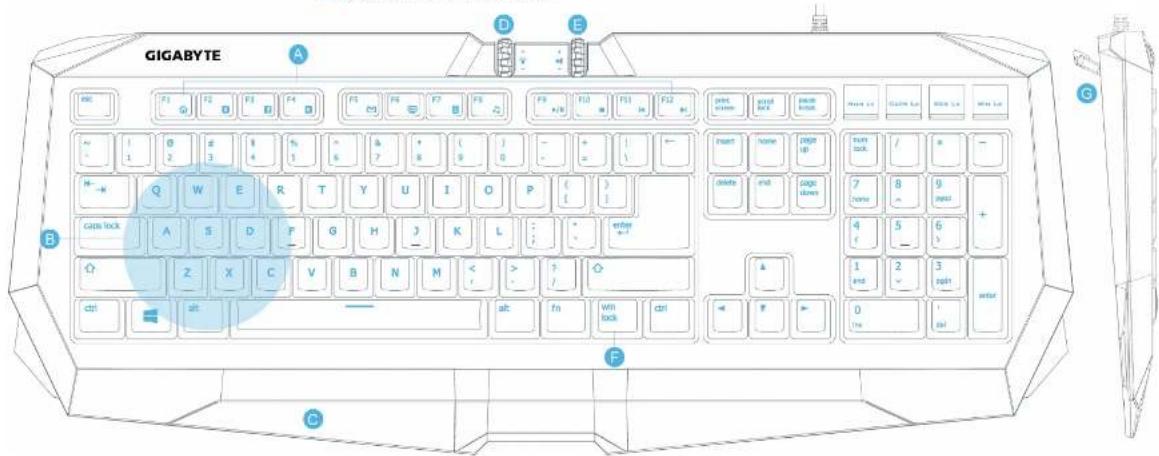
text_image
GIGABYTE A B C D E F G H I J K L M N O P Q R S T U V W X Y Z acn lock attn attn attn attn attn attn attn attn attn attn attn attn attn attn attn attn attn attn attn attn attn attn attn attn attn attn attn attn attn attn attn attn attn attnnatural_image
Close-up of a game controller with blue glowing buttons and control buttons (no readable text or symbols)text_image
win lock CR LK WIN LKtext_image
Diagram showing a computer tower with fan and USB cable connector, highlighting the connection point of the tower.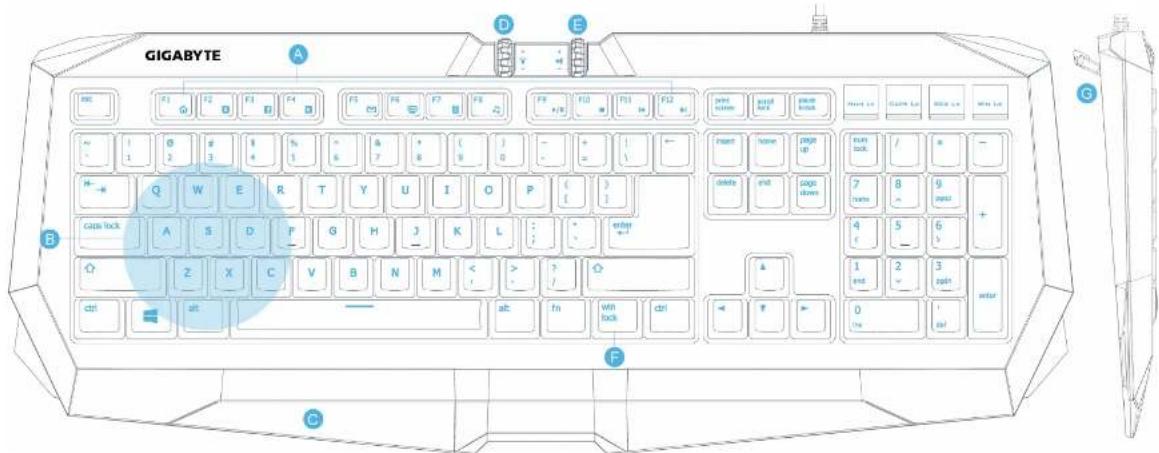
text_image
GIGABYTE A B C D E F G H I J K L M N O P Q R S T U V W X Y Z # # # # # # # # # # # # # # # # # # # # # # # # # # # # # # # # # # # # # # # # # # # # # # # # # # # # # # # # # # # # # # # # # # # # # # # # # # # # # # # # # # # # # # # # # # # # # # # # # # # # #natural_image
Close-up of a game controller with blue glowing buttons and control buttons (no readable text or symbols)text_image
win lock CR LK WIN LKtext_image
Diagram showing a computer tower with labeled USB cable and connected plug, highlighting the internal fan mechanism.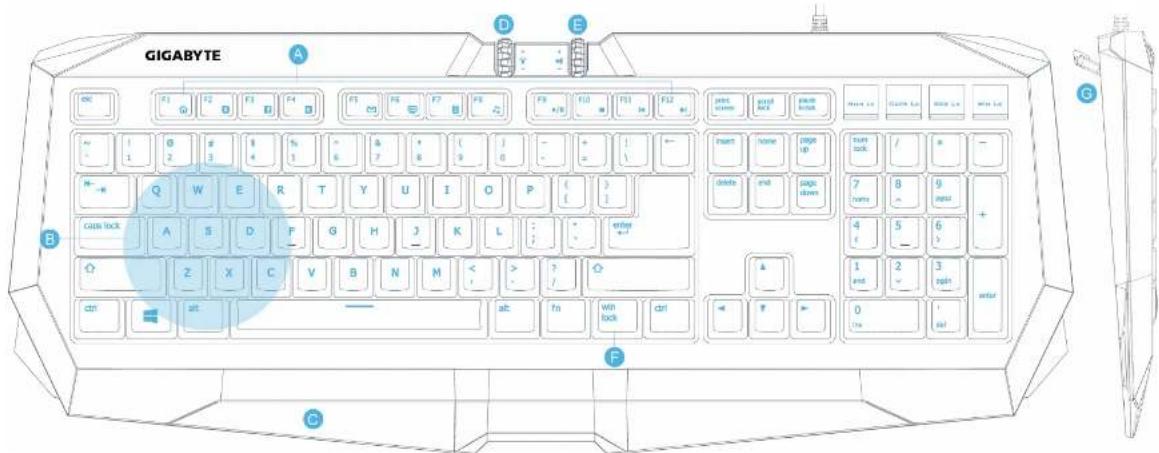
text_image
GIGABYTE A B C D E F G H I J K L M N O P Q R S T U V W X Y Z ac at out on on on on on on on on on on on on on on on on on on on on on on on on on on on on on on on on on on on on on on on on on on on on on on on on on on On On On On On On On On On On On On On On On On On On On On On On On On On On On On On On On On On On On On On On On On On On On On On On On Onnatural_image
Close-up of a game controller with blue glowing buttons and control buttons (no readable text or symbols)text_image
win lock CR LK WIN LKtext_image
Diagram showing a computer tower with fan and USB cable connector, highlighting the connection point of the tower.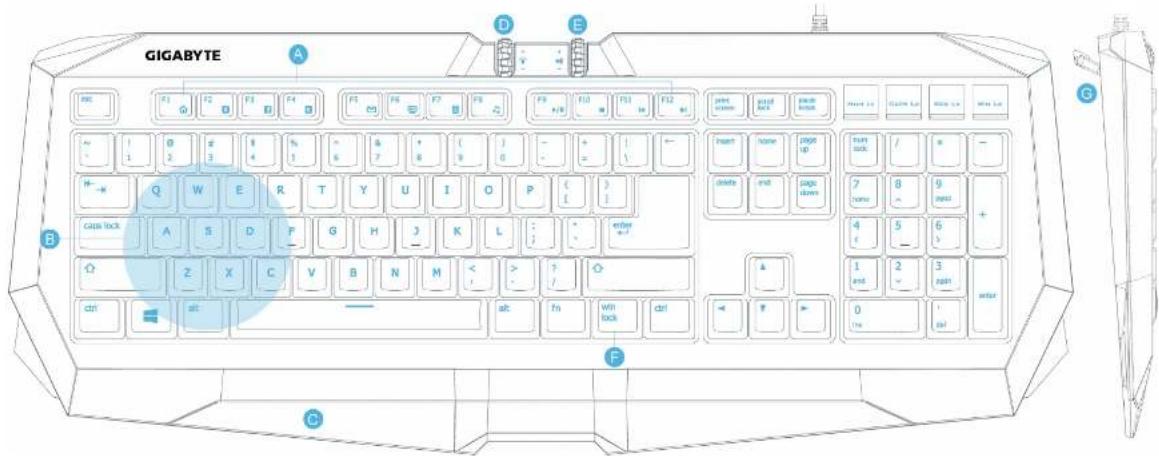
natural_image
Close-up of a game controller with blue glowing buttons and control buttons (no readable text or symbols)text_image
win lock CR LK WIN LKtext_image
Diagram showing a computer tower with fan and USB cable connector, labeled in English.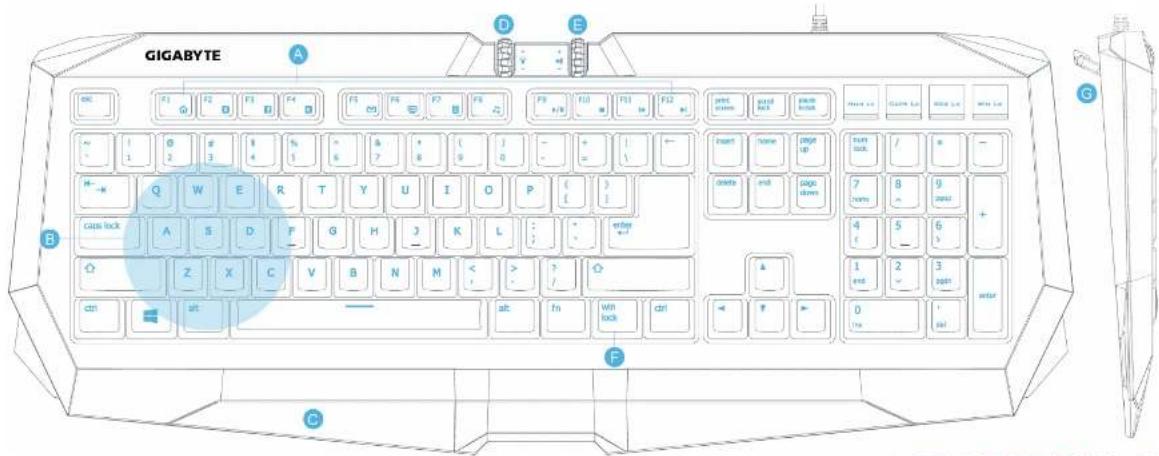
text_image
GIGABYTE A B C D E F G H I J K L M N O P Q R S T U V W X Y Z acn acn acn acn acn acn acn acn acn acn acn acn acn acn acn acn acn acn acn acn acn acn acn acn acn acn acn acn acn acn acn acn acn acnnatural_image
Close-up of a game controller with blue glowing buttons and labeled points A and B, no readable text or symbols beyond labelsⒶ 백라이트 컨트를 월
text_image
win lock CR LK WIN LKtext_image
CHI-BYTE F1 F2 F3 F4 F5 F6 F7 F8 1 2 3 4 5 6 7 8 9 10 Q W E R T Y U I O A S D F G H J K L O Z X C V B N M dt at —text_image
Diagram showing a computer tower with fan and USB cable connector, labeled in English.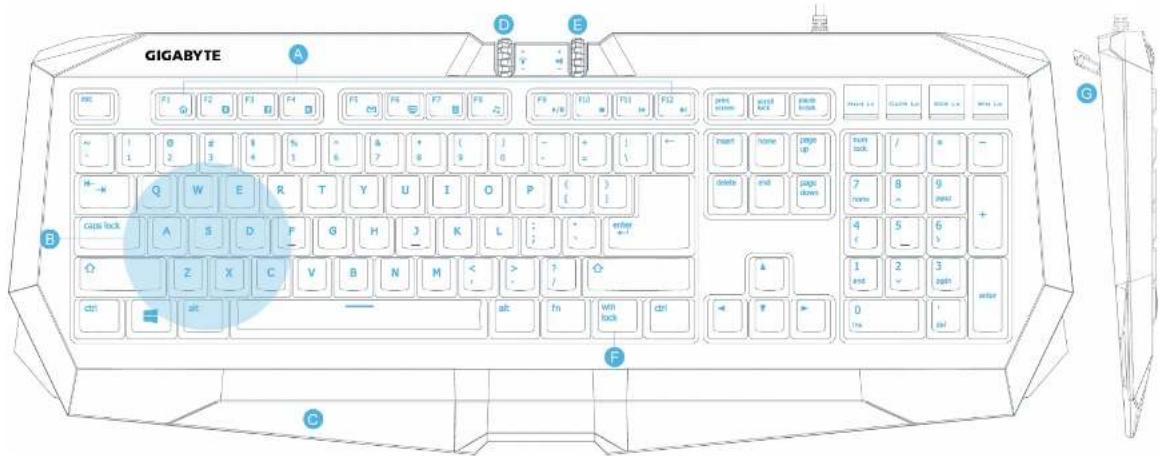
text_image
GIGABYTE A B C D E F G H I J K L M N O P Q R S T U V W X Y Z ac at out on on on on on on on on on on on on on on on on on on on on on on on on on on on on on on on on on on on on on on on on on on on on on on on on on on On On On On On On On On On On On On On On On On On On On On On On On On On On On On On On On On On On On On On On On On On On On On On On On Onnatural_image
Close-up of a game controller with blue illuminated buttons labeled A and B, showing action buttons and control buttons (no readable text or symbols beyond labels)A 背光控制滚输
text_image
win lock CR LK WIN LK鎖定Windows鍵功能
text_image
CHIC BYTE Q W E R T Y U I O Cape lock A S D F G H J K L Z X C V B N M dbl 2tWASD遊戲指令區域防鬼鍵功能
text_image
Diagram showing a computer tower with fan and USB cable connector, labeled in English.