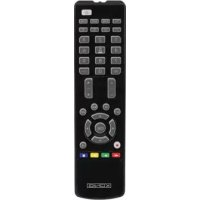
IRURC31 - Remote control KONIG - Free user manual and instructions
Find the device manual for free IRURC31 KONIG in PDF.


| Product type | Universal remote control 4 in 1 |
| Brand | Konig |
| Model | IRURC31 |
| Power supply | 2 AAA batteries (not included) |
| Range | Approximately 8 meters |
| Frequency | Infrared |
| Approximate dimensions | 20 x 5 x 2 cm |
| Approximate weight | 100 g |
| Use | Control of televisions, DVD players, satellite and cable receivers |
| Configuration methods | Brand code, automatic search, manual search |
| Function keys | On/Off, volume, channels, menu, navigation, play, pause, stop, record, rewind, fast forward, teletext, mute |
| Color keys | Red, green, yellow, blue (for teletext) |
| Code protection | Locking and protection of device codes (SET+5 and SET+7) |
| Reset | Hold SET+0 for 3 seconds |
| Code display | SET+1, SET+2, SET+3 to display digits by blinking |
| Maintenance | Clean with a dry cloth, avoid solvents and abrasive products |
| Safety | Do not modify the product; no liability for damage from incorrect use |
| Warranty | No warranty in case of modification or incorrect use |
| Storage | Keep the manual and packaging for future reference |
| General information | Design and specifications subject to change without notice |
Frequently Asked Questions - IRURC31 KONIG
User questions about IRURC31 KONIG
0 question about this device. Answer the ones you know or ask your own.
Ask a new question about this device
Download the instructions for your Remote control in PDF format for free! Find your manual IRURC31 - KONIG and take your electronic device back in hand. On this page are published all the documents necessary for the use of your device. IRURC31 by KONIG.
USER MANUAL IRURC31 KONIG
MANUAL DE USO (p. 16)
The 4-in-1 universal remote control is suitable for all TV sets (TV), DVD players (DVD), digital and analogue satellite receivers and cable receivers (CBL/SAT), from common manufacturers. The universal remote control can execute almost all basic device functions.
Button description
SET - For setting the remote.
TV, SAT, DVD, DVB - Device button
Power - On and Off
0-9 - Number buttons for selecting channels or entering the device code during setup.
AV/TV - TV/Video button on your TV remote control or the TV/SAT button on your SAT remote control or A/B in cable and CD mode.
Menu - Menu or OSD (On-Screen Display) or memory.
CH + / - Channel up and down
VOL + / - Volume up and down
Mute - Mute the sound
REW (fast reverse)
PLAY (operate your DVD, CD etc)
FFWD (fast forward)
REC (Record)
STOP (terminate your operation)
II PAUSE
Red, Green, Yellow and Blue for TV Teletext.
Television video
TV and text mixed
Teletext mode
Page hold
Up, Down, Left, Right, OK, Exit - Functions like the UP, DOWN, LEFT, RIGHT, OK, EXIT, menu functions.
Setup
Make sure that fresh batteries have been inserted correctly into the remote control.
To make your remote control ready for use, you need to carry out one of the following steps:
A. Setup by Brand Code
- Switch on the device for which you wish to use the remote control.
- Find the code number of your device brand in the code list from the respective device group.
- Press the SET button and the device button at the same time. Release the two buttons as soon as LED lights up.
- Enter the 3-digit device code within 10 seconds. If no entry within 10 seconds, the setting up mode is automatically terminated.
- The LED turns off if the code has been accepted by the remote control. If the LED flashes twice, that means the code may be wrong, and the remote control remains in setup mode, enter the correct code from the list again in good time.
- Check the function of the buttons on remote control. If it does not function correctly, try another 3-digit device code (e.g. 010...) from the list under the same brand. Repeat the step 3 to 6 until all the basic functions operate correctly.
Note: Exit the setup mode by pressing the device button, or the set-up mode is automatically terminated if no button is pressed for 10 seconds.
B. Setup by Automatic Search
- Switch on the device that you like to control. If it is a VCR insert a cassette.
- Point the remote control at the device. Simultaneously press the SET and Device buttons for three seconds. The LED should start flashing, that means it is in Automatic Search now.
- The OFF signal is automatically transmitted from the remote control to the device (code scan). As soon as the device switches off, immediately press any key (except SET key) to stop the Automatic Search.
- Switch on the device again by pressing the "POWER" key. Check the function of the other buttons on the remote control. If none of the buttons function (i.e. the search cannot be stopped at the correct time) or the majority of the buttons do not function correctly, restart the search (see steps 2 to 4) to find a suitable code. If the majority of the buttons function correctly, setup has been successful. Re-press the device button to save the code and to terminate the setup mode.
Note: To automatically terminate the search, press any button (except the SET button). The LED turns off and the search is terminated.
C. Setup by Manual Search
- Switch on the device that you like to control.
- Point the remote control at the device. Press and hold down the SET button and then press the Device button. (For less than 3 seconds, otherwise Auto search is started) Then release the two buttons.
- The LED lights up and the remote is in setup mode.
- Press the Power button (On/Off button) approx. every 1.5 seconds. (If the device you are searching for is a DVD player, etc., you can also press the play button.) The LED light should start flashing, i.e. the device is in Manual Search Mode.
- As soon as the device you are searching for switches off (or is reactive), check whether the other buttons on the remote control function correctly (do not press Power button, or else it will move to next code). If the majority of the buttons does not function correctly, press the button approx. every 1.5 seconds to initiate the reactive code (manual search is continued, see steps 4 to 5). If the majority of the buttons on the remote control functions correctly, save the code by pressing the Device button to terminate the manual search.
Note: The Manual Search is automatically terminated if no entry occurs during a 30 seconds period.
D. Display Device Code
You can call up the device code which you have set in your new remote control as follows:
- Press and hold the SET button, simultaneously press number 1 to display the hundreds of the 3-figure code. Count how often the LED flashes. If the LED does not flash, the number is Zero.
- Press and hold the set button, simultaneously press number 2 to display the tens of the 3-figure code.
- Press and hold the set button, simultaneously press number 3 to display the ones of the 3-figure code.
Example for Code 108:
- Press SET and "1" LED flashes once
- Press SET and "2" LED does not flash.
- Press SET and "3" LED flashes eight times.
E. Volume Lock
This function is very practical if you wish to use just one device to control the volume. In this case, you can use the function to set the volume and mute button to AMP, regardless of which device you are using (even if you are using a
TV, DVD, etc.). The Volume and Mute buttons on the remote control still control the volume and mute of your amplifier.
- Press the device button for which you wish to lock the volume.
- Press SET and number button 5, the current VOL and mute will be locked, LED flashes twice as confirmation..
Note: Press the Set button and number button 6 to unlock volume.
F. Write-protection of Device Codes
Proceed as follows to prevent device codes from being accidentally overwritten or deleted.
- Press the device button which you wish to protect
- Press and hold down the SET button, simultaneously press number button 7 and then release both buttons. The LED flashes twice and the code is now protected and cannot be overwritten/deleted.
Note: To cancel write protection, press and hold down the SET button, simultaneously press number button 8 and then release two buttons. The LED flashes twice and the protection is cancelled.
H. Reset / Delete Function
To delete the codes which you have set in the remote control, press and hold down the SET button, then press the 0 button simultaneously for more than 3 seconds and then release both pressed buttons. The LED flashes twice and all the set up data and commands in the remote control are deleted.
Maintenance:
Clean only with a dry cloth. Do not use cleaning solvents or abrasives.
Warranty:
No guarantee or liability can be accepted for any changes and modifications of the product or damage caused due to incorrect use of this product.
General:
Designs and specifications are subject to change without notice.
All logos brands and product names are trademarks or registered trademarks of their respective holders and are hereby recognized as such.
Keep this manual and packaging for future reference.
Attention:
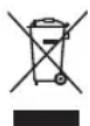
This product is marked with this symbol. It means that used electrical and electronic products should not be mixed with general household waste. There is a separate collections system for these products.
DEUTSCH
Bedienung:
Power-Zapnout/Vypnout.


Brand : KONIG
Model : IRURC31
Category : Remote control