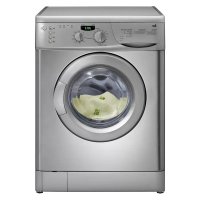
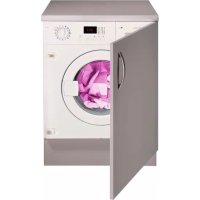
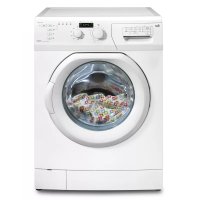
TKE 1400 T - Washing machine TEKA - Free user manual and instructions
Find the device manual for free TKE 1400 T TEKA in PDF.



| Product type | Washing machine |
| Brand | Teka |
| Model | TKE 1400 T |
| Load capacity | 7.5 kg |
| Maximum spin speed | 1400 rpm |
| Dimensions (H x W x D) | 85 x 59.6 x 60 cm |
| Supply voltage | 220-240 V / 50 Hz |
| Water pressure | 1 to 10 bar |
| Programs | 15 programs: white cotton, cotton prewash, resistant colors, delicate colors, synthetic, wool, silk, quick wash, rinse, spin, drain, etc. |
| Additional functions | Full tank stop, extra rinse, easy iron, eco wash, delayed start (1-23h), child lock |
| Loading type | Front-loading (porthole) |
| Drum material | Stainless steel |
| Safety | Child lock, error detection (codes E01-E07), leak protection |
| Maintenance | Cleaning of water inlet filters, pump filter, detergent drawer, body, drum |
| Included accessories | Water inlet hose, drain hose, seals, plastic closing screws |
Frequently Asked Questions - TKE 1400 T TEKA
User questions about TKE 1400 T TEKA
0 question about this device. Answer the ones you know or ask your own.
Ask a new question about this device
Download the instructions for your Washing machine in PDF format for free! Find your manual TKE 1400 T - TEKA and take your electronic device back in hand. On this page are published all the documents necessary for the use of your device. TKE 1400 T by TEKA.
USER MANUAL TKE 1400 T TEKA
WASHING MACHINE USER MANUAL TKE 1400 T
MODE D'EMPLOI DE MACHINE A LAVER TKE 1400 T
MANUAL DE INSTRUÇÕES DA MAQUINA DE LAVAR TKE 1400 T
natural_image
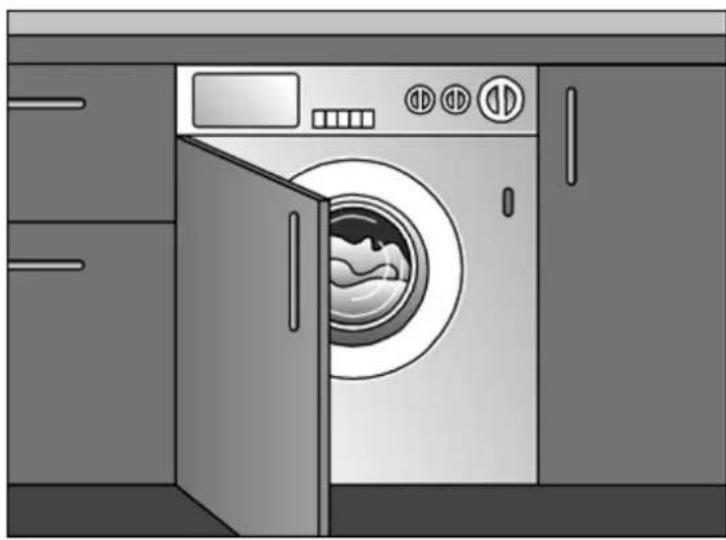
Illustration of a washing machine with open door and side drawers, no text or symbols present
SPANISH....1
ENGLISH 37
FRENCH 72
PORTUGUESE....106
CONTENIDOS
natural_image
Abstract graphic with curved black shape and circular emblem (no text or symbols)DIBUJO 1
natural_image
Close-up of a black mechanical component with a circular ring and a separate view showing a downward arrow (no text or symbols)DIBUJO 2
natural_image
Abstract graphic with a black circle and arrow, no text or symbols presentDIBUJO 3
AJUSTE DE LAS PATAS DE LA MAQUINA
natural_image
Close-up of a mechanical component with a cylindrical base and metallic components (no visible text or symbols)
natural_image
Close-up of a mechanical component with a black cylindrical body and directional arrows (no visible text or symbols)CONEXION ELECTRICA
natural_image
Simple line drawing of a bird's eye and ear with no text or symbols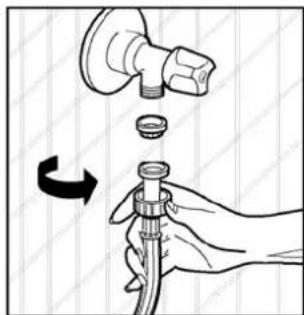
natural_image
Illustration of a hand holding a pipe fitting with a valve and cap, showing a rotation arrow (no text or symbols)CONEXION A LA TOMA DE DESAGÜE


BOTON DE MENU
SECTION 6: MAINTENANCE AND CLEANING
natural_image
Three-step diagram showing a hand holding a pen, a close-up of a fish head with eye symbols, and a separate close-up of the pen tip (no text or labels)FILTRO DE LA BOMBA
natural_image
Line drawing of a hand pressing down a mechanical component (no text or symbols)IMAGEN-1
natural_image
Illustration of hands inserting a component into a device (no text or symbols visible)IMAGEN-2
ENTRADA DEL SIFÓN
- Safety warnings
- Recommendations
SECTION 2:INSTALLATION
- Removal of transportation screws
- Adjustment of feet
• Electrical connection
• Water supply connection
• Water drain connection
SECTION 3: TECHNICAL SPECIFICATIONS
SECTION 4:CONTROL PANEL
- Start/Pause button
• Function indicator lights
• Function buttons - Spin speed selector
- Program knob
SECTION 5:WASHING YOUR LAUNDRY
- Before washing
- Running the machine
SECTION 6: MAINTENANCE AND CLEANING
• Water inlet filters
- Pump filter
• Detergent drawer
- Siphon plug
- The cabinet
- The drum
- Remove of your machine from lime
SECTION 7: PRACTICAL INFORMATION
SECTION 8: AVOIDING MINOR FAULTS
SECTION 9: AUTOMATIC FAILURE DETECTION SYSTEM
SECTION 10: INTERNATIONAL WASHING SIGNS
SECTION 1: BEFORE USING
SAFETY WARNINGS
- Do not use a multiple socket or extension cord.
- Do not insert a plug with damaged or broken cord into the socket.
- If the cord is damaged it should be replaced by the manufacturer or appointed service agent in order to avoid a hazard.
- Never remove the plug from the socket by pulling from the cord section. Remove the plug by holding.
- Do not plug the power supply with wet hands.
- Never touch the machine with wet hands or feet.
- Never open the detergent drawer while the device is running.
- Never force to open the door of the machine while the machine is running.
- Since the machine can reach high temperatures while running, do not touch the drain hose and water during draining.
- In case of any failure, first unplug the device and close the water tap. Do not attempt to repair. Please apply to the nearest authorized service station.
- Do not forget that the packing material of your machine may be hazardous for children.
- Do not let your children play with the washing machine.
- Keep your pet away from your machine.
- Your machine should only be used by adults within the information written in this manual.
- Your machine is designed for use in house environment. Warranty will be invalid if you use it for commercial purposes.
- The appliance should not be put on a carpet which can block the air ventilation on the bottom side.
RECOMMENDATIONS
- The detergent or softener in contact with air for a long time will dry and stick to your detergent drawer. To avoid this put your detergent and softener into the detergent drawer just before washing.
- It is recommended that you use pre-washing program for only very dirty clothes.
- Please do not exceed the maximum loading capacity.
- If you will not use your machine for a long time, unplug your machine, close the water supply and leave the door open in order to keep the inside of the machine dry and for prevention from unpleasant odour.
- As a result of the quality control procedures, a certain amount of water may remain in your machine. This is not harmful for your machine.
SECTION 2: INSTALLATION
You must pay attention to the following issues before using your washing machine.
REMOVAL OF TRANSPORTATION SCREWS
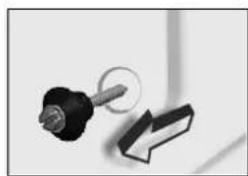
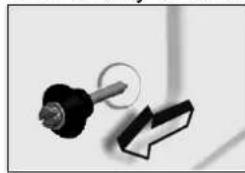
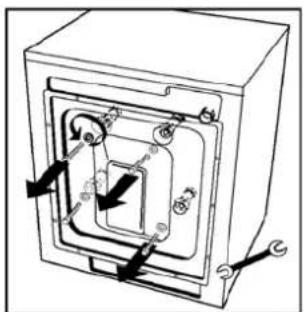
- Transportation screws, which are located at the back side of the machine, must be removed before running the machine.
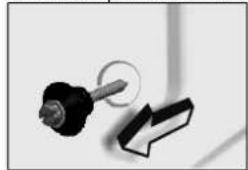
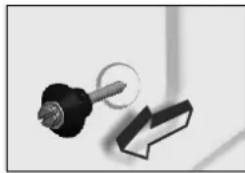
- Loosen the screws by rotating counterclockwise by a suitable wrench. (DIAGRAM-1)
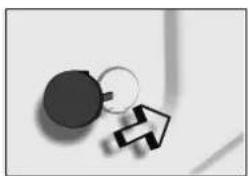
- Remove the screws by pulling them.(DIAGRAM-2)
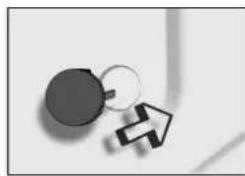
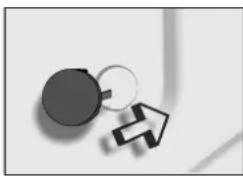
- To the holes where the transport screws have been removed, insert the plastic transport screw taps found in the accessories bag. (DIAGRAM-3)
- The transportation screws, that have been removed from the machine should be kept in hand for any other transportation necessities.

natural_image
Abstract black and white graphic with curved arrow and circular symbol (no text or symbols)DIAGRAM-2 DIAGRAM-1
natural_image
Close-up of a black mechanical component with a circular hole and a separate 3D block (no text or symbols visible)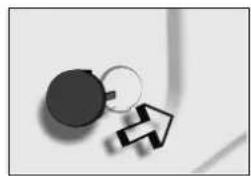
natural_image
Simple black-and-white diagram showing a circle connected to a ring with an arrow, no text or symbols present.DIAGRAM-3
natural_image
Technical diagram of a mechanical assembly with arrows indicating direction (no text or labels)ADJUSTMENT OF FEET
- Do not install your machine on rugs or similar surfaces.
- For your machine to work silently and without any vibration, it should be settled on a flat, non-slippery and tough ground.
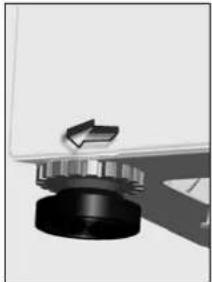
• You can adjust the balance of your machine from its feet. - First, loosen the plastic adjustment nut.
- Adjust by rotating the feet upwards or downwards.
- After the balance has been reached, tighten the plastic adjustment nut again by rotating it upwards.
- Never put cartons, wooden blocks or similar materials under the machine to balance the irregularities on the level of the ground.
natural_image
Close-up of a mechanical knob or dial with a metallic handle and black base (no visible text or symbols)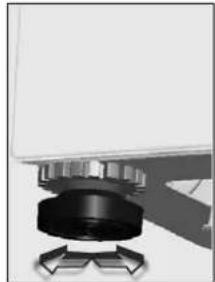
natural_image
Close-up of a mechanical component with a black cylindrical body and metallic housing, mounted on a base with directional arrows (no visible text or symbols)ELECTRICAL CONNECTION
- Your washing machine works with 220-240V and 50Hz.
- A special grounded plug has been attached to the network cable of your washing machine. This plug must definitely be inserted to a grounded socket with 10 ampere. The fuse flow value of the electricity line attached to this should also be 10 ampere. If you have no such sockets and fuses in your house, let it be made by a qualified electrician.
- Our company will not be responsible for any damages that may occur as a result of usage without grounding.
- Insert the machine's plug to a grounded socket which you can easily reach.
WATER SUPPLY CONNECTION
- Depending on the features your machine, may be with single water inlet (cold) or double water inlet (cold/hot). The white headed hose is for cold water inlet and red headed hose is for hot water inlet (valid for machines with hot&cold water inlet).
- To prevent leakage from the connection joints, 1 (valid for cold water inlet) or 2 (valid for machines with hot&cold water inlet) seals are included in the hose packing. Fit these seals at the end of water inlet hoses on the tap side.
-
Connect the white headed hose to the water inlet valve with white filter and connect the red headed hose to the water inlet valve with red filter (latter is valid in machines with hot&cold water inlet). Tighten the plastic parts of the connections with your hand. Please call a qualified plumber for safer connections.
-
Water pressure of 1-10 bars from your tap will enable your machine to work more efficiently.(1 bar pressure means water flow of more than 8 liters in 1 minute from a fully opened tap).
- After connections are completed, check for the non-leakage of the connection joints by turning on your tap completely.
- Be sure that water inlet hoses are not folded, broken or crushed.
- Mount the water inlet hoses to a 3"/4, geared water tap.
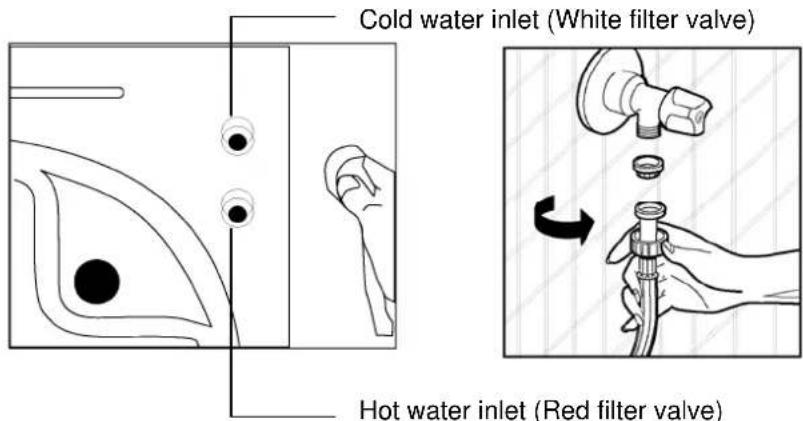
WATER DRAIN CONNECTION
- Be sure that water inlet hoses are not folded, twisted, crushed or elongated by stretching.
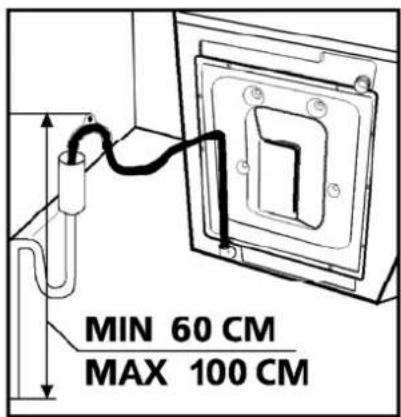
- Water drain hose should be mounted at a height of minimum 60 cm, maximum 100 cm from the ground.
- The end of the water drain hose may directly be fitted to the dirty water outlet hole or a special apparatus mounted on the outlet bracket of the wash-stand.
- Never attempt to extend the water drain hose by adding extra parts.
SECTION 3: TECHNICAL SPECIFICATIONS
| TKE 1400 T | |
| Maximum dry laundry capacity (kg) | 7,5 |
| Recommended loading (kg) | 7 |
| Height (cm) 85 | |
| Width (cm) 59,6 | |
| Depth (cm) 60 | |
| Maximum spin cycle (rpm) | 1400 |
SECTION 4:CONTROL PANEL
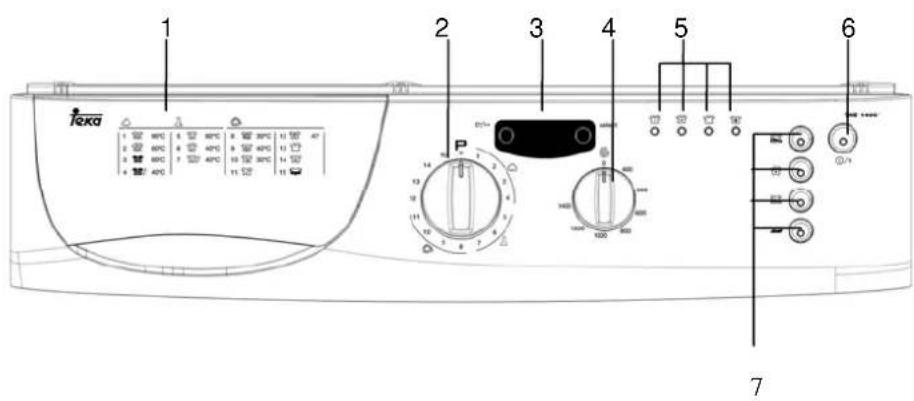
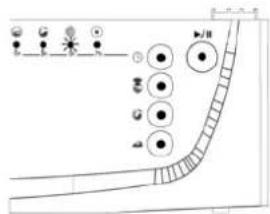
1- Detergent drawer
2- Program knob 7- Function buttons
3-Electronic
indicator
4-Spin speed selector
5- Washing operation light
6- Start/pause and cancel button
①/11
START/PAUSE BUTTON
This button is used for starting a selected programme or putting a programme in progress on pause.
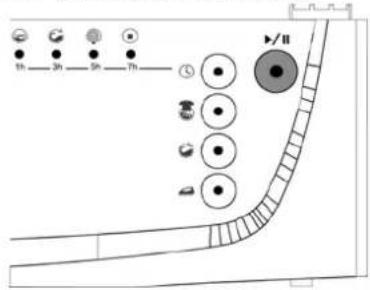

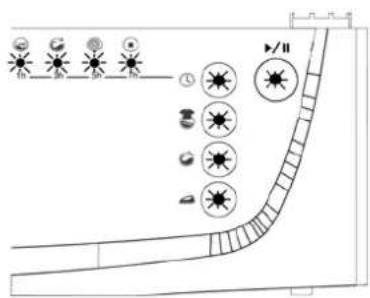
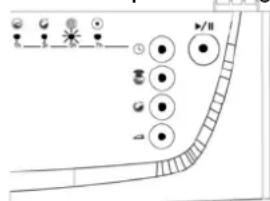
FUNCTION INDICATOR LAMPS
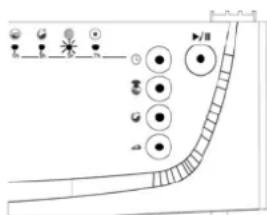
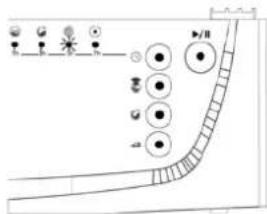
Pressing the start/hold button or any other function button switches on the lamps found above the buttons and the control panel, which indicate the wash stages of programmes. When any one of these lamps is on it means that certain programme is in use. The lamp is off when any function button or the start/hold button is pressed, or the selected function has finished its operation.

MENU BUTTON
Using the menu button you can access the functions for setting the temperature and the programme startup time of your machine.
SELECT BUTTON
select
With the select button you can change the functions for setting the temperature and the programme startup time of your machine any way you wish.
ELECTRONIC INDICATOR
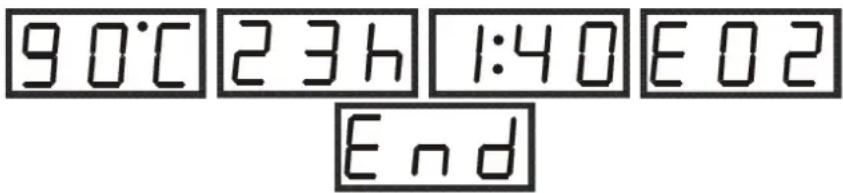
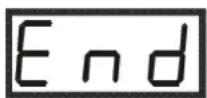
With the help of the electronic indicator you can adjust the temperature and the programme startup time, and also see the time the machine will complete the wash. The electronic indicator will warn you by showing an error icon on its indicator in case there should be any errors during the operation of your machine, and at the same time inform you of the completion of the selected wash programme by reading "END" on its indicator.
FUNCTION BUTTONS
Rinse hold

This function is recommended to be used when the clothes cannot be taken immediately after the end of the program. This will prevent occurrence of wrinkles. When this button is pressed, the last rinsing water is not drained. For the program to continue from the start pause, repress the start pause button
If you do not want your sensitive clothes to be spinned or you want them to be spinned sensitively, turn the program knob to O (off) position. Bring the program knob on one of the draining or spinning programs you desire and press the start/pause button. If the program you have selected is a drain program, your machine will draining the water inside. If you have selected a spinning program, your machine will perform a spinning operation and then end the program.

Extra rinse
You can have one more rinsing done in addition to the rinses which your machine has made in all washing programs by using this function.

Easy ironing
By using this function, you can ensure your clothes to come out less wrinkled after the washing.

Economy wash
This function serves for saving energy via decreasing the temperature value and decreased the wash time of the selected wash programme by a certain level.
WARNING!
If you have forgotten to use an additional function and the machine has started the wash operation press the button of the additional function you wish to select; if the indicator lamp above it keeps lighting the additional function you selected will become active. If the lamp stays lit for a certain while and then goes out the additional function you selected will not become active.
NOTE: Our products contain electronic cards and touchscreen buttons. Lightly pressing on the buttons will suffice to activate the functions.
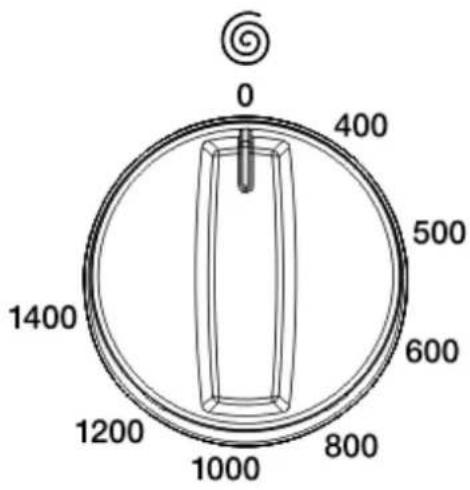
SPIN SPEED SELECTOR
By the spin speed selector knob, you can make the adjustment of speed for the process of spinning your clothes. The speed adjustment interval is between O (No spin) and the maximum spinning speed of your machine.
NOTE: Do the spinning process of your sensitive and delicate clothes in the most appropriate mode.
PROGRAM KNOB
With the program knob, you can select the program with which you desire to wash your clothes. You can adjust the program selection process by turning the program knob in both directions. You must be careful that the adjustment sign of the program knob is exactly on the program you want to select. When you bring the program knob to STOP(off) position, while your machine is running, your program will remain incomplete.
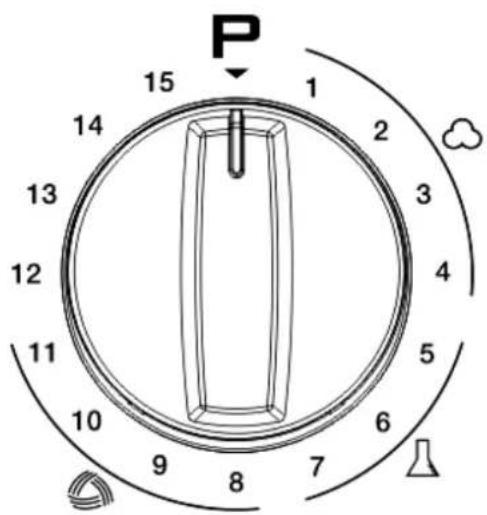
0-STOP
1-White
cotton
9-Wool
2-White cotton(Prewash)
10-Hand Wash
3-Resistant
Colors
11-Silk
4-Delicate
Colors
12-Quick
Wash
5-Resistant
Synthetics
13-Rinse
6-Synthetics
(Prewash)
14-Spin
7-Delicate
Synthetics
15-Drain
8-Mix Wash
SECTION 5: WASHING YOUR LAUNDRY
- Plug the machine.
- Open the tap water.
First wash cycle
There may be water left inside your machine after factory tests and trials. It is recommended that the first wash cycle should be made without any laundry so that carry out this water; pour half a measuring cup of normal all-purpose detergent into compartment 2 and select cotton program at 90°C.
BEFORE WASHING
Discrimination of your laundry
- Discriminate your clothes according to their types (cotton, synthetic, sensitive, woolen, etc.), washing temperatures and level of dirtiness.
- Never wash your white and coloured clothes together.
- Since your new coloured clothes may shed dye on the first wash, wash them separately.
- Be careful that no metal pieces are found on or in the pockets of your clothes, remove if there is any.
- Zip and button your clothes.
-
Remove the plastic or metal hooks of the curtains and laces or place them inside a washing bag and tie.
-
Pull the textiles like trousers, knitted fabric, t-shirt and sweat shirt inside out.
- Wash your small clothes like socks and handkerchiefs in a washing bag.

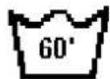
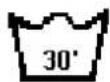

Wash up tol 90 °C Wash up to 60 °C Wash up to 30 °C Not washable in
a s h
Placement of the clothes into the machine
- Open the door of your machine.
- Fill your clothes in your machine in a well-spread manner.
- Place each cloth separately.
- When you shut the door of your machine, be careful that no cloth is jammed between the cover and the gasket.
- Shut the door of your machine tightly otherwise your machine will not start the washing process.
Filling detergent in the machine
The quantity of the detergent that you will fill in your machine depends on the following criteria:
- Your detergent consumption will change according to the dirtiness level of your clothes. For your slightly dirty clothes, do not pre-wash and put a small amount of detergent in the compartment no.2 of the detergent drawer.
- For your excessively dirty clothes, select a program with pre-washing, fill 1/4 portion of the detergent you will put in compartment 1 in the detergent drawer and the remaining portion in compartment 2.
- In your machine, use the detergents developed especially for automatic washing machines. The quantities that will be used for your clothes are written on the packing of the detergents.
- As the hardness of your water increases, the amount of the detergent to be consumed will also increase.
- As the amount of your clothes increases, the amount of the detergent to be consumed will also increase.
- Fill your softener in the softener compartment in your detergent drawer. Do not exceed the MAX level. Otherwise, the softener will diffuse in the washing water via the siphon.
- The softeners with high density should be diluted with some water before filling in the drawer. That is because the softener with high density obstructs the siphon and prevents the flow of the softener.
- You can use fluid detergents in all programs without pre-washing. For this, mount the fluid detergent level plate in the second compartment of the detergent drawer and arrange the amount of fluid detergent according to the levels on this plate.
RUNNING THE MACHINE
Program selection and features
Select programmes and additional functions appropriate for your laundry with the help of the tables shown on pages 91 and 92.
Start/Pause button
Pressing this button you can start the programme you selected or put the programme in progress on pause.
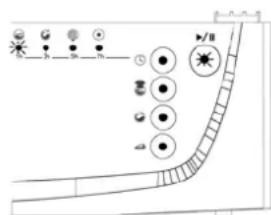
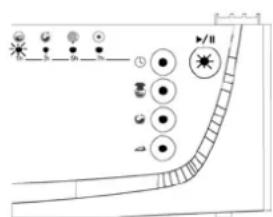
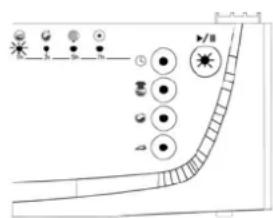
When the programme you selected starts its operation the lamp above the start/pause button will start lighting.
When you wish to put the selected programme on pause press the start/pause button once. The lamp above it will start to flash. In order to restart the programme from the point it was put on pause at you will have to press the start/pause button once again.
Starting the program
- Adjust the programme button to a programme you wish to select.
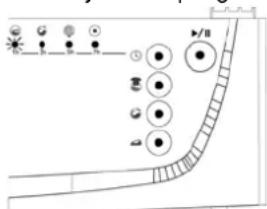
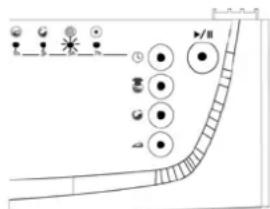
- If the programme you selected is a wash programme the wash operation lamp will flash.
- If the programme you selected is a rinse/spin or drain programme the lamps indicating the related selection will flash.
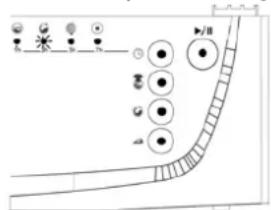
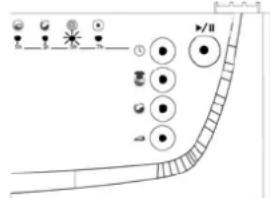
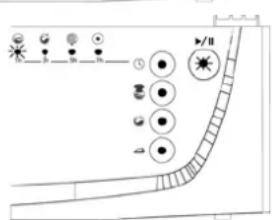
- Start the selected programme by pressing the start/pause button.
- When you start the programme by pressing the start/pause button the lamps will light up indicating that the start/pause button is active and the wash operation is in progress.
Selecting an additional function button
- Adjust the programme button to a programme you wish to select.
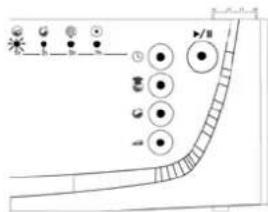
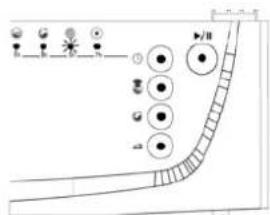
- If the programme you selected is a wash programme the wash operation lamp will light up.
- If the programme you selected is a rinse/spin or drain programme the lamps indicating the related selection will light up.
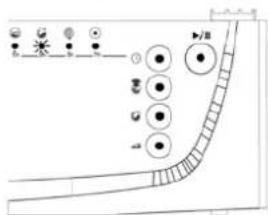
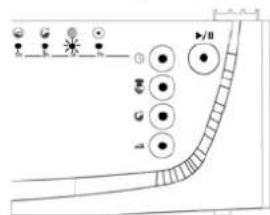
In order to select an additional function:
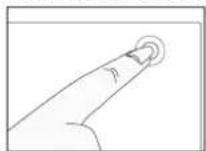
- Press once the additional function button you wish to select.
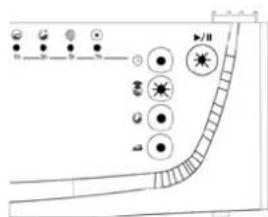
- If the lamp above the function button keeps lighting it means you have selected the function you wished to select.
- If the lamp above the function button is flashing it means you cannot use that additional function for the wash programme you selected.
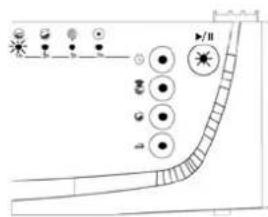
- Start the selected programme by pressing the start/pause button.
- When you start the programme by pressing the start/pause button the lamps will light up indicating that the start/pause button is active and the wash operation is in progress.
Cancelling a programme
If you wish a certain programme in progress to finish early:
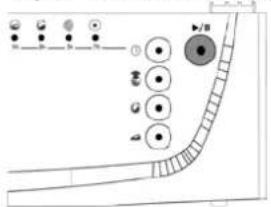
- Press the start/hold button for 4 seconds.
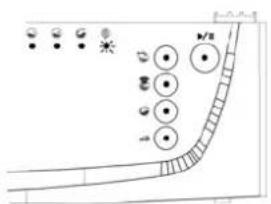
- The lamps indicating the spin/discharge operations will light up and the electronic indicator will flash "END".
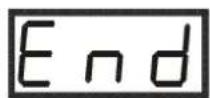
- Your machine will carry out the discharge operation necessary for the programme to finish, and then end the programme.
- The electronic indicator will keep flashing "END".
Programme end
- Your machine will stop automatically when the programme you selected has finished.
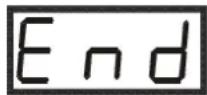
- The electronic indicator will read "END".
- Bring the programme button to the STOP (off) position.
- The door lock of your machine will automatically release about two minutes after the programme has finished. You can open the door and take out the laundry by pulling the door handle towards yourself.
- After you have taken out the laundry leave the door open so that the machine interior can dry.
- Unplug the machine.
- Turn off the water tap.
ADJUSTING THE WASH WATER TEMPERATURE
In order to adjust the temperature:
- Press the menu button once after selecting the programme and the (additional) function(s) you will use.
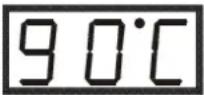
- The electronic indicator will show the wash temperature for the programme you selected.
- You can reduce this temperature value down to the wash temperature value you prefer by using the select button.
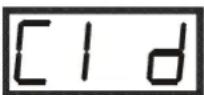
- If you wish to wash your laundry in cold water press the select button until the electronic indicator will read "CLD".
- If you have skipped the temperature level you prefer you can readjust it by continuously pressing the select button.
If you wait for longer than five seconds without pressing any button on this menu the electronic indicator will return to the start.
SETTING THE PROGRAMME STARTUP TIME
In order to set the programme startup time of your machine:
- Press the menu button twice after selecting the programme and the (additional) function(s) you will use.
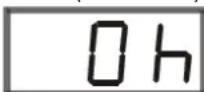
- The electronic indicator will read "0 h".
- Specify after how many hours you wish the programme you selected to start and adjust this delay time by using the select button.
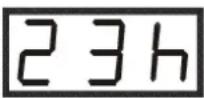
- The delay time can be set at a value between 1-23 hours.
■ In order to set the delay time:
- Set the delay time you prefer by using the select button.
- The electronic indicator will flash the "h" next to the delay time.
- You can activate the delay time by pressing the start/hold button once.
If you have skipped the delay time you prefer you can readjust it by pressing the select button.
If you wait for longer than five seconds without pressing any button on this menu the electronic indicator will return to the start.
Child lock
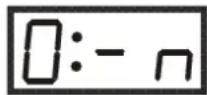
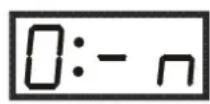
Your machine is equipped with a child lock in order to prevent a programme's operation from being affected by a push on a button during a wash operation. The child lock will become active after the third function button on the control panel is pressed for longer than three seconds.
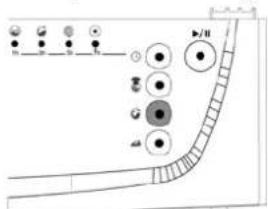
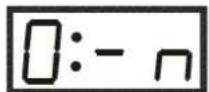
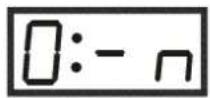
When it becomes active the electronic indicator will flash "0:-n" and the indicator will return to its previous position. In case any button is pressed the electronic indicator will warn you by flashing "0:-n". In order to deactivate it you will have to press the same button for longer than three seconds. When the lock is no longer active the electronic indicator will read "0:-n" for a short while. When the programme has finished the child lock will remain active; you must deactivate it by the procedure explained above, if you want.
| PROGRAM | Detergent Compart. | Max. Dry Load Capacity (kg) | Type of Laundry Explanations | |
| TKE 1400 T | ||||
| 1-WHITE COTTON | 2 | 7,5 | Dirty, boil, cotton and linen textile | Underwears, sheet, table cloth, t-shirt, shirt, towel |
| 2-WHITE COTTON (PREWASH) | 1+2 | 7,5 | Very dirty, cotton, coloured and linen textile | |
| 3-RESISTANT COLORS | 2 | 7,5 | Dirty, cotton, coloured and linen textile | |
| 4-DELICATE COLORS | 2 | 7,5 | Slightly dirty, paint to get out, cotton, coloured and linen textile | |
| 5-RESISTANT SYNTHETICS | 2 | 4 | Dirty, synthetic or synthetic mixture textile | Nylon socks, blouse |
| 6-SYNTHETICS (PREWASH) | 1+2 | 4 | Very dirty, synthetic or synthetic mixture textile | |
| 7-DELICATE SYNTHETICS | 2 | 4 | Dirty, synthetic or synthetic mixture textile | |
| 8-MIX WASH 2 4 | Slightly dirty, cotton, coloured and linen textile | T-shirt, nylon socks, shirt, | ||
| 9-WOOL | 2 | 2,5 | Dirty, hand and machine to wash wool laundry | All wool laundry |
| 10-HAND WASH 2 2,5 | Very slightly dirty, cold water, hand and machine to wash wool laundry | |||
| 11-SILK | 2 | 2,5 | Very slightly dirty, cold water, hand and machine to wash wool laundry | Silk mixture laundry |
| 12-QUICK WASH 2 3,5 | Slightly dirty, cotton, coloured and linen textile | Underwears, sheet, table cloth, t-shirt, shirt, towel | ||
| 13-RINSE | When you need an additional rinsing to be done to your clothes after the washing process, you can use this program for all kinds of clothes. | |||
| 14-SPIN | When you need an additional spinning to be done to your clothes after the washing process, you can use this program for all kinds of clothes. | |||
| 15-DRAIN | This program is used to drain the dirty water inside after the washing process of your machine. If you want the water inside your machine to be drained before the program ends, you can use this program. | |||
SECTION 6: MAINTENANCE AND CLEANING
- Unplug your machine.
- Close the water tap.
WATER INLET FILTERS
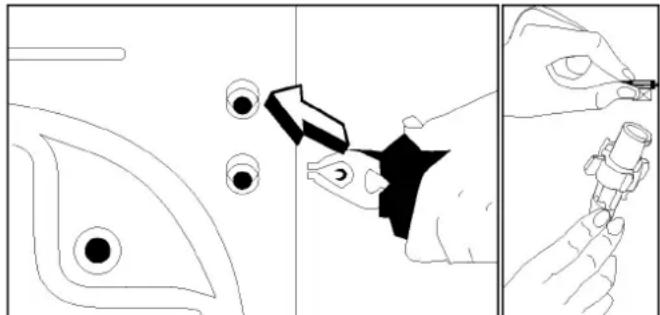
On the tap part of your machine's water inlet hose and at the ends of water inlet valves, there are filters to prevent entrance of the dirt and foreign materials in the water to the machine. If the machine is unable to receive sufficient water although your water tap is opened, these filters should be cleaned.
- Remove the water inlet hose.
- Remove the filters found on the water inlet valves by using a pincer and wash thoroughly with a brush.
- Clean the filters of the water inlet hoses located on the tap side by removing manually together with the seal.
- After you clean the filters, you can fit them the same way as you have removed.
natural_image
Three-panel diagram showing a fish being cut with a tool, before and after application (no text or symbols)PUMP FILTER
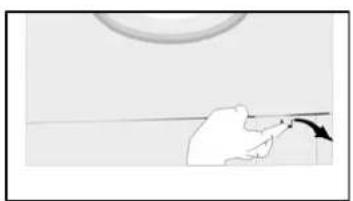
The pump filter system elongates the life of your pump, which is used to drain the dirty water. It prevents lint to enter the pump. Cleaning of your pump filter in every 2-3 months is recommended. To clean your pump filter:
- Remove the kickplate by pushing with your hand upwards from the lower claws and pulling towards yourself.
- Before opening the filter cover, place a cup in front of the filter cover to prevent flow of the remaining water in the machine.
- Loosen the filter cover by rotating it counter clockwise and drain the water.
- Remove the foreign materials from the filter.
- Check for the rotation of the pump manually.
- After you have cleaned the pump, fit the filter cover by rotating clockwise.
- Fit in the kickplate by holding from the claws and push it.
- Do not forget that if you do not fit in the filter cover properly, it will leak water.
WARNING!
Danger of being scalded!
Since the water inside the pump maybe hot, wait for it to cool.
natural_image
Simple line drawing of a hand holding a tool near a circular object (no text or symbols)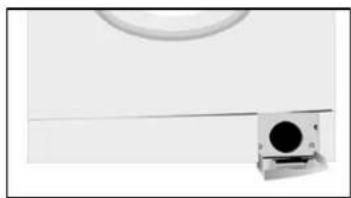
natural_image
Exterior view of a modern office building (no signage)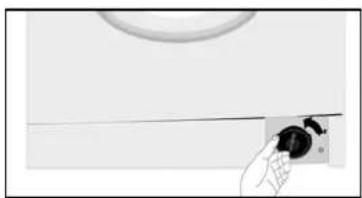
natural_image
Close-up of a hand holding a small black knob next to a circular object on a white surface (no text or symbols visible)DETERGENT DRAWER
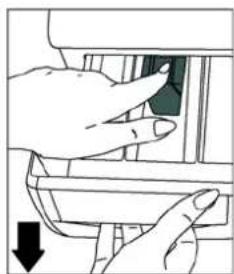
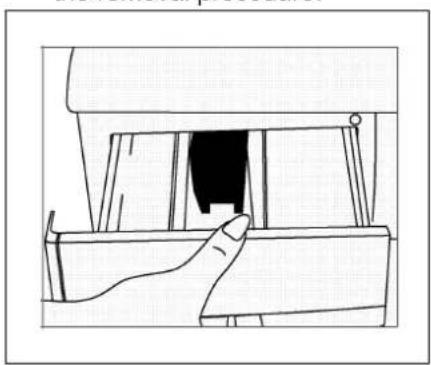
Detergents may cause residue buildup in the detergent drawer and in its slot over time. Take out the detergent drawer periodically to clean up the accumulated residue. In order to take out the drawer:
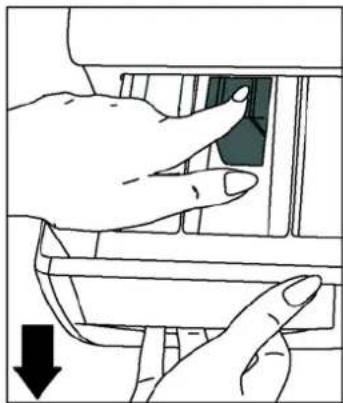
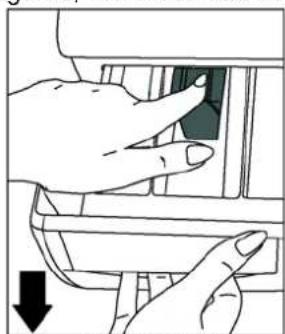
- Pull the drawer to its end (DIAGRAM-1).
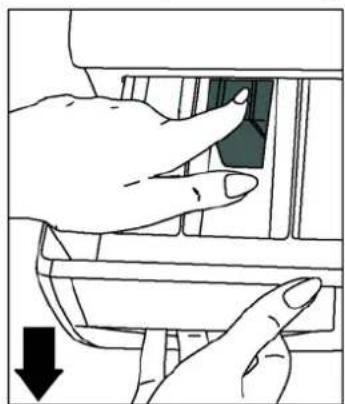
- Keep pulling by pressing on the siphon lid inside the drawer pulled to its end, and remove the drawer from its place (DIAGRAM-2).
- Wash it up with water with the help of an old toothbrush.
- Collect the residues inside the drawer slot without letting them drop into the machine.
- After thoroughly drying the drawer put it back in its place reversing the removal procedure.
natural_image
Line drawing of a hand opening a window with a black object inside (no text or symbols)DIAGRAM-1
natural_image
Illustration of hands inserting a component into a device (no text or symbols visible)DIAGRAM-2
SIPHON PLUG
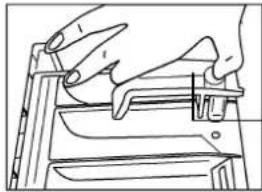
Pull out the detergent drawer. Remove the siphon plug and clean the residues of the softener thoroughly. Fit the cleaned siphon plug in its location. Check if it placed properly.
natural_image
Line drawing of hands operating a mechanical device (no text or symbols)Siphon plug
THE CABINET
Clean the exterior surface of the cabinet of your machine with lukewarm water and a cleaning substance that will not irritate the cabinet. After rinsing with clean water, wipe it with a soft and dry cloth.
WARNING!
If the machine is installed in a location where the ambient temperature can fall below 0 °C, do the following when it will not be in use:
- Plug in the machine.
- Close the water tap and pull out the water inlet hose or hoses from the tap.
- Place the ends of the water drain and water inlet hoses in a cup on the ground.
- Adjust the program knob to "Draining" program.
• The program ready light will be on. - Run the program by pressing the start/pause button.
- Unplug your machine when the program is over (program end light is on).
When you complete these proces, the remaining water inside the machine will be drained and thus formation of ice in the machine will be prevented. When you operate your machine again, be sure that the ambient temperature is above 0 °C.
THE DRUM
Do not leave metal parts like needles, staples or coins inside your machine. These pieces cause formation of rust stains in the drum. To eliminate these stains of rust, use a cleaning substance without chlorium and follow the warnings of the cleaning substance producer. For cleaning of the rust stains, never use dish-washing wires or similar rough objects.
REMOVE OF LIME FROM YOUR MACHINE
If you arrange the amount of the detergent you use in your machine properly, there will be no need for lime removal. However, if you desire to apply the removal procedure, use the lime protectors in the market and pay attention to their warnings.
WARNING!
The lime eliminating substances contain acids and this may cause colour modifications in your clothes along with an adverse effect on your machine.
SECTION 7: PRACTICAL INFORMATION

Alcoholic beverages: The stain point, should first be washed cold water, than should be wiped with glycerine and water be rinsed with water mixed with vinegar.

Shoe Polish: The stain should be slightly scratched without ruining the cloth, rubbed with detergent and rinsed. In case it is not eliminated, it should be rubbed with 1 unit of pure alcohol (96 es) mixed in 2 units of water and then washed with arm water.

Tea and coffee: Stretch the stained area of your cloth on the top of a container and pour water as hot as the type of your cloth can be on it. If the type of your cloth is suitable, wash it with lye.

plate and cocoa: By leaving your clothes in cold water and g with soap or detergent, wash it in the highest temperature that the type of your cloth can endure. If there is still a stain of oil type with oxygenated water (in proportion of 3%).

Tomato paste: After scraping the dried pieces without ruining the leave in cold water for about 30 minutes and wash by ng with detergent.

Meat broth-egg: Eliminate the dried stain residues and wipe with age or soft cloth wetted in cold water. Rub with detergent ash with diluted lye.

Grease and oil stains: First wipe the residues. Rub the stain with ent and then wash with lukewarm soapy water.
Mustard: First apply glycerine to the stained area. Rub with detergent and then wash. If the stain still does not disappear, wipe with alcohol (On synthetic and coloured cloth, a mixture of 1 unit I, 2 units water should be used)

Blood stain: Lay your clothes in cold water for 30 minutes. If the till does not disappear, lay in mixture of water and ammonia e-spoons of ammonia in 4 liters of water)for 30 minutes.

Cream, ice-cream and milk: Lay your clothes in cold water and rub the stained area with detergent. If the stain has still not disappeared, apply lye on the fabric of your clothes in proper tion.(Do not use lye on coloured clothes.)
Mould: Mould stains should be cleaned as soon as possible. The stain should be washed with detergent, and if it does not disappear, it should be wiped with oxygenated water (in proportion of 3%).

Hold the stained area under cold water and wait until the inky water completely runs off. Then rub with water diluted with lemon and detergent, wash after waiting for 5 minutes.

: Stretch the stained area of your clothes on the top of aainer and pour cold water on it. Do not pour hot water on the Wipe with cold water and apply glycerine. Wait for 1-2 hours rinse after wiping with a few drops of white vinegar.

Grass stain: Rub the stained part with detergent. If the type of fabric is suitable for use of lye, wash it with lye. Rub your woolen s with alcohol.(For coloured ones, a mixture of 1 unit pure oil and 2 units of water).

Oil Paint: The stain should be eliminated before it dries by ing thinner on it. Then it should be rubbed with detergent and d.

Burnt stain: If your cloth is suitable for use of lye, you can add lye your washing water. For woolen fabric, a cloth damped in enated water should be covered on the stain and it should be d with a dry cloth on it. It should be washed after rinsing well.
SECTION 8: AVOIDING MINOR FAULTS
All repairing which must be done on the machine should be done by authorized service. When a repairing is required for your machine or you are unable to eliminate the failure with the help of the information given below:
- Unplug the machine.
- Close the water tap.
- Apply to the nearest authorized service station.
| FAILURE | PROBABLE | CAUSE METHODS OF ELIMINATION |
| Your machine does not operate. | It is unplugged. | Insert the plug into the socket. |
| Your fuse is defected. | Change your fuse. | |
| The electric power is off. | Check the electric power. | |
| Start/pause button has not been pressed. | Press the start/pause button. | |
| The program knob is in O(off) status. | Bring the program knob on the desired status. | |
| The door is not shut properly. | Shut the door properly. You should hear the click. | |
| Your machine does not receive water. | Water tap is closed. Open water tap. | |
| The water inlet hose may be bent. | Check the water inlet hose. | |
| The water inlet hose is obstructed. | Clean the filters of water inlet hose. (*) | |
| The valve inlet filter is obstructed. | Clean the valve inlet filters. (*) | |
| The door is not shut properly. | Shut the door properly. You should hear the click. | |
| Your machine is not draining water. | The drain hose is obstructed or bent. | Check the drain hose. |
| The pump filter is obstructed. | Clean the pump filter. (*) | |
| The clothes are not placed inside the machine in a well-balanced manner. | Spread the clothes inside the machine in an orderly and well-balanced manner. | |
| Your machine is vibrating. | The feet of your machine are not adjusted. | Adjust the feet. (**) |
| Transportation screws are not removed. | Remove transportation screws. (**) | |
(*)See the section concerning the maintenance and cleaning of your machine.
(**)See the section concerning installations your machine.
| FAILURE | PROBABLE | METHODS OF CAUSE ELIMINATION |
| Your machine is vibrating. | There is a small amount of clothes in the device. | It does not prevent operation of the machine. |
| Excessive amount of clothes are filled in the machine or the clothes are not placed in a well-balanced manner. | Do not exceed the recommended quantity of clothes and spread your clothes in the machine in a well-balanced manner. | |
| Your machine touches a ripid object. | Prevent your machine's leaning on a tough place . | |
| Excessive foam in the detergent drawer. | Too much detergent has been used. | Press the start/pause button.In order to stop the foam,dilute one table-spoon of softener in half liter of water and pour it in the detergent drawer.Press the start/pause button after 5-10 minutes.Arrange the amount of the detergent properly in the next washing process. |
| Wrong detergent has been used. | Use only the detergents produced for full automatic machines. | |
| The washing result is bad. | Your laundry too dirty for the program you have selected. | Select a suitable program. (see Table-1) |
| The amount of detergent used is not sufficient. | Use more detergent according to the detergent. | |
| The washing result is not good. | Clothes exceeding the maximum capacity has been filled in your machine. | Put the clothes in your machine in a manner not to exceed its maximum capacity. |
| Your water may be hard. | Use the amount of detergent according to the declaration of the detergent producer. | |
| Distribution of the clothes in your machine is not well-balanced. | Spread the clothes inside the machine in an orderly and well-balanced manner . | |
| The water is drained from the machine as soon as it is filled. | The end of the water drain hose is in a position too low according to the machine. | Place the water drain hose in an appropriate height.(**) |
| No water is seen in the drum during washing. | No failure. The water is at the lower part of the drum. | - |
| There are residues of detergent on the clothes. | The pieces of some detergents which do not dissolve in water may stick to your clothes as white stains. | By calibrating your machine for “Rinsing” program,make an additional rinsing or eliminate the stains After drying with the help of a brush. |
| There are gray stains on the clothes. | These stains may be caused by oil,cream or ointment . | In the next washing operation, use the maximum detergent amount declared by the detergent producer. |
(**) See the section concerning installations your machine.
| FAILURE | PROBABLE | CAUSE METHODS OF ELIMINATION |
| The spinning process is not done or starts with delay. | No failure. The unbalanced load control may works in that way. | The unbalanced load control system will try to distribute your clothes in a homogenous manner. After your clothes are distributed, passage to spinning process will be realized.In the next washing process,place your clothes into the machine in a well-balanced manner. |
SECTION 9: AUTOMATIC FAILURE DETECTION SYSTEM
Your machine is equipped with systems which will both take the necessary precautions and warn you in case of any failure by controlling it self constantly during the washing processes.
(*) See the section regarding the maintenance and cleaning of your machine.
| FAILURE CODE | PROBABLE FAILURE | THE PROCESS TO BE DONE |
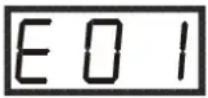 | The door is not shut properly. | Shut the door properly so that you hear the click. If the problem persists, turn off the machine unplug and apply to the nearest authorized service immediately. |
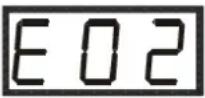 | The water level in your machine is below heater. The pressure of your water supply may be low or locking. | Turn on the tap to the end.Water may be cut, check it.If the problem is still continuing,your machine will automatically stop after a while.Unplug your machine, turn off the tap and apply to the nearest authorized service. |
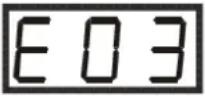 | The pump has failed or the pump filter is obstructed or drain pump is in open circuit. | Clean the pump filter.If the problem persists,apply to the nearest authorized service.(*) |
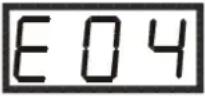 | There is an excessive amount of water in your machine. | Your machine will automatically drain the water. After your machine has completed the draining process,shut down your machine and unplug. Close the tap and apply to the nearest authorized service. |
| FAILURE CODE | PROBABLE FAILURE | THE PROCESS TO BE DONE |
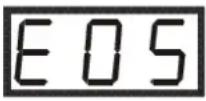 | The heater of your machine or the heat sensor has failed. | Shut down your machine and unplug. Turn off your tap and apply to the nearest authorized service. |
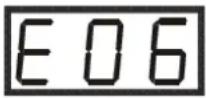 | The motor has failed. | Shut down your machine and unplug. Turn off the tap and apply to the nearest authorized service. |
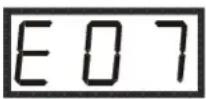 | Electronic card has failed. | Shut down your machine and unplug. Turn off the tap and apply to the nearest authorized service. |
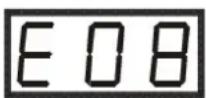 | The motor has failed. | Shut down your machine and unplug. Turn off the tap and apply to the nearest authorized service. |
| FAILURE CODE | PROBABLE FAILURE | THE PROG TO BE DONE |
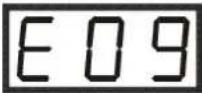 | The network voltage is too high or too low. | If the network voltage is lower than 150V or higher than 260V, your machine will automatically stop. When the network voltage is recovered, your machine will continue its operation. |
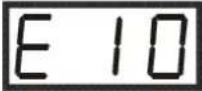 | Communication error. | Shut down your machine and unplug. Turn off the tap and apply to the nearest authorized service. |
SECTION 10: INTERNATIONAL WASHING SIGNS
 |  |  |  |
| Washing temperature. | Do not wash (hand wash) | Lukewarm iron. | Medium hot iron. |


Drip dry. Dry flat. Do not bleach. Handy to bleach.
| F | P | A |
| All of these are dry cleaning symbols. The letters are to instruct the cleaner what type of solvent to be used.Garments bearing these symbols should not be washed in your machine unless the label says otherwise. | ||
SOMMAIRE
SECTION 1 : AVANT UTILISATION
natural_image
Abstract black and white graphic with curved arrow and circular element (no text or symbols)Fig. 2
Fig. 1
natural_image
Close-up of a black mechanical component with a circular arrow indicating rotation (no text or symbols)Fig. 3
natural_image
Abstract graphic with a black circle and white circle overlapping a black arrow (no text or symbols)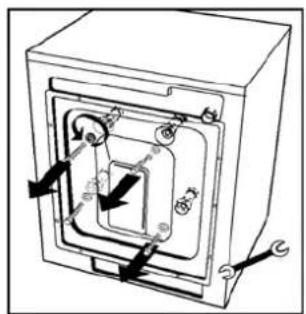
natural_image
Technical diagram of a mechanical assembly with arrows indicating motion or force directions (no text or labels)REGLAGE DES PIEDS
natural_image
Illustration of a hand holding a pipe fitting with a valve and cap, showing a rotation arrow (no text or symbols)RACCORDEMENT DU TUYAU DE VIDANGE

TOUCHE MENU
natural_image
Three-panel diagram showing a hand holding a pen, with arrows indicating the process: adding a magnified view of a small object and then adjusting the pen (no text or symbols present)Fig.10
Fig.11
FILTRE DE POMPE DE VIDANGE
natural_image
Line drawing of a hand inserting a component into a device (no text or symbols)fig. 14
natural_image
Illustration of hands inserting a component into a device (no text or symbols visible)fig. 15
SIPHON D'ASSOUPLISSANT
(*) See the section regarding the maintenance and cleaning of your machine.
natural_image
Abstract graphic with curved arrow and circular shape (no text or symbols)IMAGEM 1
natural_image
Close-up of a black mechanical component with a circular arrow indicating motion (no text or symbols visible)IMAGEM 2
natural_image
Abstract graphic with a dark circle and white circle connected by a double arrow (no text or symbols)IMAGEM 3
AJUSTE DOS PÉS DA MÁQUINA
natural_image
Close-up of a mechanical component with a metallic knob and a small protrusion (no visible text or symbols)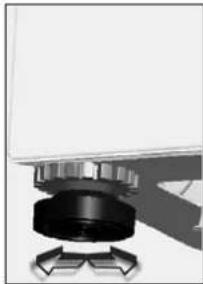
natural_image
Close-up of a mechanical component with a black cylindrical body and metallic shaft, no visible text or symbols.LIGAÇÃO ELÉCTRICA
natural_image
Diagram showing a hand reaching toward a small black dot on the left side of a curved line, with two circular eyes and a horizontal bar on the left (no text or symbols)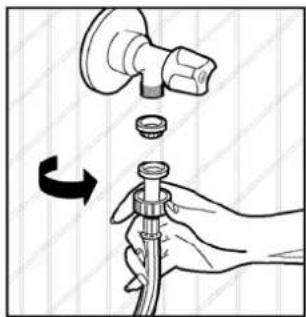
natural_image
Illustration of a hand holding a pipe fitting with a valve, showing a rotating mechanism (no text or symbols)

BOTÃO DO MENU
- Inicie o programa seleccionado pressionando o botão start/pause.
natural_image
Three-panel diagram showing a hand holding a pen, with arrows pointing to eye and lens components (no text or symbols)FILTRO DA BOMBA
natural_image
Line drawing of a hand inserting a component into a device (no text or symbols)IMAGEM-1
natural_image
Illustration of a hand inserting a component into a device (no text or symbols visible)IMAGEM-2
TAMPA DO SIFÃO
Teka Industrial S.A.
C/ Cajo, 17
39011 Santander (Spain)
Tel.: 34-942 355050
Fax 34-942347694
http://www.teka.es
35708 Haiger (Germany)
Tel.: 49-277181410
Fax: 49-2771814110
http://www.teka.com
52016607
- WASHING MACHINE USER MANUAL TKE 1400 T
- MODE D'EMPLOI DE MACHINE A LAVER TKE 1400 T
- MANUAL DE INSTRUÇÕES DA MAQUINA DE LAVAR TKE 1400 T
- CONTENIDOS
- AJUSTE DE LAS PATAS DE LA MAQUINA
- CONEXION ELECTRICA
- CONEXION A LA TOMA DE DESAGÜE
- BOTON DE MENU
- SECTION 6: MAINTENANCE AND CLEANING
- FILTRO DE LA BOMBA
- ENTRADA DEL SIFÓN
- SECTION 2:INSTALLATION
- SECTION 3: TECHNICAL SPECIFICATIONS
- SECTION 4:CONTROL PANEL
- SECTION 5:WASHING YOUR LAUNDRY
- SECTION 7: PRACTICAL INFORMATION
- SECTION 8: AVOIDING MINOR FAULTS
- SECTION 9: AUTOMATIC FAILURE DETECTION SYSTEM
- SECTION 10: INTERNATIONAL WASHING SIGNS
- SECTION 1: BEFORE USING
- SAFETY WARNINGS
- RECOMMENDATIONS
- SECTION 2: INSTALLATION
- REMOVAL OF TRANSPORTATION SCREWS
- ADJUSTMENT OF FEET
- ELECTRICAL CONNECTION
- WATER SUPPLY CONNECTION
- WATER DRAIN CONNECTION
- START/PAUSE BUTTON
- FUNCTION INDICATOR LAMPS
- MENU BUTTON
- SELECT BUTTON
- ELECTRONIC INDICATOR
- FUNCTION BUTTONS
- Rinse hold
- Extra rinse
- Easy ironing
- Economy wash
- WARNING!
- SPIN SPEED SELECTOR
- PROGRAM KNOB
- SECTION 5: WASHING YOUR LAUNDRY
- First wash cycle
- BEFORE WASHING
- Discrimination of your laundry
- Placement of the clothes into the machine
- Filling detergent in the machine
- RUNNING THE MACHINE
- Program selection and features
- Starting the program
- Selecting an additional function button
- In order to select an additional function:
- Cancelling a programme
- Programme end
- ADJUSTING THE WASH WATER TEMPERATURE
- SETTING THE PROGRAMME STARTUP TIME
- Child lock
- WATER INLET FILTERS
- PUMP FILTER
- Danger of being scalded!
- DETERGENT DRAWER
- SIPHON PLUG
- THE CABINET
- THE DRUM
- REMOVE OF LIME FROM YOUR MACHINE
- SOMMAIRE
- SECTION 1 : AVANT UTILISATION
- REGLAGE DES PIEDS
- RACCORDEMENT DU TUYAU DE VIDANGE
- TOUCHE MENU
- FILTRE DE POMPE DE VIDANGE
- SIPHON D'ASSOUPLISSANT
- AJUSTE DOS PÉS DA MÁQUINA
- LIGAÇÃO ELÉCTRICA
- BOTÃO DO MENU
- FILTRO DA BOMBA
- TAMPA DO SIFÃO
Brand : TEKA
Model : TKE 1400 T
Category : Washing machine