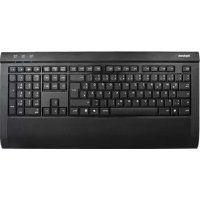
ACK5600 ALU+ - Keyboard KeySonic - Free user manual and instructions
Find the device manual for free ACK5600 ALU+ KeySonic in PDF.



| Product type | High-end wired keyboard |
| Dimensions (L × H × P) | 471 × 26,5 × 230,5 mm |
| Weight | 1700 g |
| Power supply | USB bus (+5 V DC ±5 %), max 500 mA (without external power supply) |
| Interface | USB Plug & Play |
| Cable length | 1,75 m |
| Number of keys | 104-109 (depending on country) + 4 multifunction keys |
| Key technology | X-Type membrane, silent keystroke |
| Lifespan | Approx. 5 million keystrokes per key |
| Actuation force | 55 ± 15 g |
| Total travel | 3,0 ± 0,5 mm |
| Color | Black or silver |
| Built-in USB hub | 2 USB 2.0 ports (powered by PC, up to 500 mA per port; optional external power supply possible) |
| Audio connectors | 3.5 mm jack for headset/speakers and microphone; built-in digital stereo sound card |
| Wrist rest | Integrated with self-adhesive faux leather cover (removable) |
| Multifunction keys | Volume - / Volume + / Mute / PC sleep |
| Foldable feet | Yes, two feet for ergonomic tilt |
| Compatible operating systems | Windows 98SE / ME / 2000 / XP / Vista |
| Certifications | CE, FCC, BSMI, WEEE/RoHS |
| Cleaning | Use a brush, soft compressed air or a vacuum cleaner with brush nozzle; slightly damp cloth; avoid solvents |
Frequently Asked Questions - ACK5600 ALU+ KeySonic
User questions about ACK5600 ALU+ KeySonic
0 question about this device. Answer the ones you know or ask your own.
Ask a new question about this device
Download the instructions for your Keyboard in PDF format for free! Find your manual ACK5600 ALU+ - KeySonic and take your electronic device back in hand. On this page are published all the documents necessary for the use of your device. ACK5600 ALU+ by KeySonic.
USER MANUAL ACK5600 ALU+ KeySonic
MaxPoint LEADING IN PERIPHERALS
C E
Declaration of Conformity
We, MaxPoint Handelsgesellschaft mbH - Ahrensburg, declare under our sole responsibility, that the product
Type:
Mark:
Brand Name:
Model Name:
Full-Size Aluminium-Keyboard
EAR888-62976468
KeySonic
ACK-5600ALU+ Intuition-XL
is herewith confirmed to comply with the requirements set out in the Council Directive on the approximation of the laws of the member states relating to Electromagnetic Compatibility (2004/108/EC).
For the evaluation of above mentioned Directives, the following standards were applied:
1) EN 55022: 1998 + A1: 2001 + A2: 2003
2) EN 61000-3-2: 2000 + A2: 2005
3) EN 61000-3-3: 1995 + A1: 2001 + A2: 2005
4) EN 55024: 1998 + A1: 2001 + A2: 2003
EN 61000-4-2: 1995 + A1: 1998 + A2: 2001
EN 61000-4-3:2002+A1:2002
EN 61000-4-4:2004
EN 61000-4-5: 1995 + A1: 2001
EN 61000-4-6: 1996 + A1: 2001
EN 61000-4-8: 1993 + A1: 2001
EN 61000-4-11:2004
Class B
Criteria
B
A
B
B
A
A

MaxPoint Handegoes, mbH
Kurt-Fischer-Ste. 50 D-2003 Abenburg
Tel.: +49 (0)412/686-830, Fax: +49 (0)4102/486-801
Signature of responsible Person
Maxpoint Handelsellschaft mbH - Kurt-Fischer-Strasse 50 - 22926 Ahrenburg - Germany - Tel: +45-(0)4122-458-600 - Fax: +45-(0)4122-458-600 - Email: maxpointhandelschaft mbH AG - Körn-Wöhr - Körn-Wöhr - Körn-Wöhr - Körn-Wöhr - Körn-Wöhr - Körn-Wöhr - Körn-Wöhr - Körn-Wöhr - Körn-Wöhr - Körn-Wöhr - Körn-Wöhr - Körn-Wöhr - Körn-Wöhr - Körn-Wöhr - Körn-Wöhr -
Federal Communications Commission (FCC) Notice
This device complies with Part 15 of the FCC rules. Operation is subject to the following two conditions (1) This device may not cause harmful interference, and
(2) This device must accept any interference received, including interference that may cause undesired operation. This equipment has been tested and found to comply with the limits of a Class B digital device, pursuant to Part 15 of the FCC Rules. These limits are designed to provide reasonable protection against harmful interference in a residential installation. This equipment generates, uses and can radiate radio frequency energy and, if not installed and used in accordance with the instructions, may cause harmful interference to radio communications. However, there is no guarantee that interference will not occur in particular installations. If this equipment does cause harmful interference to radio or television reception, which can be determined by turning the equipment off and on, the user is encouraged to try to correct the interference by one or more of the following measures:
- Reorient / Relocate the receiving antenna.
- Increase the distance between the mouse and Receiver.
- Connect the equipment into an outlet on a circuit different from that the Receiver is connected.
CAUTION:
Change or modifications not expressly approved by the manufacturer responsible for compliance could void the user's authority to operate the equipment
INTUITION-XL
ACK-5600 ALU+

Bedienungsanleitung

Operation Manual

1.1 Special Features
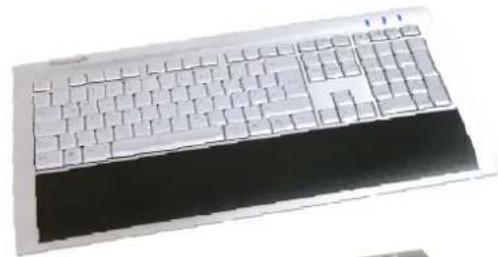
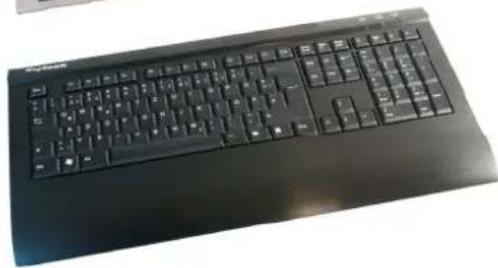
- High-end, full-sized keyboard in an exclusive design promising high quality due to the brushed, full aluminium body
- Integrated HUB: 2 x USB 2.0 for high-speed data terminals (<500 mA))
- For operation of high-speed data terminals >500mA (e.g. for external hard drives, CD/DVD writers or similar): Connection possibility for an optional power supply on the USB plug
- Integrated Stereo Digital Sound Chip for well-sounding audio applications even without a sound card in the PC
- Comfortable working through integrated palm rest with high-value imitation leather coating
- 4 x multifunctional keys for volume up, down, mute as well as PC standby
- Extremely silent stroke and tactile feedback due to high-quality X-Type membrane technology
- Appealing blue status LEDs for Caps, Num and Scroll Lock
- Plug & Play installation without any special driver
- Perfect for all home and office applications and high-end requirements
1.2 Technical data
Key count: 104-109 (depending on country) + 4 multifunctional keys
Construction: X-Type membrane technology
Life expectancy: approx. 5 million strokes per key
Switch travel: 3.0 ± 0.5 ~mm (total run)
Pressure point: 55 ± 15g
Power supply: +5 V DC ±5%
Power consumption (max.): 500 mA (without external power supply)
USB-HUB: Ports, USB 2.0 (optional even via external power supply self-powered)
External power supply (optional): +5V_DC / > 500mA
DC-barrel connector
$$ \text {i n s i d e} = 1. 3 5 \mathrm {m m} / \varnothing_ {\text {o u t s i d e}} = 3. 4 5 \mathrm {m m} / \mathrm {L} = 9. 5 \mathrm {m m} $$
Temperature: Operating: 0^ up to +50^
-20°C up to +65°C
Humidity: Operating and stor
Dimensions (W× H× D) approx.: 471× 26.5× 230.5mm
Weight approx.: 1700 g
Cable length: 1.75 m
Interface: USB
Scope of delivery: Keyboard, self-adhesive high-value imitation leather overlay, user manual
Colour: Black or silver
Certificates: CE, FCC, BSMI, WEEE/RoHS
Compatibility: Win 98SE / ME / 2000 / XP / Vista








2. Installation of keyboard
2.1 System Requirements
This keyboard requires a PC with USB connection and one of the following operating systems:
Windows 98SE / ME / 2000 / XP / Vista
For the installation of the keyboard under the mentioned above operating systems you need NO special driver!
2.2 Installation of the keyboard
In order to install your keyboard, please perform the following steps:
- Connect your keyboard to a free USB port on your computer.

- All state-of-the-art operating systems with Plug & Play support will recognize your keyboard automatically and load the required drivers. During the phase of installation your operating system informs you via changing Pop-up information windows on the task-bar about the current status of installation. Please be patient, until the system informs you finally about the successful installation. The keyboard is now ready for operation.
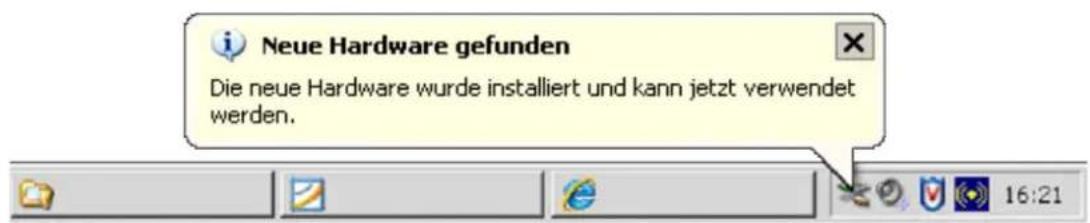
Older operating systems do not always support automatic hardware recognition. If you have attached your keyboard via USB, and exactly this error occurs on your system, you have the following alternatives to solve the problem:
-
Perform an update of your operating system and return to Step 2.2
-
In some cases the installation CD of your operating system is necessary according to the instructions on your screen. In this circumstance please follow these instructions.
-
Check whether your BIOS system supports USB keyboards*. Some main board manufacturers offer BIOS up-dates in the Internet for downloading.
-
Ensure in your system settings, that the used USB connection was not deactivated in your operating system*.
-
Should your system-updates keep out of success, it is recommendable to test the keyboard with another PC with the same operating system to rule out a hardware damage of the USB Receiver.
-
Refer to the documentation of your PC for details.
3. Specialities of the keyboard
3.1 USB 2.0-Hub
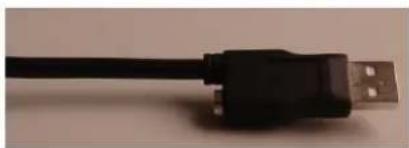
The Intuition-XL has got an integrated 2-Port USB 2.0-Hub for high-speed data terminals. The power supply of the hub is provided by the installed PC up to a power consumption of ≤ 500mA what should be enough for the most USB end devices.
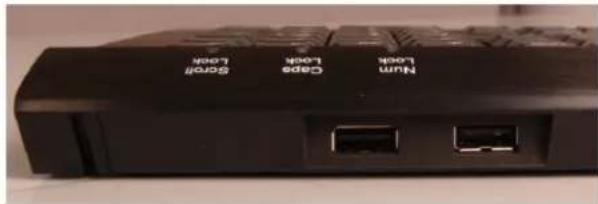
For USB data terminals with higher power consumption (e.g. for external hard drives, CD/DVD writers or similar) the Intuition-XL has got the possibility to connect an external 5V_DC standard power supply (not included in scope of delivery) with an USB connector, which is cost-efficiently to purchase in every electronic
specialist retail store. With the usually included standard adapters
(DC-barrel connector
_inside = 1.35 ~mm / _outside = 3.45 ~mm / L = 9.5 ~mm
it is possible to actuate these USB devices very easily without cable chaos directly on the keyboard.
3.2 Audio connector
The Intuition-XL has got two integrated standard Audio sockets (3.5 mm jack plug) for connection with headsets respectively loudspeakers and microphones. The specialness of this function is that you can enjoy well-sounding audio applications even without a sound card in the PC, because the Intuition-XL has already implemented a Digital Stereo Sound Chip. With help of an adequate headset (not included in scope of delivery
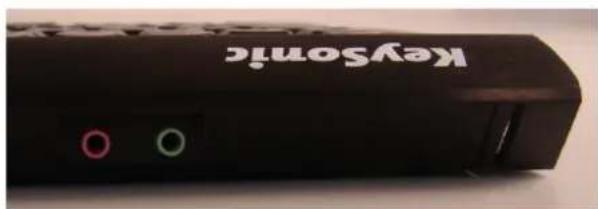
you can, for example, operate comfortably Internet telephony (Voice over IP) at the keyboard without using possibly annoying Audio extension cable, which provides the connection with the sound card of the PC.
3.3 Palm rest with leather coating
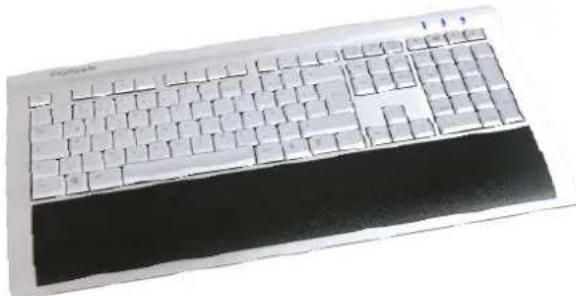
The Intuition-XL scope of delivery includes a self-adhesive stripe made out of high-value synthetic leather, which is short to paste on the metal surface below the keypad. Thereby it is your own if you like the feeling of solid metal or smooth decision, leather while writing.

3.4 Multifunctional keys
The Intuition-XL contains three keys for loudspeaker control, and one key for putting the PC directly into stand-by mode directly above the numeric keypad. These keys will also work without having installed a special driver software, but their respective factory-preset functions cannot be changed.
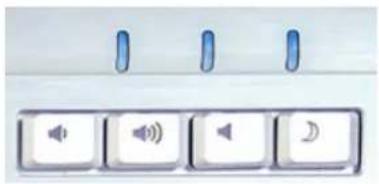
Reduces the sound volume of loudspeakers
Raising the sound volume of loudspeakers
Activates or de-activates the muting of loudspeakers
Puts the operating system into stand-by mode (this is set up in the BIOS of the PC)
3.5 Tilt-feet
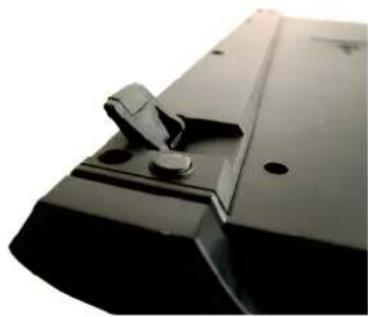
The Intuition-XL has got two tilt-feet below the keyboard allowing a slope position of the keyboard for an ergonomic and non-fatiguing work. The feet are specially conceived, that the keyboard cannot slip on the table, also with tilted feet, like it is well-known from conventional keyboards.
4. How to clean the keyboard
- Remove dust with a brush, with soft compressed air, or with a vacuum cleaner with brush head nozzle.
- Remove fine dirt with a not-too-damp cloth.
DO NOT use any aggressive detergents, solvents or gasoline in order to clean the keyboard.
Manufacturer's Disclaimer Statement
The information in this document is subject to change without notice and does not represent a commitment on the part of the vendor. No warranty or representation, either expressed or implied, is made with respect to the quality, accuracy or fitness for any particular purpose of this document. The manufacturer reserves the right to make changes to the content of this document and/or the products associated with it at any time without obligation to notify any person or organization of such changes. In no event will the manufacturer be liable for direct, indirect, special, incidental or consequential damages arising out of the use or inability to use this product or documentation, even if advised of the possibility of such damages. This document contains materials protected by copyright. All rights are reserved. No part of this manual may be reproduced or transmitted in any form, by any means or for any purpose without expressed written consent of its authors. Product names appearing in this document are mentioned for identification purchases only. All trademarks, product names or brand names appearing in this document are registered property of their respective owner.
1. Introduction Intuition-XL (ACK-5600 ALU+)
Construction: X-Type membrane technology