ManualGo.com
FC6091 - Vacuum Cleaner PHILIPS - Free user manual and instructions
Find the device manual for free FC6091 PHILIPS in PDF.



Download the instructions for your Vacuum Cleaner in PDF format for free! Find your manual FC6091 - PHILIPS and take your electronic device back in hand. On this page are published all the documents necessary for the use of your device. FC6091 by PHILIPS.
USER MANUAL FC6091 PHILIPS
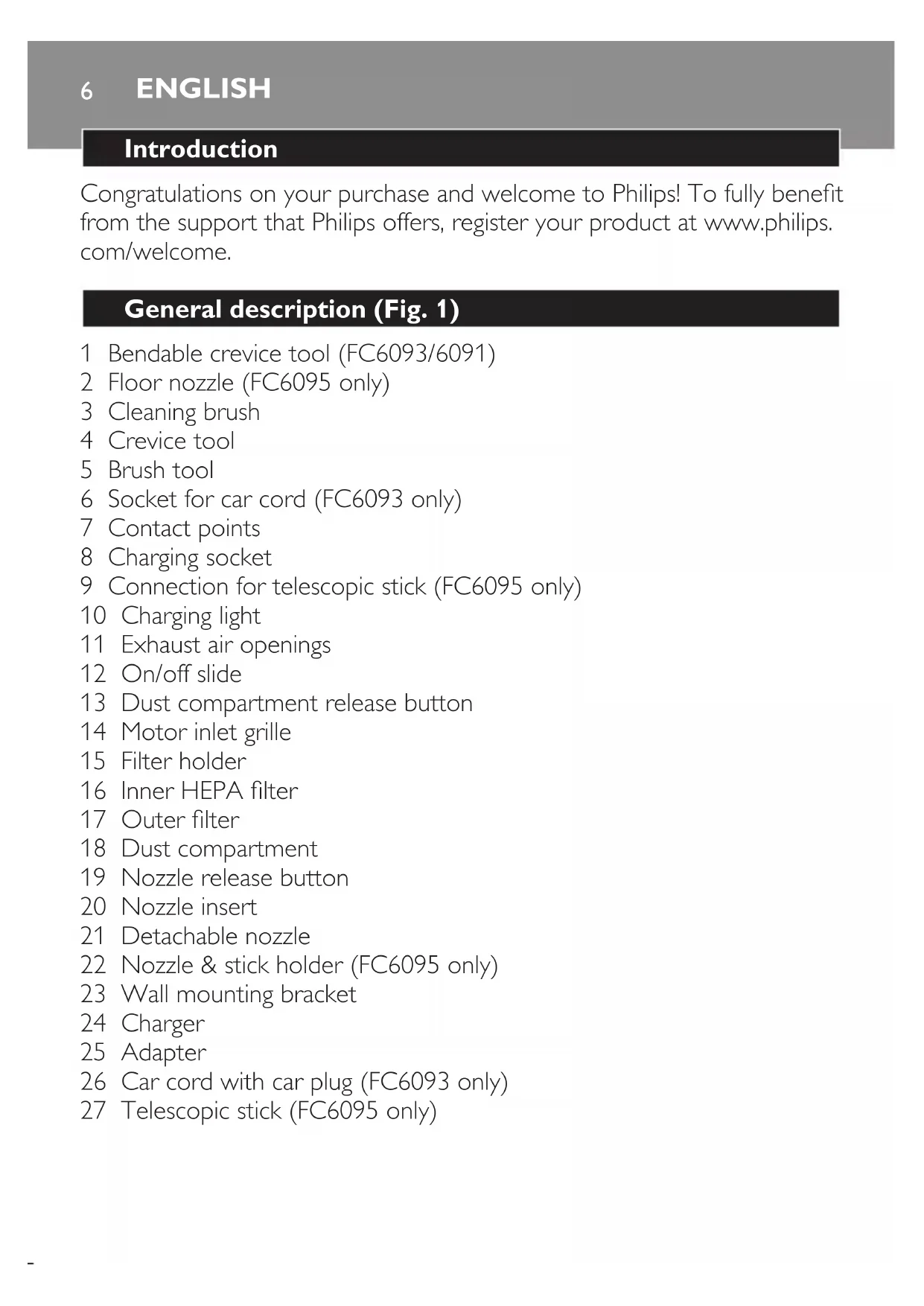
Introduction Congratulations on your purchase and welcome to Philips! To fully benet from the support that Philips offers, register your product at www.philips. com/welcome. General description (Fig. 1) 1 Bendable crevice tool (FC6093/6091) 2 Floor nozzle (FC6095 only) 3 Cleaning brush 4 Crevice tool 5 Brush tool 6 Socket for car cord (FC6093 only) 7 Contact points 8 Charging socket 9 Connection for telescopic stick (FC6095 only) 10 Charging light 11 Exhaust air openings 12 On/off slide 13 Dust compartment release button 14 Motor inlet grille 15 Filter holder 16 Inner HEPA lter 17 Outer lter 18 Dust compartment 19 Nozzle release button 20 Nozzle insert 21 Detachable nozzle 22 Nozzle & stick holder (FC6095 only) 23 Wall mounting bracket 24 Charger 25 Adapter 26 Car cord with car plug (FC6093 only) 27 Telescopic stick (FC6095 only) ENGLISHImportant Read this user manual carefully before you use the appliance and save it for future reference. Danger Never suck up water or any other liquid. Never suck up ammable substances and do not suck up ashes until they are cold. Never immerse the vacuum cleaner, the charger or the adapter in water or any other liquid. Warning Check if the voltage indicated on the appliance corresponds to the local mains voltage before you connect the appliance. Do not use the vacuum cleaner, the charger or the adapter if it is damaged. Do not use the appliance if it is damaged in any way. Take it to an authorised Philips service centre for repair. If the adapter or charger is damaged, always have it replaced with one of the original type in order to avoid a hazard. FC6093 only: if the car cord or car plug is damaged, stop using the car cord and have it replaced with one of the original type. This appliance is not intended for use by persons (including children) with reduced physical, sensory or mental capabilities, or lack of experience and knowledge, unless they have been given supervision or instruction concerning use of the appliance by a person responsible for their safety. Children should be supervised to ensure that they do not play with the appliance. Caution Remove the adapter from the wall socket before you clean the charger. Only charge the vacuum cleaner with the adapter and charger supplied. During charging, the adapter feels warm to the touch. This is normal. Always switch off the vacuum cleaner after use.
ENGLISH 7The voltage on the contact points in the charger is low (max. 30 volts) and therefore not dangerous. Never block the exhaust air openings during vacuuming. Make sure the appliance is switched off when you charge it. Always use the vacuum cleaner with the lter unit assembled. Always use the appliance with the nozzle insert in place. To avoid the risk of electric shock, be careful when you drill holes in the wall to attach the charger, especially close to a wall socket. Electromagnetic elds (EMF) This Philips appliance complies with all standards regarding electromagnetic elds (EMF). If handled properly and according to the instructions in this user manual, the appliance is safe to use based on scientic evidence available today. Preparing for use Placing the charger 1 To attach the charger to the wall: Screw the wall mounting bracket to the wall with the screws supplied with the appliance (Fig. 2). Place the charger on the wall mounting bracket (1) and push the charger downwards to x it (2) (Fig. 3). Attach the nozzle & stick holder to the wall mounting bracket (FC6095 only). Screw the nozzle & stick holder to the wall with the screws supplied with the appliance. 2 To use the charger without attaching it to the wall: Place the charger on a level and horizontal surface. (Fig. 4) 3 Slide the brush tool onto the crevice tool and place them in the charger (Fig. 5). 4 FC6095only:insertthetelescopicstickandtheoornozzleinto thenozzle&stickholder(‘click’)(Fig.6).
ENGLISH8Charging the appliance Caution: Make sure the appliance is switched off when you charge it. Charge the appliance for at least 18 hours before you use it for the rst time. Tip: If you are not going to use the appliance for a longer period of time, remove the adapter from the wall socket to save energy. 1 Charge the appliance in one of the following two ways: Insert the small plug into the charger, insert the adapter into the wall socket, and place the appliance on the charger (Fig. 7). Insert the small plug into the charging socket of the appliance and insert the adapter into the wall socket (Fig. 8). The charging light on the appliance goes on to indicate that the appliance is charging (Fig. 9). Note: The charging light stays on as long as the appliance is placed on the charger and the adapter is in the wall socket. Note: The charging light does not give any information about the charge level of the built-in battery pack. Using the appliance
Push the on/off slide forwards to switch on the appliance (Fig. 10). 2 Push the on/off slide backwards to switch off the appliance. (Fig. 11) 3 Leave the adapter in the wall socket and always put the vacuum cleaner back onto the charger after use, even if the battery pack is still almost fully charged. Accessories Tools This appliance comes with the following tools: 1 Brush tool for cleaning delicate surfaces
ENGLISH 92 Crevice tool for cleaning hard-to-reach places 3 Bendable crevice tool for cleaning at an angle (FC6093/6091 only) 1 Take the tool you want to use. 2 Attachthetooltothedetachablenozzle(Fig.12). Car cord (FC6093 only) With the car cord, you can connect the vacuum cleaner to the cigarette lighter socket in your car. You can use it as long as necessary without having to recharge it. 1 Insert the small plug of the car cord into the car cord socket of the appliance. Then insert the car plug into the cigarette lighter socket of your car (Fig. 13). Note: The car cord cannot be used to charge the appliance. 2 Press the button on the small plug to detach the car cord from the appliance. Caution: To prevent damage, do not pull the small plug out of the appliance without pressing the button. Telescopic stick (FC6095 only) 1 Pushthetelescopicstickrmlyintothebackoftheapplianceuntil itlocksintoposition(‘click’)(Fig.14). The telescopic stick gives you extra reach when you clean hard oors, carpets and hard-to-reach areas. 2 Attachtheoornozzletothedetachablenozzle(Fig.15). The oor nozzle can be used to vacuum hard oors and carpets. The oor nozzle is equipped with a uff collector that removes hair and uff. Note: Pass the uff collector gently over the hairs and/or uff to be removed. The hairs and/or uff are worked loose from the surface, collected and then sucked up. ENGLISH10Note: The oor nozzle allows you to stop the vacuuming for a short time (e.g. to answer the phone) without bending and putting the stick on the oor. Simply push the stick forwards until the rib and the ridge on the oor nozzle are aligned. This makes the vacuum cleaner stand upright independently (Fig. 16). 3 Adjustthesticktothelengthyoundmostcomfortableduring vacuum cleaning. Push the ring downwards and pull the upper part of the stick upwards or push it downwards (Fig. 17). 4 To detach the telescopic stick, press the release button on the back of the vacuum cleaner (1) and pull the stick out of the appliance (2) (Fig. 18). Cleaning
Danger: Never immerse the vacuum cleaner, the charger or the adapter
in water or any other liquid. Always disconnect the charger and the appliance from the mains before you clean them. 1 Clean the charger and the appliance with a damp cloth. Dust compartment and lters Make sure you empty the dust compartment and clean the lters regularly. We advise you to clean the lters every 2 to 4 weeks to maintain optimal suction performance. Quick cleaning To empty the dust compartment quickly: 1 Pressthenozzlereleasebuttontoremovethedetachable nozzle(Fig.19). 2 Shake the contents of the dust compartment out into a dustbin (Fig. 20). ENGLISH 11Thorough cleaning To clean the dust compartment and the lter unit thoroughly: 1 Hold the appliance over a dustbin, press the dust compartment release button (1) and remove the dust compartment (2). (Fig. 21) 2 Takethelterunitoutofthedustcompartment(Fig.22). 3 Shake the dust compartment out with your free hand to empty it. 4 Turntheouterlteranticlockwisetoremoveitfromthelter holderandcleanthelter(Fig.23). 5 GentlyturntheinnerHEPAlteranticlockwisetoremoveitfrom thelterholder(Fig.24). 6 CleantheinnerHEPAlterandtheouterlterwiththecleaning brush supplied. (Fig. 25) Brush the inner HEPA lter from the top downwards along the ribs of the lter. Ifnecessary,youcancleantheouterlterandtheinnerHEPAlter in cold or lukewarm water. TheinnerHEPAlterandouterlterarenotdishwasher-proof. 7 TurntheinnerHEPAlterclockwisetoattachittothelter holder (Fig. 26). 8 Placetheouterlterbackontothelterholderandturnit clockwise to fasten it (Fig. 27). 9 Placethelterunitbackintothedustcompartment(Fig.28). Never put the lter unit back into the dust compartment when the outer lter and inner lter are still wet. 10 Tocleanthedetachablenozzle,pressthenozzlereleasebuttonto removethedetachablenozzlefromtheappliance(Fig.19). 11 Pullthenozzleinsertoutofthedetachablenozzle. Boththenozzleinsertandthedetachablenozzlecanbecleanedin warmwaterwithsomewashing-upliquidorinthedishwasher.
ENGLISH12Makesurethenozzleinsertandthedetachablenozzlearedrybefore you reattach them to the appliance. 12 Reattach the dust compartment to the body of the vacuum cleaner (‘click’). Replacement Replace the inner HEPA lter if it can no longer be cleaned properly (usually after it has been cleaned about 50 times). You can buy new HEPA lters from authorised Philips service centres. 1 Takethelterunitoutofthedustcompartment(Fig.22). 2 Turntheouterlteranticlockwise(1)andremoveitfromthelter holder (2) (Fig. 23). 3 GentlyturntheinnerHEPAlteranticlockwise(1)andremoveit fromthelterholder(2)(Fig.24). 4 PlaceanewinnerHEPAlteronthelterholder(1)andturnthe HEPAlterclockwisetoxit.(Fig.26). 5 Placetheouterlterbackontothelterholder(1)andturnthe outerlterclockwisetoxit(2)(Fig.27). Environment Do not throw away the appliance with the normal household waste at the end of its life, but hand it in at an ofcial collection point for recycling. By doing this, you help to preserve the environment (Fig. 29). The built-in rechargeable battery pack contains substances that may pollute the environment. Always remove the battery pack before you discard and hand in the appliance at an ofcial collection point. Dispose of the battery pack at an ofcial collection point for batteries. If you have trouble removing the battery pack, you can also take the appliance to a Philips service centre. The staff of this centre will remove the battery pack for you and will dispose of it in an environmentally safe way.