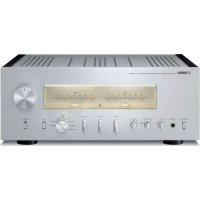
USER MANUAL AS3000 YAMAHA
A Living Tradition in Sound
A piano comes into this world through the perfect synergy of advanced technical skill and artistry. Such a piano can create sound that truly reflects the player's feelings.
The final stage in piano production is called “voicing”. It is here that the instrument is given its soul.
A highly skilled expert concentrates his mind and sensitivity on the sound of each key, finely adjusting the dynamic feel of the hammers, bringing the tone and vibrancy of all 88 keys together perfectly; a truly stunning achievement.
It is a quality of sound that can only be determined by an astute, sensitive ear. We apply this very same concept to the manufacture of our audio products. The technician performs exhaustive listening tests and every component is considered, in order to finally achieve the ideal sound.
Yamaha's tradition of audio quality stretches back over 125 years, and continues to live on in all Yamaha products today.

natural_image
Black grand piano with open lid and visible branding (no text or symbols on instrument body)
Excellence in Audio Achievement
1920-
1960s
1970s
1980s
1990s
2000s
2010s
First HiFi System introduced in 1920
We introduced numerous HiFi components (turntables, FM/AM tuners, integrated amplifiers, preamplifiers, power amplifiers and speakers) in 1955 - 1965.
Natural Sound Speaker Series introduced in 1967
NS-20 Monitor Speaker
CA-1000 Integrated Amplifier
Featuring A-Class operation, the CA-1000 set the standard for integrated amplifiers.
NS-690 Natural Sound Speaker
NS-1000M Monitor Speaker
A truly legendary speaker still revered by HiFi enthusiasts.
B-1 Power Amplifier
An innovative power amp that used vertical FETs in all stages.
C-2 Control Amplifier
Received top prize at the Milan International Music and HiFi Show.
NS-10M Studio Monitor Speaker
Became of the most popular studio monitors in the world.
A-1 Integrated Amplifier
PX-2 Turntable
Yamaha's first straight arm turntable.
B-6 Power Amplifier
Pyramid-shaped power amplifier.
GT-2000/L Turntable
First CD Player (CD-1) introduced in 1983
B-2x Power Amplifier
MX-10000 Power Amplifier and CX-10000 Control Amplifier
Redefined the capabilities of separate components.
AX-1 Integrated Amplifier
GT-CD1 CD Player
MX-1 Power Amplifier and CX-1 Preamplifier
Soavo-1 and Soavo-2 Natural Sound Speaker Systems
A-S2000 Stereo Amplifier and CD-S2000 Super Audio CD Player
NP-S2000 Network Player
NS-20
CA-1000

NS-690

NS-1000M
B-1

C-2

NS-10M

natural_image
Close-up of a black electronic device with a circular disc and mechanical components (no visible text or symbols)

A-1

B-6
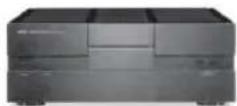
B-2x

MX-10000
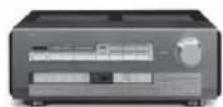
CX-10000

natural_image
Black multi-tiered speaker tower with four circular speakers, standing on a stand (no text or symbols visible)
Soavo-1

A-S2000
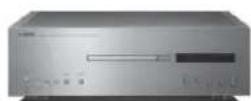
CD-S2000

NP-S2000
A-S3000
◆ Full floating and balanced circuit design achieves the full potential of analogue amplification
An entirely new floating and balanced power amplifier achieves complete symmetry and permits full balanced transmission (amplification) from the input jack to just before the speaker jack.
◆Full-stage balanced signal transmission
The integrated amplifier offers full stage balanced transmission, combining high power output with good sound texture and outstanding S/N performance.
◆Parallel volume and tone control
◆Large power supply with four separate circuits
◆Left-right symmetrical design with rigid, stable construction
◆Discrete phono amplifier
◆High-quality headphone amplifier with low-impedance drive
■Supplied accessories
Please check that you have received all of the following parts.
- Remote control
• Batteries (AAA, R03, UM-4) (×2)
- Power cable
• SAFETY BROCHURE
Contents
Controls and functions....6
Connections....16
Specifications....24
Troubleshooting....28
■About this manual
• indicates a tip for your operation.
- The color of images in this manual may vary from the original.
- Read the "SAFETY BROCHURE" before using this unit.
A-S3000
Controls and functions
In this chapter, you will learn the controls and functions of A-S3000.
■Front panel (pages 6 to 9)

①STANDBY/ON/OFF switch
Turns on or off this unit.
STANDBY/ON (upper position):
In this position, you can select STANDBY or ON, using the ⏻ AMP key on the remote control.
OFF (lower position):
The power of this unit is turned off.
Notes
- When you turn on this unit, it will take a few seconds before this unit can reproduce sound.
- If you disconnect the power cable from the AC outlet and connect it again when this unit is in STANDBY mode, the power of the unit is turned on. If the unit is not to be operated for a long time, set the STANDBY/ON/OFF switch to OFF.
②STANDBY/ON indicator
Lit brightly:
Shows that the power of the unit is ON. In this condition, you can switch the unit to STANDBY mode using the ⏻ AMP key on the remote control.
Lit dimly:
Shows that the unit is in STANDBY mode. In this condition, press the ⏻ AMP key on the remote control to turn on the unit.
Off:
Shows that the power of the unit is OFF. In this condition, you can turn on the unit using the STANDBY/ON/OFF switch only.
③PHONES jack
Outputs audio for private listening with headphones.
Notes
- When headphones are plugged in:
- Both speaker sets connected to the SPEAKERS L/R CH terminals are turned off.
- No signals are output at the PRE OUT jacks.
- You cannot select MAIN DIRECT as the input source.
- If headphones are plugged into the PHONES jack while MAIN DIRECT is selected as the input source, no audio is output at the PHONES jack.
④TRIM selector
Adjusts the volume level when headphones are plugged in to avoid sudden changes in volume.
Choices: -6 dB, 0 dB, +6 dB, +12 dB

⑤SPEAKERS selector
Turns on or off the speaker set connected to the SPEAKERS L/R CH A and/or B terminals on the rear panel.
- Switch to the OFF position to turn off both speaker sets.
- Switch to the A or B position to turn on the speaker set connected to the SPEAKERS L/R CH A or B terminals.
- Switch to the A+B BI-WIRING position to turn on both speaker sets.
Caution
If you use two sets (A and B), the impedance of each speaker must be 8 Ω or higher.
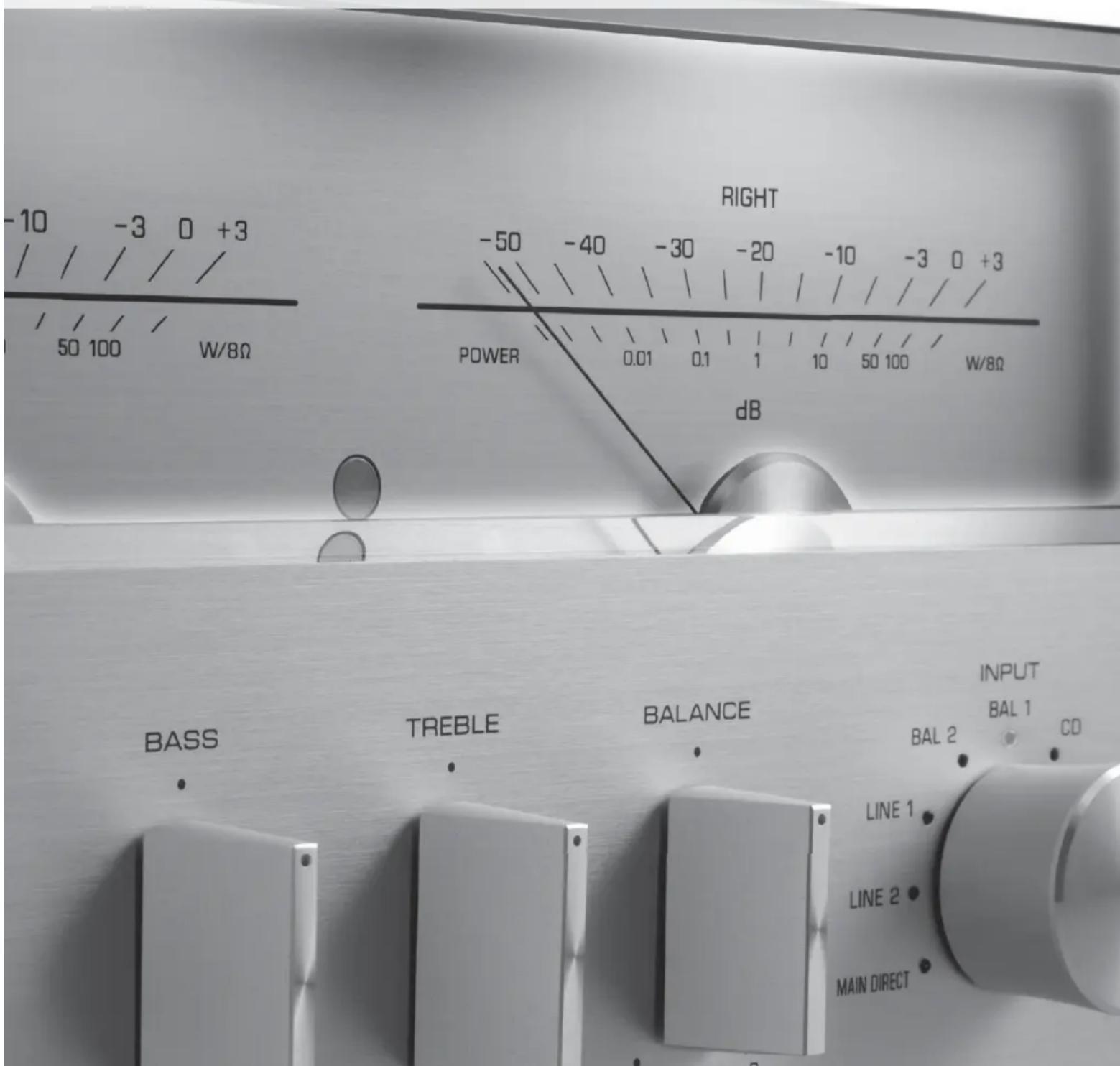
⑥METER selector
Switches the display of the meter to OFF, PEAK or VU.
OFF:
Turns off the meter and the illumination.
PEAK:
Switches the meter to a peak level meter. The peak level meter shows a momentarily highest audio output level.
VU:
Switches the meter to a VU (Volume Unit) level meter. The VU level meter shows an effective audio output value that is similar to human senses.
⑦Meter displays (LEFT/RIGHT)
Show the audio output level of the left (LEFT) and right (RIGHT) channels in VU or PEAK meter mode. The VU or PEAK meter can be selected by the METER selector.
⑧BASS control
Increases or decreases the low frequency response.
The 0 position produces a flat response.
Control range: -10 dB to +10 dB
⑨TREBLE control
Increases or decreases the high frequency response.
The 0 position produces a flat response.
Control range: -10 dB to +10 dB
⑩BALANCE control
Adjusts the audio output balance of the left and right speakers to compensate for sound imbalances caused by speaker locations or listening room conditions.
Notes
- When both the BASS and TREBLE controls are set to the 0 position, audio signal bypasses the tone control circuitry.
- The BASS, TREBLE and BALANCE controls do not affect the signals input at the MAIN IN jacks and signals output at the LINE 2 REC jacks.
■Front panel (pages 6 to 9)
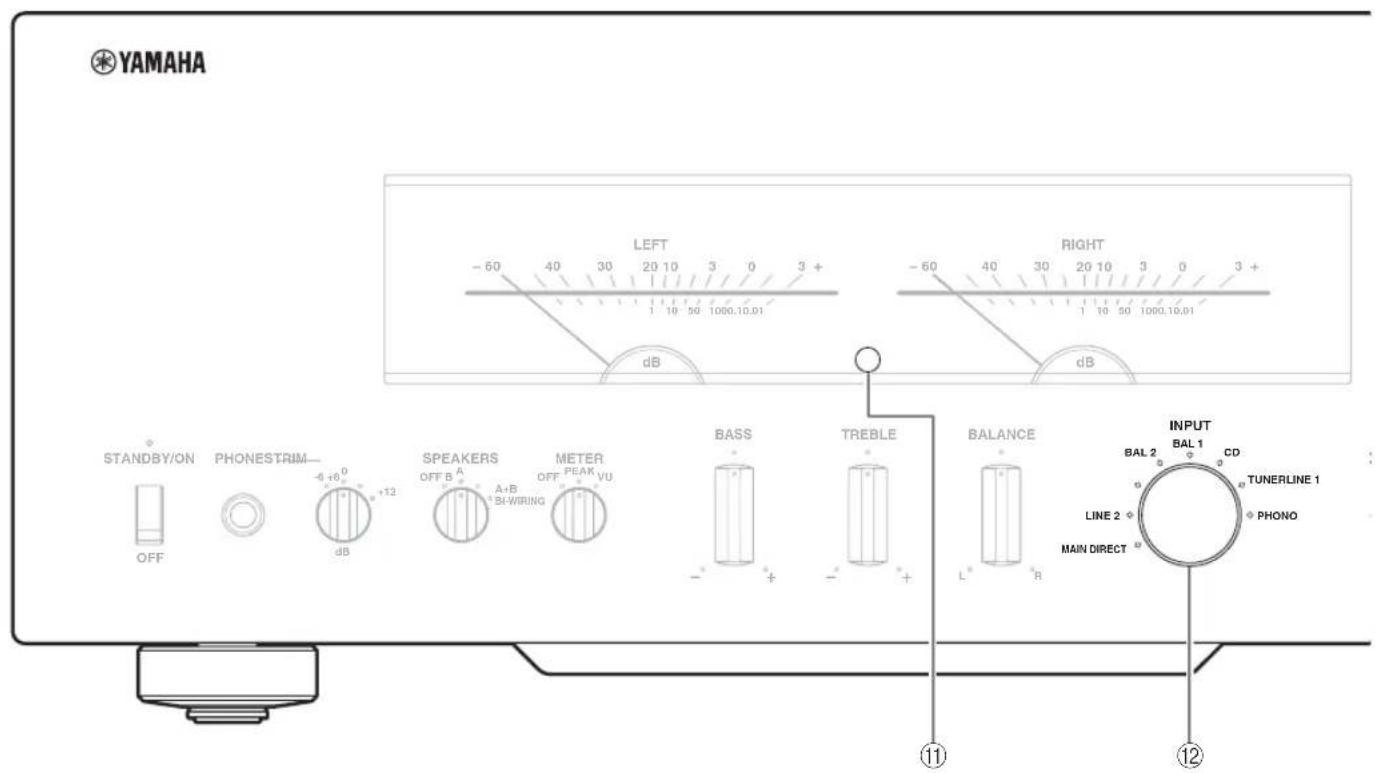
⑪ Remote control sensor
Receives signals from the remote control.
[Non-Text]
The remote control transmits a directional infrared beam. Be sure to aim the remote control directly at the remote control sensor on the front panel of this unit during operation.

Selects the input source to be played back. The indicator of the input source selected with the INPUT selector lights.
The audio signals of the selected input source are also output at the LINE 2 REC jacks.
MAIN DIRECT: Selects the component connected to the MAIN IN jacks.
When MAIN DIRECT is selected as the input source, the audio signals are not output at the PRE OUT, LINE 2 REC and PHONES jacks.
LINE 1/LINE 2: Selects the component connected to the LINE 1 or LINE 2 jacks.
BAL 1/BAL 2: Selects the component connected to the BAL 1 or BAL 2 jacks (balanced XLR jacks)
CD: Selects the CD player connected to the CD jacks (unbalanced RCA jacks).
TUNER: Selects the tuner connected to the TUNER jacks.
PHONO: Selects the turntable connected to the PHONO jacks.
Note
When LINE 2 is selected, the audio signals are not output at the LINE 2 REC jacks.

⑬PHONO switch
Selects the type of magnetic cartridge of the turntable connected to the PHONO jacks on the rear panel.
- Press upward to the MM position when the connected turntable has a moving magnet (MM) cartridge.
- Press downward to the MC position when the connected turntable has a moving coil (MC) cartridge.

When you replace the cartridge, be sure to turn off this unit.
⑭AUDIO MUTE switch
Press downward to reduce the current volume level by approximately 20 dB. Press again to restore the audio output to the previous volume level.

You can also rotate the VOLUME control on the front panel or press the VOLUME + or - key on the remote control to resume the audio output.
⑮AUDIO MUTE indicator
Lights when the mute function is turned on with the AUDIO MUTE switch.
⑯VOLUME control
Controls the volume level. This does not affect the output level at the LINE 2 REC jacks.
Note
The VOLUME control does not affect when you select MAIN DIRECT as the input source. Adjust the volume level using the volume control on the external amplifier connected to the MAIN IN jacks.
■Rear panel

See page 16 for connection information.
①TUNER input jacks
②GND (Ground) terminal
③PHONO input jacks
④CD input jacks
⑤BAL 1/BAL 2 (balanced) input jacks
Two sets of balanced input jacks are provided. Set the ATTENUATOR selector and PHASE selector associated with the BAL 1 or BAL 2 jacks according to the player connected to the corresponding jacks. For details of settings, see page 20.
⑥AUTO POWER STANDBY switch
ON:
The unit enters STANDBY mode automatically if not operated for 8 hours.
OFF:
The unit does not enter STANDBY mode automatically.
⑦LINE 1 input jacks
⑧LINE 2 jacks
PB ( playback) input jacks and REC (recording) output jacks are provided.
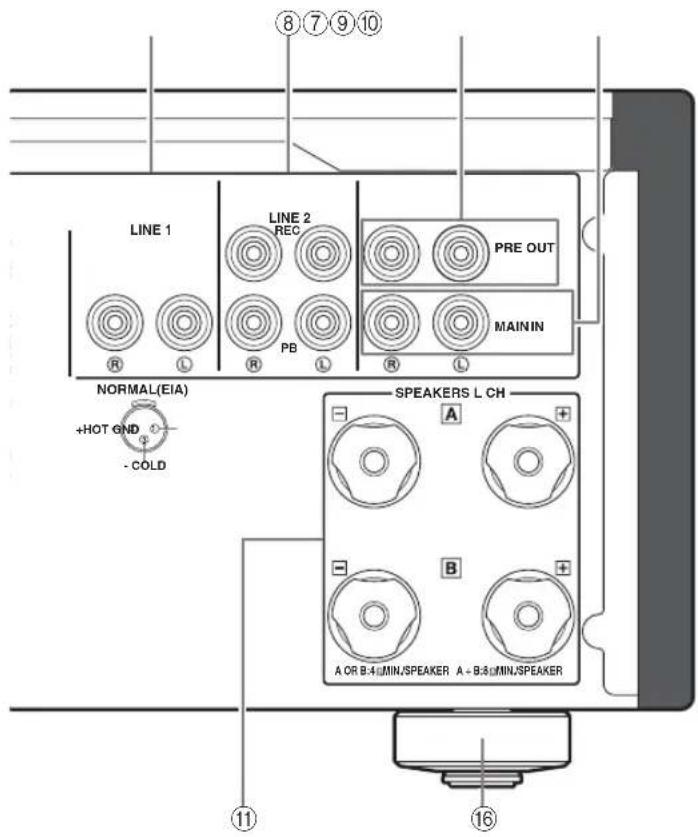
⑨PRE OUT jacks
- The PRE OUT jacks output the same channel signal as the SPEAKERS L/R CH terminals.
- When you connect a stereo cable to the PRE OUT jacks to drive the speakers using an external amplifier, it is not necessary to use the SPEAKERS L/R CII terminals.
- The signal output at the PRE OUT jacks are affected by the BASS and TREBLE control settings.
⑩MAIN IN jacks
Use these jacks to connect an external component equipped with a volume control.
Note
When you select MAIN DIRECT as the input source, the volume level is fixed.
Adjust the volume level using the volume control on the external amplifier connected to the MAIN IN jacks when you select MAIN DIRECT as the input source.
For the connection to the MAIN IN jacks, see pages 16 and 17.
⑪SPEAKERS L/R CH terminals
⑫ SYSTEM CONNECTOR
Use this connector to connect a product testing device for servicing.
⑬REMOTE IN/OUT jacks
Use these jacks to connect an external component for remote control.
For details on the connection, see page 21.
⑭TRIGGER IN jack
Use this jack to connect an external component for the trigger function.
For details on the connection, see page 22.
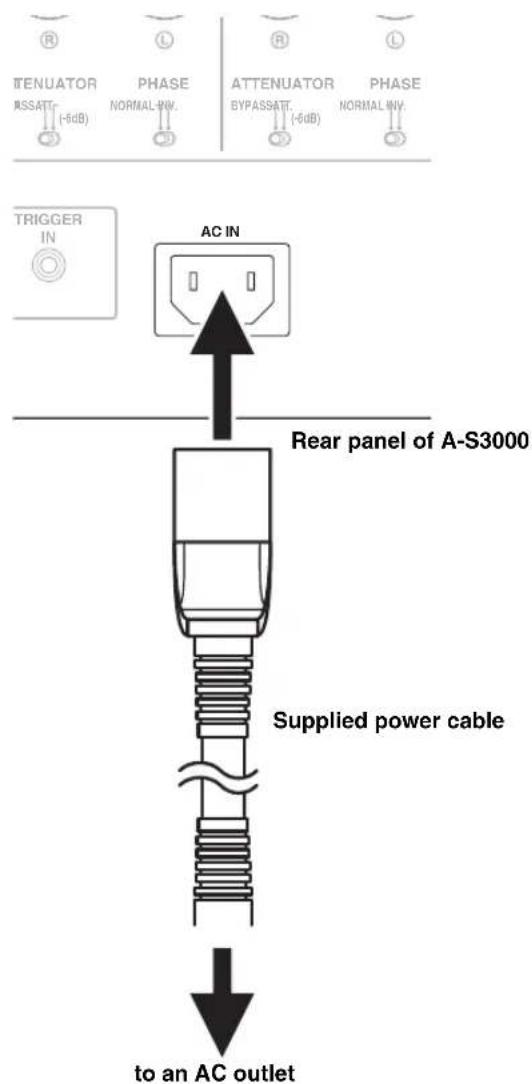
⑮AC IN inlet
Use this inlet to plug in the supplied power cable. For details on the connection, see page 19.
The feet of this unit include built-in spikes. Using the spikes can reduce the effect of vibrations on the set. When using the spikes, remove the transport tape, then remove the magnet foot by pulling it.
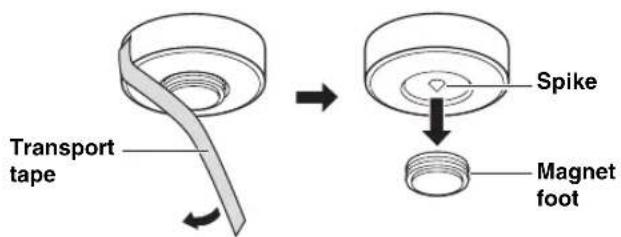
Caution
When using the feet's built-in spikes, the spikes may scratch the shelf or floor on which this unit is installed. Use the magnet feet or appropriate supports when placing this unit on expensive furniture, etc.
#
If this unit is unstable, you can adjust the foot height by rotating it.
■Remote control

①Infrared signal transmitter
Outputs infrared control signals.
② AMP key
Turns this unit ON or switches it to STANDBY mode. For details on STANDBY mode, see "Front panel" (page 6).
Selects the input source to be played back.
The audio signals of the selected input source are output at the LINE 2 REC jacks.
[Non-Text]
When LINE 2 is selected as the input source, the audio signals are not output at the LINE 2 REC jacks.
BAL: Selects the component connected to the BAL 1 or BAL 2 jacks (balanced XLR jacks).
LINE: Selects the component connected to the LINE 1 or LINE 2 jacks.
PHONO: Selects the turntable connected to the PHONO jacks.
MAIN DIRECT: Selects the component connected to the MAIN IN jacks. When MAIN DIRECT is selected as the input source, the audio signals are not output at the PRE OUT, LINE 2 REC and PHONES jacks.
CD: Selects the CD player connected to the CD jacks (unbalanced RCA jacks).
TUNER: Selects the tuner connected to the TUNER jacks
Control functions of Yamaha tuner. Refer to the owner's manual of your tuner for details.
Note
Some Yamaha tuners cannot be controlled by this remote control.
⑤ CD key
Turns the Yamaha CD player ON or switches it to STANDBY mode.
⑥ OPEN/CLOSE key
Opens/closes the disc tray of the Yamaha CD player. Refer to the owner's manual of your CD player for details.
Note
Some Yamaha CD players do not support the CD key and/or

OPEN/CLOSE key of this remote control.
⑦Yamaha CD player control keys
Control various functions of Yamaha CD player. Refer to the owner's manual of your CD player for details.
▷ (Play)
Starts playback.
□□ (Pause)
Pauses playback. Press the tor to resume playback.
□ (Stop)
Stops playback.
(Skip/Search backward)
(Skip/Search forward)
Skips to the next track, or skips back to the beginning of the current track.
SOURCE
Selects the source to be played on the Yamaha CD player. The playback source changes each time this key is pressed.
LAYER
Switches the playback layer of a hybrid SA-CD between SA-CD and CD.
⑧VOLUME +/- keys
Control the volume level.
Note
The VOLUME keys do not affect when you select MAIN DIRECT as the input source. Adjust the volume level on the external amplifier connected to the MAIN IN jacks.
⑨MUTE key
Reduces the current volume level by approximately 20 dB. Press again to restore the audio output to the previous volume level. Pressing the VOLUME + or - key also cancels muting.
■Installing batteries in the remote control
1 Remove the battery compartment cover.
2Insert the two batteries (AAA, R03, UM-4) according to the polarity markings (+ and -) on the inside of the battery compartment.

3Reinstall the battery compartment cover.

natural_image
Line drawing of a mechanical component with a numbered arrow indicating direction (no text or symbols present)

natural_image
Close-up of metallic mechanical components with no visible text or symbols
A-S3000 Connections
In this section, you will make connections between A-S3000, speakers, and source components.
natural_image
Close-up of metallic hexagonal nuts with threaded caps, arranged on a dark surface (no text or symbols visible)

flowchart
graph TD
    A["Speakers A (R channel)"] --> B["Turntable"]
    B --> C["Ground"]
    C --> D["GND PHOTO"]
    D --> E["TUNER"]
    E --> F["CD"]
    F --> G["BAL 1"]
    G --> H["ATTENUATOR BYPASSAT (-5dB)"]
    H --> I["PHASE NORMAL INX"]
    I --> J["AC IN"]
    J --> K["CD player with XLR jacks"]
    K --> L["CD player with RCA jacks"]
    L --> M["Tuner"]
    M --> N["Speaker B (R channel)"]
    style A fill:#f9f,stroke:#333
    style B fill:#ccf,stroke:#333
    style C fill:#cfc,stroke:#333
    style D fill:#fcc,stroke:#333
    style E fill:#cff,stroke:#333
    style F fill:#ffc,stroke:#333
    style G fill:#fcc,stroke:#333
    style H fill:#fcc,stroke:#333
    style I fill:#fcc,stroke:#333
    style J fill:#fcc,stroke:#333
    style K fill:#fcc,stroke:#333
    style L fill:#fcc,stroke:#333
    style M fill:#cff,stroke:#333
    style N fill:#cfc,stroke:#333
    style O fill:#cfc,stroke:#333
    style P fill:#cfc,stroke:#333
    style Q fill:#cfc,stroke:#333
    style R fill:#cfc,stroke:#333
    style S fill:#cfc,stroke:#333
    style T fill:#cfc,stroke:#333
    style U fill:#cfc,stroke:#333
    style V fill:#cfc,stroke:#333
    style W fill:#cfc,stroke:#333
    style X fill:#cfc,stroke:#333
    style Y fill:#cfc,stroke:#333
    style Z fill:#cfc,stroke:#333
Caution
- Do not let the bare speaker wires touch each other or do not let them touch any metal part of this unit. This could damage this unit and/or the speakers.
-
All connections must be correct: L (left) to L, R (right) to R, “+” to “+”, and “−” to “−”. If the connections are faulty, no sound will be heard from the speakers, and if the polarity of the speaker connections is incorrect, the sound will be unnatural and lack bass. Also, refer to the owner’s manual for each of your components.
-
Use RCA unbalanced cables to connect other components except speakers. Use XLR balanced cables to connect a CD player or network player with XLR balanced output jacks to the BAL 1 or BAL 2 jacks of this unit.
- Connect your turntable to the GND terminal to reduce noise in the signal. However, you may hear less noise without the connection to the GND terminal for some turntables.
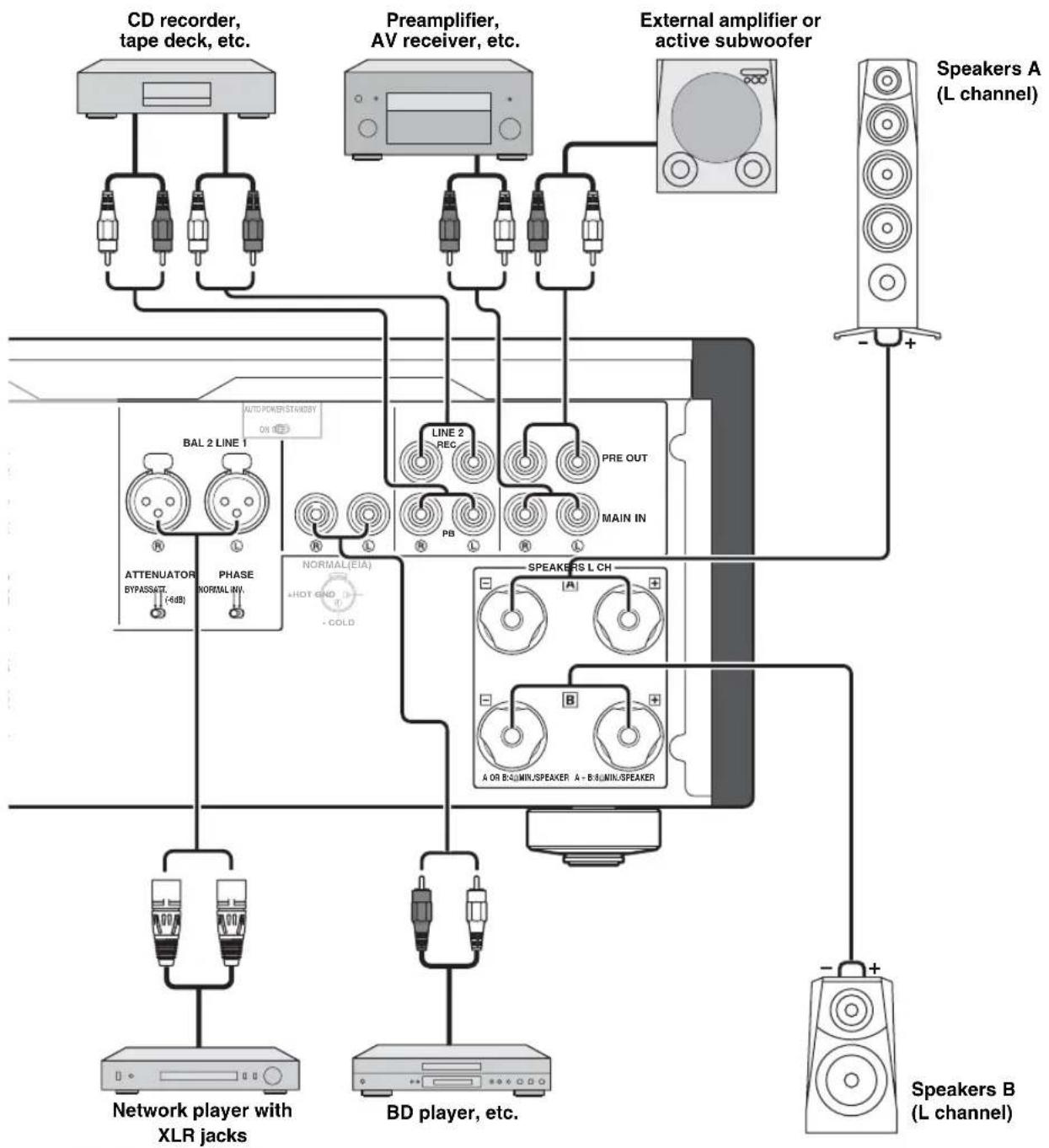
flowchart
graph TD
    A["CD recorder, tape deck, etc."] --> B["Line 2 REC"]
    C["Preamplifier, AV receiver, etc."] --> D["Line 2 REC"]
    E["External amplifier or active subwoofer"] --> F["Speaker A (L channel)"]
    G["Network player with XLR jacks"] --> H["Attenuator BYPASSINT (-4dB)"]
    G --> I["Phase NORMAL(W)"]
    G --> J["NORMAL(EIA) +HOT GND -COLD"]
    K["BD player, etc."] --> L["SPEAKERS L CH"]
    M["Speaker B (L channel)"] --> N["Speaker A"]
    M --> O["Speaker B"]
Caution
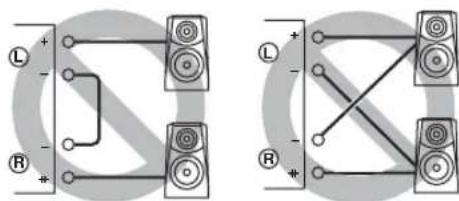
- Because the power amplifier of A-S3000 is of the floating balanced type, the following types of connections are not possible.
- Connecting with the left channel “−” terminal and the right channel “−” terminal as well as “+” terminals (Fig. 1).
- Connecting with the left channel “−” terminal and the right channel “−” terminal inverted (cross connection, Fig. 2).
- Deliberately connecting with the left/right channel “-” terminals and metal part on the rear panel of this unit, as well as accidentally touching them.
- Do not connect your active subwoofer to the SPEAKERS L/R CH terminal. Connect it to the PRE OUT jacks of this unit.
- Do not connect a component with no volume control, such as a CD player, to the MAIN IN jacks, as the volume level of the signals input to the MAIN IN jacks is fixed. If such equipment is connected, a sound may burst, and the unit and/or speaker may be damaged.
Fig. 1 Fig. 2
■Connecting the speakers
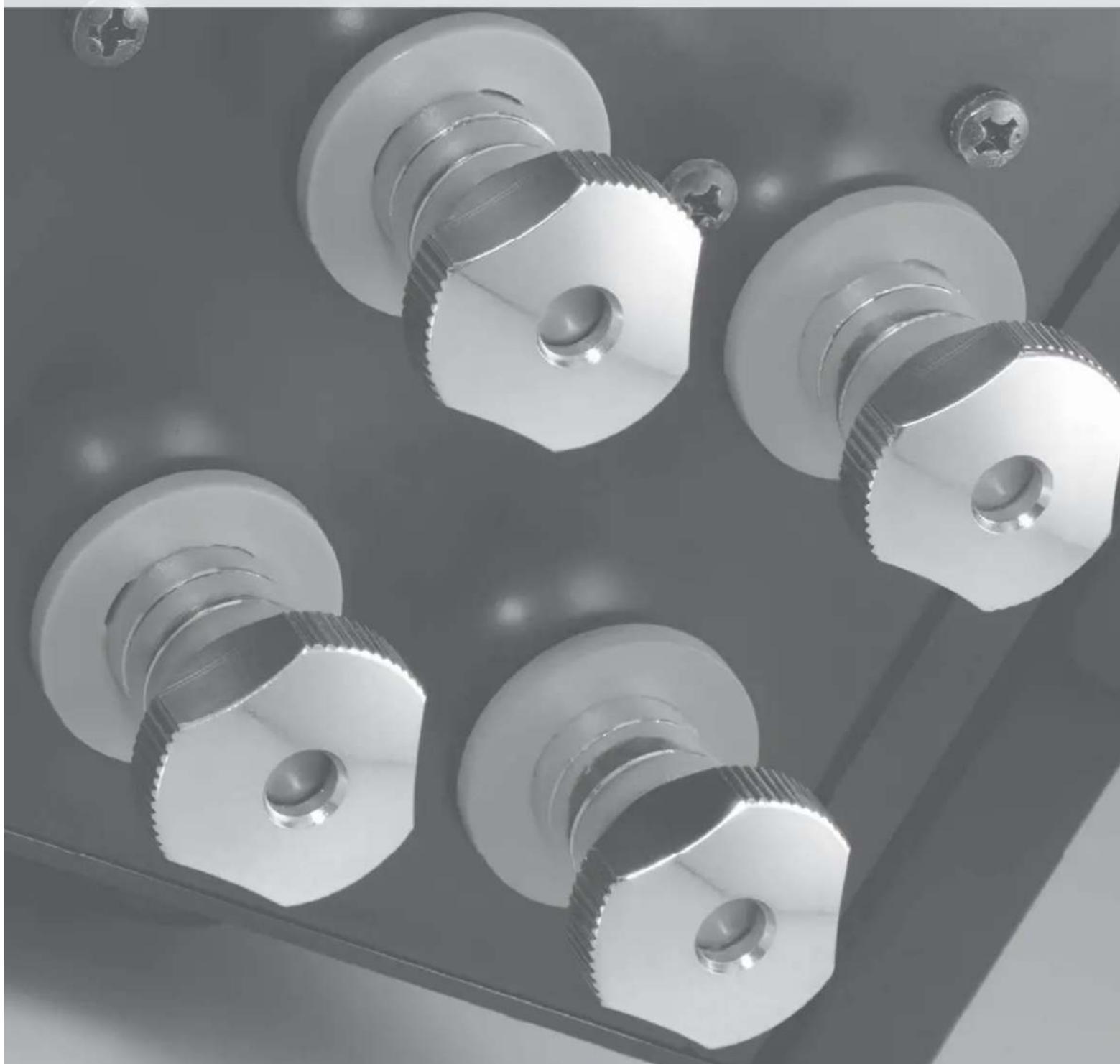
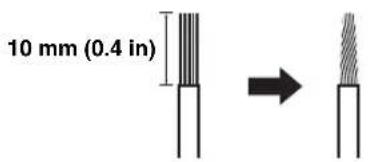
1 Remove approximately 10 mm (0.4 in) of insulation from the end of each speaker cable and twist the exposed wires of the cable together to prevent short circuits.
2Unscrew the knob and then insert the bare wire into the hole.

natural_image
Mechanical assembly diagram showing a bolt being inserted into a housing (no text or symbols present)
Hole for speaker cable: 6.0 mm (0.24 in) dia.
3Tighten the knob.

Caution
- When loosening the knob of the speaker terminal, do not rotate it excessively. The knob may come off and pose the danger of being swallowed by a child.
- Touching the speaker terminal with a metallic rack may cause short circuit and damage this unit. When installing the unit in a rack, maintain a sufficient clearance to prevent the speaker terminals from touching the rack.
- To reduce the risk of electric shock, do not touch the speaker terminal when the unit is turned on.
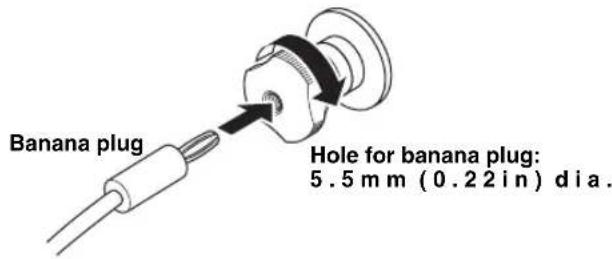
■Connecting the banana plug (Except for Europe models)
First, tighten the knob and then insert the banana plug into the end of the corresponding terminal.
■Connecting the Y-shaped lug
1Unscrew the knob and then sandwich the Y-shaped lug between the ring part and base.
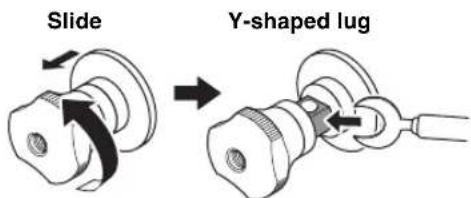
Terminal screw for Y-shaped lug: 5.0 mm (0.20 in) dia.
2Tighten the knob.
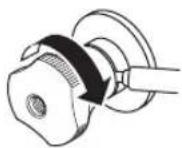
■Bi-wire connection
The bi-wire connection separates the woofer from the combined midrange and tweeter section. A bi-wire compatible speaker has four binding post terminals. These two sets of terminals allow the speaker to be split into two independent sections. This split connects the mid and high frequency drivers to one set of terminals and the low frequency driver to the other pair.
Example of a bi-wiring connection (L channel)

Caution
To use the bi-wire connections, the impedance of each speaker must be 8 Ω or higher.
Note
Remove the shorting bars or bridges to separate the LPF (low pass filter) and HPF (high pass filter) crossovers.

To use the bi-wire connections, switch the SPEAKERS selector to the A+B BI-WIRING position.
■Connecting the power cable
Plug the power cable into the AC IN inlet when all connections are complete, and then plug in the power cable to the AC outlet.
■Connecting to the BAL 1/BAL 2 jacks
Connect your CD player or network player with the XLR balanced output jacks.
Set the ATTENUATOR selector and PHASE selector located below the BAL 1 or BAL 2 jacks according to the component to be connected.
ATTENUATOR selector:
Select the allowable input level for the XLR balanced input jacks. If sound from the connected component is distorted, set the ATTENUATOR selector to ATT. (-6 dB).
PHASE selector:
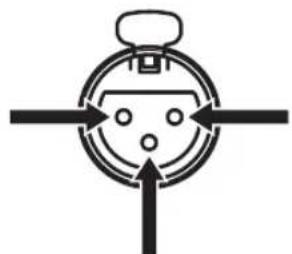
Select the assignment of the HOT pin of the XLR balanced input jacks (pin 2 HOT or pin 3 HOT).
NORMAL (pin 2 HOT)
natural_image
Simple line drawing of a stopwatch with arrows pointing outward (no text or symbols)
3: cold
1: ground2: hot
INV. (pin 3 HOT)

natural_image
Simple line drawing of a stopwatch with arrows pointing outward (no text or symbols)
3: hot
1: ground2: cold
Refer to the owner's manual supplied with the connected component and verify the assignment of the HOT pin of its XLR balanced output jacks.

Yamaha CD players are set to NORMAL (pin 2 HOT).
XLR connectors:
When connecting, be sure to match the pins and insert the connector of the "male" XLR balanced cable until you hear a "click". When disconnecting, pull out the "male" XLR balanced cable while holding down the lever of the BAL 1 or BAL 2 jack.
"Female" XLR connector
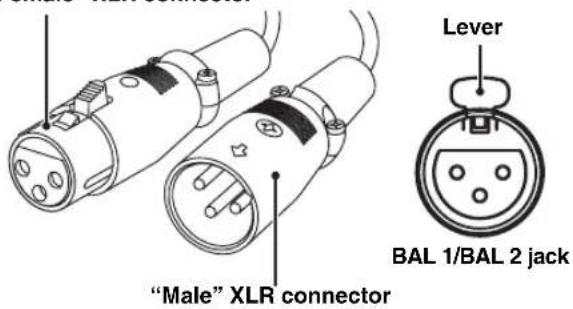
Note
To use the XLR balanced connection, you must select BAL 1 or BAL 2 as the input source.
■Operating this unit from another room
If you connect an infrared receiver and transmitter to the REMOTE IN/OUT jacks of this unit, you can operate the unit and/or external component using the supplied remote control located in another room.
■Remote connection between Yamaha components
When you have another Yamaha component supporting remote connection, as this unit does, an infrared transmitter is not necessary. You can transmit remote signals by connecting an infrared receiver and the REMOTE IN jack of the other component to the REMOTE IN/OUT jacks of this unit, using cables with monaural miniplugs.
Up to three Yamaha components (including this unit) can be connected.
Rear panel of A-S3000

flowchart
graph TD
    A["SYSTEM CONNECTOR"] --> B["REMOTE TRIGGER IN INPUT"]
    B --> C["Infrared receiver"]
    B --> D["Infrared transmitter"]
    C --> E["Remote control"]
    D --> F["External component (CD player, etc.)"]
Rear panel of A-S3000

flowchart
graph TD
    A["system connector"] --> B["REMOTE TRIGGER IN INOUT"]
    B --> C["Infrared receiver"]
    C --> D["REMOTE IN OUT"]
    D --> E["Remote control Yamaha component (up to three components including this unit)"]
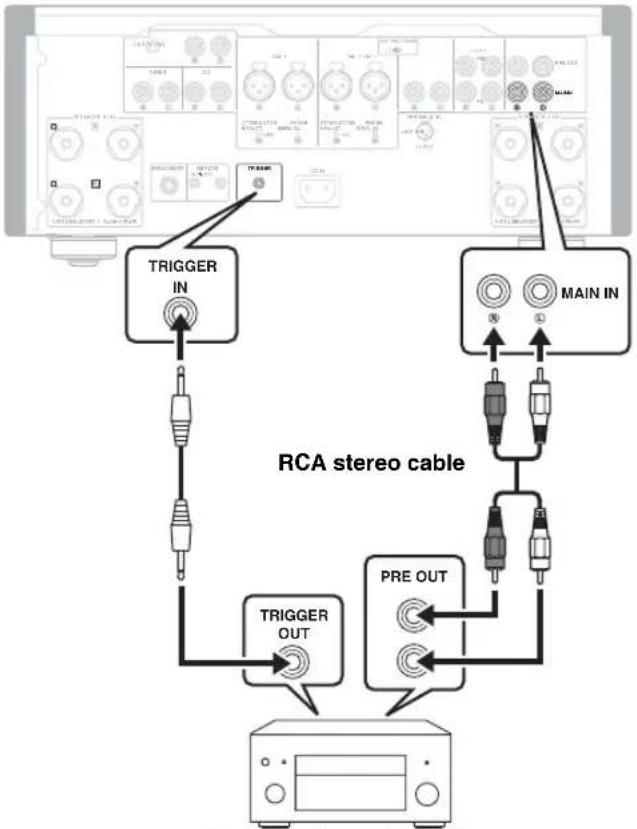
■Connecting a component supporting the trigger function such as a Yamaha AV receiver
The operations of this unit can be controlled in synchronization with the operations of the connected component, such as a Yamaha AV receiver (power ON/STANDBY or MAIN DIRECT input selection).
Connect the PRE OUT jacks and the TRIGGER OUT jack of the Yamaha AV receiver to this unit as illustrated below:
Rear panel of A-S3000
flowchart
graph TD
    A["Main IN"] --> B["TRIGGER IN"]
    A --> C["MAIN IN"]
    B --> D["TRIGGER OUT"]
    C --> E["PRE OUT"]
    D --> F["Device with LCD screen"]
    E --> F
    style A fill:#f9f,stroke:#333
    style B fill:#ccf,stroke:#333
    style C fill:#cfc,stroke:#333
    style D fill:#fcc,stroke:#333
    style E fill:#cff,stroke:#333
    style F fill:#ffc,stroke:#333
Yamaha AV receiver, etc.
with PRE OUT and
TRIGGER OUT jacks
When the power of the connected component is turned on, this unit turns on and the input is set to MAIN DIRECT automatically.
When MAIN DIRECT is selected as the input source, this unit enters STANDBY mode if the power of the connected component is turned off.
Note
To enable synchronization, turn off this unit before connecting the component to the MAIN IN jacks. The synchronization cannot be activated when the STANDBY/ON/OFF switch of the unit has been set to OFF.
A-S3000 Specifications
In this section, you will find technical specifications for A-S3000.
natural_image
Close-up of electronic components including capacitors, batteries, and a battery pack (no visible text or symbols)
POWER SECTION
- Rated Output Power
(8 Ω, 20 Hz to 20 kHz, 0.07% THD) ..... 100 W + 100 W
(4 Ω, 20 Hz to 20 kHz, 0.07% THD) ..... 150 W + 150 W
• Dynamic Power (IHF)
(8 Ω) 120 W + 120 W
(6 Ω) 150 W + 150 W
(4 Ω) 200 W + 200 W
(2 Ω) 300 W + 300 W
• Dynamic Headroom
(8 Ω) 0.79 dB
• Maximum Output Power
[U.K. and Europe models only]
(1 kHz, 0.7% THD, 4 Ω).... 170 W + 170 W
• Maximum Effective Output Power (JEITA)
[Taiwan, China, Korea, Asia and U.K. models only]
(1 kHz, 10% THD, 8 Ω).... 130 W + 130 W
(1 kHz, 10% THD, 4 Ω)....210 W + 210 W
• IEC Output Power [U.K. and Europe models only]
(1 kHz, 0.02% THD, 8 Ω).... 105 W + 105 W
• Maximum Power (JEITA)
[Taiwan, China and Asia models]
(1 kHz, 10% THD, 8 Ω).... 120 W + 120 W
(1 kHz, 10% THD, 4 Ω).... 190 W + 190 W
• Power Bandwidth
(MAIN L/R, 0.1% THD, 45 W, 8 Ω) 10 Hz to 60 kHz
- Damping Factor
(1 kHz, 8 Ω) ......250 or higher
• Maximum Input Signal Voltage
PHONO MM (1 kHz, 0.003% THD) 50 mVrms
PHONO MC (1 kHz, 0.003% THD) 2.3 mVrms
CD, etc. (1 kHz, 0.5% THD) 2.80 Vrms
BAL 1/BAL 2 (1 kHz, 0.5% THD)
(BYPASS) 2.80 Vrms
(ATT. -6 dB)....5.60 Vrms
- Rated Output Voltage/Output Impedance
REC OUT 200 mVrms/1.5 kΩ
PRE OUT 1.0 Vrms/1.5 kΩ
- Frequency Response
CD, etc. (5 Hz to 100 kHz) +0/-3 dB
CD, etc. (20 Hz to 20 kHz) +0/-0.3 dB
• RIAA Equalization Deviation
PHONO MM ±0.5 dB
PHONO MC ±0.5 dB
• Total Harmonic Distortion
PHONO MM to REC OUT
(20 Hz to 20 kHz, 1.2 Vrms) 0.005%
PHONO MC to LINE 2 REC
(20 Hz to 20 kHz, 1.2 Vrms) 0.02%
BAL 1/BAL 2 to SPEAKERS
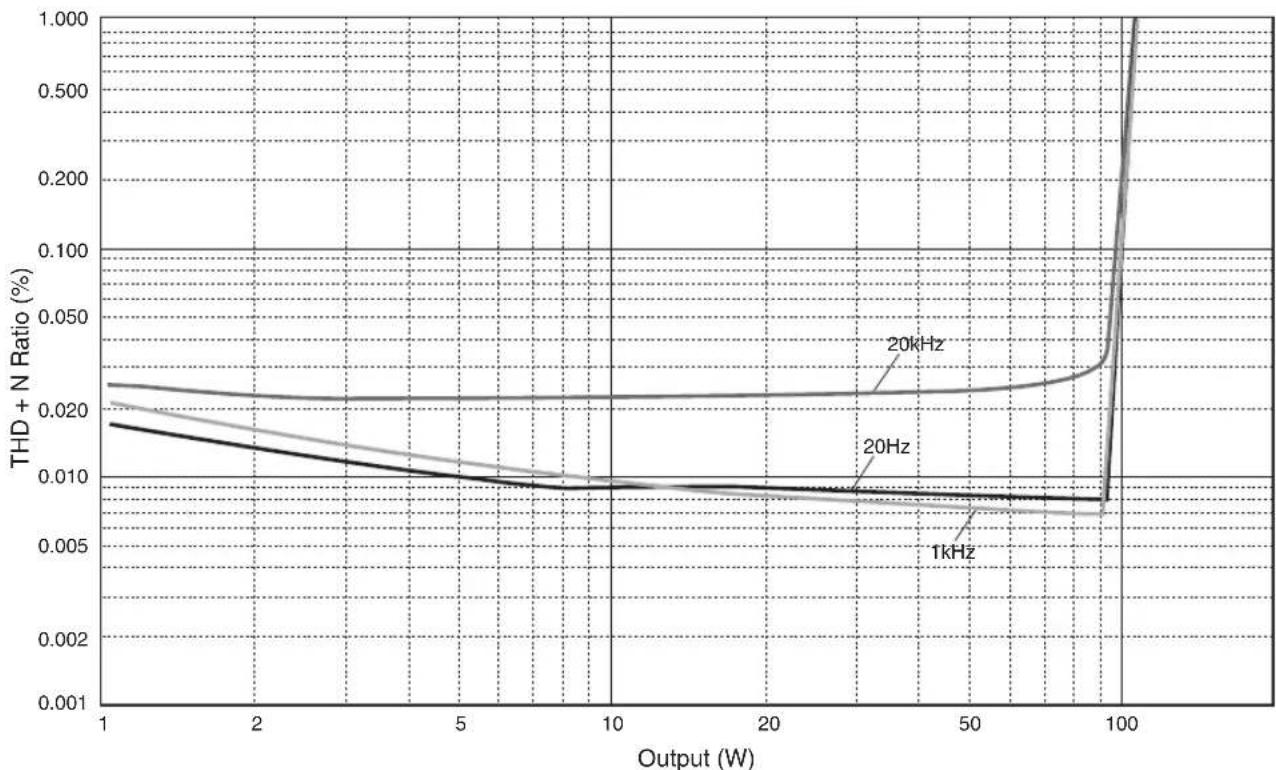
(20 Hz to 20 kHz, 50 W/8 Ω) 0.025%
CD, etc. to SPEAKERS
(20 Hz to 20 kHz, 50 W/8 Ω) 0.025%
• Signal to Noise Ratio (IHF-A Network)
PHONO MM (5 mVrms, Input shorted) 93 dB
PHONO MC (500 μVrms, Input shorted) 85 dB
CD, etc. (200 mVrms, Input shorted) 103 dB
- Residual Noise (IHF-A Network) 33 μVrms
CONTROL SECTION
- Input Sensitivity/Input Impedance
CD, etc. 200 mVrms/47 kΩ
PHONO MM 2.5 mVrms/47 kΩ
PHONO MC 100 μVrms/50 Ω
MAIN IN 1 Vrms/47 kΩ
BAL 1/BAL 2 200 mVrms/100 kΩ
• Headphone Jack Rated Output Power
CD, etc. (1 kHz, 32 Ω, 0.2% THD) 70 mW + 70 mW
- Channel Separation
CD, etc. (Input, 5.1 kΩ Terminated, 1 kHz/10 kHz) 74/54 dB or higher PHONO MM (Input shorted, 1 kHz/10 kHz, Vol.: -30 dB)
90/77 dB or higher
PHONO MC (Input shorted, 1 kHz/10 kHz, Vol.: -30 dB)
66/77 dB or higher
• Tone Control Characteristics
BASS
Boost/Cut (50 Hz) ±9 dB
Turnover Frequency 350 Hz
TREBLE
Boost/Cut (20 kHz) ±9 dB
Turnover Frequency 3.5 kHz
GENERAL
- Power Supply
[U.S.A and Canada models] AC 120 V, 60 Hz
[Taiwan model] AC 110 V, 60 Hz
[China model] AC 220 V, 50 Hz
[Korea model] AC 220 V, 60 Hz
[Australia model] AC 240 V, 50 Hz
[U.K. and Europe models] ...... AC 230 V, 50 Hz
[Asia model] AC 220 - 240 V, 50/60 Hz
• Power Consumption
[U.S.A and Canada models] 500 VA
[Other models] 350 W
- Standby Power Consumption ....0.3 W
- Dimensions (W × H × D) 435 × 180 × 464 mm
$$
(1 7 - 1 / 8 ^ {\prime \prime} \times 7 - 1 / 8 ^ {\prime \prime} \times 1 8 - 1 / 4 ^ {\prime \prime})
$$
• Weight 24.6 kg (54.2 lbs)
* Specifications are subject to change without notice.
■Block diagram

flowchart
graph TD
    A["Power Amp Pre State"] --> B["Floating Power Supply"]
    C["Power Relay"] --> B
    D["Motor Control"] --> E["TOI/TRANSFORMER"]
    F["Signal Transforms"] --> E
    G["Front Panel"] --> H["Independent Rectified Power Supply (for Audio)"]
    I["CPU"] --> J["Control"]
    K["Pressure Control"] --> L["IR Out"]
    M["Head Phone"] --> N["Floating Balance MOSFET"]
    O["Speaker Out"] --> P["Floating Balance MOSFET"]
    Q["Input Selection"] --> R["VOLUME"]
    S["Balance Gain Sel"] --> T["VOLUME"]
    U["Ree Out Buffer"] --> V["Ree Out"]
    W["Pre-Output Buffer"] --> X["Low Impedance Drive HE Apportion Arm"]
    Y["Ree Out Buffer"] --> Z["High Output"]
    AA["Ree Out"] --> AB["High Output"]
    AC["Ree Out"] --> AD["High Output"]
    AE["Ree Out"] --> AF["High Output"]
    AG["Ree Out"] --> AH["High Output"]
    AI["Ree Out"] --> AJ["High Output"]
    AK["Ree Out"] --> AL["High Output"]
    AM["Ree Out"] --> AN["High Output"]
    AO["Ree Out"] --> AP["High Output"]
    AQ["Ree Out"] --> AR["High Output"]
    AS["Ree Out"] --> AT["High Output"]
    AU["Ree Out"] --> AV["High Output"]
    AW["Ree Out"] --> AX["High Output"]
    AY["METER Unit"] --> AZ["METER CIRCUIT"]
    BA["METER Unit"] --> BB["METER UNIT"]
    BC["METER Unit"] --> BD["METER UNIT"]
    BE["METER Unit"] --> BF["METER UNIT"]
    BG["METER Unit"] --> BH["METER UNIT"]
    BI["METER Unit"] --> BJ["METER UNIT"]
    BK["METER Unit"] --> BL["METER Unit"]
    BM["METER Unit"] --> BN["METER Unit"]
    BO["METER Unit"] --> BP["METER Unit"]
    BQ["METER Unit"] --> BR["METER Unit"]
    BS["METER Unit"] --> BT["METER Unit"]
    BU["METER Unit"] --> BV["METER Unit"]
    BW["Ba1.1 + A - B"] --> BX["Ba1.2 + A - B"]
    BY["Ba1.2 + A - B"] --> BZ["Ba1.3 + A - B"]
    CA["Ba1.3 + A - B"] --> CB["Ba1.4 + A - B"]
    CC["Ba1.4 + A - B"] --> CD["Ba1.5 + A - B"]
    CE["Ba1.5 + A - B"] --> CF["Ba1.6 + A - B"]
    CG["Ba1.6 + A - B"] --> CH["Ba1.7 + A - B"]
    CI["Ba1.7 + A - B"] --> CJ["Ba1.8 + A - B"]
    CK["Ba1.8 + A - B"] --> CL["Ba1.9 + A - B"]
    CM["Ba1.9 + A - B"] --> CN["Ba2.0 + A - B"]
    CO["Ba2.0 + A - B"] --> CP["Ba2.1 + A - B"]
    CS["Ba2.1 + A - B"] --> CT["Ba2.2 + A - B"]
    CU["Ba2.2 + A - B"] --> CV["Ba2.3 + A - B"]
    CW["Ba2.3 + A - B"] --> CX["Ba2.4 + A - B"]
    CY["Ba2.4 + A - B"] --> CZ["Ba2.5 + A - B"]
    DA["Ba2.5 + A - B"] --> DB["Ba2.6 + A - B"]
    DC["Ba2.6 + A - B"] --> DD["Ba2.7 + A - B"]
    DJ["Ba2.7 + A - B"] --> DK["Ba2.8 + A - B"]
    DL["Ba2.8 + A - B"] --> DV["Ba2.9 + A - B"]
    DW["Ba2.9 + A - B"] --> DX["Ba3.0 + A - B"]
    DXB["Ba3.0 + A - B"] --> DY["Ba3.1 + A - B"]
    DYB["Ba3.1 + A - B"] --> DYB["Cable Control Logic"]
    DYB[Cable Control Logic Logic Logic Logic Logic Logic Logic Logic Logic Logic Logic Logic Logic Logic Logic Logic Logic Logic Logic Logic Logic Logic Logic Logic Logic Logic Logic Logic Logic Logic Logic Logic Logic Logic Logic Logic Logic Logic Logic Logic Logic Logic Logic Logic Logic Logic Logic Logic Logic Logic Logic Logic Logic Logic Logic Logic Logic Logic Logic Logic Logic Logic Logic Logic Logic Logic Logic Logic Logic Logic Logic Logic Logic Logic Logic Logic Logic Logic Logic Logic Logic Logic Logic Logic Logic Logic Logic Logic Logic Logic Logic Logic Logic Logic Logic Logic Logic Logic Logic LogicLogic & Control Logic & Control Logic & Control Logic & Control Logic & Control Logic & Control Logic & Control Logic & Control Logic & Control Logic & Control Logic & Control Logic & Control Logic & Control Logic & Control Logic & Control Logic & Control Logic & Control Logic & Control Logic & Control Logic & Control Logic & Control Logic & Control Logic & Control Logic & Control Logic & Control Logic & Control Logic & Control Logic & Control Logic & Control Logic & Control Logic & Control Logic & Control Logic & Control Logic & Control Logic |
■Tone control characteristics

line
| Frequency (Hz) | Response (dB) |
| -------------- | ------------- |
| 10 | 0 |
| 20 | 0 |
| 30 | 0 |
| 50 | 0 |
| 100 | 0 |
| 200 | 0 |
| 300 | 0 |
| 500 | 0 |
| 1k | 0 |
| 2k | 0 |
| 3k | 0 |
| 5k | 0 |
| 10k | 0 |
| 20k | 0 |
| 30k | 0 |
| 50k | 0 |
| 100k | 0 |
| k | 0 |
■Total harmonic distortion
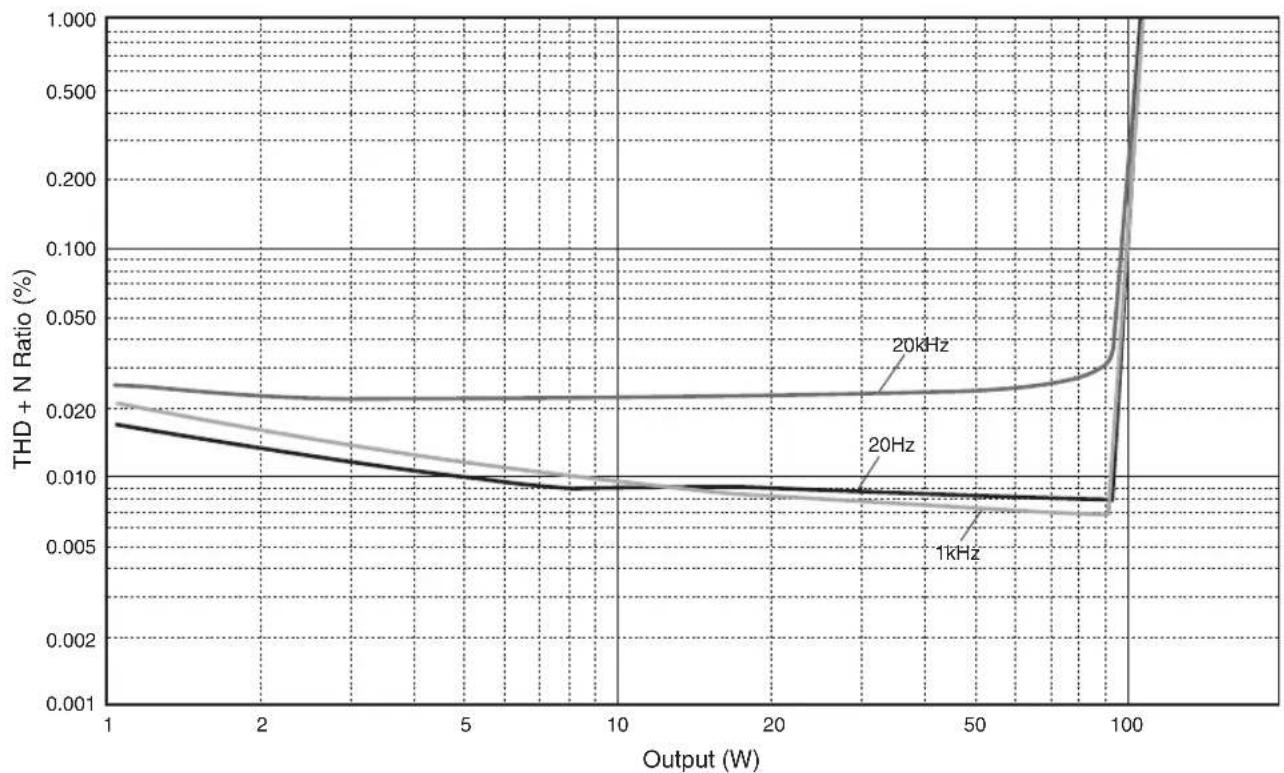
line
| Output (W) | 1kHz | 20Hz | 20kHz |
| ---------- | ------- | ------- | ------- |
| 1 | 0.018 | 0.022 | 0.023 |
| 2 | 0.015 | 0.021 | 0.022 |
| 5 | 0.010 | 0.019 | 0.021 |
| 10 | 0.009 | 0.018 | 0.020 |
| 20 | 0.008 | 0.017 | 0.019 |
| 50 | 0.007 | 0.016 | 0.018 |
| 100 | 0.007 | 0.015 | 0.017 |
■Total harmonic distortion (PHONO)

line
| Generator Level (Vrms) | 20Hz | 1kHz | 20kHz |
| ---------------------- | ---- | ---- | ----- |
| 100μ | 0.05 | 0.03 | 0.02 |
| 200μ | 0.03 | 0.02 | 0.01 |
| 500μ | 0.02 | 0.01 | 0.005 |
| 1m | 0.01 | 0.005| 0.002 |
| 2m | 0.005| 0.002| 0.001 |
| 5m | 0.002| 0.001| 0.0005|
| 10m | 0.001| 0.0005| 0.0002|
| 20m | 0.0005| 0.0002| 0.0001|
Refer to the chart below if this unit does not function properly. If the problem you are experiencing is not listed below or if the instructions below do not help, turn off this unit, disconnect the power cable, and contact the nearest authorized Yamaha dealer or service center.
| Problem Cause | Remedy | | See page |
| This unit fails to turn on. | The power cable is not connected to the AC IN inlet on the rear panel or not plugged in the AC wall outlet. | Connect the power cable firmly. | 19 |
| The protection circuitry has been activated because of a short circuit, etc. | Check that the speaker wires are not touching each other or shorting out against the rear panel of this unit, and then turn the power of this unit back on. | 18 |
| This unit has been exposed to a strong external electric shock (such as lightning or strong static electricity). | Turn off this unit, disconnect the power cable, plug it back in after 30 seconds, and then use it normally. | — |
| The STANDBY/ON indicator on the front panel flashes. | The protection circuitry has been activated because of a short circuit, etc. | Check that the speaker wires are not touching each other or shorting out against the rear panel of this unit, and then turn the power of this unit back on. | 18 |
| There is a problem with the internal circuitrics of this unit. | Disconnect the power cable and contact the nearest authorized Yamaha dealer or service center. | — |
| The INPUT indicator on the front panel flashes and the volume is turned down when you turn on this unit. | The protection circuitry has been activated because of a short circuit, etc. | Check that the speaker wires are not touching each other or shorting out against the rear panel of this unit, and then turn the power of this unit back on. | 18 |
| No sound. Incorrect input | or output cable connections. | Connect the cables properly. If the problem persists, the cables may be defective. | 16 |
| No appropriate input source has been selected. | Select an appropriate input source with the INPUT selector on the front panel (or one of the input selector keys on the remote control). | 8, 12 |
| The SPEAKERS selector is set to OFF. Switch the SPEAKERS selector to the appropriate position. | 7 |
| Speaker connections are not secure. Secure the connections. | 18 |
| The sound suddenly goes off. | The protection circuitry has been activated because of a short circuit, etc. | Check that the speaker wires are not touching each other or shorting out against the rear panel of this unit, and then turn the power of this unit back on. | 18 |
| The volume level cannot be adjusted. | MAIN DIRECT is selected as the input source. | Adjust the volume on the connected component. Or connect external component to input jacks other than MAIN IN and select the corresponding input source. | 8, 9 |
| Only the speaker on one side can be heard. | Incorrect cable connections. Connect the cables properly. If the problem persists, the cables may be defective. | 16 |
| Incorrect setting for the BALANCE control. | Set the BALANCE control to the appropriate position. | 7 |
| There is a lack of bass and no ambience. | The + and - wires are connected in reverse at the amplifier or the speakers. | Connect the speaker wires to the correct + and - phase. | 16 |
| A “humming” sound is heard. | Incorrect cable connections. Connect the audio cable plugs firmly. If the problem persists, the cables may be defective. | 16 |
| No connection from the turntable to the GND terminal. | Connect the turntable to the GND terminal of this unit. | 16 |
| The sound from the component connected to the BAL 1/BAL 2 jacks is degraded. | The sound level is higher than the maximum input level for the XLR balanced input jacks. | If the output level of the connected component is double, set the ATTENUATOR selector located below the input jacks to ATT. (-6 dB). | 20 |
| Bass is not spatial when BAL 1/BAL 2 (balanced input) is selected. | The polarity is incorrect. Select the correct | polarity with the PHASE selector. | 20 |
| The sound is degraded when listening with the headphones connected to the CD player connected to this unit. | The power of this unit is turned off. Turn on | the power of this unit. | — |
| The volume level is low while playing a record. | Incorrect setting for the PHONO switch on the front panel. | Switch the PHONO switch to the MM or MC position according to the type of magnetic cartridge of the turntable. | 9 |
| The remote control does not work or function properly. | Wrong distance or angle. The remote control | functions within a maximum range of 6 m (20 ft) and no more than 30 degrees off-axis from the front panel. | 8 |
| Direct sunlight or lighting (from an inverter type of fluorescent lamp, etc.) is striking the remote control sensor of this unit. | Reposition this unit. | — |
| The batteries are weak. Replace all batteries. | | 14 |
Taking care of this unit
Polish finish on the side panels
Use of Yamaha Unicon cloth (sold separately) is recommended. For heavy dirt, use Yamaha Piano Unicon (sold separately). For purchasing, contact your nearest authorized Yamaha dealer or service center.
Other finish
When you wipe this unit, do not use chemical solvents (alcohol, thinner, etc.), which might damage the finish. Use a clean, dry cloth. For heavy dirt, dampen a soft cloth in detergent diluted with water, wring it out, and clean this unit with the cloth.
natural_image
Black grand piano with open lid and visible branding (no text or symbols on instrument body)
natural_image
Close-up of a black electronic device with a circular disc and mechanical components (no visible text or symbols)
B-6
A-1

MX-10000

B-2x

CX-10000

natural_image
Black multi-tiered electronic speaker tower with four speakers, standing on a stand (no text or symbols visible)
Soavo-1

A-S2000

CD-S2000

NP-S2000
A-S3000
⑬Commutateur PHONO
⑨Prises PRE OUT

natural_image
Line drawing of a mechanical component with a numbered arrow indicating direction (no text or symbols present)

natural_image
Close-up of metallic mechanical components with no visible text or symbols
A-S3000 Raccordements
natural_image
Close-up of metallic hexagonal nuts with threaded caps, arranged on a dark surface (no text or symbols visible)
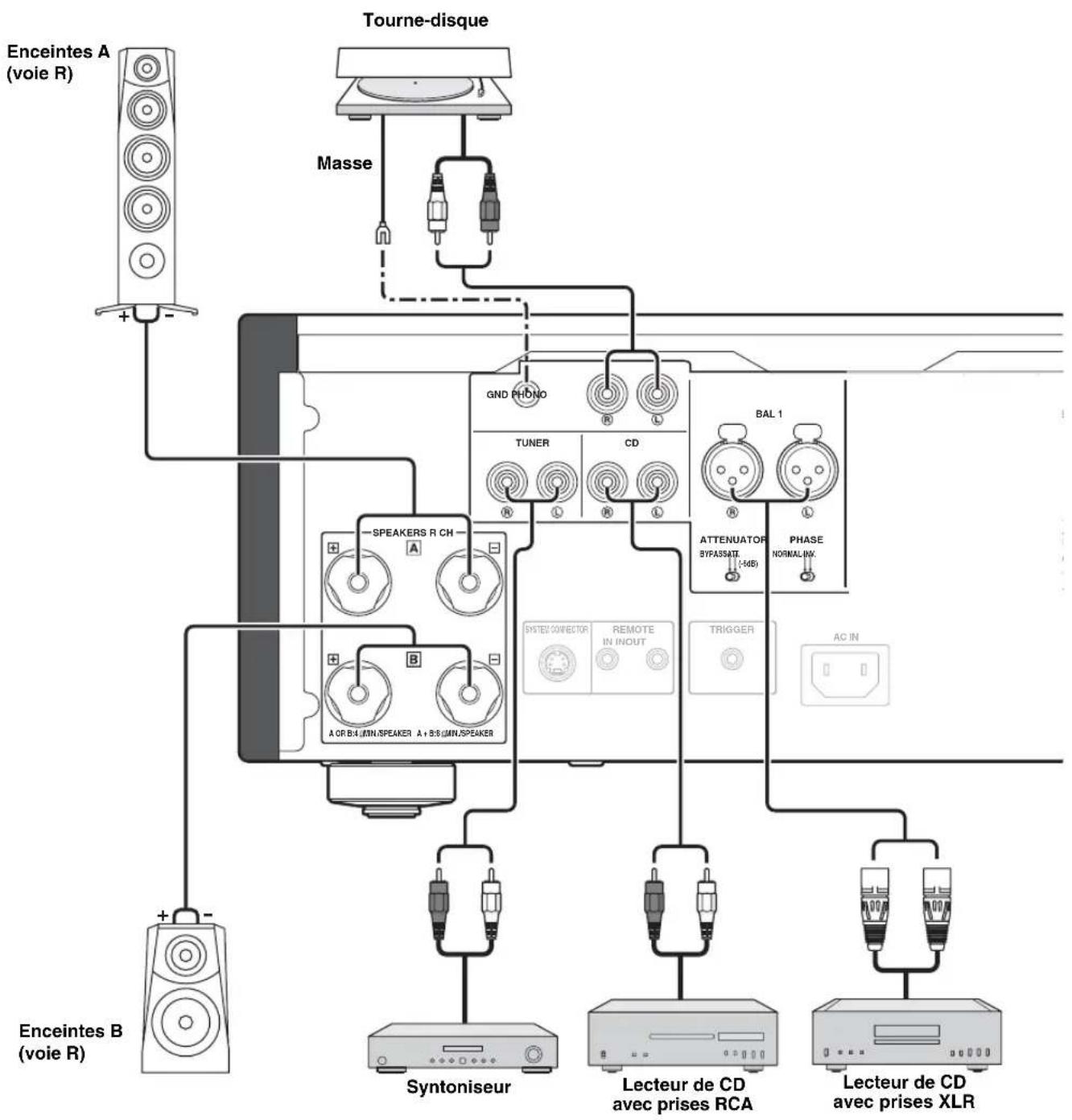
flowchart
graph TD
    A["Tourne-disque"] --> B["Masse"]
    B --> C["GND PHONO"]
    C --> D["TUNER"]
    C --> E["CD"]
    C --> F["BAL 1"]
    D --> G["SPEAKERS R CH"]
    E --> H["ATTENUATOR BYPASSAT (-MB)"]
    E --> I["PHASE NORMAL-INV."]
    F --> J["SYSTEL CONNECTOR REMOTE IN INOUT TRIGGER AC IN"]
    G --> K["Syntoniseur"]
    H --> L["Lecteur de CD avec prises RCA"]
    I --> M["Lecteur de CD avec prises XLR"]
    N["Enceintes A (voie R)"] --> O["+"]
    P["Enceintes B (voie R)"] --> Q["+"]
    style A fill:#f9f,stroke:#333
    style B fill:#ccf,stroke:#333
    style C fill:#cfc,stroke:#333
    style D fill:#fcc,stroke:#333
    style E fill:#cff,stroke:#333
    style F fill:#ffc,stroke:#333
    style G fill:#fcc,stroke:#333
    style H fill:#fcc,stroke:#333
    style I fill:#fcc,stroke:#333
    style J fill:#fcc,stroke:#333
    style K fill:#fcc,stroke:#333
    style L fill:#fcc,stroke:#333
    style M fill:#fcc,stroke:#333
    style N fill:#fff,stroke:#333
    style O fill:#fff,stroke:#333
    style P fill:#fff,stroke:#333
    style Q fill:#fff,stroke:#333
Avertissement
natural_image
Mechanical assembly diagram showing a bolt being inserted into a housing (no text or symbols present)
NORMAL (broche 2 CHAUD)
Connecteurs XLR :
natural_image
Close-up of electronic components including capacitors, resistors, and a battery pack (no visible text or symbols)
SECTION D'ALIMENTATION
(1 kHz, DHT 10%, 8 Ω) 130 W + 130 W
(1 kHz, DHT 10%, 4 Ω) 210 W + 210 W
(1 kHz, DHT 10%, 8 Ω) 120 W + 120 W
(1 kHz, DHT 10%, 4 Ω) 190 W + 190 W
- Bande passante
Renforcement/Coupure (50 Hz) ±9 dB
Renforcement/Coupure (20 kHz) ±9 dB
line
| Frequency (Hz) | Response (dB) |
| -------------- | ------------- |
| 10 | 0 |
| 20 | 0 |
| 30 | 0 |
| 50 | 0 |
| 100 | 0 |
| 200 | 0 |
| 300 | 0 |
| 500 | 0 |
| 1k | 0 |
| 2k | 0 |
| 3k | 0 |
| 5k | 0 |
| 10k | 0 |
| 20k | 0 |
| 30k | 0 |
| 50k | 0 |
| 100k | 0 |
| 2k | 0 |
| 3k | 0 |
| 5k | 0 |
| 10k | 0 |
| 2k | 0 |
| 3k | 0 |
| 5k | 0 |
| 10k | 0 |
| 2k | 0 |
| 3k | 0 |
| 5k | 0 |
| 10k | 0 |
| 2k | 0 |
| 5k | 0 |
| 10k | 0 |
| 2k | 0 |
| 5k | 0 |
| 10k | 0 |
| 2k | 0 |
| 5k | 0 |
| 10k | 0 |
| 2k | 0 |
■Distorsion harmonique totale
line
| Output (W) | 1kHz | 20Hz | 20kHz |
| ---------- | ------- | ------- | ------- |
| 1 | 0.018 | 0.022 | 0.023 |
| 5 | 0.010 | 0.011 | 0.012 |
| 10 | 0.009 | 0.010 | 0.011 |
| 20 | 0.008 | 0.009 | 0.010 |
| 50 | 0.007 | 0.008 | 0.009 |
| 100 | 0.006 | 0.007 | 0.008 |
■Distorsion harmonique totale (PHONO)

line
| Generator Level (Vrms) | 20Hz | 1kHz | 20kHz |
| ---------------------- | ---- | ---- | ----- |
| 100μ | 0.05 | 0.03 | 0.02 |
| 200μ | 0.03 | 0.02 | 0.01 |
| 500μ | 0.02 | 0.01 | 0.005 |
| 1m | 0.01 | 0.005| 0.002 |
| 2m | 0.005| 0.002| 0.001 |
| 5m | 0.002| 0.001| 0.0005|
| 10m | 0.001| 0.0005| 0.0002|
| 20m | 0.0005| 0.0002| 0.0001|