CMP 550 USB - Cd player/recorder Trevi - Free user manual and instructions
Find the device manual for free CMP 550 USB Trevi in PDF.



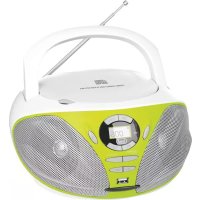
| Product type | CD/MP3/USB player/recorder with FM stereo radio |
| Brand | Trevi |
| Model | CMP 550 USB |
| Dimensions (L x H x D) | 232 x 227 x 112.5 mm |
| Power supply | AC mains adapter 100-240 V~50/60 Hz, DC output 9V/1A or 6 C-type batteries (UM-2, not included) |
| Power consumption | 9 W operating, < 0.5 W standby |
| Output power | 2 x 1.2 W |
| Radio bands | FM 87.5 - 108 MHz |
| CD playback type | Semiconductor laser, frequency response 90 Hz - 14 kHz |
| Supported formats | Audio CD, MP3, USB key (FAT32) |
| Playback functions | Play, pause, stop, track search (next/previous), skip 10 tracks, repeat (1 or all), random playback, intro, programming (up to 20 tracks CD, 99 tracks MP3/USB), single folder playback |
| Auxiliary inputs | AUX IN socket (3.5 mm jack) |
| Headphone output | Jack socket (Phone Jack) |
| Antenna | FM telescopic antenna |
| Handle | Integrated fold-down handle |
| Display | LCD screen with function indicators |
| Care and cleaning | Use a soft, slightly damp cloth. Avoid solvents and abrasives. |
| Safety | Do not open the device (high voltage). Avoid moisture, dust, high heat and vibrations. Unplug in case of liquid ingress. Do not obstruct ventilation slots. |
Frequently Asked Questions - CMP 550 USB Trevi
User questions about CMP 550 USB Trevi
0 question about this device. Answer the ones you know or ask your own.
Ask a new question about this device
Download the instructions for your Cd player/recorder in PDF format for free! Find your manual CMP 550 USB - Trevi and take your electronic device back in hand. On this page are published all the documents necessary for the use of your device. CMP 550 USB by Trevi.
USER MANUAL CMP 550 USB Trevi
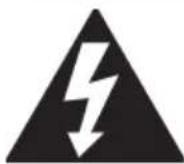
This symbol is on the back of the unit and in this manual, its function is to signal the presence, inside the apparatus, components operating at high voltage, do not open it: you will avoid this way the risk of electric shock.

ATTENTION
This symbol is on the back of the unit and in this manual, its function is to indicate the presence of important instructions for using these devices with ease. Read them carefully before using the appliance.
LASER
This apparatus consists of a reading system using a laser beam. Although the laser is low power and containing safety device prevents operation with the lid open, adhere to the following warnings: do not crowd the eye laser lens on the open unit, risk of injury to the retina. not disassemble or modify the laser unit, absorption of radiation hazard.
NOTES OF USE
This device is a precision electronic instrument, avoid using it in the following cases:
- In near sources of heat such as radiators and heaters.
- In places where there is high humidity such as bathrooms, swimming pools, etc. ...
In very dusty places. - In places subject to strong vibrations.
Position the unit so that its sides so that there is sufficient air can circulate freely forever (at least 5 cm) space.
Do not obstruct the ventilation holes.
If liquid enters the device, immediately disconnect the power plug and take the appliance to a service center nearest TREVI.
Always check before operating the appliance, the power cables and connection are properly installed.
CARE AND MAINTENANCE
For cleaning, we recommend using a soft, damp cloth. Avoid solvents and abrasives.
IMPORTANT
Any MP3 player is not working properly, this is due to the incompatibility for the processor.
Good manufacturing this device ensures long perfect operation. If still any problem occurs, it will be appropriate to consult the authorized Service Centre. When the AC/DC adapter is used as the disconnect device, the disconnect device shall remain readily operable. To be completely disconnected the power input, the AC/DC adapter shall be disconnected from the mains completely.
The marking plate is located at the bottom of the apparatus.
TREVI follows a policy of continuous research and development. Therefore products may have different characteristics to those described.
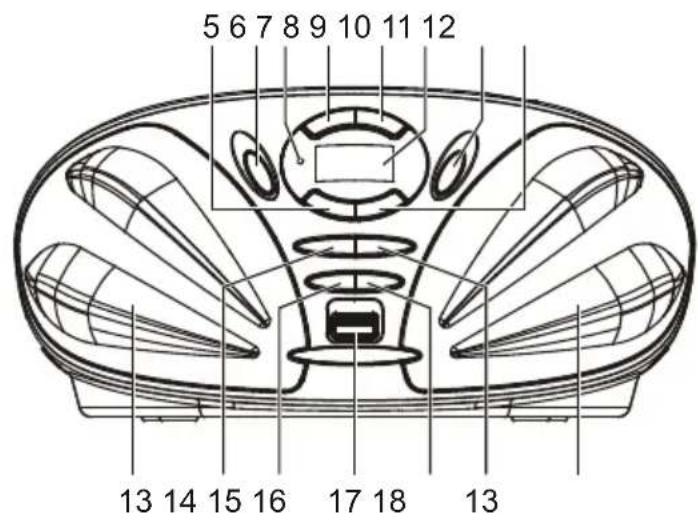
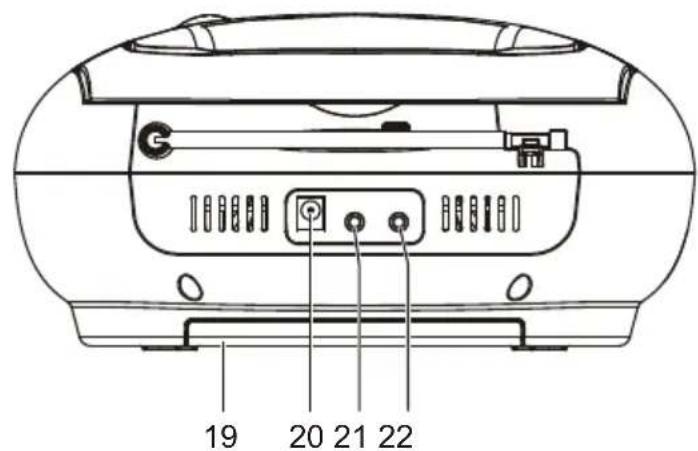
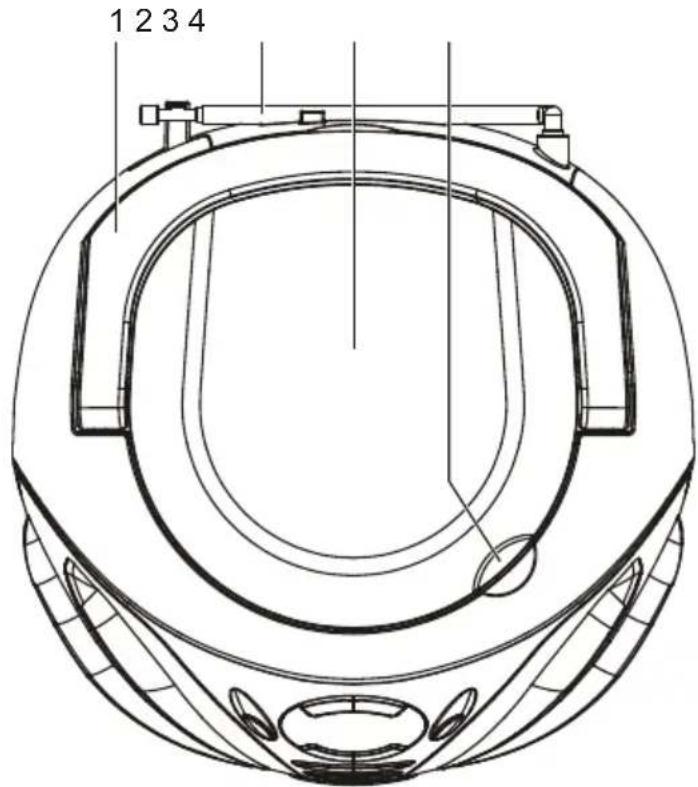
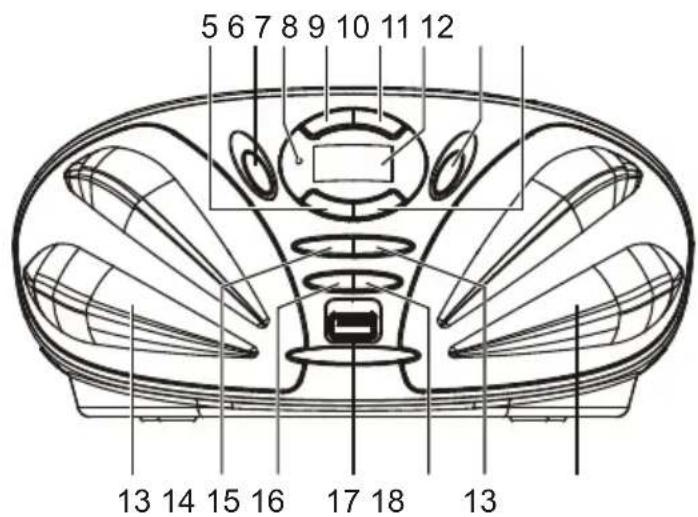
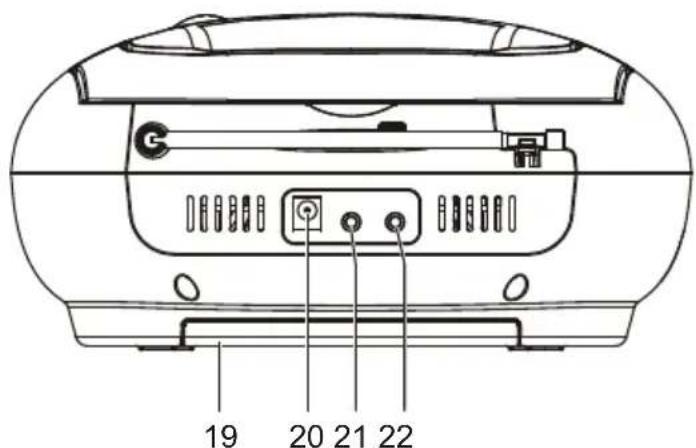
OVERVIEW OF THE PLAYER
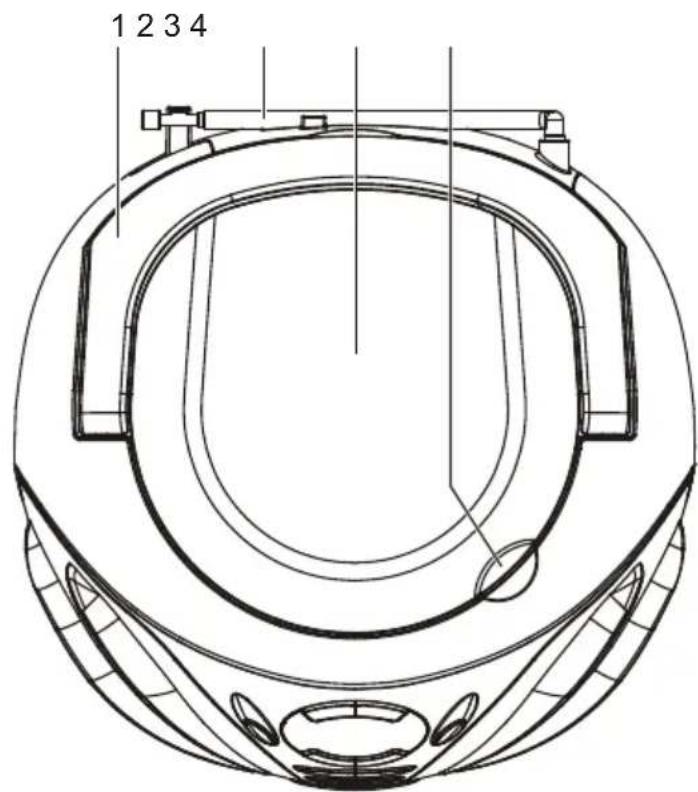
- FOLDING HANDLE
- FM TELESCOPIC ANTENNA
3.CDDOOR - CD DOOR OPEN AREA
- SKIP/SEARCH DOWN BUTTON
- SOURCE BUTTON
- STANDBY INDICATOR
- STOP/CH-B BUTTON
- PLAY/PAUSE/CH+ BUTTON
- LCD DISPLAY
- ON/STANDBY BUTTON
- SKIP/SEARCH UP BUTTON
- SPEAKERS
- MEM/MODE/PROG BUTTON
- VOLUME - BUTTON
- USB PORT
- VOLUME + BUTTON
- FOLDER/10+ BUTTON
- BATTERY COMPARTMENT
- DC IN JACK
- PHONE JACK
- AUX IN JACK
POWER SUPPLY
BATTERY OPERATION
- Remove the battery compartment cover gently.
- Install 6 x 'C' size batteries (UM-2 or equivalent) while observing the correct polarities.
- Replace the battery compartment cover.
NOTE:
- The AC/DC adapter must be detached from the DC IN jack of the player for battery operation.
- Leaking batteries may damage the battery cabinet and the player as a whole, so they should be removed from the cabinet when becoming flat or when the player is not to be played on batteries for some time.
DC INPUT OPERATION
Plug the supplied adapter to the DC IN jack on the unit and the main power.
NOTE: If not any audio signal inputs to the unit in about one hour, the unit will enter to standby mode automatically (except at FM radio mode).
FM RADIO
TUNING THE FM RADIO
- The standby indicator will light once connect the main unit to the main power. Press the ON/STANDBY button to turn the unit on (the standby indicator will be off).
- Press the SOURCE button repeatedly to switch the unit to radio mode if necessary.
- To launch the auto-searching, press and hold the SKIP/SEARCH DOWN button or SKIP/SEARCH UP button several seconds and then release it.
- Press the SKIP/SEARCH DOWN button or SKIP/SEARCH UP button to tune the radio stations manually.
- Adjust the volume level to a comfortable listening level via pressing the VOLUME +/- buttons.
- Press the ON/STANDBY button to turn off the unit.
NOTE:
- The FM telescopic antenna is directional. When you are receiving an FM broadcast, fully extend the telescopic antenna and rotate it for the best reception.
STORING YOUR FAVORITE RADIO STATION
- Tune to your favorite station first; press the MEM/MODE/PROG button for storing the current station until memory cell number flashes on the screen.
- Use the STOP/CH- button or the PLAY/PAUSE/CH+ button to select the corresponding memory cell among P01-P20.
- Confirm your selection by pressing the MEM/MODE/PROG button.
- During radio playback, press the STOP/CH- button or the PLAY/PAUSE/CH+ button repeatedly to recall the preset stations.
HANDLING AND MAINTENANCE OF A DISC
Follow the instructions below to handle and maintain your disc in order that long time and trouble free performance can possibly be obtained:
- Ensure not to caress the rain bow side of the disc; handle the disc by the edge.
- Long time exposure to sunshine, high temperatures and humidity will damage the disc. And keep storage area clean.
- Avoid sticking labels on both sides of a disc. Writing with pointed articles on the disc should be strictly avoided.
- Clean the disc wiping the centre and then working out to the edge with a dry & soft cloth or a disc brush. Avoid any cleansing lotion or chemical eradicator.
- Store them in their cases when they are not to be used.
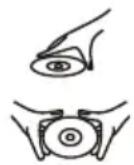
- Open the CD door by the Door open area.
- Load a disc on the disc tray with the label side facing up.
- Close the CD door.
PLAY A DISC (CD/MP3)
- Press the ON/STANDBY button to turn the unit on (the standby indicator will be off).
- Press the SOURCE button repeatedly to switch to CD mode.
- Follow the steps above to load a disc.
- The player begins reading disc immediately.
- When the disc is successfully read, the playback will start from the first track automatically.
- Press the PLAY/PAUSE/CH+ button once to halt music playback, press the button again to resume the normal playback; press the STOP/CH- button to cease music playback.
EXTERNAL MEMORY MEDIA OPERATION (USB)
- Press the ON/STANDBY button to turn the unit on (the standby indicator will be off).
- Insert an USB to the USB port.
- Press the SOURCE button repeatedly to switch to USB mode.
- When the inserted USB is detected and read, the first track will be played automatically.
- Press the PLAY/PAUSE/CH+ button to pause or resume the playback.
- Press the STOP/CH- button to cease the playback.
SKIP TRACKS AND SEARCH FOR A SPECIFIC POINT TO PLAY (CD/MP3/USB)
- Press once the SKIP/SEARCH UP button in music play to skip to the next track; press once the SKIP/SEARCH DOWN button in music play to go back to beginning of the current track, press the button twice continuously to skip to the previous track.
- Press and hold the SKIP/SEARCH UP button or the SKIP/SEARCH DOWN button in music play to search at quick rate for a specific point to play.
- Press the FOLDER/10+ button once in play to skip to the track 10 tracks ahead, twice to skip to the track 20 tracks ahead. You can reach the last track of the disc using this button.
SKIP TO THE PREVIOUS/NEXT FOLDER (MP3/USB)
- During playback, press and hold the FOLDER/10+ button until the folder number flashes on the screen.
- Press the SKIP/SEARCH DOWN button or SKIP/SEARCH UP button to select the folder you want.
- Wait several seconds or press the FOLDER/10+ button to confirm, the playback starts from the selected folder.
REPEAT PLAYBACK (CD/MP3/USB)
During playback, press the MEM/MODE/PROG button to repeat play a single track; press the button twice to repeat play all tracks; press the button three times to enter the introduction play mode; press the button four times to enter the random play mode; press the button five times to exit.
PROGRAMMED PLAY (CD/MP3 DISC/USB)
- In stop mode, press the MEM/MODE/PROG button once, the program's icon shows with a program sequence indication "P01" first, then a track number flickers on the LCD with the program's icon.
- Select the first track to be programmed using the SKIP/SEARCH UP button or the SKIP/SEARCH DOWN button, and then press the MEM/MODE/PROG button again to store and advance to the next programming step (If there are several folders on the MP3 disc or USB, it is necessary to program folders first and then the tracks. The method of the folders programming is the same as the tracks programming.).
- Repeat the above steps to program more tracks. A maximum of 20 tracks for CD and 99 tracks for MP3 disc/USB can be programmed in memory in a preferred order. If the memory is full, the screen will show "FUL" for indicating.
- Press the PLAY/PAUSE/CH+ button to begin programmed play in the preferred order after you are done with programming. The player stops automatically after all programmed tracks are played.
- You may press the STOP/CH- button to terminate programmed playback. In program stop mode, press the PLAY/PAUSE/CH+ button to begin the programmed playback with the programming order identical with the previous one done; press the STOP/CH- button again to clear the programming.
AUX IN
- Connect the AUX IN jack on the unit to an audio source, for example, MP3 player with an audio cable.
- Power on the unit following the corresponding instructions.
- Press the SOURCE button repeatedly to switch to AUX mode.
- Use the native controls on the connected audio device to begin playing music through the connected unit.
STEREOPHONE JACK
A stereo phone jack has been provided on the back side of the player so that you can listen without disturbing others. To use this jack, plug in the headphones/earphones (NOT INCLUDED) and adjust the volume level to a preferred level.
NOTE: When external headphones/earphones are connected, the speakers will be muted.
CAUTION: Listening at high power for a long moment could damage users' ears.
TECHNICAL SPECIFICATIONS
GENERAL
Power Supply: DC 9V/1A with power adapter AC 100-240V~50/60Hz or 6 Battery "C" (UM2) not included
Consumption: 9W
Power consumption in OFF Mode: <0.5 W
Maximum power output: 1.2W x 2
Dimensions: 232 x 227 x 112.5 mm
SECTION CD
Reading system: semiconductor laser
Frequency Response: .90Hz-14kHz
RADIO SECTION
Frequency Bands: FM 87.5-108MHz
COMMANDES
VOLTAGE DANGEREUX
Precautions for correct disposal of the product.
The symbol shown on the equipment indicates that waste must be disposed of in "separate collection" and so the product must not be disposed of together with urban waste.
The user must take the product to special "separate waste collection centres" provided by local government, or deliver it to the retailer against the purchase of a new product.
Separate collection of waste and subsequent treatment, recycling and disposal operations promotes the production of equipment with recycled materials and limits negative effects on the environment and on health caused by improper handling of waste.
Illegal disposal of the product leads to the enforcement of administrative penalties.

WARNING: DO NOT OPEN THE SET. NEITHER CONTROLS OR SPARE PARTS TO BE USED BY THE USER ARE TO BE FOUND INSIDE IT. APPLY TO AUTHISERED TREVI CENTERS FOR SERVICE OPERATIONS.

ATTENTION
RISQUE DE DECHARGES ELECTRIQUES NE PAS EXPOSER A LA PLUIE ET A L'HUMIDITE

ATTENTION: NE PAS OUVIR R L'APPEARL, A 'INTERIEUR IL NYA PAS DE COMMANDES A MANIPULE PAR L'UTILISATEUR OU DE PIECES DE RECHANGES. POUR TOUTES LES OPÉRATIONS DE SERVICE IL FAUT S'ADRESSER A UN SERVICE D'ASSISTANCE Autorisé TREVI.

ACHTUNG
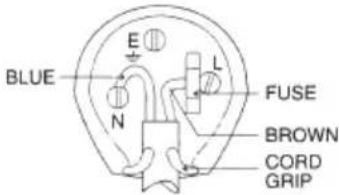
WIRES CONNECTIONS TO A UK THREE-PIN PLUG
The wires in this mains lead are coloured in accordance with the following wiring codes: Blue.. Neutral
Brown: Live
The wires in this mains lead must be connected to the terminals in the plug as follows: Blue wire: N or Black
Brown wire: L or Red
Neither wire is to be connected to the earth (E or W) terminal of three-pin plug. Should the fuse fail in the plug remove the plug form the wall socket and replace the fuse with a 3 Amp. ASTA approved BS 1362 fuse.


- ATTENTION
- LASER
- NOTES OF USE
- CARE AND MAINTENANCE
- IMPORTANT
- OVERVIEW OF THE PLAYER
- POWER SUPPLY
- BATTERY OPERATION
- NOTE:
- DC INPUT OPERATION
- FM RADIO
- TUNING THE FM RADIO
- STORING YOUR FAVORITE RADIO STATION
- HANDLING AND MAINTENANCE OF A DISC
- PLAY A DISC (CD/MP3)
- EXTERNAL MEMORY MEDIA OPERATION (USB)
- SKIP TRACKS AND SEARCH FOR A SPECIFIC POINT TO PLAY (CD/MP3/USB)
- SKIP TO THE PREVIOUS/NEXT FOLDER (MP3/USB)
- REPEAT PLAYBACK (CD/MP3/USB)
- PROGRAMMED PLAY (CD/MP3 DISC/USB)
- AUX IN
- STEREOPHONE JACK
- TECHNICAL SPECIFICATIONS
- GENERAL
- SECTION CD
- RADIO SECTION
- COMMANDES
- VOLTAGE DANGEREUX
- Precautions for correct disposal of the product.
- ACHTUNG
- WIRES CONNECTIONS TO A UK THREE-PIN PLUG
Brand : Trevi
Model : CMP 550 USB
Category : Cd player/recorder