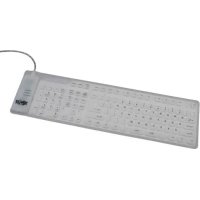
IN3009KB - Keyboard Tripp Lite - Free user manual and instructions
Find the device manual for free IN3009KB Tripp Lite in PDF.


| Product Type | Flexible Keyboard |
| Brand | Tripp Lite |
| Model | IN3009KB |
| Connectivity | USB and PS/2 (via included adapter) |
| Power | USB cable (bus-powered) |
| Moisture Resistance | Yes |
| Acid/Alkali Resistance | Yes |
| Dust and Sand Resistance | Yes |
| Cleaning | Possible with alcohol or disinfectant |
| Storage | Can be rolled for compact transport |
| Installation Safety | Shut down computer before PS/2 connection |
| System Compatibility | Windows 98/ME/2000/XP/Vista |
| Key Type | Membrane |
| Installation | Plug and Play for USB; PS/2 requires restart |
| Package Contents | Keyboard, USB cable, PS/2 adapter |
Frequently Asked Questions - IN3009KB Tripp Lite
User questions about IN3009KB Tripp Lite
0 question about this device. Answer the ones you know or ask your own.
Ask a new question about this device
Download the instructions for your Keyboard in PDF format for free! Find your manual IN3009KB - Tripp Lite and take your electronic device back in hand. On this page are published all the documents necessary for the use of your device. IN3009KB by Tripp Lite.
USER MANUAL IN3009KB Tripp Lite
IN3010KB Installation
It can be used in a damp, acidic or alkaline environment
- It can be cleaned with alcohol or disinfectant
It can be used safely in the presence of dust or sand
It can be rolled up for compact storage while traveling
- It includes a USB wired cable and PS/2 adapter
当 m = 32 且 m 1 时方程有两个实数根;
- Do not use the keyboard on an uneven or unstable surface
. Do not allow oil contents as similar solvents to touch the
- Do not allow oil, acetone or similar solvents to touch the k
Do not fold the keyboard nor crease it when rolling it up.
- Turn off your computer before connecting the keyboard via PS/2
System Requirements
Windows 98/ME/2000/XP/Vista
Available USB or PS/2 port
IN3008KB & IN3009KB Installation
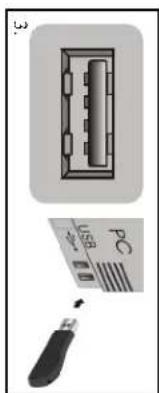
- Plug the keyboard's USB connector into an
available USB port on your computer or USB hub.
- Installation is plug-and-play for Windows
ME/2000/XP/Vista.
- The keyboard should be ready to use.
your computer's operating system, or your operating system.
PS/2 Installation
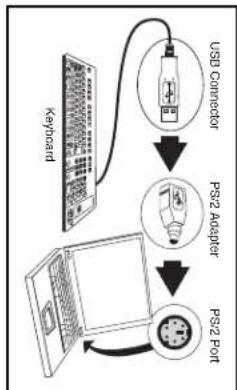
- Shut down your computer.
adapter included with the keyboard.
- Plug the PS/2 adapter into the PS/2 keyboard port
may be marked in purple, with or without a
use, consult your computer's documentation.)
use, consult your computer's documentation.)
ready to use
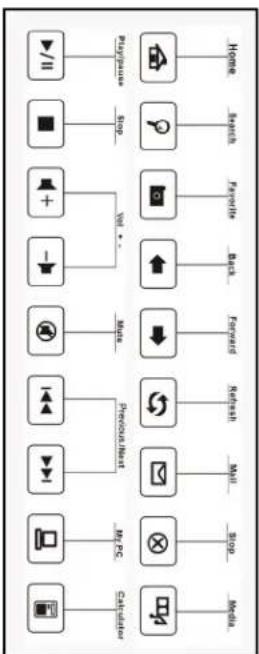
If after extended use the keyboard begins to respond slowly, replace the batteries. Alkaline, Li Ion or rechargeable batteries are recommended replacements and should provide many hours of use. Hot Keys Guide Your IN3010KB Wireless Multimedia Flexible Keyboard comes preset with the following multimedia hot keys:
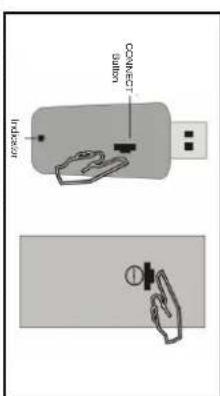
transmitter have lost auto-recognition and must be reconnected. (The receiver and transmitter have auto-recognition capability and have been preset to the same channel during production. Normally you should not need to reset them during installation.) To re-establish the connection, press the connect button on the receiver and the connect button on the bottom of the keyboard at the same time. The receiver's blue LED should flash qui successful. Next, press the Windows key and the keybo
Troubleshooting Your IN3010KB Wireless Multimedia Flexible Keyboard
keyboard is used in and the amount of interference encountered.
distance is approximately 30ft (10m). The operational distance will vary based on the environment the
activating all multimedia functions and completing the installation. NOTE: The maximum transmission
the multimedia keys functional. The driver will automatically start to guide you step-by-step in
5. If you have Windows 98 or 2000 operating system, install and run the CD driver included to make all
the keyboard is operating normally.
- Next, press the Windows Key on the keyboard. If this key is functional, the connection is complete and the keyboard is operating normally.
Next, press the Windows key on the keyboard. If this key is functional, the connection is complete and
and functioning. 3.
flash. This indicates that the receiver is connected
hub. The blue LED indicator on the receiver will
your computer or to a port on an additional USB
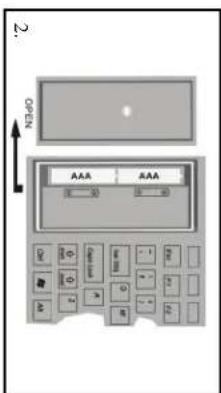
Replace the battery compartment lid.
compartment to check correct battery orientation.
incorrectly—look for guide marks inside the 2.
provided. Be careful not to load the batteries
of the keyboard and insert two AAA batteries
Remove the battery compartment lid on the left side
flexible keyboard. USB receiver. CD with driver
Flexible Keyboard package includes a wireless
Your IN3010KB (2.4 GHz) Wireless Multimedia
BIXIOENI BIX600ENI BIX800ENI:sojepow
oocnqneuee e 'Z/Sd 'Bsn ered
-sə|q!xəlF sope|cəl
Pn Pn Pn Pn Pn Pn Pn Pn Pn Pn Pn Pn Pn Pn Pn Pn Pn Pn Pn Pn Pn Pn Pn Pn Pn Pn Pn Pn Pn Pn Pn Pn Pn Pn Pn Pn Pn Pn Pn Pn Pn Pn Pn Pn Pn Pn Pn Pn Pn Pn Pn
eennnnnne ennnnne
#
\section*{Characteristicas Especiales}
bateries on labequined for leucine or inkerce used

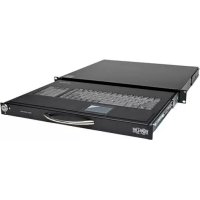
Brand : Tripp Lite
Model : IN3009KB
Category : Keyboard