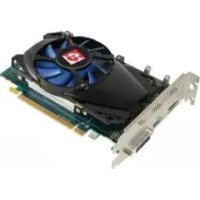
Radeon HD 7750 - Graphic card Diamond Multimedia - Free user manual and instructions
Find the device manual for free Radeon HD 7750 Diamond Multimedia in PDF.


| Product Type | Graphics Card |
| Brand | Diamond Multimedia |
| Model | Radeon HD 7750 |
| GPU | AMD Radeon HD 7750 |
| GPU Clock Speed | 800 MHz |
| Video Memory | 1 GB GDDR5 |
| Memory Interface | 128-bit |
| Memory Clock Speed | 4500 MHz (effective) |
| Display Connectors | 1x HDMI, 1x DisplayPort, 1x DVI-D, 1x VGA |
| Maximum Resolution | 2560 x 1600 |
| Multi-GPU Technology | CrossFireX |
| Power Requirements | 400 W (recommended power supply) |
| Power Connector | None (power via PCIe) |
| Slot | PCI Express x16 3.0 |
| Dimensions | 168 x 111 x 20 mm |
| Weight | 200 g |
| Cooling | Active Fan |
| DirectX | 11.1 |
| OpenGL | 4.2 |
| Operating System | Windows XP, Vista, 7 (32/64-bit) |
| Warranty | 1 year limited (extendable to 5 years upon registration) |
| Included Software | Drivers, Adobe Acrobat Reader |
Frequently Asked Questions - Radeon HD 7750 Diamond Multimedia
User questions about Radeon HD 7750 Diamond Multimedia
0 question about this device. Answer the ones you know or ask your own.
Ask a new question about this device
Download the instructions for your Graphic card in PDF format for free! Find your manual Radeon HD 7750 - Diamond Multimedia and take your electronic device back in hand. On this page are published all the documents necessary for the use of your device. Radeon HD 7750 by Diamond Multimedia.
USER MANUAL Radeon HD 7750 Diamond Multimedia
Safety Notices Page 1
Package Contents Page 1
Before You Begin Page 1
Hardware Pre-Installation Page 2
Hardware Installation Page 2
Monitor Connections Page 3
Television Set Connection Page 4
Driver Installation Page 5
Additional Software Page 7
Troubleshooting Page 8
Technical Support Page 9
- Accessories and Adapters for this product can be purchased online at www.diamondmm.com.
Safety Notices

Pleasemakesuretoreadalltheinstructionsthoroughly beforeattemptingtheinstallationofthisproduct.
-
Do not attempt to install this product during an electrical storm.
-
Make sure your computer system is connected to a properly grounded power outlet.
-
Touching the exposed metal part of your computer case (on the rear side) will discharge static electricity from your body. We recommend you perform this step before touching this product or any part inside your computer and periodically while working inside your PC.

- Internal Boards may contain "Lead" which may cause birth defects and other reproductive harm. Please wash your hands thoroughly after handling these products. This notice is required under California "proposition 65 " and Health & Safety code.

Package Contents
Please verify your package contains the following items.
- Diamond Video Card
- Quick Start Guide
- Warranty Card
- Installation CD
Before You Begin
Please have the following items available prior to the installation
- System / Motherboard manual (or working knowledge)
- A philips head screwdriver
- Can of compressed air (optional, recommended for upgraders)
- Please check the outside of the package to verify that your system meets the minimum system requirements.
Hardware Pre-Installation
- If you have on-board video, please follow the instructions on page 8.
- Install the most recent drivers for your motherboard.
- Shutdown the computer.
- Open the case to your computer.
- Touch a metal part of the computer case to discharge static.
- Remove the existing video card from its slot. (If applicable).
Hardware Installation
- Locate the PCI Express slot on the motherboard.
- Move any cables that may be blocking the slot.
- Install the Diamond video card into the slot.
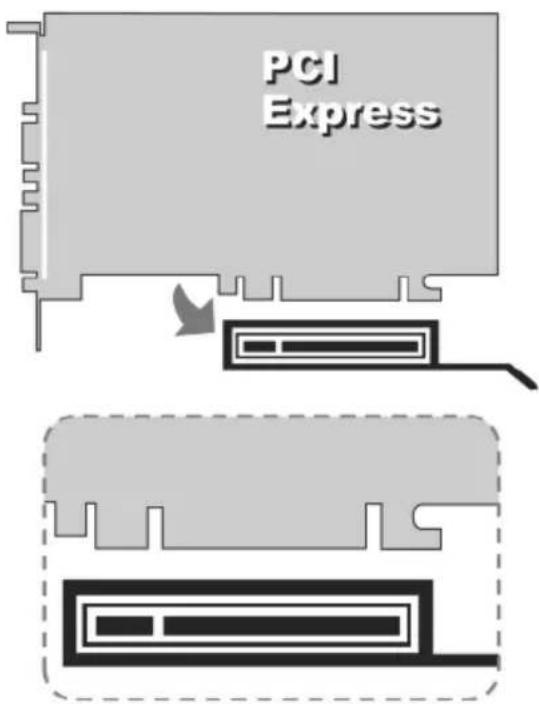
Close up - PCIE Bus
-
Pictures are for reference only and may differ from the product purchased
-
Screw the metal bracket into place.
- Close the computer case.
- Reconnect any loose cables (mouse, keyboard, etc.).
- Close the computer case.
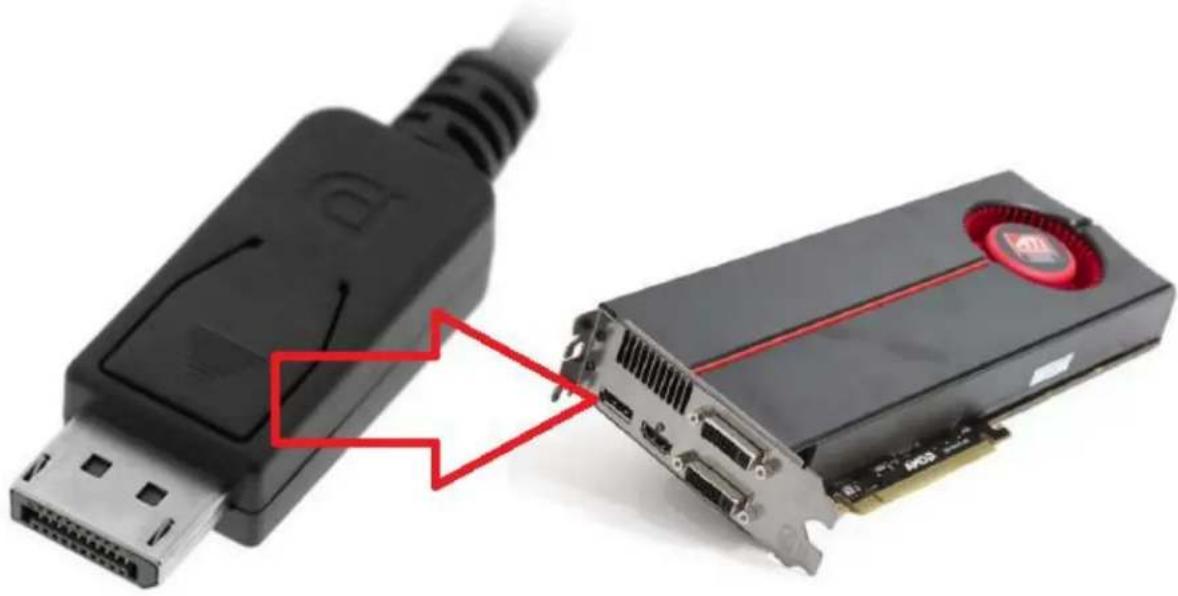
Connecting a Displayport Digital Monitor
Connect a displayport digital monitor by following the step below.
- Connect the DP cable from your monitor to the DP connector on the back of the video card.
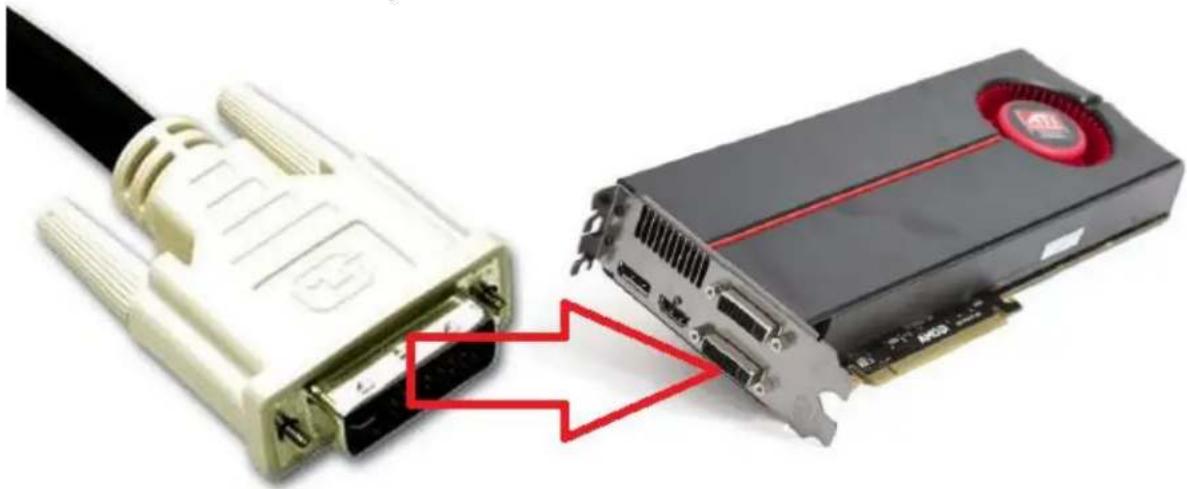
Connecting a DVI-I Compatible Monitor
Connect a DVI-I compatible monitor by following the step below.
- Connect the DVI-I cable from your monitor to the DVI-I connector on the back of the video card.
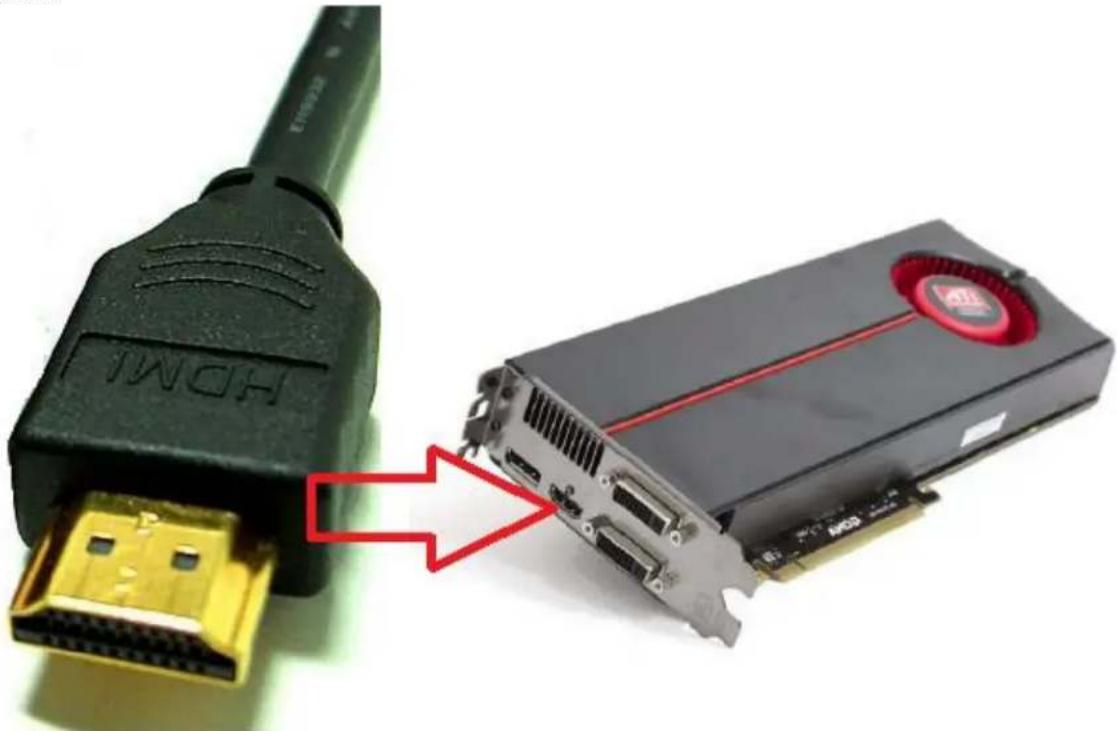
Connecting a High Definition Television Set or Digital LCD with HDMI input
Connect a HDMI compatible HDTV PLASMA/LCD/LED by following the step below.
- Connect the HDMI cable from your Monitor/HDTV to the HDMI connector on the back of the video card.
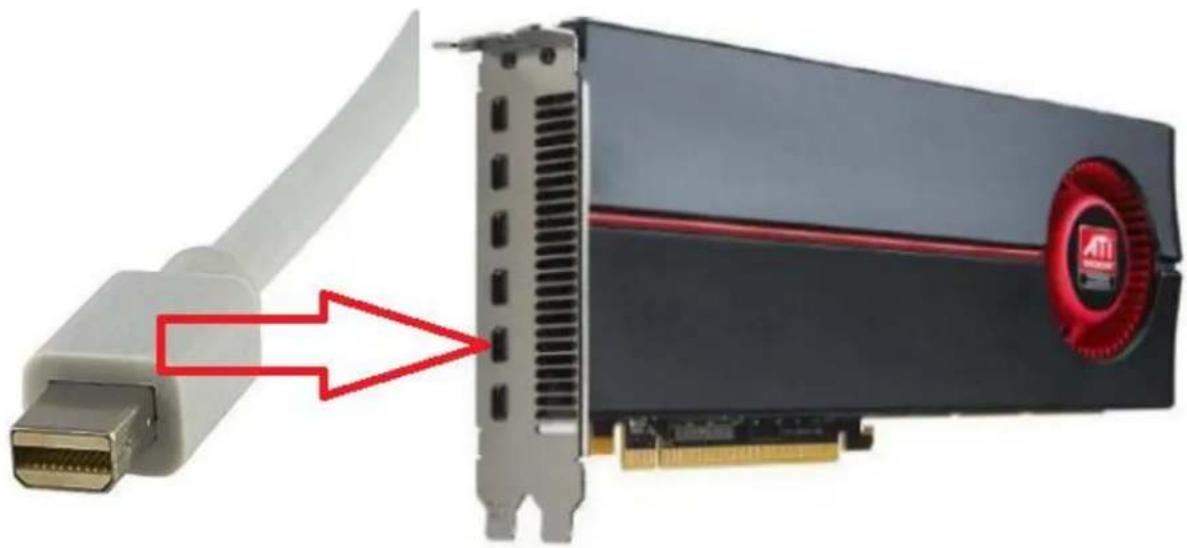
Connecting a Digital LCD with mini DP input
Connect a mini DP compatible Digital Monitor by following the step below.
- Connect the mini DP Cable/Adapter from your Digital Monitor to the mini DP connector on the back of the video card.
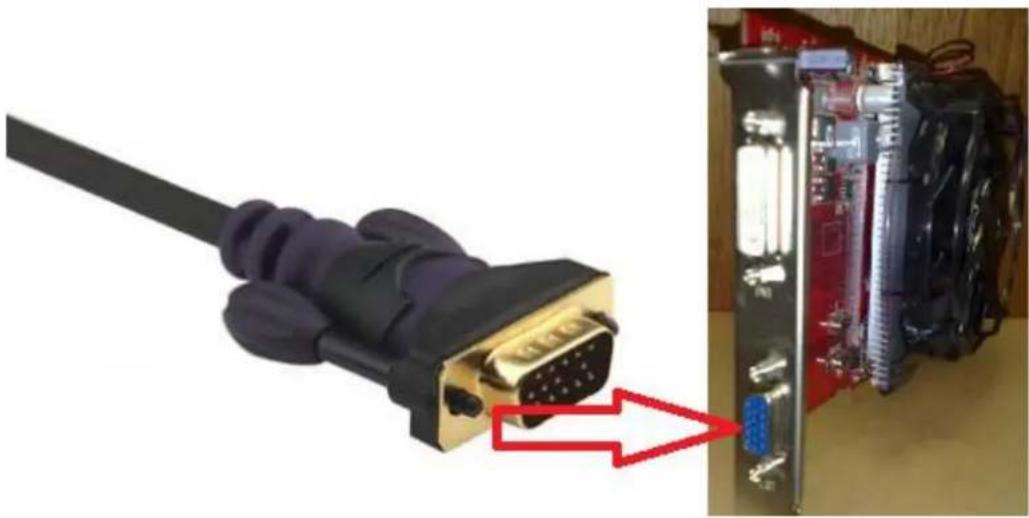
Connecting a VGA compatible Analog Monitor
Connect a VGA compatible Analog Monitor by following the step below.
- Connect the VGA from your Analog Monitor to the VGA connector on the back of the video card.
Diamond Driver Installation for WindowsMCE/Vista/Win 7
Please start your computer and do NOT insert the installation CD until you are prompted to do so.
- The Found New Hardware Wizard may appear upon Windows startup. Click the CANCEL button.
NOTICE: Users with cards which support multiple monitors will need to perform step 1 twice. - Insert the Diamond Installation disc into your CD drive and wait for the menu to appear.
NOTICE 1: If the CD does not start automatically you can double click the My Computer icon on the desktop, double click your CD drive icon (Diamond) and double click the DIAMOND (or possibly DIAMOND.EXE) icon. - Select the Install Video Driver button on the main menu and an installation wizard will appear.
- Click the NEXT button to start the wizard.
- Click YES to the license agreement.
- Click the EXPRESS button.
- You may receive the following notices:
NOTICE 2: Windows XP/MCE/Vista/Win 7 Users - Driverhas notpassedWindowslogotesting. You must click Continue Anyway to install the driver.
NOTICE 3: If you have receive either of the above posted notices, please do not be concerned with the actual text of the message. The message only implies that Microsoft has not personally tested the drivers. Diamond has thoroughly tested the drivers prior to the release of the product.
- If prompted, select the option to restart the computer.
- Click the Finish button.
For advanced setting instructions, please refer to the documentation on the installation CD.
Additional Software
Diamond has additional software on our web site at:
http://dmddownload.com/hotlinks.php.
These software packages are optional to install.
Adobe Acrobat Reader Installation
This program is required to view the electronic user manual include on the installation CD.
Acrobat Reader can be downloaded from our web site at: http://dmddownload.com/hotlinks.php
Troubleshooting
Disable On-board Video
If your system has built in video support (known as on board video), you will need to first have the on board video disabled in Windows before installing the drivers for the Diamond video card..
- Make sure your monitor is still connected to your on board video connector.
- Turn on the power to your computer and wait for the desktop to appear.
- WindowsXP/MCE/Vista/Win7Users Click Start, Run and type: DEVMGMT.MSC and click OK.
- Left click the plus symbol [+] next to Display Adapters
- Double click the onboard display adapter. (Usually this will show up something like Intel, SIS, VIA, etc.)
WindowsXP/MCE/Vista/Win7Users
There is a section at the bottom which reads Device Usage. Click the down arrow and select Do not use this device (Disable) and click OK.
- Click Start, Turn Off Computer, and click Turn Off.
- Disconnect the monitor cable from the onboard video card and connect it to the newly installed Diamond video card.
Technical Support
Diamond Technical Support staff is here to help resolve any issues that you may be experiencing with the installation of the Diamond video card. Prior to contacting technical support please make sure you have the following information available.
- Model #: (Printed on the bar code, located on the box)
- Installation CD Version: (printed on the CD label)
- The version of Windows that your system is running.
- The manufacturer and model # of your computer.
- CPU type and speed (example: Intel Pentium4 2.4GHz)
- A complete description of the problem that you are experiencing including any steps that you have taken to try to resolve the issue.
Technical Support Options Free Telephone Support
818-357-5165
(long distance rates may apply)
Mon - Fri, 8 - 4:30 PST
http://www.diamondmm.com
Support Technique Page 9
Notice de Sécurité
Diamond Multimedia Product Warranty
Diamond Multimedia Warranty
All Diamond Multimedia products are guaranteed to come with a standard one year limited warranty. The warranty is extended only to the original buyer and is not transferable. Some Diamond Multimedia products have an optional extended limited warranty with registration. It is recommended that you keep your receipt so Diamond Multimedia can verify the purchase date of the product and confirm your warranty.
Warranty Length
All Diamond Multimedia Products come with a standard one year limited warranty.
All Diamond Multimedia Graphics Cards purchased ON or AFTER May 1st, 2011 and registered within 30 days from the original date of purchase will have a FIVE (5) YEAR LIMITED WARRANTY. ALL Diamond MULTIMEDIA GRAPHICS CARDS NOT REGISTERERED WITHIN 30 DAYS FROM THE ORIGINAL DATE OF PURCHASE WILL ONLY QUALIFY FOR THE ORIGINAL ONE YEAR WARRANTY. Previous Diamond Multimedia Graphics Cards purchased AFTER June 1st, 2009 and BEFORE May 1st, 2011 and registered within the first 30 days of purchase will still have a TWO (2) YEAR LIMITED WARRANTY.
PRODUCT REGISTRATION
Conditions for the limited five (5) year warranty and limited two (2) year warranty are the same as the one year standard limited warranty.
Warranty Terms
Product Condition:
- Removal and or Defacing of Serial/Part number sticker(s) on ANY Diamond Multimedia products WILL void ALL warranties.
- All products must be returned in the originally sold condition. Products received by Diamond Multimedia for replacement that include 3rd-party attachments will be returned to the address on the package.
- All products must return in their original packaging with all original components.
-
There must be no physical damage to any component including damage that is caused by:
-
inadequate or improper repairs carried out by any person or entity which is not authorized by the manufacturer to perform warranty services on its behalf; negligence, accidents, modifications, defective installation or misuse and use of inappropriate spare parts;
-
fire, immersion in liquid, lightning, earthquake, inadequate ventilation, Acts of God, incorrect application of main voltage howsoever arising, or any other cause beyond the control of Diamond Multimedia;
any other goods which can be used with the product, but are not the product itself;
- consumable or wearing items requiring replacement as part of normal service, including (but not limited to) dry cells and rechargeable batteries.
- The warranty will NOT apply to products used for nuclear related, weapons related, medical, or life saving devices.
- Diamond Multimedia makes no warranty or representation that:
the operation of the product will be uninterrupted or error free; - defects in the product will be corrected;
- that the product will meet customer's requirements or work in combination with any hardware or software provided by third parties.
- Diamond does not warranty non Diamond merchandise obtained for promotions and giveaway
Average shipping times range from 5 to 10 days, depending on actual shipment destination. Shipments made outside the US may take longer to deliver.
Diamond Multimedia reserves the right to claim for shipping fees along with service charges for any product that is returned incomplete or not under warranty.
TO THE FULLEST EXTENT ALLOWED BY LAW, THE WARRANTYES, REMEDIES AND LIMITATIONS CONTAINED HEREIN ARE EXCLUSIVE AND ARE IN LIEU OF ALL OTHER WARRANTYES, TERMS OR CONDITIONS, EXPRESS OR IMPLIED, EITHER IN FACT OR BY OPERATION OF LAW, STATUTORY OR OTHERWISE, INCLUDING WITHOUT LIMITATION, WARRANTYES, TERMS OR CONDITIONS OF MERCHANTABILITY, FITNESS FOR A PARTICULAR PURPOSE, QUALITY, CORRESPONDENCE WITH DESCRIPTION AND NON-INFRINGEMENT, ALL OF WHICH ARE EXPRESSLY DISCLAIMED.
TO THE FULLEST EXTENT ALLOWED BY LAW, DIAMOND ALSO EXCULES FOR ITSELF AND ITS SUPPLIERS ANY LIABILITY, WHETHER BASED IN CONTRACT OR TORT (INCLUDING NEGLIGENCE), FOR INCIDENTAL, CONSEQUENTIAL, INDIRECT, SPECIAL OR PUNITIVE DAMAGES OF ANY KIND, OR FOR LOSS OF REVENUE OR PROFITS, LOSS OF BUSINESS, LOSS OF INFORMATION OR DATA, OR OTHER FINANCIAL LOSS ARISING OUT OF OR IN CONNECTION WITH THE SALE, INSTALLATION, MAINTENANCE, USE, PERFORMANCE, FAILURE, OR INTERRUPTION OF ITS PRODUCTS, EVEN IF DIAMOND, ITS SUPPLIERS OR ITS RESELLER HAS BEEN ADVISED OF THE POSSIBILITY OF SUCH DAMAGES. DIAMOND'S SOLE LIABILITY WITH RESPECT TO ITS PRODUCT IS LIMITED TO REPAIR OR REPLACEMENT OF THE PRODUCT, AT DIAMOND 'S OPTION. THIS DISCLAIMER OF LIABILITY FOR DAMAGES WILL NOT BE AFFECTED IF ANY REMEDY PROVIDED HEREIN SHALL FAIL FOR ESSENTIAL PURPOSE.
DISCLAIMER: Some jurisdictions may not allow the exclusion or limitation of incidental or
consequential damages for products supplied to consumers, or the limitation of liability for personal injury, so the foregoing limitations and exclusions may not apply or may be limited in their application to you. When implied warranties are not allowed to be excluded in their entirety, they will be limited to the duration of the applicable written warranty. This warranty gives you specific legal rights that may vary depending on the law of the applicable jurisdiction.
OBTAINING WARRANTY SERVICE: Please review the "help" resources referred to in your products accompanying documentation before seeking warranty service. If the product is still not functioning properly after making use of these resources, please access the support page at
TO THE FULLEST EXTENT ALLOWED BY LAW, THE WARRANTYES, REMEDIES AND LIMITATIONS CONTAINED HEREIN ARE EXCLUSIVE AND ARE IN LIEU OF ALL OTHER WARRANTYES, TERMS OR CONDITIONS, EXPRESS OR IMPLIED, EITHER IN FACT OR BY OPERATION OF LAW, STATUTORY OR OTHERWISE, INCLUDING WITHOUT LIMITATION, WARRANTYES, TERMS OR CONDITIONS OF MERCHANTABILITY, FITNESS FOR A PARTICULAR PURPOSE, QUALITY, CORRESPONDENCE WITH DESCRIPTION AND NON-INFRINGEMENT, ALL OF WHICH ARE EXPRESSLY DISCLAIMED.
TO THE FULLEST EXTENT ALLOWED BY LAW, DIAMOND ALSO EXCUSES FOR ITSELF AND ITS SUPPLIERS ANY LIABILITY, WHETHER BASED IN CONTRACT OR TORT (INCLUDING NEGLIGENCE), FOR INCIDENTAL, CONSEQUENTIAL, INDIRECT, SPECIAL OR PUNITIVE DAMAGES OF ANY KIND, OR FOR LOSS OF REVENUE OR PROFITS, LOSS OF BUSINESS, LOSS OF INFORMATION OR DATA, OR OTHER FINANCIAL LOSS ARISING OUT OF OR IN CONNECTION WITH THE SALE, INSTALLATION, MAINTENANCE, USE, PERFORMANCE, FAILURE, OR INTERRUPTION OF ITS PRODUCTS, EVEN IF DIAMOND, ITS SUPPLIERS OR ITS RESELLER HAS BEEN ADVISED OF THE POSSIBILITY OF SUCH DAMAGES. DIAMOND'S SOLE LIABILITY WITH RESPECT TO ITS PRODUCT IS LIMITED TO REPAIR OR REPLACEMENT OF THE PRODUCT, AT DIAMOND 'S OPTION. THIS DISCLAIMER OF LIABILITY FOR DAMAGES WILL NOT BE AFFECTED IF ANY REMEDY PROVIDED HEREIN SHALL FAIL FOR ESSENTIAL PURPOSE.
Replacement of Product:
- All Diamond Multimedia products must be sent in for RMA.
Diamond Multimedia REQUIREs the original receipt or invoice of purchase as a copy of proof of the date of purchase. - The warranty does not transfer to third party products which Diamond Multimedia distributes AS IS unless otherwise specified. Third party products may be warranted by the third party.
- Replacement of Diamond Multimedia RMA will follow the original products warranty based on the original date of purchase.
-
Diamond Multimedia will use new or refurbished parts in performing warranty repairs and in building replacement systems.
-
When a product or part is replaced or exchanged, that item becomes the customer's property and the replaced or exchanged item becomes Diamond Multimedia's property. When a refund or replacement product is given, the defective product becomes Diamond Multimedia's property.
DURING THE DURATION OF THE LIMITED WARRANTY PERIOD, IT IS AT THE SOLE DISCRETION OF DIAMOND MULTIMEDIA TO REPAIR OR REPLACE ANY DEFECTIVE COMPONENTS THAT DIAMOND MULTIMEDIA AGREES TO BE UNDER THE CONDITIONS OF THE WARRANTY.
IF AN RMA PRODUCT IS NOT REPAIRABLE AND DETERMINED TO STILL BE UNDER WARRANTY AS STATED ABOVE BUT IS NO LONGER MANUFACTURED BY DIAMOND MULTIMEDIA (END OF LIFE), DIAMOND MULTIMEDIA WILL GIVE A CREDIT OFFER FOR AN UPGRADE ON NEWER PRODUCTS. CREDIT AMOUNT IS DETERMINED BY DIAMOND MULTIMEDIA'S ASSEMENT OF THE MARKET VALUE OF THE PRODUCT OF WHEN THE RMA IS ISSUED.
SHIPPING
Starting June 1st 2009 Diamond Multimedia will pay for shipping cost from Diamond Multimedia back to US and Canadian customers provided the product is indeed under warranty and there is no damage caused by improper installation or modification of the merchandise. Customers are responsible for shipping charges to Diamond.
Customers located outside of the United States and Canada or using military addresses (APO,etc) will be required to pay for return shipping.
Diamond Multimedia réserves the right to declare the rights of the service for all products in its entirety.
DANS TOUTE LA MESURE PERMISE PAR LA LOI, LA GARANTIE, LES RÉPARATIONS ET LES LIMITATIONS CONTENUES AUX PRESENTES SONT EXCLUSIFS ET SONT AU LIEU DE TOUTES LES AUTRES GARANTIES, CONDITIONS OU DE CONDITIONS, EXPRESSES OU IMPLICITES, EN FAIT OU PAR LA LOI, STATUTAIRE OU AUTRE, Y COMPRIS, SANS LIMITATION, LES GARANTIES, TERMES OU CONDITIONS DE QUALITE MARCHANDE, D'ADEQUATION À UN USAGE PARTICULIER, QUALITE, CORRESPONDANCE AVEC SA DESCRIPTION ET DE NON-CONTREFACONCE QUI EST EXPRESSEMENT REJETEE.
DANS TOUTE LA MESURE PERMISE PAR LA LOI, DIAMOND EXCLUT ÉGALEMENT POUR ELLE-MÉME ET SES FOURNISSEURS Toute RESPONSABILITÉ, QUELLE SOIT FONDEDÉ CONTRACTUELLE OU DÉLICTUELLE (Y COMPRIS LA NÉGLIGENCE), POUR DES DOMMAGES ACCESSOIRES, CONSECUTIFS, INDIRECTS, PARTICULIERS OU PUNITIFS QUELCONQUE, OU DE LA PERTE DE REVENUS OU DE BENÉFICES, PERTE D'AFFAIRES, PERTE D'INFORMATIONS OU DE DONNÉES, OU Toute AUTRE PERTE FINANCIÈRE DÉCOULANT D'OU EN RELATION AXEC LA
VENTEINSTALLATION, ENTRETIEN, UTILISATION, PERFORMANCE, OMISSION OU INTERRUPTION DE SES PRODUITS, MÉME SI LES DIAMANTS, SES FOURNISSEURS OU SES REVENDEUR A ETÉ AVISE DE LA POSSIBILITÉ DE TELS DOMMAGES. SOLE RESPONSABILITÉ DIAMOND VIS-À-VIS DE SON PRODUIT EST LIMITÉ À LA RÉPARATION OU LE REMPLACEMENT DU PRODUIT, À L'OPTION DE DIAMOND. CE
DÉNI DE RESPONSABILITÉ POUR LES DOMMAGES EN NE SERA PAS AFFECTÉ SI TOUT RECOURS PRÉVU AUX PRESENTES DOIT ÉCHOUER POUR BUT ESSENTIEL.
20740 Plummer St Chatsworth, CA. 91311 www.diamondmm.com