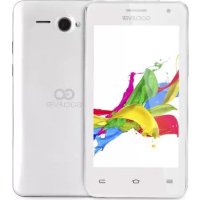
QUANTUM 400 PLUS - Smartphone GOCLEVER - Free user manual and instructions
Find the device manual for free QUANTUM 400 PLUS GOCLEVER in PDF.



| Product type | Smartphone |
| Brand | GoClever |
| Model | Quantum 400 Plus |
| Screen | 4.0 inches (estimated) |
| Screen resolution | 480 x 800 pixels (estimated) |
| Processor | Dual-core 1.2 GHz (estimated) |
| Operating system | Android (version not specified) |
| RAM | 512 MB (estimated) |
| Internal storage | 4 GB (estimated) |
| Rear camera | 5 megapixels (estimated) |
| Front camera | 2 megapixels (estimated) |
| Network | 2G (GSM) and 3G (WCDMA) |
| Connectivity | Wi-Fi 802.11 b/g/n, Bluetooth |
| Battery | Lithium-ion 1500 mAh, rechargeable, standby time ~200h |
| Power supply | Mains charger 5V 1A |
| Dimensions | 125 x 64 x 10 mm (estimated) |
| Weight | 130 g (estimated) |
| Maintenance and cleaning | Clean with a dry soft cloth, do not use abrasive products. |
| Safety | Do not expose to moisture or temperatures above 45°C. |
| Spare parts and repairability | Removable battery, removable SIM card, removable microSD card. |
| General information | Manufacturer warranty 24 months, CE certification, RoHS. |
Frequently Asked Questions - QUANTUM 400 PLUS GOCLEVER
User questions about QUANTUM 400 PLUS GOCLEVER
0 question about this device. Answer the ones you know or ask your own.
Ask a new question about this device
Download the instructions for your Smartphone in PDF format for free! Find your manual QUANTUM 400 PLUS - GOCLEVER and take your electronic device back in hand. On this page are published all the documents necessary for the use of your device. QUANTUM 400 PLUS by GOCLEVER.
USER MANUAL QUANTUM 400 PLUS GOCLEVER
| 2 | English | GB |
| 8 | Polish | PL |
| 16 | Bulgarian BG |
| 22 | Croatian | HR |
| 28 | Czech | CZ |
| 34 | Estonian | EST |
| 40 | French | FR |
| 46 | German | DE |
| 54 | Greek | GR |
| 60 | Hungarian | HU |
| 66 | Italian | IT |
| 72 | Latvian | LV |
| 78 | Lithuanian | LT |
| 84 | Portuguese | PT |
| 90 | Romanian | RO |
| 98 | Serbian | SRB |
| 104 | Slovak | SK |
| 110 | Slovenian | SL |
| 116 | Spanish | ES |
| 122 | Ukrainian | UA |
| 130 | Service center list |
Quick Start Guide - GB
Package contents

- GOCLEVER QUANTUM 400
- AC Adapter
- Earphones
- USB Cable
- Quick Start Guide
- Battery
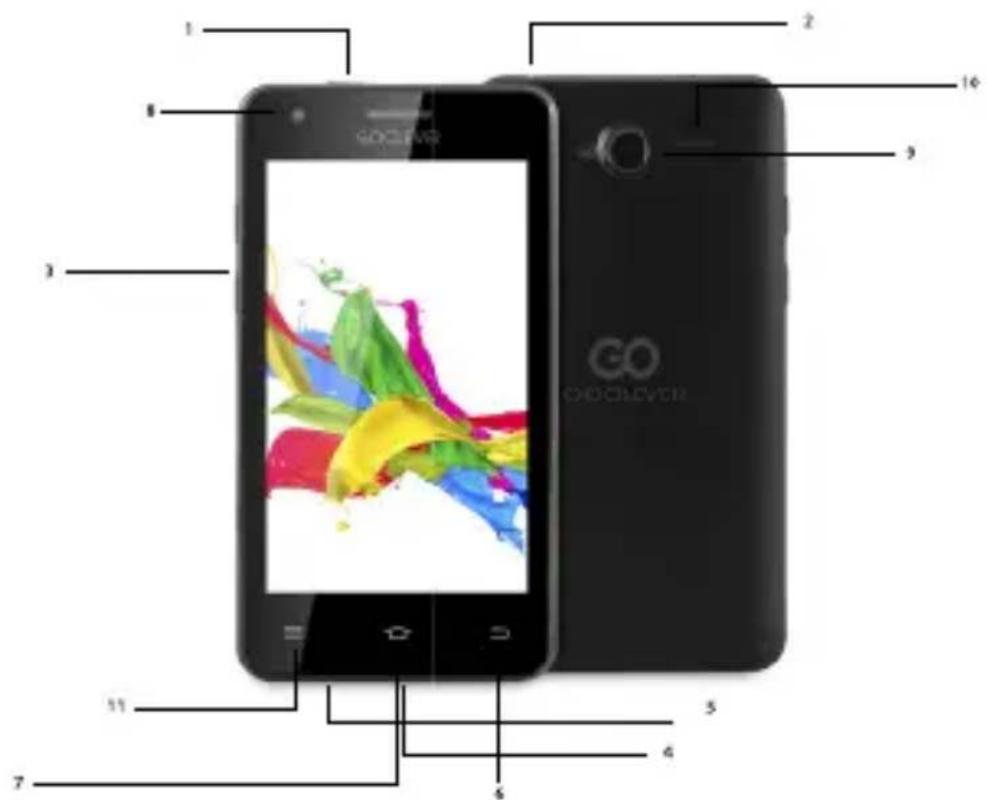
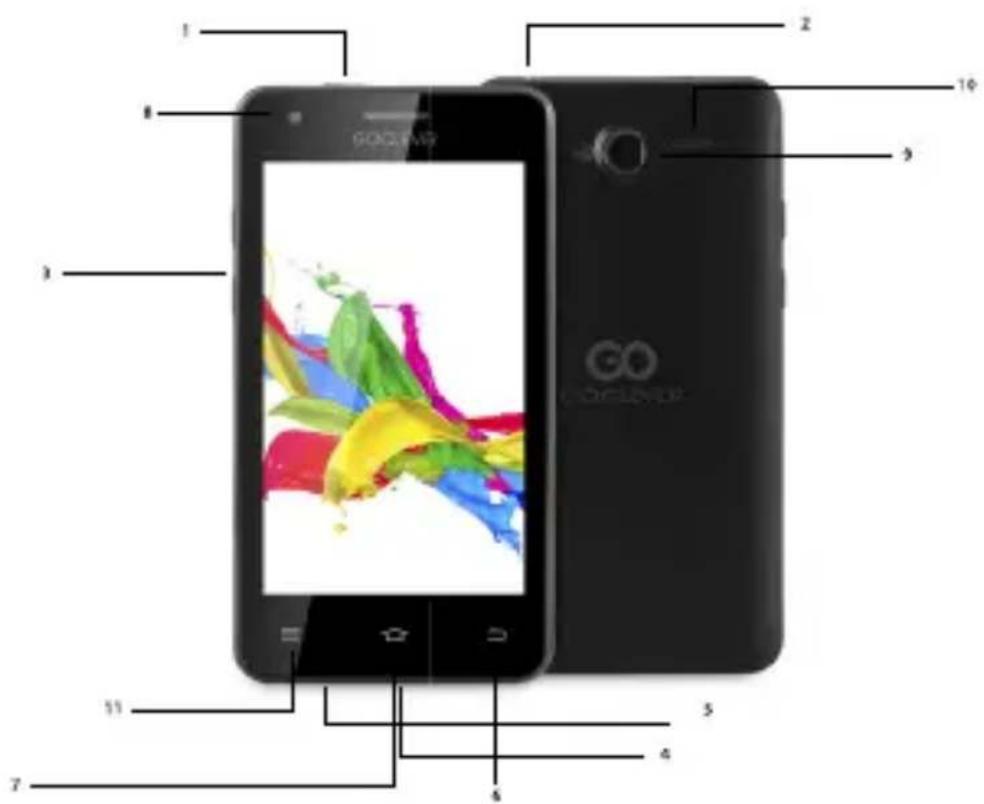
Device Overview
1.Power key: power Your phone on and off. Suspend and activate it.
2. Headset and microphone jack: plug in headphones or a microphone.
3.Volume keys: adjust the volume of the device.
4. Micro USB port: connect optional accessories and a charger.
5.Microphone: allows other callers to hear when You are speaking to them.
6.Back key: step backwards when navigating a menu or a web page.
7. Menu key: access submenus with additional options.
8.Front facing camera: take pictures and shoot videos with the front camera.
9.Rear facing camera: take pictures and shoot videos with the rear camera.
10. External speaker: allows You to hear the caller.
11.Settings.
Quick Start Guide - GB

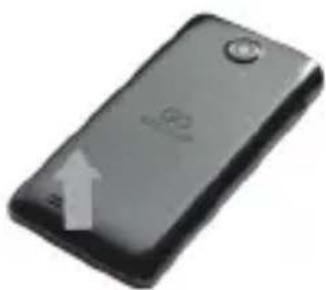
Removing the back cover and battery
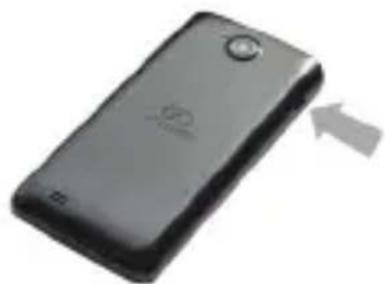
Remove the back cover by inserting a fingernail into the slot on the bottom side of Your phone. Lift the cover up and away from the phone.
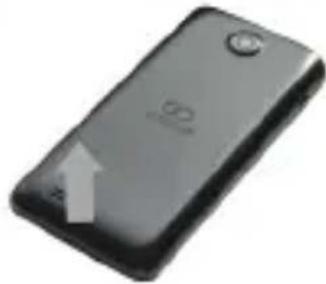
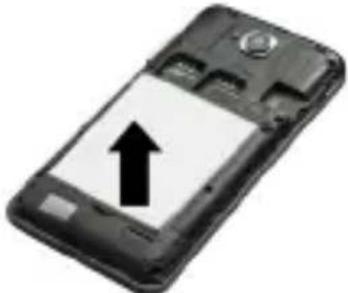
Taking out the battery: hold the side of device tightly with one hand and pull out the battery with the other hand.
Installing SIM and microSD™ cards
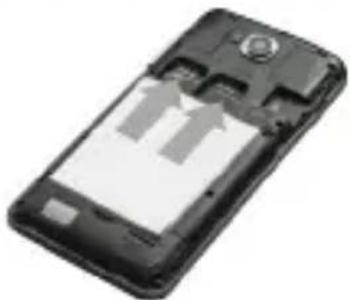

a. SIM cards
The slot on the right is a GSM card slot. The slot on the left is a 3G WCDMA card slot (compatible with a 2G card). Carefully slide the SIM card into the socket, until the card locks into place. Make sure that the card's gold contacts face into the phone. To remove the SIM card carefully pull it out of the slot.
b. MicroSD™ cards
Carefully slide the MicroSD™ card into the socket, until the card locks into place. Make sure that the card's gold contacts face into the phone. To remove the MicroSD™ card carefully pull it out of the slot.
Charging
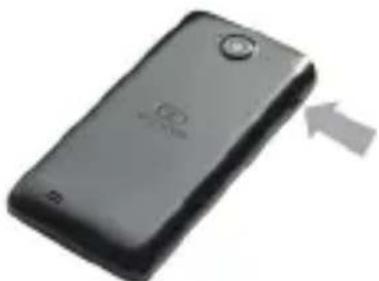
Plug one end of the micro USB cable into the micro USB port on the device and the power adapter into a standard AC power socket. A discharged battery recharges fully in approximately 3.5 hours. Operating the device while charging may extend the charging time.
Quick Start Guide - GB
Power on/Sleep Mode/Power off
Press and hold the Power Button for a few seconds to power on the device. It will automatically enter the Home screen after start-up. While the device is on, press the Power Button once to enter sleep mode and press it again to activate the device. While the device is on, press and hold the Power Button, and then select the Power off/Standby option from the menu to power off the device or to enter sleep mode.

CERTIFICATE OF CONFORMITY C E
GOCLEVER Ltd. hereby declares under our sole responsibility that the product GOCLEVER QUANTUM 400 is in conformity with the essential requirements of the following Directives is declared:
| EMC DIRECTIVE | 2004 / 108 / EC |
| LVD DIRECTIVE | 2006 / 95 / EC |
| R&TTE DIRECTIVE | 1999 / 5 / EC |
The full document with detailed information is available on our website: www.goclever.com. The .pdf file with the CE declaration is placed among the bookmarks of our product catalogue. Please read our Privacy Policy and Cookie Policy at www.goclever.com.


This product has been certified as RoHS Compliant.
MARK OF CONFORMITY - UKRAINE - National mark of conformity confirms that the specified product complies with the requirements of the technical regulations in Ukraine.
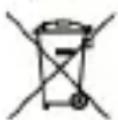
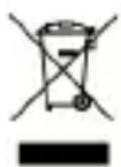
Correct Disposal of This product (Waste Electrical & Electronic Equipment).
(Applicable in the European Union and other European countries with separate collection systems)
This marking indicates that at the end of its working life this product should not be disposed of with other household waste in the EU. To prevent possible harm to the environment or human health from uncontrolled waste disposal, please separate this from other types of wastes and recycle it responsibly to promote the sustainable reuse of material resources. To dispose of your used device, please use the return and collection systems available in your area or contact the retailer where the product was purchased. They can take this product for safe environmental recycling.
Quick Start Guide - GB

Disposal of waste batteries (applicable in the European Union and other European countries with separate collection systems)
The symbol may appear on the battery or on the packaging to indicate that the battery provided with this product shall not be treated as household waste. On certain batteries this symbol might be used in combination with a chemical symbol. The chemical symbols for mercury (Hg) or lead (Pb) are added if the battery contains more than 0.0005% mercury or 0.004% lead. By ensuring these batteries are disposed of correctly, you will help prevent potentially negative consequences for the environment and human health which could otherwise be caused by inappropriate waste handling of the battery. The recycling of the materials will help to conserve natural resources. In case of products that for safety, performance or data integrity reasons require a permanent connection with an incorporated battery, this battery should be replaced by qualified service staff only. To ensure that the battery will be treated properly, hand over the product at end-of-life to the applicable collection point for the recycling of electrical and electronic equipment. Hand the battery over to the applicable collection point for the recycling of waste batteries. For more detailed information about recycling of this product or battery, please contact your local government Office, your household waste disposal service or the shop where you purchased the product.

CONDITIONS OF WI-FI USAGE [ZNAK WIFI]
When using the IEEE 802.11b/g/n Wireless LAN standard, channels 1 to 13 (2.4 GHz...2.4835 GHz) are selectable for both indoor and outdoor use, however with restrictive conditions applying in France, Italy and Norway, as follows: France: When using this product indoors, all channels can be used without restrictions. Outdoors only channels 1 to 6 are allowed. This means that in Peer-to-Peer mode, the WLAN feature can only be used outside if the peer sets up the communication on an authorized channel (i.e., between 1 & 6).
Please make sure the access point is configured properly to a channel ranging from 1 to 6 before setting up the connection.
Italy: Use of the LAN network is governed: Disposal of Old Electrical & Electronic - with respect to private use, by the Legislative Decree of 1.8.2003, no. 259 ("Code of Electronic Communications"). In particular Article 104 indicates when the prior obtainment of a general authorization is required and Art. 105 indicates when free use is permitted - with respect
Quick Start Guide - GB
to the supply to the public of the WLAN access to telecom networks and services, by the Ministerial Decree 28.5.2003, as amended, and Art. 25 (general authorization for electronic communications networks and services) of the Code of electronic communications.
Norway: Use of this equipment is not allowed within 20km of the center of Ny-Alesund, Svalbard.

REGISTER A PRODUCT
Register your GOCLEVER product to get more!
Thank you for choosing GOCLEVER! We want you to enjoy your purchase to the fullest. So that You can enjoy Your purchase to the fullest please register Your device. Registration will take you a few minutes. Go to www.goclever.com and get more! Do not miss the chance to enjoy these benefits:
- 12 months of door-to-door warranty (for selected countries and products),
- Handy tips and rapid technical support,
- Reminders about firmware updates that will keep your product up to date
- Exclusive previews of new products,
- Special offers and promotions - up to 30% discount (for selected countries and products),
- Free map updates (for selected countries and products).
TECHNICAL SUPPORT
WEBSITE: www.goclever.com/support
- USER GUIDES (have a look on online user's manual, download and share with).
- SOFTWARE AND UPDATE MANUALS (be up to date with the latest OS software or use the backup files to solve your software problems).
- FREQUENTLY ASKED QUESTIONS
- SERVICE CENTRE LOCATIONS (we recommend to use GOCLEVER Central Service and local partner services directly than make a complaint or technical inquiries to stores).
- WARRANTY INFORMATION (your GOCLEVER TAB includes 24 month guarantee. The optional for selected countries is 12 month "door2door" guarantee. See our website for details).
- SERVICE PROCEDURE
- RMA APPLICATION (depends on country).
Quick Start Guide - GB

The full manual is available at www.goclever.com
WARRANTY CARD
| DATE OF SALE: : |
| DATE OF MANUFACTURE: : |
| PRODUCT NAME: : |
| SERIAL NUMBER: : |
| DEALER'S NAME / STAMP | SIGNATURE |
Date and customer's signature
Repairs history
| Date | Confirmed defect | Made repairs | Servive sign and stamp |

Quick Start Guide - PL
OGOLNE WARUNKI GWARANCJI GOCLEVER
GO
STRONA: www.goclever.com/support
I3Baxdahe Ha 6aTepya: c eHaTa pbKa XBaHete 3dpaBO CtpaHnHHTe
yactn Ha yCTpOInCTBOTo, a c dpyraT a N3BaTe 6aTepyra, KaTo Ja
IOBdnHrTe IeKo B DoJHaTa Yact.
UCIOBn3A N3P0J3BAHE HAWI-FI
B cnyuaynHa n3noJ3BaHe Ha 6e3xuHa nHTepHeT mpeXa LAN IEEE B cTaHapTa 802.11b/
g/n B Ebpona, kaHalnte ot 1 do 13 (2,4 GHz ... 2,4835 GHz) moKe da ce n3noJ3BaT KaKTo BbTpE B NOMEeHnraTa, TaKa N N3BbH Tax. No-CTporn ca ycNoBnra Ta BbΦpaHcNra, NtAInaN HopBernra.
PENCTPNPAI TE IPODyKTA
Ha register.goclever.com
PernctpaIte npoodykta GOCLEVER, 3a da nojyute nobuee!
Благорадим Ви, чь n36рахтеб GOCLEVER!
3a da 6bdeTe HambloHo DOBOLn OT CBOrTa NOKynka, perntpupaTe CBOr npOdyKT Ha HauNya INTEpHeT caT C HAKoLKO pOcTn CTbKn.
Pernctpaunra Ta 3e Bn 3aeme HkoJko MHyTu.
He nponyckaite wahca da nojyute HOBn noJ3n cnepeRncTpaunra:
- 12-MeceHa rapaHcna door-to-door (3a n36paHn dIbpxAbn npOdyKtN),
- PpaKTHueckn yka3aHnna 6bp3a TexHnuecka nOmoU,
-AkTyaJIeH coΦTyep, - I3BecTna 3a HOBN pOdyKTn,
- CnéuzaJIHn oΦeptn n npOMOuIN - dopn do 30% oTcTBnKa (3a n36paHnDbpxkABn n npOyKTn),
- Be3nlaTHa akTyaHn3aun Ha reorpaΦcKnte Kaptn (3a n36paHn DbpxkABn n npOdyKTn).
TEXHnueCKA NOMOu
CAIIT: www.goclever.com/support
- HAPbUHnK HA NOTPEBNTEJIa (npereJaTe cbKpaTeHaTa nHCTpyKcna 3a 06cnykBaHe, n3TeTJrTe paJIOBe n rN cNoJeYrTe).
- COΦTYEP IN INHCTPYKUIN 3A AKTYALIN3AUINTE (6bJeTe B KpaK c Hau-NOBn coΦTyep, n3noJ3BaIte faiNoBe c pe3epBHO KOJIe, 3a da MoKeTe 6bp30 da peuInTe npo6lem cbc coΦTyepa).
- YECTO 3AДАВAHи BbПОСи (TexHnueckn Bbnpocn n OTROBOpn Ha BCЯKaKBr TeMn).
- MECTOIOLOXEHNH HA CEPBUN3HN IYHKTOBE (npenopbUbaMe OToPn3npanH cepBUN3n Ha GOCLEVER, 3a da yckopm BaWata peKlaMaun).
- INHΦOPMAÇUЯ 3A ΓΑPAHÇΥΑΤA (ocnrgyρaMe rapaçuŋ Ha npoɪn3BODιnteɪŋ ot 24 Meceça. 3a n36paHŋ ἀβρχaВn έpeɪlaγame roɪnɪsHa cnsTeMa „OT BpTa Do BpTa". ΠοɪpɒbHa INΦopMaÇUŋ ξε Hamepɪte Na haɪsɪŋ INθερητ caɪT www).
- CEPBn3Hn ПОUEdYPN (npoTeTe, npeIa npedAte Te yCTpoiCTBOTo Ha cepBn3).
-ΦOPMуляР 3A 3AЯВКА HA PEKЛAMAUИ (3a n36paHn Дьржави).
Quick Start Guide - BG

TAPAHLIOHHA KAPTA
DAHTAHAPNODAK
B4:
DATA HA INPOU3BODCTBO:
HAIMEHOBAHNE HAIPOdyK
TA:
CEPUEH HOM
EP:
aHMeHOBaHHe/NeuT Ha IpoDaBau NaDnC:
Data n noDnnc Ha KIneHtA
UcToPnHaPeMOHTnte
| Даа | ПOTьрдана поврева | Реалзирану ремонти | Пордис и peчат на серваца |

Quick Start Guide - HR
Sadržaj paketa
- Telefon GOCLEVER QUANTUM 400
- Punjač
- Slušalice
- USB kabel
- Brzi vodič
- Akumulator

Pregled
1.Gumb za napajanje: uključivanje i isključivanje opreme. Režim mirovanja, aktiviranje.
2. Priključak za slušalice: povezivanje slušalica.
3.Tipke za ugadanje glasnoce: regulacija nivoa glasnoce.
4.USB port: povezivanje dodatnog pribora.
5.Mikrofon.
6.Gumb za povratak na prethodnu stranicu.
7. Tipka za glavni zaslon, povratak na glavni zaslon.
8.Prednja kamera.
9. Stražnja kamera.
10.Zyučnici
11.Postavke.

Quick Start Guide - HR
Uklanjanje stražnjegPoklopca i vaedenje akumulatora
Uklanjanje stražnjegPoklopca:čvrsto držite s Jednom rukom bok urežaja i podignite stražnjiPoklopac s drugom rukom kodzasuna.
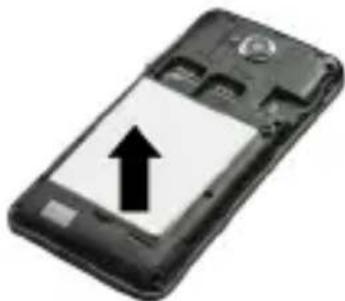
Vädènje akumulatora: Čvrsto držite s jegnom rukom bokove ureëja, te z drugom rukom izvadite akumulator, izdigavši ga u donjem dijelu.
Umetanje SIM kartica i kartice microSD™
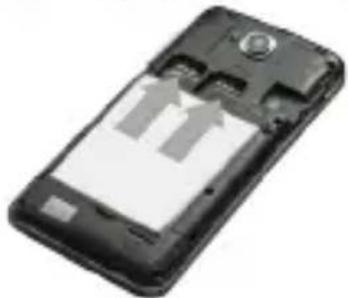
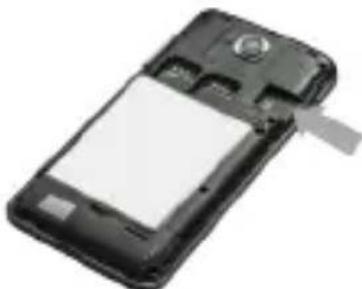
a. Umetanje SIM kartica
Desna uticnica je gnezdo GSM kartice dok je lijevo priključni utor za kartice 3G WCDMA, sukladnih s standardom 2G. Za umetanje kartice lagano je gurnite u odgovarajući utor. Uvjerite se da je prostor sa zlatim kontaktom SIM kartice okrenut prema dolje. Kako biste izvadili karticu, nježno je izvadite iz utora.
b. Umetanje microSD™ kartice
Za umetanje kartice nježno pogurajte je u pravi utor. Uvjerite se da je zlatno kontaktno područje microSD™ kartice okrenuto prema dolje. Kako biste izvadili karticu, nježno je izvadite iz utora.
Punjenje

www.goclever.com/support
- KASUTUSJUHENDID (online ja allalaaditavad).
-TARKVARAUUENDUSTE JUHISED (uuendage tarkvara voi taastage vajadusel tehaseseaded).
www.goclever.com/support
OPOI XPHES TOY WI-FI

WWW oldal: www.goclever.com/support
SITO WEB: http://www.goclever.com/it/it/pages/Service_CenterLocations.html
m = 311 ;
Šim produktam ir piemerojama RoHS direktiva.
KVALITATES ZIME - UKRAINA - Valsts kvalitates zime apliecina, ka produits atbilst Ukrainas tehnisko noteikumu prasibam.
Izstradajuma pareiza likvidešana (attiecas uz nolietotam elektriskam un elektroniskam icercem).
www.goclever.com/support
www.goclever.com/support
PÁGINA: www.goclever.com/support
a inchide sau introduce in stand by Telefonul.
CERTIFICAT DE CONFORMITATE

WEBSITE: www.goclever.com/support
- GHIDURI DE UTILIZARE (consultati manualul de'utilizarare online). - SOFTWARE SI MANUALE DE ACTUALIZARE (fiti la zi cu ultimele versiuni de software sau folositi fisierele de backup pentru a va rezolva problemele de soft).
- INTREBARI FRECVENTE
- LOCATII CENTRE DE SERVICE (va recomandam sa contactati GOCLEVER Central Service si partenerii locali in mod direct decat sa faceti reclamatii si cereri de suport tehnic la magazine).
- INFORMATII GARANTIE (dispositivul dvs GOCLEVER are 24 de luni garantie. Optional pentru tarile selectate puteti benefici de 12 luni de garantie cu colectare si livrare. Verificati website-ul nostru pentru detailii).
- PROCEDURE DE SERVICE
- APLICATIE RMA (in functie de tara).



Quick Start Guide - RO

CERTIFICAT DE GARANTIE
| DATA VANZARII: |
| DATA PRODUCTIEI: |
| NUME PRODUS: |
| NUMAR SERIAL: |
| NUME DEALER /STAMPILA | SEMNATURA |
Sernica EMC 2004/108/EC
Smernica LVD 2006/95/EC
Smernica R&TTE 1999/5/EC
www.goclever.com.com.



Ta izdelek je v skladu z direktivo RoHS.
NOTRANJE: www.goclever.com/support
PÁGINA: www.goclever.com/support
YbIMKHeHHa/ Pexm Chy/BmKHeHHa
HaTnCHiB Ta yTpIMyIe KHONKy XINBLeHHa DeKeJIbKa CeKHy dJa TORO, 0o6 BkJIIOHTn npNCTpi. NoyatKOBn ekpaH 3'ABITbcB BiDpa3y nICJy 3anycky. Pn yBIMKHeHOMy npNCTpoi HATNCiTB KHOKNKY XINBLeHHa ODNH pa3 dJa TORO, 0o6 nepeYtn y PeXm cHy; HATNCiTB ue pa3, 0o6 aKTINByBaTH npNCTpi. Pn yBIMKHeHOMy npNCTpoi HATNCiTB Ta yTpIMyIte KHONky XINBLeHHa, a Notim o6epiTb B MeHIO onciIO BImKHeHHa/Pexm OuiKyBaHHa dJa TORO, 0o6 BIMKHyTN npNCTpi a6o nepeYtn do peXmMy cHy.
CEPTNΦIKAT BIDNOBIDHOCTI CE TOB "GOCLEVER" 3 BnKlHouO BiINOBiJaIbHicTIO 3aYBnE npo Te, 0TOBAP GOCLEVER QUANTUM 400 BiINOBiJaE BCIM BaXJIbUm BImOram Ta NpIoJKeHHaM HAcTyuHnx DInpeKTNB:
EMC DIRECTIVE 2004 / 108 / EC
LVD DIRECTIVE 2006 / 95 / EC
R&TTE DIRECTIVE 1999 / 5 / EC
www.goclever.com. Φайу φорматi .pdf 3 Декларачю BiДноВIDиHOCTi Hopmam EC poЗтaweовань в ЗаКладкх Нашог Каталогуnpodyкii.
O3haioMTecb, 6yNbJaCKa, 3 HaIoIO PoIITkoIO KoHΦiDeHciHocTi Ta PoiITkoIO BnKOpncTaHHa Cookie Ha caTl www.goclever.com. Preberite naS Pravilnik o zasebnosti in Politike datoteke "Cookies" na www.goclever.com.com.



3HAK BIDIOBIDHOCTI - YKPAIHHA
- HaiziohaIbHn 3NaK BiIDNoBIDHOCTi NiITBepdXyE Te, 3a3HaueHn TOBap BiIDNoBIdaE BImoram TexHiuHx perIaMeHTiB YKpaIHn.
YTNJI3AUJI P1C7A KIHUEHH TEPMHY CUYK6N
UcTaHOBKn dIyTnI3auii 3apa3 DoCTynHi dIy ycix KJIeHTIB, De Bn MoXeTe 3aIIuHTN Bawi cTapi npncTrooi GOCLEVER a6o 6ybIki IHIeKTPnuHIO TBAPNI. Ce E BImoroIO BiIDNOBIDHO do EBpOeCbKOro 3aKOHODABCTBa (DInpeKTnBa 2002/96/EC npo BiXODNeEeKTPnuHOrO Ta eJeKTPPOHORO o6laHaHH). KJIeHTMaOTb 3Mory BiIDHeCTN yce cTape eJeKTPnuHne o6laHaHHdo ueHTPiB ny6liuHOI yTnI3auii a60 ToOK npodaxy. DIA toro, 106 HaraDATN Bam npo Heo6xIdHicTB yTnI3auii, yc i eJeKTPnuHITOBAPNI MicTAYb nepeKpecLehe 3o6paKeHHcMIITEBORO KOHTeHepa. DaHni CmMBoI npscTyHl Hi Ha ycIX npncTroox GOCLEVER.
Quick Start Guide - UA

yMOBn KopnctyBaHHa WI-FI
Пд час викорисань стандарту Wireless LAN IEEE 802.11b/g/n, каданыд 1do 13 (2.4 Гц...2.4835 Гц) образовся对于我们 викорисаня впримиени, i надови, поулбалынму mOBamn 3aCTOCyBaHny y Фразцii, Italii ta Hopberiп Настунихчнам: Фразця: Коли Викорисовуete дани писрив римишени, усі кадан можут b Wnkорисовуbatиь 6e3 obmexжь. Hab WidкритOMу nobITpi Do3BOleHo liше kaданыд 1do 6. Ze o3nauae, zuo B peximi "Peer-to-Peer" onця мереки WLAN може викорисовуbatиь лише hab WidкритOMу nobITpi, raKio nip BCTahOBJIIOE 3B'ЯЗOK Ha ABTOPNUOBAHOMy kaHani (To6To mix 1 ta 6). Пepekonайесь, bydлackа, zuo Tocka doctu np Yu HalaSTOBaHa npabINbNo do KaHany BiD 1do 6 nepeДТIM, як BCTAHOBЛOBaTи 3B'ЯЗOK. Itaiia: KopructyaВань мерекею RLAN peryIIOeTbcr: YtNilaazicstapnx eIeKTPuHHx Ta eIeKTPoHHx пистоВ - CTOCOBHO OC6NCTORO KopructyaВань - 3rIDno 3aKOHODaBQuO aKty N#259 BiD 01.08.2003 ("KodekceleKTPoHHO 3B'ЯЗКY"). 3okpemaВ статi 104 za3NaUaetbcr, koI HeobxIDNo nonepedhbo OTPimATn reHepalbHni Do3Bil, aВ ctaTTi 105 3a3NaUaEeTbcr, koI Do3BOJAEtbcr 6e3KoSTOBHe kopructyaВань; - no BiDNoHSEHHO do noCTaunHЯ kopructyaBauam doCTuynу chepez WLAN mepexky Do megex Ta noclyr 3B'ЯЗKY, 3rIDno NocTahOBN MiHicTepcTBaВ peDAKcii BiD 28.05.2003p., ta CT. 25 (reHepalbHni Do3Bil Na WnkorncTahHЯ megex Ta noClyr eIeKTPoHHoro 3B'ЯЗKY) KoideKcy eIeKTPoHHoro 3B'ЯЗKY. Hopberia: Викорисань данoro obladhanня 3a6OpOHeNo B Mekax Tepitopii 20 KM 3 ceHTpomВ HIO-Oleccyn, CBaplb6apd.
3AralbHI NOLOXEHNA MOBN TAPAHTI KOMNHI "GOCLEVER"
- TOB "GOCLEVER", 3a 3naOHTbc8a aDpecoo: M. P03HaHb (60-431), ByI. CyaHOBcBA, 4a, HadaJI - TapaHToDaBeu, rapaHTyE, 3o ToBap iI 6peHdOM GOCLEVER He MicTtBJ KOJDNHX KOHCTpyKTHBHX uMATEpiaJIbHIX DeΦeKTIIB, kI MoIIN 6 HeraTNBHO BnInHyTu Ha NOrO ΦyHKQIOHaJIbHiCTb 3a yMOBN dOTpMaHHraPABIN eKcnnyatauii, Bka3aHnx B IHCTpyKUII KOpNCTyBaA.
2.ДаHA rapaHTiA DiIcHa IInIe Ha TepntOpii YKpaIHn. - Ra paHToDaBeuB 306OB'3yE7bCyaCyHyTn 6yDb-9ki MoxJInBi DeΦeKTH DaHOrO npCTpoB BiINOBiDHO Do NOLoxHeB daHOI rapaHTii Ta 3a yMOBN, 9o rapaHTiHN TaON H3aONBHeH B DeH npID6aHHN PrpCTPOU pa3OM 3 HaDAHIM NiITBepdXeHHM npID6aHHN. HABHicTB 6yDb-9kNX BnPaBLeHb, DOnNCOK a6o 3akpcJeHX cIb Y rapaHTiHOMy TaLoHi, 3pO6JIeHX HeBNOBHOaXeHO Oc6oIO, np3BeDe do No36abLeHHN npab, HadaHnx DaHOIO rapaHTieIO.
- Tpnbalictb rapaHTiHa npncIpoi GOCLEVER cTaHOBntb 24 micai, nouHaOUn3 dHra npodaJy npncIpoo i He nepeBnUoyu 27 micaiB 3 daTN BuroTOBLeHHa, Bka3aHoHa npncIpoi.

Quick Start Guide - UA
www.goclever.com/support
- NOCIBHNI KOPNCTYBAU (neperehnte noci6nK KopnCTyBaHa OHnaH, 3aBaHTaXTe a6o noiitbcnHm);
- IHCTPyKciI 3A6E3NEUHRA TOHOOBHEb (6yDbTe B Kypci OctaHHbOro nporpaMHorO 3a6e3neuHnra 60 BnKOpncToByte pe3epBHi konii faiNIB, 606 BnpiHTn BaWi npo6JIemn 3 nporpaMHm 3a6e3neuHnM;
- NOUINPEH3AINTAHN
- MICU3HAXOJXEHJ CEPBICHIX LHTPIB (Mn paIMo 3BepTaTncb 3i cKapram Ta TexHiHmPiHaHm6e3nocepEnbO do UeHTpaIbHoro cepBichoro ceHTpy GOCLEVER a60 MicueBHX cepBICHNX eHTrip NapThepiB, a He do MaRa3HHIB).
- TAPAHIIHA IHΦOPMAI (Bau npicpti GOCLEVER TAB maé rapaHTIO 24 mica. DoataKBOIO nocnyroIO dna neBnIX kpaIH e o6cnyroByBaHn3 doCTaBKOIO do DBepe (T.3B. "door -to-door service") tepmiHom 12 micaizB. BiDbiAaTe haw Be6-caIT dny OTPMaHHa DeTaJIbHOI iHΦOpMaIi)
- NOPRAOK O6CLyYOBYBAHH
-3ABA RMA (B 3aJIeKHOCTI BiД KpaIHn). - PROCEDURA SERWISOWE (przechytaj zanim oddsz urzadzenie do serwisu).

Quick Start Guide - UA

CERTIFICAT DE GARANTIE
DATA VANZARII:
DATA PRODUCTIEI:
NUME PRODUS:
NUMAR SERIAL:
NUMDEALER/STAMPILA
SEMNATURA
Member of Logo d.o.o, group
Bulevar kraljq Aleksandra 265, 1000
Beograd, Sribija
tel: +381 11 3820-535, +381 11 3820-536,
+381 11 3820-537
servis@etservis.rs
www.etservis.rs
MONTENEGRO
ITS Information Technology Service
Josipa Broza, Zgrada Normala pp4, 81000
Podgorica
fel: +382 (0) 20 512-596
www.itscg.me
BULGARIA
Stemo
bul. Nikola Vaptsarov 55, EXPO 2000
fei. (+359,2)8162300
fax: 8162303
email: main@sf.stemo.bg
www.stemo.bg
HUNGARY
SZELLEMKEP BT
1031 Budapest Vizimolnár koz 5-7.
tel: 06-1-388-2728, 06-1-242-2274
220053, Republic of Belarus, Minsk,
V.Slutskoi 67-2
email: belarus@goglever.com
S.C. Cordon Electronics S.R.L
Str. Dumitru Brumarescu nr. 9A, sector 4,
Bucuresti, Romania
email: office@cordongroup.ro
Service Center KROK-TTC
Rusanivska Naberezhna 8
Ravis (Kyiv)
tel: +380 800504504, 380 (44) 295-79-49,
295-89-19, 380 (63) 232-05-23

GOCLEVER
INFINITE INVENTION