
Quantum 550 - Smartphone GOCLEVER - Free user manual and instructions
Find the device manual for free Quantum 550 GOCLEVER in PDF.


| Product type | Smartphone |
| Brand | GoClever |
| Model | Quantum 550 |
| Dimensions (H x W x D) | 152 x 76 x 8.5 mm |
| Weight | 180 g |
| Screen | 5.5 inches IPS, resolution 720 x 1280 pixels |
| Processor | Quad-core 1.3 GHz |
| RAM | 2 GB |
| Internal storage | 16 GB (expandable via microSD up to 64 GB) |
| Operating system | Android 6.0 Marshmallow |
| Main camera | 8 megapixels with LED flash |
| Front camera | 5 megapixels |
| Battery | Lithium-ion 2500 mAh (removable) |
| Power supply | Charger 5V/1A, micro USB port |
| Connectivity | Wi-Fi 802.11 b/g/n, Bluetooth 4.0, GPS, Dual SIM (Micro-SIM) |
| Network | GSM / 3G / 4G LTE |
| Sensors | Accelerometer, proximity sensor, compass |
| Main functions | Calls, SMS, web browsing, camera, media player, FM radio |
| Maintenance and cleaning | Clean with a soft, dry cloth. Do not use abrasive cleaners. |
| Safety | Screen lock by code, pattern, or fingerprint (not available), do not expose to water or excessive heat |
| Spare parts and repairability | Removable battery, micro USB connector, screen (replacement by a professional) |
| Warranty | 2 years (according to applicable law) |
Frequently Asked Questions - Quantum 550 GOCLEVER
User questions about Quantum 550 GOCLEVER
0 question about this device. Answer the ones you know or ask your own.
Ask a new question about this device
Download the instructions for your Smartphone in PDF format for free! Find your manual Quantum 550 - GOCLEVER and take your electronic device back in hand. On this page are published all the documents necessary for the use of your device. Quantum 550 by GOCLEVER.
USER MANUAL Quantum 550 GOCLEVER
GOCLEVER
INFINITE INVENTION
QUANTUM 550

Google Play™
Get Android apps on Google Play
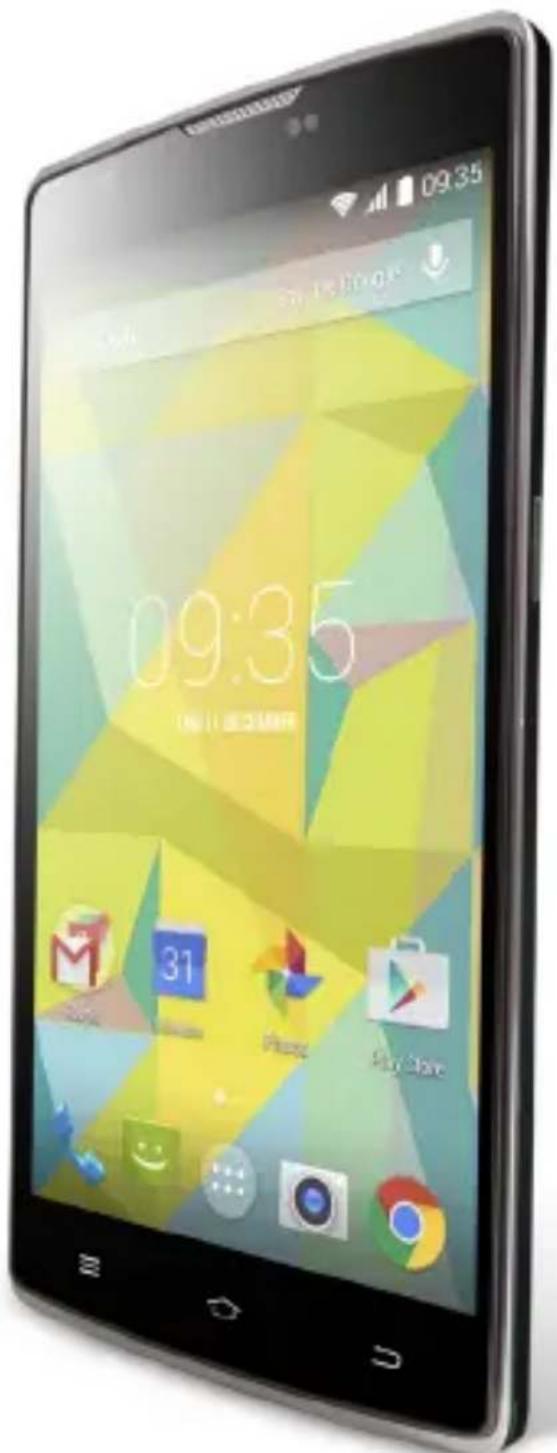
QUICK START QUIDE
Quick Start Guide

2 | English | GB
8 Polish | PL
16 Bulgarian BG
22 | Croatian | HR
28 | Czech | CZ
34 | Estonian | EST
40 | French | FR
46 | German | DE
54 | Greek | GR
60 Hungarian | HU
66 | Italian | IT
72 | Latvian | LV
78 Lithuanian | LT
84 | Portuguese | PT
90 | Romanian | RO
98 | Russian | RU
104 | Serbian | SRB
110 | Slovak | SK
116 | Slovenian | SI
122 | Spanish | ES
128 Ukrainian | UA
136 | Service center list
Quick Start Guide - GB
Package contents

- GOCLEVER QUANTUM 550 (GCFQUA550)
- AC Adapter
- Earphones
- USB Cable
- Quick Start Guide
- Battery

Device Overview
- Power key: power Your phone on and off. Suspend and activate it.
- Headset and microphone jack: plug in headphones or a microphone.
- Volume keys: adjust the volume of the device.
- Micro USB port: connect optional accessories and a charger.
- Microphone: allows other callers to hear when You are speaking to them.
- Back key: step backwards when navigating a menu or a web page.
- Menu key: access submenus with additional options.
- Front facing camera: take pictures and shoot videos with the front camera.
- Rear facing camera: take pictures and shoot videos with the rear camera.
- External speaker: allows You to hear the caller.
11.Settings.
Quick Start Guide - GB

Removing the back cover and battery
Remove the back cover by inserting a fingernail into the slot on the bottom side of Your phone. Lift the cover up and away from the phone.

Taking out the battery: hold the side of device tightly with one hand and pull out the battery with the other hand.
Installing SIM and microSD™ cards

a. SIM cards
The slot on the right is a GSM card slot. The slot on the left is a 3G WCDMA card slot (compatible with a 2G card). Carefully slide the SIM card into the socket, until the card locks into place. Make sure that the card's gold contacts face into the phone. To remove the SIM card carefully pull it out of the slot.
b. MicroSD ™ cards
Carefully slide the MicroSD TM card into the socket, until the card locks into place. Make sure that the card's gold contacts face into the phone. To remove the MicroSD TM card carefully pull it out of the slot.
Charging

Plug one end of the micro USB cable into the micro USB port on the device and the power adapter into a standard AC power socket. A discharged battery recharges fully in approximately 3.5 hours. Operating the device while charging may extend the charging time.
Quick Start Guide - GB
Power on/Sleep Mode/Power off
Press and hold the Power Button for a few seconds to power on the device. It will automatically enter the Home screen after start-up. While the device is on, press the Power Button once to enter sleep mode and press it again to activate the device. While the device is on, press and hold the Power Button, and then select the Power off/Standby option from the menu to power off the device or to enter sleep mode.

CERTIFICATE OF CONFORMITY C€
GOCLEVER Ltd. hereby declares under our sole responsibility that the product GOCLEVER QUANTUM 550 (GCFQUA550) is in conformity with the essential requirements of the following Directives is declared:
| EMC DIRECTIVE | 2004 / 108 / EC |
| LVD DIRECTIVE | 2006 / 95 / EC |
| R&TTE DIRECTIVE | 1999 / 5 / EC |
The full document with detailed information is available on our website: www.goclever.com. The .pdf file with the CE declaration is placed among the bookmarks of our product catalogue. Please read our Privacy Policy and Cookie Policy at www.goclever.com.

This product has been certified as RoHS Compliant.
MARK OF CONFORMITY - UKRAINE - National mark of conformity confirms that the specified product complies with the requirements of the technical regulations in Ukraine.

Correct Disposal of This product (Waste Electrical & Electronic Equipment).
(Applicable in the European Union and other European countries with separate collection systems)
This marking indicates that at the end of its working life this product should not be disposed of with other household waste in the EU. To prevent possible harm to the environment or human health from uncontrolled waste disposal, please separate this from other types of wastes and recycle it responsibly to promote the sustainable reuse of material resources. To dispose of your used device, please use the return and collection systems available in your area or contact the retailer where the product was purchased. They can take this product for safe environmental recycling.
Quick Start Guide - GB

Disposal of waste batteries (applicable in the European Union and other European countries with separate collection systems)

The symbol may appear on the battery or on the packaging to indicate that the battery provided with this product shall not be treated as household waste. On certain batteries this symbol might be used in combination with a chemical symbol. The chemical symbols for mercury (Hg) or lead (Pb) are added if the battery contains more than 0.0005% mercury or 0.004% lead. By ensuring these batteries are disposed of correctly, you will help prevent potentially negative consequences for the environment and human health which could otherwise be caused by inappropriate waste handling of the battery. The recycling of the materials will help to conserve natural resources. In case of products that for safety, performance or data integrity reasons require a permanent connection with an incorporated battery, this battery should be replaced by qualified service staff only. To ensure that the battery will be treated properly, hand over the product at end-of-life to the applicable collection point for the recycling of electrical and electronic equipment. Hand the battery over to the applicable collection point for the recycling of waste batteries. For more detailed information about recycling of this product or battery, please contact your local government Office, your household waste disposal service or the shop where you purchased the product.

CONDITIONS OF WI-FI USAGE
When using the IEEE 802.11b/g/n Wireless LAN standard, channels 1 to 13 (2.4 GHz...2.4835 GHz) are selectable for both indoor and outdoor use, however with restrictive conditions applying in France, Italy and Norway, as follows: France: When using this product indoors, all channels can be used without restrictions. Outdoors only channels 1 to 6 are allowed. This means that in Peer-to-Peer mode, the WLAN feature can only be used outside if the peer sets up the communication on an authorized channel (i.e., between 1 & 6).
Please make sure the access point is configured properly to a channel ranging from 1 to 6 before setting up the connection.
Italy: Use of the RLAN network is governed: Disposal of Old Electrical & Electronic - with respect to private use, by the Legislative Decree of 1.8.2003, no. 259 ("Code of Electronic Communications"). In particular Article 104 indicates when the prior obtainment of a general authorization is required and Art. 105 indicates when free use is permitted - with respect
Quick Start Guide - GB
to the supply to the public of the WLAN access to telecom networks and services, by the Ministerial Decree 28.5.2003, as amended, and Art. 25 (general authorization for electronic communications networks and services) of the Code of electronic communications.
Norway: Use of this equipment is not allowed within 20 km of the center of Ny-Ålesund, Svalbard.

REGISTER A PRODUCT
Register your GOCLEVER product to get more!
Thank you for choosing GOCLEVER! We want you to enjoy your purchase to the fullest. So that You can enjoy Your purchase to the fullest please register Your device. Registration will take you a few minutes. Go to www.goclever.com and get more! Do not miss the chance to enjoy these benefits:
- 12 months of door-to-door warranty (for selected countries and products),
- Handy tips and rapid technical support,
- Reminders about firmware updates that will keep your product up to date
- Exclusive previews of new products,
- Special offers and promotions - up to 30% discount (for selected countries and products),
- Free map updates (for selected countries and products).
TECHNICAL SUPPORT
WEBSITE: www.goclever.com/support
- USER GUIDES (have a look on online user's manual, download and share with).
- SOFTWARE AND UPDATE MANUALS (be up to date with the latest OS software or use the backup files to solve your software problems).
- FREQUENTLY ASKED QUESTIONS
- SERVICE CENTRE LOCATIONS (we recommend to use GOCLEVER Central Service and local partner services directly than make a complaint or technical inquiries to stores).
- WARRANTY INFORMATION (your GOCLEVER TAB includes 24 month guarantee. The optional for selected countries is 12 month "door2door" guarantee. See our website for details).
- SERVICE PROCEDURE
- RMA APPLICATION (depends on country).
Quick Start Guide - GB

The full manual is available at www.goclever.com
WARRANTY CARD
DATE OF SALE: :
DATE OF MANUFACTURE:
PRODUCT NAME:
SERIAL NUMBER:
| DEALER’S NAME / STAMP | SIGNATURE |
Date and customer's signature
Repairs history
| Date | Confirmed defect | Made repairs | Servive sign and stamp |
Quick Start Guide - PL
STRONA: www.goclever.com/support


САЙТ: www.goclever.com/support

Vađenje akumulatora: čvrsto držite s jednom rukom bokove uređaja, te z drugom rukom izvadite akumulator, izdigavši ga u donjem dijelu.
Umetanje SIM kartica i kartice microSD™


a. Umetanje SIM kartica
Desna utičnica je gnezdo GSM kartice dok je lijevo priključni utor za kartice 3G WCDMA, sukladnih s standardom 2G. Za umetanje kartice lagano je gurnite u odgovarajući utor. Uvjerite se da je prostor sa zlatim kontaktom SIM kartice okrenut prema dolje. Kako biste izvadili karticu, nježno je izvadite iz utora.
b. Umetanje microSD ™ kartice
Za umetanje kartice nježno pogurajte je u pravi utor. Uvjerite se da je zlatno kontaktno područje microSD TM kartice okrenuto prema dolje. Kako biste izvadili karticu, nježno je izvadite iz utora.
Punjenje

STRANICA: www.goclever.com/support
Prohlídka
PODMÍNKY POUŽÍVÁNÍ WI-FI
www.goclever.com/support
- KASUTUSJUHENDID (online ja allalaaditavad).
SITE: www.goclever.com/support
a. SIM Karte
www.goclever.com/support
WWW oldal: www.goclever.com/support
Note
SITO WEB: http://www.goclever.com/it/it/pages/Service_Center_Locations.html
Tālruņa detaļas
www.goclever.com/support
www.goclever.com/support
PÁGINA: www.goclever.com/support

Instalare SIM si card microSD™


a)(Compatibil cu card microSD™ de 2GB). Introduceti cardul SIM cu grija in socket pana la capat. Asigurati-va ca zona aurie de contact este cu fata in jos. Pentru a indeparta cartela SIM, va rugam sa o extrageti cu grija din slot.
b) Carduri MicroSD ™
Introduceti cu grija cardul MicroSD ™ in socket pana la capat.
a inchide sau introduce in stand by telefonul.
CERTIFICAT DE CONFORMITATE C€
WEBSITE: www.goclever.com/support
a. Ubacivanje SIM kartice
Priključite jedan kraj USB kabla u USB priključak na uređaju, a zatim ubacite punjač u električnu utičnicu. Za potpuno punjenje potrebno je oko 3,5 sati. Korišćenje uređaja tokom punjenja, može produžiti vreme punjenja.
Quick Start Guide - SRB
Napomena: Ako telefon nije u upotrebi duže vreme, akumulator se postepeno prazni. Akumulator treba napuniti pre upotrebe ili, čak i kada telefon nije u upotrebi, napunite bateriju svaka tri meseca.
Uključivanje / isključivanje uređaja/ režim mirovanja
Pritisnite i držite dugme za napajanje kroz nekoliko sekundi. Pojavljuje se dobrodošli ekran, a zatim glavni ekran. Kada se dugme pritisne jedanput uređaj prelazi u režim mirovanja. Da biste izašli iz ovog režima , ponovo pritisnite dugme za napajanje. Da biste isključili uređaj, pritisnite i držite dugme za napajanje, posle čega iz menija izaberite isključivanje (Power off) .
SERTFIKAT O USKLAĐENOSTI - EU ZEMLJE C€
Ovim GOCLEVER Sp. z o.o. izjavljuje, da uređaj GOCLEVER QUANTUM 550 (GCFQUA550) usklađen je sa osnovnim zahtevima i drugim bitnim odredbama pomenutih dole direktiva:
SAJT: www.goclever.com/support
- KORISNIČKI VODIĆ (pregledajte skračeno uputstvo za rukovanje, preuzmite fajlove i podelite ih).
- SOFTVER I UPUTSTVA ZA UPDATOVANJE (budite u toku sa najnovijim softverom, iskoristite rezervne kopije datoteke, da se brzo reši softverski problem).
- NAJČEŠĆA PITANJA (tehnička pitanja i odgovori na bilo koju temu).
- LAKACIJA SERVISA (preporučujemo ovlašćeni servis GOCLEVER, da se ubrza Vaš zahtev).
- INFORMACIJE O GARANCIJI (obezbeđujemo 24-mesečnu garanciju proizvođaća. Za odabrane zemlje nudimo godišnji sistem "od vrata do vrata". Detalji se mogu naći na našem sajtu).
- SERVISNE PROCEDURE (pročitajte pre nego što predate uređaj na servis).
- OBRAZAC PRIJAVE REKLAMACIJE (za odabrane zemlje).

Quick Start Guide - SRB

GARANCIJSKA KNIŽICA
DATUM PRODAJE: ....
DATUM PROIZVODNJE: ....
NAZIV PROIZVODA:
SERIJSKI BROJ: ....
a. Vkladanie SIM karty.
Pregled
Odstranjevanje akumulatorja: Trdno držite napravo z eno roko straneh enote in z drugo roko potegniti akumulator jo dvignete na dnu.
Vstavljanje kartice SIM in microSD TM kartico

NOTRANJE: www.goclever.com/support
Revisión
PÁGINA: www.goclever.com/support
a. SIM карти
www.goclever.com/support
GB: Service center available at www.goclever.com


- GOCLEVER
- INFINITE INVENTION
- QUANTUM 550
- QUICK START GUIDE
- QUICK START GUIDE - GB
- PACKAGE CONTENTS
- DEVICE OVERVIEW
- REMOVING THE BACK COVER AND BATTERY
- INSTALLING SIM AND MICROSD™ CARDS
- SIM CARDS
- MICROSD ™ CARDS
- CHARGING
- POWER ON/SLEEP MODE/POWER OFF
- CERTIFICATE OF CONFORMITY C€
- CORRECT DISPOSAL OF THIS PRODUCT (WASTE ELECTRICAL & ELECTRONIC EQUIPMENT)
- DISPOSAL OF WASTE BATTERIES (APPLICABLE IN THE EUROPEAN UNION AND OTHER EUROPEAN COUNTRIES WITH SEPARATE COLLECTION SYSTEMS)
- CONDITIONS OF WI-FI USAGE
- REGISTER A PRODUCT
- TECHNICAL SUPPORT
- WARRANTY CARD
- QUICK START GUIDE - PL
- UMETANJE SIM KARTICA I KARTICE MICROSD™
- UMETANJE SIM KARTICA
- UMETANJE MICROSD ™ KARTICE
- PUNJENJE
- PROHLÍDKA
- PODMÍNKY POUŽÍVÁNÍ WI-FI
- SIM KARTE
- NOTE
- TĀLRUŅA DETAĻAS
- INSTALARE SIM SI CARD MICROSD™
- CERTIFICAT DE CONFORMITATE C€
- UBACIVANJE SIM KARTICE
- QUICK START GUIDE - SRB
- UKLJUČIVANJE / ISKLJUČIVANJE UREĐAJA/ REŽIM MIROVANJA
- SERTFIKAT O USKLAĐENOSTI - EU ZEMLJE C€
- GARANCIJSKA KNIŽICA
- PREGLED
- VSTAVLJANJE KARTICE SIM IN MICROSD TM KARTICO
- REVISIÓN
Brand : GOCLEVER
Model : Quantum 550
Category : Smartphone