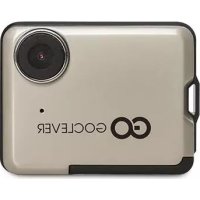
DVR Extreme gold - Camcorder GOCLEVER - Free user manual and instructions
Find the device manual for free DVR Extreme gold GOCLEVER in PDF.



| Product type | Camcorder / Dashcam |
| Brand | GoClever |
| Model | DVR Extreme Gold |
| Manual pages | 58 pages |
| Available languages | FR, CS, DE, EL, EN, ES, ET, HU, IT, LT, PL, RO, RU, SK, UK and others |
| Operating modes | Car mode, video recording mode, photo mode, photo/video playback mode |
| Power supply | Rechargeable battery via miniUSB or car charger |
| Charging time | 3 hours |
| Memory card | MicroSD (not included) |
| PC connection | MiniUSB (mass storage mode) |
| Compatible operating systems | Windows 2000/XP/Vista/7, Mac OS 10.3.6 or higher |
| Weight (estimated) | Approximately 100 g |
| Dimensions (estimated) | Approximately 10 x 5 x 3 cm |
| Main functions | Video recording, photo taking, playback, automatic recording in car, date setting |
| Maintenance | Clean with a soft dry cloth |
| Safety and recycling | Do not dispose of with household waste; comply with WEEE directive and battery recycling |
Frequently Asked Questions - DVR Extreme gold GOCLEVER
User questions about DVR Extreme gold GOCLEVER
0 question about this device. Answer the ones you know or ask your own.
Ask a new question about this device
Download the instructions for your Camcorder in PDF format for free! Find your manual DVR Extreme gold - GOCLEVER and take your electronic device back in hand. On this page are published all the documents necessary for the use of your device. DVR Extreme gold by GOCLEVER.
USER MANUAL DVR Extreme gold GOCLEVER
2 English | EN
5 Polish | PL
8 Croatian | HR
11 Czech | CZ
14 Estonian | EST
17 French | FR
20 German | DE
23 Greek | GR
26 Hungarian | HU
29 Italian | IT
32 Lithuanian | LT
35 Portuguese | PT
38 Romanian | RO
41 Russian | RU
44 Serbian | SRB
47 Slovak | SK
50 Spanish | ES
53 Ukrainian | UA
56 Service center list
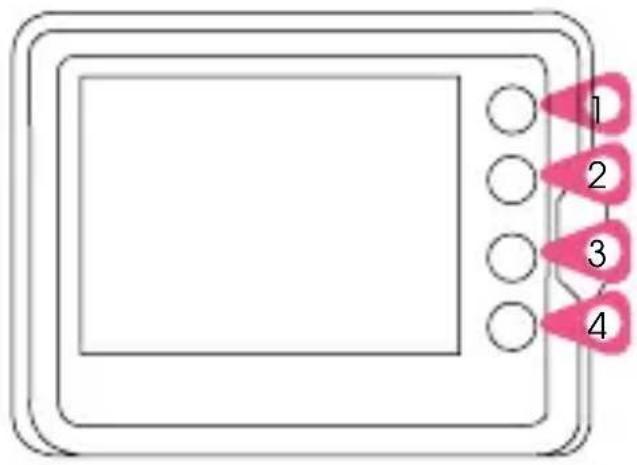
DEVICE: GOCLEVER DVR EXTREME GOLD
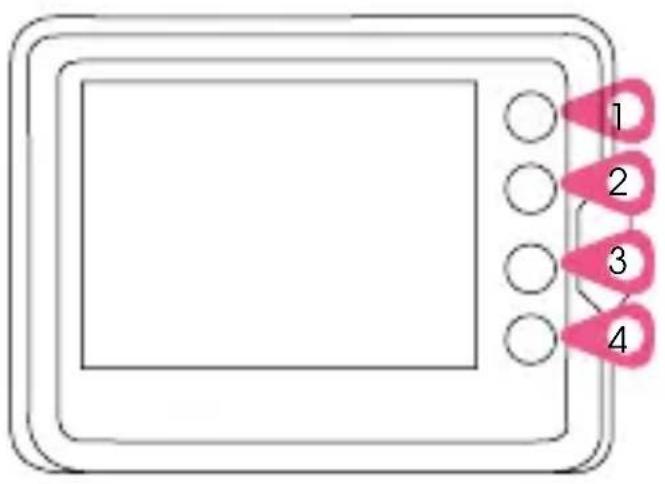
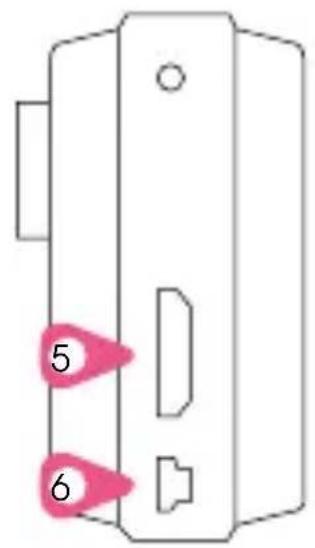
1.MODE
2.RECORD
3.DOWN / Press for 3 seconds to set up the date.
4. POWER BUTTON
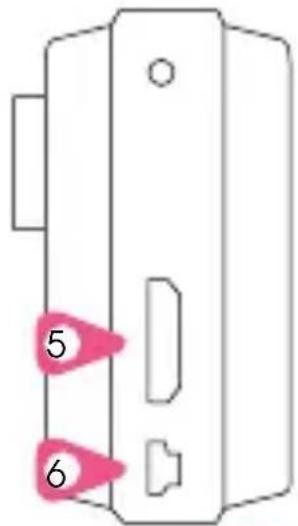
5.HDMI PORT
6.miniUSB PORT
Charging the batteries
Connect your device via miniUSB cable to your computer or via AC adapter into a wall outlet or use the car charger. Charge the device for 3 hours. (6).
Inserting a memory card
Before you start your device, insert a SD card into the memory card slot.
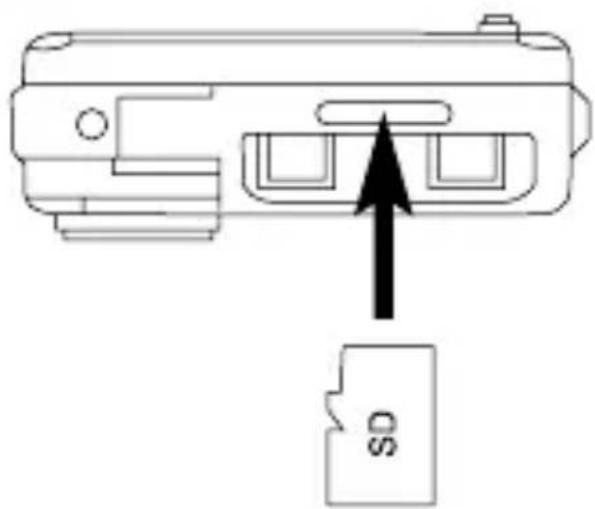
Turning on the device
Press the power button (4) to start your device. Wait a few seconds for the software to load.
Selecting the operations mode
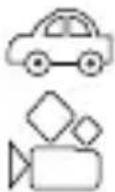
The device can work in 4 operation modes:
- Car mode
- Video mode
- Photo mode
-Playbackmode
The device has pre-installed SPORT MODE function firmware. If You need CAR DVR MODE function visit www.goclever.com/dvextreme. Look at the symbols on the screen (see illustration above), to check which mode currently activated.
Recording a video, taking a photo (video mode, photo mode)
Press RECORD button (2) in video mode to start recording a video. Press RECORD button (2) in photo mode to take a photo. Press MODE button in each mode to bring the desired menu.
Video and photo playback (playback mode)
If you select the playback mode, the device will display last recorded video or photo. Select files using DOWN button. Press MODE button to play a video (1).
Recording a video (car mode)
The device supports automatic recording. The recording will start while turning on the car engine. The recording will stop while turning off the car engine. Please note, that the car charger have to be plugged in.
PC CONNECTION:
Connect the miniUSB cable to your PC. The device will display the start screen and the blue indicator will turn on. Select the mass storage option on your computer to browse and manage files on the device. Unplug the miniUSB cable to turn off the device. Note: If the device will crash for some reason, press the reset.

SYSTEM REQUIREMENTS: Windows 2000/XP/Vista/Seven, Mac OS 10.3.6 or above.

CERTIFICATE OF CONFORMITY
GOCLEVER Ltd. hereby declares under our sole responsibility that the product GOCLEVER DVR EXTREME GOLD is in conformity with the essential requirements of the following Directives is declared:
EMC DIRECTIVE 2004/108/EC LVD DIRECTIVE 2006/95/EC R&TTE DIRECTIVE 1999/5/EC
The full document with detailed information is available on our website: www.goclever.com. The .pdf file with the CE declaration is placed among the bookmarks of our product catalogue.

This product has been certified as RoHS Compliant. MARK OF CONFORMITY - UKRAINE
National mark of conformity confirms that the specified product complies with the requirements of the technical regulations in Ukraine. END OF LIFE DISPOSAL
Recycling facilities are now available for all customers at which you can deposit your old GOCLEVER devices or any other electrical products. This is a requirement under European legislation (the Waste Electrical and Electronic Equipment - or WEEE - Directive 2002/96/EU). Customers are able to take any old electrical equipment to waste recycling public centers or point of sales. Please remember that this devices/cables etc. will be further handled during the recycling process. To remind you to recycle, all electrical products are marked with a symol.

DISPOSAL OF WASTE BATTERIES (APPLICABLE IN THE EUROPEAN UNION AND OTHER EUROPEAN COUNTRIES WITH SEPARATE COLLECTION SYSTEMS)
The symbol may appear on the battery or on the packaging to indicate that the battery provided with this product shall not be treated as household waste. On certain batteries this symbol might be used in combination with a chemical symbol. The chemical symbols for mercury (Hg) or lead (Pb) are added if the battery contains more than 0.0005% mercury or 0.004% lead. By ensuring these batteries are disposed of correctly, you will help prevent potentially negative consequences for the environment and human health which could otherwise be caused by inappropriate waste handling of the battery. The recycling of the materials will help to conserve natural resources. In case of products that for safety, performance or data integrity reasons require a permanent connection with an incorporated battery, this battery should be replaced by qualified service staff only. To ensure that the battery will be treated properly, hand over the product at end-of-life to the applicable collection point for the recycling of electrical and electronic equipment. Hand the battery over to the applicable collection point for the recycling of waste batteries. For more detailed information about recycling of this product or battery, please contact your local government Office, your household waste disposal service or the shop where you purchased the product.
URZADZENIE: GOCLEVER DVR EXTREME GOLD
OBSŁUGA:
UTYLIZACJA I RECYKLING
National mark of conformity confirms that the specified product complies with the requirements of the technical regulations in Ukraine.

KORREKTNE TOOTE UTILISEERIMINE
National mark of conformity confirms that the specified product complies with the requirements of the technical regulations in Ukraine.
Technical Support UK
tel.: 0844 8566848
email: uk@goclever.com
Technical Support Ireland
email: ireland@goclever.com
Technical Support Spain
tel: 902104953
email: rma@gocleverspain.com
Technical and warranty support
Canary Islands
tel: 902 050 255
Partner Services
Partner Services
BELARUS
220053, Republic of Belarus, Minsk,
V.Slutskoi 67-2
email: belarus@goclever.com
tel.:+375(17)3354883
Lithuania, Estonia, Latvia
Servisa ICT
e-mail: suport@servisaict.com
Tel. Lithuania: +370 (37) 329000,
+370(37)337458,
+370(5)2101160
Tel. Latvia: +371 (674) 08838
Tel. Estonia: +372 (66) 71796
www.servisaict.com
Serbia
ET Servis d.o.o. Beograd
Member of Logo d.o.o. group
Bulevar kralja Aleksandra 265, 11000
Beograd, Srbija
tel: +381 11 3820-535, +381 11
3820-536,+381 11 3820-537
www.etservis.rs
Bulgaria
Stemo
bul. Nikola Vapsarov 55, EXPO 2000
tel. (+359 2) 8162300
fax: 8162303 e-mail: main@
sf.stemo.bg
www.stemo.bg
CZECH REPUBLIC
Bouncer s.r.o
Slavonicka 324, 67531 Jemnice, Czech
Republic
email: servis@goclever.cz
tel.: +420 546 606 021
ROMANIA
S.C. Cordon Electronics S.R.L.
Str. Spataru Preda nr 12, sector 5,
Bucuresti
email: office@cordongroup.ro
tel.: +40 372324762, +40 213009905
UKRAINE
Service Center KROK-TTC
Geroev Dnepra 2A, 04212 Kiev
email: info@krok-ttc.com
tel.: +380 800504504
Slovenia
BIROTEHNA
Litijska cesta 259, 1261 Ljubljana
-Dobrunje
tel:015853777
fax: 01 5400 130
e-mail: servis@birotehna.si
Croatia
PlayCom
Heinzelova 78b, 10000 Zagreb
tel 1: +385 (0)15613-
222,+385(0)15618-433,+385(0)1
6184-115
e-mail: info@play.com.hr
www.playcom.hr
Bosnia and Herzegovina
System One d.o.o.
Vilsonovo šetalište 10, 71000 Sarajevo
tel: +389 (0) 2-2653-270
fax: +387 33 652 781
e-mail: servis@itd.mk
www.s1see.com
www.itd.mk
Hungary
E-care Solutions
Szent 1102, László ter 20, Budapest
tel: +36212524688
e-mail: e-care@e-care.hu

GOCLEVER
INFINITE INVENTION

- Charging the batteries
- Inserting a memory card
- Turning on the device
- Selecting the operations mode
- Recording a video, taking a photo (video mode, photo mode)
- Video and photo playback (playback mode)
- Recording a video (car mode)
- PC CONNECTION:
- CERTIFICATE OF CONFORMITY
- UTYLIZACJA I RECYKLING
- KORREKTNE TOOTE UTILISEERIMINE
- Technical Support UK
- Technical Support Ireland
- Technical Support Spain
- Technical and warranty support
- Canary Islands
- BELARUS
- Lithuania, Estonia, Latvia
- Serbia
- Bulgaria
- CZECH REPUBLIC
- ROMANIA
- UKRAINE
- BIROTEHNA
- Croatia
- Bosnia and Herzegovina
- Hungary
- GOCLEVER
Brand : GOCLEVER
Model : DVR Extreme gold
Category : Camcorder