
EY74A1X - Drill PANASONIC - Free user manual and instructions
Find the device manual for free EY74A1X PANASONIC in PDF.
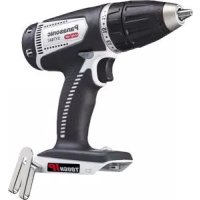



| Product Type | Cordless Drill/Driver |
| Brand | Panasonic |
| Model | EY74A1X |
| Voltage | 18 V DC |
| Battery Type | Li-ion (compatible models: EY9L41, EY9L42, EY9L44, EY9L45, EY9L50, EY9L51) |
| No-load speed (low) | 80 - 600 min⁻¹ |
| No-load speed (high) | 220 - 1750 min⁻¹ |
| Chuck capacity | 1.5 mm - 13 mm (1/16" - 1/2") |
| Tightening torque (clutch) | 0.5 N·m - 4.4 N·m (18 positions) |
| Overall length | 203 mm (8") |
| Weight (with battery EY9L41/EY9L44) | 1.85 kg (4.08 lbs) |
| Weight (with battery EY9L50/EY9L51) | 1.95 kg (4.30 lbs) |
| Compatible charger | EY0L81 or EY0L82 |
| Charging time (typical) | 30 to 80 minutes depending on battery model |
| Protection rating | IP56 (dust and water jet resistant) |
| Main functions | Drilling, screwdriving with clutch, reverse rotation, variable speed, electronic brake |
| Lighting | Integrated LED (temporary work area lighting) |
| Belt hook | Removable, can be mounted on either side |
| Safety | Overheat protection (motor and battery), over-discharge protection, switch lock |
| Care and cleaning | Clean with a dry, clean cloth. Do not use water, solvent, or volatile substances. |
| Spare parts and repairability | Entrust any repair to a qualified technician. Use only genuine Panasonic replacement parts. |
| Recommended use | Drilling in wood (max. 35 mm), metal (max. 13 mm), screwdriving of wood screws (max. 6.8 mm) |
Frequently Asked Questions - EY74A1X PANASONIC
User questions about EY74A1X PANASONIC
0 question about this device. Answer the ones you know or ask your own.
Ask a new question about this device
Download the instructions for your Drill in PDF format for free! Find your manual EY74A1X - PANASONIC and take your electronic device back in hand. On this page are published all the documents necessary for the use of your device. EY74A1X by PANASONIC.
USER MANUAL EY74A1X PANASONIC
IMPORTANT
This manual contains safety information. Read the manual completely before first using this product and save this manual for future use.
IMPORTANT
Register online at www.panasonic.com/register
FUNCTIONAL DESCRIPTION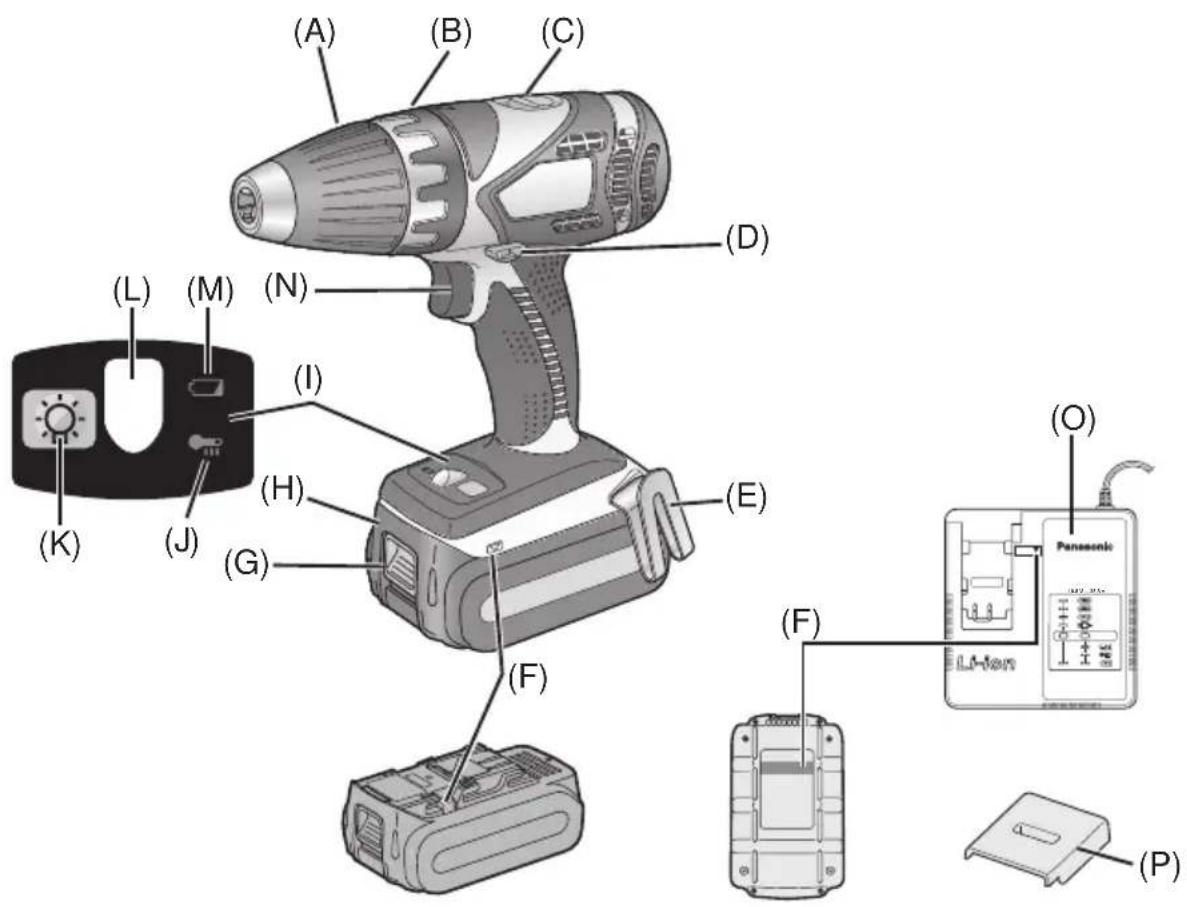
| (A) | Keyless drill chuckMandrin porte-foret sans filMandril sin llave | (B) | Clutch handlePoignée de l'embrayageMango de embrague |
| (C) | Speed selector switchInterrupteur de sélection de vitesseInterruptor selector de velocidad | (D) | Forward/Reverse leverLevier d'inversion marche avant-marche arrièrePalanca de avance/inversión |
| (E) | Belt hookCrochet de ceintureGancho del cinturón | (F) | Alignment marksMarques d'alignementMarcas de alineación |
| (G) | Battery pack release buttonBouton de libération de batterie autonomeBotón de liberación de batería | (H) | Battery packBatterie autonomeBatería |
| (I) | Control panelPanneau de commandePanel de controle | (J) | Overheat warning lamp (battery)Témoin d'avertissement de surchauffe (batterie)Luz de advertencia de sobrecalentamiento (batería) |
| (K) | LED light on/off buttonBouton Marche/Arrêt de la lumière DELBotón ON/OFF de luz LED | (L) | LED lightLumière DELLuz indicadora |
| (M) | Battery low warning lampTémoin d'avertissement de batterie basseLuz de aviso de baja carga de batería | (N) | Variable speed control triggerGâchette de commande de vitesseDisparador del control de velocided variable |
| (O) | Battery chargerChargeur de batterieCargador de batería | (P) | Pack coverCouvercle de la batterie autonomeCubierta de batería |
Be sure to use the pack cover.
- When the battery pack is not being used, store the battery in a way that foreign substances such as dust and water etc. do not contaminate the terminals. Be sure to attach the battery pack cover to protect the battery terminals.
- When charging the battery pack, confirm that the terminals on the battery charger are free of foreign substances such as dust and water etc. Clean the terminals before charging the battery pack if any foreign substances are found on the terminals.
The life of the battery pack terminals may be affected by foreign substances such as dust and water etc. during operation.
CAUTION: To protect the motor or battery, be sure to note the following when carrying out this operation.
- If the motor or battery becomes hot, the protection function will be activated and the motor or battery will stop operating.
The overheat warning lamp on the control panel illuminates or flashes when this feature is active.
For safe use
- The battery pack is designed to be installed by proceeding two steps for safety. Make sure the battery pack is installed properly to the main body before use.
- If the battery pack is not inserted firmly when the switch is switched on, the overheat warning lamp and the battery low warning lamp will flash to indicate that safe operation is not possible, and the bit will not rotate normally. Insert the battery pack into the body of the tool until the red label disappears.
This tool, as a complete unit with a battery pack, satisfies appropriate IP Degrees of Protection based on the IEC regulations.
Definition of IP code
IP5X: Ingress of dust is not totally prevented, but dust shall not penetrate in a quantity to interfere with satisfactory operation of the tool or to impair safety (In case that the talcum powder under 75 µ m intrudes inside the tool). IPX6: Water projected in powerful jets against the tool from any direction shall have no harmful effects (In case that, with a nozzle of 12.5 mm inner diameter, approximately 100 L/min of normal temperature water is injected to the tool for 3 minutes from 3 meter distance).
LIMITED WARRANTY
The rating of IP56 qualifies this tool for the minimum impact of water or dust, but not for the assurance of performance in such conditions. See Safety and Operating Instructions for further details for proper operation.
I. INTRODUCTION
These tools can be used to tighten screws in clutch mode and to drill holes in wood and metal in drill mode. Additionally, model EY7940 can be used to drill holes in soft concrete and similar materials in hammer mode.
II. GENERAL SAFETY RULES
⚠ WARNING! Read all instructions
Failure to follow all instructions listed below may result in electric shock, fire and/or serious injury. The term “power tool” in all of the warnings listed below refers to your main operated (corded) power tool and battery operated (cordless) power tool.
SAVE THESE INSTRUCTIONS Work Area Safety
1) Keep work area clean and well lit.
Cluttered or dark areas invite accidents.
2) Do not operate power tools in explosive atmospheres, such as in the presence of flammable liquids, gases or dust.
Power tools create sparks which may ignite the dust or fumes.
3) Keep children and bystanders away while operating a power tool.
Distractions can cause you to lose control.
Electrical Safety
1) Power tool plugs must match the outlet. Never modify the plug in any way. Do not use any adapter plugs with earthed (grounded) power tools.
Unmodified plugs and matching outlets will reduce risk of electric shock.
2) Avoid body contact with earthed or grounded surfaces such as pipes, radiators, ranges and refrigerators.
There is an increased risk of electric shock if your body is earthed or grounded.
3) Do not expose power tools to rain or wet conditions.
Water entering a power tool will increase the risk of electric shock.
4) Do not abuse the cord. Never use the cord for carrying, pulling or unplugging the power tool. Keep cord away from heat, oil, sharp edges or moving parts.
Damaged or entangled cords increase the risk of electric shock.
5) When operating a power tool outdoors, use an extension cord suitable for outdoor use.
Use of a cord suitable for outdoor use reduces the risk of electric shock.
Personal Safety
1) Stay alert, watch what you are doing and use common sense when operating a power tool. Do not use a power tool while you are tired or under the influence of drugs, alcohol or medication.
A moment of inattention while operating power tools may result in personal injury.
2) Use safety equipment. Always wear eye protection.
Safety equipment such as dust mask, non-skid safety shoes, hard hat, or hearing protection used for appropriate conditions will reduce personal injuries.
3) Avoid accidental starting. Ensure the switch is in the off position before plugging in.
Carrying power tools with your finger on the switch or plugging in the power tools that have the switch on invites accidents.
4) Remove any adjusting key or wrench before turning the power tool on.
A wrench or a key left attached to a rotating part of the power tool may result in personal injury.
5) Do not overreach. Keep proper footing and balance at all times.
This enables better control of the power tool in unexpected situations.
6) Dress properly. Do not wear loose clothing or jewelry. Keep your hair, clothing and gloves away from moving parts.
Loose clothes, jewelry or long hair can be caught in moving parts.
7) If devices are provided for the connection of dust extraction and collection facilities, ensure these are connected and properly used.
Use of these devices can reduce dust related hazards.
Power Tool Use and Care
1) Do not force the power tool. Use the correct power tool for your application.
The correct power tool will do the job better and safer at the rate for which it was designed.
2) Do not use the power tool if the switch does not turn it on and off.
Any power tool that cannot be controlled with the switch is dangerous and must be repaired.
3) Disconnect the plug from the power source and/or the battery pack from the power tool before making any adjustments, changing accessories, or storing power tools.
Such preventive safety measures reduce the risk of starting the power tool accidentally.
4) Store idle power tools out of the reach of children and do not allow persons unfamiliar with the power tool or these instructions to operate the power tool.
Power tools are dangerous in the hands of untrained users.
5) Maintain power tools. Check for misalignment or binding of moving parts, breakage of parts and any other condition that may affect the power tools operation. If damaged, have the power tool repaired before use.
Many accidents are caused by poorly maintained power tools.
6) Keep cutting tools sharp and clean.
Properly maintained cutting tools with sharp cutting edges are less likely to bind and are easier to control.
7) Use the power tool, accessories and tool bits etc. in accordance with these instructions and in the manner intended for the particular type of power tool, taking into account the working conditions and the work to be performed.
Use of the power tool for operations different from those intended could result in a hazardous situation.
Battery Tool Use and Care
1) Ensure the switch is in the off position before inserting battery pack.
Inserting battery pack into power tools that have the switch on invites accidents.
2) Recharge only with the charger specified by the manufacturer.
A charger that is suitable for one type of battery pack may create a risk of fire when used with another battery pack.
3) Use power tools only with specifically designated battery packs.
Use of any other battery packs may create a risk of injury and fire.
4) When battery pack is not in use, keep it away from other metal objects like paper clips, coins, keys, nails, screws, or other small metal objects that can make a connection from one terminal to another.
Shorting the battery terminals together may cause burns, or a fire.
5) Under abusive conditions, liquid may be ejected from battery; avoid contact. If contact accidentally occurs, flush with water. If liquid contacts eyes, additionally seek medical help.
Liquid ejected from the battery may cause irritation or burns.
Service
1) Have your power tool serviced by a qualified repair person using only identical replacement parts.
This will ensure that the safety of power tool is maintained.
III. SPECIFIC SAFETY RULES
1) Wear ear protectors. Exposure to noise can cause hearing loss.
2) Use auxiliary handles supplied with the tool. Loss of control can cause personal injury.
3) Hold power tools by insulated gripping surfaces when performing an operation where the cutting tool may contact hidden wiring.
Contact with a "live" wire will make exposed metal parts of the tool "live" and shock the operator.
4) Be aware that this tool is always in an operating condition, since it does not have to be plugged into an electrical outlet.
5) If the bit becomes jammed, immediately turn the trigger switch off to prevent an overload which can damage the battery pack or motor. Use reverse motion to loosen jammed bits.
6) Do not operate the Forward/Reverse lever when the trigger switch is on. The battery will discharge rapidly and damage to the unit may occur.
7) When storing or carrying the tool, set the Forward/Reverse lever to the center position (switch lock).
8) Do not strain the tool by holding the speed control trigger halfway (speed control mode) so that the motor stops. The protection circuit will activate and may prevent speed control operation. If this happens, release the speed control trigger and squeeze again for normal operation.
9) Be careful not to get dust inside the chuck.
10) Do not touch the rotating parts to avoid injury.
11) Do not use the tool continuously for a long period of time. Stop using the tool from time to time to avoid temperature rise and heat overload of the motor.
12) Do not drop the tool.
13) Wear dust mask, if the work causes dust.
14) During charging, the charger may become slightly warm. This is normal. Do NOT charge the battery for a long period.
| Symbol Meaning | |
| V Volts | |
| --- | Direct current |
| no | No load speed |
| ...min -1 | Revolutions orreciprocations per minutes |
| Ah | Electrical capacity ofbattery pack |
 | Rotation with hammering |
 | Rotation only |

WARNING:
Some dust created by power sanding, sawing, grinding, drilling, and other construction activities contains chemicals known to the State of California to cause cancer, birth defects or other reproductive harm. Some examples of these chemicals are:
* Lead from lead-based paints * Crystalline silica from bricks and cement and other masonry products * Arsenic and chromium from chemically-treated lumber.
To reduce your exposure to these chemicals: work in a well ventilated area, and work with approved safety equipment, such as dust masks that are specially designed to filter the microscopic particles.
IV. FOR BATTERY CHARGER & BATTERY PACK
Important Safety Instructions
1) SAVE THESE INSTRUCTIONS. This manual contains important safety and operating instructions for battery charger.
2) Before using battery charger, read all instructions and cautionary markings on (1) battery charger, (2) battery pack.
3) CAUTION - To reduce the risk of injury, charge only Panasonic Battery Pack as shown in last page.
Other types of batteries may burst causing personal injury and damage.
4) Do not expose charger to rain or snow.
5) To reduce the risk of damaging the electric plug and cord, pull by plug rather than cord when disconnecting charger.
6) Make sure cord is located so that it will not be stepped on, tripped over, or otherwise subjected to damage or stress.
7) An extension cord should not be used unless absolutely necessary.
Use of improper extension cord could result in a risk of fire and electric shock. If extension cord must be used, make sure:
a. that pins on plug of extension cord are the same number, size and shape as those of plug on charger. b. that extension cord is properly wired and in good electrical condition. c. that wire size is large enough for ampere rating of charger as specified below.
| RECOMMENDED MINIMUM AWG SIZE OF EXTENSION CORDS FOR BATTERY CHARGERS | ||
| AC Input Rating. Amperes AWG Size of Cord | ||
| Equal to or greater than | But less than | Length of Cord, Feet 25 50 100 150 |
| 0 | 2 | 18 18 18 16 |
8) Do not operate charger with damaged cord or plug; replace them immediately.
9) Do not operate charger if it has received a sharp blow, been dropped, or otherwise damaged in any way; take it to a qualified serviceman.
10) Do not disassemble charger; take it to a qualified serviceman when service or repair is required. Incorrect reassembly may result in a risk of electric shock or fire.
11) To reduce the risk of electric shock, unplug charger from outlet before attempting any maintenance or cleaning. 12) The charger and battery pack are specifically designed to work together. Do not attempt to charge any other cordless tool or battery pack with this charger. 13) Do not attempt to charge the battery pack with any other charger. 14) Do not attempt to disassemble the battery pack housing. 15) Do not store the tool and battery pack in locations where the temperature may reach or exceed 50°C (122°F) (such as a metal tool shed, or a car in the summer), which can lead to deterioration of the storage battery. 16) Do not charge battery pack when the temperature is BELOW 0°C (32°F) or ABOVE 40°C (104°F). This is very important. 17) Do not incinerate the battery pack. It can explode in a fire. 18) Avoid dangerous environment. Do not use charger in damp or wet locations. 19) The charger is designed to operate on standard household electrical power only. Do not attempt to use it on any other voltage! 20) Do not abuse cord. Never carry charger by cord or yank it to disconnect from outlet. Keep cord away from heat, oil and sharp edges. 21) Charge the battery pack in a well ventilated place, do not cover the charger and battery pack with a cloth, etc., while charging. 22) Use of an attachment not recommended may result in a risk of fire, electric shock, or injury to persons. 23) Do not short the battery pack. A battery short can cause a large current flow, over heating and burns. 24) NOTE: If the supply cord of this appliance is damaged, it must only be replaced by a repair shop appointed by the manufacturer, because special purpose tools are required.
25) TO REDUCE THE RISK OF ELECTRIC SHOCK, THIS APPLIANCE HAS A POLARIZED PLUG (ONE BLADE IS WIDER THAN THE OTHER).
This plug will fit in a polarized outlet only one way. If the plug does not fit fully in the outlet, reverse the plug. If it still does not fit, contact a qualified electrician to install the proper outlet. Do not change the plug in any way.
WARNING:
- Do not use other than the Panasonic battery packs that are designed for use with this rechargeable tool.
- Panasonic is not responsible for any damage or accident caused by the use of the recycled battery pack and the counterfeit battery pack.
- Do not dispose of the battery pack in a fire, or expose it to excessive heat.
- Do not drive the likes of nails into the battery pack, subject it to shocks, dismantle it, or attempt to modify it.
- Do not allow metal objects to touch the battery pack terminals.
- Do not carry or store the battery pack in the same container as nails or similar metal objects.
- Do not charge the battery pack in a high-temperature location, such as next to a fire or in direct sunlight. Otherwise, the battery may overheat, catch fire, or explode.
- Never use other than the dedicated charger to charge the battery pack. Otherwise, the battery may leak, overheat, or explode.
- After removing the battery pack from the tool or the charger, always reattach the pack cover. Otherwise, the battery contacts could be shorted, leading to a risk of fire.
- When the Battery Pack Has Deteriorated, Replace It with a New One. Continued use of a damaged battery pack may result in heat generation, ignition or battery rupture.
V. ASSEMBLY Attaching or Removing Bit NOTE:
When attaching or removing a bit, disconnect battery pack from tool or place the switch in the center position (switch lock).
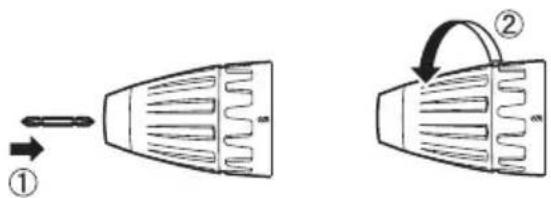
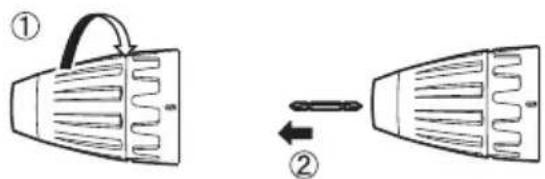
This tool is equipped with a keyless drill chuck.
1. Attachment
Insert the bit and turn the lock collar clockwise (looking from the front) to tighten firmly until it stops clicking.
2. Removal
Turn the lock collar counterclockwise (looking from the front), then remove the bit.
NOTE:
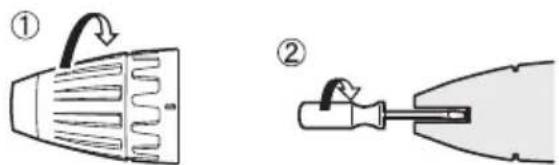
If excessive play occurs in the chuck, secure the drill in place and ① open the chuck jaws by turning the lock collar and ② tighten the screw (left-handed screw) with a screwdriver by turning it counterclockwise (viewed from the front).
Attaching or Removing Battery Pack
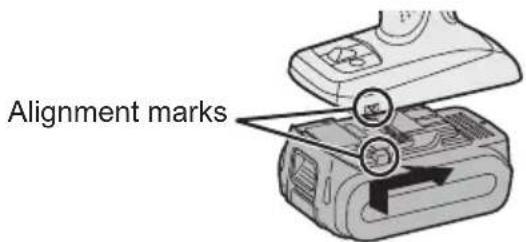
1. To connect the battery pack:
Line up the alignment marks and attach the battery pack.
- Slide the battery pack until it locks into position.
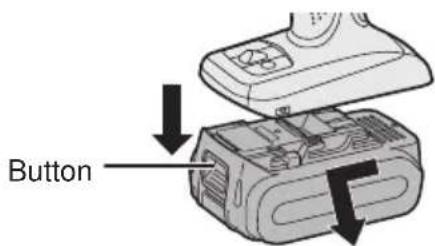
2. To remove the battery pack:
Pull the button from the front to release the battery pack.
VI. OPERATION [Main Body]
Switch Operation
- The speed increases with the amount of depression of the trigger. When beginning work, depress the trigger slightly to start the rotation slowly.
- A feedback electronic controller is used to give a strong torque even in low speed.
- The brake operates when the trigger is released and the motor stops immediately.
NOTE:
When the brake operates, a braking sound may be heard. This is normal.
CAUTION:
When operating the tool by pulling the trigger, there may be a momentary lag before rotation starts. This does not signal a malfunction.
* This lag occurs as the tool's circuitry starts up when the trigger is pulled for the first time after installing a new battery pack or after the tool has not been used for at least 1 minute (or at least 5 minutes when the LED is on). Rotation will start without any lag during second and subsequent operations.
Switch and Forward/Reverse Lever Operation
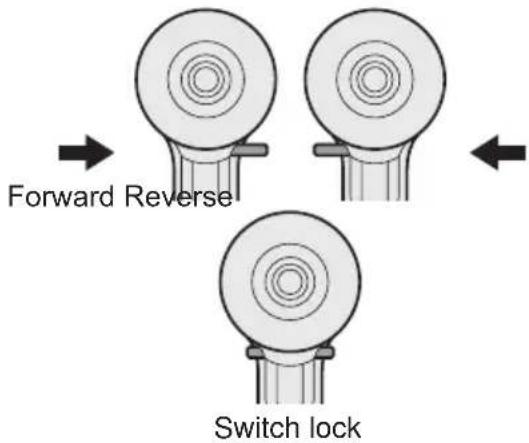
CAUTION:
To prevent damage, do not operate Forward/Reverse lever until the bit comes to a complete stop.
Forward Rotation Switch Operation
- Push the lever for forward rotation.
- Depress the trigger switch slightly to start the tool slowly.
- The speed increases with the amount of depression of the trigger for efficient tightening of screws and drilling. The brake operates and the chuck stops immediately when the trigger is released.
- After use, set the lever to its center position (switch lock).
Reverse Rotation Switch Operation
- Push the lever for reverse rotation. Check the direction of rotation before use.
- Depress the trigger switch slightly to start the tool slowly.
- After use, set the lever to its center position (switch lock).
Clutch Torque Setting
Adjust the torque to one of the 18 clutch settings or the “☐” position (EY7441, EY74A1).
Adjust the torque to one of the 18 clutch settings or the “2” or “↑” position (EY7940).
NOTE:
Always make sure to stop operation of the tool and disengage it from the work when you select Hammering mode from Drilling mode, or when you shift to Drilling mode from Hammering mode by rotating the clutch handle.
CAUTION:
Set the clutch setting at this mark ( ) before actual operation.
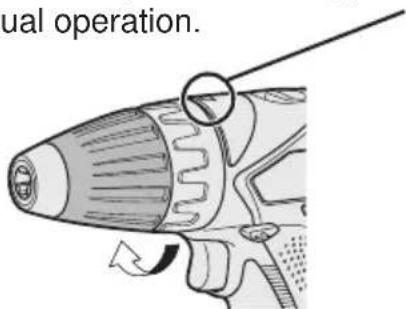
If the clutch handle cannot be set at "drilling" or "hammering" mode after driving with clutch function, set the clutch handle at position 1 and operate the clutch for a second.
Speed Selection
Choose a low or high speed to suit the use.
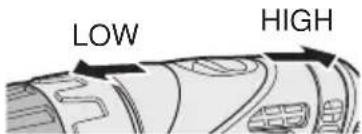
The more the variable speed control trigger is pulled, the higher the speed becomes.
CAUTION:
- Check the speed selector switch before use.
- Use at low speed when high torque is needed during operation. (Using at high speed when high torque is required may cause a motor breakdown.)
- Do not operate the speed selector switch (LOW-HIGH) while pulling on the speed control trigger. This can cause the rechargeable battery to wear quickly or damage the internal mechanism of the motor. * See specifications for "MAXIMUM RECOMMENDED CAPACITIES".
CAUTION:
- To prevent excessive temperature increase of the tool surface, do not operate the tool continuously using two or more battery packs. The tool needs cool-off time before switching to another pack.
- Do not close up vent holes on the sides of the body during operation. Otherwise, the machine function is adversely affected to cause a failure.
- Do NOT strain the tool (motor). This may cause damage to the unit.
- Use the tool in such a way as to prevent the air from the body vent holes from blowing directly onto your skin. Otherwise, you may get burned.
Bit-locking Function
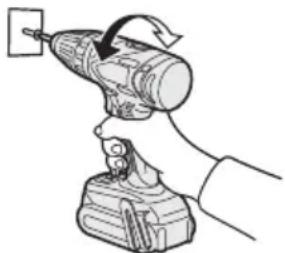
- With the trigger switch not engaged and a screw driver bit locked in place, the tool can be used as a manual screwdriver (up to 22.6 N·m, 230 kgf·cm, 199 in-lbs).
There will be a little play in the chuck, but this is not a malfunction.
- This feature is handy for tightening screws that require more torque than the maximum torque of the driver (position 2 on the clutch), for confirming the tightness of a screw or to loosen an extremely tight screw.
How to Use the Belt Hook
WARNING!
- Be sure to attach the belt hook securely to the main unit with the screw firmly fastened. When the belt hook is not firmly attached to the main unit, the hook may disconnect and the main unit may fall.
This may result in an accident or injury.
- Periodically check screw for tightness. If found to be loose, tighten firmly.
- Be sure to attach the belt hook firmly and securely onto a waist belt or other belt. Pay attention that the unit does not slip off the belt. This may result in an accident or injury.
- When the main unit is held by the belt hook, avoid jumping or running with it. Doing so may cause the hook to slip and the main unit may fall.
This may result in an accident or injury.
- When the belt hook is not used, be sure to return it to the storing position. The belt hook may catch on something. This may result in an accident or injury.
- When the unit is hooked onto the waist belt by the belt hook, do not attach driver bits to the unit. A sharp edge object, such as a drill bit, may cause injury or an accident.
To Change the Belt Hook Location Side
The belt hook can be attached to either side of the unit.
- Removing the hook
(1) Remove the nut. (2) Draw out the hook.
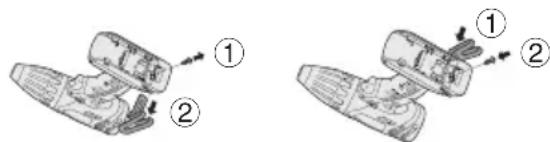
- Attaching the hook to the other side
(1) Insert the hook in the other side. (2) Tighten the nut fully so that it securely fastened.
Control Panel

(1) LED light
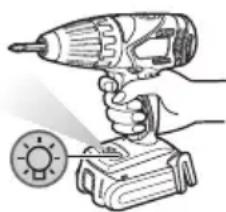
Before the use of LED light, always pull the power switch once.
Press the LED light button.
The light illuminates with
very low current, and it does not adversely affect the performance of the tool during use or its battery capacity.
CAUTION:
- The built-in LED light is designed to illuminate the small work area temporarily.
- Do not use it as a substitute for a regular flashlight, since it does not have enough brightness.
- LED light turns off when the tool has not been used for 5 minutes.
Caution: DO NOT STARE INTO BEAM. Use of controls or adjustments or performance of procedures other than those specified herein may result in hazardous radiation exposure.
(2) Overheat warning lamp
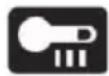

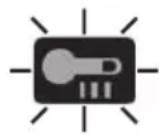
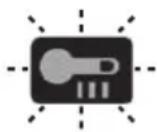
Off (normal operation)
Illuminated: Overheat (motor)
Flashing: Overheat (battery)
Indicates operation has been halted due to motor or battery overheating.
To protect the motor or battery, be sure to note the following when carrying out this operation.
- If the motor or battery becomes hot, the protection function will be activated and the motor or battery will stop operating. The overheat warning lamp on the control panel illuminates or flashes when this feature is active.
- If the overheating protection feature activates, allow the tool to cool thoroughly (at least 30 minutes). The tool is ready for use when the overheat warning lamp goes out.
- Avoid using the tool in a way that causes the overheating protection feature to activate repeatedly.
- If the tool is operated continuously under high-load conditions or if it is used in hot-temperature conditions (such as during summer), the overheating protection feature may activate frequently.
- If the tool is used in cold-temperature conditions (such as during winter) or if it is frequently stopped during use, the overheating protection feature may not activate.
The performance of the EY9L42 deteriorates significantly at and below 10°C due to work conditions and other factors.
- The ambient temperature range is between 0°C (32°F) and 40°C (104°F). If the battery pack is used when the battery temperature is below 0°C (32°F), the tool may fail to function properly.
- When charging a cool battery pack (below 0°C (32°F)) in a warm place, leave the battery pack at the place and wait for more than one hour to warm up the battery to the level of the ambient temperature.
(3) Battery low warning lamp

Off (normal operation)

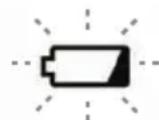
Flashing (No charge) Battery protection feature active
Excessive (complete) discharging of lithium ion batteries shortens their service
life dramatically. The driver includes a battery protection feature designed to prevent excessive discharging of the battery pack.
- The battery protection feature activates immediately before the battery loses its charge, causing the battery low warning lamp to flash.
- If you notice the battery low warning lamp flashing, charge the battery pack immediately.
- If it is started with too little battery power remaining, the tool may stop operating without the battery low warning lamp flashing first. This indicates that there is too little battery power remaining to use the tool, and the battery pack should be charged before further use.
- If the tool is subject to a sudden load during use that causes the motor to lock up, the overdischarge prevention sensor may be triggered, and the battery low warning lamp may flash. The lamp will stop flashing once you address the cause of the motor's locking up and cycle the trigger.
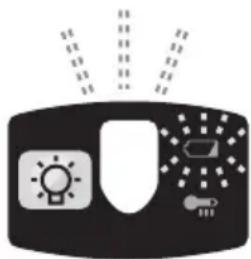
- The battery protection feature may activate when a high load is abruptly placed on the motor, even if ample battery charge remains. In this case, both the battery low warning lamp and LED light will flash (EY74A1).
- If both the battery low warning lamp and LED light flash, reduce the force with which you are pushing on the driver or, if using a drill driver, adjust the speed switch to a lower setting (EY74A1).
Battery Pack Life
The rechargeable batteries have a limited life. If the operation time becomes extremely short after recharging, replace the battery pack with a new one.
Battery Recycling
ATTENTION:
FOR Li-ion Battery Pack
A Li-ion battery that is recyclable powers the product you have purchased. Please call 1-800-8-BATTERY for information on how to recycle this battery.
[Battery Charger]
Charging
CAUTION:
- If the temperature of the battery pack falls approximately below -10°C (14°F), charging will automatically stop to prevent degradation of the battery.
- The ambient temperature range is between 0°C (32°F) and 40°C (104°F). If the battery pack is used when the battery temperature is below 0°C (32°F), the tool may fail to function properly.
- When charging a cool battery pack (below 0°C (32°F)) in a warm place, leave the battery pack at the place and wait for more than one hour to warm up the battery to the level of the ambient temperature.
- Cool down the charger when charging more than two battery packs consecutively.
- Do not insert your fingers into contact hole, when holding charger or any other occasions.
To prevent the risk of fire or damage to the battery charger.
- Do not use power source from an engine generator.
- Do not cover vent holes on the charger and the battery pack.
- Unplug the charger when not in use.
NOTE:
Your battery pack is not fully charged at the time of purchase. Be sure to charge the battery before use.
Battery charger
- Plug the charger into the AC outlet.
- Insert the battery pack firmly into the charger.
1) Line up the alignment marks and place the battery onto the dock on the charger.
2) Slide forward in the direction of the arrow.
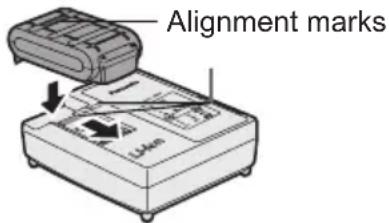
- During charging, the charging lamp will be lit. When charging is completed, an internal electronic switch will automatically be triggered to prevent overcharging.
- Charging will not start if the battery pack is warm (for example, immediately after heavy-duty operation).
The orange standby lamp will be flashing until the battery cools down. Charging will then begin automatically.
- The charge lamp (green) will flash slowly once the battery is approximately 80% charged.
- When charging is completed, the green charging lamp will turn off.
- If the temperature of the battery pack is 0°C or less, charging takes longer to fully charge the battery pack than the standard charging time.
Even when the battery is fully charged, it will have approximately 50% of the power of a fully charged battery at normal operating temperature.
- Consult an authorized dealer if the charging lamp (green) does not turn off.
- If a fully charged battery pack is inserted into the charger again, the charging lamp lights up. After several minutes, the green charging lamp will turn off.
LAMP INDICATIONS
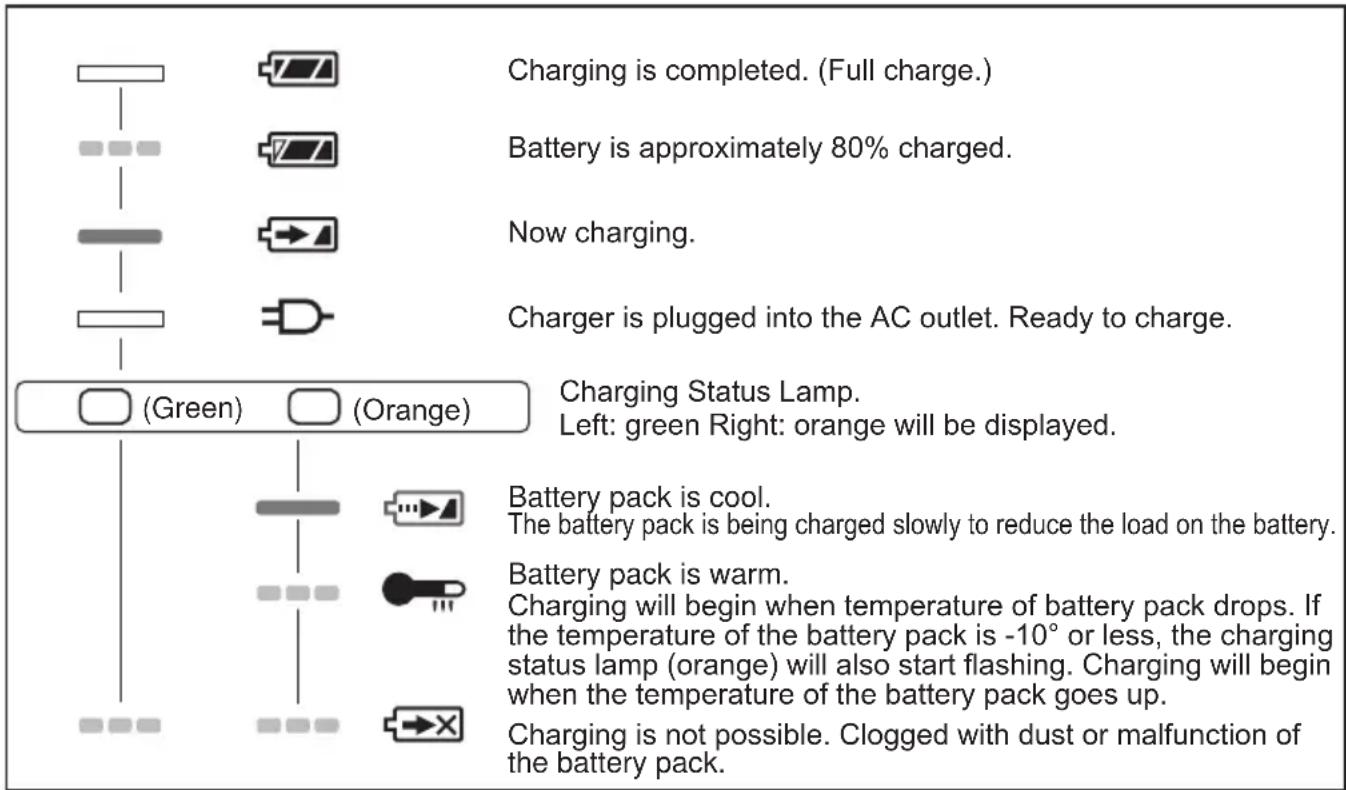

Turn off Lit


Flashing
VII. MAINTENANCE
- Use only a dry, soft cloth for wiping the unit. Do not use a damp cloth, thinner, benzine, or other volatile solvents for cleaning.
- In the event that the inside of the tool or battery pack is exposed to water, drain and allow to dry as soon as possible. Carefully remove any dust or iron filings that collect inside the tool. If you experience any problems operating the tool, consult with a repair shop.
VIII. ACCESSORIES
Use only bits suitable for size of drill's chuck.
IX. APPENDIX
MAXIMUM RECOMMENDED CAPACITIES
| Model EY7441 EY7940 EY74A1 | ||||
| Screw driving | Machine screw M5 | |||
| Wood screw ø6.8 mm (17/64") | ||||
| Drilling | Self-drilling screw ø6 mm (15/64") | |||
| For Wood ø35 mm (1-3/8") | ||||
| For Metal ø13 mm (1/2") | ||||
| For Masonry - ø13 mm (1/2") | - | |||
X. SPECIFICATIONS
MAIN UNIT
| Model EY7441 EY7940 EY74A1 | |||||
| Motor voltage 14.4 V | 14.4 V 18 V | ||||
| No load speed | Low | 70~400 min-1(rpm) | 50~480min-1(rpm) | 80~600min-1(rpm) | |
| High | 200~1400 min-1(rpm) | 130~1400min-1(rpm) | 220~1750min-1(rpm) | ||
| Blows Rate Per Minute | Low | - | 1260~7200 min-1(rpm) | - | - |
| High | - | 3600~25200 min-1(rpm) | - | - | |
| Chuck capacity | ø1.5 mm - ø13 mm (1/16"-1/2") | ||||
| Clutch torque | Approx 0.5N m-4.4Nm(4.3in-lbs - 39in-lbs) | Approx 1.0N m-4.4Nm(8.7in-lbs - 39in-lbs) | Approx 0.5N m-4.4Nm(4.3in-lbs - 39in-lbs) | ||
| Overall length | 193 mm (7-5/8") | 200 mm (7-7/8") | 203 mm (8") | ||
| Weight (with battery pack EY9L44) | 1.75 kg (3.86lbs) | 1.8 kg (3.97lbs) | 1.85 kg (4.08lbs) | - | |
| Weight (with battery pack EY9L45) | 1.75 kg (3.86lbs) | 1.8 kg (3.97lbs) | 1.85 kg (4.08lbs) | - | |
| Weight (with battery pack EY9L50) | - | - | - | 1.95 kg (4.30lbs) | |
| Weight (with battery pack EY9L51) | - | - | - | 1.95 kg (4.30lbs) | |
BATTERY PACK
| Model No. EY9L41 EY9L42 EY9L44 EY9L45 EY9L50 EY9L51 | ||||
| Storage battery Li-ion Battery | ||||
| Motor voltage | 14.4V DC(3.6V x 4 cells) | 14.4V DC(3.6V x 8 cells) | 18V DC(3.6V x 10 cells) | |
BATTERY CHARGER
| Model No. EY0L81 | ||||||
| Electrical rating See the rating plate on the bottom of the charger | ||||||
| Weight 0.93 kg (2lbs) | ||||||
| Charging time | EY9L41 EY9L42 EY9L44 | EY9L45 EY9L50 EY9L51 | ||||
| Usable:45min | Usable:30min | Usable:50min | Usable:65min | Usable:50min | Usable:65min | |
| Full:60min | Full:35min | Full:65min | Full:80min | Full:80min | ||
| Model No. EY0L82 | ||||||
| Electrical rating See the rating plate on the bottom of the charger | ||||||
| Weight 0.93 kg (2lbs) | ||||||
| Charging time | EY9L41 EY | 9L42 EY9L44 E | Y9L45 EY9L50 | EY9L51 | ||
| Usable:35min | Usable:30min U | usable:40min U | usable:50min Us | able:40min Usable:55min | ||
| Full:50min F | Full:35min Full: | 55min Full:60 | min Full:55min | Full:70min | ||
NOTE: This chart may include models that are not available in your area. Please refer to the latest general catalogue.
NOTE: For the dealer name and address, please see the included warranty card.
Federal Communication Commission Interference Statement
This equipment has been tested and found to comply with the limits for a Class B digital device, pursuant to Part 15 of the FCC Rules. These limits are designed to provide reasonable protection against harmful interference in a residential installation. This equipment generates, uses and can radiate radio frequency energy and, if not installed and used in accordance with the instructions, may cause harmful interference to radio communications. However, there is no guarantee that interference will not occur in a particular installation. If this equipment does cause harmful interference to radio or television reception, which can be determined by turning the equipment off and on, the user is encouraged to try to correct the interference by one of the following measures:
- Reorient or relocate the receiving antenna.
- Increase the separation between the equipment and receiver.
- Connect the equipment into an outlet on a circuit different from that to which the receiver is connected.
- Consult the dealer or an experienced radio/TV technician for help.
FCC Caution: To assure continued compliance, install and use in accordance with provided instructions. Use only the battery pack specified in the instructions. Any changes or modifications not expressly approved by the party responsible for compliance could void the user's authority to operate this equipment.
This device complies with part 15 of the FCC Rules. Operation is subject to the following two conditions: (1) This device may not cause harmful interference, and (2) this device must accept any interference received, including interference that may cause undesired operation.
This Class B digital apparatus complies with Canadian ICES-003.
2. Removal
NOTE:
2. Disassembly
NOTE:


- IMPORTANT
- BE SURE TO USE THE PACK COVER
- FOR SAFE USE
- DEFINITION OF IP CODE
- LIMITED WARRANTY
- INTRODUCTION
- GENERAL SAFETY RULES
- ⚠ WARNING! READ ALL INSTRUCTIONS
- SAVE THESE INSTRUCTIONS WORK AREA SAFETY
- KEEP WORK AREA CLEAN AND WELL LIT
- ELECTRICAL SAFETY
- PERSONAL SAFETY
- POWER TOOL USE AND CARE
- BATTERY TOOL USE AND CARE
- SERVICE
- SPECIFIC SAFETY RULES
- WARNING
- FOR BATTERY CHARGER & BATTERY PACK
- IMPORTANT SAFETY INSTRUCTIONS
- ASSEMBLY ATTACHING OR REMOVING BIT NOTE
- ATTACHMENT
- REMOVAL
- NOTE
- ATTACHING OR REMOVING BATTERY PACK
- TO CONNECT THE BATTERY PACK
- TO REMOVE THE BATTERY PACK
- OPERATION [MAIN BODY]
- SWITCH OPERATION
- CAUTION
- SWITCH AND FORWARD/REVERSE LEVER OPERATION
- FORWARD ROTATION SWITCH OPERATION
- REVERSE ROTATION SWITCH OPERATION
- CLUTCH TORQUE SETTING
- SPEED SELECTION
- BIT-LOCKING FUNCTION
- HOW TO USE THE BELT HOOK
- TO CHANGE THE BELT HOOK LOCATION SIDE
- CONTROL PANEL
- LED LIGHT
- OVERHEAT WARNING LAMP
- BATTERY LOW WARNING LAMP
- BATTERY PACK LIFE
- BATTERY RECYCLING
- ATTENTION
- FOR LI-ION BATTERY PACK
- [BATTERY CHARGER]
- CHARGING
- BATTERY CHARGER
- LAMP INDICATIONS
- MAINTENANCE
- ACCESSORIES
- APPENDIX
- SPECIFICATIONS
- BATTERY PACK
- FEDERAL COMMUNICATION COMMISSION INTERFERENCE STATEMENT
- DISASSEMBLY
Brand : PANASONIC
Model : EY74A1X
Category : Drill