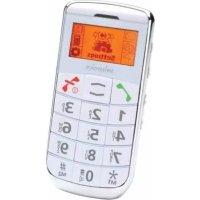
MP03 - Smartphone SWISSVOICE - Free user manual and instructions
Find the device manual for free MP03 SWISSVOICE in PDF.


| Product Type | Smartphone |
| Brand | Swissvoice |
| Model | MP03 |
| Battery | Lithium-ion 3.7 V, 1000 mAh |
| Charger | Power adapter included |
| Network | GSM 2G (not compatible with 3G) |
| SIM card | Required, not included |
| Screen | Not specified |
| Dimensions | Not specified |
| Weight | Not specified |
| Phonebook | Up to 300 contacts |
| Messages | SMS, up to 150 messages in internal memory |
| FM Radio | Built-in, with speaker or headphones |
| Flashlight | Built-in LED |
| Emergency function | Dedicated button, up to 5 numbers, emergency SMS |
| Speaker | Hands-free mode |
| Alarm | 3 programmable alarms |
| Calculator | Basic operations |
| Operating temperature | -10 °C to 45 °C |
| SAR | 0.450 W/kg (head, at 15 mm from body) |
| Maintenance | Keep dry, avoid smoke and excessive heat |
| Safety | Use original accessories, keep away from pacemakers |
Frequently Asked Questions - MP03 SWISSVOICE
User questions about MP03 SWISSVOICE
0 question about this device. Answer the ones you know or ask your own.
Ask a new question about this device
Download the instructions for your Smartphone in PDF format for free! Find your manual MP03 - SWISSVOICE and take your electronic device back in hand. On this page are published all the documents necessary for the use of your device. MP03 by SWISSVOICE.
USER MANUAL MP03 SWISSVOICE
Swissvoice Service Center
Im Frauental 14
92224 Amberg.
Batteries rechargeables
Accumulators ricaricabili
- Your telephone is delivered without any SIM card. You need a SIM card to use the phone regularly.
- This GSM phone is not compatible with SIM cards 3G. Please contact your operator to make sure your SIM card is 2G.
Starting up the phone
After having inserted the SIM card press the End Call Key for approx. 3 s. You are requested to enter an official SOS number. You will find the SOS numbers valid for your country in the corresponding country directory. Enter the according informations as requested. You can programm other personal emergency numbers (see chapter "Emergency call function").
If necessary enter then the PIN and press the Call key. The phone will go to idle state.
Press —, select Settings, Phone Settings, Clock Settings, Set time or Set date and confirm each by pressing the Call key. Enter the time and date and confirm each by pressing the Call key. Press the End Call Key briefly - the phone will go to idle state.
Safety Information
Intended use
This telephone is designed for use when connected to a mobile phone network. Any other use is considered unintended use. Unauthorized modification or reconstruction is not permitted. Under no circumstances open the device or complete any repair work yourself.

Hearing Safety
Listen to the radio at a moderate volume.
Extended high-volume listening can cause permanent hearing loss.
Areas of use
- Do not use the phone in prohibited areas.
- Switch the phone off in the vicinity of medical equipment (e.g. in hospitals).
- Do not use the phone in petrol stations or near fuels and chemicals.
- Inquire by the airline company whether mobile phones may be used before using the phone in aircraft.
- Permitted temperature range: from -10^ to 45^ .
General information
- Prevent exposure to smoke, dust, vibration, chemicals, moisture, heat and direct sunlight. The phone is not waterproof; therefore, keep it dry.
- Only use original accessories and batteries. Never attempt to connect other products.
- If you want to connect the phone to another device, read the manual supplied with that device with regard to any detailed safety information. Never attempt to connect incompatible products.
- Repairs to this device may only be completed by qualified service personnel.
- Keep the phone and accessories out of the reach of children.
- The SIM card can be removed. Caution! Small children can swallow them.
- The ringing tone is issued via the loudspeaker. Take an incoming call first and then hold the phone to your ear. This prevents any possible hearing damage.
- Only use the phone while driving or riding a transport vehicle in road traffic when using the approved hands-free equipment and appropriately positioned holders. Ensure that no safety-related functions are interfered with when operating the phone. It is essential to observe the applicable laws and national regulations.
Swissvoice MP03
- Always maintain a distance of at least 20~cm to implanted heart pacemakers to prevent any possible interference. If you have had a pacemaker implanted, do not carry the phone in a breast pocket when switched on. Always hold the phone to the ear furthest away from the pacemaker during calls. Switch the phone off immediately if you notice or suspect any adverse effects.
- This phone is hearing aid compatible. If you wear a hearing aid, however, please contact your doctor or the hearing aid manufacturer to inquire about any possible impairments through mobile communication equipment.
- Do not rely on the mobile phone as a safeguard for emergencies. For a variety of technical reasons, it is not possible to guarantee a reliable connection under all circumstances.
Power adapter plug
Only use the power adapter plug supplied because other power supplies could damage the telephone. Ensure access to the power adapter plug is not obstructed by furniture or such.
Rechargeable batteries
Never throw batteries into a fire. Only use the batterie delivered with the phone or batteries of the same type.
Disposal

In order to dispose of your device, take it to a collection point provided by your local public waste authorities (e.g. recycling centre). The adjacent symbol indicates that the device must not be disposed of in normal domestic waste!
According to laws on the disposal of electronic and electrical devices, owners are obliged to dispose of old electronic and electrical devices in a separate waste container. Batteries must be disposed of at the point of sale or at the appropriate collection points provided by the public waste authorities.

Packaging materials must be disposed of according to local regulations.
SAR information
Your mobile device is a radio transmitter and receiver. It is designed not to exceed the limits for exposure to radio waves recommended by international guidelines. These guidelines were developed by the independent scientific organisation ICNIRP and include safety margins designed to assure the protection of all persons, regardless of age and health.
The exposure guidelines for mobile devices employ a unit of measurement known as the Specific Absorption Rate or SAR. The SAR limit stated in the ICNIRP guidelines is 2.0 watts/kilogram (W/kg).
The highest SAR value measured for this device is 0.450W / kg at the ear or at a distance of 15mm from the body.
Contents
Important note 72
Starting up the phone 72
Safety Information 72
Preparing the telephone 76
Emergency Call Function 78
Key Functions 80
Icons in the handset display .81
Using the phone 81
Telephoning 83
PhoneBook 85
Call History 87
SMS 88
Settings 90
Tools 92
FM Radio 93
94
Warranty conditions 94
Technical Support telephone number (Germany) . . . .95
Approval and conformity 95
Preparing the telephone
Checking the package contents
The package contains:
1 mobile phone MP03
1 power adapter plug
1 charger
- 1 Li-ion battery 3.7V / 1000mAh
1 headset
1 operating manual
Installing the SIM card and the battery
Before using the phone for the first time you have to insert a SIM card. The SIM card and its contacts can easily be damaged by scratches or bending, so be careful when handling. Keep all miniature SIM cards out of small children's reach.
Slide the SIM card with the golden contacts facing down in the moulded SIM card holder.
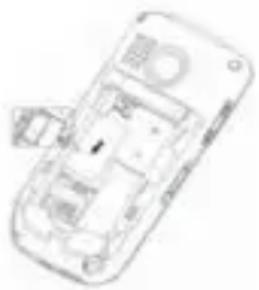
Put the battery in the phone as shown in the illustration opposite (text upwards/gold-coloured connectors downwards).
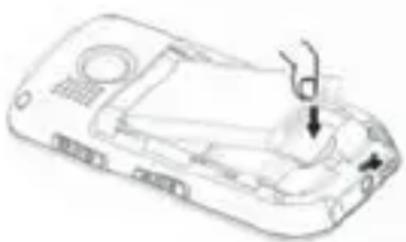
Replace the back cover by placing it flat on the back of the handset and sliding up until it clicks into place. Make sure the cover fits correctly.
For later removing the back cover push in the button at the bottom of the back cover and slide the cover down.
Charging the battery
Connect the charger lead firmly into the socket as shown in the illustration opposite.
Plug the charger into a mains socket.
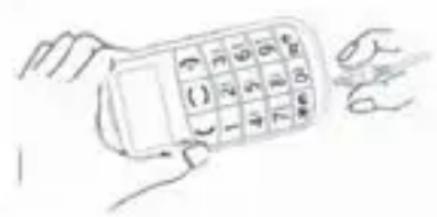
The battery symbol is displayed. The first charging of the battery may take up to 4 hours. If the battery is fully charged, disconnect the charger from the phone and the mains socket.
Note: When recharging the battery if it is "very empty", you may have to wait a few minutes before your phone will recognize it.
Emergency Call Function
This mobile phone is equipped with a convenient emergency call function. Up to 5 personal emergency numbers can be entered for emergency calls.
Activate/deactivate the Emergency Call Function
To activate/deactivate the Emergency Call Function press, select Phonebook -> Emergency settings -> Emergency button and switch the function on or off.
Entering emergency call numbers
- Press —, select Phonebook -> Emergency settings and press the Call key.
- Select Emergency numbers and press the Call key.
- Select Create to enter a new emergency call number or Edit to modify an existing one and press the Call key. Note: In this menu you can also delete emergency call numbers or Change sequence (the order of emergency calls).
Call emergency numbers
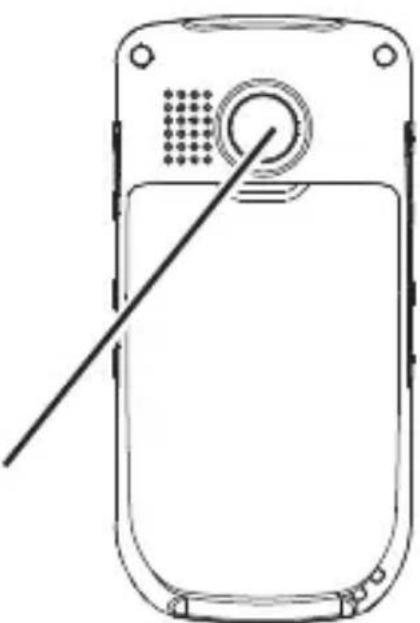
Press the red key on the back of your telephone. The first programmed emergency number appears and an acoustic alarm is issued.
When the first emergency numbers doesn't answer, the mobile phone automatically dials the next one. Up to three further attempts are made to dial all the programmed emergency numbers (max. 5).
The phone is locked during the emergency call. Incoming calls are automatically recorded in the Call History without ringing.
Attention:
- If an emergency telephone number call is answered by a telephone machine, the emergency call is considered as answered and no further emergency numbers will be called. However, the emergency SMS (see below) will be sent to all programmed emergency call numbers.
- When the keypad is locked and you press the red key on the back, the telephone requests a confirmation. You must first unlock the keypad to enable the emergency call function.
- If no SIM card is installed, the emergency call number 112 is automatically dialled (except in Germany).
Emergency SMS
An emergency SMS message is sent to all programmed emergency numbers. You can use the factory-provided emergency SMS or save and send your own personalized message.
Emergency call interruption
To interrupt a current emergency call, press and hold the End Call key until the alarm melody stops playing and Call end is displayed.
Key Functions
Call button:
Take a call or dial a number
- Open the radial list
Key 1
- Press and hold down for direct access to network answer machine
Asterisk key
- Press and hold down: speed dial key M1
- Radio operation: channel scanner
Key 0
- Insert a space
- Switch to handsfree
Hash key
- Press and hold down: speed dial key M2
- Switch between upper and lower case lettering
Emergency call key
Arrow keys
- Scrolling in lists, menus and settings
- In idle mode:
--> Open main menu
--> Open Phonebook
End Call key:
- End or reject a call
- Return to idle state (during programming)
- Switch the mobile phone on and off
Icons in the handset display

Signal strength of the phone connection
Battery charge indication
Alarm
New SMS message
Call diversion
Missed calls
Silent is activated
Roaming
Headset
Using the phone
General
Menu lists are used for set up and operation.
Use the arrow keys / to scroll through menus and lists (e. g. phonebook). Press the End Call key or the Call key, to get to the next or previous step.
When writing text (e. g. phonebook or SMS) use # to switch cases (upper case: ABC, title case: Abc, lower case: abc or numerals: 123).
Use the arrow keys / to move the cursor and the End Call key to delete characters.
Switching the mobile phone off and on
Switch off: Press and hold down the End Call Key. After a short time the display gets dark.
Switch on: Press and hold down the End Call Key, until the display is illuminated. Enter the PIN code and press the Call key.
Key lock
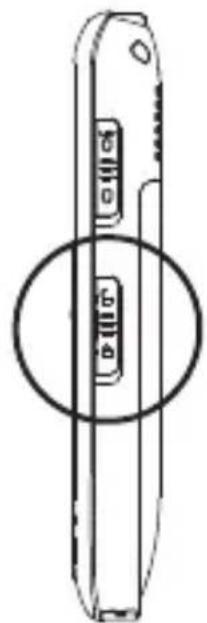
Activate: Slide the switch on the right hand side of the phone to the lower position. The corresponding symbol appears in the display. You can furthermore take and reject calls. During a call the lock is deactivated.
Deactivate: Slide the switch in the upper position again.
Using the torch
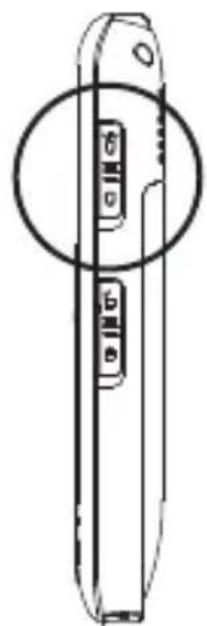
Activate: Slide the switch on the right hand side of the phone to the upper position.
Deactivate: Slide the switch in the lower position again.
Note:
- The torch uses a high-brightness LED and you should not point the beam directly into eyes, or view with optical instruments.
- Please note that this feature requires much energy and so the standby time for the phone will significantly decrease.
Telephoning
The phone has to be switched on.
Dialling a telephone number and making a call
- Key in the phone number including the area code. To make international phone calls: Add a "+" by pressing * twice, and add the country (or region) code in front of the area code.
- Press the Call key to dial the telephone number.
- For ending the call press the End Call key.
Making a call using the speed dial keys
- Press one of the speed dial keys for approx. 2 seconds. The relevant number saved to this key will be dialled. For saving a number to a speed dial key refer to "Saving a phonebook entry to a speed dial key".
Making a call using the radial function
- Press the Call key. The last 20 dialled telephone numbers will be displayed. Select an entry using / -
- Press the Call key to dial the telephone number.
Taking a call
- If your telephone is ringing press the call key
- Press the End Call key, to reject this call. The caller will hear the busy tone (if supported by your provider).
Setting the receiver volume
- The volume can be adjusted during a call using the keys + / - on the left side of the mobile phone. The setting will be saved.
Activating hands-free
- During a call: Press the Call key, select Hands free and press the Call key. The loudspeaker will be switched on and the corresponding symbol appears in the display.
- Press the End Call Key to cut off the connection.
Warning:
Do not hold the device near your ear when the loudspeaker is in use, because the volume may be extremely loud.
Muting the microphone in the handset
- During a call press the Call key, select Mute and press the Call key. The microphone is muted and the corresponding symbol appears on the display.
- For unmuting the microphone press the Call key, select Unmute and press the Call key.
Setting up a 3-party conference
"3-party" is a network feature to talk to multiple subscribers simultaneously (check with your service provider).
- Call the first subscriber.
- Press the Call key, select Conference Call.
-
Enter the number of the second subscriber (or search for the number in the phonebook).
-
Press the Call key. When the second subscriber answers, press the Call key again, select Conference and press the Call key.
The 3 parties are now connected.
Note:
You can switch from one subscriber to the other and talk to each one separately using Swap.
PhoneBook
You can save names and telephone numbers in the phone (up to 300 entries) and on the SIM card.
Opening the phone book
In idle state press
or
During a call press the Call key, select Phonebook.
Checking used space
For checking how many entries are already made press
Phonebook -> PhoneBk Settings -> Memory
status. You will get information about the available
memory in the phone as well as on the SIM card.
Creating a new entry
- Press Phonebook Add contact and press the Call key every time.
- Enter the name and the telephone number and press the Call key.
Dialling numbers from the phone book
- Press to open the phone book.
- Select an entry using the arrow keys or enter the first character of the entry.
- Press the Call key to dial the telephone number.
Editing an entry
- Press to open the phone book.
- Select an entry and press the Call key, select Edit contact and press the Call key.
- Edit the entry and press the Call key.
Deleting an entry
- Press to open the phone book.
- Select an entry and press the Call key, select Delete and press the Call key.
Deleting all entries
- Press Phonebook Delete contact All. Select whether the entries in the phone or on the SIM card will be deleted and confirm.
Copying all entries
- Press Phonebook Copy contact. Select whether the entries in the phone should be copied to the SIM card or viceversa and select All.
Saving a phonebook entry to a speed dial key
- Press Phonebook, select Quick dial keys and press the Call key.
- Enter the name and number and confirm with the Call key.
Call History
New entries in the call list are marked with A new missed call will be displayed ("Missed Call") as long as you did not press the Call key or the End Call key.
Viewing the call history
- Press —, select Call History and press the Call key.
- Use to select Missed calls, Dialled numbers or Received calls. Select Delete all to delete all lists.
-
In the menu Call duration you can display the duration of:
-
the last call
- all calls
- the dialled numbers
- the received calls
or you can
- Clear all timers
Note:
If you select an entry and press the Call key you have the following options:
- Call: The telephone number is dialled.
- Send SMS: You can send a message to this telephone number.
- Details: You get more details to this entry.
- Save to PhoneBk: The telephone number is stored in the phonebook.
- Delete: The entry will be deleted.
SMS
You can send and receive text messages (SMS/Short Message Service). Received messages are stored internal in the phone (up to 150) or on the SIM card. Unread messages are stored in the inbox and marked with After having received a new message "New message" will be displayed as long as you did not press the Call key (showing the message) or the End Call key.
The SMS menu
After pressing SMS you have the following options:
- Write new SMS: You can write a new SMS.
- Received SMS: Opens the inbox (received SMS).
- Sent SMS: Opens the outbox (sent SMS).
- Draft Box: Access to the draftbox.
- Templates: Opens the list of templates.
- Delete SMS: You have several options - see chapter "Deleting messages"
- Mailbox number: Enter your Network answer machine number.
- Service centre No.
- Status report: Enable or disable a notice of receipt.
- Memory Status: Displays the internal memory space (phone) and SIM card.
Writing and sending a SMS
- Press SMS, select Write new SMS and press the Call key. Write your SMS (max 160 characters) using the keypad. For further information on entering text refer to "Using the phone/General".
- Enter the text, press the Call key, select Send and press the Call key.
- Enter the recipient's telephone number and press the Call key.
or
- Select a number from the phonebook. Press the Call key, select an entry and press the Call key. The sending state is displayed.
Note:
If you do not want to send your message now but storing it for further editing, select Save as template. If you want a copy of the sent message saved in the outbox, select Send and save. If sending failed the message will again be shown in editing mode.
In the menu Create SMS you have further options:
- Send
- Send and save
-Delete text - Insert number
- Insert name & number
- Insert Template
- Save as Template
- Save to Draft box
- Text Input Settings: Select capital or lower case letters or numeric characters.
Reading messages
- Press SMS, select Received SMS and press the Call key.
- Select an entry using / -
- Press the Call key, to view this message.
-
Press again the Call key to open the menu Option. Select from the following:
-
Reply: You can send a reply to the sender of the message.
-
Call number: You can directly call the message's sender.
-
Delete SMS: You can delete the message.
- Forward: You can edit the message and send it to a different telephone number.
- Save to PhoneBk: You can store the telephone number to the phonebook.
Deleting messages
- Press SMS, select Delete SMS and press the Call key.
-
Select from the following list:
-
All SMS, to delete all messages.
- Received SMS, to delete messages in the inbox.
- Sent SMS, to delete messages in the outbox.
- Draft box, to delete messages in the draftbox.
- Templates, to delete templates.
Settings
You are able to adjust various settings on the phone, and also to reset them to their factory default values.
- Press —, select Settings and press the Call key.
-
You have the following options:
-
Silent mode: The ringer is deactivated on incoming calls.
-
Vibrating Alert: Incoming calls are signalled by a vibrating alert.
-
Phone Settings
-
Melody: You can select different ringer melodies.
- Volume: Adjust the ringer volumes.
- Display contrast: You can set the contrast of the display.
- Language: You can set the display language.
- Clock Settings: You can set time and date and the date format.
- Network settings
- Call Waiting: When activated you can take a second call during a current call using the call key. The first call is put on hold.
- Call forward: You can set different call diversions.
- Call Barring: You can restrict making and receiving calls.
- Network selection: You can select a different network.
-
Hide Number: You can withhold the sending of your own number (call anonymously).
-
PIN Code Request: You can set the phone to request the PIN code of your SIM card every time the phone is switched on. Note: some SIM cards don't allow it turned off.
Attention: If you enter an incorrect PIN three times the SIM card is blocked, and you must enter the PUK number or contact your service provider, to unblock it and set a new PIN code. PIN and PUK numbers come with your SIM card.
- Factory default: You can reset the phone to delivery state. For this, you have to enter the PIN code (0000 on delivery).
Tools
- STK: The services available depend on your network operator.
- Alarm Clock: You can set up to 3 different alarms to sound at the time you want just once, or repeatedly, for example every working day.
When alarm sounds, you can stop the alarm by pressing the End Call key. If you press the Call key, the alarm stops and rings again in five minutes.
- Set Alarm: Set the desired alarm repetition, the time and the alarm melody.
-
Clear All: Clears all set alarms.
-
Memo: You can enter up to 3 different memos to be displayed at the time you want just once, or repeatedly. When the memo alarm sounds, you can stop the alarm by pressing the End Call key.
-
Edit Memo: Set the desired alarm repetition, the date and time and enter your memo text.
-
Clear All: Clears all entered memos.
-
Birthday Reminder: You can enter 10 birthday reminders. When the birthday alarm sounds, you can stop it by pressing the End Call key.
-
New Brithday: Enter the name, date and time.
- Edit Birthday
- Delete Birthday
FM Radio
You can listen to the radio through the loudspeaker or a headset. To switch from loudspeaker to headset operation press the End Call key.
Activate the radio:
- Slide the switch on the left hand side of the phone to the upper position.
Set the channel:
-
Press / to select the desired channel or
-
Press key and then the Call key to activate the automatic channel search. You can terminate the search by pressing the End call key.
Deactivate the radio:
- Slide the switch on the left hand side of the phone to the lower position again.
Note:
Set the radio volume using + / - on the left hand side of the phone.
Warning:
Listen to music at a moderate level. Continuous exposure to high volume may damage your hearing.
Calculator
You can add, subtract, divide and multiply using the integrated calculator:
- Enter the first number(s) of your arithmetic operation.
- Press / to select the operation symbol (+ - x /).
- Enter the next number(s).
- Press the Call key to accomplish the operation.
Warranty conditions
Your telephone is subject to a guarantee from the date of purchase in accordance with the legal provisions of the country in which the unit was purchased. As evidence of the date of purchase, please keep the receipt or the warranty card completed by the retailer. All defects attributable to material and manufacturing faults will be corrected free of charge within the warranty period, either by repairing or replacing the defective equipment.
The warranty does not cover expendable materials (battery cells), defects which affect the value or use of the equipment only insignificantly, and damage caused by incorrect use, ordinary wear and tear, or manipulation by third parties.
This warranty does not cover consequential damage caused by the use, failure or defectiveness of the product. In particular, no liability whatsoever is accepted for damage to property and pecuniary loss.
To claim under this warranty, please contact the retailer where you purchased your telephone.
Warranty information for Germany
If the good evinces a defect due to manufacturing or materials faults within 24 months of purchase, please send the entire product including accessories and sales receipt to
Swissvoice Service Center
Im Frauental 14
92224 Amberg.
The Swissvoice Service Center will replace it with and equivalent good or perform a repair. In the case of components subject to wear (e.g. batteries) this period lasts for 6 months from the date of purchase.
Technical Support telephone number (Germany)
For Hotline, repairs, spare parts, technical support and warranty
From Monday to Friday from 09:00 AM to 06:00 PM
Please call 0180 55 82 888 (Euro 0,14 / Minute)
E-mail: support-de@swissvoice.net
Approval and conformity
This telephone complies with the basic requirements contained in the R&TTE Directive 1999/5/EC on radio equipment and telecommunications terminal equipment and is suitable for connection and operation in the member state indicated on the device and/or packaging.
The declaration of conformity may be viewed at: www.swissvoice.net.
The CE symbol confirms the conformity of the telephone with the above directive.
Warranty Certificate
swissvoice
Warranty Certificate
Garantieschein, Bon de garantie, Certificato di garanzia, Garantiebewijs, Takuutodistus, Garantibevis, Garantisedel, Garantibevis, Certificado de Garantía, Talao de garantia
device type:
(Geratotyp, type d'appareil, tipo di apparecchio, toesteltype, laitetyppi, maskintype, apparattyp, apparattype, modelodel aparato, modelodaparelho):
serial number: (Seriennummer, numero de série, numero di série, serienummer, sarjanumero, serienummer, serienummer, serienummer, numero de série, numero de série):
dealer's stamp:
(Handlerstempel, sceau du vendeur, timbro del rivenditore, stempel van de dealer, kauppiaan leima, forhandlerens stempel, forsäljarens stämpel, forhandlerstempel, sello del commerciante. carimbo do vendedor):
dealer's signature: (Unterschrift des Handlers, signature du vendeur,irma del rivenditore, handtekening van de dealer, kauppiaan allekirjoitus, forhandlerens underskrift, forsäljarens underskrift, forhandlers underskrift,irma del commerciente, assinatura do vendedor):
date of purchase: (Kaufdatum, date d'achat, data d'acquisto, datum van aankoop, ostopáiváys, kjapsdato, datum für kopet, salgsdato, fecha de adquisión, data de compra):
Internet:
www.swissvoice.net
© Swissvoice SA 2011
20405579_de_fr_it_en_ba_e0
SV 20405579