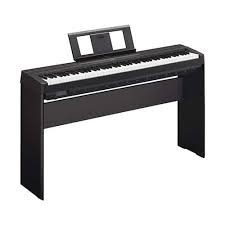
YAMAHA P-45 - Digital piano

P-45 - Digital piano YAMAHA - Free user manual and instructions

Find the device manual for free P-45 YAMAHA in PDF.

📄 26 pages English EN Download 💬 AI Question 15 questions ⚙️ Specs
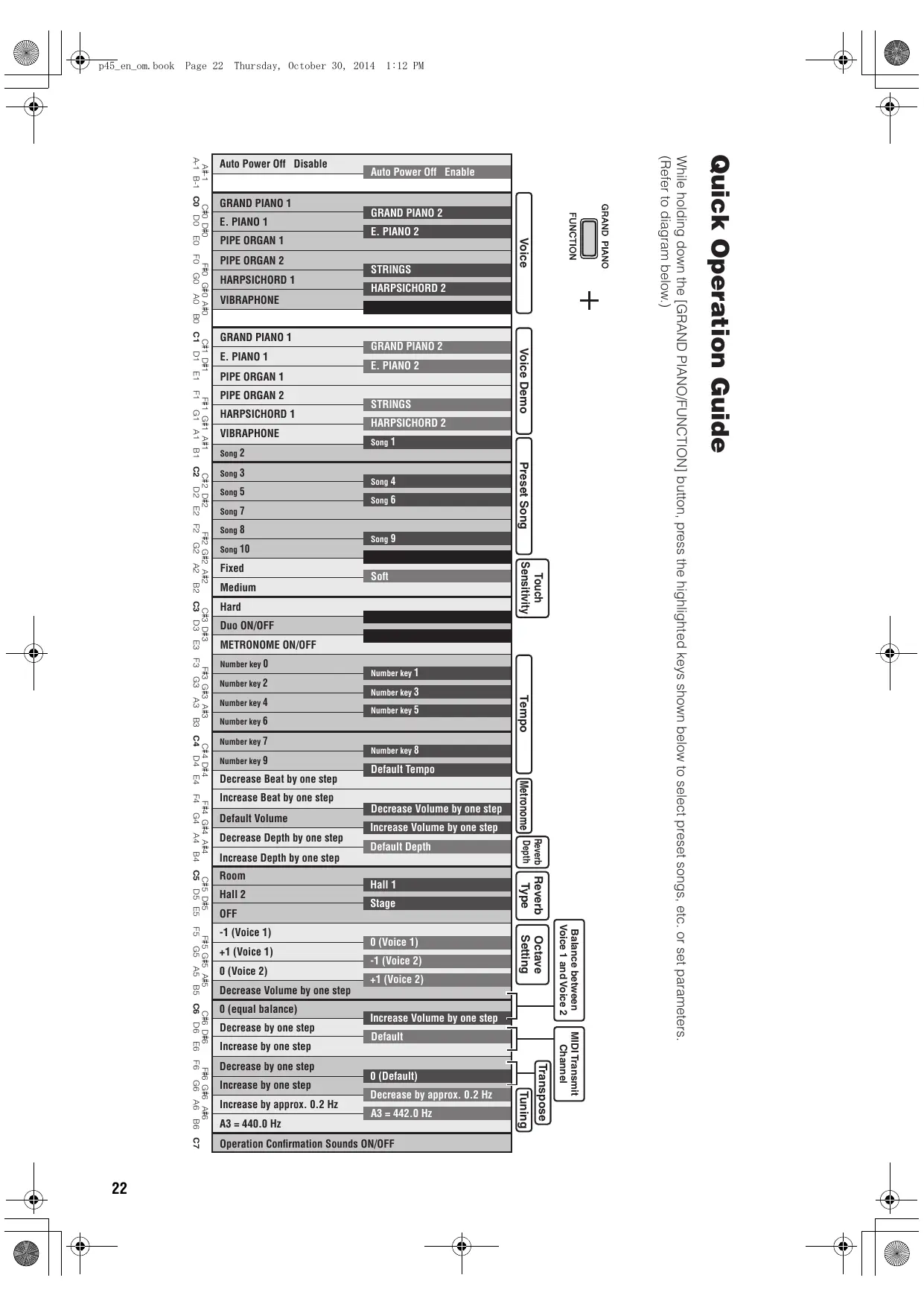
Notice YAMAHA P-45 - page 22
View the manual : Français FR English EN
Pick your language and provide your email: we'll send you a specifically translated version.
BrandYAMAHA
ModelP-45
CategoryDigital Piano
Keyboard TypeGraded Hammer Standard (GHS) with matte black keys
Number of Keys88 (A1 to C7)
Maximum Polyphony64 notes
Built-in Voices10 (Grand Piano 1/2, E. Piano 1/2, Pipe Organ 1/2, Strings, Harpsichord 1/2, Vibraphone)
EffectsReverb (Room, Hall1, Hall2, Stage, Off) – adjustable depth
Playing ModesDual (layer), Duo (keyboard split)
MetronomeTempo 32-280, volume and beat adjustment
ConnectivityUSB TO HOST (for iPhone/iPad/computer), Sustain jack, Stereo headphone jack
PedalIncluded (foot switch); optional FC3A pedal unit support (half-pedal)
SpeakersBuilt-in
Power SupplyPower adapter PA-150 or equivalent; power consumption 6 W
Dimensions (approx.)132.6 x 29.5 x 15.4 cm
Weight (approx.)11.5 kg
Included AccessoriesOwner's manual, music rest, power adapter, foot switch, registration card
Special FunctionsAuto power off, touch sensitivity (4 levels), transpose, fine tuning
Built-in Songs10 demo songs + 10 preset songs
App CompatibilityiOS apps via USB connection (Airplane Mode recommended)
MaintenanceClean with a soft dry cloth; do not use solvents
SafetyUse only the specified adapter; do not open; avoid water and heat sources
RepairabilityReplacement parts via Yamaha after-sales service; no user-serviceable parts

Frequently Asked Questions - P-45 YAMAHA

How to disable auto power off?
Hold down the lowest key (A-1) and press the [O] (Standby/On) switch to turn the instrument back on. The indicator blinks three times to confirm deactivation.
My pedal produces the opposite effect (sound cuts when I press it). What should I do?
This happens if the pedal is pressed when turning on the power. Turn the instrument off, then turn it back on without pressing the pedal.
Can I connect this instrument to an iPad or iPhone?
Yes, via the USB TO HOST port with an appropriate USB cable (type AB). Enable Airplane Mode on your iOS device to avoid interference.
How to transpose the keyboard?
Hold down the [GRAND PIANO/FUNCTION] key and press F6 (lower by a semitone) or G6 (raise); F#6 returns to original pitch. Range of -6 to +6 semitones.
How to layer two voices (Dual mode)?
Hold down [GRAND PIANO/FUNCTION] and press two voice keys simultaneously (C0 to A0). The first key selects voice 1, the second voice 2.
How to use Duo mode for two players?
Hold down [GRAND PIANO/FUNCTION] and press D3. The keyboard is divided into two zones with the split point at E3. Each zone is independent for two musicians.
How to adjust the metronome?
Hold down [GRAND PIANO/FUNCTION] and press E3 to start/stop. Set the tempo with keys F3 to D4 (enter three digits), the beat with E4/F4, and the volume with F#4/G#4.
How to adjust touch sensitivity?
Hold down [GRAND PIANO/FUNCTION] and press A2 (Fixed), A#2 (Soft), B2 (Medium) or C3 (Hard). Medium is the default setting.
Can I use headphones?
Yes, plug a stereo headphone with a 1/4 inch plug into the [PHONES] jack. The speakers are automatically muted. Avoid prolonged listening at high volume.
How to reset the instrument to factory settings?
Hold down the C7 key (rightmost) and press the [O] switch to turn on the power. The indicator blinks during initialization. Do not turn off the instrument during this process.

User questions about P-45 YAMAHA

5 questions about this device. Answer the ones you know or ask your own.

Ask a new question about this device

The email remains private: it is only used to notify you if someone responds to your question.

How to lower the pitch of the Yamaha P-45?
Frequently Asked Questions - 17 j
Response Notice-Facile

The Yamaha P-45 offers two ways to lower the pitch:

Transposition by semitone

To lower the keyboard pitch by semitones (up to -6 semitones):

  • Press and hold the [GRAND PIANO/FUNCTION] key (the lowest key on the keyboard)
  • Press the F6 key

You can repeat this operation several times to reach the desired pitch. To return to the original pitch, hold [GRAND PIANO/FUNCTION] and press F#6.

This function is very useful for accompanying a singer or playing in a different key without changing your fingering.

Fine tuning

For a finer adjustment of the frequency (approximately 0.2 Hz per increment):

  • Hold [GRAND PIANO/FUNCTION] and press G#6 to decrease
  • Hold [GRAND PIANO/FUNCTION] and press B6 to return to A3 = 440 Hz (the standard pitch)

This function allows for precise tuning of the piano with other instruments or external audio sources.

Respond (be the first)
Why do I have to press very hard on the keys of the Yamaha P-45 digital piano to get a sound?
Frequently Asked Questions - 11/03/2026
Response Notice-Facile

If you have to press very hard on the keys of your Yamaha P-45 digital piano to get a sound, it is most likely related to the touch sensitivity setting. The P-45 has four different modes that control the keyboard's response to your playing strength. If the Hard mode is activated, you will indeed need to press very hard on the keys to produce a sustained sound with significant dynamic variations.

To adjust the touch sensitivity setting of the Yamaha P-45, hold down the [GRAND PIANO/FUNCTION] key and simultaneously press one of the keys between A2 and C3. Here are the four available modes:

  • A2 (Fixed): The volume remains constant, regardless of the playing strength. The keyboard does not respond to dynamics.
  • A#2 (Soft): The volume changes slightly in response to your playing strength. This mode is suitable if you find the touch too hard.
  • B2 (Medium): This is the default setting, offering a standard response of an acoustic piano with a balance between dynamics and ease of play.
  • C3 (Hard): The volume changes significantly and requires more playing strength. Select this mode if you are currently playing with a lot of pressure and cannot produce the desired sounds.

If the problem persists after trying the Soft or Medium mode, check that your piano does not have a hardware issue. The Yamaha P-45 is equipped with a Graded Hammer Standard (GHS) keyboard with 88 weighted keys, which means it naturally offers some resistance to replicate the touch of an acoustic piano. This resistance is normal and is part of the P-45's design.

In case of persistent mechanical malfunction (stuck keys, faulty velocity sensors, or debris accumulation under the keys), gently clean your keyboard with a soft, dry cloth, and then have the device inspected by a qualified Yamaha technician. Do not attempt to open the piano or modify its internal components yourself.

Respond (be the first)
Why do the keys on the right side of my Yamaha P-45 digital piano not produce the correct sound?
Frequently Asked Questions - 11/03/2026
Response Notice-Facile

Several factors may explain a weak or absent sound on the keys to the right of your Yamaha P-45. Start by checking your setup:

Check the Duo mode. In Duo mode, the keyboard is automatically split at the E3 key: the keys on the left play one sound and those on the right play another. If this mode is accidentally activated, the right sound may be set too low or on an inappropriate quality. To disable it, press and hold the [GRAND PIANO/FUNCTION] key, then press D3. This will restore the full keyboard with a single sound.

Adjust the MASTER VOLUME slider. Make sure that the [MASTER VOLUME] slider located on the front panel is high enough. It controls the overall volume of the piano. A level that is too low will affect all keys. In Dual mode (layering two sounds), you can also adjust the balance between the left and right sounds: press [GRAND PIANO/FUNCTION] + B5 to decrease, C6 to balance, or C#6 to increase.

Check the connections. A headphone plugged into the [PHONES] jack automatically cuts off the built-in speakers. Make sure no plug is connected to this jack. Similarly, if you are using headphones or an external amplifier, first test with the built-in speakers to isolate the problem.

Consider the polyphony limit. The P-45 has a polyphony of 64 notes. With complex pieces or reverb activated, the oldest notes may be cut off if you exceed 64 simultaneous notes. This is a normal limitation of this instrument.

Check the touch sensitivity. In Fixed mode, all keys produce the same volume regardless of your touch. In Hard mode, you need to strike very hard to get a sustained sound. Press and hold the [GRAND PIANO/FUNCTION] key, then press a key between A2 and C3 to adjust this setting (successive keys allow you to choose Fixed, Soft, Medium, or Hard).

Reset the instrument. To return to the default settings, press and hold the C7 key (the farthest right), then turn the instrument on. The indicator blinks during initialization. This action resets the saved data (metronome volume, touch sensitivity, fine tuning, etc.) without loss of function.

If after these steps the keys on the right still do not sound correctly, it is likely that an internal hardware defect is present (key sensors, electronic circuits). In this case, contact an authorized Yamaha dealer or customer service for a professional diagnosis and repair.

Respond (be the first)
How to disable the default pedal function on the Yamaha P-45 digital piano?
Frequently Asked Questions - 03/02/2026
Response Notice-Facile

To disable the default pedal function on your Yamaha P-45 digital piano, follow this simple procedure:

  1. Turn off the piano to start the setup safely.
  2. Press and hold the C1 key (the first white key on the far left) while turning on the piano.
  3. Release the C1 key once the piano is powered on.

This action disables the default pedal function. To reactivate this function, simply repeat the same steps.

This method allows you to modify the behavior of the built-in sustain pedal, which can be useful depending on your playing style or preferences.

Respond (be the first)
How to record your performance on the YAMAHA P-45 digital piano?
Frequently Asked Questions - 03/12/2025
Response Notice-Facile

The YAMAHA P-45 digital piano does not have a built-in recording function. To record your playing, you need to use a computer or an external device with recording software. Here’s how to proceed:

1. Connecting the piano to a computer

  • Use a USB cable to connect the P-45 to your computer.
  • Install the necessary drivers available on the official YAMAHA website if your computer does not automatically recognize the piano.

2. Setting up the recording software

  • Open a MIDI-compatible software, such as GarageBand, Ableton Live, FL Studio, or any other audio/MIDI recording software.
  • In the software settings, select the YAMAHA P-45 as the MIDI input source.
  • Create a new MIDI track to record your performance.

3. Recording the performance

  • Press the record button in the software.
  • Play on your piano; the software will capture the played MIDI notes.
  • Once finished, stop the recording in the software.

4. Saving and exporting

  • Save your project in the software to keep your performance.
  • You can also export your recording in audio format (MP3, WAV, etc.) depending on the options provided by the software.

If you want to record the sound directly (audio) rather than the MIDI notes, you can connect the audio output of the P-45 to an audio interface connected to your computer or to an external recorder.

Respond (be the first)

Download the instructions for your Digital piano in PDF format for free! Find your manual P-45 - YAMAHA and take your electronic device back in hand. On this page are published all the documents necessary for the use of your device. P-45 by YAMAHA.

USER MANUAL P-45 YAMAHA

Sonorité 1F5-1
F#50
G5+1
Sonorité 2G#5-1
A50
A#5+1

Dimensions (L x P x H)

  • 1326 x 295 x 154 mm

Poids

11,5 kg

Claviers

  • DC IN (12 V), PHONES, SUSTAIN, USB TO HOST

Amplificateurs

  • 6W + 6W

Haut-parleurs

  • 12 cm x 2

Alimentation

Quick Operation Guide 22

R

Réglage du tempo 16-17

Réglages MIDI 18

Reverb (Réverbération) 13

s

Yamaha Canada Music Ltd.

135 Milner Avenue, Toronto, Ontario,

M1S 3R1 Canada

Tel: 416-298-1311

U.S.A.

Yamaha Corporation of America

6600 Orangethorpe Avenue, Buena Park, CA 90620,

U.S.A

Tel: 714-522-9011

CENTRAL & SOUTH AMERICA

MEXICO

Yamaha de Mexico, S.A. de C.V.

Av. Insurgentes Sur 1647 "Prisma Insurgentes",

Col. San Jose Insurgentes, Del. Benito Juarez,

03900, Mexico, D.F.

Tel: 55-5804-0600

BRAZIL

PANAMA AND OTHER LATIN

AMERICAN COUNTRIES

CARIBBEAN COUNTRIES

Yamaha Music Latin America, S.A.

Torre Banco General, Piso No.7, Marbella,

Sherbourne Drive, Tilbrook, Milton Keynes,

MK7 8BL, U.K

Tel: 01908-366700

GERMANY

Yamaha Music Europe GmbH

Siemensstraße 22-34, 25462 Rellingen, Germany

Tel: 04101-3030

Branch Switzerland in Zurich

Seefeldstrasse 94, 8008 Zurich, Switzerland

Tel: 044-387-8080

AUSTRIA

Yamaha Music Europe GmbH Branch Austria

Schleiergasse 20, A-1100 Wien, Austria

Tel: 01-60203900

CZECH REPUBLIC/HUNGARY/

ROMANIA/SLOVAKIA/SLOVENIA

Yamaha Music Europe GmbH

Branch Austria (Central Eastern Europe Office)

Schleiergasse 20, A-1100 Wien, Austria

Tel: 01-60203900

POLAND/LITHUANIA/LATVIA/

ESTONIA

Yamaha Music Europe GmbH

Branch Poland Office

Yamaha Music Europe GmbH, Branch Italy

Viale Italia 88, 20020 Lainate (Milano), Italy

Tel: 02-935-771

SPAIN/PORTUGAL

Yamaha Music Europe GmbH Ibérica, Sucursal

en España

Ctra.de la Coruna km.17,200,28231

Las Rozas (Madrid), Spain

147 Skiathou Street, 112-55 Athens, Greece

Tel: 01-228 2160

SWEDEN

Yamaha Music Europe GmbH Germany filial

Scandinavia

J.A.Wettergrensgata 1,Box 30053

S-400 43 Göteborg, Sweden

Tel: +46 31 89 34 00

DENMARK

Yamaha Music Europe GmbH, Tyskland - filial

Denmark

Generatorvej 6A, DK-2730 Herlev, Denmark

Tel: 44 92 49 00

FINLAND

F-Musiikl

Kluuvikatu 6, P.O. Box 260,

SF-00101 Helsinki, Finland

Tel: 09 618511

NORWAY

Yamaha Music Europe GmbH Germany -

Norwegian Branch

Grini Næringspark 1, N-1361 Østerås, Norway

Tel: 67 16 78 00

ICELAND

Skifan HF

Skeifan 17 P.O. Box 8120, IS-128 Reykjavik,

Iceland

Tel: 525 5000

RUSSIA

Yamaha Music (Russia) LLC.

Room 37, bld. 7, Kievskaya street, Moscow,

121059, Russia

Tel: 495 626 5005

TURKEY/CYPRUS

Yamaha Music Europe GmbH

OTHER EUROPEAN COUNTRIES

Yamaha Music Europe GmbH

Siemensstraße 22-34, 25462 Rellingen, Germany

Tel: +49-4101-3030

AFRICA/MIDDLE EAST

SOUTH AFRICA

Global Music Instruments

World of Yamaha

19 Eastern Service Road, Eastgate Ext.6, Sandton,

South Africa

Tel: +27-11-259-7700

OTHER COUNTRIES

Yamaha Music Gulf FZE

LOB 16-513, P.O.Box 17328, Jebel Ali,

Dubai, United Arab Emirates

Tel: +971-4-881-5868

ASIA

THE PEOPLE'S REPUBLIC OF CHINA

Yamaha Music & Electronics (China) Co.,Ltd.

2F, Yunhedasha, 1818 Xinzha-lu, Jingan-qu,

Shanghai, China

Tel: 400-051-7700

HONG KONG

Tom Lee Music Co., Ltd.

11/F., Silvercord Tower 1, 30 Canton Road,

Tsimshatsui, Kowloon, Hong Kong

Tel: 2737-7688

INDIA

Yamaha Music India Pvt. Ltd.

Spazedge building, Ground Floor, Tower A, Sector

47, Gurgaon- Sohna Road, Gurgaon, Haryana, India

Tel: 0124-485-3300

INDONESIA

PT. Yamaha Musik Indonesia (Distributor)

Yamaha Music Center Bldg. Jalan Jend. Gatot

SubROTO Kav. 4, Jakarta 12930, Indonesia

Tel: 021-520-2577

KOREA

Yamaha Music Korea Ltd.

8F, 9F, Dongsung Bldg. 158-9 Samsung-Dong,

Kangnam-Gu, Seoul, Korea

Tel: 02-3467-3300

MALAYSIA

Yamaha Music (Malaysia) Sdn., Bhd.

No.8,Jalan Perbandaran, Kelana Jaya, 47301

Petaling Jaya, Selangor, Malaysia

Tel: 03-78030900

SINGAPORE

Yamaha Music (Asia) Private Limited

Block 202 Hougang Street 21, #02-00

Singapore 530202, Singapore

Tel: 65-6747-4374

TAIWAN

Yamaha Music & Electronics Taiwan Co.,Ltd.

3F, No.6, Section 2 Nan-Jing East Road, Taipei,

Taiwan R.O.C.

Tel: 02-2511-8688

THAILAND

Siam Music Yamaha Co., Ltd.

3,4,15 and 16th floor, Siam Motors Building,

891/1 Rama 1 Road, Wangmai,

Pathumwan, Bangkok 10330, Thailand

Tel: 02-215-2622

VIETNAM

Yamaha Music Vietnam Company Limited

15th Floor, Nam A Bank Tower, 201-203 Cach

Mang Thang Tam St., Ward 4, Dist.3

Ho Chi Minh City, Vietnam

Tel: +84-8-3818-1122

OTHER ASIAN COUNTRIES

http://asia.yamaha.com

OCEANIA

AUSTRALIA

Yamaha Music Australia Pty. Ltd.

Level 1, 99 Queensbridge Street, Southbank,

Victoria 3006, Australia

Tel: 3-9693-5111

NEW ZEALAND

Music Works LTD

P.O.BOX 6246 Wellesley,Auckland 4680

New Zealand

Tel: 9-634-0099

COUNTRIES AND TRUST

TERRITORIES IN PACIFIC OCEAN

http://asia.yamaha.com

YAMAHA
Manual assistant
Powered by Anthropic
Waiting for your message
Product information

Brand : YAMAHA

Model : P-45

Category : Digital piano