ManualGo.com
 SH40055 - Aspirateur HOOVER - Free user manual and instructions
Find the device manual for free SH40055 HOOVER in PDF.


Download the instructions for your Aspirateur in PDF format for free! Find your manual SH40055 - HOOVER and take your electronic device back in hand. On this page are published all the documents necessary for the use of your device. SH40055 by HOOVER.
USER MANUAL SH40055 HOOVER
Operating and Servicing Instructions
©2010 Techtronic Floor Care Technology Limited. All rights reserved. #960009660 ID101391-R2
IMPORTANT: READ CAREFULLY BEFORE ASSEMBLY AND USE.
Questions or concerns? For assistance, please call Customer Service at 1-800-944-9200
Thank you for choosing a HOOVER
Please enter the complete model and Manufacturing
Code in the spaces provided.
MODEL MFG. CODE Hint: Attach your sales receipt to this owner’s manual.
Verification of date of purchase may be required for
warranty service of your HOOVER
Be sure to register your product online at Hoover.com or
call 1-800-944-9200 to register by phone.
If you need assistance:
Visit our website at hoover.com. Follow the authorized dealer locator link to find the Hoover
dealer nearest you or call 1-800-944-9200 for an automated referral of Hoover
locations (U.S. only) or to speak with a customer service representative; Mon- Fri 8am- 7pm EST.
PLEASE DO NOT RETURN THIS PRODUCT TO THE STORE.
(Label located on bottom of cleaner)
Cleaner Description 6
Cord Release/Rewind 6
followed,includingthefollowing:
beforecleaningorservicing.
aroundsharpedgesorcorners.
• Donothandleplugorappliancewithwethands.
ofdust,lint,hair,andanythingthatmayreduceairflow.
• Keephair,looseclothing,fingers,andallpartsofbodyawayfromopeningsand
• Turnoffallcontrolsbeforeunplugging.
• Useextracarewhencleaningonstairs.Donotplacecarpetcleaneronstairs.
• Donotusetopickupflammableorcombustibleliquids,suchasgasoline,orusein
areaswheretheymaybepresent.
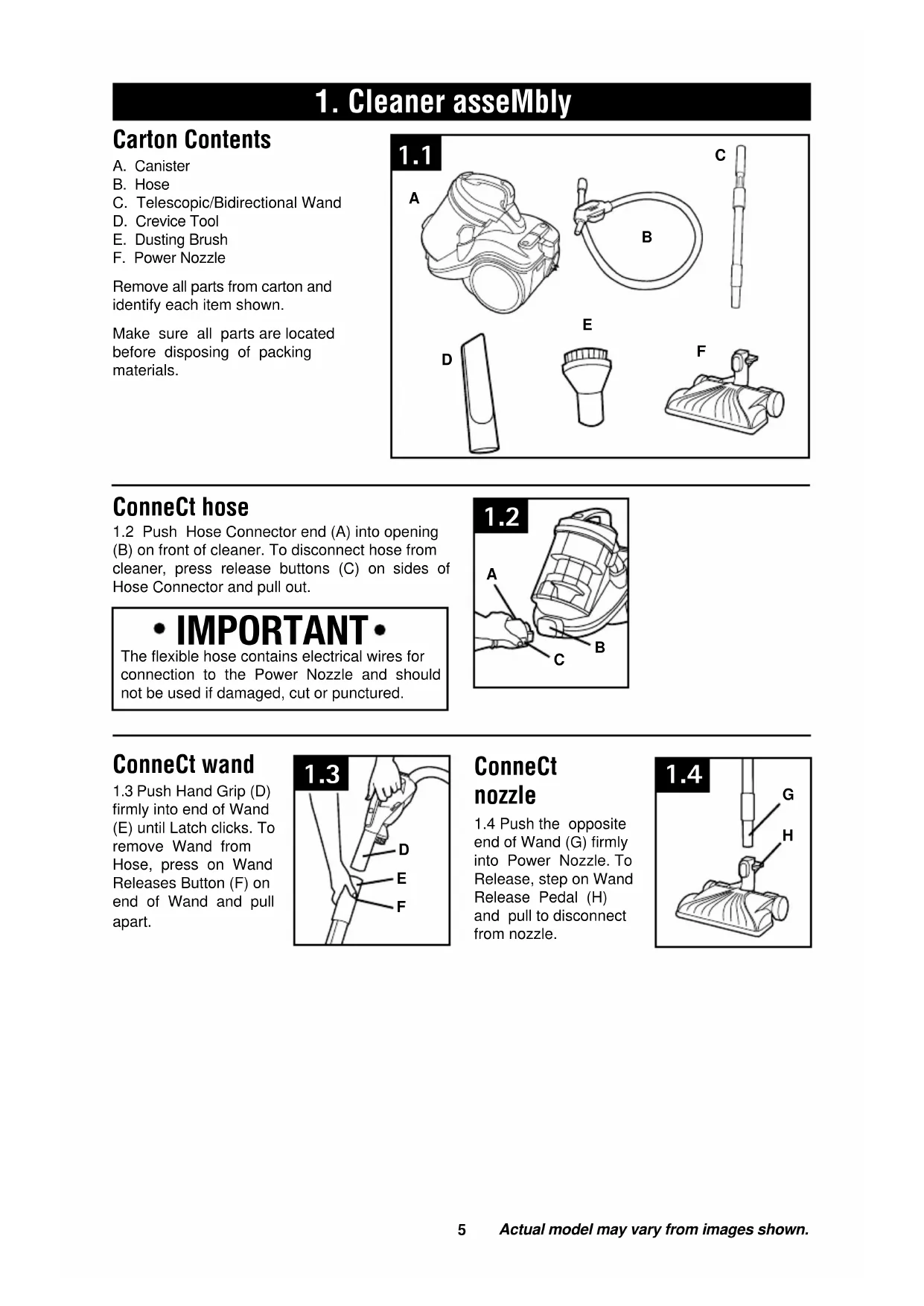
5 A. Canister B. HoseC. Telescopic/Bidirectional Wand D. Crevice Tool E. Dusting BrushF. Power NozzleRemove all parts from carton and identify each item shown. Make sure all parts are located before disposing of packing materials.1.2 Push Hose Connector end (A) into opening (B) on front of cleaner. To disconnect hose from cleaner, press release buttons (C) on sides of Hose Connector and pull out. ConneCt hose
Actual model may vary from images shown.
IMPORTANT The flexible hose contains electrical wires for connection to the Power Nozzle and should not be used if damaged, cut or punctured.1.3 Push Hand Grip (D) firmly into end of Wand (E) until Latch clicks. To remove Wand from Hose, press on Wand Releases Button (F) on end of Wand and pull apart. ConneCt wand
1.3 1.4 Push the opposite end of Wand (G) firmly into Power Nozzle. To Release, step on Wand Release Pedal (H) and pull to disconnect from nozzle. ConneCt
Actual model may vary from images shown.
Cleaner desCription Canister1 Hose Inlet (Front Of Canister)2 Dirt Cup3 Dirt Cup Handle/Carry Handle4 Dirt Cup Release Button5 Auto Cord Rewind Pedal6 ON/OFF Pedal7 Power Cord8 Exhaust Filter CoverPower Nozzle9 Wand Release Pedal10 Headlight11 Handle Release PedalHose/Hand Grip/Wand12 Hose13 Brushroll On/Off Button14 Wand Release Button15 Telescopic/Bidirectional Wand16 Suction Control Valve17 Tool Storage Accessories18 Crevice Tool19 Dusting Brush(Included in all models) 2.3
Carry handle 2.3 To unwind Power Cord from Vacuum, pull out to desired length. 2.4 Use the carry handle located on the top of the dirt bin to move the vacuum cleaner from room to room. IMPORTANT A YELLOW mark on the Power Cord indicates the maximum recommended cord length. Do not exceed the cord length beyond the RED mark. To rewind the Power Cord, press the Cord Rewind Pedal (A), located on the top of the vacuum cleaner, and guide the Power Cord with one hand. This will prevent the cord from whipping which could cause damage or injury. 2.2
on-off switCh 2.2 Insert the plug into the electrical outlet. Press the on/off pedal on back of canister, to switch the cleaner on and press pedal again to turn the cleaner off. 1
Actual model may vary from images shown.
IMPORTANT Operate cleaner only at voltage specified on the data plate on the underside of the cleaner.
VACUUM CONTROLS Handle/Hose Grip (Fig. 2.5) 1 brushroll On/Off buttonPush to turn Brushroll on and off.2 Suction Control ValveTo clean delicate fabrics, slide the Suction Control Valve to the open position to lower the suction. Slide as shown to open and close the Valve. Nozzle (Fig. 2.6) 3 Handle Release PedalStep on the Handle Release Pedal to lower hand grip into cleaning position. 2.5 CLOSED - OPEN 1
IMPORTANT Brushroll will not run until handle is released. 6 2.8 Power Nozzle is recommended for vacuuming wood, laminate coverings and ceramic floor surfaces. Simply push brushroll button on handle to off and begin hard floor cleaning.2.7 After attaching the Power Nozzle, set the Floor Selector to the proper setting for your carpet type. Reference the “Vacuum Controls” section under “How to Operate” for carpet settings of Power Nozzle.
CARPET CLEANING HARD FLOOR CLEANING
STAIR CLEANING 2.10 Clean stairs from bottom to top.
EDGE CLEANING 2.9 Guide side of Nozzle parallel to edge of carpet or furniture as shown. 2.9
IMPORTANT Take extra care when vacuuming stairs. Do not store canister in vertical position. 2.108
Actual model may vary from images shown.
2.12 Tools may be attached directly to the hand grip or
to the wand. Firmly push tool into the hand grip or wand.
Twist tool slightly to tighten or loosen connection.
A. Crevice Tool may be used in tight spaces, corners,
and along edges in such places as dresser drawers,
upholstered furniture, stairs and baseboards. (Tool
stored under Hand Grip)
B. Dusting brush with swivel neck may be used to dust
furniture, lamps, lighting fixtures, blinds, baseboards,
shutters and registers. May also be used for upholstered
furniture, draperies, tapestries and mattresses. (Tool
stored under Hand Grip)
C. Power Nozzle may be used for carpets, rugs and
hard floor surfaces. (See “Hard Floor Cleaning” section
2.129 Actual model may vary from images shown.
DIRT CUP When to Clean Empty the Dirt Cup at the end of each cleaning session and before the dirt reaches the fill line. How to Clean Disconnect cleaner from electrical outlet. 3.1 Press button on the handle located on the Dirt Cup Lid and pull Dirt Cup Out.3.2 Holding Dirt Cup over trash receptacle, press Dirt Cup Door Release Button to open and empty Dirt Cup. When all the dirt has fallen, close the Dirt Cup Door and replace.
UMBRELLA TUBE When to Clean Check Umbrella Tube on a monthly basis and clean when it is wrapped with debris. Check more frequently if cleaning up pet hair or you have family members with long hair. How to Clean Disconnect cleaner from electrical outlet. Remove Dirt Cup as described in Fig. 3.1.3.3 Press red Dirt Cup Door Release Button to open Dirt Cup Door. 3.4 Twist Umbrella Tube left and remove from bottom of the Dirt Cup and remove debris.Replace Umbrella Tube in bottom of Dirt Cup and twist right. 3.1
Always unplug the vacuum cleaner from the electrical outlet before performing any general maintenance.Do not use cleaner without Dirt Cup, Umbrella Tube or Filters in place. It is recommended that you clean the Filters every time the Dirt Cup is emptied for consistent cleaning performance of your machine. Very fine materials, such as face powder or cornstarch, may clog the filter and cause a reduction in performance. When using the cleaner for this type of dust, empty the cup and clean the filters often. 3. MAINTENANCE Familiarize yourself with these home maintenance tasks as proper use and care of your cleaner will ensure continued cleaning effectiveness. Any other servicing should be done by an authorized service representative.10
Actual model may vary from images shown.
LIFETIME PRIMARY FILTER What to Buy: Lifetime Primary Filter To assure cleaning effectiveness, use only Hoover ® service part only, #302445001.It is important that you use only genuine HOOVER ® parts to assure your cleaner operates at peak performance. To order Filters please visit www.hoover.com. HOOVER ® parts can be identified by the trademark- IMPORTANT This is located on the canister behind the Dirt Cup bin. When to Clean It is recommended that the Primary Filter be checked and cleaned periodically depending on the frequency of use and volume of dirt being picked up on each cleaning. How to Clean 3.5 Release the Primary Filter Cover by lifting up the tab.3.6 Lift off the Filter Cover to gain access to the Filter Assembly. Separate the Filter from Filter Frame and remove.3.7 Hold Filter under cold running water to remove dirt and debris. Squeeze Filter to remove excess water. IMPORTANT Allow Filter to dry completely before replacing, which may take up to 24 hours. Do not use any detergents or boiling water to wash the Filters. Once completely dry, return the Lifetime Primary Filter to the Filter Frame, replace Filter Assembly into canister and replace cover. 3.5
HEPA EXHAUST FILTER When to Clean The HEPA Filter is intended to be a lifetime Filter. Inspect HEPA Filter at the same time Primary Filter is cleaned. Over time, it is normal for the Filter to turn gray. If HEPA Filter appears visibly dirty, follow cleaning instructions. How to Clean 3.8 Release the HEPA Filter Cover and remove the Cover as shown. Remove the Filter by pulling the tab towards you.3.9 Gently tap the Pleated Filter on the inside of a trash receptacle to remove excess dust and dirt. Once cleaned, return the HEPA Filter to the vacuum cleaner. Replace the HEPA Filter Cover before restarting the vacuum cleaner. IMPORTANT Be careful not to damage Filter pleats.Replace Filter if any sign of damage. WARNING
! ! DO NOT WASH OR APPLY WATER TO PLEATED FILTER. 3.8
3.9The belt in your power nozzle drives the agitator. It has been designed specifically for use in this cleaner and is important for effective operation. What to Buy There are other belts manufactured that are similar in shape and size, but are not designed for the HOOVER ® power nozzle. Such belts do not operate the agitator correctly and may create stress which could damage your power nozzle.
POWER NOZZLE BRUSHROLL REPLACEMENT
Actual model may vary from images shown.
How to Remove Disconnect cleaner from electrical outlet.3.11 Turn cleaner over and remove 9 Screws as indicated in photo. 3.12 Remove Bottom Plate.3.13 Remove Brushroll. How to Replace 3.14 Align new Brushroll and Belt.3.15 Replace Brushroll.3.16 Replace Bottom Plate and Screws. WARNING
! ! Risk of personal injury - Brushroll may suddenly restart - unplug before cleaning or servicing. When Brushroll brushes are worn, it should be replaced. When to Replace 3.10 To check condition of brushes, move edge of a card across Bottom Plate while turning Brushroll. To maintain cleaning effectiveness, replace Brushroll if brushes do not touch card. 3.10
What to Buy: Brushroll To assure cleaning effectiveness, use only Hoover ® Brushroll part #59143012.It is important that you use only genuine HOOVER ® parts to assure your cleaner operates at peak performance. To order Filters please visit www.hoover.com. 3.15
4. troubleshootinG If a minor problem occurs, it usually can be solved quite easily when the cause is found by using the
Any other servicing should be done by an authorized service representative.
To reduce risk of personal injury - unplug cleaner before servicing.
1. Power pedal not pressed “on”. 1. Press power pedal and turn cleaner “on”. 2. Power Cord not firmly plugged in. 2. Plug Power Cord in firmly. 3. No Voltage in wall plug. 3. Replace Fuse or reset Circuit Breaker in Home. 4. Motor Thermal Protector has tripped. 4. Switch off and unplug the vacuum cleaner. Leave for 30 min. before plugging in and switching the cleaner back “ON”. 5. Needs Service. 5. See “Service” section in manual. Low suction:
Power Nozzle 1. Dirt Cup full or blocked. 1. Empty Dirt Cup and/or remove blockage.2. Dirt Cup not installed properly. 2. Review Dirt Cup replacement section in manual.3. Blockage in Nozzle Connector, Hose or Wands.3. Remove blockage. 4. Filters dirty or clogged. 4. Clean or replace Filters.5. Suction Control Valve is open. 5. Close Suction Control Valve on Hand Grip.6. Needs Service. 6. See “Service” section in manual. Power Nozzle
won’t run 1. Power pedal not pressed “on”. 1. Press power pedal and turn cleaner “on”.2. Handle is not released and in stored upright position. Brushroll is automatically shut off in the upright storage position. 2. Step on Wand Release Pedal to lower Handle and start Brushroll. 3. Needs Service. 3. See “Service” section in manual. Power Nozzle
won’t pickup 1. Low cleaner suction. 1. See “Low suction” section above.2. Blockage in the Nozzle or Nozzle Connector.2. Remove blockage.3. Brushroll not running. 3. See “Power Nozzle won’t run ” section above.4. Brushroll bristles worn. 4. Replace Brushroll. See Brushroll replacement section in manual.5. Needs Service. 5. See “Service” section in manual. Brushroll
been tripped 1. Possible jam in brushroll. 1. See “Vacuum Controls” section.13
To obtain approved Hoover
service and genuine Hoover
parts, locate the nearest Authorized Hoover
Warranty Service Dealer (Depot) by:
•CheckingtheYellowPagesunder“VacuumCleaners”or“Household”.
•Visitourwebsiteathoover.com(U.S.Customers)orhoover.ca(Canadiancustomers).
Follow the service center link to find the service outlet nearest you.
•Foranautomatedreferralofauthorizedserviceoutletlocationscall1-800-944-9200.
Do not send your vacuum to Hoover
, Inc., Company in Glenwillow for service. This will only result in delay.
If you need further assistance:
To speak with a customer service representative call 1-800-944-9200; Mon-Fri 8am-7pm EST. In Canada,
Canada, Toronto: 755 Progress Ave., Scarborough, ON M1H 2W7 OR Hoover
Edmonton: 18129-111 Ave., Edmonton, AB T5W 2P2, Phone: 1-800-944-9200, Mon-Fri 8am-7pm EST.
Always identify your vacuum by the complete model number when requesting information or ordering parts.
(The model number appears on the bottom of the vacuum.)
PLEASE DO NOT RETURN THIS PRODUCT TO THE STORE.
liMited two year warranty
WHAT THIS WARRANTY COVERS When used and maintained in normal household
use and in accordance with the Owner’s Manual,
product is warranted against
original defects in material and workmanship for a
full two year from date of purchase (the “Warranty
Period”). During the Warranty Period, Hoover
provide labor and parts, at no cost to you, to
correct any such defect in products purchased in
the United States, U.S. Military Exchanges and
HOW TO MAKE A WARRANTY CLAIM If this product is not as warranted, take or send
the product to either a Hoover
Authorized Warranty Service
Dealer along with proof of purchase. For an
automated referral to authorized service outlets in
the U.S.A., phone: 1-800-944-9200 OR visit
online at www.hoover.com. For additional
assistance or information concerning this
Warranty or the availability of warranty service
outlets, phone the Hoover
Carson Building, 100 Carson St., Etobicoke,
Ontario M8W 3R9, Phone: 1-800-944-9200, Mon-
WHAT THIS WARRANTY DOES NOT COVER This Warranty does not cover: use of the product
in a commercial operation (such as maid, janitorial
and equipment rental services), improper
maintenance of the product, damage due to
misuse, acts of God, nature, vandalism or other
acts beyond the control of Hoover
or omissions, use outside the country in which the
product was initially purchased and resales of the
product by the original owner. This warranty does
not cover pick up, delivery, transportation or house
calls. However, if you mail your product to a
Sales and Service Center for warranty
service, cost of shipping will be paid one way.
This warranty does not apply to products
purchased outside the United States, including its
territories and possessions, outside a U.S. Military
Exchange and outside of Canada. This warranty
does not cover products purchased from a party
that is not an authorized retailer, dealer, or
distributor of Hoover
OTHER IMPORTANT TERMS This Warranty is not transferable and may not be
assigned. This Warranty shall be governed and
construed under the laws of the state of Ohio. The
Warranty Period will not be extended by any
replacement or repair performed under this
INCIDENTAL OR CONSEQUENTIAL DAMAGES OF ANY KIND OR NATURE TO OWNER OR ANY PARTY CLAIMING THROUGH OWNER,
WHETHER BASED IN CONTRACT,
NEGLIGENCE, TORT OR STRICT PRODUCTS LIABILITY OR ARISING FROM ANY CAUSE WHATSOEVER. Some states do not allow the
exclusion of consequential damages, so the
above exclusion may not apply to you. This
warranty gives you specific rights; you may also
have others that vary from state to state.
6. warranty©2010 Techtronic Floor Care Technology Limited. Todos los derechos reservados. #960009660 ID101391-R2
Scarborough, ON M1H 2W7 O Hoover
3.911 The belt in your power nozzle drives the agitator. It has been designed specifically for use in this cleaner and is important for effective operation. What to Buy There are other belts manufactured that are similar in shape and size, but are not designed for the HOOVER ® power nozzle. Such belts do not operate the agitator correctly and may create stress which could damage your power nozzle.
composer le 1 800 944-9200 OU visiter Hoover