ManualGo.com
 C1703900 - Aspirateur HOOVER - Free user manual and instructions
Find the device manual for free C1703900 HOOVER in PDF.


Download the instructions for your Aspirateur in PDF format for free! Find your manual C1703900 - HOOVER and take your electronic device back in hand. On this page are published all the documents necessary for the use of your device. C1703900 by HOOVER.
USER MANUAL C1703900 HOOVER
Operating and Servicing Instructions
©2009 Techtronic Floor Care Technology Limited. All rights reserved. #56511A46
IMPORTANT: READ CAREFULLY BEFORE ASSEMBLY AND USE.
Questions or concerns? For assistance, please call Customer Service at
1-800-944-9200 Mon-Fri 8am-7pm EST before returning this product to the store.
THIS PRODUCT IS INTENDED FOR HOUSEHOLD USE ONLY.
Thank you for choosing a HOOVER
Please enter the complete model and Manufacturing Code in
the spaces provided.
MODEL MFG. CODE Hint: Attach your sales receipt to this owner’s manual.
Verification of date of purchase may be required for
warranty service of your HOOVER
Be sure to register your product online at Hoover.com or call
1-800-236-6375 to register by phone.
If you need assistance:
Visit our website at hoover.com. Follow the authorized dealer locator link to find the Hoover
authorized dealer near-
locations (U.S. only) or to speak with a customer service representative; Mon- Fri 8am- 7pm EST. Please do not
return this product to the store.
(Label located under vacuum)
Important Safeguards 3
Cleaner Description 6
IMPORTANT SAFETY INSTRUCTIONS SAVE THESE INSTRUCTIONS When using an electrical appliance, basic precautions should always be
followed, including the following:
READ ALL INSTRUCTIONS BEFORE USING THIS APPLIANCE.
WARNING: TO REDUCE THE RISK OF FIRE,
ELECTRIC SHOCK OR INJURY:
• Fully assemble before operating.
• Operate vacuum only at voltage specified on data label on bottom of cleaner.
• Do not leave appliance when plugged in. Unplug from outlet when not in use and
before cleaning or servicing.
• Do not use outdoors or on wet surfaces.
• Do not allow to be used as a toy. Not intended for use by children age 12 and under.
Close supervision is necessary when used near children. To avoid injury or damage,
keep children away from product, and do not allow children to place fingers or other
objects into any openings.
• Use only as described in this manual. Use only manufacturer’s recommended
attachments and products.
• Do not use with damaged cord or plug. If appliance is not working as it should, has
been dropped, damaged, left outdoors, or dropped into water, take it to a service
center prior to continuing use.
• Do not pull or carry by cord, use cord as a handle, close a door on cord, or pull cord
around sharp edges or corners. Do not place product on cord. Do not run appliance
over cord. Keep cord away from heated surfaces.
• Do not unplug by pulling on cord. To unplug, grasp the plug, not the cord.
• Do not handle plug or appliance with wet hands.
• Do not put any object into openings. Do not use with any opening blocked; keep free
of dust, lint, hair, and anything that may reduce air flow.
• Keep hair, loose clothing, fingers, and all parts of body away from openings and
moving parts. Brushroll continues to rotate when in the upright position.
• Turn off all controls before unplugging.
• Use extra care when cleaning on stairs. To avoid personal injury or damage, and to
prevent the cleaner from falling, always place cleaner at bottom of stairs on floor.
Do not place cleaner on stairs or furniture, as it may result in injury or damage.
• Do not use to pick up flammable or combustible liquids, such as gasoline, or fine
wood sandings, or use in areas where they may be present.
• Do not pick up anything that is burning or smoking, such as cigarettes, matches, or
• Do not use without Dust bag and Filters in place.
• WARNING: This product contains chemicals known to the State of California to
cause cancer, birth defects or reproductive harm.4
• To reduce the risk of electric shock, this appliance has a polarized plug (one blade
is wider than the other). This plug will fit in a polarized outlet only one way. If the
plug does not fit fully in the outlet, reverse the plug. If it still does not fit, contact a
qualified electrican to install the proper outlet. Do not change the plug in any way.
A Thermal Protector has been designed into your cleaner to protect it from overheating. When the
thermal protector activates the cleaner will stop running.
If this happens proceed as follows:
1. Turn cleaner OFF and unplug it from the electrical outlet.
2. Check fullness of filter bag; change if needed.
3. Inspect and remove blockage along the dirt path. This blockage may occur at the: nozzle inlet,
hose tube, dirt duct, hose, filter bag inlet, secondary filter, and final filter.
4. When cleaner is unplugged and motor cools for 30 minutes, the thermal protector will deactivate
and cleaning may continue.
If the thermal protector continues to activate after following the above steps, your cleaner needs servic-
CAUTION: TO REDUCE THE RISK OF DAMAGE:
• Brushroll continues to turn while product is turned on and handle is in upright
position. To avoid damage to carpet, rugs, furniture and flooring, avoid tipping cleaner
or setting it on furniture, fringed area rugs, or carpeted stairs during tool use.4
• Ne pas aspirer les liquides inflammables ou combustibles comme l’essence, ni
C. Hose, cleaning tools and wands
D. Handle bolts and nuts packet
Remove all parts from carton and identify
Make sure all parts are located before dis-
posing of packing materials.
1.2 Remove bag door on cleaner body by
pushing down at top of door and pulling door outward.
Switch (A) above bag door should be in OFF position.
1.3 Slide handle onto cleaner body.
1.4 Push bolts into holes on back of handle.
1.5 Place nuts in recessed areas on front of handle. Hold
each nut in place while tightening each bolt securely with
a Phillips screwdriver.
1.6 Reposition bag door by fitting tabs on bottom of door
into opening. Press top of door to snap securely shut.
1.7 Position cord on back of cleaner as shown and press
VaCuuM desCription 1. Handle2. Cord Hooks: wrap cord around hooks for storage. The top hook can be rotated right or left for easy cord release.3. Hose4. ON/OFF Switch: located on left rear corner of cleaner body 5. Carry Handle6. Bag Door7. Stair Cleaning Handle: located on lower edge of bag door8. Handle Release Lever: step on lever to lower handle to operating or low positions9. Headlight*10. Nozzle Control Knob: slide knob to correct setting for height of carpet being cleaned11. Furniture Guard: helps prevent cleaner from marking furniture12. Embedded DirtFINDER™ display*13. DirtFINDER™ Sensitivity Switch*14. Wands15. Check Bag Indicator*16. Final Filter Exhaust17. Dusting Brush18. Crevice Tool*19. Furniture Nozzle20. Hose Hook 1.8 1.9
attaCh hose 1.8 Slide hose(A) into dirt duct(B) and twist hose to lock it into place. 1.9 Position hose over hose hook (D) and into hose tube (E). b
position tools 1.10 Place smaller unridged end of wand into bottom of rack. Snap wand into clip. Repeat with other wand.1.1 1 For models with tools on back, snap ends of dusting brush (A), crevice tool (B) and furniture nozzle (C) into clips as shown. C
A *Available on select models only.Foot design may vary per model.
IMPORTANT Hose must be connected as shown for all opera- tions. 2.1
Plug cord into electrical
To turn cleaner ON, push
switch (A) toward front of
To turn cleaner OFF, push
switch toward back of
A To help keep the cord out
of the way while vacuum-
ing, position cord down
into cord clip (B) located
between top cord hook
The handle of your cleaner
has three positions;
upright for storage and
when using cleaning tools;
operating position for
general operation on
carpet and floors; low for
furniture. Step on handle
release lever to lower
transportinG Cleaner
To move your cleaner from
room to room, put handle
in upright position, tilt
cleaner back on rear
wheels and push forward.
The cleaner can also be
moved by using the carry
eMbedded dirtfinder™
(Available on select models only)
With red and green lights (A),
the ‘DirtFINDER’ system
alerts the user to areas of
carpet that may need more
cleaning attention. It is able
to sense when larger
amounts of dirt particles,
especially embedded dirt,
To let you know that the
DirtFINDER™ feature is
ready, the red light will come
on when the cleaner is first turned on. After a few
seconds, the red light will go off and the green light will
come on. Cleaning may then begin.
The green light will remain on throughout cleaning except
when the detector senses that a larger amount of dirt is
being picked up; then the red light will come on.
When the red light is on, you should take additional
cleaning strokes in the area until it changes to green.
• The red light may seldom come on during cleaning. This
means that your cleaner is picking up primarily fine
surface dust and lint which the system may not detect, or
that the carpet is generally clean. To increase the feature’s
sensitivity to dirt, set the switch (B) to the “Hi” position.
• At other times, the red light may stay on for a considerable
amount of time. This means that the carpet contains a
high level of dirt which is being removed by the cleaner.
To decrease the feature’s sensitivity to dirt, set the switch
to the “Reg” (Regular) position.
A BCarpet heiGht adjustMent
The cleaning of carpet
and rugs takes place at
When it is necessary to
raise and lower the nozzle
for various carpet pile
heights, slide the nozzle
control knob (B) to the
For ease in sliding knob,
the handle should be in
the upright position (C).
The nozzle will not move
into the adjusted position
until the cleaner handle is
lowered to the operating
For maximum cleaning performance, the following carpet
height settings are recommended:
• Lowest setting: or all types of carpet. Note: If the
cleaner is difficult to push, slide knob to the next higher
• Higher settings: for very deep pile carpet where easier
pushing effort is desired, while maintaining good clean-
Stand on one end of rug and move cleaner toward other
end or edge. Before reaching edge, push down on
handle. This will lift up the nozzle (front of cleaner) as
shown and will prevent rug from clinging to cleaner.
Continue to lift up nozzle so that when you have reached
the edge, it is completely off the rug. Move cleaner back
to start again, lower nozzle, and use only forward
2.12 Lift vacuum by Stair Cleaning Handle and
position on stairs. Clean forward to back. Never leave
the vacuum standing on stairs when not cleaning.
stair CleaninGréGlaGe selon la hauteur
aCCessoires de nettoYaGeWhen using cleaning tools, cleaner handle should be in the upright position. Also, turn cleaner OFF before dis-connecting and connecting hose to hose tube (A).To use hose, lift hose end as shown. A
3.1 A. Dusting brush may be used for carved furniture, table tops, books, lamps, lighting fixtures, venetian blinds, baseboards, shutters, and registers.B. Furniture nozzle may be used for upholstered furniture, draperies, mattresses, clothing, automobile interiors, and carpeted stairs.C. Crevice tool* may be used in tight spaces, corners and along edges in such places as dresser drawers, upholstered furniture, stairs and baseboards.D. Extension wands are used to give extra length to your hose. Use them with any of the above tools.*Available on select models only. 3.2
attaCh wand and tools
Attach tool, wand or crevice tool* to the hose (H) by pushing it firmly into the hose. Attach second wand, tool or crevice tool* to the wand in the same manner.Twist wand or tool slightly to tighten or loosen the con-nection.For models with crevice tool, the dusting brush (I) can be attached to the crevice tool*.*Available on select models only. how to
Clean tools To clean the hose, wipe off dirt with a cloth damp-ened in a mild detergent. Rinse with a damp cloth.Cleaning tools may be washed in warm water with a detergent. Rinse and air dry before using. Tools allow for cleaning surfaces above the floor and for reaching hard to clean areas.The vacuum is ready for tool use when handle is in upright position. IMPORTANT Brushroll continues to turn while product is turned on and handle is in upright position. To avoid damage to carpet, rugs, furniture and flooring, avoid tipping cleaner or setting it on furniture, fringed area rugs, or carpeted stairs during tool use. CleaninG tools10
Attach Hose 3.4 Push ON/OFF switch to OFF position.Remove regular hose from cleaner. Align end of extra reach hose with projections (J) over slots (K) in dirt duct.3.5 Slide hose into (K) and twist hose to lock it into place. (To detach hose, reverse procedure.)Attach wands or tools to the other end of hose.*Available at additional cost if not included with your cleaner. EXTRA REACH HOSE*
K J K CHECK BAG INDICATOR (Available on select models only)The indicator (L) will begin to show red as the filter bag fills with dirt. There are three conditions that will cause the indicator to become completely red:1. If the bag is full; change the bag.2. If very fine materials have been picked up, clogging the bag pores; change the bag. 3. If there is a blockage in the nozzle, hose, tools or at the bag opening; remove the blockage (see “Clearing blockages” section). 3.6
4. MAINTENANCE Check filter bag from time to time. It is recommended
that you change the filter bag when dirt reaches the dotted line. If more dirt than this accumulates, your cleaner will not operate effectively. FILTER BAG: When to Replace
! ! Very fine materials, such as face powder or cornstarch, may seal the filter bag and may cause it to burst even though it is partially full of dirt. When the cleaner is used to remove material of this nature, change filter bag often. What to Buy Use only genuine HOOVER ® bags with your vacuum. When purchasing a new bag, ask for HOOVER ®
Allergen Type Y Part No. 4010100Y. IMPORTANT All new carpet has loose fibers which can fill the bag quickly while vacuuming. This type of debris does not activate the “Check bag” indicator available on some models.3.4
priée, il ne devra pas être remplacé pendant la période de garantie. Au besoin, il est possible d’acheter des filtres supplémentaires. Demander la pièce Hoover MD no 40110-004.4.1
4.1 To change filter bag, push down at top of bag door
and pull door forward. Remove door.
4.2 Grasp filter bag collar (A) and pull collar from tube
Hold new filter bag as shown. Align opening in filter
bag with (B). Push (A) firmly onto (B). Tuck in filter
To reduce the risk of injury from moving parts,
unplug vacuum before servicing.
IMPORTANT Do not clean out old filter bag and reuse. Discard
FILTER BAG: How to Replace
4.3 Reposition bag door
by placing tabs on bottom
of door into opening (C).
Press top of door to snap
A FILTERS: How to Clean
4.4 The secondary filter (A), located behind the grill in the
bottom of bag compartment, protects the motor from dirt
If filter becomes dirty, pull off grill and lift out filter.
Hand wash filter in cold water with mild detergent, then air
dry. Reposition dry filter and grill.
To reduce the risk of injury from moving parts,
unplug vacuum before servicing.
Do not operate cleaner without either the secondary
or final filter in place.
Use only genuine HOOVER
Secondary Filter with
your vacuum. When purchasing a new Secondary
Filter, ask for HOOVER
The final filter assists in the filtration process to return
clean air to the room.
4.5 To remove this filter when it be-comes dirty, remove
bag door and pull down top of filter.
4.6 Lift out filter (B) and hand wash it in cold water with
Let filter air dry and reposition it on the side of the cleaner.
Reposition bag door.
Use only genuine HOOVER
Final Filter with your
vacuum. When purchasing a new Final Filter, ask for
4.7 Using a screwdriver, remove the two screws as
shown and lift off lens.
4.8 Pull old bulb straight out of socket. Push new bulb
straight into socket until locked in place.
Excessive force is not required.
4.9 Reposition lens and secure with the two screws.
HEADLIGHT: How to Replace
Check Agitator Shield
Because your cleaner picks up so well, we strongly recommend you check for debris accumulation under the agitator shield
each time you clean the filters.
Removing debris under the shield will help maintain your cleaner’s excellent pick up and suction. Remove debris as
1. Disconnect cleaner from electrical outlet.
2. Check for dirt accumulation by removing bottom plate (Fig. 4-10), removing agitator (Fig. 4-11), and lifting
agitator shield (Fig. 4-13).
3. Remove any debris and replace shield, agitator and bottom plate (Figs. 4-13 to 4-15).
BELT: How to Replace
The belt on your Hoover
cleaner causes the agitator to
rotate and is important for the effective operation of the
cleaner. The belt is located under the bottom plate of the
cleaner and should be checked from time to time to be
sure it is in good condition.
To reduce the risk of injury from moving parts,
unplug vacuum before servicing.
To check belt, remove bottom plate as shown in “How to
replace”. Replace belt if it is stretched, cut or broken.
Place handle in low position and turn cleaner over so bot-
4.10 Remove the 4 screws as shown with a Phillips
To reduce the risk of electric shock, unplug vacuum
!4.12 With lettering on outside of belt and positioned as
shown in box on (D), slide new belt over motor pulley
4.13 Insert agitator through belt and place belt in belt
guide (C) on agitator.
Should the agitator shield (D) become dislodged while
replacing the belt or the agitator, reposition it as shown
noting the placement of its belt guide (E).
4.14 Grasp agitator firmly and fit it into position by first
sliding end opposite the belt into the rectangular slot (F)
on side of cleaner. Pull other side of agitator (G) into
Turn agitator making sure belt is not pinched between
agitator and agitator shield.
4.15 Reposition bottom plate and 4 Phillips head screws.
Tighten screws securely.
Use only genuine HOOVER
Belt with your vacuum.
When purchasing a new Belt, ask for HOOVER
When agitator brushes are worn, the agitator should be
To check condition of brushes, disconnect cleaner from
4.16 Move edge of a card across bottom plate while turn-
agitator if brushes do not touch card.
Remove bottom plate, belt and agitator following direc-
tions in “BELT: How to Replace” section beginning with
Fig. 4-10. Discard old agitator.
Continue following the directions in “BELT: How to
Replace” section to reposition belt, new agitator and
When purchasing a new agitator, ask for one of the
To reduce the risk of injury from moving parts,
unplug vacuum before servicing.14
Checking Under Bottom Plate
4. Turn cleaner OFF and unplug.
5. Remove bottom plate, belt and agitator (see “BELT:
How to Replace section” section).
Look into opening (D) for blockages and remove.
6. Remove agitator shield (see Fig. 4-10) and remove any
loose debris which may have accumulated under it.
To reduce the risk of injury from moving parts,
unplug vacuum before servicing.
Low suction or pick up may be due to a blockage in the
system. Refer to the following steps to check for
blockages continuing with each step until the blockage is
1. Check fullness of filter bag; change if needed.
Checking Airflow Path
2. Plug cleaner in and turn ON. Check for suction at end
a. If there is suction, continue with step 3.
b. If there is no suction, check for blockage in
hose and dirt tube as follows:
1) Disconnect hose from dirt duct (C) by
reversing procedure for “ATTACH HOSE”.
3) Look into (C) and remove blockage.
3. Check connection at hose tube (B); remove any block-
LUBRICATION The motor is equipped with bearings that contain sufficient lubrication for the life of the motor. The addition of lubricant
could cause damage. Therefore, do not add lubricant to motor bearings.
The agitator is equipped with two ball bearings that should be lubricated periodically by an Authorized Hoover Warranty
Service Dealer (Depot).LUBRIFICATION Le moteur est pourvu de deux paliers suffisamment lubrifiés pour toute la durée de vie du moteur. Toute lubrification
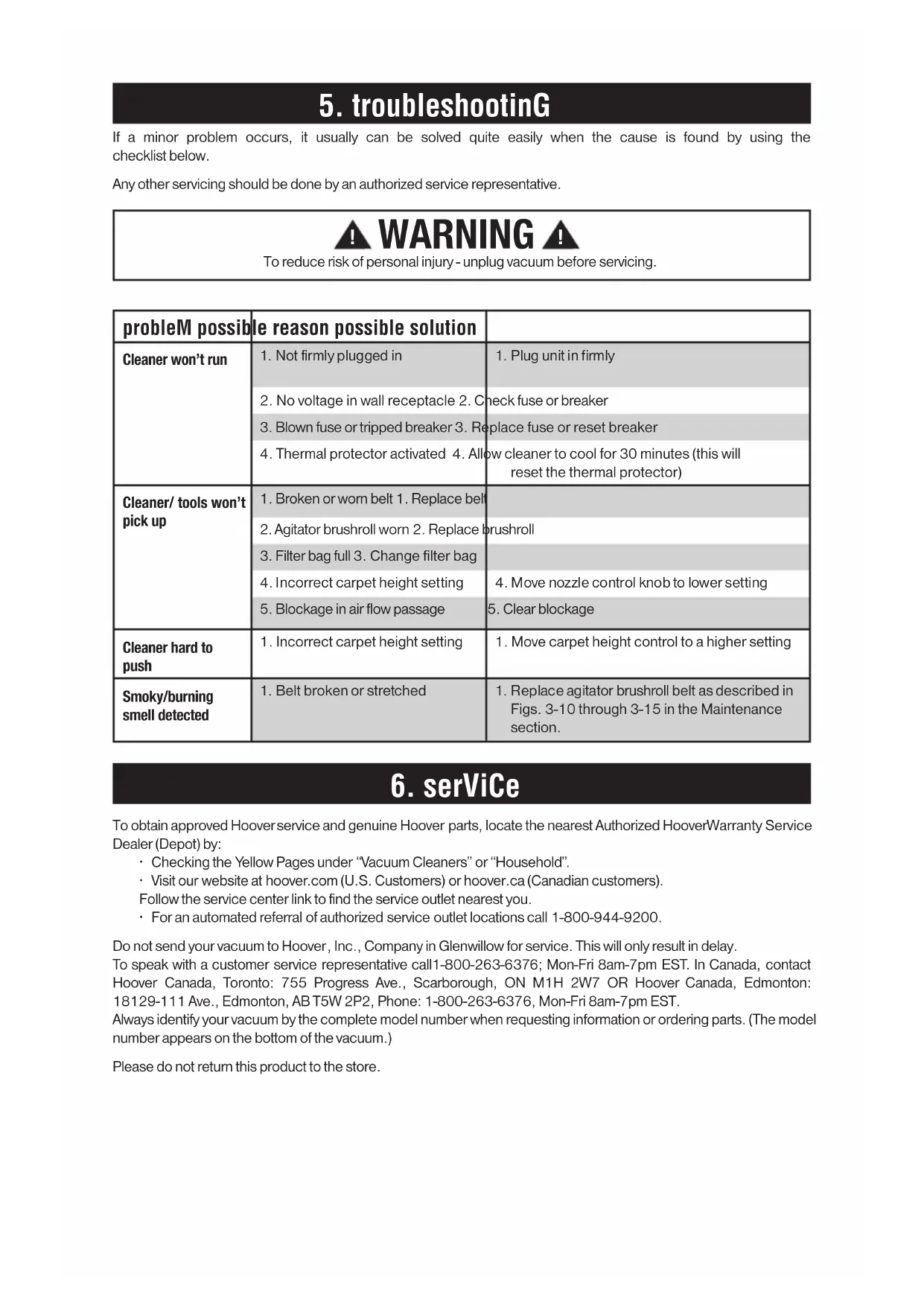
6. serViCe5. troubleshootinG If a minor problem occurs, it usually can be solved quite easily when the cause is found by using the
Any other servicing should be done by an authorized service representative.
To reduce risk of personal injury - unplug vacuum before servicing.
probleM possible reason possible solution
1. Not firmly plugged in 1. Plug unit in firmly
2. No voltage in wall receptacle 2. Check fuse or breaker
3. Blown fuse or tripped breaker 3. Replace fuse or reset breaker
4. Thermal protector activated 4. Allow cleaner to cool for 30 minutes (this will
Cleaner/ tools won’t
1. Broken or worn belt 1. Replace belt
2. Agitator brushroll worn 2. Replace brushroll
3. Filter bag full 3. Change filter bag
4. Incorrect carpet height setting 4. Move nozzle control knob to lower setting
5. Blockage in air flow passage 5. Clear blockage
1. Incorrect carpet height setting 1. Move carpet height control to a higher setting
1. Belt broken or stretched 1. Replace agitator brushroll belt as described in
Figs. 3-10 through 3-15 in the Maintenance
To obtain approved Hoover
service and genuine Hoover
parts, locate the nearest Authorized Hoover
• Checking the Yellow Pages under “Vacuum Cleaners” or “Household”.
• Visit our website at hoover.com (U.S. Customers) or hoover.ca (Canadian customers).
Follow the service center link to find the service outlet nearest you.
• For an automated referral of authorized service outlet locations call 1-800-944-9200.
Do not send your vacuum to Hoover
, Inc., Company in Glenwillow for service. This will only result in delay.
To speak with a customer service representative call1-800-263-6376; Mon-Fri 8am-7pm EST. In Canada, contact
Canada, Toronto: 755 Progress Ave., Scarborough, ON M1H 2W7 OR Hoover
18129-111 Ave., Edmonton, AB T5W 2P2, Phone: 1-800-263-6376, Mon-Fri 8am-7pm EST.
Always identify your vacuum by the complete model number when requesting information or ordering parts. (The model
number appears on the bottom of the vacuum.)
Please do not return this product to the store.
6. serViCe7. warrantY Limited One-Year Commercial Product Warranty
Plus Limited Two-Year Motor Warranty
WHAT THIS WARRANTY COVERS When used and maintained in normal Commercial
use and in accordance with the Owner’s Manual,
your HOOVER® product is warranted against original
defects in material and workmanship for a full one
year from date of purchase (the “Warranty Period”),
plus a full two years from date of purchase on the
motor. During the Warranty Period, as described in
this warranty, Hoover will provide labor and parts,
at no cost to you, to correct any such defect in
products purchased in the United States, U.S. Military
Exchanges and Canada.
HOW TO MAKE A WARRANTY CLAIM If this product is not as warranted, take or send
the product to a Hoover Authorized Warranty
Service Dealer along with proof of purchase. For an
automated referral to authorized service outlets,
phone: 1-800-944-9200 OR visit Hoover® online
at www.hoover.com (U.S. Customers) or www.
hoover.ca (Canadian Customers). For additional
assistance or information concerning this Warranty
or the availability of warranty service outlets, phone
1-800-944-9200, Mon-Fri 8am-7pm EST. In Canada,
call 1-800-263-6376, Mon-Fri 8am-7pm EST.
WHAT THIS WARRANTY DOES NOT COVER Certain parts for your Hoover Commercial product
require replacement in the ordinary course of use due
to normal wear. These items include belts, agitator roll
sleeves, agitator bearings, brushes, bags, filters and
bulbs. These parts are not covered by this Warranty.
This Warranty also does not cover: improper
maintenance of the product, damage due to misuse,
acts of God, nature, vandalism or other acts beyond
the control of Hoover, owner’s acts or omissions, use
outside the country in which the product was initially
purchased, resale of the product by the original owner,
defects or damages caused by repair or alteration by
anyone other than an Authorized Hoover Warranty
Service Dealer. Hoover, Inc. reserves the right to
inspect any alleged defective product and make final
decisions on any warranty claim.
This warranty does not cover pick up, delivery,
transportation or house calls. However, if you mail
your product to a Hoover Authorized Warranty Service
Dealer for warranty service, cost of shipping will be
OTHER IMPORTANT TERMS This Warranty is not transferable and may not be
assigned. This Warranty shall be governed and
construed under the laws of the state of Ohio.
The Warranty Period will not be extended by any
replacement or repair performed under this Warranty.
THIS WARRANTY IS THE EXCLUSIVE WARRANTY AND REMEDY PROVIDED BY HOOVER. ALL OTHER WARRANTIES, EXPRESSED OR IMPLIED,
INCLUDING WARRANTIES OF MERCHANTABILITY OR FITNESS FOR PARTICULAR PURPOSE, ARE DISCLAIMED. IN NO EVENT WILL HOOVER BE LIABLE FOR ANY SPECIAL, INDIRECT,
INCIDENTAL OR CONSEQUENTIAL DAMAGES OF ANY KIND OR NATURE TO OWNER OR ANY PARTY CLAIMING THROUGH OWNER,
WHETHER BASED IN CONTRACT, NEGLIGENCE,
TORT OR STRICT PRODUCTS LIABILITY OR ARISING FROM ANY CAUSE WHATSOEVER.
Some states do not allow the exclusion of
consequential damages, so the above exclusion
may not apply to you. This warranty gives you
specific rights; you may also have others that
vary from state to state.16
Canada, Toronto: 755 Progress Ave., Scarborough, ON M1H 2W7 O Hoover