ManualGo.com
EasyLife FC8137 - Aspirateur PHILIPS - Free user manual and instructions
Find the device manual for free EasyLife FC8137 PHILIPS in PDF.


Download the instructions for your Aspirateur in PDF format for free! Find your manual EasyLife FC8137 - PHILIPS and take your electronic device back in hand. On this page are published all the documents necessary for the use of your device. EasyLife FC8137 by PHILIPS.
USER MANUAL EasyLife FC8137 PHILIPS
Register your product and get support at
Congratulations on your purchase and welcome to Philips! To fully
benet from the support that Philips offers, register your product
at www.philips.com/welcome.
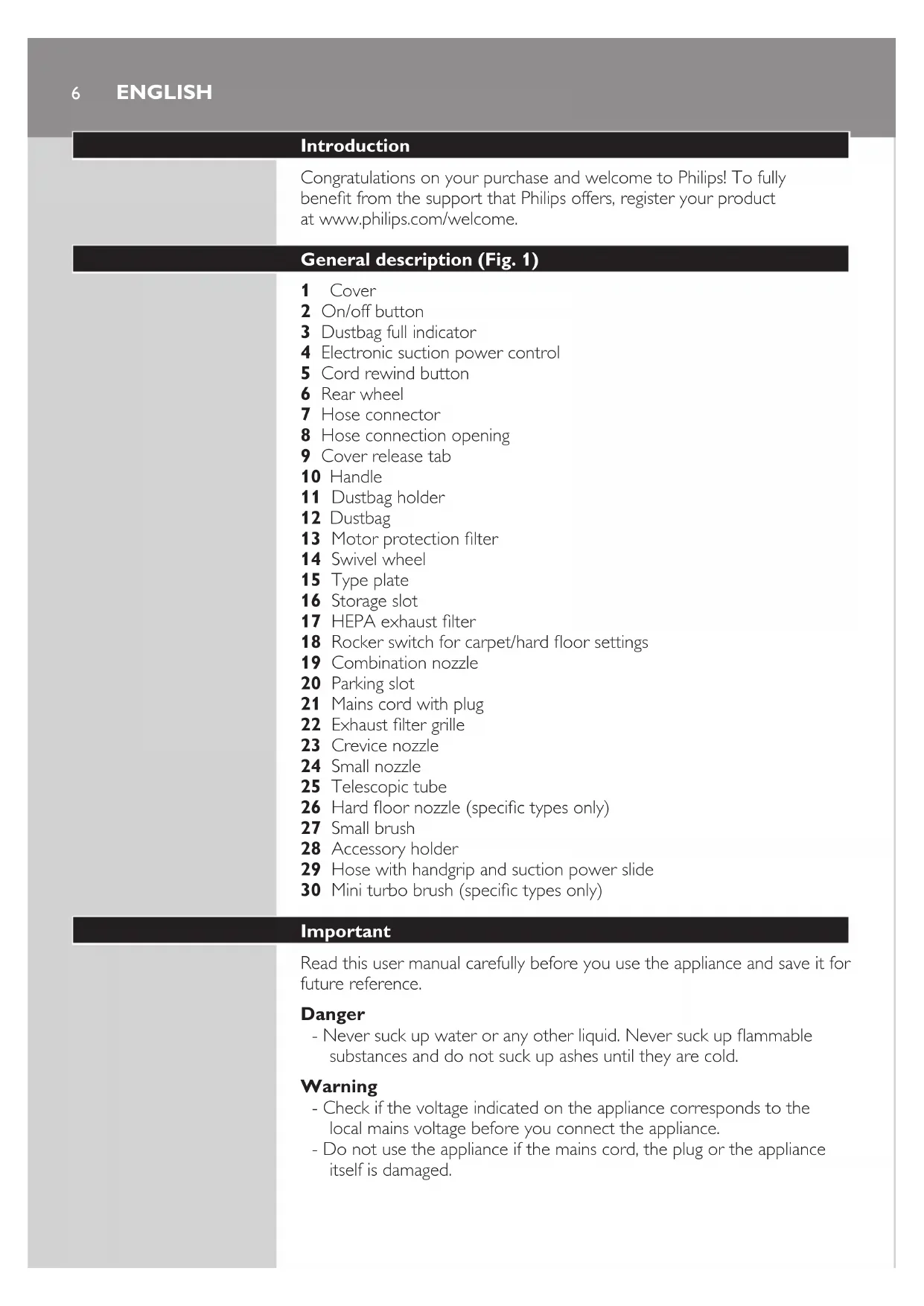
General description (Fig. 1)
4 Electronic suction power control
8 Hose connection opening
21 Mains cord with plug
26 Hard oor nozzle (specic types only)
29 Hose with handgrip and suction power slide
30 Mini turbo brush (specic types only)
Read this user manual carefully before you use the appliance and save it for
substances and do not suck up ashes until they are cold.
- Check if the voltage indicated on the appliance corresponds to the
local mains voltage before you connect the appliance.
- Do not use the appliance if the mains cord, the plug or the appliance
ENGLISH- If the mains cord is damaged, you must have it replaced by Philips, a
service centre authorised by Philips or similarly qualied persons in
order to avoid a hazard.
- This appliance is not intended for use by persons (including children)
with reduced physical, sensory or mental capabilities, or lack of
experience and knowledge, unless they have been given supervision or
instruction concerning use of the appliance by a person responsible for
- Children should be supervised to ensure that they do not play with the
- Do not point the hose, the tube or any other accessory at the eyes
or ears nor put it in your mouth when it is connected to the vacuum
cleaner and the vacuum cleaner is switched on.
- Do not use the appliance and the mini turbo brush on pets.
- The plug must be removed from the socket-outlet before cleaning or
maintaining the appliance.
- Do not suck up large objects as this may cause the air passage in the
tube or hose to become obstructed.
- When you use the vacuum cleaner to vacuum ashes, ne sand, lime,
cement dust and similar substances, the pores of the dustbag and
the motor protection lter become clogged. If you notice a strong
decrease in suction power, replace the dustbag and clean the motor
- Always unplug the appliance before you replace the dustbag or clean
the lters and assemble or disassemble accessories.
- Never use the appliance without a dustbag or the motor protection
lter. This could damage the motor and shorten the life of the
appliance. We advise you to use Philips s-bag ® dustbags or Philips
Electromagnetic elds (EMF)
This Philips appliance complies with all standards regarding electromagnetic
elds (EMF). If handled properly and according to the instructions in this
user manual, the appliance is safe to use based on scientic evidence
1 To connect the hose, push it into the appliance (‘click’).
ENGLISH 72 To disconnect the hose, press the release buttons (1) and pull the
hose connector out of the hose connection opening (2).
1 To connect the tube to the handgrip of the hose, insert the narrow
section into the wider section while turning a little.
To disconnect the tube, pull while turning a little.
2 Adjustthetelescopictubetothelengthyoundmostcomfortable
during vacuuming. Press the slide on the tube (1) and push the lower
tube part downwards or pull it upwards (2).
You can use the combination nozzle on carpet (with the brush strips
folded in) or on hard oors (with the brush strips folded out).
- To clean hard oors, push the rocker switch on top of the combination
nozzle with your foot to make the brush strips come out of the nozzle
ENGLISH8- To clean carpet, push the rocker switch on the other side to make the
brush strips disappear into the housing.
Hard oor nozzle (specic types only)
- The hard oor nozzle is designed for gentle cleaning of hard oors.
You can store two accessories in the accessory holder at the same time.
1 Connect the accessory holder to the tube (1) and then connect the
hose to the accessory holder (2).
2 To store accessories in the accessory holder, push them onto the
English 9Crevice nozzle, small nozzle and small brush
1 Connect the crevice nozzle, small nozzle or small brush to the
handgrip of the hose or to the tube. To do this, insert the handgrip
or tube into the accessory while turning a little.
- Use the crevice nozzle to clean narrow corners or hard-to-reach
- Use the small nozzle to clean small areas, e.g. the seats of chairs and
- Use the small brush to clean computers, bookshelves etc.
Mini turbo brush (specic types only)
The mini turbo brush is specially designed to effectively pick up animal hairs
and uff from furniture and mattresses. The unique brush inside the mini
turbo brush loosens the hairs from the fabric so that they can be picked
up by the vacuum cleaner. The mini turbo brush can be attached to the
handgrip of the hose or to the telescopic tube.
1 To attach the mini turbo brush, insert it into the handgrip or the
telescopic tube while turning a little.
2 To detach the mini turbo brush, pull it out of the handgrip or the
telescopic tube while turning it a little.
1 Pull the cord out of the appliance and insert the mains plug into the
2 Press the on/off button on top of the appliance with your foot to
switch on the appliance.
Note: If you want to pause for a moment, insert the ridge on the nozzle into
the parking slot to park the tube in a convenient position.
ENGLISH10Note: You can carry the vacuum cleaner by the handle at the front of the
Adjusting suction power
You can adjust the suction power with:
- the suction power slide on the handgrip.
- the electronic suction power control on the vacuum cleaner.
Cleaning and maintenance
The plug must be removed from the socket-outlet before cleaning or
maintaining the appliance.
1 Switch off and unplug the appliance before you remove and clean any
2 Clean the appliance and its parts with a damp cloth.
Do not clean any part of the vacuum cleaner in the dishwasher.
ENGLISH 11Cleaning the HEPA exhaust lter
To maintain optimal performance, clean the HEPA lter each time you
replace the dustbag.
1 ToopentheHEPAexhaustltergrille,grabthetabsandpullthe
grille upwards to remove it from the appliance.
3 RinsethepleatedsideoftheHEPAexhaustlterunderahotslow-
- Hold the lter in such a way that the pleated side points upwards and
the water ows parallel to the pleats. Hold the lter at an angle so that
the water washes away the dirt inside the pleats.
- Turn the lter 180° and let the water ow along the pleats in the
- Continue this process until the lter is clean.
NevercleantheHEPAexhaustlterwithabrush.
Note: Cleaning does not restore the original colour of the lter, but does restore
its ltration power.
4 Carefully shake the water from the surface of the HEPA exhaust
lter.LettheHEPAexhaustlterdrycompletelybeforeyouputit
back into the vacuum cleaner.
5 PlacethedryHEPAexhaustlterbackintotheappliance.
6 ToclosetheHEPAexhaustltergrille,rstalignthelugsonthetop
of the grille with the slots in the appliance (1). Then press the tabs
downwards until the grille locks into place (2) (‘click’).
English12Cleaning the motor protection lter
To maintain optimal performance, clean the motor protection lter at least
1 Pull the cover upwards to open it.
2 Liftthedustbagholderoutoftheappliance.
Make sure you hold the dustbag upright when you lift it out of the
6 Put the dustbag holder back into the appliance.
To clean the brush inside the mini turbo brush, follow the steps below.
1 Rotate the brush inside the mini turbo brush until the cutting groove
faces you. Use a pair of scissors to cut the hairs, threads etc that
have collected around the brush.
2 Removeuff,hairsandotherdirtfromthebrush.
English 13Replacement
The plug must be removed from the socket-outlet before cleaning or
maintaining the appliance.
Replacing the dustbag
- Replace the dustbag as soon as the dustbag-full indicator has changed
colour permanently, i.e. even when the nozzle is not placed on the
1 Switch off and unplug the appliance.
2 Pull the cover upwards to open it.
3 Liftthedustbagholderoutoftheappliance.
Make sure you hold the dustbag upright when you lift it out of the
4 Pull at the cardboard tag to remove the full dustbag from the holder.
, When you do this, the dustbag is sealed automatically.
5 Slide the cardboard front of the new dustbag into the two grooves of
the dustbag holder as far as possible.
6 Put the dustbag holder back into the vacuum cleaner.
Note: If no dustbag has been inserted, you cannot close the cover.
7 Push the cover downwards to close it.
ENGLISH14Replacing the HEPA exhaust lter
Alwaysunplugtheappliancebeforeyoureplacealter.
Replace the HEPA exhaust lter every 12 months.
- To remove the old lter and place the new lter, follow the instructions
for removing and placing the lters in section ‘Cleaning the HEPA
exhaust lter’ in chapter ‘Cleaning and maintenance’.
- Philips Classic s-bag ® synthetic dustbags are available under type
- Philips Clinic s-bag ® high ltration synthetic dustbags are available
under type number FC8022.
- Philips Anti-odour s-bag ® synthetic dustbags are available under type
- Reusable dustbags (some countries only) are available under code
number 4322 004 93370.
Note: Please visit www.s-bag.com for more information about the s-bag.
Ordering lters and accessories
- HEPA exhaust lters are available under type number FC8070.
1 Switch off and unplug the appliance.
2 Press the cord rewind button to rewind the cord.
3 Put the appliance in upright position. To attach the nozzle to the
appliance, insert the ridge on the nozzle into the storage slot.
Note: To ensure stable storage of the telescopic tube, adjust the tube to the
- Do not throw away the appliance with the normal household waste
at the end of its life, but hand it in at an ofcial collection point for
recycling. By doing this, you help to preserve the environment.
ENGLISH 15Guarantee and service
If you need service or information or if you have a problem, please visit
the Philips website at www.philips.com or contact the Philips Consumer
Care Centre in your country (you nd its phone number in the worldwide
guarantee leaet). If there is no Consumer Care Centre in your country, go
to your local Philips dealer.
1 Thesuctionpowerisinsufcient
- Perhaps the dustbag is full.
If necessary, empty the dustbag.
- Perhaps the lters need to be cleaned or replaced.
If necessary, clean or replace the lters.
- Perhaps the suction power slide on the handgrip is open.
- Perhaps the electronic suction power control is set to a low setting.
Set the control to a higher setting.
- Perhaps the nozzle, tube or hose is blocked up.
To remove the obstruction, disconnect the blocked-up item and connect it
(as far as possible) the other way round. Switch on the vacuum cleaner to
force the air through the blocked-up item in opposite direction.
2 Specictypesonly:hairsareentangledaroundthebrushinsidethe