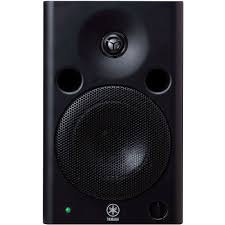
MSP5 - Studio Monitor YAMAHA - Free user manual and instructions
Find the device manual for free MSP5 YAMAHA in PDF.


| Brand | YAMAHA |
| Model | MSP5 |
| Category | Studio monitor |
| Speaker type | Bi-amplified two-way active bass reflex |
| Woofer | 12 cm cone, magnetic shielding |
| Tweeter | 2.5 cm titanium dome, magnetic shielding |
| Crossover frequency | 2.5 kHz |
| Frequency response | 50 Hz - 40 kHz |
| Maximum output level | 101 dB (1 m in axis) |
| Woofer amplification power | 40 W (400 Hz, 4 Ω, THD 0.02 %) |
| Tweeter amplification power | 27 W (10 kHz, 6 Ω, THD 0.02 %) |
| Input sensitivity | Line 1: +4 dB / 10 kΩ (balanced XLR); Line 2: -10 dB / 10 kΩ (unbalanced jack) |
| Signal-to-noise ratio | 100 dB (A-weighting) |
| Controls | Volume, Trim Low (4 positions), Trim High (3 positions), Power On/Off |
| Power indicator | Green LED |
| Dimensions (W × H × D) | 169 × 279 × 222 mm |
| Weight | 7.5 kg |
| Power supply | AC 120 V / 230 V / 240 V depending on region (60 Hz / 50 Hz) |
| Power consumption | 60 W |
| Included accessories | 2 anti-slip feet |
| Inputs | Line 1 (balanced XLR), Line 2 (unbalanced 6.35 mm jack) |
| Enclosure | Bass Reflex |
| Required ventilation | Clearance of 5 cm at the rear, 10 cm on the sides and above |
| Cleaning | Disconnect power before cleaning |
| Recommended usage | Professional home recording |
Frequently Asked Questions - MSP5 YAMAHA
User questions about MSP5 YAMAHA
0 question about this device. Answer the ones you know or ask your own.
Ask a new question about this device
Download the instructions for your Studio Monitor in PDF format for free! Find your manual MSP5 - YAMAHA and take your electronic device back in hand. On this page are published all the documents necessary for the use of your device. MSP5 by YAMAHA.
USER MANUAL MSP5 YAMAHA
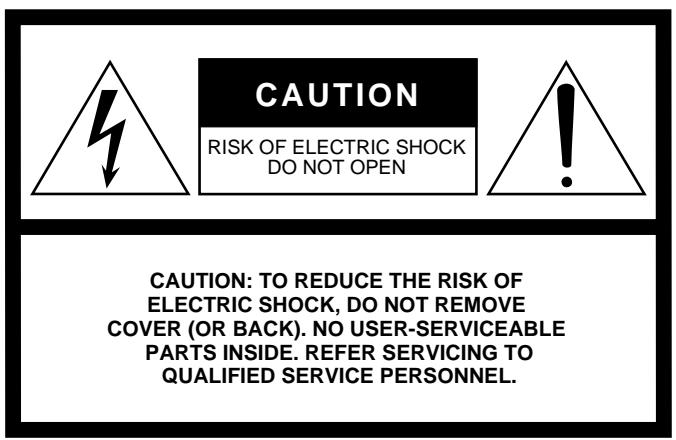
The above warning is located on the bottom or rear of the unit
- Explanation of Graphical Symbols

The exclamation point within an equilateral triangle is intended to alert the user to the presence of important operating and maintenance (servicing) instructions in the literature accompanying the product.
The lightning flash with arrowhead symbol within an equilateral triangle is intended to alert the user to the presence of uninsulated "dangerous voltage" within the product's enclosure that may be of sufficient magnitude to constitute a risk of electric shock to persons.
SAFETY INSTRUCTIONS
- Read Instructions — All the safety and operating instructions should be read before the appliance is operated.
- Retain Instructions — The safety and operating instructions should be retained for future reference.
- HeedWarnings — All warnings on the appliance and in the operating instructions should be adhered to.
- Follow Instructions — All operating and use instructions should be followed.
- Water and Moisture — The appliance should not be used near water – for example, near a bathtub, washbowl, kitchen sink, laundry tub, in a wet basement, or near a swimming pool, and the like.
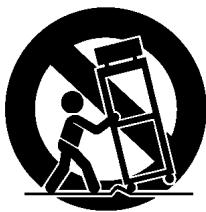
- Carts and Stands - The appliance should be used only with a cart or stand that is recommended by the manufacturer.
6A An appliance and cart combination should be moved with care. Quick stops, excessive force, and uneven
surfaces may cause the appliance and cart combination to overturn. - Wall or Ceiling Mounting — The appliance should be mounted to a wall or ceiling only as recommended by the manufacturer.
- Ventilation — The appliance should be situated so that its location or position does not interfere with its proper ventilation. For example, the appliance should not be situated on a bed, sofa, rug, or similar surface that may block the ventilation openings; or, placed in a built-in installation, such as a bookcase or cabinet that may impede the flow of air through the ventilation openings.
-
Heat — The appliance should be situated away from heat sources such as radiators, heat registers, stoves, or other appliances (including amplifiers) that produce heat.
-
Power Sources — The appliance should be connected to a power supply only of the type described in the operating instructions or as marked on the appliance.
- Grounding or Polarization — The precautions that should be taken so that the grounding or polarization means of an appliance is not defeated.
- Power-Cord Protection — Power-supply cords should be routed so that they are not likely to be walked on or pinched by items placed upon or against them, paying particular attention to cords at plugs, convenience receptacles, and the point where they exit from the appliance.
- Cleaning — The appliance should be cleaned only as recommended by the manufacturer.
- Nonuse Periods — The power cord of the appliance should be unplugged from the outlet when left unused for a long period of time.
- Object and Liquid Entry — Care should be taken so that objects do not fall and liquids are not spilled into the enclosure through openings.
- Damage Requiring Service — The appliance should be serviced by qualified service personnel when:
A. The power-supply cord or the plug has been damaged; or
B. Objects have fallen, or liquid has been spilled into the appliance; or
C. The appliance has been exposed to rain; or
D. The appliance does not appear to operate normally or exhibits a marked change in performance; or
E. The appliance has been dropped, or the enclosure damaged.
- Servicing — The user should not attempt service the appliance beyond that described in the operating instructions.
Thank you for purchasing Yamaha MSP5 monitor speaker. The MSP5 features a compact bass reflex cabinet, with 12 cm two-way cone speaker and 2.5 cm titanium dome speaker. This powered bi-amplifier speaker system faithfully reproduces sound and can be used for a wide range of applications, from personal home recordings to serious professional use. Please read this Owner's Manual thoroughly to make the best use of the MSP5's quality functions for a long period of time.
Precautions
- Connect this unit's power cord only to an AC outlet of the type stated in this Owner's Manual or as marked on the unit. Failure to do so is a fire and electrical shock hazard.
- Do not allow water to enter this unit or allow the unit to become wet. Fire or electrical shock may result.
- Do not place heavy objects, including this unit, on top of the power cord. A damaged power cord is a fire and electrical shock hazard. In particular, be careful not to place heavy objects on a power cord covered by a carpet.
- Do not place a container with liquid or small metal objects on top of this unit. Liquid or metal objects inside this unit are a fire and electrical shock hazard.
- Do not scratch, bend, twist, pull, or heat the power cord. A damaged power cord is a fire and electrical shock hazard.
- If lightning begins to occur, turn off the power switch of the unit as soon as possible, and unplug the power cord plug from the electrical outlet.
- If there is a possibility of lightning, do not touch the power cable plug if it is still connected. Doing so may be an electrical shock hazard.
- Do not modify the unit. Doing so is a fire and electrical shock hazard.
- Do not remove the unit's cover. You could receive an electrical shock. If you think internal inspection, maintenance, or repair is necessary, contact your dealer.
- If the power cord is damaged (i.e., cut or a bare wire is exposed), ask your dealer for a replacement. Using the unit with a damaged power cord is a fire and electrical shock hazard.
- If you notice any abnormality, such as smoke, odor, or noise, or if a foreign object or liquid gets inside the unit, turn it off immediately. Remove the power cord from the AC outlet. Consult your dealer for repair. Using the unit in this condition is a fire and electrical shock hazard.
- Should this unit be dropped or the cabinet be damaged, turn the power switch off, remove the power plug from the AC outlet, and contact your dealer. If you continue using the unit without heeding this instruction, fire or electrical shock may result.
-
Keep this unit away from the following locations:
-
Locations exposed to oil splashes or steam, such as near cooking stoves, humidifiers, etc.
- Unstable surfaces, such as a wobbly table or slope.
- Locations exposed to excessive heat, such as inside a car with all the windows closed, or places that receive direct sunlight.
-
Locations subject to excessive humidity or dust accumulation.
-
Do not place the power cord close to a heater. It may melt, causing fire or electrical shock.
- Hold the power cord plug when disconnecting it from an AC outlet. Never pull the cord. A damaged power cord is a potential fire and electrical shock hazard.
- Do not touch the power plug with wet hands. Doing so is a potential electrical shock hazard.
- To relocate the unit, turn the power switch off, remove the power plug from the AC outlet, and remove all connecting cables. Damaged cables may cause fire or electrical shock.
-
This unit is heavy. Use two or more people to carry it.
-
Turn off all musical instruments, audio equipment, and speakers when connecting to this unit. Use the correct connecting cables and connect as specified.
- Always lower the volume control to minimum before turning on the power to this unit. A sudden blast of sound may damage your hearing.
- Do not output distorted sounds for long periods of time, as this will cause the speaker to heat up, leading to a fire hazard.
- If you know you will not use this unit for a long period of time, such as when going on vacation, remove the power plug from the AC outlet. Leaving it connected is a potential fire hazard.
- To prevent electrical shock when cleaning the unit, remove the power plug from the AC outlet.
- Magnetic shield type: This speaker is magnetically shielded. However, if a nearby monitor displays any uneven colors, place it further away from the monitor.
- Using a mobile telephone near this unit may induce noise. If noise occurs, use the telephone away from the unit.
- The rubber feet included in this package can be used to prevent the device from slipping. Attach these feet to the unit when you use it on a slippery surface.
- You may notice air blowing in and out of the ports on the device. This is not abnormal. It is more noticeable when you play a program with an expanded lower range.
- Allow a distance of 5cm between the unit and the wall so that heat generated from the unit will be released effectively. Also, allow enough space between the unit and other devices. Keep a space of 10cm on the top and the side. If heat release is inadequate, the unit will retain heat inside the unit, which may cause a fire.
IMPORTANT
Please record the serial number of this unit in the space below.
Serial No.:
The serial number is located on the bottom or rear of the unit. Retain this Owner's Manual in a safe place for future reference.
IMPORTANT
THE WIRES IN MAINS LEAD ARE COLOURED IN ACCORDANCE WITH THE FOLLOWING CODE:
BLUE: NEUTRAL
BROWN: LIVE
As the colours of the wires in the mains lead of this apparatus may not correspond with the coloured markings identifying the terminals in your plug proceed as follows:
The wire which is coloured BLUE must be connected to the terminal which is marked with the letter N or coloured BLACK.
The wire which is coloured BROWN must be connected to the terminal which is marked with the letter L or coloured RED.
-
Making sure that neither core is connected to the earth terminal of the three pin plug.
-
This applies only to products distributed by YAMAHA KEMBLE MUSIC (U.K.) LTD.
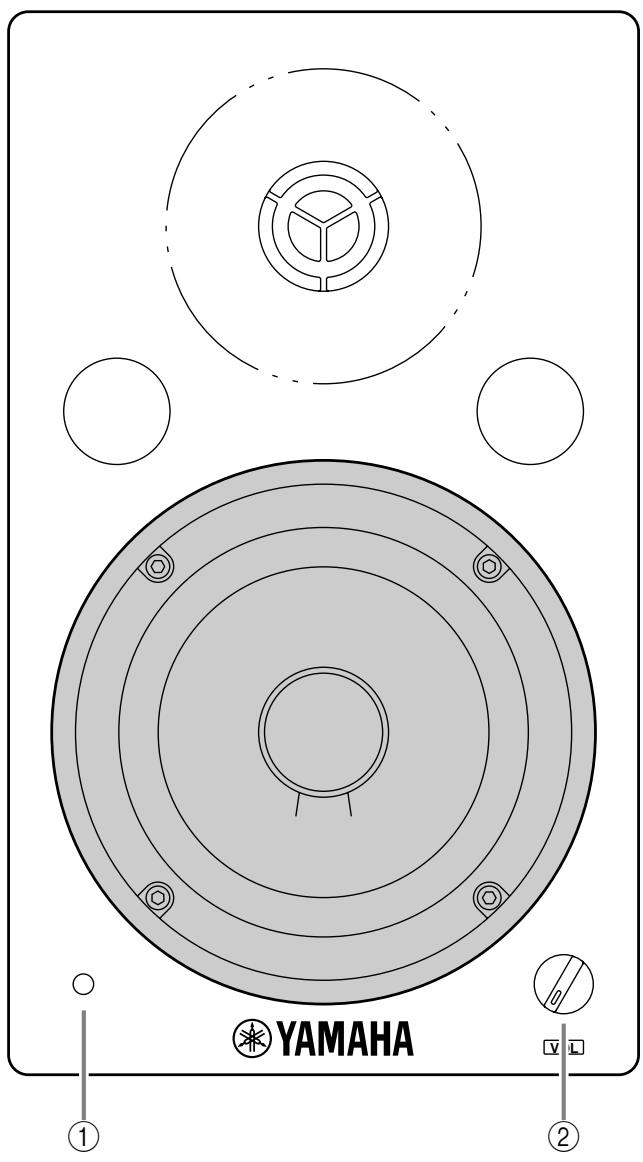
① Power indicator
This indicator lights up when you turn the POWER switch ON.
② VOL (Volume) control
This control knob enables you to adjust the overall sound volume. Rotating the control counter clockwise lowers the volume level. Rotating it clockwise raises the volume level.
CAUTION
TO PREVENT ELECTRIC SHOCK, MATCH WIDE BLADE OF PLUG TO WIDE SLOT, FULLY INSERT.
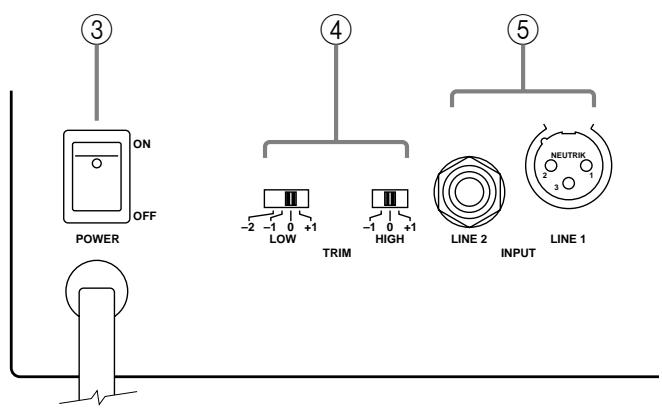
③ POWER switch
This switch turns the power to the MSP5 on and off. When you turn this switch on, the green power indicator on the front panel lights up.
④ TRIM switches
These switches enable you to adjust the bass and treble for the MSP5.
LOW: four positions
The LOW switch adjusts the bass range. With the +1 setting, the bass range is boosted by 1.5 dB. With the -1 and -2 settings, the bass range is cut by 1.5 dB. (See performance graph.)
HIGH: three positions
The HIGH switch adjusts the treble. With the “+1” setting, the treble range is boosted by 1.5 dB. With the “-1” setting, the treble range is cut by 1.5 dB. (See performance graph.)
⑤ INPUT jacks
LINE 1
This is an XLR-type jack used to connect a balanced.
LINE 2
This is a monaural phone jack used to connect an unbalanced line output.
General specifications
Type............ Bi-Amp 2-way Bass Reflex Powered Speaker
Crossover Frequency. 2.5 kHz
Frequency Range 50 Hz-40 kHz
Maximum Output Level 101 dB (1 m on Axis)
Dimensiones (W× H× D) 169x279x222 mm
Weight 7.5 kg
Speaker unit
Speaker Unit . LF: 12 cm cone (4 , magnetic shielded)
HF: 2.5 cm titan dome (6, magnetic shielded)
Enclosure .... Type: Bass Reflex
Volume: 6.3 l
Amp(unit
Maximum Output Power ......... LF: 40 W at 400 Hz, THD= 0.02%, RL=4
HF: 27 W at 10 kHz, THD= 0.02%, RL=6
Input Sensitivity/Impedance...... Line 1: +4 dB/10 k (XLR Blanced)
Line 2: -10dB / 10k (phone Unblanced)
Signal to Noise Ratio 100 dB (A Weighted)
Controls TRIM switch
LOW: 4 positions (+1.5 dB, 0 dB, -1.5 dB, -3 dB at 60 Hz)
HIGH: 3 positions (+1.5 dB, 0 dB, -1.5 dB at 15 kHz)
Power switch: On/Off
VOL control
Power Indicator ......... Green LED
Power Requirement . . . . . . . . . . . . . . . . . . . . . . . . . . . . . . . . . . . . . . . . . . . . . . . . . . . . . . . . . . . . . . . . . . . . . . . . . . . . . . . . . . . . . USA and Canada: AC120V, 60 Hz
Europe: AC230V,50Hz
Others: AC240V,50Hz
Power Consumption 60 W
Accessories. Non-skid pads × 2
Specifications and appearance are subject to change without notice.
Dimensions
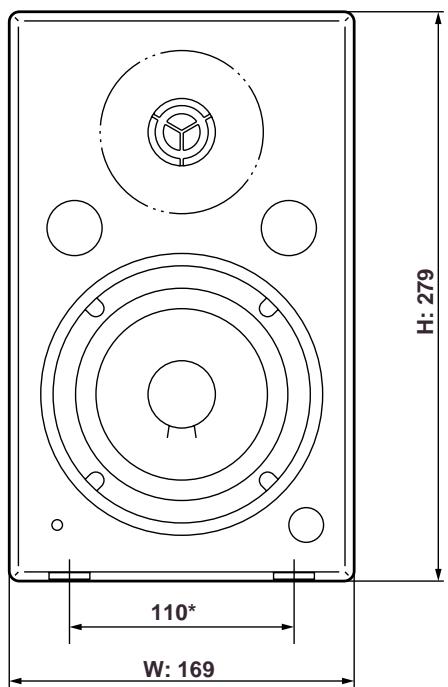
* Non-skid pad positions.
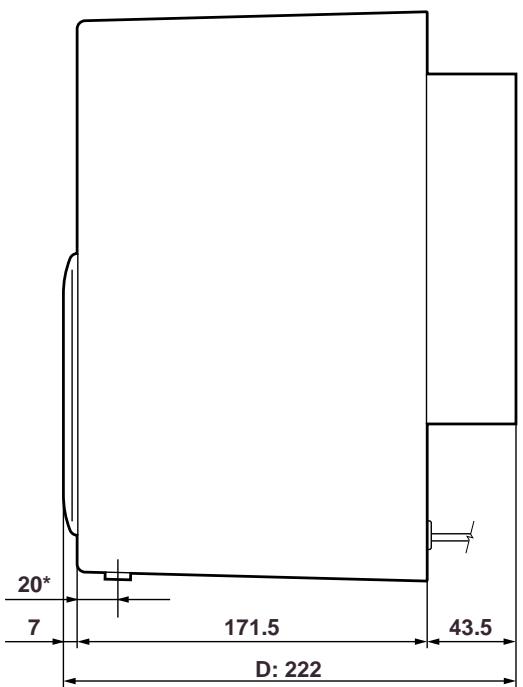
Unit: mm
