
EY7450LR2S - Drill PANASONIC - Free user manual and instructions
Find the device manual for free EY7450LR2S PANASONIC in PDF.
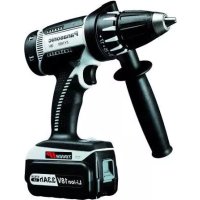



| Product Type | Cordless drill/driver |
| Brand | Panasonic |
| Model | EY7450LR2S |
| Screwdriving capacity (machine screw) | M2.5 - M5 |
| Screwdriving capacity (wood screw) | Ø 3.8 x 38 mm |
| Drilling capacity (metal) | Ø 5 mm |
| Motor | 3.6 V DC |
| No-load speed (low/high) | 200 rpm / 600 rpm |
| Max clutch torque | 3.0 N·m (30 kgf·cm, 26 in-lb) |
| Number of clutch positions | 21 |
| Total length | 276 mm |
| Weight (with battery) | 0.5 kg |
| Battery type | Li-ion |
| Battery voltage | 3.6 V |
| Battery capacity | 1.5 Ah |
| Battery model | EY9L10 |
| Charger model | EY0L10 |
| Charger weight | 0.6 kg |
| Charging time (Li-ion, usable/full) | 15 min / 30 min |
| Main functions | Drilling, screwdriving, adjustable clutch, forward/reverse, 2 speeds, LED light, spindle lock |
| Maintenance and cleaning | Clean with a dry cloth. Do not use water, solvent, or volatile product |
| Safety | Safety goggles recommended. Disconnect battery before changing accessory. Do not expose to rain |
| Included accessories | Hex bit set, battery EY9L10, charger EY0L10 |
| Reparability | Have repairs done by a qualified technician using original parts |
Frequently Asked Questions - EY7450LR2S PANASONIC
User questions about EY7450LR2S PANASONIC
0 question about this device. Answer the ones you know or ask your own.
Ask a new question about this device
Download the instructions for your Drill in PDF format for free! Find your manual EY7450LR2S - PANASONIC and take your electronic device back in hand. On this page are published all the documents necessary for the use of your device. EY7450LR2S by PANASONIC.
USER MANUAL EY7450LR2S PANASONIC
Cordless Drill & Driver
Operating Instructions
IMPORTANT
This manual contains safety information. Read the manual completely before first using this product and save this manual for future use.
IMPORTANT
⚠ WARNING! Read all instructions
Failure to follow all instructions listed below may result in electric shock, fire and/or serious injury. The term “power tool” in all of the warnings listed below refers to your mains operated (corded) power tool and battery operated (cordless) power tool.
SAVE THESE INSTRUCTIONS Work Area Safety
1) Keep work area clean and well lit. Cluttered or dark areas invite accidents. 2) Do not operate power tools in explosive atmospheres, such as in the presence of flammable liquids, gases or dust. Power tools create sparks which may ignite the dust or fumes. 3) Keep children and bystanders away while operating a power tool. Distractions can cause you to lose control.
Electrical Safety
1) Power tool plugs must match the outlet. Never modify the plug in any way. Do not use any adapter plugs with earthed (grounded) power tools. Unmodified plugs and matching outlets will reduce risk of electric shock.
2) Avoid body contact with earthed or grounded surfaces such as pipes, radiators, ranges and refrigerators. There is an increased risk of electric shock if your body is earthed or grounded.
3) Do not expose power tools to rain or wet conditions.
Water entering a power tool will increase the risk of electric shock.
4) Do not abuse the cord. Never use the cord for carrying, pulling or unplugging the power tool. Keep cord away from heat, oil, sharp edges or moving parts.
Damaged or entangled cords increase the risk of electric shock.
5) When operating a power tool outdoors, use an extension cord suitable for outdoor use.
Use of a cord suitable for outdoor use reduces the risk of electric shock.
Personal Safety
1) Stay alert, watch what you are doing and use common sense when operating a power tool. Do not use a power tool while you are tired or under the influence of drugs, alcohol or medication. A moment of inattention while operating power tools may result in personal injury.
2) Use safety equipment. Always wear eye protection.
Safety equipment such as dust mask, non-skid safety shoes, hard hat, or hearing protection used for appropriate conditions will reduce personal injuries.
3) Avoid accidental starting. Ensure the switch is in the off position before plugging in.
Carrying power tools with your finger on the switch or plugging in the power tools that have the switch on invites accidents.
4) Remove any adjusting key or wrench before turning the power tool on.
A wrench or a key left attached to a rotating part of the power tool may result in personal injury.
5) Do not overreach. Keep proper footing and balance at all times.
This enables better control of the power tool in unexpected situations.
6) Dress properly. Do not wear loose clothing or jewellery. Keep your hair, clothing and gloves away from moving parts.
Loose clothes, jewellery or long hair can be caught in moving parts.
7) If devices are provided for the connection of dust extraction and collection facilities, ensure these are connected and properly used.
Use of these devices can reduce dust related hazards.
Power Tool Use and Care
1) Do not force the power tool. Use the correct power tool for your application. The correct power tool will do the job better and safer at the rate for which it was designed.
2) Do not use the power tool if the switch does not turn it on and off.
Any power tool that cannot be controlled with the switch is dangerous and must be repaired.
3) Disconnect the plug from the power source and/or the battery pack from the power tool before making any adjustments, changing accessories, or storing power tools.
Such preventive safety measures reduce the risk of starting the power tool accidentally.
4) Store idle power tools out of the reach of children and do not allow persons unfamiliar with the power tool or these instructions to operate the power tool. Power tools are dangerous in the hands of untrained users.
5) Maintain power tools. Check for misalignment or binding of moving parts, breakage of parts and any other condition that may affect the power tools operation. If damaged, have the power tool repaired before use.
Many accidents are caused by poorly maintained power tools.
6) Keep cutting tools sharp and clean.
Properly maintained cutting tools with sharp cutting edges are less likely to bind and are easier to control.
7) Use the power tool, accessories and tool bits etc. in accordance with these instructions and in the manner intended for the particular type of power tool, taking into account the working conditions and the work to be performed.
Use of the power tool for operations different from those intended could result in a hazardous situation.
Battery Tool Use and Care
1) Ensure the switch is in the off position before inserting battery pack. Inserting battery pack into power tools that have the switch on invites accidents.
2) Recharge only with the charger specified by the manufacturer.
A charger that is suitable for one type of battery pack may create a risk of fire when used with another battery pack.
3) Use power tools only with specifically designated battery packs.
Use of any other battery packs may create a risk of injury and fire.
4) When battery pack is not in use, keep it away from other metal objects like paper clips, coins, keys, nails, screws, or other small metal objects that can make a connection from one terminal to another.
Shorting the battery terminals together may cause burns, or a fire.
5) Under abusive conditions, liquid may be ejected from battery; avoid contact. If contact accidentally occurs, flush with water. If liquid contacts eyes, additionally seek medical help.
Liquid ejected from the battery may cause irritation or burns.
Service
1) Have your power tool serviced by a qualified repair person using only identical replacement parts.
This will ensure that the safety of power tool is maintained.
II. SPECIFIC SAFETY RULES
1) Wear ear protectors when using the tool for extended periods.
Prolonged exposure to high intensity noise can cause hearing loss.
2) Be aware that this tool is always in an operating condition, since it does not have to be plugged into an electrical outlet. 3) Hold power tools by insulated gripping surfaces when performing an operation where the cutting tool may contact hidden wiring.
Contact with a “live” wire will make exposed metal parts of the tool “live” and shock the operator.
4) If the bit becomes jammed, immediately turn the main switch off to prevent an overload which can damage the battery pack or motor. Use reverse motion to loosen jammed bits. 5) Do not touch the rotating parts to avoid injury. 6) Do not use the tool continuously for a long period of time. Stop using the tool from time to time to avoid temperature rise and heat overload of the motor. 7) Do not drop the tool.
| Symbol | Meaning |
| V | Volts |
| —— | Direct current |
| no | No load speed |
| .../min | Revolutions or reciprocations per minutes |
| Ah | Electrical capacity of battery pack |
| Rotation only |

WARNING!
Some dust created by power sanding, sawing, grinding, drilling, and other construction activities contains chemicals known to the State of California to cause cancer, birth defects or other reproductive harm. Some examples of these chemicals are:
- Lead from lead-based paints • Crystalline silica from bricks and cement and other masonry products
- Arsenic and chromium from chemically-treated lumber.
To reduce your exposure to these chemicals: work in a well ventilated area, and work with approved safety equipment, such as dust masks that are specially designed to filter out microscopic particles.
III. FOR BATTERY CHARGER & BATTERY PACK
Important Safety Instructions
1) SAVE THESE INSTRUCTIONS - This manual contains important safety and operating instructions for battery charger EY0L10. 2) Before using battery charger, read all instructions and cautionary markings on battery charger, battery pack, and product using battery pack. 3) CAUTION - To reduce the risk of injury, charge only Panasonic Battery Pack as shown in last page. Other types of batteries may burst causing personal injury and damage. 4) Do not expose charger and battery pack to rain or snow.
5) To reduce risk of damaging the electric plug and cord, pull by plug rather than cord when disconnecting charger. 6) Make sure cord is located so that it will not be stepped on, tripped over, or otherwise subjected to damage or stress. 7) An extension cord should not be used unless absolutely necessary. Use of improper extension cord could result in a risk of fire and electric shock. If extension cord must be used, make sure that: a. pins on plug of extension cord are the same number, size and shape as those of plug on charger. b. extension cord is properly wired and in good electrical condition. c. wire size is large enough for ampere rating of charger as specified below.
| RECOMMENDED MINIMUM AWG SIZE OF EXTENSION CORDS FOR BATTERY CHARGERS | ||
| AC Input Rating. Amperes | AWG Size of Cord | |
| Equal to or greater than | But less than | Length of Cord, Feet25 50 100 150 |
| 0 | 2 | 18 18 18 16 |
8) Do not operate charger with damaged cord or plug - replace them immediately. 9) Do not operate charger if it has received a sharp blow, been dropped, or otherwise damaged in any way; take it to a qualified service personnel. 10) Do not disassemble charger; take it to a qualified service personnel when service or repair is required. Incorrect reassembly may result in a risk of electric shock or fire. 11) To reduce the risk of electric shock, unplug charger from outlet before attempting any maintenance or cleaning. 12) The charger and battery pack are specifically designed to work together. Do not attempt to charge any other cordless tool or battery pack with this charger. 13) Do not attempt to charge the battery pack with any other charger. 14) Do not attempt to disassemble the battery pack housing. 15) Do not store the tool and battery pack in locations where the temperature may reach or exceed 50°C (122°F) (such as a metal tool shed, or a car in the
summer), which can lead to deterioration of the storage battery.
16) Do not charge battery pack when the temperature is BELOW 0°C (32°F) or ABOVE 40°C (104°F). This is very important in order to maintain optimal condition of the battery pack. 17) Do not incinerate the battery pack. It can explode in a fire. 18) Avoid dangerous environment. Do not use charger in damp or wet locations. 19) The charger is designed to operate on standard household electrical power only. Do not attempt to use it on any other voltage! 20) Do not abuse cord. Never carry charger by cord or yank it to disconnect from outlet. Keep cord away from heat, oil and sharp edges. 21) Charge the battery pack in a well ventilated place, do not cover the charger and battery pack with a cloth, etc., while charging. 22) Use of an attachment not recommended may result in a risk of fire, electric shock, or personal injury. 23) Do not short the battery pack. A battery short can cause a large current flow, over heating and create the risk of fire or personal injury. 24) NOTE: If the supply cord of this appliance is damaged, it must only be replaced by a repair shop authorized by the manufacturer, because special purpose tools are required. 25) TO REDUCE THE RISK OF ELECTRIC SHOCK, THIS APPLIANCE HAS A POLARIZED PLUG (ONE BLADE IS WIDER THAN THE OTHER).
This plug will fit in a polarized outlet only one way. If the plug does not fit fully in the outlet, reverse the plug. If it still does not fit, contact a qualified electrician to install the proper outlet. Do not change the plug in any way.
IV. ASSEMBLY & OPERATION
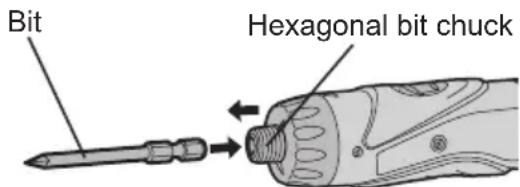
- Hexagonal Bit Chuck
Attaching the bits
NOTE:
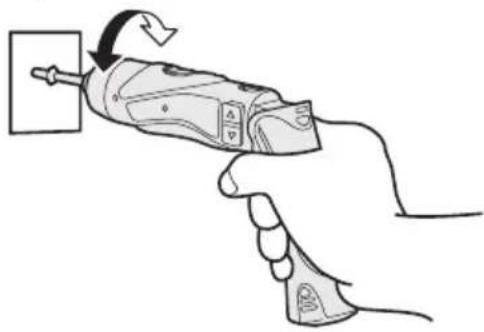
When attaching or removing drill bits, disconnect the battery pack from the tool and switch the lock button into the lock position.
- Hold the collar of the chuck and pull it out from the driver.
- Insert the bit into the chuck. Release the collar.
- The collar will return to its original position when it is released.
- Pull the bit to make sure it does not come out.
- To remove the bit, pull out the collar in the same way.
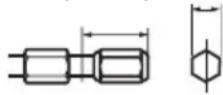
9.5 mm (3/8") - 13 mm (33/64") 6.35 mm (1/4")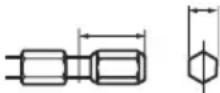
- Clutch Handle (Clutch Torque Setting)
Adjust the torque to one of the 21 possible settings to suit the job. There is an interval of about 0.13 N·m (1.3 kg·cm or 1.1 in-lbs) between steps.
CAUTION:
Test the setting before actual operation.
Set the scale at this mark.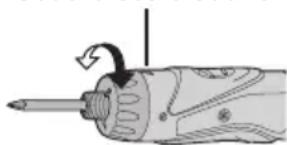
Reference for Adjusting Torque
| Setting | Torque Use | |
| 1 | Approx: 0.29 N·m(3.0 kgf-cm or 2.6 in-lbs) | For driving screws |
| 5 | Approx: 0.82 N·m(8.4 kgf-cm or 7.3 in-lbs) | |
| 9 | Approx: 1.35 N·m(13.8 kgf-cm or 12.0 in-lbs) | |
| 13 | Approx: 1.88 N·m(19.2 kgf-cm or 16.6 in-lbs) | |
| 17 | Approx: 2.41 N·m(24.6 kgf-cm or 21.3 in-lbs) | |
| 21 | Approx: 2.94 N·m(30.0 kgf-cm or 26.0 in-lbs) | |
| Approx: 4.4 N·m(45.0 kgf-cm or 39.0 in-lbs) | For powerful driving screws and drilling |
- When using at high speeds, set the clutch at 10 or below. (Operation stops at the maximum torque of 1.5 N·m (15 kgf·cm) when the scale is higher.)
- The auto shut-off function may become inoperable at higher clutch settings when battery power drops. Recharge the battery in that case.
NOTE:
The chart is only a reference. The torque settings may differ by materials, types of screws, etc. Please test it at your own conditions before use.
● Battery Low Warning Lamp
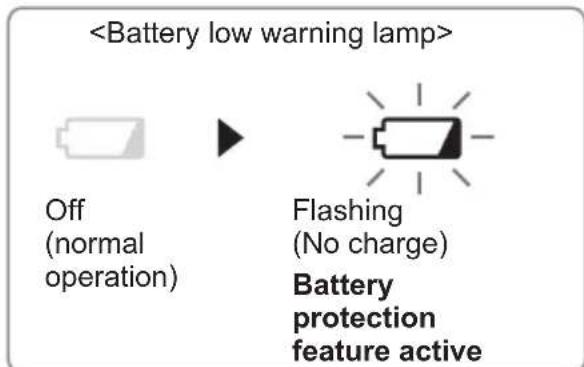
Excessive (complete) discharging of Li-ion batteries shortens their service life dramatically. The driver includes a battery protection feature designed to prevent excessive discharging of the battery pack.
- The battery protection feature activates immediately before the battery loses its charge, causing the battery low warning lamp to flash.
- If you notice the battery low warning lamp flashing, charge the battery pack immediately.
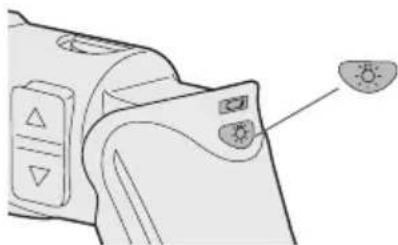
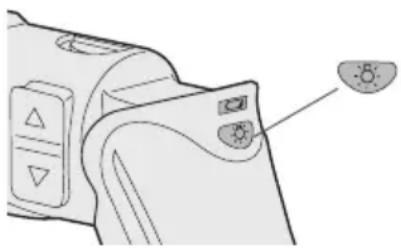
• Using the LED Light
Use the LED light on jobs in dark locations such as attics to illuminate your workspace.

CAUTION
- The LED light is intended for use as a supplemental light source. Do not use it as a flashlight. Doing so may result in accident or injury.
- Do not look at the light or shine it directly into your eyes. Continuous exposure to the LED light may damage your eyes.
- Press to toggle the light on and off.
- To use the light immediately after attaching the battery pack or after the drill has not been used for 5 minutes or more, operate the drill briefly.
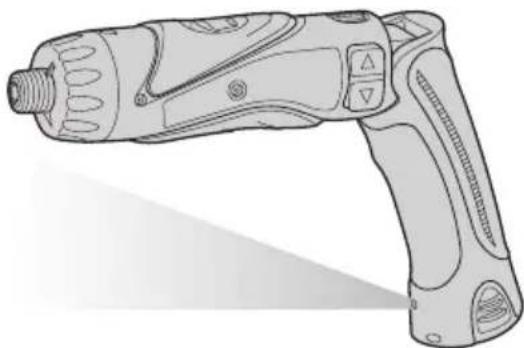
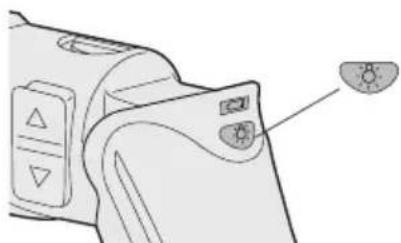
- The light will automatically turn off if the drill is not used for 5 minutes.
- The light uses an extremely small amount of current. Using the light
has a negligible effect on the operational capacity of the drill.
- The LED is incapable of lighting the tip of the bit when the drill is used in the straight configuration.
- Bit-locking Function
With the switch at off and the bit locked in place, the tool can be used as a manual screw-driver - up to 14.7 N·m (150 kgf·cm, 130 in-lbs).
There will be a little play in the driving shaft, but this is not a malfunction.
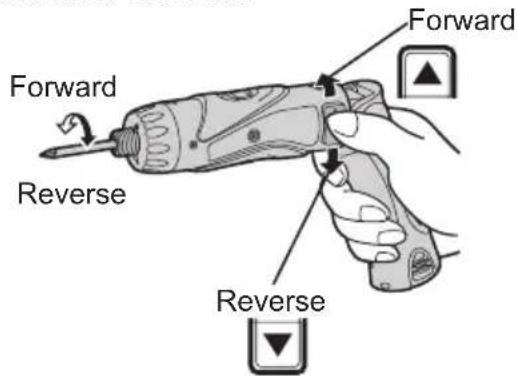
- Main Switch (ON/OFF)
Push the upper half of the switch for forward rotation, or the lower half for reverse rotation.
- Speed Selector Switch
To suit the application of this tool, two different rotational speeds are available. Depending upon use, either the high or low speed should be selected.
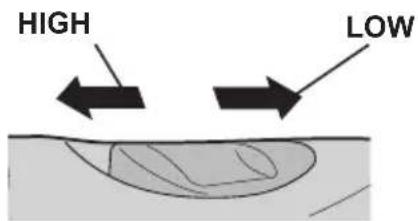
| Speed selection Torque | ||
| LOW 200 /min (rpm) High | ||
| HIGH 600 /min (rpm) Low | ||
CAUTION:
- Check speed selector switch before use.
- Do not operate the speed selector switch while the main switch is on (switch is in the ON position).
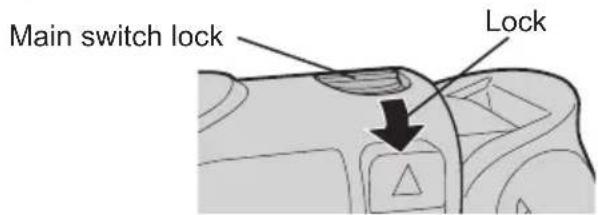
- Main Switch Lock
After use, set the main switch lock at the lock position to prevent accidental operation.
● Battery Pack (EY9L10)
CAUTION:
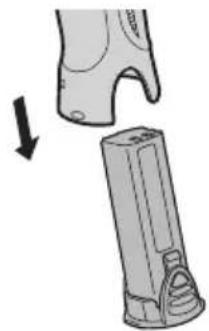
- Remove the battery pack away from the tool.
- Charge the battery pack using the battery charger.
- After charging has been completed, remove the battery pack from the charger and connect it to the tool. Disconnect the charger from the power source when not in use.
NOTE:
Use under extremely hot or cold conditions will reduce operating capacity per charge.
[Battery Pack]
For Appropriate Use of Battery pack
Li-ion Battery pack (EY9L10)
- For optimum battery life, store the Li-ion battery pack following use without charging it.
- The ambient temperature range is between 0°C (32°F) and 40°C (104°F). If the battery pack is used when the battery temperature is below 0°C (32°F), the tool may fail to function properly.
- When battery pack is not in use, keep it away from other metal objects like: paper clips, coins, keys, nails, screws, or other small metal objects that can make a connection from one terminal to another.
Shorting the battery terminals together may cause sparks, burns or a fire.
- When operating the battery pack, make sure the work place is well ventilated.
Battery Pack Life
The rechargeable batteries have a limited life. If the operation time becomes extremely short after recharging, replace the battery pack with a new one.
Battery Recycling
ATTENTION:
FOR Li-ion Battery Pack, EY9L10
A Li-ion battery that is recyclable powers the product you have purchased.
Please call 1-800-8-BATTERY for information on how to recycle this battery.
[Battery Charger]
Charging
Common Cautions for the Li-ion/Ni-Cd Battery Pack
NOTE:
- When a cold battery (of about 0°C or less) is to be charged in a warm room, leave the battery in the room for at least one hour and charge it when it has warmed up to room temperature. (Failing to do so may result in less than a full charge.)
- Cool down the charger when charging more than two battery packs consecutively.
- Do not insert your fingers into contact hole, when holding charger or any other occasions.
CAUTION:
To prevent the risk of fire or damage to the battery charger.
- Do not use power source from an engine generator.
- Do not cover vent holes on the charger and the battery pack.
- Unplug the charger when not in use.
Li-ion Battery Pack
NOTE:
Your battery pack is not fully charged at the time of purchase. Be sure to charge the battery before use.
Battery charger (EY0L10)
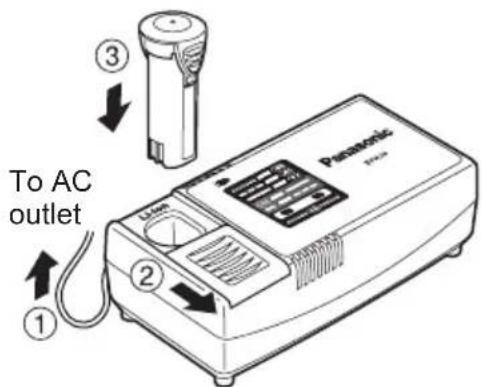
- Plug the charger into the AC outlet.
NOTE:
Sparks may be produced when the plug is inserted into the AC power supply, but this is not a problem in terms of safety.
- Slide the battery dock cover back to allow insertion of the Li-ion battery pack.
- Verify that the cover is locked securely in place.
- Insert the battery pack firmly into the charger.
- During charging, the charging lamp will be lit.
When charging is completed, an internal electronic switch will automatically be triggered to prevent overcharging.
- Charging will not start if the battery pack is warm (for example, immediately after heavy-duty operation). The orange standby lamp will be flashing until the battery cools down. Charging will then begin automatically.
- The charge lamp (green) will flash slowly once the battery is approximately 80% charged.
- When charging is completed, the charging lamp will start flashing quickly in green color.
- If the temperature of the battery pack is 0°C or less, charging takes longer to fully charge the battery pack than the standard charging time. Even when the battery is fully charged, it will have approximately 50% of the power of a fully charged battery at normal operating temperature.
- If the power lamp does not light immediately after the charger is plugged in, or if after the standard charging time the charging lamp does not flash quickly in green, consult an authorized dealer.
- If a fully charged battery pack is inserted into the charger again, the charging lamp lights up. After several minutes, the charging lamp may flash quickly to indicate the charging is completed.
Ni-Cd Battery Pack
NOTE:
When you charge the battery pack for the first time, or after prolonged
storage, charge it for about 24 hours to bring the battery up to full capacity.
Battery charger (EY0L10)
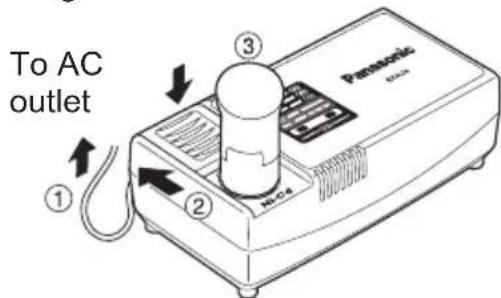
- Plug the charger into the AC outlet.
NOTE:
Sparks may be produced when the plug is inserted into the AC power supply, but this is not a problem in terms of safety.
- Slide the battery dock cover back to allow insertion of the Ni-Cd battery pack.
- Verify that the cover is locked securely in place.
- Insert the battery pack firmly into the charger.
- During charging, the charging lamp will be lit.
When charging is completed, an internal electronic switch will automatically be triggered to prevent overcharging.
- Charging will not start if the battery pack is warm (for example, immediately after heavy-duty operation). The orange standby lamp will be flashing until the battery cools down. Charging will then begin automatically.
- When charging is completed, the charging lamp will start flashing quickly in green color.
- If the power lamp does not light immediately after the charger is plugged in, or if after the standard charging time the charging lamp does not flash quickly in green, consult an authorized dealer.
- If a fully charged battery pack is inserted into the charger again, the charging lamp lights up. After several minutes, the charging lamp may flash quickly to indicate the charging is completed.
LAMP INDICATIONS
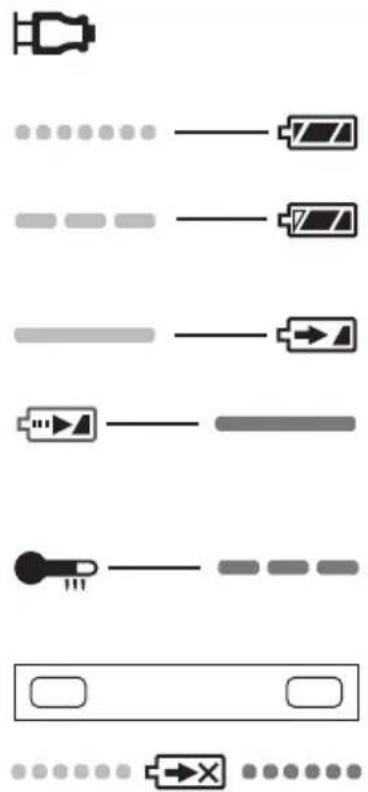
Green Lit Charger is plugged into the AC outlet. Ready to charge.
Green Flashing Quickly Charging is completed. (Full charge.)
Green Flashing Battery is approximately 80% charged. (Usable charge. Li-ion only)
Green Lit Now charging.
Orange Lit Battery pack is cool. The battery pack is being charged slowly to reduce the load on the battery. (Li-ion only)
Orange Flashing Battery pack is warm. Charging will begin when temperature of battery pack drops.
Charging Status Lamp Left: green Right: orange will be displayed.
Both Orange and Green Flashing Quickly Charging is not possible. Clogged with dust or malfunction of the battery pack.
If the temperature of the battery pack is -10°C or less, the charging status lamp (orange) will also start flashing. Charging will begin when the temperature of the battery pack goes up (Li-ion only)
V. MAINTENANCE
Use only a dry, soft cloth for wiping the unit. Do not use a damp cloth, thinner, benzine, or other volatile solvents for cleaning.
VI. ACCESSORIES
Use only bits suitable for size of drill's chuck.
VII. SPECIFICATIONS
MAIN UNIT
| Model EY7410 | |||
| Capacity | Screw driving | Machine screw M2.5 - M5 | |
| Wood screw ø 3.8 x | 38 mm (5/32 " x 1-29/64") | ||
| Drilling For met | tal ø 5 mm (13/64) | ") spc t = 1.6 mm | |
| Motor 3.6 V DC | |||
| No load speed | LOW: 200 /min (rpm) | ||
| HIGH: 600 /min (rpm) | |||
| Maximum clutch torque 3.0 N·m (30 kgf·cm, 26 in-lbs) | |||
| Overall length 276 mm (10-55/64") | |||
| Weight (with battery pack) 0.5 kg (1.1 lbs) | |||
BATTERY PACK
| Model EY9L10 | |
| Storage battery Li-ion Battery | |
| Battery voltage 3.6 V DC (3.6 V x 1 cell) | |
| Capacity | 1.5 Ah |
BATTERY CHARGER
| Model EY0L10 | |||
| Weight | 0.6 kg (1.3 lbs) | ||
| Electrical rating | See the rating plate on the bottom of the charger. | ||
| Charging time | 2.4 V | 3.6 V | |
| 1.2 Ah | EY902115 min. | EY902515 min. | |
| 1.5 Ah | EY9L10Usable: 15 min.Full: 30 min. | ||
NOTE:
- For applicable battery packs to this charger, see the label on the charger or the latest general catalog.
I. GENERAL SAFETY INSTRUCTIONS
9.5 mm (3/8") - 13 mm (33/64") 6.35 mm (1/4")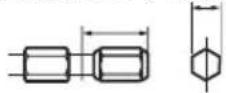
● Self-contained battery (EY9L10) CAUTION:
NOTE:
9.5 mm (3/8") - 13 mm (33/64") 6.35 mm (1/4")
- Main switch (ON/OFF)
NOTE:


- IMPORTANT
- ⚠ WARNING! READ ALL INSTRUCTIONS
- SAVE THESE INSTRUCTIONS WORK AREA SAFETY
- ELECTRICAL SAFETY
- PERSONAL SAFETY
- POWER TOOL USE AND CARE
- BATTERY TOOL USE AND CARE
- SERVICE
- SPECIFIC SAFETY RULES
- WARNING
- FOR BATTERY CHARGER & BATTERY PACK
- IMPORTANT SAFETY INSTRUCTIONS
- ASSEMBLY & OPERATION
- HEXAGONAL BIT CHUCK
- ATTACHING THE BITS
- NOTE
- CLUTCH HANDLE (CLUTCH TORQUE SETTING)
- CAUTION
- ● BATTERY LOW WARNING LAMP
- USING THE LED LIGHT
- BIT-LOCKING FUNCTION
- MAIN SWITCH (ON/OFF)
- SPEED SELECTOR SWITCH
- MAIN SWITCH LOCK
- ● BATTERY PACK (EY9L10)
- [BATTERY PACK]
- FOR APPROPRIATE USE OF BATTERY PACK
- LI-ION BATTERY PACK (EY9L10)
- BATTERY PACK LIFE
- BATTERY RECYCLING
- ATTENTION
- FOR LI-ION BATTERY PACK, EY9L
- [BATTERY CHARGER]
- CHARGING
- COMMON CAUTIONS FOR THE LI-ION/NI-CD BATTERY PACK
- LI-ION BATTERY PACK
- BATTERY CHARGER (EY0L10)
- NI-CD BATTERY PACK
- LAMP INDICATIONS
- MAINTENANCE
- ACCESSORIES
- SPECIFICATIONS
- GENERAL SAFETY INSTRUCTIONS
- ● SELF-CONTAINED BATTERY (EY9L10) CAUTION
Brand : PANASONIC
Model : EY7450LR2S
Category : Drill