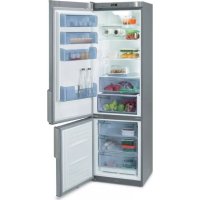
FFA4815X - Fridge FAGOR - Free user manual and instructions
Find the device manual for free FFA4815X FAGOR in PDF.



| Brand | Fagor |
| Model | FFA4815X |
| Product type | Combined refrigerator (fridge + freezer) |
| Power supply | 220-240 V, earthed plug |
| Refrigerant | R600A |
| Recommended refrigerator temperature | 4 °C |
| Recommended freezer temperature | -18 °C (storage) / -24 °C (freezing) |
| Fast cooling function (fridge) | Yes, activated for 6 hours |
| Fast cooling function (freezer) | Yes, activated for 52 hours |
| Holiday function | Yes, keeps the freezer running |
| Open door alarm | Yes, after 2 minutes |
| High freezer temperature alarm | Yes, acoustic and visual signal |
| Interior lighting | Bulb E14, 220-240 V, 15/25 W |
| Charcoal filter | Yes, to be replaced every 6 months |
| S.P.A. system (crisper drawer) | Optional, maintains humidity |
| Reversing the door opening direction | Possible, detailed procedure in the manual |
| Interior cleaning | Water and baking soda, no steam cleaner |
| Exterior cleaning | No steam cleaner, rear grille with vacuum cleaner |
| Safety | Do not damage the refrigeration circuit; do not use electrical appliances inside |
Frequently Asked Questions - FFA4815X FAGOR
User questions about FFA4815X FAGOR
0 question about this device. Answer the ones you know or ask your own.
Ask a new question about this device
Download the instructions for your Fridge in PDF format for free! Find your manual FFA4815X - FAGOR and take your electronic device back in hand. On this page are published all the documents necessary for the use of your device. FFA4815X by FAGOR.
USER MANUAL FFA4815X FAGOR
Very important: Read this manual carefully before using your refrigerator.
This manual is designed with texts corresponding to drawings.

Identification

Identify the model of your refrigerator ("a", "b", "c", "d", "e") by comparing the control panel with the illustrations.
1
Installation
1.1 Unpacking. Remove all protective elements.
1.2 Placement. Place the refrigerator away from heat sources and protect it from direct sunlight in order to conserve energy.
Do not install the refrigerator in the open air or where it is exposed to rain.
Air should be able to circulate behind the refrigerator. Leave 25mm between the rear of the refrigerator and the wall. Do not enclose the space between the refrigerator and the floor or ceiling with any object.
Level the refrigerator to prevent vibration and noise. Remember that if the refrigerator is situated next to a wall or cupboard, it could make some noise.
In addition, make sure that the trays are correctly placed and position the containers with a space between them to prevent vibration.
1.3 Connecting to power. Let the refrigerator sit in a upright position for at least 2 hours before connecting it. Check the information on the specifi cation plate (220-240V with ground wire) (1.3.1, 1.3.2).
Do not use adapters or extension leads.
Prevent the cord from coming in contact with the motor or getting trapped beneath it.
1.4 Changing the side that the door opens from. Disconnect the refrigerator from the power outlet and empty the inside of the door.
Remove the upper hinge cover with a fl at blade screwdriver (1.4.1). Loosen the screws and remove the hinge mechanism with help of a screwdriver (1.4.2).
Disconnect by pressing the connector tab. (1.4.3). Remove the refrigerator door (1.4.4). Remove the controls with a screwdriver, prying it away using the grooves placed for that purpose (1.4.5).
Make a notch for the cable on the opposite side, as marked on the casing (1.4.6). Remount the control panel passing the cable through the notch you made (1.4.7)
Remove the screw cover from the centre hinge, loosen the screws and remove the hinge (1.4.8). Move the freezer door up (1.4.9).
Loosen the screws of the lower hinge and remove it. Change the position of the hinge axis and place it on the opposite side.
Place the lower freezer handle on the refrigerator door and the lower refrigerator handle on the freezer door, rotated 180^ . Place the vertical handles on the opposite side rotating them 180^ (1.4.11).
Rotate the self-closures and place the one from the refrigerator on the freezer and vice versa (1.4.12).
Position the freezer door (1.4.13) and attach the central hinge (1.4.14). Position the refrigerator door (1.4.15).
Place the closure mechanism in the upper hinge space on the opposite side (1.4.16). Put the cable through the upper hinge and rotation mechanism and plug it into the door connector (1.4.17).
Screw in the upper hinge (1.4.18) and put the cover in place (1.4.19)

Operation

2.1 Switching on the refrigerator. Press
ON-OFF (2.1.1), 2.1.3) or the plus + or - keys until you see a number in the display (2.1.2). The Mini LCD models lock automatically (2.1.3). To unlock, press any key for 3 seconds.
2.2 Selecting the compartment. In comb
refrigerators, the refrigeration compartment and the freezer compartment operate independently.
2.3 Temperature selection. Turn the control
(2.3.1) or press the +, - keys, first for the freezer compartment and then for the refrigerator compartment (2.3.2, 2.3.3).
Once the temperature is selected, you
can see the current temperature of the compartment with the lighted indicator (2.3.4) or by pressing the + or - keys of the appropriate compartment for 5 seconds. The compartment temperature will blink.
Recommendation: The recommended
temperature for the refrigeration compartment is and the freezer compartment for already frozen food. If you want to freeze, the recommended temperature is -24
Remember that the interior temperature
depends on the temperature of the environment, placement, and frequency with which the door is opened.
2.4 Refrigerator functions.
Rapid cooling mode: This function sets
refrigeration to the coldest temperature for 6 hours. It should be used if you put a large quantity of food in the refrigerator.
To activate and deactivate: Press
SUPER
(2.4.1), press (2.4.2) or 2.4.3).
Holiday mode: The vacation function is very useful when the refrigerator will not be used for a long period of time, but you want to keep food in the freezer. With this function, your refrigerator will use little power and smells won't develop in its interior.
Warning: To use this function, the refrigerator door must be closed.
To activate and deactivate: Press
HOLIDAY
(2.4.4) or the +, - keys until you see H on the display (2.4.5) or for 3 seconds (2.4.6). To cancel, repeat this operation. Some models allow the refrigeration compartment to be shut off.
Press ON-OFF (2.4.7), or the +, - (2.4.8, 2.4.9), keys, until no number can be seen.
2.5 Freezer functions.
Rapid cooling mode: This function sets the coldest freezer temperature for 52 hours. The function should be activated 24 hours before putting a large quantity of food in the freezer.
To activate and deactivate: Press
SUPER
(2.5.1), press (2.5.2) or
(2.5.3)
Connecting / disconnecting the freezer:
Press ON-OFFkey(2.5.4), the +, keys (2.5.5) until no temperatura can be seen on the display, or for 3 seconds (2.5.6). Shutting off the freezer also shuts off the refrigeration comopartment.
2.6 Usage recommendations.
- Don't leave the door open more time than necessary and don't put hot foods in the refrigerator. This will provide the most efficiient use of the refrigerator and avoid increasing power consumption.
If your refrigerator is of the NO FROST variety, don't block the ventilation grille and try leave space between food items so that air circulates around them. - Don't put carbonated drinks or glass bottles containing liquid in the freezer, they can burst.
- Store food in hermetically sealed containers to prevent drying.
- Do not eat extremely cold ices or food as they can produce burns in the mouth.
3
Maintenance and cleaning
3.1 Interior cleaning. To clean the interior, use a sponge or cloth soaked in water with bicarbonate in order to prevent odours developing. In no case use steam cleaning machines, solvents, or abrasive detergents.
3.2 Exterior cleaning. Do not clean the screens with a steam cleaning machine.
It is advisable to clean the back vent once a year with a vacuum cleaner.
3.3 Cleaning the accessories. Accessories are not suitable for automatic dishwashers. Clean them by hand with a sponge or cloth.
3.4 Changing the lamp. In the case that the lamp goes out: disconnect the refrigerator. Remove the cover by pressing the tab (3.4.1, 3.4.3) and remove the burnt out lamp (3.4.2, 3.4.4). Replace it with another with the same type of thread, E14, 220-240V, 15/25W or according to fixture instructions.
3.5 Changing the carbon fiter. The refrigerator may incorporate a carbon fiter that absorbs the odours of certain foods and retains microorganisms (fungus and bacteria) circulating in the air.
The filter keeps its properties for 6 months. After that time, it is recommended to replace it. Its location varies based on model.
To activate the fi Iter: Press the tab and remove the cover to access the fi Iter (3.5.1, 3.5.3). Separate the fi Iter from the tab (3.5.2, 3.5.4) and remove the seals (3.5.5).
Press the BIOFILTER viewer until hearing a click (3.5.6) and in a few seconds the duration scale will become coloured. Place the new filter in the original location.
Keep the old fi iters and the replacements out of the reach of children: Ingesting a large quantity could be dangerous.
Don't get the fi Iter wet, as it will lose it properties.
3.6 S.P.A. salus per aquam (optional)
Your refrigerator may incorporate the S.P.A. accessory which maintains a constant level
of humidity in the vegetable compartment, preventing drying.
It is located in the vegetable compartment drawer separator. It consists of a receptacle with a pouring container and a fullness level indicator. When the S.P.A. needs water, the level will become hidden. Take out the container (3.6.2) and use it to refill the receptacle.
The fi titer should be changed every 2 years (3.6.4).

Diagnostics

4.1 Door open. If the door stays open for more than 2 minutes, an alarm will sound and the refrigerator light will go off. The alarm is disconnected when the door is closed.
4.2 Freezer not cold enough.
- If the temperature of the freezer is unusually high, a warning light will appear (4.2.1, 4.2.2) or a blinking icon (4.2.3) as well as a beeping alarm. Press SUPER or 水 to manually shut off the beeping (4.2.4, 4.2.5, 4.2.6).
- The first time the refrigerator is connected, the icon or the warning light will appear, but the alarm won't sound.
4.3 Loss of electrical power
Open the refrigerator doors as little as possible. When the power returns, check if the frozen food has thawed.
4.4 Normal refrigerator noises
It is perfectly normal for your refrigerator to make certain noises while it is running and you should not worry about them.
- The coolant gas can make a bubbling sound as it circulates.
- The compressor may make humming or tapping sounds, especially at start-up.
-
The expansion and contraction of material used may make clicking or creaking sounds.
-
The air that moves the freezer ventilator may generate a light background sound.
Don't try to repair the refrigerator. Call technical service.

Safety

- Keep the ventilation grille uncovered.
- Be careful not to damage refrigeration circuits.
- Don't use electrical devices in the interior of the refrigerator, unless they are recommended by the manufacturer.
- Don't use mechanical devices or means other than those recommended by the manufacturer to speed up the thawing process.
- This appliance is not intended for use by people (including children) whose physical, sensory, or mental capacities are reduced or who lack experience or knowledge, except under supervision or after receiving instruction regarding use of the appliance from a person responsible for their safety. Use by children should be supervised to prevent them playing with the appliance.
- If the power cable is damaged, it should be replaced by the manufacturer, by their after sales service, or by personnel similarly qualifi ed in order to prevent dangerous situations.

The environment

This refrigerator was designed with environmental conservation in mind.
The appliance operates with coolant R600A, which does not damage the environment.
Respect the environment. Use the recommended temperatures for each compartment. They will depend on the mode you need for effcient use of your refrigerator.
Disconnect the refrigerator or set it to holiday mode when you will not be using it for a prolonged period. You will reduce power consumption and save energy.
Avoid leaving the doors open more time than necessary. It causes an increase in power use.
Waste management of electrical and electronic appliances.
Do not discard appliances mixing them general household waste.
Deliver your refrigerator to a special collection centre.
Recycling domestic appliances prevents negative impacts on health and the environment and helps save energy and resources.
For more information, contact your local authorities or the establishment where you purchased your refrigerator.
Bedienungsanleitung
2.6 PeKoMeHdauN no 3KcNpyaTuN.
He depxnte DBeepbOtKpbTbIMn 60JIbWe Heo6xoDMIMO BpemeH, Hne KlaIaNTe B XoIOJNbHnik RopHne npOyKTbI NnUy. Blaorap3TomyXoIOJNbHnik 6ydet NCIOB3OBATcC 60JIbWeN 3ΦΦeKTHBOCTbIO, IN Bbl N36ExNTe NOBbIeHHORo NOTpe6JIeHnE 3NeKTPo3Heprnn.
- Ecni Bawx XOIOINbHnK OChaueh fynknei NO FROST, He 3aropaxnBaIte BeHTnlaUHOHHbe OTBepCTnN OCTaBnTe HeKOtOpoe IpoctpaHCTBO MExdy IPOyKTAmN, daBaB BO3MOXHOCTb BO3DyXu LIPKyInpOBaTb MeXdY HMMN.
He KnaIte B Mopo3nIbHoe OTdJeHne 6yTbIKn C rA3nPOBaHHbIMn HAnNTkAMN n CTekJIaHHbIe 6yTbIKN C XKnIOCTbIO, TaK KaK OHMOrYB3OpBaTbcra.
Bo n36eKaHne BbCyuBaHnI npOyKToB KnaIte Ix B XoJOnIbHnB RepMeTuYeCKnx EMKOCTRX.
HeynoppeBnTe OeHb XoNoDHOe MOpOKeHHoe nCnIbHo 3aMOpOKeHHbI pOdyKtbl, TaK KaK 3TO MOKeT BblBaTb OkOrn pTa.
3 ynctka n yxoid
3.1. YnCTKa BHyTpEHnX qaTei. JnA nCTKn BHyTpEHnX qacteN cnoJIb3yIte r6ky IIN TpIKNy, yBnaXHeHHyO Cna6bIM BoHbIM paCTbOpOM CoIbI, YTObI yCTpaHITb HnPnATHBie 3anax. Kateropueckn 3anpeuaeTc npimeHrTb IIn YnCTKn pnp6Opblc napOBOn YnCTKO, pactBopnteN n abpa3NBhIe MOUe CpeJCTBa.
3.2.нстка hapyxньх чаөг.Зanpeшаetс npimehrtbnp6opblcnapobOчNTKoДнчNTknDinCnleeB.PekomeHnyetc OINHpa3Вrod ChnttB nbInecoCOM 3aDHIIO peWetky.
3.3.нstka npnHaJnxHocTe.3aPpeuaeTcA nCTNb npHaJnxHocTe B NOcyDOMOeHybIX MaunHax.PekOMeHdyetc pyHra ChSTKa C nOMOuBrykNINTPaKN.
3.4. 3aMeHa JAMNoKc. EcIn JAMNoKc nepectaJa CBETNb: OTKJIIOuHTb XOLOJINbHnK OT CETn. CHATb KpbIshKy, Haxab Ha «R3bYOK» (3.4.1, 3.4.3), n I3BneB Hepa6oTaIOUyIO JAMNoKy (3.4.2, 3.4.4). 3aMeHNTb ee HOBo anAIONuHOro TINOpa3Mepa (E14, 220-240 B, 15/25 BT) nI IN B COOTBeTCTBnC cyKa3aHnMM no OCBeUEHnIO.
3.5. 3aMeHa yrolbHoroФnIbTpA. B xOIOAnIbHnke MoKET NmETbCRA yrolbHbI qnlbTp, KOToPbI NOrIoUaEt NocToPOHHne 3anaxn, Opba3yeMbIe HEKOToPbIMN IpoDyKTAMN, n YJIaBnBaET MInKpOoPrAHn3MbI (rpn6Kn b6aKTepeIN) n3 UnpKynipyUoJero BO3dYxa.
CboiCTBaФиNbTpacoXpaHHTcIИшb onpeDJIeHHOBpeMn,OKOIO6MeCAUEB.No ICTeUeHm3TOro BpeMeHn peKOMeHnyETc3aMeHnTbФиNbTp.MecToPacNoJoxKeHneФиNbTp a3AUCNTOTMOdeJI.
ДЯВКЛIOUeHINФиьТРа:нaxKaTb «R3bIOK» N CHATb KpbIshKy,чTOБы NOJyHnTb DOCTynKФпИьTpY (3.5.1,3.5.3).OTdENITbФиьTpOT KpbIshKn (3.5.2,
3.5.4) n CHrTb yNtNoTHHeHnR (3.5.5).
Haxatb Bn3np BIOFILTER do nerkoro ueyka (3.5.6), upee3 Heckonbko cekynd shkana dntelbHOCTn HauHET OKpaunBaTbC. YctahOBHTb fIbTp B HaayabHoe noloxKeHne.
H3noeHHbIe n CMeHHbIe qNbTpbl Heo6xOIMO XpaHnTB B HeoCTynHom dna TeT MeCT. IOnaHaHne 3NaHTeBbIX KOJIueCTB MaTePnAla QnIbTpBa OprAHn3M MoXET 6blb ONaCHbIM.
He donyckaTe HAMOKaHnФnIbTpA, TaK KaOH MOXET YtpaTNT CBON CBOICTBa.
3.6 OnuHaBHa FyHKsA S.P.A. (salus per aquam, «3doOpBaBe yepe3 Body»)
BawxOoNbHmK MoKeT 6bItb OChaSeH yCTpoiCTBOM S.P.A., KOtOpoe NoIepXnBaET NOCTOHHb yPoBeHb BnaXHOCTn BOTcKe IIN OBOUeH n CpyKTOB, IN bNaOrDaP3 TOMy npEDOTBpaaaeTcN XN BbCyuWBaHne.
Oho HaxoDnTcB pa3dEJIHOUIeI nepeROpOKe RAnka dIa OBOUeH N ppyKTOB (3.6.1).YCTpoCTBO COCTOHT n3 pe3epByapa CO CInBbIM cocydom u Yka3aTelem yPOBHa 3aONHeH.N B cnyae ecN S.P.A.Tpe6yeTcB Oda,yPOBeHb ONyCKaETcDO Tex nop, noka He cKpOEtC.N3BLeKeNTe cocyd (3.6.2) IN BOCNoJIb3yIITecb IM dJa HAnOnHeHnpe3epByapa (3.6.3).
Yepe3KaKbIe2roJaФnIbTppeKOMeHnyETc 3aMeHrTb(3.6.4).

Функци KoHTpoJЯ COCTOHHN XOJODHbHNKa

4.1 OTKpbIa DBepua.Ecnn DBepua ocTaeTcra OTKpbToB 6oJee Yem 2 MNHyTb, XOIOINbHnK NOaET 3ByKOBo CnHaJ, a OCBeueHne XOIOINbHorO OTDeJeHnBaIKNouayetc. Iocne 3aKpbITNa DBepu NODaCa CNHa npeKpaauetca.
4.2 HeoctaToHbXOJIOB MOp03nIbHOM OTDeJeHHN
- Ecnn TemnepaTpya B Mopo03nHbHom OTdJeHHe HHeOpMaIbHO BbICOka, NOdaETcBcETOBOn CnHAn (4.2.1, 4.2.2), INN Mmraet CnMBoN A(4.2.3)), n (B CBOIO OuepeDb) NOdaETcN npepbInCTb3ByKOBoCnHAn. DnA OTKIOUeHn 3ByKOBOrO CNHana BpyHyHO HaxMNTe SuPpER (4.2.4, 4.2.5, 4.2.6).
- Pn nepBOM BKJIOUeHnn npnbopa nOBnAETCA
CNMBON CNCBTOBOCNHAI,ODHaKO 3BYKOBON CnHAI He NoDAeTcR.
4.3 OTKJIIOUeHne 3JNEKtpoNTaHn
OTKpbBaIte DBePcIbXoIOJNbHnKa KaK MoxHO pexe HEnpOdoJnxTeIbHei. Iocne TORO KaK B cEtN CHOBA NOBtCnHaPjaKeHne, npOBepbTe, He pa3MOpO3uINCb Nn PpOdyKTbl.
4.4 HopmaNbHbIe Wymbl npn pa6oTe xoJOnJIbHnka
Bo Bpempa6oTbXOIOuINbHmKMOKeTn3aBaTaB pIuMOB,KOTOpBIE HJNHTcHOPMaJIbHbIM RJIeHNEM, IN3-3a HIX He CTONT 6ecIOKOUTbcA.
-ПицИркУнцИи XладагERTА NO KOTypAM MOKET BO3HnKaTb Wym 6урпеня.
- Ppi pa6oTe KOMnPecccopa MoKet 6bITb CbIuHO JxJxKaHne W/Unn JERKoe NocTyKuBaHne, Oc06eHHO npE erO BKJIIOUeHIn.
- Pn pauchepenHn n Cxatnn nCNoIb3yeMbIX MaTePnaIOB MOrT n3daBaTbcra XpyCT nIN nOTpecknBaHne.
-ДИЖЕне BO3dUxa 3a Cuet pa60tBeHTINIATopa MoKet DaBaTb He6OblwofФOHOBi Wym.

He nbitaTecb camoCTOReIbHO
OTpemOHnPoBaTb np6Op. PnB03HKnHOBeHm HeNCnPabHOCTn 6paTntEcB CnyXby Texnuecko noDepKKn no TenefoHy

aal aagll g yall jaaal aaiy
aJgS g sIeall Jnssll Jr.(1.4.16)
.(1.4.17)
(1.4.18)
1.1.4.19

2.1
(2.1.3), (2.1.1)ON-OFF
.(2.1.2)ssalal aogle Lg raln g -j+ j
sia jai 150
J 121 J 15 10 10 10 10 10 10 10 10 10 10 10 10 10 10 10 10 10 10 10 10 10 10 10 10 10 10 10
垂直于 3JL_2
.2.2
y
Jaaa Jaaa
.23
+jbcj(2.3.1)
2.3.2)
(2.3.3)
a a a a a a a a a a a a a a a a a a a a
5Jda baiiaa 2.3.4
p j 10 g a. yg yall g - + j rj21 sgc gil
y
cui
1-19 42
aaiy 1yaiy j
aai jia aaiiial gall jai jaiy
J 1 1 1 1 1 1 1 1 1 1 1 1 1 1 1
suiy
y

a1 = 2,an + 1 = n2 - 2an
.
1 2 3 4 5 6 7 8 9 10 11 12
J 1 J 1 J 1 J 1 J 1 J 1 J 1 J 1 J 1 J 1 J 1 J 1 J 1 J 1 J 1 J 1 J 1 J 1 J 1 J 1 J 1 J 1 J 1 J 1 J 1 J 1 J 1 J 1 J 1 J 1 J 1 J 1 J 1 J 1
y j 10000000000000000000000000000000000000000000000000000000000000000000