
2VFT75 S - Cooker FAGOR - Free user manual and instructions
Find the device manual for free 2VFT75 S FAGOR in PDF.
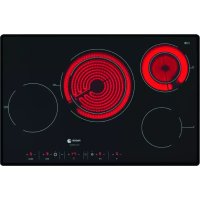



| Product Type | Ceramic glass hob |
| Brand | Fagor |
| Model | 2VFT75 S |
| Dimensions (W x D x H) | 60 x 51 x 5 cm (approx.) |
| Weight | Approximately 10 kg |
| Electrical supply | 220-240 V~, 30 A, 6.8 kW (for 60 cm model) |
| Number of cooking zones | 4 |
| Type of cooking zones | Ceramic glass with double, triple and large plate zones |
| Main functions | Timer, rapid heat, child safety lock, residual heat indicator |
| Surface material | Ceramic glass |
| Cleaning and maintenance | Specific products for ceramic glass (VITROCLEN recommended), special scraper |
| Safety | Temperature limiter, automatic shutdown in case of overheating, control lock, overflow detection |
| Installation | Built-in with foam seal and clip fixation |
| Electrical connection | 5-wire cable (dark blue, light blue, brown, red, green-yellow), adaptable to different voltages |
| Compliance | European directives 73/23/EEC and 89/336/EEC |
| Spare parts and repairability | Power cable replaceable by a professional, ceramic glass replaceable by after-sales service |
| General information | User manual available in multiple languages, 58 pages |
Frequently Asked Questions - 2VFT75 S FAGOR
User questions about 2VFT75 S FAGOR
0 question about this device. Answer the ones you know or ask your own.
Ask a new question about this device
Download the instructions for your Cooker in PDF format for free! Find your manual 2VFT75 S - FAGOR and take your electronic device back in hand. On this page are published all the documents necessary for the use of your device. 2VFT75 S by FAGOR.
USER MANUAL 2VFT75 S FAGOR
Very important: Read this manual thoroughly before using the hob.
This manual is designed so that the texts relate to the corresponding illustrations.

Identification
Identify the model of your hob ("a", "b", "c", "d", "e", "f", "g", "h", "i", "j", "k", "l", "m", "n", "o") by comparing the number and layout of the elements on your appliance with that shown in the illustrations.
1
Installation

1.1 Unpacking. Remove all the protective materials.
1.2 Insertion into the unit. Always take into account the details on the characteristics plate (1.2.1) and the measurements of the unit into which the hob is going to be inserted (1.2.2, 1.2.3). If you are not going to fit an oven beneath the hob, you must install a protective panel in accordance with the measure indicated (1.2.4). Stick the foam join along the outer edge of the hob to make it watertight (1.2.5). Turn the hob over and insert it into the hole (1.2.6). Secure it to the unit with the four hooks supplied (1.2.7). Do not use non-removable materials such as silicone.
1.3 Connection to the power supply. The hob is supplied with a power cable.
- With 5 wires: a) dark blue, b) light blue, c) brown, d) red, e) green yellow. (1.3.1) • Prepared for a 230V~ hob. (1.3.2)
- Prepared for a 220-240V~ hob: see table. (1.3.3) • Total power: 60cm hob 6.8kW, >60cm hob 7.8kW
220-240V~ Nominal switch by phases
60 cm hob 30 A
60cm hob 34 A
- If the type of connection is other than 220-240V~, remove the cable and make the connection as per diagrams (1.3.3, 1.3.4).
| 220-240V 3~ Nominal switch by phases | |
| 60 cm hob 14 A | |
| >60cm hob 16,5 A | |
| 380-415V 3N~ Nominal switch by phases | |
| 60 cm hob 11 A | |
| >60cm hob 13 A | |
| 380-415V 2N~ Nominal switch by phases | |
| 60 cm hob 16 A | |
| >60cm hob 19 A | |
This appliance is compliant with European directives 73/23/EEC and 89/336/EEC.
Recommendation: The hob must be installed by an authorized installer, who shall follow the manufacturer's instructions and diagrams.
2
Use
Clay, copper, or stainless steel receptacles can be used with vitroceramic hobs. Aluminum receptacles are not recommended as they can stain the glass of the hob.
2.1 Selecting the cooking zone. You have various elements on which to place the receptacles. Choose the most suitable one depending on the size of the receptacle.
2.2 Turning on the hob. Press ① for 3 seconds to turn on the hob; the ⏻ of the different cooking zones will be activated.
N.B.: In order to be able to select whether the child safety function is activated, deactivate it by pressing the → key for 3 seconds (2.13).
2.3 Activating the element. Activate the element on which you have placed the receptacle by pressing the corresponding key □ □ □ □ □ (2.3.1, 2.3.2) or press + (2.4.2).
N.B.: If you take longer than 5 seconds to select the element, the hob will automatically turn itself off, as a safety measure.
2.4 Selecting the power. Adjust it by sliding your finger along the bar (2.4.1) or by pressing + or - (2.4.2, 2.4.3).
SPECIAL ELEMENTS
2.5 Double element, Triple element. Once you have selected the power, press Ⓞ, Ⓞ and this will activate the double element (2.5.1, 2.5.3). If you press Ⓞ (2.5.2) or Ⓞ (2.5.4) again, this will activate the triple element. To cancel, press ( Ⓞ, Ⓞ, Ⓞ, Ⓞ ).
2.6 Large hotplate. You can use this element in a circular way 🐘 or in a joint way, as a large hot plate 🐘 . Press 🐘 to activate it and press again to deactivate it.
Recommendation: on the models with halogen elements, the light is so bright that we advise you not to look at it when it is on without the receptacle.
TIMER FUNCTIONS
2.7 Setting the time Ⓤ. When the hob is plugged in, the digits on the clock will flash and will show 12.00 (2.7.1). Adjust the time with the keys +, - (2.7.2). Follow the same procedure whenever the appliance is unplugged or the power supply is cut off.
To change the time, press the Ⓛ key for 5 seconds (2.7.3). The time will start to flash and you will hear a beep; adjust it with the keys +, -
2.8 Selecting the time.
Models abc: Once an element has been activated and the power selected, you have 5 seconds of flashing in which to press the Ⓛ key (2.8.1). Select the time required by pressing +, - (2.8.2). After five seconds the timer is set and the time will be displayed with an illuminated dot beneath the icon of the timed element (2.8.3). To alter or see the time remaining, press the icon of the timed element (2.8.4). To cancel the programming, press the +, - keys simultaneously (2.8.5).
Models dfghkmo: Once an element has been activated and the power selected, press the + key on the clock. 00 and a t will appear on each element (2.8.6). Press + on the element to be timed and t will
flash (2.8.7). Select the time with +, - on the clock (2.8.8). After 5 seconds the time will be set and the power and t will be displayed alternately on the timed element. Once the time has passed, you will hear a sound and 📞 will flash. To cancel the timing, press — on the 🔒 icon until 📞 is displayed.
N.B.: The timer will automatically turn itself off if you take longer than 10 seconds to select the time.
Models e: Once an element has been activated and the power selected, press again the selection key of the element to be timed, and a ± will appear. (2.8.11). Select the time with +, - (2.8.12) and set it by pressing the timed element key again (2.8.13). The power will be displayed with a dot indicating that the element is on a timer. You will hear a sound and see - to indicate that the time has passed (2.8.14). Press any key and the sound will stop.
N.B.: The timer will automatically turn itself off if you take longer than 10 seconds to select the time.
Observations on timing: If the power level is 9, the maximum time for the timer will be 60 min. Otherwise, the maximum will be 99 min.
Once the time has passed, the alarm will sound until you press any key.
PROGRAMMING FUNCTIONS
2.9 Rapid heating. Reaches maximum temperature quickly to automatically go to the constant temperature.
Models abc: Activates an element and takes the bar to the maximum power. Press \(\parallel D\) and a R will appear on the display screen of the selected element (2.9.1). You have 5 seconds to select the desired level, you are advised to use levels from 3 to 6 (2.9.2). After five seconds the rapid heating will be set and will appear on the display screen of the selected element (2.9.1). You have 5 seconds to select the desired level, you are advised to use levels from 3 to 6 (2.9.2). After five seconds the rapid heating will be set and R and the power will be displayed alternately. Once the maximum temperature has been reached, R will disappear, leaving the power constant. The element will continue operating in the conventional way. If you want
to cancel the rapid heating, press the icon of the programmed element and select a new power.
Models dfghjklmo: Select an element and set it at the maximum power by pressing + until a 9 and a dot 9 are displayed (2.9.3). Adjust the power by pressing —; levels 3 to 6 are recommended (2.9.4). After 5 seconds, fast heating is set and the power will be displayed followed by a dot (2.9.5). Once the maximum temperature has been reached, the decimal point will disappear and the element will continue operating in the conventional way. To cancel the function, press the key of the programmed element and select a new power.
2.10 Vitros with controls. Make sure that the element you are going to activate is the element you want to use (2.10.1). Turn the control to the desired position and the 'on' light will come on (2.10.2) which also indicates the residual heat when the element is turned off.
On the models with double elements or a large hotplate, turning the control to the left will adjust a part of the element and turning the control to the right will adjust the whole element (2.10.3).
2.11 Turning the element off. Select the power of the element you want to turn off.
2.12 Residual heat. After using the hob, the elements will stay hot for some time, which will vary according to the power selected and a H or a dot will be displayed on the elements that are still hot. Do not touch these elements, as there is a risk of burning yourself.
Caution: If the power supply is cut off, when it is restored, the H icon will not be displayed even if the cooking zone is hot. It is important to remember this fact.
2.13 Locking function. To prevent children from handling the appliance. Press down the → key for 3 seconds and this will activate the lock. To unlock it, repeat the procedure.
Recommendations:
- Avoid knocking receptacles against the glass. • Aluminium receptacles are not advisable as
they can stain the glass, unless they have a stainless steel protective base.
- The heat elements should not be operated without a receptacle.
- The base of the receptacle must be flat and dry.
- Make sure that the diameters of the receptacles are larger than or the same as the element to be used and place them in the centre of the heat source.
- Try not to move the receptacles as this can scratch the glass.
- Only use the appliance for cooking food. Do not use the hob as a worktop.
- Do not apply cold water directly onto the hob when it is hot.
Caution: Intermittent operation of the cooking zones is not a fault. They operate with longer or shorter on and off periods depending on the desired power.
Maintenance and cleaning

- Do not use a steam cleaner.
- Clean the surface of your hob regularly once it has cooled down. Do not use abrasive products or sponges. Clean with a damp cloth and soapy water (3.1.1).
- Once a week, clean thoroughly with products specifically designed for vitroceramic hobs. We recommend VITRO-CLEN for cleaning and maintaining your vitroceramic hob.
- Stubborn stains can be removed with the glass scraper (3.1.2).
- If you accidentally burn some sugar, sugary elements or plastic on the hob, remove it as soon as possible with a scraper while it is still hot. If this is not done, you may be left with permanent marks.
- Use the blade of the scraper in perfect condition; replace it if it is damaged.
Safety

- The power circuit supplying the hob must have an all-pole circuit breaker with at least 3mm space between contacts.
- The hob must be installed by an authorized installer, who shall follow the manufacturer's instructions and diagrams.
- The installation must be of the appropriate size for the maximum power indicated on the characteristics plate and the power socket with the regulatory earth.
- If the cable is damaged, it must be replaced by the post-sales service or similarly qualified personnel for safety purposes.
- The element is equipped with an inner temperature limiter which turns the element off in the event of the hob overheating.
- After each use, switch the element off using its control.
- If the surface of the glass is cracked or broken, unplug the appliance immediately to avoid the possibility of an electric shock. Do not use the hob until the glass has been replaced (4.1.1).
- If anything spills onto the control keys, the hob will stop and emit a sound (4.1.2).
- If you press a sensor down for too long or there is an object activating the sensors, the hob will stop and emit a sound (4.1.3).
- Do not place receptacles with hot bases onto the sensors; you can burn yourself when pressing them (4.1.3).
- Keep young children well away; the heating surfaces can be extremely hot when in use. Use the locking system to prevent children from playing with the controls.
- This appliance is not designed for use by people with disabilities.
- Always stay nearby when cooking dishes or food with fat or oil. Excessive heat could cause them to catch fire.
- If the hob is installed above a drawer, no flammable objects must be stored inside.
5
Environment

The hob has been designed with protection of the environment in mind.
Be environmentally aware. Use the adequate power for each cooking operation and select the receptacles of a suitable size for the food you are going to prepare. The heat transmission is best when the base of the receptacle and the diameter of the cooking zone are the same size.
When you have finished cooking, if you like you can leave the receptacle where it is to make use of the residual heat accumulated. This will save energy.
Use a lid whenever you can in order to reduce the heat lost through steam.
Electrical and electronic appliance waste management.
Do not dispose of appliances by mixing them with general domestic waste.
Take your hob to a special collection centre.
The recycling of domestic appliances avoids negative consequences to our health, the environment and enables us to save energy and resources.
For further information, contact your local authority or the establishment from where you purchased your hob.
Brand : FAGOR
Model : 2VFT75 S
Category : Cooker