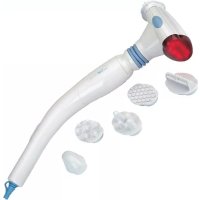
MSI 2556 - Massage device CLATRONIC - Free user manual and instructions
Find the device manual for free MSI 2556 CLATRONIC in PDF.


| Product type | Massage device |
| Brand | Clatronic |
| Model | MSI 2556 |
| Power supply | 230 V, 50 Hz |
| Functions | Vibration, infrared heat, massage with infrared heat |
| Included accessories | Spot massager (A), scalp massager (B), surface massager (C), foot massager (D) |
| Maximum usage time | 20 minutes |
| Cooling time | 15 minutes |
| Cleaning | Exterior with a dry cloth, do not immerse |
| Safety | Do not use near eyes or under a blanket |
| Warranty | 24 months |
| Spare parts | Massage accessories available separately |
| Repairability | By an authorized specialist only |
Frequently Asked Questions - MSI 2556 CLATRONIC
User questions about MSI 2556 CLATRONIC
0 question about this device. Answer the ones you know or ask your own.
Ask a new question about this device
Download the instructions for your Massage device in PDF format for free! Find your manual MSI 2556 - CLATRONIC and take your electronic device back in hand. On this page are published all the documents necessary for the use of your device. MSI 2556 by CLATRONIC.
USER MANUAL MSI 2556 CLATRONIC
General safety instructions
GB
- Before commissioning this device please read the instruction manual carefully.
- Please keep these instructions, the guaranty certificate, the sales receipt and, if possible, the carton with the inner packaging!
- The device is intended exclusively for private and not for commercial use!
- Always remove the plug from the socket whenever the device is not in use, when attaching accessory parts, cleaning the device or whenever a disturbance occurs. Switch off the device beforehand. Pull on the plug, not on the cable.
- In order to protect children from the dangers of electrical appliances, never leave them unsupervised with the device. Consequently, when selecting the location for your device, do so in such a way that children do not have access to the device. Take care to ensure that the cable does not hang down.
- Test the device and the cable regularly for damage. If there is damage of any kind, the device should not be used.
- Do not repair the device yourself, but rather consult an authorised expert.
- For safety reasons a broken or damaged mains lead may only be replaced by an equivalent lead from the manufacturer, our customer service department or a similar qualified person.
- Keep the device and the cable away from heat, direct sunlight, moisture, sharp edges and suchlike.
- Never use the device unsupervised! Switch off the device whenever you are not using it, even if this is only for a moment.
- Use only original accessories.
- Do not use the device outdoors.
- Under no circumstances must the device be placed in water or other liquid, or come into contact with such. Do not use the device with wet or moist hands.
- Should the device become moist or wet, remove the mains plug from the socket immediately. Do not reach into the water.
- Use the device only for the intended purpose.
Special Safety Instructions
- Do not use the device at eye level or on other sensitive parts of the body.
- The massager should not be used under a blanket or in other poorly ventilated places.
Overview of Components Accessories
1 Function switch A Point concentrator
2 Infrared LED's B Head skin massager
3 Massage head C Surface massager
4 Revolving ring D Foot massager
5 Joint
GB
Using the Device
Electrical Connection
- Insert the plug in a duly installed 230V/50Hz socket.
- Use the massager only for a maximum of 20 minutes.
Then allow it to cool down for 15 minutes.
Function switch (1)
0 = 0 OFF
1 = Massage
2 = Infrared heating
3 = Massage with infrared heating
- Select the mode with the function switch (1)
- The machine works most efficiently if you use it without clothing.
Before using the infrared heat, test the temperature of the head.
- The ring (4) and the joint (5) can be turned, thus enabling personalized operation.
Massage Accessories
If required, place a massage accessory on the massage head (3).
A: Point concentrator (deep massage, loosens tense muscles)
B: Scalp massager (improves blood circulation)
C: Area massager (intensive massage in the case of aching muscles and tenseness)
D: Foot massager
Cleaning
Always remove the mains lead before cleaning!
- Clean the housing with a dry cloth.
This appliance conforms with the CE directives for radio interference suppression and low-voltage safety and has been built to meet current safety requirements.
Subject to technical changes without prior notice!
Warranty
We undertake to guarantee the appliance sold by our company for 24 months as of the date of purchase (cash receipt).
During the life of the warranty we shall provide for the repair or replacement of the appliance owing to material or manufacturing defects absolutely free of charge.
Proof for the warranty is provided by the purchase document. The replacement and repair will not be performed free of charge without this proof of purchase.
GB
Should the warranty be valid, please consign the complete appliance in its original packing together with the cash receipt to your local dealer.
You are not entitled to the replacement of the appliance owing to broken glass parts and faulty accessories. However, said parts will be replaced free of charge. In this case only the faulty accessory needs to be ordered without sending back the whole appliance!
The cleaning, servicing and replacement of wear parts are not covered by this warranty and hence are to be paid for.
The warranty is terminated in case of handling on the part of Third parties.
After the warranty
Once the warranty has expired, repairs can be carried out by specialized technicians or repair services against the payment of the service.
PL
0 = AUS (VYPNUTO)
Pa36bItoe cTeKIO nII DeΦeKTHbI ePnHaJdEJIeXHOCTN He ABJIOTcN NOBOOM dJa 3aMeHbI npi6op, a 6yDyT 6ecpIaTHO npicNaHbI B3aMeH NaDeΦeKTHbIe. B TaKnx Clyuayx Heo6xOIMO 3aKa3bIBaT ToIbKO DeΦeKTHbIe npHaJdEJIeXHOCTN, a He NocblaTb BeCb Pnp6Op Ha 3aMeHy!
Iop rapaHTIO He nonaIaOT: YnCTka, TexOCMOTp NII 3aMeHa TpyuxcY deTaei np60pa, OHn DeJaOTc8 3a DOnOIHNTeJbHyO ONlaTy.
TapaHTnA TepaETcP npBCKpbITn np6opaa NOCTOPHHIMN JIuaMn.
По Okончани rapаHTи
IIO nCTeueHn cpoKa rapaHTn npi6Op MOXHO cdaTb Ha peMOHT B CnEuaJIIN3npOBaHHbMara3HN IINI peMOHTHyO MaCTepCKyIO 3a ONlaTy.
Technische Daten
Modell: MSI 2556
