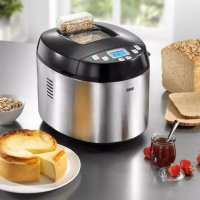
MultiBack TopClass - Bread maker BEEM - Free user manual and instructions
Find the device manual for free MultiBack TopClass BEEM in PDF.



| Product type | Automatic bread machine |
| Brand | BEEM |
| Model | MultiBack TopClass 3 in 1 |
| Type number | B7.001 |
| Dimensions (H x W x D) | 310 x 290 x 380 mm |
| Net weight | 5.6 kg |
| Operating voltage | 230 V AC |
| Mains frequency | 50 Hz |
| Power consumption | 650 W |
| Protection class | I |
| Protection type | IP X0 |
| Baking programs | 11 programs: Basic, White bread, Whole wheat bread, Sweet bread, Quick bake, Gluten-free, Pizza dough, Pasta dough, Jam, Bake only, Cake |
| Adjustable bread weight | 540 g, 680 g, 900 g |
| Browning levels | 3 levels: light, medium, dark |
| Delay timer | Up to 15 hours |
| Keep warm | 1 hour (programs 1-6, 10, 11) |
| Ingredient dispenser | Yes, for programs 1-7 |
| Included accessories | Bread pan, cake pan, kneading hook, mixing hook, measuring cup, measuring spoon |
| Pan coating | Ceramic non-stick |
| Safety | Automatic shut-off, overheating protection, child safety (supervision required) |
| Cleaning | Body: damp cloth; pans and hooks: hand wash (dishwasher not recommended) |
| Available spare parts | Dispenser (900 566 001), bread pan (900 566 076), cake pan (900 566 071), measuring cup (900 566 016) |
| Warranty | Extended manufacturer warranty (according to conditions on packaging) |
Frequently Asked Questions - MultiBack TopClass BEEM
User questions about MultiBack TopClass BEEM
0 question about this device. Answer the ones you know or ask your own.
Ask a new question about this device
Download the instructions for your Bread maker in PDF format for free! Find your manual MultiBack TopClass - BEEM and take your electronic device back in hand. On this page are published all the documents necessary for the use of your device. MultiBack TopClass by BEEM.
USER MANUAL MultiBack TopClass BEEM
Multi-back Topclass 3 in 1
Brotbackautomat
Bread maker
Open the fold-out page at the beginning and end of the user manual in order to view the illustrations during reading.
Safety instructions 25
Appliance description 27
Startup 28
Operation and use 30
Storage 35
Cleaning and care 35
Troubleshooting 36
Spare parts and other accessories . . 37
Technical data 37
Dear Customer,
before using the appliance, please read the instructions contained in this user manual on startup, safety, intended use as well as cleaning and care.
Open the fold-out page at the beginning and end of the user manual in order to view the illustrations during reading.
Keep this user manual in a safe place and pass it on to any future owners together with the appliance.
General notes
Copyright
This document is copyrighted. Any duplication or reprinting, in whole or in part, as well as reproduction of the illustrations even in modified form is only permitted with the written approval of the manufacturer.
Notes on environmental protection

The packaging materials used can be recycled. When no longer ready, dispose of the packaging materials according to local environmental regulation.

This product may not be disposed of in the domestic refuse within the European Union. Dispose of the appli- via communal collection points.
Warranty/Guarantee
In addition to the statutory warranty obligation, BEEM also grants an extended manufacturer's guarantee for some products.
Provided this is granted, the corresponding details for each product can be found either on the product-specific packaging, advertising material or on the BEEM website.
Please visit our website to obtain more information on comprehensive guarantee conditions, available accessories and spare parts as well as user manuals in various languages.
Symbols used
DANGER
This indicates an imminent hazardous situation, which could lead to severe physical injury or death.
Follow these instructions to avoid danger.
WARNING
This indicates a possible hazardous situation, which could lead to severe physical injury or death.
Follow these instructions to avoid danger.
CAUTION
This indicates a potentially hazardous situation, which could lead to minor injuries or material damage.
Follow these instructions to avoid danger.
NOTE
A note contains additional information to simplify the use of the appliance.
Intended use
This appliance is primarily intended for non-commercial use in closed rooms for baking different types of bread and cake, cooking rice and for making dough, pastas and jams. Any use other than previously stated is considered as improper use.
WARNING
If not used for its intended purpose and/or used in any other way, the appliance may be or become a source of danger.
Use the appliance only for its intended purpose.
Observe the procedures described in this user manual.
No claims of any kind will be accepted for damage resulting from use of the appliance for other than its intended purpose.
The risk must be borne solely by the user.
Limitation of liability
We assume no reliability for damage or follow-up damage in the case of:
failure to observe the instructions in the user manual,
use for other than the intended purpose,
improper or unsuitable handling,
incorrectly performed repairs,
unauthorised modifications,
use of non-approved parts or spare parts,
use of unsuitable supplementary or accessory parts.
Declaration of Conformity
BEEM hereby declares that this appliance complies with the fundamental requirements and other relevant provisions of 2006/95/EC, 2009/125/EC and 2004/108/EC directives.
Safety instructions
Inspect the appliance for visible signs of damage before use. Do not use a damaged appliance.
This appliance is not intended for use by persons (including children) with restricted physical, sensory or mental capabilities or with insufficient experience and/or knowledge unless they are supervised by a person responsibly for their safety or have received instructions on the use of the appliance from such a person.
Children must be supervised to ensure that they do not play with the appliance.
Store the appliance and accessory parts out of the reach of children.
Do not leave the appliance unattended during operation.
Only allow repairs to the appliance to be carried out by an authorised specialist or by the works customer service; this particularly applies to replacing a damaged connecting cable. Unqualified repairs can lead to considerable danger for the user. They will also invalidate the warranty or guarantee.
Repairs to the appliance during the guarantee period may only be carried out by service centres authorised by the manufacturer, otherwise the warranty or guarantee will become invalid in the event of damage or subsequent damage.
Defective parts may only be replaced with original spare parts. Only original spare parts guarantee that the safety requirements are met.
Only use spare parts from the manu-facturer or spare parts that are specifically recommended by the manufac
turer. The warranty or guarantee will otherwise be invalidated.
Do not use this appliance together with an external timer or a separate remote control system.
DANGER
Danger from electric current!
Do not use the appliance if the mains cable or mains plug is damaged.
Do not open the housing of the ap- pliance. Danger from electric current if live connections are touched and/ or the electrical and mechanical configuration is changed.
Never immerse the appliance or the mains plug in water or other liquids.
Pull the plug out of the mains socket, before inserting or removing the kneading/stirring hook,
-
if you are not using the appliance,
-
if a malfunction occurs during operation,
-
before you clean the appliance.
Ensure that the appliance is completely dry before use.
Risk of suffocation!
Never play with packaging material. Risk of suffocation.

WARNING
Danger of burns!
Do not open the appliance during the baking process.
Do not touch any parts inside the appliance when it is in operation.
Wear oven gloves when removing the baking mould from the appliance.
Before cleaning, allow the appliance to cool down.
Danger from moving parts!
Do not reach into the baking mould when the appliance is in operation.
CAUTION
Do not pull the connecting cable to remove the plug from the mains socket.
Clean the appliance and the accessories used as described in the section Cleaning and care.
In order not to destroy the non-stick coating, never use sharp objects or abrasive cleaners when cleaning the oven, baking moulds and kneader.
Never lift or move the appliance with the mains cable.
Requirements for the place of use
For safe and trouble-free operation of the appliance, the installation location must satisfy the following requirements:
Place the appliance on a dry, flat and heat-resistant surface.
Do not place the appliance in a hot, wet or very humid environment or in the vicinity of inflammable materials.
Select a location that does not allow children to reach the hot surfaces of the appliance.
The mains socket must be easily accessible to enable quick disconnection of the appliance from the electric circuit in the event of an emergency.
Electrical connection
For safe and trouble-free operation of the appliance, the following instructions on the electrical connection must be observed:
Before connecting the appliance, compare the connection data (voltage and frequency) on the rating plate with those of your mains power supply. The data must correspond in order to avoid damage to the appliance. If in doubt, ask your electrical appliance retailer.
Ensure that the mains lead is undamaged and is not laid over sharp edges.
The mains cable must not pulled tightly, bent or come into contact with hot surfaces.
Route the cable to prevent risk of trip- ping.
The electrical safety of the appliance is only assured when it is connected to a properly installed protective earth (PE) conductor system. Connection to a mains socket without PE conductor is forbidden. If in doubt, the electrical system must be checked by a qualified electrician. The manufacturer assumes no liability for injury or damage caused by a missing or interrupted protective earth conductor.
Appliance description
(See illustration on the left fold-out page)
Control panel and display1
Lid2
Window3
Ingredients dispenser4
Bread baking mould5
Kneading hook6
Cake baking mould7
Stirring hook8
Measuring spoon9
10 Measuring cup
11 User manual (not illustrated)
Control panel and display (1a/1b)
NOTE
Press the buttons described below repeatedly to test all setting options. An acoustic signal is emitted each time the button is pressed. Pay attention to the display; it changes each time the button is pressed.
Each combination of programme, browning level and weight is automatically displayed with the corresponding baking time.
: Use this button to select from the eleven preset programmes. The set programme appears in the display under Menu (baking programme 1 - 11).
Use this button to set the weight of the finished bread. You can choose between three different sizes: = 540g , = 680g or = 900g . The set weight is underlined in the display.
: Use this button to select one of three different browning levels for programmes 1 - 4: = light , = medium , = dark . You can also shorten the baking time in baking programmes 1, 2 or 3. The set browning level is underlined in the display.
: Use this button to start the selected programme. To stop the programme, press and hold down this button for approximately two seconds.
Use these buttons to increase or decrease the timer of the appliance in 10-minute steps. Be aware that the set time indicates when the baking process is completed. The maximum possible setting is 15 hours.
Example: the timer displays 6:30. That means that the baking process will be completed in 6 hours and 30 minutes. If you start the programme with the button, the timer runs backwards. The bread will be baked in 6 hours and 30 minutes.
These buttons are also used to set the baking time for menu 10.
After connecting the appliance to the power supply, the basic setting (1b) appears in the display.
The individual phases of the baking programme are listed on the right and left of the display. After pressing the button, a triangle on the left or right of the display indicates the current phase of the baking programme.
Timer (if start delay is active)
Preheating the bread maker
Kneading the dough.
Resting the dough
Dough rising
Baking the dough
Keeping the finished product warm
End of the programme
Startup
Unpacking
Remove the appliance, all accessory parts and the user manual from the box.
Remove all packaging materials and protective foils from the product and the accessories before using it for the first time.
NOTE
Do not remove the rating plate or any warning signs on the appliance. If possible, keep the original packaging during the guarantee period in order to be able to pack the appliance properly in the event of a guarantee claim. Transport damage will invalidate the warranty/guarantee.
Check the delivery contents
Check for visible signs of damage or missing items.
Report incomplete or damaged contents to your supplier immediately.
Before using for the first time
Clean the appliance and the accessories used as described in the section Cleaning and care.
Inserting and removing the baking mould and kneading/stirring hook
NOTE
When the term "baking mould" is used in this user manual, it refers to both the bread baking mould and the cake baking mould. To improve readability, the use of both forms was deliberately avoided. A specific baking mould is only stated when only that type of is required.
Inserting the kneading/stirring hook (image A1)
Push the kneading/stirring hook onto the drive spindle in the middle of the baking mould base. Hook and pin have flat surfaces and only fit together when these surfaces are aligned. The drive spindle is held by a wing nut on the underside of the baking mould.
Removing the kneading/stirring hook (images A2 and A3)
Hold the wing nut on the underside of the baking mould firmly with one hand and the kneading/stirring hook firmly with the other.
Pull the kneading/stirring hook off the drive spindle with a slight turning movement while simultaneously turning the wing nut in the opposite direction.
NOTE
You can remove the kneading/ stirring hook after the final kneading process in the selected baking programme so that there is no hole in the bread after baking.
Sprinkle a little flour onto your hands and lift the dough in order to pull the kneading/stirring hook upwards out of the baking mould.
Inserting the baking mould (images B1 - B3)
First push the kneading/stirring hook onto the drive spindle of the baking mould.
Turn the baking mould slightly and insert it into the appliance.
Turn the baking mould clockwise until it snaps in.
Removing the baking mould (images C1 - C3)
Open the cover of the appliance.
Use the handle to turn the baking mould anticlockwise until it stops.
Lift the baking mould out of the appli- ance.
Operation and use
Basic operation of the appliance
NOTE
Baking tips can be found in the recipe book supplied.
Remove the baking mould from the appliance and if necessary, push the kneading/stirring hook onto the drive spindle in the base of the baking mould (see section Inserting and removing baking mould and kneading/stirring hook).
Pour the previously measured baking ingredients into the baking mould. Use the baking instructions in the recipe book or on the packaging of the selected bread baking mixture as a guide.
NOTE
You can use the measuring cup and measuring spoon supplied for measuring the baking ingredients. For liquids, place the measuring cup on a flat surface and check the filling level at eye level.
Insert the baking mould into the ap- pliance (see section Inserting and removing the baking mould and kneading/stirring hook).
Close the lid.
Insert the plug into a mains socket.
Use the button to select a suitable baking programme.
Use the button to set the bread weight.
Use the button to select the browning level of the bread crust.
If you wish to delay starting of the baking process, use buttons and to set the period of time to complete bread baking.
Press the button to start the programme
NOTE
As soon as you have pressed the button, all other button combinations are inhibited.
The appliance begins processing of the selected baking programme. The baking progress is indicated by the triangle on the left or right side of the display.
NOTE
You can cancel the programme sequence by pressing the button for two seconds.
An acoustic signal is emitted repeatedly at the end of the baking time. The keepwarm phase begins (menus 1-6, 10 and 11 only).
NOTE
You can also take the baking mould out of the appliance during the keepwarm phase. Quit the programme sequence by pressing and holding down the button for approx. two seconds and pulling the plug out of the mains socket.
At the end of the programme, the selected start position appears on the display. Use oven gloves to lift the baking mould out of the appliance. Allow the bread or cake to cool down slightly before removing from the mould.
NOTE
Pull the kneading/stirring hook out of the bread after baking and before cutting the bread.
You can also remove the kneading/ stirring hook after the last kneading cycle of the selected baking programme so that it does not leave a hole in the bread after baking. Sprinkle a little flour onto your hands and lift out the bread dough so that you can pull the kneading/stirring hook upwards out of the baking mould.
Further tips for achieving ideal baking results can be found in the recipe book supplied.
Baking programmes
Use the following button to select between 11 preset programmes:

Menu 1 - Basic
Baking brown bread. You can add other ingredients to improve the taste such as pumpkin seeds, bacon or roasted onions. This is the most frequently used programme.
Menu 2 - White bread
Baking white bread. The classic variant is wheat bread, a light bread with a crisp crust.
Menu 3 - Wholemeal bread
Wholemeal bread is often made from crushed or ground wholemeal cereal. The programme starts with preheating, i.e. the ingredients are warmed before kneading.
NOTE
To shorten menus 1, 2 or 3, use the button to select the setting In this case, lukewarm water should be added.
Menu 4 - Sweet bread
Sweet breads are frequently made with milk and ingredients such as chocolate flakes, raisins or nuts can be added to taste.
Menu 5 - Short baking programme
This programme enables you to shorten the baking time for brown and white bread.
The baking time for brown bread with
menu 1 and settings and is 3 hours and 25 minutes but only 1 hour and 20 minutes with menu 5. Time is saved from the dough resting phases. For this menu, it is therefore recommended to warm up the required liquids in advance. The dough cannot rise properly when using cold liquids. If the liquid is too hot, the yeast cannot ferment.
Menu 6 - Gluten-free bread
For baking gluten-free products using gluten-free flours or flour blends.
Menu 7 - Pizza dough
For kneading pizza dough. Pour all ingredients into the bread baking mould and the appliance produces a smooth pizza dough. You then only need to roll out the dough, add the toppings and bake.
Menu 8 - Pasta dough
The programme produces a smooth pasta dough in a very short time.
Menu 9 - Jam
Preparing jams. This programme enables you to produce different types of jam. You then only need to pour the hot jam into the jars.
Menu 10 - Baking without kneading and cooking rice
For baking ready-mixed dough; the dough is not kneaded in this programme.
This programme is also suitable for cooking rice: add one part rice and just under 2 parts water to the bread baking mould (e.g. 1 cup of rice and 114 cups of water).
The baking or cooking time can be varied using the buttons and (1:10, 1:20; 1:30). You can interrupt the programme at any time by pressing and holding the button down for two seconds.
Menu 11-Cake
For making sponge cakes,_Use the cake baking mould with the stirring hook for this programme.
NOTE
The individual times for each pro- gramme can be found in the table in the appendix.
Recipes for bread, cakes, pasta, dough and jams can be found in our recipe book.
If you wish to make bread or other baked products using ready-to-use baking mixes, follow the baking instructions on the package.
Timer
NOTE
The timer can be used for all menus except menu 10 (baking without kneading). The baking time can be changed using buttons and (1:10; 1:20; 1:30).
First select the desired menu (button), the bread weight (button) and the browning level (button
Example: The following setting was selected:
Menu 1, bread weight, browning level
The baking time on the display is 3:25.
Use buttons and to set
the desired delay time. Each press of the button changes the displayed time by 10 minutes. You can set a maximum time of 15 hours (including baking time).
Example: Each button press
changes the time on the display: 3:25 - 3:30 - 3:40
- 3:50 - 4:00 etc. If the bread is to be ready in 6
hours,press the 1 button until 6:00 appears in the display.
Start the programme by pressing the button. The colon on the display start flashing and the set time counts down. The baking programme starts automatically when the start of the baking time is reached.
Example: The displayed time is 6:00, the colon is flashing. When 3:25 is reached, the baking programme starts automatically.
After the set period of time has elapsed, the bread is finished and the baking mould can be removed from the appliance.
Example: After 6 hours incl. baking programme, the bread is finished. The display changes to 00:00 and the keep-warm phase starts. You can take the bread out of the appliance or leave it in the appliance during the keep-warm phase. At the end of the keep-warm phase, the display returns to the original setting:
Menu 1, bread weight browning level 325.

NOTE
During warm or humid weather, the dough may rise too quickly and a delay time of more than two hours may be too long.
To prevent the yeast rising too fast, add the flour to the mould last of all, form a small hollow in the flour and place the yeast into the hollow.
Do not set long delay times if you are working with perishable foodstuffs (milk, eggs, etc.).
Keep-warm function
For example, the keep-warm function prevents the bread from absorbing moisture. At the end of programmes 1-6, 10 and 11, the finished product is kept warm for a certain time. "00:00" appears in the display and an acoustic signal is emitted intermittently.
If you wish to remove the finished bread during the keep-warm phase, switch off the appliance by pressing and holding the

button down for two seconds.
NOTE
For details of the keep-warm time, I refer to the table containing the individual programme phases in the appendix.
Ingredients dispenser
The ingredients dispenser allows you to add dry ingredients such as pumpkin seeds or raisins to the dough towards the end of the kneading process. The bottom flap of the dispenser opens automatically during baking programmes 1-7. Flap opening is indicated by clearly audible clicking and several acoustic signals.
The ingredients dispenser does not open during baking programmes 8-11 (pasta dough, jam, baking without kneading, cake).
NOTE
Details on the time when the ingredients dispenser opens in each individual programme can be obtained from the table in the appendix.
Make sure that you do not overfill the dispenser, otherwise the ingredients may become wedged and will not drop into the baking mould. Pay attention to the quantities specified in the recipes.
Small-sized ingredients such as sesame seeds can drop through the grate at the bottom of the dispenser. In this case, open the cover of the bread maker and add the seeds directly to the baking mould when the acoustic signal for the opening of the dispenser is emitted.
Proceed in the same way for ingredients that can melt or stick (chocolate, cheese, pieces of fruit, etc.).
Clean the dispenser after each use. Soiling can also prevent the flap at the bottom of the dispenser from opening.
NOTE
Short acoustic signals indicate when the flap at the bottom of the dispenser opens. At this point, you can also open the cover of the bread maker to add the ingredients directly into the baking mould.
When the baking process is complete, lift the ingredients dispenser out of the appliance, clean it, close the flap in the base and reinsert the dispenser into the appliance.
Removing the ingredients dispenser (image D1)
To remove the ingredients dispenser, lift it firmly out of the appliance.
Inserting the ingredients dispenser (images D2 - D3)
To insert the dispenser, push the base flap until it closes and locks.
Press the ingredients dispenser into the appliance until it audibly snaps in.
Storage
If you do not intend to use the appliance for a longer period of time, clean it as described in the section Cleaning and care.
Store the appliance and all accessory parts at a dry, clean and frost-free location, which is protected against direct sunlight.
Cleaning and care
Before beginning work, pay attention to the safety instructions in the section on safety!
Clean the appliance after each use. To simplify cleaning, the lid of the appliance can be removed.
Lift the lid until it is upright and pull it upwards out of the appliance (image E1).
Wipe the appliance and the inside of the housing using a damp cloth.
Other parts used can be cleaned in warm dishwater. Cleaning the bread or cake forms or the stirring tools in a dishwasher is not recommended as plain aluminium parts will discolour. In addition, the ceramic coating is very sensitive to strongly acidic cleaning agents. Frequent cleaning in the dishwasher is detrimental to the non-stick properties.
Allow sufficient time for the appliance to dry completely.
After cleaning, replace the lid (image E2). Hold the lid upright and push the latches of the lid into the recesses in the housing (see markings).
Troubleshooting
The following table will help you locate and eliminate minor faults:
| Fault Possible cause Remedy | ||
| E00 appears in the display. | Appliance is too cold. | Wait until the appliance has reached room temperature. |
| E01 appears in the display. | Appliance is still too warm after the last baking programme. | Wait until the appliance has cooled down. |
| EEE appears in the display. | Temperature sensor open. Call | customer service. |
| HHH appears in the display. | Short-circuit in temperature sensor. | Call customer service. |
NOTE
If you cannot resolve the problem with the steps described above, please contact customer service.
For problems relating to the baking result, please refer to the notes in the recipe book supplied.
Spare parts and other accessories
| Item* Article No. Designation |
| 4 900 566 001 Ingredients dispenser |
| 5, 6 900 566 076 Bread baking mould with dough hook |
| 7, 8 900 566 071 Cake baking mould with stirring hook |
| 9, 10 900 566 016 Measuring spoon and measuring cup |
- numbering according to the description of the appliance
Technical data
| Model | Bread Maker MULTI-BACK TOPCLASS 3 in 1 |
| Type number B7.001 | |
| Operating voltage 230 VAC | |
| Mains frequency 50 Hz | |
| Power consumption 650 W | |
| Dimensions | 310 x 290 x 380 mm (H x W x D) |
| Net weight approx. 5.6 kg | |
| Protection class I | |
| Degree of protection IP X0 |
Table of baking times
| Menu 1. Basic | |||||||||||||||||||||||||||||||||||||||||||||||||||||||||||||||||||||||||||||||||||||||||||||||||||||||
| Browning level | ☐ | ☐ | ☐ | ☐ | |||||||||||||||||||||||||||||||||||||||||||||||||||||||||||||||||||||||||||||||||||||||||||||||||||
| Weight | |||||||||||||||||||||||||||||||||||||||||||||||||||||||||||||||||||||||||||||||||||||||||||||||||||||||
| Preheating | - - - - - - - - - - - - - - - - - - - - - - - - - - - - - - - - - - - - - - - - - - - - - - - - - - - - - - - - - - - - - - - - - - - - - - - - - - - - - - - - - - - - - - - - - - - - - - - - - - - - - | 5 min 5 min 5 min 5 min 5 min 5 min 5 min 5 min 5 min 5 min 5 min 5 min 5 min 5 min 5 min 5 min 5 min 5 min 5 min 5 min 5 min 5 min 5 min 5 min 5 min 5 min 5 min 5 min 5 min 5 min 5 min 5 min 5 min 5 min 40 min 40 min 40 min 40 min 40 min 40 min 40 min 40 min 40 min 40 min 40 min 40 min 40 min 40 min 40 min 40 min 40 min 40 min 40 min 40 min 40 min 40 min 40 min 40 min 40 min 41 min 41 min 41 min 41 min 41 min 41 min 41 min 41 min 41 min 41 min 41 min 41 min 41 min 41 min 41 min 41 min 41 min 41 min 41 min 41 min 41 min 41 min 41 min 41 min 41 min 42 min 42 min 42 min 42 min 42 min 42 min 42 min 42 min 42 min 42 min 42 min 42 min 42 min 42 min 42 min 42 min 42 min 42 min 42 min 42 min 42 min 42 min 42 min 42 min 42 min 43 min 43 min 43 min 43 min 43 min 43 min 43 min 43 min 43 min 43 min 43 min 43 min 43 min 43 min 43 min 43 min 43 min 43 min 43 min 43 min 43 min 43 min 43 min 43 min 43 min 44 min 44 min 44 min 44 min 44 min 44 min 44 min 44 min 44 min 44 min 44 min 44 min 44 min 44 min 44 min 44 min 44 min 44 min 44 min 44 min 44 min 44 min 44 min 44 min 44 min 45 min 45 min 45 min 45 min 45 min 45 min 45 min 45 min 45 min 45 min 45 min 45 min 45 min 45 min 45 min 45 min 45 min 45 min 45 min 45 min 45 min 45 min 45 min 45 min 45 min 46 min 46 min 46 min 46 min 46 min 46 min 46 min 46 min 46 min 46 min 46 min 46 min 46 min 46 min 46 min 46 min 46 min 46 min 46 min 46 min 46 min 46 min 46 min 46 min 46 min 47 min 47 min 47 min 47 min 47 min 47 min 47 min 47 min 47 min 47 min 47 min 47 min 47 min 47 min 47 min 47 min 47 min 47 min 47 min 47 min 47 min 47 min 47 min 47 min 47 min 48 min 48 min 48 min 48 min 48 min 48 min 48 min 48 min 48 min 48 min 48 min 48 min 48 min 48 min 48 min 48 min 48 min 48 min 48 min 48 min 48 min 48 min 48 min 48 min 48 min 49 min 49 min 49 min 49 min 49 min 49 min 49 min 49 min 49 min 49 min 49 min 49 min 49 min 49 min 49 min 49 min 49 min 49 min 49 min 49 min 49 min 49 min 49 min 49 min 49 min 48 min 48 min 48 min 48 min 48 min 48 min 48 min 48 min 48 min 48 min 48 min 48 min 48 min 48 min 48 min 48 min 48 min 48 min 48 min 48 min 48 min 48 min 48 min 48 min 47 min 47 min 47 min 47 min 47 min 47 min 47 min 47 min 47 min 47 min 47 min 47 min 47 min 47 min 47 min 47 min 47 min 47 min 47 min 47 min 47 min 47 min 47 min 47 min 46 min 46 min 46 min 46 min 46 min 46 min 46 min 46 min 46 min 46 min 46 min 46 min 46 min 46 min 46 min 46 min 46 min 46 min 46 min 46 min 46 min 46 min 46 min 46 min 48 min 48 min 48 min 48 min 48 min 48 min 48 min 48 min 48 min 48 min 48 min 48 min 48 min 48 min 48 min 48 min 48 min 48 min 48 min 48 min 48 min 48 min 48 min 48 min 46 min 46 min 46 min 46 min 46 min 46 min 46 min 46 min 46 min 46 min 46 min 46 min 46 min 46 min 46 min 46 min 46 min 46 min 46 min 46 min 46 min 46 min 46 min 46 min 45 min 45 min 45 min 45 min 45 min 45 min 45 min 45 min 45 min 45 min 45 min 45 min 45 min 45 min 45 min 45 min 45 min 45 min 45 min 45 min 45 min 45 min 45 min 45 min 47 min 47 min 47 min 47 min 47 min 47 min 47 min 47 min 47 min 47 min 47 min 47 min 47 min 47 min 47 min 47 min 47 min 47 min 47 min 47 min 47 min 47 min 47 min 47 min 45 min 45 min 45 min 45 min 45 min 45 min 45 min 45 min 45 min 45 min 45 min 45 min 45 min 45 min 45 min 45 min 45 min 45 min 45 min 45 min 45 min 45 min 45 min 45 min 48 min 48 min 48 min 48 min 48 min 48 min 48 min 48 min 48 min 48 min 48 min 48 min 48 min 48 min 48 min 48 min 48 min 48 min 48 min 48 min 48 min 48 min 48 min 48 min 45 min 45 min 45 min 45 min 45 min 45 min 45 min 45 min 45 min 45 min 45 min 45 min 45 min 45 min 45 min 45 min 45 min 45 min 45 min 45 min 45 min 45 min 45 min 45 min 49 min 49 min 49 min 49 min 49 min 49 min 49 min 49 min 49 min 49 min 49 min 49 min 49 min 49 min 49 min 49 min 49 min 49 min 49 min 49 min 49 min 49 min 49 min 49 min 413:33:33:33:33:33:33:33:33:33:33:33:33:33:33:33:33:33:33:33:33:33:33:33:33:33:33:33:33:33:33:33:33:33:3 | 1:33:33:33:33:33:33:33:33:33:33:33:33:33:33:33:33:33:33:33:33:33:33:33:33:33:33:33:33:33:33:33:33:333:33:33:33:33:33:33:33:33:33:33:33:33:33:33:33:33:33:33:33:33:33:33:33:33:33:33:33:33:33:33:33:33:05:25:25:25:25:25:25:25:25:25:25:25:25:25:25:25:25:25:25:25:25:25:25:25:25:25:25:25:25:25:25:25:25:25:26:26:26:26:26:26:26:26:26:26:26:26:26:26:26:26:26:26:26:26:26:26:26:26:26:26:26:26:26:26:26:26:26:26 :26 :26 :26 :26 :26 :26 :26 :26 :26 :26 :26 :26 :26 :26 :26 :26 :26 :26 :26 :26 :26 :26 :26 :26 :26 :26 :26 :26 :26 :26 :26 :26 :26 : | ||||||||||||||||||||||||||||||||||||||||||||||||||||||||||||||||||||||||||||||||||||||||||||||||||||
| Weight | |||||||||||||||||||||||||||||||||||||||||||||||||||||||||||||||||||||||||||||||||||||||||||||||||||||||
| Preheating | - - - - - - - - - - - - - - - - - - - - - - - - - - - - - - - - - - - - - - - - - - - - - - - - - - - - - - - - - - - - - - - - - - - - - - - - - - - - - - - - - | - - - - - - - - - - - - - - - - - - - - - - - - - - - - - - - - - - - - - - - - - - - - - - - - - - - - - - - - - - - - - - - - - - - - - - - - - - - - - - - - - - - - - - - - - - - - - - - - - - | - - - - - - - - - - - - - - - - - - | - - - - - - - - - - - - - - - - - - - - - - - - - - - - - - - - - - - - - - - - - - - - - - - - - - - - - - - - - - - - - - - - - - - - - - - - - - - - - - - - - | - - - - - - - - - - - - - - - - | - - - - - - - - - - - - - - - - - - - - - - - - - - - - - - - - - - - - - - - - - - - - - - - - - - - - - - - - - - - - - - - - - - - - - - - - - - - - - - - - - - - | - - - - - - - - - - - - - - - - | - | - | - | - | - | - | - | - | - | - | - | - | - | - | - | - | - | - | - | - | - | - | - | - | - | - | - | - | - | - | - | - | - | - | - | - | - | - | - | - | - | - | - | - | - | - | - | - | - | - | ||||||||||||||||||||||||||||||||||||||||||||||
| Kneading | 5 min 5 min 5 min 5 min 5 min 5 min 5 min 5 min 5 min 5 min 5 min 5 min 5 min 5 min 5 min 5 min 5 min 5 min 5 min 5 min 5 min 5 min 5 min 5 min 5 min 5 min 5 min 5 min 5 min 5 min 5 min 5 min 5 min | 5 min 5 min 5 min 5 min 5 min 5 min 5 min 5 min 5 min 5 min 5 min 5 min 5 min 5 min 5 min 5 min 5 min 5 min 5 min 5 min 5 min 5 min 5 min 5 min 5 min 5 min 5 min 5 min 5 min 5 min 5 min 5 min 5 min - | - | - | - | - | - | - | - | - | - | - | - | - | - | - | - | - | - | - | - | - | - | - | - | - | - | - | - | - | - | - | - | - | - | - | - | - | - | - | - | - | - | - | - | - | - | - | - | - | - | ||||||||||||||||||||||||||||||||||||||||||||||||||||
| Resting | 10 s 10 s 10 s 10 s 10 s 10 s 10 s 10 s 10 s 10 s 10 s 10 s 10 s 10 s 10 s 10 s 10 s 10 s 10 s 10 s 10 s 10 s 10 s 10 s 10 s 10 s - | - | - | - | - | - | - | - | - | - | - | - | - | - | - | - | - | - | - | - | - | - | - | - | - | - | - | - | - | - | - | - | - | - | - | - | - | - | - | - | - | - | - | - | - | - | - | - | - | ||||||||||||||||||||||||||||||||||||||||||||||||||||||
| Menu 2. White | bread | |||||||||||
| Browning level | ||||||||||||
| Weight | ||||||||||||
| Preheating | ||||||||||||
| Kneading | 5 min 5 min 5 min 5 min 5 min 5 min 5 min 5 min 5 min 5 min 5 min 5 min 5 min 5 min 5 min 5 min 5 min 5 min 5 min 5 min 5 min 5 min 5 min 5 min 5 min 5 min 5 min 5 min 5 min 5 min 5 min 5 min 5 min 5 min 10 s 10 s 10 s 10 s 10 s 10 s 10 s 10 s 10 s 10 s 10 s 10 s 10 s 10 s 10 s 10 s 10 s 10 s 10 s 10 s 10 s 10 s 10 s 10 s 10 s 10 S 3:33 3:30 3:32 3:35 3:35 3:37 3:40 2:35 2:37 2:40 | |||||||||||
| Kneading | 20 min 20 min 20 min 20 min 20 min 20 min 20 min 20 min 20 min 20 min 20 min 20 min 20 min 20 min 20 min 20 min 20 min 20 min 20 min 20 min 20 min 20 min 20 min 20 min 20 min 20 min | |||||||||||
| Rising | 39 min 39 min 39 min 39 min 39 min 39 min 39 min 39 min 39 min 39 min 39 min 39 min 39 min 39 min 39 min 39 min 39 min 39 min 39 min 39 min 39 min 39 min 39 min 39 min 39 min 39 min | |||||||||||
| Kneading | 10 s 10 s 10 s 10 s 10 s 10 s 10 s 10 s 10 s 10 s 10 s 10 s 10 s 10 s 10 s 10 s 10 s 10 s 10 s 10 s 10 s 10 s 10 s 10 s 10 s | |||||||||||
| Rising | 31 min 31 min 31 min 31 min 31 min 31 min 31 min 31 min 31 min 31 min 31 min 31 min 31 min 31 min 31 min 31 min 31 min 31 min 31 min 31 min 31 min 31 min 31 min 31 min 31 min 31 min | |||||||||||
| Kneading | 10 s 10 s 10 s 10 s 10 s 10 s 10 s 10 s 10 s 10 s 10 s 10 s 10 s 10 s 10 s 10 s 10 s 10 s 10 s 10 s 11 h | |||||||||||
| Rising | 60 min 60 min 60 min 60 min 60 min 60 min 60 min 60 min 60 min 60 min 60 min 60 min 60 min 60 min 60 min 60 min 60 min 60 min 60 min 60 min 60 min 60 min 60 min 60 min 60 min 60 min | |||||||||||
| Baking | 48 min 50 min 53 min 50 min 52 min 55 min 55 min 55 min 57 min 60 min 50 min 52 min 55 min | |||||||||||
| Programme duration (h:min) 3:28 3:30 3:33 3:30 3:32 3:35 3:35 3:37 3:40 2:35 2:37 2:40 | ||||||||||||
| Keeping warm | 1 h 1 h 1 h 1 h 1 h | |||||||||||
| Ingredients dispenser opens automat- cally (h:min) | 3:08 3:10 3:13 3:10 3:12 3:15 3:15 3:17 3:20 2:15 2:17 2:20 | |||||||||||
| Max. programme sequence delay (h:min) | 15:00 15:00 15:00 15:00 15:00 15:00 15:00 15:00 15:00 15:00 15:00 | |||||||||||
| Menu 3. Wholemeal bread | |||||||||||
| Browning level | |||||||||||
| Weight | |||||||||||
| Preheating | 30 min 30 min 30 min 30 min 30 min 30 min 30 min 30 min 30 min 30 min 30 min 30 min 30 min 30 min 30 min 30 min 30 min 30 min 30 min 30 min 30 min 30 min 30 min 30 min 30 min 30 min | min 30 min 30 min 30 min 30 min 30 min 30 min 30 min 30 min 30 min 30 min 30 min 30 min 30 min 30 min 30 min 30 min 30 min 30 min 30 min 30 min 30 min 30 min 30 min 30 min 30min | min 30 min 30 min 30 min 30 min 30 min 30 min 30 min 30 min 30 min 30 min 30 min 30 min 30 min 30 min 30 min 30 min 30 min 30 min 30 min 30 min 30 min 30 min 30 min 30 min 25 min 25 min 25 min 25 min 25 min 25 min 25 min 25 min 25 min 25 min 25 min 25 min 25 min 25 min 25 min 25 min 25 min 25 min 25 min 25 min 25 min 25 min 25 min 25 min 25 min 24 min | min 30 min 30 min 30 min 30 min 30 min 30 min 30 min 30 min 30 min 30 min 30 min 30 min 30 min 30 min 30 min 30 min 30 min 30 min 30 min 30 min 30 min 30 min 30 min 30 min | min 5 min 5 min 5 min 5 min 5 min 5 min 5 min 5 min 5 min 5 min 5 min 5 min 5 min 5 min 5 min 5 min 5 min 5 min 5 min 5 min 5 min 5 min 5 min 5 min 5 min 5 min 5 min 5 min 5 min 5 min 5 min 5 min 5 min 5 min | ||||||
| Kneading | 5 min 5 min 5 min 5 min 5 min 5 min 5 min 5 min 5 min 5 min 5 min 5 min 5 min 5 min 5 min 5 min 5 min 5 min 5 min 5 min 5 min 5 min 5 min 5 min 5 min 5 min 5 min 5 min 5 min 5 min 5 min 5 min 5 min 15 min 15 min 15 min 15 min 15 min 15 min 15 min 15 min 15 min 15 min 15 min 15 min 15 min 15 min 15 min 15 min 15 min 15 min 15 min 15 min 15 min 15 min 15 min 15 min 15 min 25 min 25 min 25 min 25 min 25 min 25 min 25 min 25 min 25 min 25 min 25 min 25 min 25 min 25 min 25 min 25 min 25 min 25 min 25 min 25 min 25 min 25 min 25 min 25 min 15 min 15 min 15 min 15 min 15 min 15 min 15 min 15 min 15 min 15 min 15 min 15 min 15 min 15 min 15 min 15 min 15 min 15 min 15 min 15 min 15 min 15 min 15 min 15 min 30 min 30 min 30 min 30 min 30 min 30 min 30 min 30 min 30 min 30 min 30 min 30 min 30 min 30 min 30 min 30 min 30 min 30 min 30 min 30 min 30 min 30 min 30 min 30 min 35 min 35 min 35 min 35 min 35 min 35 min 35 min 35 min 35 min 35 min 35 min 35 min 35 min 35 min 35 min 35 min 35 min 35 min 35 min 35 min 35 min 35 min 35 min 35 min 35 min 30 min 30 min 30 min 30 min 30 min 30 min 30 min 30 min 30 min 30 min 30 min 30 min 30 min 30 min 30 min 30 min 30 min 30 min 30 min 30 min 30 min 30 min 30 min 30 min 15 min 15 min 15 min 15 min 15 min 15 min 15 min 15 min 15 min 15 min 15 min 15 min 15 min 15 min 15 min 15 min 15 min 15 min 15 min 15 min 15 min 15 min 15 min 15 min 16 min 16 min 16 min 16 min 16 min 16 min 16 min 16 min 16 min 16 min 16 min 16 min 16 min 16 min 16 min 16 min 16 min 16 min 16 min 16 min 16 min 16 min 16 min 16 min 16 min 15 min 15 min 15 min 15 min 15 min 15 min 15 min 15 min 15 min 15 min 15 min 15 min 15 min 15 min 15 min 15 min 15 min 15 min 15 min 15 min 15 min 15 min 15 min 15 min 18 min 18 min 18 min 18 min 18 min 18 min 18 min 18 min 18 min 18 min 18 min 18 min 18 min 18 min 18 min 18 min 18 min 18 min 18 min 18 min 18 min 18 min 18 min 18 min 18 min 16 min 16 min 16 min 16 min 16 min 16 min 16 min 16 min 16 min 16 min 16 min 16 min 16 min 16 min 16 min 16 min 16 min 16 min 16 min 16 min 16 min 16 min 16 min 16 min 18 min 18 min 18 min 18 min 18 min 18 min 18 min 18 min 18 min 18 min 18 min 18 min 18 min 18 min 18 min 18 min 18 min 18 min 18 min 18 min 18 min 18 min 18 min 18 min 15 min 15 min 15 min 15 min 15 min 15 min 15 min 15 min 15 min 15 min 15 min 15 min 15 min 15 min 15 min 15 min 15 min 15 min 15 min 15 min 15 min 15 min 15 min 15 min 17:30:30:30:30:30:30:30:30:30:30:30:30:30:30:30:30:30:30:30:30:30:30:30:30:30:30:30:30:30:30:30:30:30:30 | min 30 min 30 min 30 min 30 min 30 min 30 min 30 min 30 min 30 min 30 min 30 min 30 min 30 min 30 min 30 min 30 min 30 min 30 min 30 min 30 min 30 min 30 min 30 min 30 min 15min | min 30 min 30 min 30 min 30 min 30 min 30 min 30 min 30 min 30 min 30 min 30 min 30 min 30 min 30 min 30 min 30 min 30 min 30 min 30 min 30 min 30 min 30 min 30 min 30 min | ||||||||
| Kneading | 5 min 5 min 5 min 5 min 5 min 5 min 5 min 5 min 5 min 5 min 5 min 5 min 5 min 5 min 5 min 5 min 5 min 5 min 5 min 5 min 5 min 5 min 5 min 5 min 5 min 5 min 5 min 5 min 5 min 15 min 15 min 15 min 25 min 25 min 25 min 25 min 25 min 25 min 25 min 25 min 25 min 25 min 25 min 25 min 25 min 25 min 25 min 25 min 25 min 25 min 25 min 25 min 25 min 15 min 15 min 15 min 25 min 25 min 25 min 25 min 25 min 25 min 25 min 25 min 25 min 25 min 25 min 25 min 25 min 25 min 25 min 25 min 25 min 25 min 25 min 25 min 25 min 30 min 30 min 30 min 30 min 30 min 30 min 30 min 30 min 30 min 30 min 30 min 30 min 30 min 30 min 30 min 30 min 30 min 30 min 30 min 30 min 30 min 30 min 30 min 30 min 25min | min 30 min 30 min 30 min 30 min 30 min 30 min 30 min 30 min 30 min 30 min 30 min 30 min 30 min 30 min 30 min 30 min 30 min 30 min 30 min 30 min 30 min 30 min 30 min 30min | min 25 min | min 25 min | min 25 min | min 25 min | min 25 min | min 25 min | min 25 min | min 25 min | |
| Menu | 4. Sweet bread | 5. Accelerated baking programme | 6. Gluten-free bread | 7. Pizza dough | 8. Pasta dough | 9. Jams 10. | Baking 11. Cake | ||
| Weight | - | ||||||||
| Preheating | - | - | |||||||
| Kneading | 5 min | 5 min | 5 min | 5 min | 5 min | 5 min | 3 min | 5 min | - |
| Resting | 5 min 5 min | 5 min | - | 5 min | - | - | |||
| Kneading | 20 min | 20 min | 20 min | 15 min | 10 min | 20 min | 11 min | 10 min | - |
| Rising | 39 min | 39 min | 39 min | 12 min | - | 60 min | - | - | - |
| Kneading | 10 s | 10 s | 10 s | - | - | - | - | - | - |
| Rising | 26 min | 26 min | 26 min | - | - | - | - | - | - |
| Kneading | 5 s | 5 s | 5 s | - | - | - | - | - | - |
| Rising | 52 min | 52 min | 52 min | - | 60 min | - | - | - | - |
| Baking | 50 min | 55 min | 60 min | 48 min | 55 min | - | - | 70 min | 60 -90 min |
| Programme duration (h:min) | 3:17 | 3:22 | 3:27 | 1:20 | 2:10 | 1:30 | 00:14 | 1:25 | 1:00-1:30 |
| Keeping warm | 1 h | 1 h | 1 h | 1 h | 1 h | - | - | - | 1 h |
| Ingredients dispenser opens automatically (h:min) | 2:57 | 3:02 | 3:07 | 1:10 | 2:05 | 1:10 | - | - | - |
| Max. programme delay (h:min) | 15:00 | 15:00 | 15:00 | 15:00 | 15:00 | 15:00 | 15:00 | 15:00 | 15:00 |
Table des matieres
Remarques generales 43
Ingredient dispenser
Elements of Lifestyle
BEEM
Subject to printing error.
For service in other countries contact your local dealer.



- Multi-back Topclass 3 in 1
- General notes
- Copyright
- Notes on environmental protection
- Warranty/Guarantee
- Symbols used
- DANGER
- WARNING
- CAUTION
- NOTE
- Intended use
- Limitation of liability
- Declaration of Conformity
- Safety instructions
- Danger of burns!
- Danger from moving parts!
- Requirements for the place of use
- Electrical connection
- Appliance description
- Control panel and display (1a/1b)
- Startup
- Unpacking
- Check the delivery contents
- Before using for the first time
- Inserting and removing the baking mould and kneading/stirring hook
- Inserting the kneading/stirring hook (image A1)
- Removing the kneading/stirring hook (images A2 and A3)
- Inserting the baking mould (images B1 - B3)
- Removing the baking mould (images C1 - C3)
- Operation and use
- Basic operation of the appliance
- Baking programmes
- Menu 1 - Basic
- Menu 2 - White bread
- Menu 3 - Wholemeal bread
- Menu 4 - Sweet bread
- Menu 5 - Short baking programme
- Menu 6 - Gluten-free bread
- Menu 7 - Pizza dough
- Menu 8 - Pasta dough
- Menu 9 - Jam
- Menu 10 - Baking without kneading and cooking rice
- Menu 11-Cake
- Timer
- Keep-warm function
- Ingredients dispenser
- Removing the ingredients dispenser (image D1)
- Inserting the ingredients dispenser (images D2 - D3)
- Storage
- Cleaning and care
- Troubleshooting
- Table des matieres
- Ingredient dispenser
- BEEM
Brand : BEEM
Model : MultiBack TopClass
Category : Bread maker