Smart Tracker - Item locator AMAZON - Free user manual and instructions
Find the device manual for free Smart Tracker AMAZON in PDF.


User questions about Smart Tracker AMAZON
0 question about this device. Answer the ones you know or ask your own.
Ask a new question about this device
Download the instructions for your Item locator in PDF format for free! Find your manual Smart Tracker - AMAZON and take your electronic device back in hand. On this page are published all the documents necessary for the use of your device. Smart Tracker by AMAZON.
USER MANUAL Smart Tracker AMAZON
Safety Instructions 3
Package Contents. 8
Parts Overview. 8
Setting Up the Finder 10
Using the Finder. 12
Troubleshooting. 13
Specifications 14
Legal Notices. 15
Feedback and Help. 18
Safety Instructions

WARNING
KEEP OUT OF REACH OF CHILDREN
Swallowing can lead to chemical burns, perforation of soft tissue, and death. Severe burns can occur within 2 hours of ingestion. Seek medical attention immediately.

AVERTISSEMENT
MAINTENEZ CE PRODUIT HORS DE LA PORTEE DES ENFANTS
CAUTION Keep the product away from moisture and heat.

WARNING
INGESTION HAZARD: this product contains a button or coin battery / RISQUE D'INGESTION: Ce produit content une pile bouton.
DEATH or serious injury can occur if ingested/ Des blessures graves, voire la MORT, risquent de survenir en cas d'ingestion.
A swallowed button cell or coin battery can cause Internal Chemical
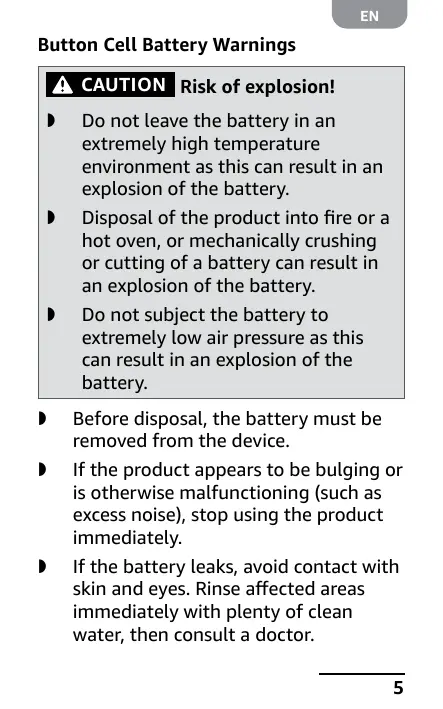
Button Cell BatteryWarnings

CAUTION
Risk of explosion!
Do not leave the battery in an extremely high temperature environment as this can result in an explosion of the battery.
- Disposal of the product into fire or a hot oven, or mechanically crushing or cutting of a battery can result in an explosion of the battery.
- Do not subject the battery to extremely low air pressure as this can result in an explosion of the battery.
Before disposal, the battery must be removed from the device.
If the product appears to be bulging or is otherwise malfunctioning (such as excess noise), stop using the product immediately.
If the battery leaks, avoid contact with skin and eyes. Rinse affected areas immediately with plenty of clean water, then consult a doctor.
- Keep away from children. Seek immediate help if swallowed.

CAUTION
Contains a coin battery.
Hazardous if swallowed.

CAUTION
A coin battery can
cause serious internal chemical burns if swallowed.

CAUTION
Dispose of used batteries
immediately. Keep new and used batteries away from children. If you think batteries might have been swallowed or placed inside any part of the body, seek immediate medical attention. If the battery compartment does not close securely, stop using the product and keep it away from children.
NO OBVIOUS SYMPTOMS: Unfortunately, it is not obvious when a button or coin battery is stuck in a child's oesophagus (food pipe). There are no specific symptoms associated with this. The child might:
Cough, gag or drool a lot;
- Appear to have an upset stomach or virus;
Be sick;
Point to their abdomen or throat;
Be tired or lethargic;
Be quieter or more clingy than usual or otherwise "not themselves"; - Lose their appetite or have reduced appetite; and
Not want to eat solid food/ be unable to eat solid food.
These sorts of symptoms vary or fluctuate, with the pain increasing and then subsiding. Another possible symptom of button and coin battery ingestion is vomiting fresh (bright red) blood. If the child does this seek immediate medical help. The lack of clear symptoms is why it is important to be vigilant with "flat" or spare button or coin batteries in the home and the products that contain them.
Package Contents
Receivers with batteries (x6)
Remote control with battery
Stand for remote control
SIM eject tool
User Manual
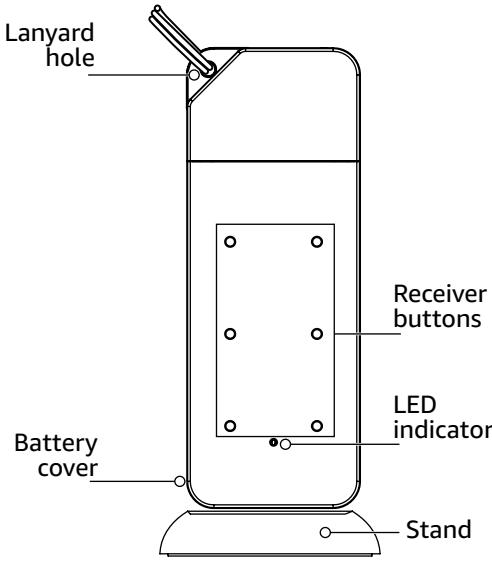
Parts Overview
Receiver
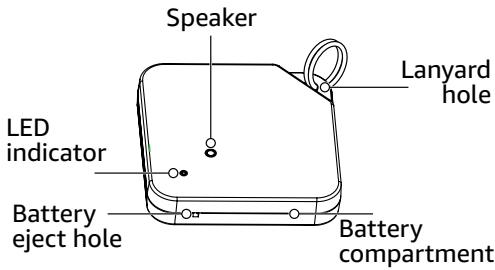
Remote Control with Stand
Setting Up the Finder
Attaching the Receivers
Use the receivers' lanyard holes to attach the receivers to your keys, wallet, purse, or other items you don't want to lose. Keep track of which color receiver is with each item.
NOTICE
For items without a hole or
loop, use double-sided tape to attach the receiver. The receiver is not shockproof or waterproof.
Replacing a Receiver Battery
- To open the battery compartment, push a SIM-eject tool or paper clip into the battery eject hole.
Battery eject hole
SIM-eject tool
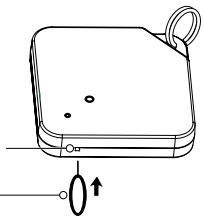
- Install a new CR2032 battery. Make sure the polarity symbols on the battery match the symbols in the compartment.
- Push the battery compartment back into the receiver.
NOTICE Batteries in the receivers and remote should be changed every six months for the best performance. If the battery strength is low, signal strength may decrease or you may not hear a beep from a receiver.
Replacing a Remote Battery
- Remove the battery cover.
- Install a new CR2032 battery. Make sure the polarity symbols on the battery match the symbols in the compartment.
- Replace the battery cover.
Using the Finder
Locate lost items within a range of about 100 ft. (30 m).
On the remote control, press the button with the same color as the receiver with your lost item. When the receiver beeps, move toward the sound to find your item.
The LED indicator on the receiver lights red to show it senses the remote.
Troubleshooting
Problem
No sound from the receiver.
Solutions
The receiver and remote control may be too far away from one another. Try to get closer by moving around with the remote control.
There may be an object blocking the remote control's signal. Try moving around with the remote control.
If you forget the color of the receiver, try pressing different colored buttons on the remote until you find the correct color.
Replace the batteries in the receiver and remote control.
Specifications
| Range | 100 ft. (30 m) |
| Sound Level | 60 dB per meter |
| Operating Temperature | -4 to 140°F (-20 to 60°C) |
| Battery Type | Receiver: CR2032 x6 Remote Control: CR2032 x1 |
| Battery Life | Receiver: Six months (max) Remote Control: Six months (max) |
Legal Notices
FCC - Supplier's Declaration of Conformity
| Unique Identifier | Amazon Basics Key Finder, Wallet, Pet, Item Locator - Smart Tracker 100 ft (30 m) Range, 60dB (1M) BOCDLQ7ZL4 |
| Responsible Party | Amazon.com Services LLC. |
| U.S. Contact Information | 410 Terry Ave N. Seattle, WA 98109, United States |
| Telephone Number | (206) 266-1000 |
FCC Compliance Statement
- This device complies with Part 15 of the FCC Rules. Operation is subject to the two following conditions:
(1) this device may not cause harmful interference, and
(2) this device must accept any interference received, including interference that may cause undesired operation.
- Changes or modifications to this product not expressly approved by the party responsible for compliance could void the user's authority to operate the equipment.
FCC Interference Statement
This equipment has been tested and found to comply with the limits for a Class B digital device, pursuant to part 15 of the FCC Rules. These limits are designed to provide reasonable protection against harmful interference in a residential installation.
This equipment generates, uses, and can radiate radio frequency energy and, if not installed and used in accordance with the instructions, may cause harmful interference to radio communications.
However, there is no guarantee that interference will not occur in a particular installation. If this equipment does cause harmful interference to radio or television reception, which can be determined by turning the equipment off and on, the user is encouraged to try to correct the interference by one or more, of the following measures:
Reorient or relocate the receiving antenna.
- Increase the separation between the equipment and the receiver.
Connect the equipment into an outlet on a circuit different to which the receiver is connected.
Consult the dealer or an experienced radio/TV technician for help.
Canada IC Notice
This Class B digital apparatus complies with Canadian CAN ICES-003 (B)/NMB-003 (B) standard.
IC Statement
This device complies with Industry Canada's licence-exempt RSSs. Operation is subject to the following two conditions:
(1) This device may not cause interference; and
(2) This device must accept any interference, including interference that may cause undesired operation of the device.
The term "IC: before the certification/ registration number only signifies that the Industry Canada technical specifications were met. This product meets the applicable Industry Canada technical specifications.
Dispose of used batteries immediately. Keep new and used batteries away from children. If you think batteries might have been swallowed or placed inside any part of the body, seek immediate medical attention. If the battery compartment does not close securely, stop using the product and keep it away from children.
This product contains batteries and should not be treated as normal household waste and should be recycled. Please take it to your nearest collection facility or for further details contact your local council.
Environment Protection
Waste electrical products should not be disposed of as household waste. Please recycle where facilities exist. Check with your Local Authority or retailer for recycling advice.
Feedback and Help
We would love to hear your feedback. To ensure we are providing the best customer experience possible, please consider writing a customer review.
Scan QR Code below with your phone camera or QR reader:
If you need help with your Amazon Basics product, please use the website or number below.

amazon.com/gp/help/customer/ contact-us

+1 877-485-0385
amazon basics
amazon.com/AmazonBasics
MADE IN CHINA
FABRIQUÉ EN CHINE
HECHO EN CHINA
V01-10/23