TD174 - Paging system Retevis - Free user manual and instructions
Find the device manual for free TD174 Retevis in PDF.



| Product Type | Wireless Paging System for Queue |
| Brand | Retevis |
| Model | TD174 |
| Operating Frequency | 433.92 MHz |
| Encoding Type | Learning Code (AM) |
| Receiver - Working Voltage | DC 3.7 V (rechargeable battery) |
| Receiver - Charging Voltage | DC 5 V |
| Receiver - Battery Capacity | 200 mAh |
| Receiver - Standby Current | 10 ± 5 mA |
| Receiver - Working Current (vibration) | 75 ± 10 mA |
| Receiver - Reception Sensitivity | -107 ± 2 dBm |
| Receiver - Dimensions | 49 x 101 x 11 mm |
| Keypad - Working Voltage | DC 5 V (power adapter) |
| Keypad - Standby Current | 24 ± 5 mA |
| Keypad - Transmission Current | 100 ± 30 mA |
| Keypad - Dimensions | 130 x 190 x 33 mm |
| Number of Channels | 10 |
| Number of Charging Slots | 10 |
| Call Modes | Vibration, Buzzer, Vibration + Buzzer |
| Indicators | Status LED and Charging LED |
| Main Functions | Wireless call, independent storage memory, power-on self-test |
| Safety | Compliant with RF standards, avoid battery short circuit |
Frequently Asked Questions - TD174 Retevis
User questions about TD174 Retevis
0 question about this device. Answer the ones you know or ask your own.
Ask a new question about this device
Download the instructions for your Paging system in PDF format for free! Find your manual TD174 - Retevis and take your electronic device back in hand. On this page are published all the documents necessary for the use of your device. TD174 by Retevis.
USER MANUAL TD174 Retevis
Operation instruction. 3
Pairing method 3
Change number paper. 3
Charge thePager. 4
FAQ. 4
DE(9-16)
FR(17-24)
IT(25-32)
ES(33-40)
Summary
Thanks for choosing Retekess TD174 Pager System. It adopts RF wireless technology with millions of different learning codes. The system includes 1 keypad transmitter and 10 pagers. The keypad transmitter has 10 charging slots. Each pager is labeled with a number.
In standby status, the parsers are put into the charging slot, while the client places an order, he(she) will be dispatched one pager with a number , when the order is ready, press the keypad to call the number, the client will receive signal through the beep/vibration/flash indications
The pager system is greatly improve the work efficiency and avoid the client waiting in a long queue. It is widely used in fast food restaurant, dessert shop, auto 4S shop or other queue occasions.
Features
- 10 channels keypad call buttons
10 charging slots - Portable and rechargeable vibration & beep pager
- Independent storage memory avoiding data lost
High receive sensitivity - Self testing while power on
- Beautiful and fashionable designing
Technical data
| Receiver | |
| Working voltage | DC3.7V (rechargeable battery) |
| Charging voltage | DC5V |
| Working frequency | 433.92MHz |
| Standby current | 10±5mA |
| Working current | 75±10mA (vibration) |
| Receive sensitivity | -107±2dBm |
| Battery capacity | 200mAh |
| Decoder | Learning code (AM) |
| Dimension | 49x101x11mm |
| Keypad Transmitter | |
| Working voltage | DC5V / power adapter |
| Working frequency | 433.92MHz |
| Standby current | 24±5mA |
| Transmit current | 100±30mA |
| Encoder | Learning code (AM) |
| Dimension | 130x190x33mm |
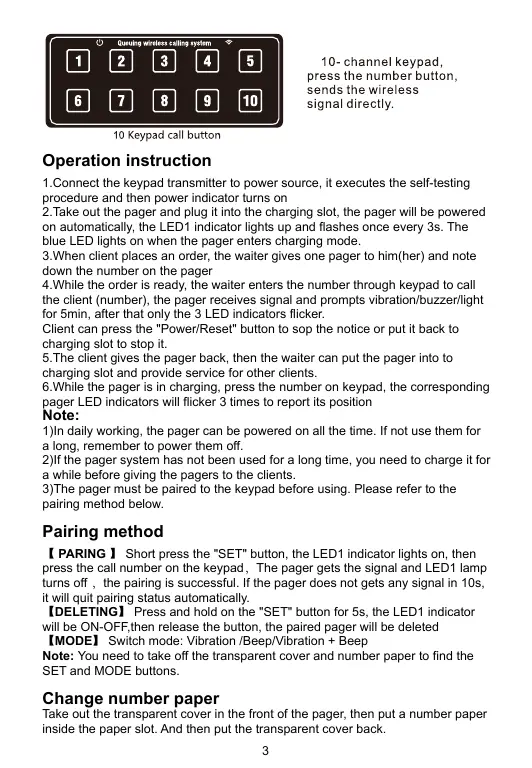
10 Diagram of Keypad Transmitter
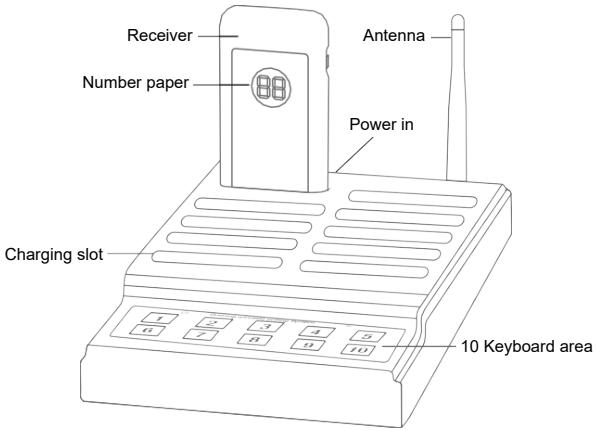
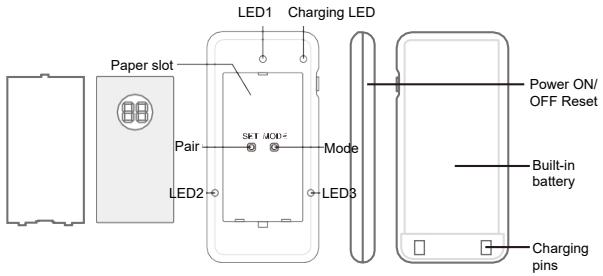
Diagram of Pager
Button function
【POWER】Press and hold the button for 3s to power on/off the pager, Short press the button to stop the notice of the pager.
【SET】Short press the button to enter pairing mode;Press and hold on the button for 3s to delete the paired information
【MODE】Change the prompt mode of the pager.
【KEYPAD】Enter the number to call the corresponding pager
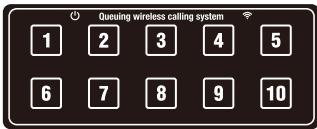
10 Keypad call button
10-channel keypad, press the number button, sends the wireless signal directly.
Operation instruction
- Connect the keypad transmitter to power source, it executes the self-testing procedure and then power indicator turns on
- Take out the pager and plug it into the charging slot, the pager will be powered on automatically, the LED1 indicator lights up and flashes once every 3s. The blue LED lights on when the pager enters charging mode.
3.When client places an order, the waiter gives one pager to him/her) and note down the number on the pager - While the order is ready, the waiter enters the number through keypad to call the client (number), the pager receives signal and prompts vibration/buzzer/light for 5min, after that only the 3 LED indicators flicker.
Client can press the "Power/Reset" button to sop the notice or put it back to charging slot to stop it.
5.The client gives the pager back, then the waiter can put the pager into to charging slot and provide service for other clients.
6.While the pager is in charging, press the number on keypad, the corresponding pager LED indicators will flicker 3 times to report its position
Note:
1) In daily working, the pager can be powered on all the time. If not use them for a long, remember to power them off.
2)If the pager system has not been used for a long time, you need to charge it for a while before giving the pagers to the clients.
3)The pager must be paired to the keypad before using. Please refer to the pairing method below.
Pairing method
【PARING】Short press the "SET" button, the LED1 indicator lights on, then press the call number on the keypad, The pager gets the signal and LED1 lamp turns off, the pairing is successful. If the pager does not gets any signal in 10s, it will quit pairing status automatically.
【DELETEING】Press and hold on the "SET" button for 5s, the LED1 indicator will be ON-OFF, then release the button, the paired pager will be deleted
【MODE】Switch mode: Vibration/Beep/Vibration + Beep
Note: You need to take off the transparent cover and number paper to find the SET and MODE buttons.
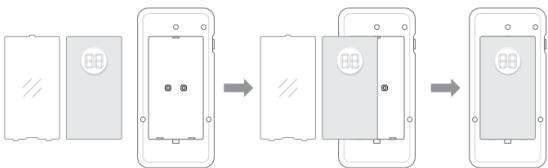
Change number paper
Take out the transparent cover in the front of the pager, then put a number paper inside the paper slot. And then put the transparent cover back.
Charge the Pager
When the pager battery is low, the LED1 and blue charging LED indicator flicker with short beep sound, then you need to charge the pager in time.
Plug the pager into the charging slot, the blue charging LED indicator will flash, and the LED indicator will light on all the time when the it's fully charged.
FAQ
| Problems | Reasons | Solutions |
| Put on the charging base but the LED screen does not display | The power adapter is failed | Replace the power adapter |
| Receiving distance is greatly shortened | The pager battery is low | Charge the pager in time |
| The pager can not receive signal from keypad transmitter | The pager has not been paired with the keypad Out of range | Pair the pager with keypad Try it in a short distance |
| Put on the charging base but the LED screen does not display | The power adapter is failed | Replace the power adapter |
RF ENERGY EXPOSURE AND PRODUCT SAFETY GUIDE

ATTENTION!
Before using this radio, read this guide which contains important operating instructions for safe usage and rf energy awareness and control for compliance with applicable standards and regulations.
This radio uses electromagnetic energy in the radio frequency (RF) spectrum to provide communications between two or more users over a distance. RF energy, which when used improperly, can cause biological damage.
All Retekess radios are designed, manufactured, and tested to ensure they meet government-established RF exposure levels. In addition, manufacturers also recommend specific operating instructions to users of the radios. These instructions are important because they inform users about RF energy exposure and provide simple procedures on how to control it.
Please refer to the following websites for more information on what RF energy exposure is and how to control your exposure to assure compliance with established RF exposure limits: http://www.who.int/en/
Local Government Regulations
When radios are used as a consequence of employment, the Local Government Regulations requires users to be fully aware of and able to control their exposure to meet occupational requirements. Exposure awareness can be facilitated by the use of a product label directing users to specific user awareness information. Your Retekess radio has a RF Exposure Product Label. Also, your Retekess user manual, or separate safety booklet includes information and operating instructions required to control your RF exposure and to satisfy compliance requirements.
Radio License (if appropriate)
Governments keep the radios in classification, business radios operate on radio frequencies that are regulated by the local radio management departments (FCC, ISED, OFCOM, ANFR, BFTK, Bundesnetzagentur...). To transmit on these frequencies, you are required to have a license issued by them. The detailed classification and the use of your radios, please contact the local government radio management departments.
Use of this radio outside the country where it was intended to be distributed is subject to government regulations and may be prohibited.
Unauthorized modification and adjustment
Changes or modifications not expressly approved by the party responsible for compliance may void the user's authority granted by the local government radio management departments to operate this radio and should not be made. To comply with the corresponding requirements, transmitter adjustments should be made only by or under the supervision of a person certified as technically qualified to perform transmitter maintenance and repairs in the private land mobile and fixed services as certified by an organization representative of the user of those services.
Replacement of any transmitter component (crystal, semiconductor, etc.) not authorized by the local government radio management departments equipment authorization for this radio could violate the rules.
FCC Requirements:
- This device complies with part 15 of the FCC Rules. Operation is subject to the following two conditions:
(1) This device may not cause harmful interference, and
(2) this device must accept any interference received, including interference that may cause undesired operation.
- (If applicable) This equipment has been tested and found to comply with the limits for a Class B digital device, pursuant to Part 15 of the FCC Rules. These limits are designed to provide reasonable protection against harmful interference in a residential installation.
This equipment generates uses and can radiate radio frequency energy and, if not installed and used in accordance with the instructions, may cause harmful interference to radio communications. However, there is no guarantee that interference will not occur in a particular installation. If this equipment does cause harmful interference to radio or television reception, which can be determined by turning the equipment off and on, the user is encouraged to try to correct the interference by one or more of the following measures:
-- Reorient or relocate the receiving antenna.
-- Increase the separation between the equipment and receiver.
-- Connect the equipment into an outlet on a circuit different from that to which the receiver is connected.
-- Consult the dealer or an experienced radio/TV technician for help.
CE Requirements:
(Simple EU declaration of conformity) Henan Eshow Electronic Commerce Co., Ltd declares that the radio equipment type is in compliance with the essential requirements and other relevant provisions of RED Directive 2014/53/EU and the ROHS Directive 2011/65/EU and the WEEE Directive 2012/19/EU; the full text of the EU declaration of conformity is available at the following internet address: www.retekess.com.
- Disposal
The crossed-out wheeled-bin symbol on your product, literature, or packaging reminds you that in the European Union, all electrical and electronic products, batteries, and accumulators (rechargeable batteries) must be taken to designated collection locations at the end of their working life. Do not dispose of these products as unsorted municipal waste. Dispose of them according to the laws in your area.

IC Requirements:
Licence-exempt radio apparatus
This device contains licence-exempt transmitter(s)/receiver(s) that comply with Innovation, Science and Economic Development Canada's licence-exempt RSS(s). Operation is subject to the following two conditions:
(1) This device may not cause interference.
(2) This device must accept any interference, including interference that may cause undesired operation of the device.
RF Exposure Information (if appropriate)
-
DO NOT operate the radio without a proper antenna attached, as this may damage the radio and may also cause you to exceed RF exposure limits. A proper antenna is the antenna supplied with this radio by the manufacturer or an antenna specifically authorized by the manufacturer for use with this radio, and the antenna gain shall not exceed the specified gain by the manufacturer declared.
-
DO NOT transmit for more than 50% of total radio use time, more than 50% of the time can cause RF exposure compliance requirements to be exceeded.
- During transmissions, your radio generates RF energy that can possibly cause interference with other devices or systems. To avoid such interference, turn off the radio in areas where signs are posted to do so.
- This equipment complies with FCC radiation exposure limits set forth for an uncontrolled environment. This equipment should be installed and operated with minimum distance 20cm between the radiator and your body.
- DO NOT operate the transmitter in areas that are sensitive to electromagnetic radiation such as hospitals, aircraft, and blasting sites.
Avoid Choking Hazard

Small Parts. Not for children under 3 years.
Avoid Choking Hazard

- Use the lowest volume necessary to do your job.
- Turn up the volume only if you are in noisy surroundings.
- Turn down the volume before adding headset or earpiece.
- Limit the amount of time you use headsets or earpieces at high volume.
- When using the radio without a headset orearpiece, do not place the radio's speaker directly against your ear
Use careful with the earphone maybe possible excessive sound pressure from earphones and headphones can cause hearing loss Note: Exposure to loud noises from any source for extended periods of time may temporarily or permanently affect your hearing. The
louder the radio's volume, the less time is required before your hearing could be affected. Hearing damage from loud noise is sometimes undetectable at first and can have a cumulative effect.

Avoid Burns

Antennas
- Do not use any portable radio that has a damaged antenna. If a damaged antenna comes into contact with the skin when the radio is in use, a minor burn can result.
Batteries (If appropriate)
- When the conductive material such as jewelry, keys or chains touch exposed terminals of the batteries, may complete an electrical circuit (short circuit the battery) and become hot to cause bodily injury such as burns. Exercise care in handling any battery, particularly when placing it inside a pocket, purse or other container with metal objects
Long transmission
- When the transceiver is used for long transmissions, the radiator and chassis will become hot.
Safety Operation

Forbid
- Do not use charger outdoors or in moist environments, use only in dry locations/conditions.
- Do not disassemble the charger, that may result in risk of electrical shock or fire.
- Do not operate the charger if it has been broken or damaged in any way.
- Do not place a portable radio in the area over an air bag or in the air bag deployment area. The radio may be propelled with great force and cause serious injury to occupants of the vehicle when the air bag inflates.
To reduce risk
- Pull by the plug rather than the cord when disconnecting the charger.
- Unplug the charger from the AC outlet before attempting any maintenance or cleaning.
- Contact Retekess for assistance regarding repairs and service.
- The adapter shall be installed near the equipment and shall be easily accessible
- Risk of explosion if battery is replaced by an incorrect type. Dispose of used batteries according to the instructions.
- Adapter shall be installed near the equipment and shall be easily accessible.
- The plug considered as disconnect device of adapter.
The operating temperature of the EUT can't exceed the specified range.
Approved Accessories

- This radio meets the RF exposure guidelines when used with the Retekess accessories supplied or designated for the product. Use of other accessories may not ensure compliance with the RF exposure guidelines and may violate regulations.
-For a list of Retekess-approved accessories for your radio model, visit the following website: http://www.Retekess.com
Zusammenfassung
(1) This device may not cause interference.
(2) This device must accept any interference, including interference that may cause undesired operation of the device.
(1) This device may not cause interference.
(2) This device must accept any interference, including interference that may cause undesired operation of the device.
(1) This device may not cause interference.
(2) This device must accept any interference, including interference that may cause undesired operation of the device.
(1) This device may not cause interference.
(2) This device must accept any interference, including interference that may cause undesired operation of the device.
User's Name: Telephone:
Country: Address:
Post Code: Email:
Remarks:
- This guarantee card should be kept by the user, no replacement if lost.
- Most new products carry a two-year manufacturer's warranty from the date of purchase.
3.The user can get warranty and after-sales service as below: - Contact the seller where you buy.
- Products Repaired by Our Local Repair Center
4.For warranty service, you will need to provide a receipt proof of purchase from the actual seller for verification
Exclusions from Warranty Coverage:
1.To any product damaged by accident.
2. In the event of misuse or abuse of the product or as a result of unauthorized alterations or repairs.
3.If the serial number has been altered, defaced, or removed.


RoHS

Henan Eshow Electronic Commerce Co., Ltd
Add: 7/F, Sanjiang Building, No.170 Nanyang Road, Huiji District,
Zhengzhou, Henan, China
Facebook: facebook.com/Retekess
E-mail: support@retekess.com
Web: www.retekess.com

MADE IN CHINA
说明书要求
尺寸:90*130mm
印刷:黑白印刷
装订:胶黏订
纸张材质:双胶纸
本页无需印刷
- Summary
- Features
- Technical data
- Diagram of Keypad Transmitter
- Diagram of Pager
- Button function
- Operation instruction
- Note:
- Pairing method
- Change number paper
- Charge the Pager
- RF ENERGY EXPOSURE AND PRODUCT SAFETY GUIDE
- Local Government Regulations
- Radio License (if appropriate)
- Unauthorized modification and adjustment
- FCC Requirements:
- CE Requirements:
- IC Requirements:
- RF Exposure Information (if appropriate)
- Avoid Choking Hazard
- Avoid Burns
- Antennas
- Batteries (If appropriate)
- Long transmission
- Safety Operation
- Forbid
- To reduce risk
- Approved Accessories
- Zusammenfassung
- Remarks:
- Exclusions from Warranty Coverage:
- 说明书要求
Brand : Retevis
Model : TD174
Category : Paging system